
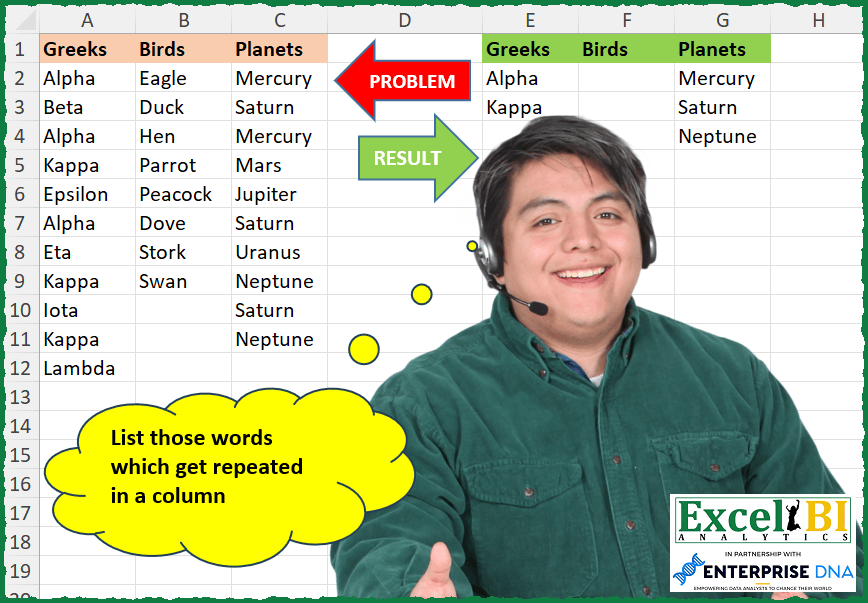
List those words which get repeated in a column
📌 Challenge Details and Links
ExcelBI Excel Challenge Number: 257
Challenge Difficulty: ⭐️
📥Download Sample File
📥Link to the solutions on LinkedIn
Solving the challenge of List Repeated Column Words with Power Query
Power Query solution 1 for List Repeated Column Words, proposed by Bo Rydobon 🇹🇭:
let
  Source = Excel.CurrentWorkbook(){[Name = "Table1"]}[Content],
  Ans = Table.FromColumns(
    List.Transform(
      Table.ToColumns(Source),
      each List.Distinct(List.Difference(_, List.Distinct(_)))
    ),
    Table.ColumnNames(Source)
  )
in
  Ans
Power Query solution 2 for List Repeated Column Words, proposed by Zoran Milokanović:
let
  Source = Excel.CurrentWorkbook(){[Name = "Input"]}[Content],
  S = Table.FromColumns(
    List.Transform(
      Table.ToColumns(Source),
      each List.Accumulate(
        _,
        {},
        (s, c) =>
          if List.Count(List.Select(_, each _ = c)) > 1 and not List.Contains(s, c) then
            s & {c}
          else
            s
      )
    ),
    Table.ColumnNames(Source)
  )
in
  S
Power Query solution 3 for List Repeated Column Words, proposed by Alejandro Simón 🇵🇦 🇪🇸:
let
  Source = Excel.CurrentWorkbook(){[Name = "Table1"]}[Content],
  Sol = Table.FromColumns(
    List.Transform(
      Table.ToColumns(Source),
      each
        let
          a = Table.FromColumns({_}),
          b = Table.SelectRows(
            Table.Group(a, {"Column1"}, {"Count", each List.Count(_)}),
            each [Count] > 1
          )[Column1]
        in
          b
    ),
    Table.ColumnNames(Source)
  )
in
  Sol
Power Query solution 4 for List Repeated Column Words, proposed by Luan Rodrigues:
let
  Fonte = Tabela1,
  res = Table.FromColumns(
    [
      a = Table.ToColumns(Fonte),
      b = List.Transform(a, (x) => List.Distinct(List.Difference(x, List.Distinct(x))))
    ][b],
    Table.ColumnNames(Fonte)
  )
in
  res
Power Query solution 5 for List Repeated Column Words, proposed by Brian Julius:
let
  Source = Excel.CurrentWorkbook(){[Name = "Table1"]}[Content],
  ToListTable = Table.FromList(
    Table.ToColumns(Source),
    Splitter.SplitByNothing(),
    {"Columns"},
    null,
    ExtraValues.Error
  ),
  AddDistiinctDiff = Table.ToColumns(
    Table.AddColumn(
      ToListTable,
      "DistinctDiff",
      each [a = [Columns], b = List.Distinct(a), c = List.Distinct(List.Difference(a, b))][c]
    )
  ),
  Restore = Table.FromColumns(AddDistiinctDiff{1}, Table.ColumnNames(Source))
in
  Restore
Solving the challenge of List Repeated Column Words with Excel
Excel solution 1 for List Repeated Column Words, proposed by Rick Rothstein:
=LET(
    f,
    LAMBDA(
        a,
        UNIQUE(
            FILTER(
                a,
                COUNTIF(
                    a,
                    a
                )>1,
                ""
            )
        )
    ),
    IFNA(
        HSTACK(
            f(
                A1:A99
            ),
            f(
                B1:B99
            ),
            f(
                C2:C99
            )
        ),
        ""
    )
)
Excel solution 2 for List Repeated Column Words, proposed by Rick Rothstein:
=LET(a,A2:A12,UNIQUE(FILTER(a,COUNTIF(a,a)>1,"")))Excel solution 3 for List Repeated Column Words, proposed by John V.:
=VSTACK(A1:C1,IFNA(DROP(REDUCE(0,{1;2;3},LAMBDA(a,v,LET(y,INDEX(A2:C12,,v),HSTACK(a,UNIQUE(FILTER(y,COUNTIF(y,y)>1,"")))))),,1),""))

✅=LET(f,LAMBDA(r,UNIQUE(FILTER(r,COUNTIF(r,r)>1,""))),VSTACK(A1:C1,IFNA(HSTACK(f(A2:A12),f(B2:B12),f(C2:C12)),"")))
Excel solution 4 for List Repeated Column Words, proposed by محمد حلمي:
=MAKEARRAY(
    5,
    3,
    LAMBDA(
        r,
        c,
        LET(
            i,
            INDEX(
                A2:C12,
                ,
                c
            ),
            IFERROR(
                INDEX(
                    UNIQUE(
                        FILTER(
                            i,
                            COUNTIF(
                                i,
                                i
                            )>1
                        )
                    ),
                    r
                ),
                ""
            )
        )
    )
)
=DROP(
    REDUCE(
        0,
        SEQUENCE(
            3
        ),
        LAMBDA(
            a,
            d,
            LET(
                i,
                INDEX(
                    A2:C12,
                    ,
                    d
                ),
                IFNA(
                    HSTACK(
                        a,
                        UNIQUE(
                            FILTER(
                                i,
                                COUNTIF(
                                i,
                                i
                            )>1,
                                ""
                            )
                        )
                    ),
                    ""
                )
            )
        )
    ),
    ,
    1
)
Excel solution 5 for List Repeated Column Words, proposed by Julian Poeltl:
=IFNA(
    TRANSPOSE(
        TEXTSPLIT(
            TEXTJOIN(
                "|",
                0,
                BYCOL(
                    A2:C12,
                    LAMBDA(
                        B,
                        TEXTJOIN(
                            ",",
                            ,
                            UNIQUE(
                                FILTER(
                                    B,
                                    1
Excel solution 6 for List Repeated Column Words, proposed by Timothée BLIOT:
=LET(A, A2:C12, B, DROP(IFERROR(REDUCE("",SEQUENCE(COLUMNS(A)), LAMBDA(ac,v, HSTACK(ac,UNIQUE(FILTER(INDEX(A,,v),MAP(INDEX(A,,v), LAMBDA(x, SUMPRODUCT(1*(INDEX(A,,v)=x))>1 )),""))))),""),,1),IF(B=0,"",B))Excel solution 7 for List Repeated Column Words, proposed by Hussein SATOUR:
=TRANSPOSE(TEXTSPLIT(CONCAT(BYCOL(A2:C12, LAMBDA(x, TEXTJOIN("/",,UNIQUE(FILTER(x,COUNTIF(x,x)>1, "")))))&","), "/", ",",,,""))Excel solution 8 for List Repeated Column Words, proposed by Sunny Baggu:
=LET(
 _r, IFNA(
 DROP(
 REDUCE(
 "",
 SEQUENCE(COLUMNS(A1:C1)),
 LAMBDA(a, v,
 HSTACK(
 a,
 UNIQUE(
 FILTER(
 INDEX(A2:C12, , v),
 MAP(INDEX(A2:C12, , v), LAMBDA(a, SUM(N(INDEX(A2:C12, , v) = a)) > 1))
 )
 )
 )
 )
 ),
 ,
 1
 ),
 ""
 ),
 VSTACK(A1:C1, IF(ISTEXT(_r), _r, ""))
)
Excel solution 9 for List Repeated Column Words, proposed by Sunny Baggu:
=LET(

     _r,
     IFNA(

          DROP(

               REDUCE(

                    "",

                    SEQUENCE(
                        COLUMNS(
                            A1:C1
                        )
                    ),

                    LAMBDA(
                        a,
                         v,

                         HSTACK(
                             a,
                              UNIQUE(
                                  VSTACK(
                                      UNIQUE(
                                          INDEX(
                                              A2:C12,
                                               ,
                                               v
                                          ),
                                           ,
                                           1
                                      ),
                                       UNIQUE(
                                           INDEX(
                                              A2:C12,
                                               ,
                                               v
                                          )
                                       )
                                  ),
                                   ,
                                   1
                              )
                         )

                    )

               ),

               ,

               1

          ),

          ""

     ),

     IF(
         ISTEXT(
             _r
         ),
          _r,
          ""
     )

)
Excel solution 10 for List Repeated Column Words, proposed by Abdallah Ally:
=LET(
    a,
    A2:A12,
    b,
    B2:B12,
    c,
    C2:C12,
    d,
    IFERROR(
        FILTER(
            a,
            COUNTIF(
                a,
                a
            )>1
        ),
        ""
    ),
    e,
    IFERROR(
        FILTER(
            b,
            COUNTIF(
                b,
                b
            )>1
        ),
        ""
    ),
    f,
    IFERROR(
        FILTER(
            c,
            COUNTIF(
                c,
                c
            )>1
        ),
        ""
    ),
    VSTACK(
        A1:C1,
        IFERROR(
            HSTACK(
                UNIQUE(
                    d
                ),
                UNIQUE(
                    e
                ),
                UNIQUE(
                    f
                )
            ),
            ""
        )
    )
)
Excel solution 11 for List Repeated Column Words, proposed by Asheesh Pahwa:
=LET(a,A2:C12,cnt,COUNTIFS(a,a),
v,REDUCE(0,SEQUENCE(3),LAMBDA(acc,ite
,IFNA(HSTACK(acc,UNIQUE(FILTER(INDEX(a,,itr),
INDEX(cnt,,itr)>1,"")))),""))),
VSTACK(A1:C1,DROP (v,,1)))
Excel solution 12 for List Repeated Column Words, proposed by Ziad A.:
=BYCOL(A2:C,LAMBDA(c,UNIQUE(IFNA(FILTER(c,COUNTIF(c,c)>1)))))Excel solution 13 for List Repeated Column Words, proposed by Giorgi Goderdzishvili:
=LET(

    grid,
    A2:C13,

    one,
    INDEX(
        grid,
        ,
        1
    ),

    two,
    INDEX(
        grid,
        ,
        2
    ),

    three,
    INDEX(
        grid,
        ,
        3
    ),

    one_,
     IFERROR(
         UNIQUE(
             FILTER(
                 one,
                 COUNTIF(
                     one,
                     one
                 )>1
             )
         ),
         ""
     ),

    two_,
     IFERROR(
         UNIQUE(
             FILTER(
                 two,
                 COUNTIF(
                     two,
                     two
                 )>1
             )
         ),
         ""
     ),

    three_,
     IFERROR(
         UNIQUE(
             FILTER(
                 three,
                 COUNTIF(
                     three,
                     three
                 )>1
             )
         ),
         ""
     ),

    IFERROR(
        HSTACK(
            one_,
            two_,
            three_
        ),
        ""
    )
)
Excel solution 14 for List Repeated Column Words, proposed by Daniel Garzia:
=VSTACK(
    A1:C1,
    IFNA(
        DROP(
            REDUCE(
                0,
                COLUMN(
                    A:C
                ),
                LAMBDA(
                    a,
                    b,
                    LET(
                        f,
                        LAMBDA(
                            x,
                            UNIQUE(
                                FILTER(
                                    x,
                                    COUNTIF(
                                        x,
                                        x
                                    )>1,
                                    ""
                                )
                            )
                        ),
                        HSTACK(
                            a,
                            f(
                                INDEX(
                                    A2:C12,
                                    ,
                                    b
                                )
                            )
                        )
                    )
                )
            ),
            ,
            1
        ),
        ""
    )
)
Excel solution 15 for List Repeated Column Words, proposed by samir tobeil:
=LET(a,LAMBDA(d,x,VSTACK(d,IFERROR(UNIQUE(FILTER(x,COUNTIF(x,x)>1)),""))),
IFERROR(HSTACK(a(A1,A2:A12),a(B1,B2:B12),a(C1,C2:C12)),""))
Excel solution 16 for List Repeated Column Words, proposed by Md Ismail Hosen:
=LAMBDA(
    Data,

     LET(

          Data2,
          A1:C12,

          Header,
          CHOOSEROWS(
              Data,
               1
          ),

          fx,
          LAMBDA(
              ColData,

               LET(

                    WithoutBlank,
                    FILTER(
                        ColData,
                         ColData <> ""
                    ),

                    Result,
                    FILTER(

                         UNIQUE(
                             WithoutBlank
                         ),

                         BYROW(
                             UNIQUE(
                             WithoutBlank
                         ) = TRANSPOSE(
                                 UNIQUE(
                                     WithoutBlank,
                                      ,
                                      TRUE
                                 )
                             ),
                              LAMBDA(
                                 & row,
                                   NOT(
                                       OR(
                                           row
                                       )
                                   )
                              )
                         )

                    ),

                    IFERROR(
                        Result,
                         ""
                    )

               )

          ),

          Result,
          VSTACK(

               Header,

               IFNA(
                   DROP(
                       REDUCE(
                           "",
                            SEQUENCE(
                                COLUMNS(
                                    Data
                                )
                            ),
                            LAMBDA(
                                a,
                                 v,
                                 HSTACK(
                                     a,
                                      fx(
                                          CHOOSECOLS(
                                              DROP(
              Data,
               1
          ),
                                               v
                                          )
                                      )
                                 )
                            )
                       ),
                        ,
                        1
                   ),
                    ""
               )

          ),

          Result

     )

)(A1:C12)
Excel solution 17 for List Repeated Column Words, proposed by Rayan S.:
=LET(

     x,
     IF(
         COUNTIF(
             A2:C12,
              A2:C12
         ) > 1,
          A2:C12,
          ""
     ),

     IFERROR(

          HSTACK(

               SORT(
                   UNIQUE(
                       TAKE(
                           x,
                            ,
                            1
                       )
                   ),
                    ,
                    -1
               ),

               SORT(
                   UNIQUE(
                       TAKE(
                           TAKE(
                               x,
                                ,
                                2
                           ),
                            ,
                            -1
                       )
                   ),
                    ,
                    -1
               ),

               SORT(
                   UNIQUE(
                       TAKE(
                           x,
                            ,
                            -1
                       )
                   ),
                    ,
                    -1
               )

          ),

          ""

     )

)
Excel solution 18 for List Repeated Column Words, proposed by Vishal Mishra:
=LAMBDA(
    Table,

    TRANSPOSE(
        IFERROR(
            TEXTSPLIT(

                 TEXTJOIN(
                     ";",
                     0,

                      BYCOL(
                          Table,

                           LAMBDA(
                               CurCol,

                                TEXTJOIN(
                                    ",",
                                    1,
                                    UNIQUE(
                                        FILTER(
                                            CurCol,
                                            COUNTIF(
                                                CurCol,
                                                CurCol
                                            )>1,
                                            ""
                                        )
                                    )
                                )

                           )

                      )

                 ),
                ",",
                ";"
            ),
            ""
        )
    )
)(A2:C12)
Solving the challenge of List Repeated Column Words with Python in Excel
Python in Excel solution 1 for List Repeated Column Words, proposed by Alejandro Campos:
df = xl("A1:C12", headers=True)
 'Greeks': df['Greeks'].value_counts()[df['Greeks'].value_counts() > 1].index.tolist(),
 'Birds': df['Birds'].value_counts()[df['Birds'].value_counts() > 1].index.tolist(),
 'Planets': df['Planets'].value_counts()[df['Planets'].value_counts() > 1].index.tolist()
}
repeated_df = pd.DataFrame(dict([(k, pd.Series(v)) for k, v in repeated_words.items()])).fillna(' ')
repeated_df
Solving the challenge of List Repeated Column Words with Excel VBA
Excel VBA solution 1 for List Repeated Column Words, proposed by Nicolas Micot:
VBA solution:
Function f_listeDoublons(Plage As Range) As Variant
Dim tableau As Variant, resultat As Variant
Dim Valeurs As New Collection, Doublons As New Collection
Dim cle As String
tableau = Plage
On Error Resume Next
For i = 1 To UBound(tableau, 1)
 cle = tableau(i, 1)
 test = ""
 test = Valeurs(cle)
 If test = "" Then
 Valeurs.Add cle, cle
 Else
 test = ""
 test = Doublons(cle)
 If test = "" Then Doublons.Add cle, cle
 End If
Next i
If Doublons.Count > 1 Then
 ReDim resultat(1 To Doublons.Count, 1 To 1)
 For i = 1 To Doublons.Count
 resultat(i, 1) = Doublons(i)
 Next i
Else
 resultat = ""
End If
f_listeDoublons = resultat
End Function
&&