
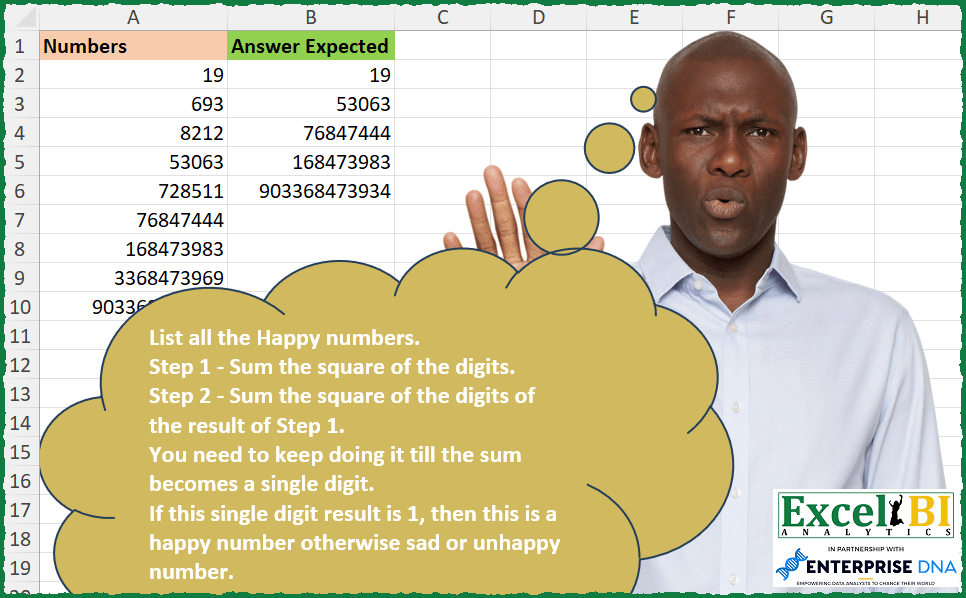
List all the Happy numbers. Step 1 – Sum the square of the digits. Step 2 – Sum the square of the digits of the result of Step 1. You need to keep doing it till the sum becomes a single digit. If this single digit result is 1, then this is a happy number otherwise sad or unhappy number. Example – 478 478 => 4^2+7^2+8^2 = 129 129 => 1^2+2^2+9^2 =86 86 => 8^2+6^2 = 100 100 = > 1^2+0^2+0^2 = 1 Hence, 478 is a happy number
📌 Challenge Details and Links
ExcelBI Excel Challenge Number: 255
Challenge Difficulty: ⭐️
📥Download Sample File
📥Link to the solutions on LinkedIn
Solving the challenge of Find All Happy Numbers with Power Query
Power Query solution 1 for Find All Happy Numbers, proposed by Bo Rydobon 🇹🇭:
let
  Source = Excel.CurrentWorkbook(){[Name = "Table1"]}[Content],
  Ans = Table.SelectRows(
    Source,
    each List.Accumulate(
      {1 .. 15},
      [Numbers],
      (a, l) =>
        List.Sum(List.Transform(Text.ToList(Text.From(a)), each Number.Power(Number.From(_), 2)))
    )
      = 1
  )
in
  Ans
Power Query solution 2 for Find All Happy Numbers, proposed by Zoran Milokanović:
let
  Source = Excel.CurrentWorkbook(){[Name = "Input"]}[Content][Numbers],
  Sum = (n) =>
    List.Sum(
      List.Transform(
        Text.ToList(Text.From(n)),
        each
          let
            s = Number.From(_)
          in
            s * s
      )
    ),
  S = List.Select(
    Source,
    each List.Min(
      List.Generate(() => {_, 1}, each List.IsDistinct(_), each {Sum(_{0})} & _, each Sum(_{0}))
    )
      = 1
  )
in
  S
Power Query solution 3 for Find All Happy Numbers, proposed by Aditya Kumar Darak 🇮🇳:
let
  Source = Excel.CurrentWorkbook(){[Name = "data"]}[Content],
  MyFun = (Number as number) as number =>
    let
      N      = Number,
      Text   = Text.From(N),
      ToList = Text.ToList(Text),
      Calc   = List.Sum(List.Transform(ToList, each Number.Power(Number.From(_), 2))),
      Final  = if N < 10 then N else @MyFun(Calc)
    in
      Final,
  Return = Table.SelectRows(Source, each MyFun([Numbers]) = 1)
in
  Return
Power Query solution 4 for Find All Happy Numbers, proposed by Alejandro Simón 🇵🇦 🇪🇸:
let
  Source = Excel.CurrentWorkbook(){[Name = "Table1"]}[Content],
  g = (f) =>
    let
      a = List.Transform(Text.ToList(Text.From(f)), Number.From),
      b = List.Sum(List.Transform(a, each Number.Power(_, 2)))
    in
      if Text.Length(Text.From(b)) = 1 then b else @g(b),
  Sol = Table.SelectRows(Source, each g([Numbers]) = 1)
in
  Sol
Power Query solution 5 for Find All Happy Numbers, proposed by Luan Rodrigues:
let
  Fonte = Tabela1,
  loop = (s) =>
    [
      a = List.Transform(Text.ToList(Text.From(s)), Number.From),
      b = List.Sum(List.Transform(a, (x) => Number.Power(x, 2))),
      c = if s < 10 then b else @loop(b)
    ][c],
  res = Table.SelectRows(Fonte, each loop([Numbers]) = 1)
in
  res
Power Query solution 6 for Find All Happy Numbers, proposed by Rafael González B.:
let
  Source = Excel.CurrentWorkbook(){[Name = "Table1"]}[Content],
  TC = Table.TransformColumnTypes(Source, {{"Numbers", Int64.Type}}),
  HN = (x) =>
    let
      a = Text.ToList(Text.From(x)),
      b = List.Transform(a, each Number.Power(Number.From(_), 2)),
      c = List.Sum(b),
      d = Text.From(c),
      e = Text.Length(d),
      f = if e = 1 then c else @HN(d)
    in
      f,
  FT = Table.AddColumn(TC, "Digit", each HN([Numbers])),
  Result = Table.SelectRows(FT, each ([Digit] = 1))[[Numbers]]
in
  Result
Solving the challenge of Find All Happy Numbers with Excel
Excel solution 1 for Find All Happy Numbers, proposed by Bo Rydobon 🇹🇭:
=LET(
    r,
    LAMBDA(
        r,
        n,
        IF(
            n>9,
            r(
                r,
                SUM(
                    MID(
                        n,
                        SEQUENCE(
                            LEN(
                                n
                            )
                        ),
                        1
                    )^2
                )
            ),
            n=1
        )
    ),
    TOCOL(
        MAP(
            A2:A10,
            LAMBDA(
                n,
                n/r(
                    r,
                    n
                )
            )
        ),
        3
    )
)
Excel solution 2 for Find All Happy Numbers, proposed by Bo Rydobon 🇹🇭:
=TOCOL(MAP(A2:A10,
    LAMBDA(z,
    LET(s,
    SEQUENCE(
        15
    ),
    z/(1=REDUCE(z,
    s,
    LAMBDA(a,
    v,
    SUM((0&MID(
        a,
        s,
        1
    ))^2))))))),
    3)
Excel solution 3 for Find All Happy Numbers, proposed by Rick Rothstein:
=FILTER(
    A2:A10,
    MAP(
        A2:A10,
        LAMBDA(
            r,
            LET(
                f,
                LAMBDA(
                    x,
                    SUM(
                        MID(
                            x,
                            SEQUENCE(
                                LEN(
                                    x
                                )
                            ),
                            1
                        )^2
                    )
                ),
                REDUCE(
                    r,
                    SEQUENCE(
                        99
                    ),
                    LAMBDA(
                        a,
                        n,
                        f(
                            a
                        )
                    )
                )
            )
        )
    )=1
)
Excel solution 4 for Find All Happy Numbers, proposed by John V.:
=TOCOL(MAP(A2:A10,
    LAMBDA(x,
    x/(REDUCE(x,
    ROW(
        1:9
    ),
    LAMBDA(a,
    v,
    SUM((0&MID(
        a,
        ROW(
            1:13
        ),
        1
    ))^2)))=1))),
    2)
Excel solution 5 for Find All Happy Numbers, proposed by محمد حلمي:
=TOCOL(MAP(A2:A10,
    LAMBDA(x,
    x/(1=REDUCE(
        x,
        SEQUENCE(
            7
        ),
        LAMBDA(
            a,
            d,
            SUM(
                MID(
                    a,
                    SEQUENCE(
                        LEN(
                            a
                        )
                    ),
                    1
                )^2
            )
        )
    )))),
    2)
Excel solution 6 for Find All Happy Numbers, proposed by محمد حلمي:
=LET(r,LAMBDA(r,a,IF(a=1,a,r(r,SUM(MID(a,SEQUENCE(LEN(a)),1)^2)))),TOCOL(MAP(A2:A10,LAMBDA(a,a/r(r,a))),2))Excel solution 7 for Find All Happy Numbers, proposed by Kris Jaganah:
=TOCOL(MAP(A2:A10,LAMBDA(z,IFS(REDUCE(z,SEQUENCE(9),LAMBDA(x,y,SUM(MID(x,SEQUENCE(LEN(x)),1)^2)))=1,z))),3)Excel solution 8 for Find All Happy Numbers, proposed by Julian Poeltl:
=FILTER(
    A2:A10,
    1=MAP(
        A2:A10,
        LAMBDA(
            A,
            TAKE(
                SCAN(
                    SUM(
                        MID(
                            A,
                            SEQUENCE(
                                LEN(
                                    A
                                )
                            ),
                            1
                        )^2
                    ),
                    SEQUENCE(
                        9
                    ),
                    LAMBDA(
                        A,
                        B,
                        SUM(
                        MID(
                            A,
                            SEQUENCE(
                                LEN(
                                    A
                                )
                            ),
                            1
                        )^2
                    )
                    )
                ),
                -1
            )
        )
    )
)
Excel solution 9 for Find All Happy Numbers, proposed by Aditya Kumar Darak 🇮🇳:
=LET(
 _d, A2:A10,
 _fun, LAMBDA(ME, a,
 IF(a < 10, a, ME(ME, SUM(MID(a, SEQUENCE(LEN(a)), 1) ^ 2)))
 ),
 _e, LAMBDA(x, _fun(_fun, x)),
 _r, FILTER(_d, MAP(_d, _e) = 1),
 _r
)
Excel solution 10 for Find All Happy Numbers, proposed by Timothée BLIOT:
=FILTER(A2:A10,MAP(A2:A10,LAMBDA(z,LET(F,LAMBDA(me,x,IF(LEN(x)=1,x,me(me,SUM((MID(x,SEQUENCE(LEN(x)),1)*1)^2)))),F(F,z)=1))))Excel solution 11 for Find All Happy Numbers, proposed by Hussein SATOUR:
=FILTER(
    A2:A10,
     MAP(
         A2:A10,
          LAMBDA(
              y,
               LET(

                   f,
                    LAMBDA(
                        x,
                         SUM(
                             MID(
                                 x,
                                  SEQUENCE(
                                      LEN(
                                          x
                                      )
                                  ),
                                  1
                             )^2
                         )
                    ),

                   g,
                    LAMBDA(
                        a,
                        b,
                         IF(
                             b<10,
                              b,
                              a(
                                  a,
                                   f(
                                       b
                                   )
                              )
                         )
                    ),
                    g(
                        g,
                         y
                    )
               )
          )
     ) = 1
)
Excel solution 12 for Find All Happy Numbers, proposed by Sunny Baggu:
=TOCOL(

     A2:A10 /
     MAP(

          A2:A10,

          LAMBDA(
              x,

               LET(

                    _sum,
                    LAMBDA(
                        num,
                         rfn,

                         IF(
                             num = 1,
                              num,
                              rfn(
                                  SUM(
                                      POWER(
                                          MID(
                                              num,
                                               SEQUENCE(
                                                   LEN(
                                                       num
                                                   )
                                               ),
                                               1
                                          ),
                                           2
                                      )
                                  ),
                                   rfn
                              )
                         )

                    ),

                    _sum(
                        x,
                         _sum
                    )

               )

          )

     ),

     3

)
Excel solution 13 for Find All Happy Numbers, proposed by Sunny Baggu:
=TOCOL(

     IFS(

          MAP(

               A2:A10,

               LAMBDA(
                   x,
                    REDUCE(
                        x,
                         SEQUENCE(
                             10
                         ),
                         LAMBDA(
                             a,
                              v,
                              SUM(
                                  POWER(
                                      MID(
                                          a,
                                           SEQUENCE(
                                               LEN(
                                                   a
                                               )
                                           ),
                                           1
                                      ),
                                       2
                                  )
                              )
                         )
                    )
               )

          ) = 1,

          A2:A10

     ),

     3

)
Excel solution 14 for Find All Happy Numbers, proposed by LEONARD OCHEA 🇷🇴:
=LET(
    n,
    A2:A10,
    FILTER(
        n,
        MAP(
            n,
            LAMBDA(
                a,
                LET(
                    F,
                    LAMBDA(
                        F,
                        x,
                        LET(
                            s,
                            SUM(
                                MID(
                                    x,
                                    SEQUENCE(
                                        LEN(
                                            x
                                        )
                                    ),
                                    1
                                )^2
                            ),
                            IF(
                                LEN(
                                    s
                                )=1,
                                IF(
                                    s=1,
                                    1,
                                    0
                                ),
                                F(
                                    F,
                                    s
                                )
                            )
                        )
                    ),
                    F(
                        F,
                        a
                    )
                )
            )
        )
    )
)
Excel solution 15 for Find All Happy Numbers, proposed by Anshu Bantra:
= []
 for num in lst:
 num = str(
     num
 )
 chk = num
 while len(
     chk
 ) > 1:
 sum_ = 0
 for digit in chk:
 sum_ += (int(
     digit
 )**2)
 chk = str(
     sum_
 )
 if sum_ == 1:
 result.append(
     num
 )

 return result

lst = [19,
&    693,
    8212,
    53063,
    728511,
    76847444,
    168473983,
    3368473969,
    903368473934]
happy_numbers(
    lst
)
Excel solution 16 for Find All Happy Numbers, proposed by Charles Roldan:
=LET(M,
     LAMBDA(φ,
     φ(φ)),
     S,
     LAMBDA(
         φ,
          LAMBDA(
              x,
               FILTER(
                   x,
                    MAP(
                        x,
                         φ
                    )
               )
          )
     ),

f,
     M(LAMBDA(φ,
     LAMBDA(x,
     IF(LEN(
         x
     ),
     LEFT(
         x
     ) ^ 2 + φ(φ)(REPLACE(
         x,
          1,
          1,

     )))))),

S(M(LAMBDA(φ,
     LAMBDA(x,
     IF(LEN(
         x
     ) > 1,
     φ(φ)(f(
         x
     )),
     x = 1))))))(A2:A10)
Excel solution 17 for Find All Happy Numbers, proposed by JvdV -:
=LET(i,
    A2:A10,
    s,
    SEQUENCE(
        ,
        99
    ),
     FILTER(i,
    REDUCE(i,
    s,
    LAMBDA(x,
    y,
    MMULT((0&MID(
        x,
        s,
        1
    ))^2,
    TOCOL(
        s
    )^0)))=1))
Excel solution 18 for Find All Happy Numbers, proposed by Julien Lacaze:
=TOCOL(
    MAP(
        A2:A10,
        LAMBDA(
            d,
            LET(
                sqSum,
                LAMBDA(
                    value,
                    f,
                    LET(
                        v,
                        SUM(
                            POWER(
                                1*MID(
                                    value,
                                    SEQUENCE(
                                        LEN(
                                            value
                                        )
                                    ),
                                    1
                                ),
                                2
                            )
                        ),
                        IF(
                            LEN(
                                v
                            )=1,
                            v,
                            f(
                                v,
                                f
                            )
                        )
                    )
                ),
                IF(
                    sqSum(
                        d,
                        sqSum
                    )=1,
                    d,
                    NA()
                )
            )
        )
    ),
    3
)
Excel solution 19 for Find All Happy Numbers, proposed by Anup Kumar:
=FILTER(A2:A10,BYROW(A2:A10,LAMBDA(a, LET(
nm,a,
REDUCE(nm,SEQUENCE(25),LAMBDA(x,y,IF(x>9,SUMPRODUCT((MID(x,SEQUENCE(LEN(x)),1)*1)*(MID(x,SEQUENCE(LEN(x)),1)*1)),x))))
))=1)
Excel solution 20 for Find All Happy Numbers, proposed by samir tobeil:
=FILTER(
    A2:A10,
    BYROW(
        A2:A10,
        LAMBDA(
            f,
            REDUCE(
                ,
                f:A30,
                LAMBDA(
                    a,
                    x,
                    SUM(
                        POWER(
                            MID(
                                a,
                                SEQUENCE(
                                    LEN(
                                        a
                                    )
                                ),
                                1
                            ),
                            2
                        )
                    )
                )
            )
        )
    )=1
)
Excel solution 21 for Find All Happy Numbers, proposed by Md Ismail Hosen:
=LAMBDA(Data,
 LET(
 fx_rec, LAMBDA(pl, x, LET(tot, SUM(MID(x, SEQUENCE(LEN(x)), 1) ^ 2), IF(LEN(tot) = 1, IF(tot = 1, TRUE, FALSE), pl(pl, tot)))),
 FILTER(Data, MAP(Data, LAMBDA(v, fx_rec(fx_rec, v))))
 )
)(A2:A10)
Solving the challenge of Find All Happy Numbers with Python in Excel
Python in Excel solution 1 for Find All Happy Numbers, proposed by Mungunbayar Bat-Ochir:
recursive lambda:
=FILTER(A2:A10;BYROW(A2:A10;LAMBDA(n;
LET(
HAPPY;LAMBDA(ME;n;
IF(
 LEN(n)=1;
 n;
 ME(
 ME;
 SUM(MID(n;SEQUENCE(LEN(n));1)^2)
 )
)
 );
result;HAPPY(HAPPY;n);
result=1
)
)))
Solving the challenge of Find All Happy Numbers with Excel VBA
Excel VBA solution 1 for Find All Happy Numbers, proposed by Nicolas Micot:
Mix of FILTER + VBA coding:
=FILTRE(A2:A10;f_happyNumbers(A2:A10))
VBA function:
Function f_happyNumbers(Numbers As Range) As Variant
Dim tableau As Variant
tableau = Numbers.Value
For i = 1 To UBound(tableau, 1)
 nombre = tableau(i, 1)
 somme = 0
 While Len(nombre) > 1
 For j = 1 To Len(nombre)
 somme = somme + Mid(nombre, j, 1) ^ 2
 Next j
 nombre = somme
 somme = 0
 Wend
 tableau(i, 1) = nombre = 1
Next i
f_happyNumbers = tableau
End Function
&&