
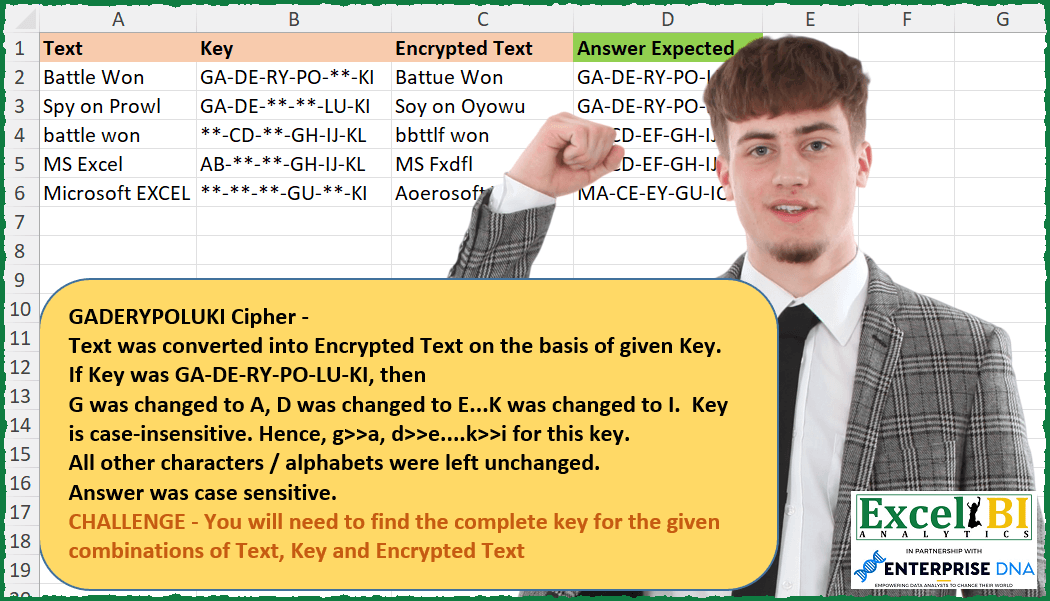
NOTE – Order in answer is not important. Hence, if you get CE-EY-IO-GU-MA-KI in place of MA-CE-EY-GU-IO-KI, this is fine. Order is totally immaterial. GADERYPOLUKI Cipher Missing Keys Challenge- Text was converted into Encrypted Text on the basis of given Key. If Key was GA-DE-RY-PO-LU-KI, then G was changed to A, D was changed to E…K was changed to I. Key is case-insensitive. Hence, g>>a, d>>e….k>>i for this key. All other characters / alphabets were left unchanged. Answer was case sensitive. CHALLENGE – You will need to find the complete key for the given combinations of Text, Key and Encrypted Text NOTE – Order in answer is not important. Hence, if you get CE-EY-IO-GU-MA-KI in place of MA-CE-EY-GU-IO-KI, this is fine.
📌 Challenge Details and Links
ExcelBI Excel Challenge Number: 253
Challenge Difficulty: ⭐️⭐️
📥Download Sample File
📥Link to the solutions on LinkedIn
Solving the challenge of Recover Missing Cipher Keys with Power Query
Power Query solution 1 for Recover Missing Cipher Keys, proposed by Bo Rydobon 🇹🇭:
let
  Source = Excel.CurrentWorkbook(){[Name = "Table1"]}[Content],
  Ans = Table.TransformRows(
    Source,
    each Text.Combine(
      List.Select(
        List.Distinct(
          List.Combine(
            {
              List.Transform(
                List.Zip({Text.ToList([Text]), Text.ToList([EncryptedText])}),
                each Text.Upper(Text.Combine(_))
              ),
              Text.Split([Key], "-")
            }
          )
        ),
        each Text.Start(_, 1) <> Text.End(_, 1)
      ),
      "-"
    )
  )
in
  Ans
Power Query solution 2 for Recover Missing Cipher Keys, proposed by Zoran Milokanović:
let
  Source = Excel.CurrentWorkbook(){[Name = "Input"]}[Content],
  d = (t) => Text.ToList(Text.Upper(t)),
  S = Table.TransformRows(
    Source,
    each
      let
        k = [Key],
        r = List.Distinct(
          List.Transform(
            List.Select(
              List.Zip({d([Text]), d([Encrypted Text])}),
              each (_{0} <> _{1}) and Text.PositionOf(k, _{0} & _{1}) = - 1
            ),
            Text.Combine
          )
        )
      in
        List.Accumulate(r, k, (s, c) => Text.ReplaceRange(s, Text.PositionOf(s, "**"), 2, c))
  )
in
  S
Power Query solution 3 for Recover Missing Cipher Keys, proposed by Aditya Kumar Darak 🇮🇳:
let
  Source = Excel.CurrentWorkbook(){[Name = "data"]}[Content],
  Return = Table.AddColumn(
    Source,
    "Answer",
    each [
      UpperT = Text.Upper([Text]),
      UpperE = Text.Upper([Encrypted Text]),
      Len = Text.Length([Text]),
      Seq = {0 .. Len - 1},
      SpltB = List.Distinct(List.Transform(Seq, (f) => Text.At(UpperT, f) & Text.At(UpperE, f))),
      Select = List.Select(SpltB, (f) => Text.At(f, 0) <> Text.At(f, 1)),
      SpltK = Text.Split([Key], "-"),
      Diff = List.Difference(Select, SpltK),
      FinalK = List.Skip(
        List.Generate(
          () => [x = - 1, y = - 1, z = {}],
          each [x] < List.Count(SpltK),
          each [
            x = [x] + 1,
            y = [y] + Number.From(SpltK{x} = "**"),
            z = if [y] <> y then Diff{y} else SpltK{x}
          ],
          each [z]
        )
      ),
      Combine = Text.Combine(FinalK, "-")
    ][Combine]
  )
in
  Return
Power Query solution 4 for Recover Missing Cipher Keys, proposed by Alejandro Simón 🇵🇦 🇪🇸:
let
  Source = Excel.CurrentWorkbook(){[Name = "Table1"]}[Content],
  Sol = Table.AddColumn(
    Source,
    "Answer",
    each Text.Combine(
      List.RemoveFirstN(
        let
          a = Text.ToList(Text.Upper([Text])),
          b = Text.ToList(Text.Upper([Encrypted Text])),
          c = List.Transform(
            List.Distinct(List.Select(List.Zip({a, b}), each _{0} <> _{1})),
            Text.Combine
          ),
          d = Text.Split([Key], "-"),
          e = List.Generate(
            () => [w = 0, y = c],
            each [w] <= List.Count(d),
            each [
              x = if d{w - 1} = "**" then [y]{0} else d{w - 1},
              w = [w] + 1,
              y = if d{w - 1} = "**" then List.RemoveFirstN([y]) else [y]
            ],
            each [x]
          )
        in
          e
      ),
      "-"
    )
  )[[Answer]]
in
  Sol
Power Query solution 5 for Recover Missing Cipher Keys, proposed by Alejandro Simón 🇵🇦 🇪🇸:
let
 Source = Excel.CurrentWorkbook(){[Name="Table1"]}[Content],
 Sol = Table.AddColumn(Source, "Answer", each
 let
 a = Text.ToList([Text]),
 b = Text.ToList([Encrypted Text]),
 c = List.Transform(List.Distinct(List.Select(List.Zip({a,b}), each _{0}<>_{1}), Comparer.OrdinalIgnoreCase), each Text.Upper(Text.Combine(_))),
 d = Text.Split([Key], "-"),
 e = Text.Combine(List.Select(List.Distinct(c&d), each _<> "**"), "-")
 in e)
in
Power Query solution 6 for Recover Missing Cipher Keys, proposed by Luan Rodrigues:
let
  Fonte = Tabela1,
  res = Table.AddColumn(
    Fonte,
    "Personalizar",
    each [
      a = Text.ToList(Text.Upper([Text])),
      b = Text.ToList(Text.Upper([Encrypted Text])),
      c = List.Zip({a, b}),
      d = List.Transform(List.Distinct(List.Select(c, (x) => x{0} <> x{1})), Text.Combine),
      e = Text.Combine(List.Distinct(List.Select(Text.Split([Key], "-") & d, each _ <> "**")), "-")
    ][e]
  )[[Personalizar]]
in
  res
Power Query solution 7 for Recover Missing Cipher Keys, proposed by Kalyan Kumar Reddy Kethireddy:
let
  Source = Excel.Workbook(File.Contents(Data), true, true),
  Data_Sheet = Source{[Item = "Data", Kind = "Sheet"]}[Data],
  #"Changed Type" = Table.TransformColumnTypes(
    Data_Sheet,
    {{"Text", type text}, {"Key", type text}, {"Encrypted Text", type text}}
  ),
  ExpectedKey = Table.AddColumn(
    #"Changed Type",
    "Expected Key",
    each [
      List1 = Text.ToList([Text]),
      List2 = Text.ToList([Encrypted Text]),
      a = List.Positions(List2),
      b = List.Distinct(List.Transform(a, (x) => Text.At([Text], x) & Text.At([Encrypted Text], x))),
      Filter = List.Select(b, (x) => Text.End(x, 1) <> Text.Start(x, 1)),
      c = List.FindText(Text.Split([Key], "-"), "**"),
      d = List.RemoveItems(Text.Split([Key], "-"), c) & Filter,
      e = Text.Upper(Text.Combine(d, "-"))
    ][e]
  )
in
  ExpectedKey
Solving the challenge of Recover Missing Cipher Keys with Excel
Excel solution 1 for Recover Missing Cipher Keys, proposed by Bo Rydobon 🇹🇭:
=MAP(
    A2:A6,
    B2:B6,
    C2:C6,
    LAMBDA(
        a,
        b,
        c,
        LET(
            s,
            SEQUENCE(
                LEN(
                    a
                )
            ),
            u,
            UNIQUE(
                VSTACK(
                    UPPER(
                        MID(
                            a,
                            s,
                            1
                        )&MID(
                            c,
                            s,
                            1
                        )
                    ),
                    TEXTSPLIT(
                        b,
                        ,
                        "-"
                    )
                )
            ),

            TEXTJOIN(
                "-",
                ,
                REPT(
                    u,
                    LEFT(
                        u
                    )<>RIGHT(
                        u
                    )
                )
            )
        )
    )
)
Excel solution 2 for Recover Missing Cipher Keys, proposed by John V.:
=MAP(
    A2:A6,
    B2:B6,
    C2:C6,
    LAMBDA(
        a,
        b,
        c,
        LET(
            s,
            ROW(
                1:20
            ),
            t,
            MID(
                a,
                s,
                1
            ),
            e,
            MID(
                c,
                s,
                1
            ),
            TEXTJOIN(
                "-",
                ,
                UNIQUE(
                    VSTACK(
                        TEXTSPLIT(
                            b,
                            ,
                            {"-";"**"}
                        ),
                        REPT(
                            UPPER(
                                t&e
                            ),
                            t<>e
                        )
                    )
                )
            )
        )
    )
)
Excel solution 3 for Recover Missing Cipher Keys, proposed by محمد حلمي:
=MAP(
    A2:A6,
    B2:B6,
    C2:C6,
    LAMBDA(
        a,
        b,
        c,
        LET(

            e,
            SEQUENCE(
                50
            ),
            s,
            MID(
                a,
                e,
                1
            ),
            i,
            MID(
                c,
                e,
                1
            ),

            TEXTJOIN(
                "-",
                ,
                UPPER(
                    UNIQUE(
                        VSTACK(

                            TEXTSPLIT(
                                b,
                                ,
                                {"**",
                                "-"}
                            ),
                            IF(
                                s=i,
                                "",
                                s&i
                            )
                        )
                    )
                )
            )
        )
    )
)
Excel solution 4 for Recover Missing Cipher Keys, proposed by Kris Jaganah:
=MAP(A2:A6,
    B2:B6,
    C2:C6,
    LAMBDA(x,
    y,
    z,
    LET(a,
    MID(
        x,
        SEQUENCE(
            LEN(
                x
            )
        ),
        1
    ),
    b,
    MID(
        z,
        SEQUENCE(
            LEN(
                z
            )
        ),
        1
    ),
    c,
    BYROW(UNIQUE(FILTER(HSTACK(
        a,
        b
    ),
    (a<>b))),
    LAMBDA(
        x,
        CONCAT(
                x
            )
    )),
    d,
    TEXTSPLIT(
        y,
        ,
        "-"
    ),
    e,
    SORT(
        d
    ),
    f,
    SEQUENCE(
        ROWS(
        d
    )
    )*(e="**"),
    TEXTJOIN(
        "-",
        ,
        SORT(
            UPPER(
                IFNA(
                    XLOOKUP(
                        f,
                        XMATCH(
                            c,
                            c
                        ),
                        c
                    ),
                    e
                )
            )
        )
    ))))
Excel solution 5 for Recover Missing Cipher Keys, proposed by Julian Poeltl:
=MAP(A2:A6,
    B2:B6,
    C2:C6,
    LAMBDA(T,
    K,
    E,
    LET(L,
    LAMBDA(
        A,
        UPPER(
            MID(
                A,
                SEQUENCE(
                    LEN(
                        A
                    )
                ),
                1
            )
        )
    ),
    V,
    VSTACK(
        TEXTSPLIT(
            K,
            ,
            "-"
        ),
        IF(
            L(
                T
            )<>L(
                E
            ),
            L(
                T
            )&L(
                E
            ),
            ""
        )
    ),
    TEXTJOIN("-",
    ,
    UNIQUE(FILTER(V,
    (V<>"**")*(V<>"")))))))
Excel solution 6 for Recover Missing Cipher Keys, proposed by Aditya Kumar Darak 🇮🇳:
=MAP(
 A2:A6,

 B2:B6,

 C2:C6,

 LAMBDA(a,
     b,
     c,

 LET(
 sq,
     SEQUENCE(
         LEN(
             a
         )
     ),

 upt,
     UPPER(
             a
         ),

 upe,
     UPPER(
         c
     ),

 spltt,
     MID(
         upt,
          sq,
          1
     ),

 splte,
     MID(
         upe,
          sq,
          1
     ),

 rmk,
     UNIQUE(
         TOCOL(
             IF(
                 spltt = splte,
                  NA(),
                  spltt & splte
             ),
              2
         )
     ),

 spltk,
     TEXTSPLIT(
         b,
          ,
          "-"
     ),

 knum,
     SCAN(0,
     spltk,
     LAMBDA(a,
     b,
     a + (b = "**"))),

 calc,
     IF(
         spltk = "**",
          INDEX(
              rmk,
               knum
          ),
          spltk
     ),

 r,
     TEXTJOIN(
         "-",
          1,
          calc
     ),

 r
 )
 )
)
Excel solution 7 for Recover Missing Cipher Keys, proposed by Timothée BLIOT:
=MAP(
    A2:A6,
    B2:B6,
    C2:C6,
    LAMBDA(
        r,
        s,
        t,
        LET(
            A,
            TEXTSPLIT(
                s,
                "-"
            ),
            B,
            DROP(
                 REDUCE(
                     "",
                     A,
                     LAMBDA(
                         a,
                         v,
                         VSTACK(
                             a,
                             MID(
                                 v,
                                 {1,
                                 2},
                                 1
                             )
                         )
                     )
                 ),
                1
            ),
            C,
            MID(
                r,
                SEQUENCE(
                     LEN(
                         r
                     )
                ),
                1
            ),
            E,
            REDUCE(
                UPPER(
                    C
                ),
                INDEX(
                    B,
                    ,
                    1
                ),
                LAMBDA(
                    a,
                    v,
                    SUBSTITUTE(
                        a,
                        v,
                        XLOOKUP(
                            v,
                            INDEX(
                    B,
                    ,
                    1
                ),
                            INDEX(
                                B,
                                ,
                                2
                            )
                        )
                    )
                )
            ),
            F,
            UNIQUE(
                MAP(
                    E,
                    UPPER(
                        MID(
                            t,
                            SEQUENCE(
                                LEN(
                                    t
                                )
                            ),
                            1
                        )
                    ),
                    LAMBDA(
                        x,
                        y,
                        IF(
                            x=y,
                            "",
                            x&y
                        )
                    )
                )
            ),
            G,
            FILTER(
                F,
                F<>""
            ),
            H,
            SCAN(
                0,
                A,
                LAMBDA(
                    a,
                    v,
                    IF(
                        v="**",
                        a+1,
                        a
                    )
                )
            ),
            I,
            MAP(
                SEQUENCE(
                    COLUMNS(
                        H
                    )
                ),
                LAMBDA(
                    x,
                    IF(
                        INDEX(
                            A,
                            ,
                   &         x
                        )="**",
                        INDEX(
                            G,
                            INDEX(
                                H,
                                ,
                                x
                            )
                        ),
                        INDEX(
                            A,
                            ,
                            x
                        )
                    )
                )
            ),
            TEXTJOIN(
                "-",
                ,
                I
            )
        )
    )
)
Excel solution 8 for Recover Missing Cipher Keys, proposed by Hussein SATOUR:
=MAP(
    A2:A6,
    B2:B6,
    C2:C6,
     LAMBDA(
         x,
         y,
         z,
          LET(

              a,
               LEN(
                   x
               ),
               t,
               MID(
                   x,
                    SEQUENCE(
                        a
                    ),
                   1
               ),
               e,
               MID(
                   z,
                   SEQUENCE(
                        a
                    ),
                   1
               ),

              b,
               UNIQUE(
                   UPPER(
                       FILTER(
                           t&e,
                            t<>e
                       )
                   )
               ),

              REDUCE(
                  y,
                   b,
                   LAMBDA(
                       u,
                       v,
                        SUBSTITUTE(
                            u,
                            "**",
                             v,
                             XMATCH(
                                 v,
                                 v
                             )
                        )
                   )
              )
          )
     )
)
Excel solution 9 for Recover Missing Cipher Keys, proposed by Oscar Mendez Roca Farell:
=MAP(A12:A16, B12:B16, C12:C16, LAMBDA(a, b, c, LET(_f,LAMBDA(x, MID(x, SEQUENCE(15), 1)),_u, TOCOL(IF(_f(a)<>_f(c), UPPER(_f(a)&_f(c)), NOD()) ,2),_d, TEXTSPLIT(SUBSTITUTE(b,"**",""), ,"-", 1), TEXTJOIN("-", ,UNIQUE(VSTACK(_u,_d))))))Excel solution 10 for Recover Missing Cipher Keys, proposed by Sunny Baggu:
=MAP(
 A2:A6,
 B2:B6,
 C2:C6,
 LAMBDA(a, b, c,
 LET(
 _e1, LAMBDA(x, MID(x, SEQUENCE(LEN(x)), 1)),
 _t, _e1(a),
 _et, _e1(c),
 _cri, 1 - (_t = _et),
 _k, UNIQUE(UPPER(FILTER(_t & _et, _cri))),
 REDUCE(b, _k, LAMBDA(a, v, SUBSTITUTE(a, "**", v, 1)))
 )
 )
)
Excel solution 11 for Recover Missing Cipher Keys, proposed by LEONARD OCHEA 🇷🇴:
=MAP(
    A2:A6,
    B2:B6,
    C2:C6,
    LAMBDA(
        a,
        b,
        c,
        LET(
            f,
            LAMBDA(
                x,
                MID(
                    x,
                    SEQUENCE(
                        LEN(
                            x
                        )
                    ),
                    1
                )
            ),
            m,
            UPPER(
                f(
                    a
                )&f(
                     c
                )
            ),
            v,
            TEXTJOIN(
                "@",
                ,
                UNIQUE(
                    IF(
                        f(
                    a
                )<>f(
                    c
                ),
                        IF(
                            LEN(
                                SUBSTITUTE(
                                    b,
                                    m,
                                    ""
                                )
                            )=LEN(
                                b
                            ),
                            m,
                            ""
                        ),
                        ""
                    )
                )
            ),
            REDUCE(
                b,
                TEXTSPLIT(
                    v,
                    "@"
                ),
                LAMBDA(
                    o,
                    p,
                    REPLACE(
                        o,
                        FIND(
                            "**",
                            o
                        ),
                        2,
                        p
                    )
                )
            )
        )
    )
)
Excel solution 12 for Recover Missing Cipher Keys, proposed by Pieter de B.:
=MAP(
    A2:A6,
    B2:B6,
    C2:C6,
    LAMBDA(
        a,
        b,
        c,
        REDUCE(
            b,
            SEQUENCE(
                LEN(
                    a
                )
            ),
            LAMBDA(
                x,
                y,
                LET(
                    t,
                    UPPER(
                        MID(
                            a,
                            y,
                            1
                        )
                    ),
                    e,
                    UPPER(
                        MID(
                            c,
                            y,
                            1
                        )
                    ),
                    IFERROR(
                        IFS(
                            t=e,
                            x,
                            ISNUMBER(
                                SEARCH(
                                    t&e,
                                    x
                                )
                            ),
                            x
                        ),
                        SUBSTITUTE(
                            x,
                            "**",
                            t&e,
                            1
                        )
                    )
                )
            )
        )
    )
)
Excel solution 13 for Recover Missing Cipher Keys, proposed by Asheesh Pahwa:
=MAP(R3:R6,T3:T6,S3:S6, LAMBDA(txt, encr,key,LET(a, MID(txt,SEQUENCE(LEN(txt)),1),b,MID(encr,SEQUENCE(LEN(encr)),1),c,UPPER(TEXTJOIN("-",TRUE,UNIQUE(IF(a=b,"", BYROW(HSTACK(a,b), LAMBDA(x,CONCAT(x))))))), d,TEXTSPLIT(key,,"-"),TEXTJOIN("-",,UNIQUE(TEXTSPLIT(EXTJOIN("-",,UNIQUE(IF(d="**",c,d))),,"-")))))))Excel solution 14 for Recover Missing Cipher Keys, proposed by JvdV -:
=MAP(
    A2:A6,
    B2:B6,
    C2:C6,
    LAMBDA(
        a,
        b,
        c,
        LET(
            s,
            ROW(
                1:99
            ),
            i,
            MID(
                a,
                s,
                1
            ),
            o,
            MID(
                c,
                s,
                1
            ),
            UPPER(
                TEXTJOIN(
                    "-",
                    ,
                    UNIQUE(
                        VSTACK(
                            TEXTSPLIT(
                                b,
                                ,
                                {"-",
                                "*"}
                            ),
                            REPT(
                                i&o,
                                i<>o
                            )
                        )
                    )
                )
            )
        )
    )
)
Excel solution 15 for Recover Missing Cipher Keys, proposed by Julien Lacaze:
=MAP(UPPER(A2:A6),UPPER(C2:C6),B2:B6,
LAMBDA(text,encry,key,LET(
keys,TEXTSPLIT(key,,"-"),
s,LAMBDA(t,MID(t,SEQUENCE(LEN(t)),1)),
newkeys,FILTER(s(text)&s(encry),s(text)<>s(encry)),
TEXTJOIN("-",,UNIQUE(VSTACK(FILTER(keys,keys<>"**"),newkeys))))))
Excel solution 16 for Recover Missing Cipher Keys, proposed by Mihai Radu O:
=MAP(
 LOWER(A2:A6),
 B2:B6,
 LOWER(C2:C6),
 LAMBDA(t, k, r,
 LET(
 _t, MID(t, SEQUENCE(LEN(t)), 1),
 _r, MID(r, SEQUENCE(LEN(r)), 1),
 a, BYROW(
 UNIQUE(FILTER(HSTACK(_t, _r), _t <> _r)),
 LAMBDA(x, CONCAT(x))
 ),
 b, SORT(TEXTSPLIT(k, , "-")),
 c, UPPER(FILTER(a, ISERROR(XMATCH(a, b)))),
 d, FILTER(b, b <> "**"),
 TEXTJOIN("-", 1, SORT(VSTACK(c, d)))
 )
 )
)
Excel solution 17 for Recover Missing Cipher Keys, proposed by Md Ismail Hosen:
=LAMBDA(EncryptionMap,
 LET(
 _fxForOne, LAMBDA(Text, Key, EncryptedText,
 LET(
 _ToChars, LAMBDA(InputText, IF(InputText = "", "", MID(InputText, SEQUENCE(LEN(InputText)), 1))),
 _CharsOfText, _ToChars(Text),
 _CharsOfEncryptedText, _ToChars(EncryptedText),
 _KeyMap, FILTER(HSTACK(_CharsOfText, _CharsOfEncryptedText), _CharsOfText <> _CharsOfEncryptedText),
 _EncryptionUsed, UNIQUE(BYROW(_KeyMap, LAMBDA(Row, UPPER(CONCAT(Row))))),
 _MissingEncryption, LET(
 ProvidedKey, TEXTSPLIT(Key, , "-"),
 AlreadyGiven, ISERROR(XMATCH(_EncryptionUsed, ProvidedKey, 0)),
 Result, FILTER(_EncryptionUsed, AlreadyGiven),
 Result
 ),
 _Result, REDUCE(Key, _MissingEncryption, LAMBDA(Acc, Curr, SUBSTITUTE(Acc, "**", Curr, 1))),
 _Result
 )
 ),
 _Result, BYROW(EncryptionMap, LAMBDA(row, _fxForOne(INDEX(row, 1, 1), INDEX(row, 1, 2), INDEX(row, 1, 3)))),
 _Result
 )
)(A2:C6)
&&