
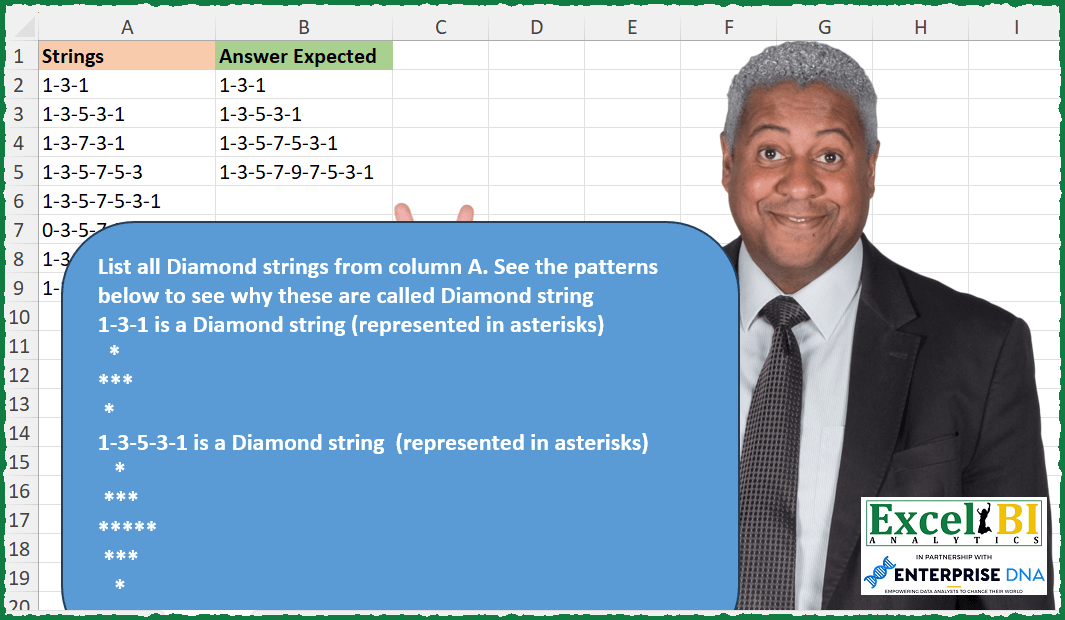
List all Diamond strings from column A. See the patterns below to see why these are called Diamond string 1-3-1 is a Diamond string (represented in asterisks) * *** * 1-3-5-3-1 is a Diamond string (represented in asterisks) * *** ***** *** *
📌 Challenge Details and Links
ExcelBI Excel Challenge Number: 245
Challenge Difficulty: ⭐️
📥Download Sample File
📥Link to the solutions on LinkedIn
Solving the challenge of Identify Diamond Strings with Power Query
Power Query solution 1 for Identify Diamond Strings, proposed by Bo Rydobon 🇹🇭:
let
  Source = Excel.CurrentWorkbook(){[Name = "Table1"]}[Content],
  Ans = List.Intersect(
    {
      Source[Strings],
      List.Transform(
        List.Numbers(2, 9),
        each
          let
            l = List.Numbers(1, _, 2)
          in
            Text.Combine(List.Transform(l & List.Reverse(List.FirstN(l, _ - 1)), Text.From), "-")
      )
    }
  )
in
  Ans
Power Query solution 2 for Identify Diamond Strings, proposed by Zoran Milokanović:
let
  Source = Excel.CurrentWorkbook(){[Name = "Input"]}[Content][Strings],
  S = List.Select(
    Source,
    (t) =>
      t
        = Text.Combine(
          List.Generate(
            () => [i = 2, s = 1],
            each [s] > 0,
            each [
              i = (if [s] + [i] > Text.Length(Text.Select(t, {"0" .. "9"})) then - [i] else [i]),
              s = [s] + i
            ],
            each Text.From([s])
          ),
          "-"
        )
  )
in
  S
Power Query solution 3 for Identify Diamond Strings, proposed by Kris Jaganah:
let
  Source = Excel.CurrentWorkbook(){[Name = "Table1"]}[Content],
  New = Table.AddColumn(
    Source,
    "Workings",
    each
      let
        a = Text.Combine(Text.Split([Strings], "-")),
        b = Number.RoundUp(Text.Length(a) / 2),
        c = List.Numbers(1, b, 2),
        d = Text.Combine(List.Transform(c, Text.From)),
        e = Text.Combine(List.Transform(List.Numbers(List.Max(c) - 2, b - 1, - 2), Text.From)),
        f = Text.Combine({d, e}),
        g = if a = f then 1 else null
      in
        g
  ),
  Filter = Table.SelectRows(New, each ([Workings] = 1)),
  Remove = Table.RemoveColumns(Filter, {"Workings"})
in
  Remove
Power Query solution 4 for Identify Diamond Strings, proposed by Alejandro Simón 🇵🇦 🇪🇸:
let
  Source = Excel.CurrentWorkbook(){[Name = "Table1"]}[Content],
  Sol = Table.SelectRows(
    Source,
    each
      let
        a = List.Transform(Text.Split([Strings], "-"), Number.From),
        b = List.Max(a),
        c = List.Select({1 .. b}, Number.IsOdd),
        d = c & List.RemoveFirstN(List.Reverse(c))
      in
        d = a
  )
in
  Sol
Power Query solution 5 for Identify Diamond Strings, proposed by Alejandro Simón 🇵🇦 🇪🇸:
let
  Source = Excel.CurrentWorkbook(){[Name = "Table1"]}[Content],
  Sol = Table.SelectRows(
    Source,
    each
      let
        a = List.Transform(Text.Split([Strings], "-"), Number.From),
        b = List.RemoveLastN(
          List.Transform({0 .. List.Count(a) - 1}, each Number.Abs(a{_} - a{_ + 1}) = 2),
          1
        )
      in
        List.AllTrue(b) and Number.IsOdd(List.Count(a)) and List.First(a) = 1
  )
in
  Sol
Power Query solution 6 for Identify Diamond Strings, proposed by Luan Rodrigues:
let
  Fonte = Query_Tabela1,
  res = Table.SelectRows(
    Fonte,
    each [
      a = Text.Split([Strings], "-"),
      b = List.Transform(a, Number.From),
      c = List.Transform(
        List.Transform({0 .. List.Count(b) - 2}, each {b{_}, b{_ + 1}}),
        (x) => x{0} - x{1}
      ),
      d = List.Select(c, each _ = 2 or _ = - 2),
      e = List.Count(c) = List.Count(d) and List.Last(a) = "1"
    ][e]
  )
in
  res
Power Query solution 7 for Identify Diamond Strings, proposed by Brian Julius:
let
  Source = Excel.CurrentWorkbook(){[Name = "Table1"]}[Content],
  AddNumList = Table.AddColumn(
    Source,
    "NumList",
    each [
      a = Text.Split([Strings], "-"),
      b = {null} & List.RemoveLastN(a, 1),
      c = Table.RemoveFirstN(Table.FromColumns({a, b}), 1),
      d = Table.AddColumn(
        c,
        "Diff",
        each Number.Abs(Number.From([Column1]) - Number.From([Column2]))
      ),
      e = Table.SelectColumns(d, "Diff"),
      f = List.RemoveItems(e[Diff], {2}),
      g = List.Count(f)
    ][g]
  ),
  FilterNClean = Table.SelectColumns(Table.SelectRows(AddNumList, each ([NumList] = 0)), "Strings")
in
  FilterNClean
Power Query solution 8 for Identify Diamond Strings, proposed by Kalyan Kumar Reddy Kethireddy:
let
  Source = Excel.Workbook(File.Contents(Data_1), true, true),
  Sheet2_Sheet = Source{2}[Data],
  #"Added Custom" = Table.AddColumn(
    Sheet2_Sheet,
    "Custom",
    each [
      a = [Strings],
      b = List.Transform(Text.Split(a, "-"), each Number.From(_)),
      c = List.AllTrue(List.Transform(b, each Number.IsOdd(_))),
      d = List.RemoveLastN(
        List.Transform({0 .. List.Count(b) - 1}, each Number.Abs(b{_} - b{_ + 1}) = 2)
      ),
      e = a = Text.Reverse(a) and c and List.AllTrue(d)
    ][e]
  ),
  #"Filtered Rows" = Table.SelectRows(#"Added Custom", each ([Custom] = true))
in
  #"Filtered Rows"[Strings]
Power Query solution 9 for Identify Diamond Strings, proposed by Daniel Madhadha:
let
  Source = Excel.CurrentWorkbook(){[Name = "Table1"]}[Content],
  #"Added Custom" = Table.AddColumn(
    Source,
    "Custom",
    each
      let
        a = Text.Split([Strings], "-"),
        b = Text.Combine(a),
        c = Text.Length(b),
        d = Number.RoundUp(c / 2),
        e = List.Numbers(1, d, 2),
        f = Text.Combine(List.Transform(e, Text.From)),
        g = List.Max(e),
        h = List.Numbers(g - 2, d - 1, - 2),
        i = Text.Combine(List.Transform(h, Text.From)),
        j = Text.Combine({f, i}),
        k = if j = b then 1 else 0
      in
        k
  ),
  #"Filtered Rows" = Table.SelectRows(#"Added Custom", each ([Custom] = 1))
in
  #"Filtered Rows"
Solving the challenge of Identify Diamond Strings with Excel
Excel solution 1 for Identify Diamond Strings, proposed by Bo Rydobon 🇹🇭:
=FILTER(A2:A9,ISNUMBER(XMATCH(A2:A9,MAP(SEQUENCE(9,,3,2),LAMBDA(a,LET(b,SEQUENCE(a,,,2),c,AVERAGE(b),TEXTJOIN("-",,c-ABS(b-c))))))))Excel solution 2 for Identify Diamond Strings, proposed by Bo Rydobon 🇹🇭:
=TOCOL(
    VLOOKUP(
        A2:A9,
        MAP(
            SEQUENCE(
                9
            )*2+1,
            LAMBDA(
                a,
                TEXTJOIN(
                    "-",
                    ,
                    a-ABS(
                        a-SEQUENCE(
                            a,
                            ,
                            ,
                            2
                        )
                    )
                )
            )
        ),
        1,

    ),
    3
)
Excel solution 3 for Identify Diamond Strings, proposed by John V.:
=FILTER(A2:A9,MAP(A2:A9,LAMBDA(x,LET(n,TEXTSPLIT(x,,"-"),d,DROP(n,-1)-DROP(n,1),AND(ABS(d)=2,SUM(d)=0)))))Excel solution 4 for Identify Diamond Strings, proposed by محمد حلمي:
=FILTER(A2:A9,
    MAP(A2:A9,
    LAMBDA(a,
    LET(i,
    TEXTSPLIT(
        a,
        ,
        "-"
    ),
    e,
    DROP(
        i,
        1
    )-DROP(
        i,
        -1
    ),
    AND(ABS(
        e
    )=2*(SUM(
        e
    )=0))))))
Excel solution 5 for Identify Diamond Strings, proposed by محمد حلمي:
=FILTER(A2:A9,MAP(A2:A9,LAMBDA(a,LET(i,TEXTSPLIT(a,,"-")+0,AND(MAX(i)=ROWS(i),ABS(IFNA(DROP(i,1)-i,2))=2)))))Excel solution 6 for Identify Diamond Strings, proposed by Kris Jaganah:
=TOCOL(MAP(A2:A9,LAMBDA(x,LET(a,--TEXTSPLIT(x,,"-"),b,ROWS(a),c,SEQUENCE(b/2+1,,,2),d,VSTACK(c,SORT(DROP(c,-1),,-1)),IFS(--(SUM(--(a=d))=b),x)))),3)Excel solution 7 for Identify Diamond Strings, proposed by Julian Poeltl:
=FILTER(A2:A9,
    MAP(A2:A9,
    LAMBDA(A,
    A=TEXTJOIN("-",
    ,
    LET(R,
    (LEN(
        A
    )+1)/4,
    VSTACK(
        SEQUENCE(
            R,
            ,
            ,
            2
        ),
        SEQUENCE(
            R+1,
            ,
            R*2,
            -2
        )
    ))))))
Excel solution 8 for Identify Diamond Strings, proposed by Timothée BLIOT:
=FILTER(A2:A9,
    MAP(A2:A9,
    LAMBDA(x,
    LET(A,
    TEXTSPLIT(
        x,
        ,
        "-"
    ),
    IF( MOD(
        ROWS(
            A
        ),
        2
    ),
    CONCAT(VSTACK(SEQUENCE((ROWS(
            A
        )-1)/2+1,
    ,
    ,
    2),
    SEQUENCE(ROUNDDOWN((ROWS(
            A
        ))/2,
    0),
    ,
    ROWS(
            A
        )-2,
    -2)))=CONCAT(
            A
        ),
    0)))))
Excel solution 9 for Identify Diamond Strings, proposed by Hussein SATOUR:
=FILTER(A2:A9, MAP(A2:A9, LAMBDA(x, LET(
a, TEXTSPLIT(x, ,"-"),
b, PRODUCT((ABS(DROP(a, 1) - DROP(a, -1)) = 2)*1) = 1,
AND(ISODD(COUNTA(a)), b)))))
Excel solution 10 for Identify Diamond Strings, proposed by Oscar Mendez Roca Farell:
=FILTER(
    A2:A9,
     MAP(
         A2:A9,
          LAMBDA(
              a,
               LET(
                   _n,
                   --TEXTSPLIT(
                       a,
                        ,
                       "-"
                   ),
                   _s,
                    2*SEQUENCE(
                        1+MAX(
                            _n
                        )/2
                    )-1,
                    a=TEXTJOIN(
                        "-",
                         ,
                         VSTACK(
                             DROP(
                                 _s,
                                 -1
                             ),
                              ORDER(
                                  _s,
                                   ,
                                  -1
                              )
                         )
                    )
               )
          )
     )
)
Excel solution 11 for Identify Diamond Strings, proposed by Sunny Baggu:
=FILTER(
 A2:A9,
 MAP(
 A2:A9,
 LAMBDA(a,
 LET(_m, TEXTSPLIT(a, , "-"), _d, ABS(DROP(_m, 1) - DROP(_m, -1)), AND(ISODD(ROWS(_m)), AND(_d = 2)))
 )
 )
)
Excel solution 12 for Identify Diamond Strings, proposed by Abdallah Ally:
=FILTER(A2:A9,MAP(A2:A9,LAMBDA(x,LET(a, x, b, LEN(a), c,CONCAT(MID(a,SEQUENCE(b,,b,-1),1)),d,--TEXTSPLIT(a,"-"),e,LEN(TOCOL(d)),IFERROR(AND(a=c,MOD(d,2),--MID(a,INT(b/2)+1,1)=COUNT(TOCOL(d))),FALSE)))))Excel solution 13 for Identify Diamond Strings, proposed by Bhavya Gupta:
=FILTER(A2:A9,
    MAP(A2:A9,
    LAMBDA(s,
    LET(r,
    ROWS(
        TEXTSPLIT(
            s,
            ,
            "-"
        )
    ),
    a,
    SEQUENCE(
        r
    ),
    b,
    MEDIAN(
        a
    ),
    AND(ISODD(
        r
    ),
    TEXTJOIN("-",
    ,
    ABS(2*((a>=b)*2*b-a))-1)=s)))))
Excel solution 14 for Identify Diamond Strings, proposed by Tolga Demirci, PMP, PMI-ACP, MOS-Expert:
=LET(g;MAP(A2:A9;LAMBDA(e;IF(LET(d;IFERROR(VALUE(MID(e;SEQUENCE(LEN(e));1));"");LEN(VALUE(TEXTAFTER(TEXTJOIN(;;SUBSTITUTE(d;MAX(d);"+";1));"+";1;;;)))=LEN(VALUE(TEXTBEFORE(TEXTJOIN(;;SUBSTITUTE(d;MAX(d);"+";1));"+";1;;;))));TEXTJOIN(;;IF(IFERROR(LET(b;LET(a;LET(a;UNIQUE(IFERROR(VALUE(MID(e;SEQUENCE(LEN(e));1));""));FILTER(a;a<>""));LET(y;IFERROR(DROP(a;1)-a;"");FILTER(y;y<>"")));FILTER(b;(b<>2)*(b<>0)*(b<>-2)));"")="";e;""));"")));FILTER(g;g<>""))Excel solution 15 for Identify Diamond Strings, proposed by Julien Lacaze:
=LET(data,
    A2:A9,

isDiamond,
    LAMBDA(text,
    MAP(text,
    LAMBDA(t,
    LET(s,
    --TEXTSPLIT(
        t,
        "-"
    ),
    --(1=REDUCE(
        -1,
        s,
        LAMBDA(
            a,
            v,
            IF(
                ABS(
                    a-v
                )=2,
                v,
                0
            )
        )
    )))))),

FILTER(
    data,
    isDiamond(
        data
    )
))


IsDiamond Lambda split the strings in an array,

the REDUCE() function check the distance between each cell and the previous one :
if it is 2,
     then it goes until the end,
     returning the last value ;
else,
     it returns 0.
A diamond has to start and end by a 1,
     hence the check of the REDUCE() return = 1.
the final FILTER()
Excel solution 16 for Identify Diamond Strings, proposed by Nicolas Micot:
=LET(_estDiamant;
    LAMBDA(l_string;
    LET(_split;
    FRACTIONNER.TEXTE(
        l_string;
        "-"
    );

_ecarts;
    INDEX(
        _split;
        1;
        SEQUENCE(
            1;
            COLONNES(
                _split
            )-1;
            2
        )
    )-INDEX(
        _split;
        1;
        SEQUENCE(
            1;
            COLONNES(
                _split
            )-1;
            1
        )
    );

_compter;
    LAMBDA(
        l_valeurs;
        l_critere;
        SOMME(
            SI(
                l_valeurs=l_critere;
                1;
                0
            )
        )
    );

(_compter(
    _ecarts;
    -2
)=_compter(
    _ecarts;
    2
))*(_compter(
    ABS(
        _ecarts
    );
    2
)=NBVAL(
        _ecarts
    ))));

_strings;
    A2:A9;
    FILTRE(
        _strings;
        MAP(
            _strings;
            LAMBDA(
                l_strings;
                _estDiaman&t(
                    l_strings
                )
            )
        )
    ))
Excel solution 17 for Identify Diamond Strings, proposed by Giorgi Goderdzishvili:
=LET(k,
    MAP(A2:A9,
    LAMBDA(x,
    LET(
str,
    x,

spl,
    --TEXTSPLIT(
        str,
        "-"
    ),

mkr,
    MAKEARRAY(
        1,
        COLUMNS(
            spl
        ),
        LAMBDA(
            r,
            c,

            INDEX(
                spl,
                1,
                c+1
            )-INDEX(
                spl,
                1,
                c
            )
        )
    ),

lg,
    SUM(--(ABS(
        DROP(
            mkr,
            ,
            -1
        )
    )=2))=(COLUMNS(
            spl
        )-1)*(ISODD(
        COLUMNS(
            spl
        )
    )),

IF(
    lg,
    str,
    ""
)))),
     FILTER(
         k,
          k<>""
     ))
Excel solution 18 for Identify Diamond Strings, proposed by Daniel Garzia:
=FILTER(A2:A9,MAP(A2:A9,LAMBDA(x,LET(l,LEN(x),f,LEFT(x,5),AND(MID(x,SEQUENCE(l),1)=MID(x,SEQUENCE(l,,l,-1),1),OR(f="1-3-5",f="1-3-1"))))))Excel solution 19 for Identify Diamond Strings, proposed by Quadri Olayinka Atharu:
=TOCOL(MAP(A2:A9,LAMBDA(s,LET(x,SUBSTITUTE(s,"-",""),k,LEN(x),
y,MID(x,SORT(SEQUENCE(k),,-1),1),
IF((CONCAT(y)=x)*SUM(N(ABS(DROP(--y,1)-DROP(--y,-1))=2))=(k-1),s,NA())))),2)
Excel solution 20 for Identify Diamond Strings, proposed by Quadri Olayinka Atharu:
=FILTER(A2:A9,MAP(A2:A9,LAMBDA(s,LET(x,SUBSTITUTE(s,"-",""),k,LEN(x),
y,MID(x,SORT(SEQUENCE(k),,-1),1),
(CONCAT(y)=x)*SUM(N(ABS(DROP(--y,1)-DROP(--y,-1))=2))=(k-1)))))
Excel solution 21 for Identify Diamond Strings, proposed by Quadri Olayinka Atharu:
=FILTER(A2:A9,MAP(A2:A9,LAMBDA(a,LET(t,--TEXTSPLIT(a,,"-"),
r,SEQUENCE(ROWS(t)),
(TEXTJOIN("-",,SORTBY(t,r,-1))=a)*
(SUM(N((DROP(t,1)-DROP(t,-1))^2=4))=MAX(r)-1)))))
Excel solution 22 for Identify Diamond Strings, proposed by Md Ismail Hosen:
=LAMBDA(
    Strings,

     LET(

          _IsDiamondString,
          LAMBDA(
              String,

               LET(

                    _Splitted,
                    TEXTSPLIT(
                        String,
                         "-"
                    ) * 1,

                    _RevSplitted,
                    SORTBY(
                        _Splitted,
                         SEQUENCE(
                             1,
                              COLUMNS(
                                  _Splitted
                              )
                         ),
                         -1
                    ),

                    _RemoveFirstCol,
                    DROP(
                        _Splitted,
                         ,
                         1
                    ),

                    _Result,
                    AND(
                        ABS(
                            DROP(
                                _Splitted - _RemoveFirstCol,
                                 ,
                                 -1
                            )
                        ) = 2,
                         _Splitted = _RevSplitted
                    ),

                    _Result

               )

          ),

          _Result,
          FILTER(
              Strings,
               MAP(
                   Strings,
                    _IsDiamondString
               )
          ),

          _Result

     )

)(A2:A9)
Excel solution 23 for Identify Diamond Strings, proposed by Henriette Hamer:
=FILTER(
    A2:A9;
    MAP(
        A2:A9;
        LAMBDA(
            data;
            AND(
                IF(
                    IsPalindrome(
                        data
                    );
                    MID(
                        data;
                        SEQUENCE(
                            ;
                            LEN(
                        data
                    )/4+1;
                            1;
                            2
                        );
                        1
                    )*1;
                    ""
                )=SEQUENCE(
                            ;
                            LEN(
                        data
                    )/4+1;
                            1;
                            2
                        )
            )
        )
    )
)

with
IsPalindrome = LAMBDA(
    x;
    AND(
        MID(
            x;
            SEQUENCE(
                ROUNDDOWN(
                    LEN(
                        x
                    )/2;
                    0
                );
                ;
                1;
                1
            );
            1
        )=MID(
            x;
            LEN(
                        x
                    )-SEQUENCE(
                ROUNDDOWN(
                    LEN(
                        x
                    )/2;
                    0
                );
                ;
                0;
                1
            );
            1
        )
    )
)
Excel solution 24 for Identify Diamond Strings, proposed by Harry Seiders:
=LET(list,MAP(SEQUENCE(10),LAMBDA(R,TEXTJOIN("-",TRUE,SEQUENCE(,R+1,,2),SEQUENCE(,R,(R-1)*2+1,-2)))),ck,XLOOKUP(A2:A9,list,list,""),FILTER(ck,ck<>""))Solving the challenge of Identify Diamond Strings with R
R solution 1 for Identify Diamond Strings, proposed by Rayan S.:
=LET(a,MAP(A2:A9,LAMBDA(arr,LET(x,LET(split, TRANSPOSE(TEXTSPLIT(arr, "-") + 0), HSTACK(VSTACK(0, split) - VSTACK(split, 0))),IFERROR(SUM(FILTER(x,((x<-2)+(x>2)))),arr)))),FILTER(a,ISTEXT(a)))&&