
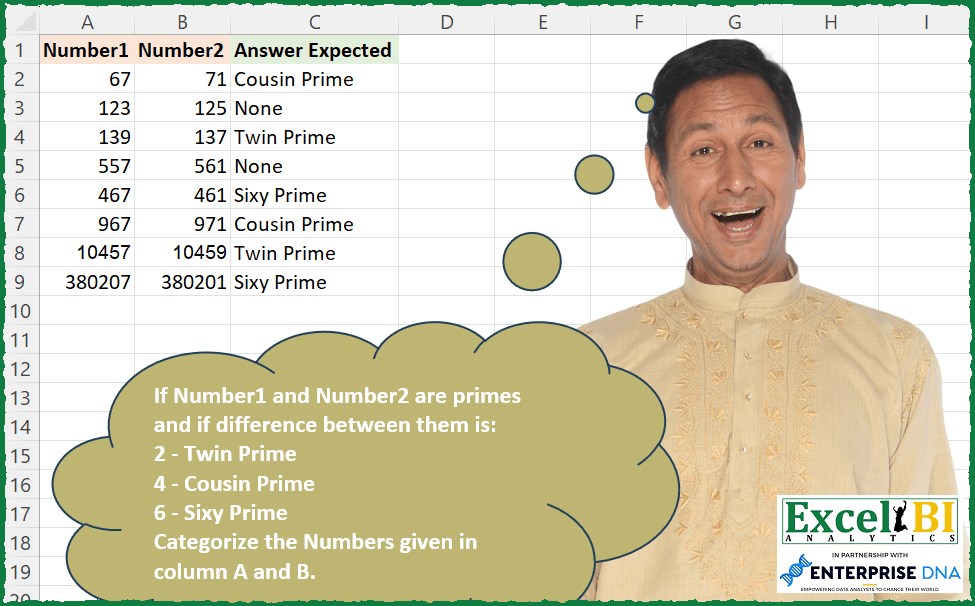
If Number1 and Number2 are primes and if difference between them is: 2 – Twin Prime 4 – Cousin Prime 6 – Sixy Prime Categorize the Numbers given in column A and B. If above criteria is not met, then None.
📌 Challenge Details and Links
ExcelBI Excel Challenge Number: 242
Challenge Difficulty: ⭐️⭐️
📥Download Sample File
📥Link to the solutions on LinkedIn
Solving the challenge of Prime Difference Category with Power Query
Power Query solution 1 for Prime Difference Category, proposed by Bo Rydobon 🇹🇭:
let
  Source = Excel.CurrentWorkbook(){[Name = "Table1"]}[Content],
  Ans = Table.AddColumn(
    Source,
    "Ans",
    each
      let
        N = Record.ToList(_),
        D = Number.Abs(N{0} - N{1})
      in
        if List.AllTrue(
          List.Combine(
            List.Transform(
              N,
              each List.Transform(
                {2} & List.Numbers(3, Number.RoundUp(Number.Sqrt(List.Max(N)) / 2), 2),
                (m) => Number.Mod(_, m) > 0
              )
            )
          )
        )
        then
          if D = 2 then
            "Twin Prime"
          else if D = 4 then
            "Cousin Prime"
          else if D = 6 then
            "Sixy Prime"
          else
            "None"
        else
          "None"
  )
in
  Ans
Power Query solution 2 for Prime Difference Category, proposed by Zoran Milokanović:
let
  Source = Table.ToRows(Excel.CurrentWorkbook(){[Name = "Input"]}[Content]),
  IsPrime = (n) =>
    not List.Accumulate(
      {2 .. Number.RoundDown(Number.Sqrt(n))},
      n = 1,
      (s, d) => s or (Number.Mod(n, d) = 0)
    ),
  S = List.Transform(
    Source,
    each
      let
        s = List.Sort(_),
        d = s{1} - s{0},
        b = IsPrime(s{1}) and IsPrime(s{0})
      in
        if b and d = 6 then
          "Sixy Prime"
        else if b and d = 4 then
          "Cousin Prime"
        else if b and d = 2 then
          "Twin Prime"
        else
          "None"
  )
in
  S
Power Query solution 3 for Prime Difference Category, proposed by Alejandro Simón 🇵🇦 🇪🇸:
let
  Source = Excel.CurrentWorkbook(){[Name = "Table1"]}[Content],
  Sol = Table.AddColumn(
    Source,
    "Answer",
    each
      let
        a = Record.ToList(_),
        b = List.Transform(
          a,
          each List.Transform({2 .. Number.RoundDown(Number.Sqrt(_))}, (x) => Number.Mod(_, x) <> 0)
        ),
        c = List.AllTrue(List.Transform(b, List.AllTrue)),
        d = if c = true then Number.Abs(a{0} - a{1}) else "None",
        e = {{2, "Twin Prime"}, {4, "Cousin Prime"}, {6, "Sixy Prime"}}
      in
        List.ReplaceMatchingItems({d}, e){0}
  )[[Answer]]
in
  Sol
Power Query solution 4 for Prime Difference Category, proposed by Luan Rodrigues:
let
  Fonte = Query_Tabela1,
  res = Table.AddColumn(
    Fonte,
    "Personalizar",
    each [
      a = [Number1],
      b = List.Count(
        List.Select(
          List.Transform(List.Buffer({1 .. a}), (x) => a / x - Number.RoundDown(a / x)),
          each _ = 0
        )
      ),
      c = [Number2],
      d = List.Count(
        List.Select(
          List.Transform(List.Buffer({1 .. c}), (x) => c / x - Number.RoundDown(c / x)),
          each _ = 0
        )
      ),
      e =
        if List.Sum({b, d}) = 4 and (c - a = 4 or c - a = - 4) then
          "Cousin Prime"
        else if List.Sum({b, d}) = 4 and (c - a = 6 or c - a = - 6) then
          "Sixy Prime"
        else if List.Sum({b, d}) = 4 and (c - a = 2 or c - a = - 2) then
          "Twin Prime"
        else
          "None"
    ][e]
  )
in
  res
Power Query solution 5 for Prime Difference Category, proposed by Venkata Rajesh:
let
  Source = Data,
  Output = Table.AddColumn(
    Source,
    "Expected",
    each [
      x = List.Count(
        List.Select(
          {[Number1], [Number2]},
          each List.Count(
            [a = _, b = List.Select({2 .. Number.Round(Number.Sqrt(a))}, each Number.Mod(a, _) = 0)][
              b
            ]
          )
            = 0
        )
      ),
      y = Number.Abs([Number1] - [Number2]),
      z =
        if x = 2 then
          if y = 2 then
            "Twin Prime"
          else if y = 4 then
            "Cousin Prime"
          else if y = 6 then
            "Sixy Prime"
          else
            "None"
        else
          "None"
    ][z]
  )
in
  Output
Power Query solution 6 for Prime Difference Category, proposed by Kalyan Kumar Reddy Kethireddy:
let
  Source = Excel.Workbook(File.Contents(Data), null, true),
  Sheet2_Sheet = Source{[Item = "Sheet2", Kind = "Sheet"]}[Data],
  #"Promoted Headers" = Table.PromoteHeaders(Sheet2_Sheet, [PromoteAllScalars = true]),
  #"Changed Type" = Table.TransformColumnTypes(
    #"Promoted Headers",
    {{"Number1", Int64.Type}, {"Number2", Int64.Type}}
  ),
  #"Answer Expected" = Table.AddColumn(
    #"Changed Type",
    "Answer Expected",
    each
      let
        a = Record.ToList(_),
        b = List.Transform(
          a,
          each List.Transform({2 .. Number.RoundUp(Number.Sqrt(_))}, (x) => Number.Mod(_, x) <> 0)
        ),
        c = List.AllTrue(List.Transform(b, List.AllTrue)),
        d = if c = true then Number.Abs(a{0} - a{1}) else "None",
        e =
          if d = 2 then
            "Twin Prime"
          else if d = 4 then
            "Cousin Prime"
          else if d = 6 then
            "Sixy Prime"
          else
            "None"
      in
        e,
    type text
  )
in
  #"Answer Expected"
Solving the challenge of Prime Difference Category with Excel
Excel solution 1 for Prime Difference Category, proposed by Bo Rydobon 🇹🇭:
=BYROW(A2:B9,LAMBDA(a,SWITCH(ABS(SUM(a*{1,-1}))*AND(MOD(a,SEQUENCE(MAX(a)^0.5,,2))),2,"Twin Prime",4,"Cousin Prime",6,"Sixy Prime","None")))Excel solution 2 for Prime Difference Category, proposed by Bo Rydobon 🇹🇭:
=BYROW(A2:B9,LAMBDA(a,IFERROR(CHOOSE(ABS(SUM(a*{1,-1}))/2*AND(MOD(a,SEQUENCE(MAX(a)^0.5,,2))),"Twin","Cousin","Sixy")&" Prime","None")))Excel solution 3 for Prime Difference Category, proposed by John V.:
=MAP(
    A2:A9,
    B2:B9,
    LAMBDA(
        a,
        b,
        LET(
            f,
            LAMBDA(
                n,
                AND(
                    MOD(
                        n,
                        1+SEQUENCE(
                            n^0.5
                        )
                    )
                )
            ),
            XLOOKUP(
                f(
                    a
                )*f(
                    b
                )*ABS(
                    a-b
                ),
                {2;4;6},
                {"Twin";"Cousin";"Sixy"}&" Prime",
                "None"
            )
        )
    )
)

✅=BYROW(
    A2:B9,
    LAMBDA(
        r,
        XLOOKUP(
            ABS(
                SUM(
                    r*{1,
                    -1}
                )
            )*AND(
                MOD(
                    r,
                    1+SEQUENCE(
                        MAX(
                            r
                        )^0.5
                    )
                )
            ),
            {2;4;6},
            {"Twin";"Cousin";"Sixy"}&" Prime",
            "None"
        )
    )
)
Excel solution 4 for Prime Difference Category, proposed by محمد حلمي:
=MAP(
    A2:A9,
    B2:B9,
    LAMBDA(
        a,
        b,
        LET(
            x,
            LAMBDA(
                v,

                LET(
                    e,
                    v/SEQUENCE(
                        v^0.5-1,
                        ,
                        2
                    ),
                    OR(
                        INT(
                            e
                        )=e
                    )
                )
            ),

            IFNA(
                SWITCH(
                    NOT(
                        x(
                            a
                        )+x(
                            b
                        )
                    )*ABS(
                        b-a
                    ),
                    4,
                    "Cousin",
                    2,
                    "Twin",
                    6,
                    "Sixy"
                )&" Prime",
                "None"
            )
        )
    )
)
Excel solution 5 for Prime Difference Category, proposed by محمد حلمي:
=MAP(
    A2:A9,
    B2:B9,
    LAMBDA(
        a,
        b,
        LET(
            x,
            LAMBDA(
                v,
                AND(
                    MOD(
                        v,
                        SEQUENCE(
                            v^0.5,
                            ,
                            2
                        )
                    )
                )
            ),
            IFNA(
                SWITCH(
                    x(
                        a
                    )*x(
                        b
                    )*ABS(
                        b-a
                    ),
                    4,
                    "Cousin",
                    2,
                    "Twin",
                    6,
                    "Sixy"
                )&" Prime",
                "None"
            )
        )
    )
)
Excel solution 6 for Prime Difference Category, proposed by Kris Jaganah:
=LET(a,A2:A9,b,B2:B9,c,HSTACK(a,b),d,((MOD((c-1)/6,1)=0)+(MOD((c+1)/6,1)=0)),IFNA(SWITCH(TAKE(d,,1)*TAKE(d,,-1)*ABS(a-b),2,"Twin",4,"Cousin",6,"Sixy")&" Prime","None"))Excel solution 7 for Prime Difference Category, proposed by Julian Poeltl:
=MAP(
    A2:A9,
    B2:B9,
    LAMBDA(
        A,
        B,
        IF(
            E_ISPrimeNumber(
                A
            )*E_ISPrimeNumber(
                B
            ),
            CHOOSE(
                ABS(
                    A-B
                )/2,
                "Twin",
                "Cousin",
                "Sixy"
            )&" Prime",
            "None"
        )
    )
)

E_ISPrimeNumber:
=LAMBDA(
    Number,
    LET(
        c,
        {2357},
        D,
        Number/TOCOL(
            VSTACK(
                c,
                SEQUENCE(
                    Number^0,
                    5/6,
                    ,
                    2
                )*6+{-11}
            ),
            3
        ),
        OR(
            Number=c,
            AND(
                D-INT(
                    D
                ),
                Number>1
            )
        )
    )
)
Excel solution 8 for Prime Difference Category, proposed by Timothée BLIOT:
=LET(D,
    LAMBDA(n,
    IF(n<5,
    2,
    VSTACK(2,
    SEQUENCE(ROUNDDOWN(((n^0.5)-3),
    0)/2+1,
    ,
    3,
    2)))),
    P,
    LAMBDA(x,
    LET(A,
    D(
        x
    ),
    SWITCH(x,
    1,
    0,
    2,
    1,
    --(SUM(MAP(A,
     LAMBDA(a,
    --(MOD(
        x,
        a
    )=0))))=0)))),
    MAP(
        A2:A9,
        B2:B9,
        LAMBDA(
            v,
            w,
            IF(
                P(
                    v
                )* P(
                    w
                ),
                SWITCH(
                    ABS(
                        v-w
                    ),
                    2,
                    "Twin Prime",
                    4,
                    "Cousin Prime",
                     6,
                    "Sixy Prime"
                ),
                 "None"
            )
        )
    ))
Excel solution 9 for Prime Difference Category, proposed by Hussein SATOUR:
=MAP(A2:A9,
    B2:B9,
     LAMBDA(x,
    y,
     LET(a,
     ABS(
         x-y
     ),
     b,
     SUM((x/SEQUENCE(
         x
     ) = INT(
         x/SEQUENCE(
         x
     )
     )) * 1) = 2,
     c,
     SUM((y/SEQUENCE(
         y
     ) = INT(
         y/SEQUENCE(
         y
     )
     )) * 1) = 2,
     IF(
         AND(
             b,
             c
         ),
          SWITCH(
              a,
               2,
               "Twin",
               4,
               "Cousin",
               6,
               "Sixy"
          ),
          "None"
     ))))
Excel solution 10 for Prime Difference Category, proposed by Sunny Baggu:
=LET(
 _e1, LAMBDA(a, AND(MOD(a, SEQUENCE(SQRT(a), , 2)) > 0)),
 _cri, MAP(A2:A9, B2:B9, LAMBDA(b, c, AND(_e1(b), _e1(c)))),
 _num, ABS(MMULT(A2:B9, {-1; 1})),
 _num1, IFS(_cri, _num, 1, "None"),
 XLOOKUP(
 _num1,
 {2; 4; 6},
 {"Twin Prime"; "Cousin Prime"; "Sixy Prime"},
 "None"
 )
)
Excel solution 11 for Prime Difference Category, proposed by LEONARD OCHEA 🇷🇴:
=LET(d,A2:B9,f,LAMBDA(x,MAP(INDEX(d,,x),LAMBDA(a,LET(n,a/SEQUENCE(a^0,5,,2),a*NOT(OR(n=INT(n))))))),IF(f(1)*f(2),CHOOSE(ABS(f(1)-f(2))/2,"Twin","Cousin","Sixy")&" Prime","None"))Excel solution 12 for Prime Difference Category, proposed by Julien Lacaze:
=LET(number1,A2:A9,number2,B2:B9,
isPrime,LAMBDA(value,
 SUM(N(MOD(value,SEQUENCE(SQRT(value)))=0))=1),
 MAP(number1,number2,LAMBDA(a,b,
 SWITCH(isPrime(a)*isPrime(b)*ABS(a-b),
 2,"Twin Prime",
 4,"Cousin Prime",
 6,"Sixy Prime",
 "None"))))
Excel solution 13 for Prime Difference Category, proposed by Daniel Garzia:
=LET(f,
    LAMBDA(
        x,
        AND(
            MOD(
                x,
                SEQUENCE(
                    ROUNDUP(
                        SQRT(
                            x
                        ),

                    )-1,
                    ,
                    2
                )
            )
        )
    ),
    l,
    MAP(A2:A9,
    B2:B9,
    LAMBDA(a,
    b,
    ABS(f(
        a
    )*f(
        b
    )*(b-a)))),
    IFS(
        l=6,
        "Sixy Prime",
        l=4,
        "Cousin Prime",
        l=2,
        "Twin Prime",
        1,
        "None"
    ))
Excel solution 14 for Prime Difference Category, proposed by Quadri Olayinka Atharu:
=LET(isprime,
    (LAMBDA(
        x,
        LET(
            s,
            DROP(
                SEQUENCE(
                    INT(
                        SQRT(
                            x
                        )
                    )
                ),
                1
            ),

            SUM(
                N(
                    MOD(
                        x/s,
                        1
                    )<>0
                )
            )=ROWS(
                s
            )
        )
    )),

MAP(
    A2:A9,
    B2:B9,
    LAMBDA(
        x,
        y,
        LET(
           & ip,
            N(
                isprime(
                            x
                        )
            )+N(
                isprime(
                    y
                )
            )=2,
            d,
            ABS(
                x-y
            ),

            r,
            IFS(
                d=2,
                "Twin",
                d=4,
                "Cousin",
                d=6,
                "Sixy"
            )&" Prime",

            IF(
                ip,
                r,
                "None"
            )
        )
    )
))
Excel solution 15 for Prime Difference Category, proposed by Md Ismail Hosen:
=LAMBDA(NumberArray,
 LET(
 IsPrime, LAMBDA(n,
 LET(seq, SEQUENCE(n), mod, MOD(n, seq), divisibleCount, ROWS(FILTER(mod, mod = 0)), Result, (divisibleCount = 2), Result)
 ),
 diff, ABS(CHOOSECOLS(NumberArray, 2) - CHOOSECOLS(NumberArray, 1)),
 PrimeCheck, BYROW(
 MAP(NumberArray, LAMBDA(Curr, IsPrime(Curr))),
 LAMBDA(Row, IFERROR(COLUMNS(FILTER(Row, Row = TRUE)) = 2, FALSE))
 ),
 Answer, SWITCH(diff * PrimeCheck, 2, "Twin Prime", 4, "Cousin Prime", 6, "Sixy Prime", "None"),
 Answer
 )
)(A2:B9)
Excel solution 16 for Prime Difference Category, proposed by Henriette Hamer:
=LAMBDA(
    a;
    NOT(
        OR(
            MOD(
                a/SEQUENCE(
                    ;
                    SQRT(
                        a
                    );
                    2
                );
                1
            )=0
        )
    )
)

=MAP(
    A2:A9;
    B2:B9;
    LAMBDA(
        x;
        y;
        IF(
            AND(
                IsPrime(
                    x
                );
                IsPrime(
                    y
                )
            );
            SWITCH(
                ABS(
                    y-x
                );
                2;
                "Twin Prime";
                4;
                "Cousin Prime";
                6;
                "Sixy Prime"
            );
            "None"
        )
    )
)

I'm going to collect possible lambda's preparing for in the end the MEWC, although I don't expect to reach Vegas :-)
Excel solution 17 for Prime Difference Category, proposed by Steve Reed:
=MAP(
    A2:A9,
    B2:B9,
    LAMBDA(
        x,
        y,

        LET(

            seq,
            SEQUENCE(
                ,
                10,
                2
            ),

            a,
            FILTER(
                MOD(
                    x,
                    seq
                ),
                MOD(
                    x,
                    seq
                )=0,
                ""
            ),

            b,
            FILTER(
                MOD(
                    y,
                    seq
                ),
                MOD(
                    y,
                    seq
                )=0,
                ""
            ),

            isprime,
            IF(
                OR(
                    a=0,
                    b=0
                ),
                FALSE,
                TRUE
            ),

            Diff,
            ABS(
                y-x
            ),

            IFS(

                AND(
                    isprime=TRUE,
                    Diff=2
                ),
                "Twin Prime",

                AND(
                    isprime=TRUE,
                    Diff=4
                ),
                "Cousin Prime",

                AND(
                    isprime=TRUE,
                    Diff=6
                ),
                "Sixy Prime",

                TRUE,
                "None"
            )
        )

    )
)
&&