
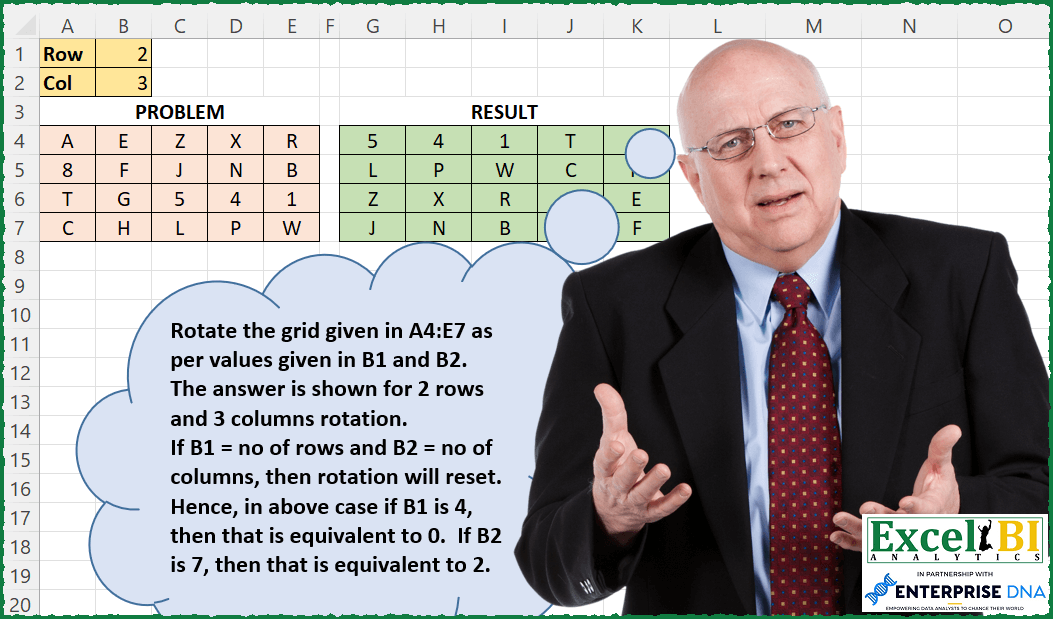
Now rotation has to be done for both columns and rows. Rotate the grid given in A4:E7 as per values given in B1 and B2. The answer is shown for 2 rows and 3 columns rotation. If B1 = no of rows and B2 = no of columns, then rotation will reset. Hence, in above case if B1 is 4, then that is equivalent to 0. If B2 is 7, then that is equivalent to 2.
📌 Challenge Details and Links
ExcelBI Excel Challenge Number: 240
Challenge Difficulty: ⭐️⭐️
📥Download Sample File
📥Link to the solutions on LinkedIn
Solving the challenge of Rotate Rows and Columns with Power Query
Power Query solution 1 for Rotate Rows and Columns, proposed by Zoran Milokanović:
let
  Source = Excel.CurrentWorkbook(){[Name = "Input"]}[Content],
  Row = 2,
  Col = 3,
  Rot = (l, s) =>
    List.Transform(
      List.Positions(l),
      each
        let
          c = List.Count(l)
        in
          l{Number.Mod(_ + c - Number.Mod(s, c), c)}
    ),
  S = Table.FromRows(Rot(Table.ToRows(Table.FromColumns(Rot(Table.ToColumns(Source), Col))), Row))
in
  S
Power Query solution 2 for Rotate Rows and Columns, proposed by Alejandro Simón 🇵🇦 🇪🇸:
let
 Source = Table2,
 RowCol = Table1,
 RowPos = List.Transform(List.Positions(Table.ToRows(Source)), each Number.Mod(_ + RowCol[Column1]{0}, List.Count(Table.ToRows(Source)))),
 Col = Table.ToColumns(Table.FromRows(List.Transform(RowPos, each Table.ToRows(Source){_}))),
 Sol = Table.FromColumns(List.Transform(List.Transform(List.Positions(Col), each Number.Mod(_ + RowCol[Column1]{0}, Table.ColumnCount(Source))), (x)=> Col{x}))
in
 Sol

Pero no se compara con los querys presentados por Zoran, Luan y Venkata. Mis respetos!!
Power Query solution 3 for Rotate Rows and Columns, proposed by Alejandro Simón 🇵🇦 🇪🇸:
let
  Source = Excel.CurrentWorkbook(){[Name = "Table2"]}[Content],
  Rows = Table.RemoveColumns(
    Table.Sort(
      Table.TransformColumns(
        Table.AddIndexColumn(Source, "Index", 0, 1, Int64.Type),
        {"Index", each Number.Mod(_ + Table1[Column1]{0}, Table.RowCount(Source))}
      ),
      {"Index"}
    ),
    {"Index"}
  ),
  Cols = Table.FromRows(
    List.RemoveLastN(
      Table.ToColumns(
        Table.Sort(
          Table.TransformColumns(
            Table.FromColumns(Table.ToRows(Rows) & {{0 .. Table.ColumnCount(Source) - 1}}),
            {
              "Column" & Text.From(Table.ColumnCount(Source)),
              each Number.Mod(_ + Table1[Column1]{1}, Table.ColumnCount(Source))
            }
          ),
          {"Column" & Text.From(Table.ColumnCount(Source))}
        )
      ),
      1
    )
  )
in
  Cols
Power Query solution 4 for Rotate Rows and Columns, proposed by Luan Rodrigues:
let
  Linha = 2,
  Col = 3,
  res_lin = Table.FromRows(
    List.Distinct(List.RemoveFirstN(List.Repeat(Table.ToRows(Query_Tabela1), Linha), Linha))
  ),
  res_col = Table.FromColumns(
    List.Distinct(List.RemoveFirstN(List.Repeat(Table.ToColumns(res_lin), Col), Linha))
  )
in
  res_col
Power Query solution 5 for Rotate Rows and Columns, proposed by Venkata Rajesh:
let
  Source = Data,
  Index = Table.AddIndexColumn(Source, "Index", 0, 1, Int64.Type),
  Output = Table.FromRows(
    Table.AddColumn(
      Index,
      "Custom",
      each [
        row    = 2,
        col    = 3,
        pos    = if [Index] < row then [Index] + row else Number.Mod([Index], row),
        list   = Record.ToList(Source{pos}),
        result = List.Skip(list, col - 1) & List.FirstN(list, col - 1)
      ][result]
    )[Custom]
  )
in
  Output
Solving the challenge of Rotate Rows and Columns with Excel
Excel solution 1 for Rotate Rows and Columns, proposed by Bo Rydobon 🇹🇭:
=LET(z,A4:E7,x,ROWS(z),y,COLUMNS(z),MAKEARRAY(x,y,LAMBDA(r,c,INDEX(z,MOD(r-B1-1,x)+1,MOD(c-B2-1,y)+1))))Excel solution 2 for Rotate Rows and Columns, proposed by Rick Rothstein:
=LET(r,A4:E7,h,HSTACK(r,r),d,ROWS(r),a,COLUMNS(r),TAKE(DROP(VSTACK(h,h),1+MOD(d-B1-1,d),1+MOD(a-B2-1,a)),d,a))Excel solution 3 for Rotate Rows and Columns, proposed by John V.:
=LET(b,A4:E7,r,ROWS(b),c,COLUMNS(b),INDEX(b,1+MOD(SEQUENCE(r)-B1-1,r),1+MOD(SEQUENCE(,c)-B2-1,c)))Excel solution 4 for Rotate Rows and Columns, proposed by محمد حلمي:
=INDEX(A4:E7,MOD(SEQUENCE(4,,B1),4)+1,MOD(SEQUENCE(,5,B2)-1,5)+1)Excel solution 5 for Rotate Rows and Columns, proposed by محمد حلمي:
=LET(e,A4:E7,r,ROWS(e),c,COLUMNS(e),IF(B1*B2,INDEX(e,
MOD(SEQUENCE(r,,B1),r)+1,MOD(SEQUENCE(,c,B2)-1,c)+1),e))
Excel solution 6 for Rotate Rows and Columns, proposed by Kris Jaganah:
=LET(a,B1,b,B2,c,A4:E7,d,ROWS(c),e,MOD(a,d),f,SEQUENCE(d),g,COLUMNS(c),h,SEQUENCE(,g),i,MOD(b,g),SORTBY(SORTBY(c,IF(f<=e,f+e,f-e)),IF(hExcel solution 7 for Rotate Rows and Columns, proposed by Julian Poeltl:
=LET(
    A;
    A4:E7;
    R;
    ROWS(
        A
    );
    C;
    COLUMNS(
        A
    );
    INDEX(
        A;
        MOD(
            MAKEARRAY(
                R;
                C;
                LAMBDA(
                    A;
                    B;
                    A
                )
            )+B1-1;
            R
        )+1;
        MOD(
            MAKEARRAY(
                R;
                C;
                LAMBDA(
                    A;
                    B;
                    B
                )
            )-B2-1;
            C
        )+1
    )
)
Excel solution 8 for Rotate Rows and Columns, proposed by Timothée BLIOT:
=LET(
    A,
    A4:E7,
    r,
    ROWS(
        A
    ),
    c,
    COLUMNS(
        A
    ),
    MAKEARRAY(
        r,
        c,
        LAMBDA(
            x,
            y,
            INDEX(
                A,
                MOD(
                    x-B1-1,
                    r
                )+1,
                MOD(
                    y-B2-1,
                    c
                )+1
            )
        )
    )
)
Excel solution 9 for Rotate Rows and Columns, proposed by Hussein SATOUR:
=LET(
    v,
     A4:E7,
     a,
     MIN(
         ROW(
             v
         )
     ),
     b,
     MIN(
         COLUMN(
             v
         )
     ),
     c,
     ROWS(
             v
         ),
     d,
     COLUMNS(
             v
         ),
     MAP(
         v,
          LAMBDA(
              x,
               LET(
                   e,
                    ROW(
                        x
                    ) - a + MOD(
                        B1,
                         c
                    ) + 1,
                    f,
                    COLUMN(
                        x
                    ) - b + MOD(
                        B2,
                         d
                    ),
                    g,
                    IF(
                        f=0,
                         d,
                         f
                    ),

                   INDEX(
                       v,
                        IF(
                            e>c,
                             e-c,
                             e
                        ),
                        IF(
                            g>d,
                             g-d,
                             g
                        )
                   )
               )
          )
     )
)
Excel solution 10 for Rotate Rows and Columns, proposed by LEONARD OCHEA 🇷🇴:
=LET(
    d,
    A4:E7,
    r,
    ROWS(
        d
    ),
    c,
    COLUMNS(
        d
    ),
    sf,
    SEQUENCE(
        r
    ),
    sc,
    SEQUENCE(
        ,
        c
    ),
    f,
    INDEX(
        d,
        MOD(
            sf-B1-1,
            r
        )+1,
        sc
    ),
    INDEX(
        f,
        sf,
        MOD(
            sc-B2-1,
            c
        )+1
    )
)
Excel solution 11 for Rotate Rows and Columns, proposed by Charles Roldan:
=LET(a, A4:E7, r, B1, c, B2,
n, ROWS(a), m, COLUMNS(a),
f, LAMBDA(x, TRANSPOSE(VSTACK(x, x))),

TAKE(DROP(f(f(a)), -MOD(r, n), -MOD(c, m)), -n, -m))
Excel solution 12 for Rotate Rows and Columns, proposed by JvdV -:
=CHOOSECOLS(
    CHOOSEROWS(
        A4:E7,
        MOD(
            ROW(
                1:4
            )-1-B1,
            4
        )+1
    ),
    MOD(
        ROW(
            1:5
        )-1-B2,
        5
    )+1
)

Was hoping for the following to work:

=T(
    OFFSET(
        A4,
        MOD(
            ROW(
                1:4
            )-1-B1,
            4
        ),
        MOD(
            SEQUENCE(
                ,
                5
            )-1-B2,
            5
        )
    )
)

But that would require the input to all be text,
     or you'd need to rework the dynamic array which is sub-optimal:

=LET(
    x,
    OFFSET(
        A4,
        MOD(
            ROW(
                1:4
            )-1-B1,
            4
        ),
        MOD(
            SEQUENCE(
                ,
                5
            )-1-B2,
            5
        )
    ),
    LEFT(
        T(
            x
        )&N(
            x
        )
    )
)
Excel solution 13 for Rotate Rows and Columns, proposed by Julien Lacaze:
=LET(
    row,
    B1,
    col,
    B2,
    data,
    A4:E7,

    rotate,
    LAMBDA(
        a,
        r,
        c,

        LET(
            rows,
             ROWS(
                 a
             ),
             cols,
             COLUMNS(
                 a
             ),

            nc,
             MOD(
                 IF(
                     c >= 0,
                      c,
                      cols + c
                 ),
                  cols
             ),
             nr,
             MOD(
                 IF(
                     r >= 0,
                      r,
                      rows + r
                 ),
                  rows
             ),

            left,
             TAKE(
                 a,
                  ,
                  -nc
             ),
             right,
             TAKE(
                 a,
                  ,
                  cols-nc
             ),
             hwrap,
             IF(
                 nc = 0,
                  a,
                  HSTACK(
                      left,
                       right
                  )
             ),

            up,
             TAKE(
                 hwrap,
                  -nr
             ),
             down,
             TAKE(
                 hwrap,
                  rows-nr
             ),
             IF(
                 nr = 0,
                  hwrap,
                  VSTACK(
                      up,
                       down
                  )
             )
        )
    ),

    rotate(
        data,
        row,
        col
    )
)

Rotate Lambda :
 - Rows & Cols for array dimensions
 - nc,
     nr,
     for normalized cols and rows (works also for negative numbers)
Excel solution 14 for Rotate Rows and Columns, proposed by Diarmuid Early:
=CHOOSECOLS(
    CHOOSEROWS(
        A4:E7,

         MOD(
             SEQUENCE(
                 4,
                 ,
                 0
             )-B1,
             4
         )+1
    ),

     MOD(
         SEQUENCE(
             5,
             ,
             0
         )-B2,
         5
     )+1
)

=INDEX(
    A4:E7,

     MOD(
             SEQUENCE(
                 4,
                 ,
                 0
             )-B1,
             4
         )+1,

     MOD(
         SEQUENCE(
             ,
             5,
             0
         )-B2,
         5
     )+1
)

=SORTBY(
    SORTBY(
        A4:E7,

         MOD(
             SEQUENCE(
                 4,
                 ,
                 0
             )+B1,
             4
         )
    ),

     MOD(
         SEQUENCE(
             ,
             5,
             0
         )+B2,
         5
     )
)

The idea is that you take a sequence of 4 / 5 numbers (for rows / columns) starting from 0,
     subtract the offset,
     MOD 4 / 5 to get back to 0 to 3 / 4,
     then add 1 - that gives the indices of the rows / columns. Then you can use that with CHOOSEROWS/COLS or INDEX (note you have to have the sequences oriented the right way for INDEX,
     but for CHOOSE they can be in either rows or columns).

For the SORTBY option,
     you need to flip the sign (e.g. +B1 instead of -B1)
Excel solution 15 for Rotate Rows and Columns, proposed by Henriette Hamer:
=LET(
    _range;
    A4:E7;

    _rowrotate;
    B1;

    _columnrotate;
    B2;

    _rows;
    ROWS(
        _range
    );

     _columns;
    COLUMNS(
        _range
    );

    _colsequence;
    LET(
        _columnresult;
        SEQUENCE(
            _columns;
            ;
            _columnrotate;
            1
        );

         IF(
             _columnresult>_columns;
             _columnresult-_columns;
             _columnresult
         )
    );

    _rowsequence;
    LET(
        _rowresult;
        SEQUENCE(
            _rows;
            ;
            _rowrotate+1;
            1
        );

         IF(
             _rowresult>_rows;
             _rowresult-_rows;
             _rowresult
         )
    );

    CHOOSEROWS(
        CHOOSECOLS(
            _range;
            _colsequence
        );
        _rowsequence
    )
)
Excel solution 16 for Rotate Rows and Columns, proposed by Harry Seiders:
=LET(
    R,
    MOD(
        B1,
        4
    ),
    C,
    MOD(
        B2,
        5
    ),
    orig,
    A4:E7,
    R_Num,
    MOD(
        SEQUENCE(
            4
        )-R-1,
        4
    )+1,
    C_Num,
    MOD(
        SEQUENCE(
            ,
            5
        )-C-1,
        5
    )+1,
    INDEX(
        orig,
        R_Num,
        C_Num
    )
)
Excel solution 17 for Rotate Rows and Columns, proposed by Murat Hasanoglu:
=INDEX(
    $A$4:$E$7;

    MOD(
        ROWS(
            $G$4:G4
        )-1+$B$1;
        ROWS(
            $A$4:$E$7
        )
    )+1;

    MOD(
        COLUMNS(
            $G$4:G4
        )-1+$B$&2;
        COLUMNS(
            $A$4:$E$7
        )
    )+1
)
&&