
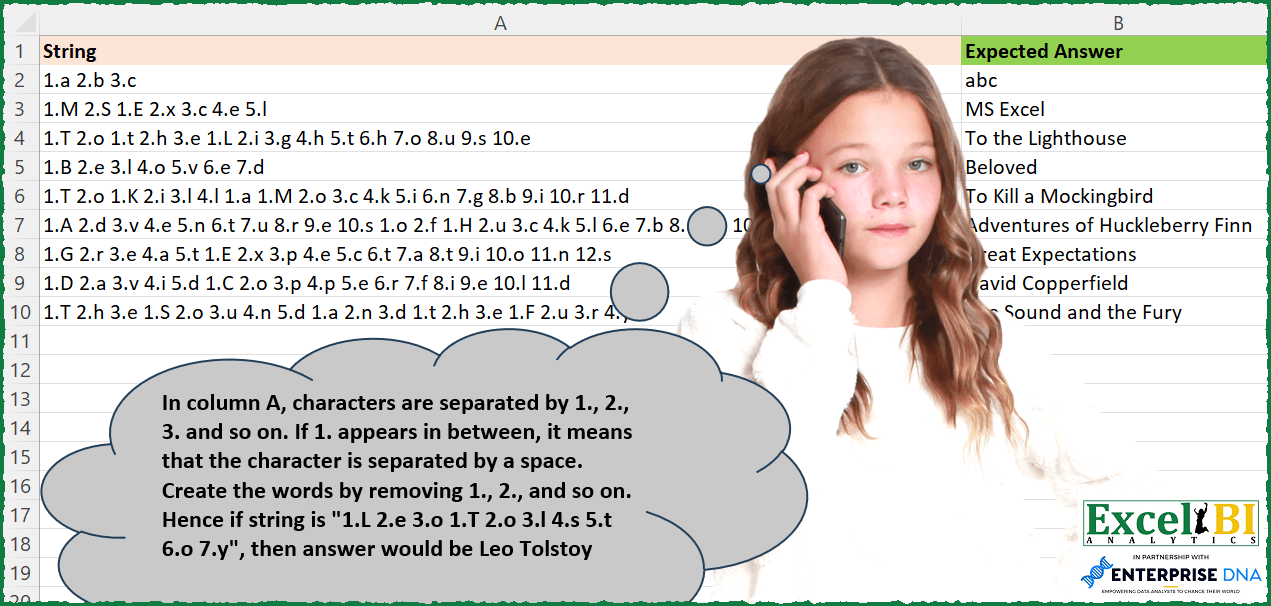
In column A, characters are separated by 1., 2., 3. and so on. If 1. appears in between, it means that the character is separated by a space. Create the words by removing 1., 2., and so on. Hence if string is “1.L 2.e 3.o 1.T 2.o 3.l 4.s 5.t 6.o 7.y”, then answer would be Leo Tolstoy
📌 Challenge Details and Links
ExcelBI Excel Challenge Number: 227
Challenge Difficulty: ⭐️
📥Download Sample File
📥Link to the solutions on LinkedIn
Solving the challenge of Decode Numbered Character Words with Power Query
Power Query solution 1 for Decode Numbered Character Words, proposed by Omid Motamedisedeh:
let
  Source = Excel.CurrentWorkbook(){[Name = "Table1"]}[Content],
  Custom1 = Table.TransformColumns(
    Source,
    {
      "String",
      (ox) =>
        Text.Trim(
          Text.Combine(
            List.Transform(
              Text.ToList(ox),
              each if _ = "1" then " " else if Text.Upper(_) = Text.Lower(_) then "" else _
            )
          )
        )
    }
  )
in
  Custom1
Power Query solution 2 for Decode Numbered Character Words, proposed by Bo Rydobon 🇹🇭:
let
  Source = Excel.CurrentWorkbook(){[Name = "Table1"]}[Content],
  Ans = Table.TransformColumns(
    Source,
    {},
    each Text.Combine(
      Splitter.SplitTextByAnyDelimiter(
        List.Transform({2 .. 99}, each " " & Text.From(_) & ".") & {"1."}
      )(_)
    )
  )
in
  Ans
Power Query solution 3 for Decode Numbered Character Words, proposed by Zoran Milokanović:
let
  Source = Excel.CurrentWorkbook(){[Name = "Table1"]}[Content],
  S = Table.TransformRows(
    Source,
    each Text.Combine(
      List.Transform(
        List.RemoveNulls(Text.Split([String], " 1.")),
        each Text.Remove(_, {"0" .. "9", " ", "."})
      ),
      " "
    )
  )
in
  S
Power Query solution 4 for Decode Numbered Character Words, proposed by Alejandro Simón 🇵🇦 🇪🇸:
let
  Source = Excel.CurrentWorkbook(){[Name = "Table1"]}[Content],
  Sol = Table.AddColumn(
    Source,
    "Custom",
    each
      let
        a = List.Combine(
          List.Transform(
            Text.Split(Text.TrimStart([String], {"1", "."}), "."),
            each Text.Split(_, " ")
          )
        ),
        b = Text.Combine(
          List.RemoveMatchingItems(a, {2 .. 20}, each try Number.From(_) otherwise ""),
          ""
        ),
        c = Text.Replace(b, "1", " ")
      in
        c
  )
in
  Sol
Power Query solution 5 for Decode Numbered Character Words, proposed by Luan Rodrigues:
let
  Fonte = Tabela1,
  res = Table.AddColumn(
    Fonte,
    "Personalizar",
    each Text.Combine(
      List.Transform(Text.Split([String], " 1."), (x) => Text.Select(x, {"a" .. "z", "A" .. "Z"})),
      " "
    )
  )
in
  res
Solving the challenge of Decode Numbered Character Words with Excel
Excel solution 1 for Decode Numbered Character Words, proposed by Bo Rydobon 🇹🇭:
=MAP(A2:A10,LAMBDA(a,TRIM(CONCAT(TEXTSPLIT(SUBSTITUTE(" "&a," 1."," ")," "&SEQUENCE(99)&".",,1)))))Excel solution 2 for Decode Numbered Character Words, proposed by Bo Rydobon 🇹🇭:
=MAP(A2:A10,LAMBDA(a,CONCAT(TEXTSPLIT(a," "&SEQUENCE(99,,2)&".","1.",,,""))))Excel solution 3 for Decode Numbered Character Words, proposed by Rick Rothstein:
=MAP(A2:A10,LAMBDA(x,TRIM(SUBSTITUTE(CONCAT(TEXTSPLIT(SUBSTITUTE(x," ",""),HSTACK(".",SEQUENCE(,99,2)))),1," "))))Excel solution 4 for Decode Numbered Character Words, proposed by John V.:
=REDUCE(A2:A10,16-ROW(1:15),LAMBDA(a,v,SUBSTITUTE(a,REPT(" ",v>1)&v&".",)))Excel solution 5 for Decode Numbered Character Words, proposed by محمد حلمي:
=MAP(A2:A10,LAMBDA(a,SUBSTITUTE(CONCAT(TRIM(TEXTSPLIT(a,ROW(2:20),".",1))),1,"")))Excel solution 6 for Decode Numbered Character Words, proposed by Kris Jaganah:
=MAP(A2:A10,LAMBDA(x,LET(a,TEXTSPLIT(x,"."," "),b,IF(VSTACK(--DROP(TAKE(a,,1),1),0)=1," ",1/0),CONCAT(TOCOL(HSTACK(TAKE(a,,-1),b),3)))))Excel solution 7 for Decode Numbered Character Words, proposed by Julian Poeltl:
=MAP(A2:A10,LAMBDA(S,LET(SP,TEXTSPLIT(S," "),TRIM(CONCAT(IF(--TEXTBEFORE(SP,".")=1," ","")&TEXTAFTER(SP,"."))))))Excel solution 8 for Decode Numbered Character Words, proposed by Timothée BLIOT:
=MAP(A2:A10,LAMBDA(z,LET(A,TEXTSPLIT(z,{"","."}),B,IF(A="1","#",A),D,REDUCE(B,SEQUENCE(10,,0),LAMBDA(a,v,SUBSTITUTE(a,v,""))),TRIM(SUBSTITUTE(CONCAT(D),"#","")))))Excel solution 9 for Decode Numbered Character Words, proposed by Hussein SATOUR:
=TRIM(SUBSTITUTE(REDUCE(A2:A10, VSTACK(".", " ", SEQUENCE(19,,19,-1)+1), LAMBDA(x,y, SUBSTITUTE(x,y,""))), 1, " "))Excel solution 10 for Decode Numbered Character Words, proposed by Oscar Mendez Roca Farell:
=MAP(A2:A10, LAMBDA(a, CONCAT(LEFT(TEXTSPLIT(SUBSTITUTE(SUSBTITUTE(a, " 1.", " 1. 1."), ".", ""), , SEQUENCE(12))))))Excel solution 11 for Decode Numbered Character Words, proposed by Sunny Baggu:
=MAP(
 A2:A10,
 LAMBDA(a,
 SUBSTITUTE(
 CONCAT(DROP(CHOOSECOLS(TEXTSPLIT(SUBSTITUTE(" " & a, " 1.", "  1."), ".", " ", , , "#"), 2), 2)),
 "#",
 " "
 )
 )
)
Excel solution 12 for Decode Numbered Character Words, proposed by Sunny Baggu:
=MAP(
 A2:A10,
 LAMBDA(a,
 TRIM(
 SUBSTITUTE(
 SUBSTITUTE(
 CONCAT(
 TEXTSPLIT(SUBSTITUTE(" " & a, " 1.", "# 1. "), , SEQUENCE(99) & ".")
 ),
 " ",
 ""
 ),
 "#",
 " "
 )
 )
 )
)
Excel solution 13 for Decode Numbered Character Words, proposed by Charles Roldan:
=LET(B, LAMBDA(f, LAMBDA(x, MAP(x, f))),
_f, B(LAMBDA(x, CONCAT(LEFT(TEXTSPLIT(x, "."))))),
_g, B(LAMBDA(x, TEXTJOIN(" ", , _f(DROP(TEXTSPLIT(" " & x, , " 1."), 1))))),
_g(A2:A10))
Excel solution 14 for Decode Numbered Character Words, proposed by JvdV –:
=MAP(A2:A10,LAMBDA(s,CONCAT(TEXTSPLIT(s,TEXT(ROW(1:99),"[>1] #.;#.")))))

Note: This would work for any locale which has decimal point. If not the case for you, escape the dots with a forward slash:

=MAP(A2:A10,LAMBDA(s,CONCAT(TEXTSPLIT(s,TEXT(ROW(1:99),"[>1] #.;#.")))))

A different solution, slightly less verbose:

=MAP(A2:A10,LAMBDA(s,CONCAT(TEXTSPLIT(s," "&ROW(2:99)&".","1.",,,""))))
Excel solution 15 for Decode Numbered Character Words, proposed by Tolga Demirci, PMP, PMI-ACP, MOS-Expert:
=MAP(A2:A10;LAMBDA(x;LET(b;TEXTSPLIT(x;".";" ");LET(a;MID(TEXTJOIN(;FALSE;IF("1"=b;" ";b));SEQUENCE(LEN(TEXTJOIN(;FALSE;IF("1"=b;" ";b))));1);TEXTJOIN(;FALSE;DROP(FILTER(a;NOT(ISNUMBER(VALUE(a))));1))))))Excel solution 16 for Decode Numbered Character Words, proposed by Julien Lacaze:
=TRIM(MAP(A2:A10,LAMBDA(a,CONCAT(IF(TEXTBEFORE(TEXTSPLIT(a," "),".")="1"," "&RIGHT(TEXTSPLIT(a," ")),RIGHT(TEXTSPLIT(a," ")))))))Excel solution 17 for Decode Numbered Character Words, proposed by Pieter de Bruijn:
=MAP(A2:A10,LAMBDA(x,LET(y,TEXTSPLIT(x," "),n,--TEXTBEFORE(y,"."),a,RIGHT(y),TRIM(CONCAT(IF(n=1," ","")&a)))))

or

=MAP(A2:A10,LAMBDA(x,LET(y,TEXTSPLIT(x," "),TRIM(CONCAT(IF(--TEXTBEFORE(y,".")=1," ","")&RIGHT(y))))))
Excel solution 18 for Decode Numbered Character Words, proposed by Daniel Garzia:
=MAP(A2:A10,LAMBDA(l,LET(t,TEXTSPLIT(l,," "),r,RIGHT(t),TRIM(CONCAT(IF(LEFT(t,2)="1."," "&r,r))))))Excel solution 19 for Decode Numbered Character Words, proposed by Rayan S.:
=MAP(A2:A10,LAMBDA(arr,TEXTJOIN(" ",,MAP(TEXTSPLIT(arr,," 1."),LAMBDA(arr,LET(x,CODE(MID(arr,SEQUENCE(LEN(arr)),1)),TEXTJOIN("",,UNICHAR(FILTER(x,x>64)))))))))Excel solution 20 for Decode Numbered Character Words, proposed by Mungunbayar Bat-Ochir:
=BYROW(A2:A10;LAMBDA(str;CONCAT(INDEX(TEXTSPLIT(str;".";" ";FALSE);;2))))Excel solution 21 for Decode Numbered Character Words, proposed by Surendra Reddy:
=MAP(A2:A10,LAMBDA(x,SUBSTITUTE(CONCAT(TRIM(TEXTSPLIT(x,SEQUENCE(11,,2),".",1))),1,"")))Excel solution 22 for Decode Numbered Character Words, proposed by Crispo Mwangi:
=SUBSTITUTE(
SUBSTITUTE(SUBSTITUTE(CONCAT(IF(ISNUMBER(MID(SUBSTITUTE(A9," 1.","*"),ROW(INDIRECT("1:"&999)),1)+0),"",MID(SUBSTITUTE(A9," 1.","*"),ROW(INDIRECT("1:"&999)),1)))," .",""),".",""),"*", " ")
Excel solution 23 for Decode Numbered Character Words, proposed by Mohd Sahil:
=Substitute(rng,char(sequence(,10,47)), ""))&&&