
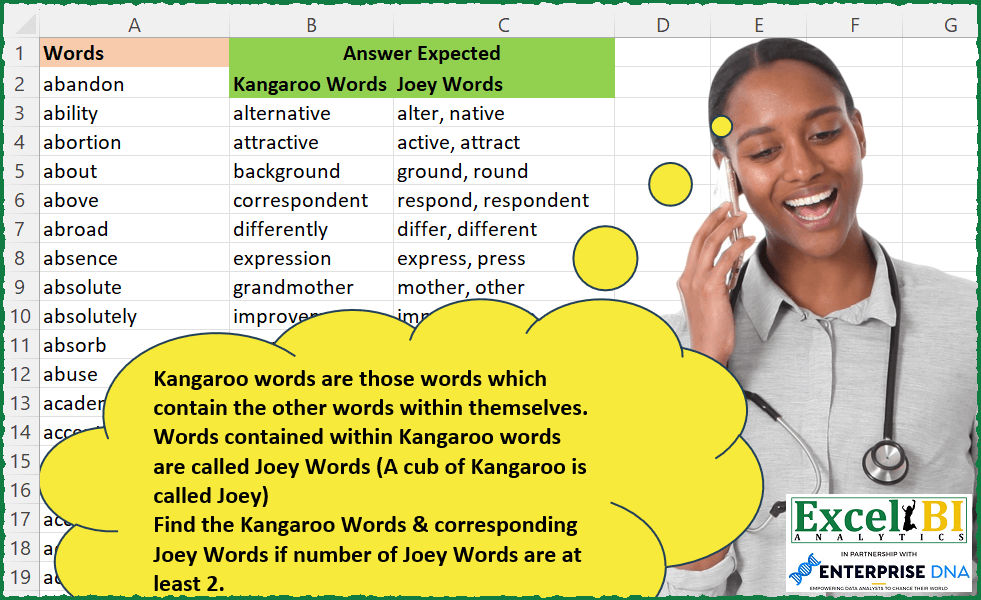
Kangaroo words are those words which contain the other words within themselves. Words contained within Kangaroo words are called Joey Words (A cub of Kangaroo is called Joey) Find the Kangaroo Words from column A & corresponding Joey Words if number of Joey Words are at least 2.
📌 Challenge Details and Links
ExcelBI Excel Challenge Number: 225
Challenge Difficulty: ⭐️⭐️⭐️
📥Download Sample File
📥Link to the solutions on LinkedIn
Solving the challenge of Find Kangaroo and Joey Words with Power Query
Power Query solution 1 for Find Kangaroo and Joey Words, proposed by Omid Motamedisedeh:
let
  Source = Excel.CurrentWorkbook(){[Name = "Table1"]}[Content],
  #"Added Custom" = Table.SelectRows(
    Table.AddColumn(
      Source,
      "X",
      each Text.Combine(
        List.Select(Source[Words], (x) => Text.PositionOf(_[Words], x) >= 0 and x <> _[Words]),
        ", "
      )
    ),
    each Text.Contains(_[X], ",")
  )
in
  #"Added Custom"
Power Query solution 2 for Find Kangaroo and Joey Words, proposed by Bo Rydobon 🇹🇭:
let
  Source = Excel.CurrentWorkbook(){[Name = "Table1"]}[Content],
  Ans = Table.SelectRows(
    Table.AddColumn(
      Source,
      "Joey",
      each
        let
          l = List.Buffer(Source[Words]),
          x = List.Select(l, (L) => Text.Contains([Words], L) and [Words] <> L)
        in
          if List.Count(x) > 1 then Text.Combine(x, ", ") else null
    ),
    each [Joey] <> null
  )
in
  Ans
Power Query solution 3 for Find Kangaroo and Joey Words, proposed by Zoran Milokanović:
let
  Source = Excel.CurrentWorkbook(){[Name = "Input"]}[Content],
  Solution = Table.SelectRows(
    Table.RenameColumns(
      Table.AddColumn(
        Source,
        "Joey Words",
        each Text.Combine(
          List.Select(Source[Words], (w) => w <> [Words] and Text.PositionOf([Words], w) >= 0),
          ", "
        )
      ),
      {{"Words", "Kangaroo Words"}}
    ),
    each Text.Contains([Joey Words], ",")
  )
in
  Solution
Power Query solution 4 for Find Kangaroo and Joey Words, proposed by Alejandro Simón 🇵🇦 🇪🇸:
let
  Source = Excel.CurrentWorkbook(){[Name = "Table1"]}[Content],
  Sol = Table.SelectRows(
    Table.AddColumn(
      Source,
      "Joey Words",
      (x) =>
        let
          a = Source[Words],
          b = List.Select(a, each Text.Contains(x[Words], _) and _ <> x[Words]),
          c = List.Select(b, each List.Count(b) > 1)
        in
          Text.Combine(c, ", ")
    ),
    each [Joey Words] <> ""
  )
in
  Sol
Power Query solution 5 for Find Kangaroo and Joey Words, proposed by Luan Rodrigues:
let
  Fonte = Tabela1,
  res = Table.SelectRows(
    Table.AddColumn(
      Fonte,
      "Personalizar",
      each Text.Combine(
        List.Select(Fonte[Words], (x) => Text.Contains([Words], x) and x <> [Words]),
        ", "
      )
    ),
    each Text.Contains([Personalizar], ",")
  )
in
  res
Solving the challenge of Find Kangaroo and Joey Words with Excel
Excel solution 1 for Find Kangaroo and Joey Words, proposed by Bo Rydobon 🇹🇭:
=LET(z,A2:A2283,m,MAP(z,LAMBDA(y,LET(x,FILTER(z,ISNUMBER(SEARCH(z,y))*(z<>y)),
IFS(ROWS(x)>1,TEXTJOIN(", ",,x))))),FILTER(HSTACK(z,m),ISTEXT(m)))
Excel solution 2 for Find Kangaroo and Joey Words, proposed by Rick Rothstein:
=LET(r,REDUCE("",A2:A2283,LAMBDA(a,x,VSTACK(a,LET(w,FILTER(A2:A2283,COUNTIF(x,"*"&A2:A2283&"*")),s,SORTBY(w,LEN(w),-1),IF(COUNTA(s)>2,HSTACK(TAKE(s,1),TEXTJOIN(", ",,DROP(s,1))),""))))),FILTER(r,LEN(TAKE(r,,1))))Excel solution 3 for Find Kangaroo and Joey Words, proposed by John V.:
=LET(w,A2:A2283,j,MAP(w,LAMBDA(x,TEXTJOIN(", ",,REPT(w,(1-ISERR(FIND(w,x)))*(w<>x))))),FILTER(HSTACK(w,j),1-ISERR(FIND(",",j))))Excel solution 4 for Find Kangaroo and Joey Words, proposed by محمد حلمي:
=LET(r,A2:A2283,e,MAP(r,LAMBDA(a,LET(v,UNIQUE(TOCOL(IF(FIND(r,TOROW(SUBSTITUTE(a,LEFT(a,SEQUENCE(LEN(a))-1),))),r),2)),ARRAYTOTEXT(SORT(DROP(SORTBY(v,-LEN(v)),1)))))),FILTER(HSTACK(r,e),ISNUMBER(FIND(",",e))))Excel solution 5 for Find Kangaroo and Joey Words, proposed by Kris Jaganah:
=LET(a,A2:A2283,b,MAP(a,LAMBDA(x,ARRAYTOTEXT(FILTER(a,(--ISERR(SEARCH(a,x))=0)*(a<>x),"")))),FILTER(HSTACK(a,b),(b<>"")*(IFERROR(FIND(", ",b),0)>0)))Excel solution 6 for Find Kangaroo and Joey Words, proposed by Kris Jaganah:
=LET(n,A2:A2283,p,MAP(n,LAMBDA(x,LET(a,n,b,LEFT(x,SEQUENCE(LEN(x))),c,RIGHT(x,SEQUENCE(LEN(x),,LEN(x),-1)),d,UNIQUE(VSTACK(b,c)),e,XLOOKUP(d,a,a,""),f,ARRAYTOTEXT(FILTER(e,(e<>"")*(e<>x),"")),g,x&"-"&f,g))),REDUCE({"Kangaroo Words","Joey Words"},FILTER(p,IFERROR(FIND(", ",p),0)>0),LAMBDA(v,w,VSTACK(v,TEXTSPLIT(w,"-")))))Excel solution 7 for Find Kangaroo and Joey Words, proposed by Julian Poeltl:
=LET(W,A2:A2283,R,MAP(W,LAMBDA(A,TEXTJOIN(", ",,FILTER(FILTER(W,W<>A),ISNUMBER(SEARCH(FILTER(W,W<>A),A)))))),FILTER(HSTACK(W,R),ISNUMBER(SEARCH(",",R))))Excel solution 8 for Find Kangaroo and Joey Words, proposed by Timothée BLIOT:
=LET(A,A2:A2283,D,FILTER(A,MAP(A,LAMBDA(x,SUM(--ISNUMBER(FIND(x, A)))>1))),E,IFERROR(DROP(REDUCE("",D,LAMBDA(ac,x,VSTACK(ac,TOROW(FILTER(A,ISNUMBER(FIND(x,A))))))),1),""),F,MAP(E,LAMBDA(x,IF(x="","",--(SUMPRODUCT(1*(x=E))>1)))),G,UNIQUE(TOCOL(IF(F=1,E,1/0),3)),H,SORT( FILTER(G,MAP(G,LAMBDA(x,SUM(MAP(D,LAMBDA(y,IF(x=y,0,--ISNUMBER(FIND(y,x))))))))>1)),I,MAP(H,LAMBDA(x,TEXTJOIN(", ",,MAP(D,LAMBDA(y,IF(ISNUMBER(FIND(y,x)),y,"")))))),HSTACK(H,I))Excel solution 9 for Find Kangaroo and Joey Words, proposed by Charles Roldan:
=LET(R, LAMBDA(f, LAMBDA(x, BYROW(x, f))),
_Join, R(LAMBDA(x, TEXTJOIN(", ", TRUE, x))), _Add, R(LAMBDA(x, SUM(x))),
Headers, B2:C2, x, A2:A2283, xT, TRANSPOSE(x),
Crit, ISNUMBER(FIND(xT, x)) * NOT(xT = x),
VSTACK(Headers, FILTER(HSTACK(x, _Join(REPT(xT, Crit))), 1 < _Add(Crit))))
Excel solution 10 for Find Kangaroo and Joey Words, proposed by JvdV -:
=LET(x,A2:A2283,y,MAP(x,LAMBDA(z,TEXTJOIN(", ",,REPT(x,COUNTIF(z,"*"&x&"*")*(x<>z))))),FILTER(HSTACK(x,y),ISNUMBER(FIND(",",y))))Excel solution 11 for Find Kangaroo and Joey Words, proposed by Julien Lacaze:
=LET(words,A2:A2283,
list, MAP(words,LAMBDA(w,LET(f,IFERROR(FILTER(words,(words<>w)*(ISNUMBER(FIND(words,w)))),""), IF(ROWS(f)>1,TEXTJOIN(",",,f),"")))), FILTER(HSTACK(words,list),list<>""))
If you just invert the arguments in the FIND, you have the opposite answer : list of Joey words, and the Kangaroo linked (i initially misunderstood the question and build this answer 😋 )
=LET(words,A2:A2283,
list, MAP(words,LAMBDA(w,LET(f,IFERROR(FILTER(words,(words<>w)*(ISNUMBER(FIND(w,words)))),""), IF(ROWS(f)>1,TEXTJOIN(",",,f),"")))), FILTER(HSTACK(words,list),list<>""))
Excel solution 12 for Find Kangaroo and Joey Words, proposed by Giorgi Goderdzishvili:
=LET(
words,C4:C2285,
seq,SEQUENCE(COUNTA(words)),
maping, MAP(words, seq, LAMBDA(w,s,
TEXTJOIN(", ",TRUE, IF( ( ( LEN(w)-LEN(SUBSTITUTE(w,words,""))<>0)*(s<>seq)),seq,"")))),
extracting, MAP(maping, LAMBDA(m,TEXTJOIN(", ",TRUE, INDEX(words, --TEXTSPLIT(m,", ",),1)))),
twomore, ISNUMBER(SEARCH(", ",extracting)),
FILTER(HSTACK(words,extracting),twomore*ISTEXT(extracting)))
Solving the challenge of Find Kangaroo and Joey Words with Excel VBA
Excel VBA solution 1 for Find Kangaroo and Joey Words, proposed by Nicolas Micot:
I wanted to have a bit of fun with VBA and Type instruction:
Type kangaroo
 mot As String
 Joey As New Collection
End Type
Function f_kangaroo(Mots As Range)
Dim tableau As Variant, resultat As Variant
Dim kangaroos() As kangaroo
Dim cpt As Integer, lig As Integer
tableau = Mots.Value
ReDim kangaroos(1 To UBound(tableau, 1))
For i = 1 To UBound(tableau, 1)
 kangaroos(i).mot = tableau(i, 1)
 For a = 1 To UBound(tableau, 1)
 If Not tableau(a, 1) = kangaroos(i).mot Then
 If InStr(1, kangaroos(i).mot, tableau(a, 1)) > 0 Then
 kangaroos(i).Joey.Add tableau(a, 1)
 End If
 End If
 Next a
 If kangaroos(i).Joey.Count > 1 Then
 cpt = cpt + 1
 End If
Next i
ReDim resultat(1 To cpt, 1 To 2)
lig = 1
For i = 1 To UBound(kangaroos, 1)
 If kangaroos(i).Joey.Count > 1 Then
 resultat(lig, 1) = kangaroos(i).mot
 For a = 1 To kangaroos(i).Joey.Count
 resultat(lig, 2) = resultat(lig, 2) & IIf(resultat(lig, 2) <> "", ", ", "") & kangaroos(i).Joey(a)
 Next a
 lig = lig + 1
 End If
Next i
f_kangaroo = resultat
End Function
&&&