
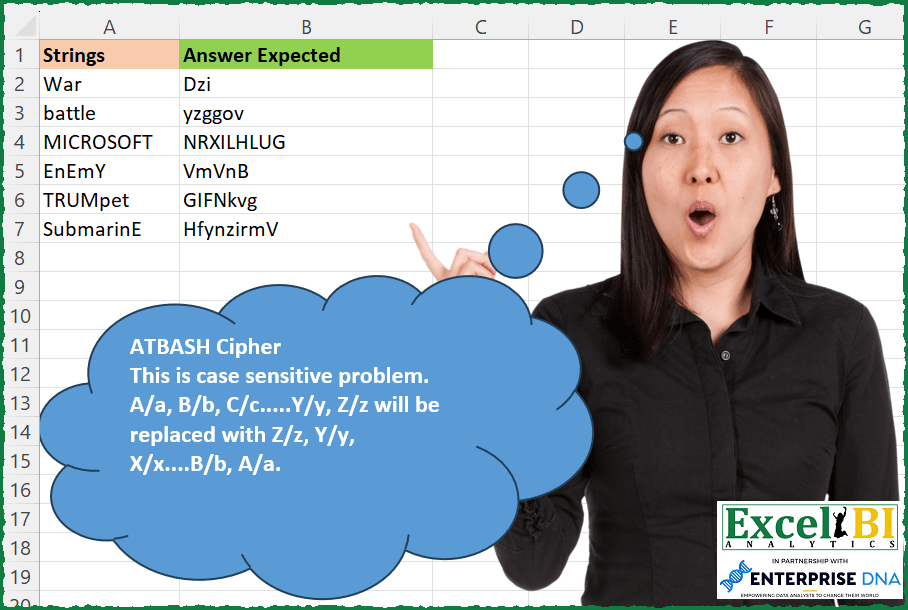
ATBASH Cipher This is case sensitive problem. An English alphabet is replaced by that alphabet which has the same position from rear and vice versa. Hence A which is at 1st position from front will be replaced by Z which is at 1st position from rear. Similarly, Z will be replaced by A. Basically, A/a, B/b, C/c…..Y/y, Z/z will be replaced with Z/z, Y/y, X/x….B/b, A/a.
📌 Challenge Details and Links
ExcelBI Excel Challenge Number: 217
Challenge Difficulty: ⭐️
📥Download Sample File
📥Link to the solutions on LinkedIn
Solving the challenge of Apply ATBASH Cipher Rules with Power Query
Power Query solution 1 for Apply ATBASH Cipher Rules, proposed by Bo Rydobon 🇹🇭:
let
  Source = Excel.CurrentWorkbook(){[Name = "Table1"]}[Content],
  Ans = Table.TransformRows(
    Source,
    each Text.Combine(
      List.Transform(
        Text.ToList([Strings]),
        each
          let
            c = 155 - Character.ToNumber(_)
          in
            Character.FromNumber(c + (if c < 65 then 64 else 0))
      )
    )
  )
in
  Ans
Power Query solution 2 for Apply ATBASH Cipher Rules, proposed by Zoran Milokanović:
let
  Source = Excel.CurrentWorkbook(){[Name = "Input"]}[Content],
  S = Table.TransformRows(
    Source,
    each Text.Combine(
      List.Transform(
        Text.ToList([Strings]),
        each
          let
            a = Character.ToNumber(_)
          in
            Character.FromNumber((if a >= 97 then 219 else 155) - a)
      )
    )
  )
in
  S
Power Query solution 3 for Apply ATBASH Cipher Rules, proposed by Zoran Milokanović:
let
  Source = Excel.CurrentWorkbook(){[Name = "Input"]}[Content],
  S = Table.TransformRows(
    Source,
    each
      let
        a = {"a" .. "z"} & {"A" .. "Z"},
        p = List.Transform(
          Text.ToList([Strings]),
          each List.Reverse(a & a){List.PositionOf(a, _) + 26}
        )
      in
        Text.Combine(p)
  )
in
  S
Power Query solution 4 for Apply ATBASH Cipher Rules, proposed by Alejandro Simón 🇵🇦 🇪🇸:
let
  Source = Excel.CurrentWorkbook(){[Name = "Table1"]}[Content],
  Sol = Table.AddColumn(
    Source,
    "Answer",
    each Text.Combine(
      List.ReplaceMatchingItems(
        Text.ToList([Strings]),
        List.Zip({{"A" .. "Z", "a" .. "z"}, List.Reverse({"a" .. "z", "A" .. "Z"})})
      ),
      ""
    )
  )
in
  Sol
Power Query solution 5 for Apply ATBASH Cipher Rules, proposed by Luan Rodrigues:
let
  Fonte = Tabela1,
  sub = List.Zip({{"a" .. "z", "A" .. "Z"}, List.Reverse({"A" .. "Z", "a" .. "z"})}),
  res = Table.TransformColumns(
    Fonte,
    {{"Strings", each Text.Combine(List.ReplaceMatchingItems(Text.ToList(_), sub))}}
  )
in
  res
Power Query solution 6 for Apply ATBASH Cipher Rules, proposed by Rafael González B.:
let
  Source = Excel.CurrentWorkbook(){[Name = "Table1"]}[Content],
  CT = Table.TransformColumnTypes(Source, {{"Strings", type text}}),
  TST =
    let
      LMayus = List.Zip({{"A" .. "Z"}, List.Reverse({"A" .. "Z"})}),
      LMinus = List.Zip({{"a" .. "z"}, List.Reverse({"a" .. "z"})}),
      LU = List.Union({LMayus, LMinus}),
      T = Table.FromRows(LU, {"Before", "After"}),
      TU = Table.TransformColumns(
        CT,
        {
          "Strings",
          each Table.Sort(
            Table.ExpandTableColumn(
              Table.NestedJoin(
                Table.AddIndexColumn(
                  Table.FromList(Text.ToList(_), Splitter.SplitByNothing(), {"Strings"}),
                  "I",
                  1,
                  1
                ),
                {"Strings"},
                T,
                "Before",
                "ST2",
                1
              ),
              "ST2",
              {"After"},
              {"Result"}
            ),
            "I"
          )[Result]
        }
      )
    in
      TU,
  Answer = Table.TransformColumns(TST, {"Strings", each Text.Combine(_)})
in
  Answer
Solving the challenge of Apply ATBASH Cipher Rules with Excel
Excel solution 1 for Apply ATBASH Cipher Rules, proposed by Bo Rydobon 🇹🇭:
=MAP(A2:A7,LAMBDA(a,LET(c,155-CODE(MID(a,SEQUENCE(LEN(a)),1)),CONCAT(CHAR(c+64*(c<65))))))Excel solution 2 for Apply ATBASH Cipher Rules, proposed by Rick Rothstein:
=MAP(A2:A7,LAMBDA(r,LET(c,MID(r,SEQUENCE(LEN(r)),1),a,32*(CODE(c)>90),k,a+91-CODE(c),CONCAT(CHAR(64+a+k)))))Excel solution 3 for Apply ATBASH Cipher Rules, proposed by Rick Rothstein:
=LET(c,CODE(MID(A2:A7,SEQUENCE(,99),1)),BYROW(IFERROR(CHAR(64*(c>90)+155-c),""),LAMBDA(r,CONCAT(r))))Excel solution 4 for Apply ATBASH Cipher Rules, proposed by John V.:
=MAP(A2:A7,
    LAMBDA(x,
    LET(c,
    CODE(
        MID(
            x,
            SEQUENCE(
                LEN(
                    x
                )
            ),
            1
        )
    ),
    CONCAT(CHAR(155+64*(c>90)-c)))))
Excel solution 5 for Apply ATBASH Cipher Rules, proposed by محمد حلمي:
=MAP(
    A2:A7,
    LAMBDA(
        a,
        LET(
            r,
            MID(
                a,
                SEQUENCE(
                    LEN(
                        a
                    )
                ),
                1
            ),
            CONCAT(
                CHAR(
                    IF(
                        CODE(
                            r
                        )<91,
                        155,
                        219
                    )-CODE(
                            r
                        )
                )
            )
        )
    )
)
Excel solution 6 for Apply ATBASH Cipher Rules, proposed by محمد حلمي:
=MAP(
    A2:A7,
    LAMBDA(
        a,
        LET(
            r,
            MID(
                a,
                SEQUENCE(
                    LEN(
                        a
                    )
                ),
                1
            ),
            c,
            CODE(
                r
            ),
            CONCAT(
                CHAR(
                    IF(
                        c<91,
                        155,
                        219
                    )-c
                )
            )
        )
    )
)
Excel solution 7 for Apply ATBASH Cipher Rules, proposed by محمد حلمي:
=MAP(
    A2:A7,
    LAMBDA(
        a,
        LET(
            r,
            CODE(
                MID(
                    a,
                    SEQUENCE(
                        LEN(
                            a
                        )
                    ),
                    1
                )
            ),
            CONCAT(
                CHAR(
                    IF(
                        r<91,
                        155,
                        219
                    )-r
                )
            )
        )
    )
)
Excel solution 8 for Apply ATBASH Cipher Rules, proposed by Kris Jaganah:
=MAP(
    A2:A7,
    LAMBDA(
        x,
        LET(
            a,
            SEQUENCE(
                26,
                ,
                65
            ),
            b,
            a+32,
            CONCAT(
                XLOOKUP(
                    CODE(
                        MID(
                            x,
                            SEQUENCE(
                                LEN(
                                    x
                                )
                            ),
                            1
                        )
                    ),
                    VSTACK(
                        a,
                        b
                    ),
                    CHAR(
                        VSTACK(
                            SORT(
                                a,
                                ,
                                -1
                            ),
                            SORT(
                                b,
                                ,
                                -1
                            )
                        )
                    )
                )
            )
        )
    )
)
Excel solution 9 for Apply ATBASH Cipher Rules, proposed by Julian Poeltl:
=MAP(
    A2:A7,
    LAMBDA(
        S,
        LET(
            A,
            CHAR(
                SEQUENCE(
                    26
                )+64
            ),
            Z,
            CHAR(
                SEQUENCE(
                    26,
                    ,
                    26,
                    -1
                )+64
            ),
            SP,
            MID(
                S,
                SEQUENCE(
                    LEN(
                        S
                    )
                ),
                1
            ),
            X,
            XLOOKUP(
                SP,
                A,
                Z
            ),
            CONCAT(
                IF(
                    EXACT(
                        LOWER(
                            SP
                        ),
                        SP
                    ),
                    LOWER(
                        X
                    ),
                    X
                )
            )
        )
    )
)
Excel solution 10 for Apply ATBASH Cipher Rules, proposed by Timothée BLIOT:
=MAP(
    A2:A7,
    LAMBDA(
        z,
        LET(
            A,
            SEQUENCE(
                26
            ),
            B,
            SEQUENCE(
                26,
                ,
                26,
                -1
            ),
            CONCAT(
                CHAR(
                    MAP(
                        CODE(
                            MID(
                                z,
                                SEQUENCE(
                                    LEN(
                                        z
                                    )
                                ),
                                1
                            )
                        ),
                        LAMBDA(
                            x,
                            IF(
                                x>90,
                                XLOOKUP(
                                    x,
                                    A+96,
                                    B+96
                                ),
                                XLOOKUP(
                                    x,
                                    A+64,
                                    B+64
                                )
                            )
                        )
                    )
                )
            )
        )
    )
)
Excel solution 11 for Apply ATBASH Cipher Rules, proposed by Hussein SATOUR:
=MAP(
    A2:A7,
     LAMBDA(
         x,
          LET(

              a,
               CHAR(
                   VSTACK(
                       ROW(
                           65:90
                       ),
                       ROW(
                           97:122
                       )
                   )
               ),

              b,
               CHAR(
                   VSTACK(
                       SEQUENCE(
                           26,
                           ,
                           90,
                           -1
                       ),
                        SEQUENCE(
                            26,
                            ,
                            122,
                            -1
                        )
                   )
               ),

              c,
               MID(
                   x,
                    SEQUENCE(
                        LEN(
                            x
                        )
                    ),
                   1
               ),
               CONCAT(
                   XLOOKUP(
                       c,
                       a,
                       b,
                       ,
                       ,
                       IF(
                           EXACT(
                               c,
                               UPPER(
                                   c
                               )
                           ),
                           1,
                           -1
                       )
                   )
               )
          )
     )
)
Excel solution 12 for Apply ATBASH Cipher Rules, proposed by Oscar Mendez Roca Farell:
=MAP(
    A2:A7,
     LAMBDA(
         s,
          LET(
              _n,
               CODE(
                   MID(
                       s,
                        SEQUENCE(
                            LEN(
                                s
                            )
                        ),
                        1
                   )
               ),
               CONCAT(
                   CHAR(
                       IF(
                           _n>90,
                           96,
                           64
                       )+ABS(
                           _n-IF(
                               _n>90,
                               123,
                               91
                           )
                       )
                   )
               )
          )
     )
)
Excel solution 13 for Apply ATBASH Cipher Rules, proposed by Sunny Baggu:
=MAP(
 A2:A7,
 LAMBDA(a,
 LET(
 _l, CHAR(SEQUENCE(26, , CODE("a"))),
 _lr, CHAR(SEQUENCE(26, , CODE("z"), -1)),
 _U, CHAR(SEQUENCE(26, , CODE("A"))),
 _Ur, CHAR(SEQUENCE(26, , CODE("Z"), -1)),
 _ts, MID(a, SEQUENCE(LEN(a)), 1),
 _code, CODE(_ts),
 _cri, IF(_code >= 97, "Lower", "Upper"),
 CONCAT(IF(_cri = "Upper", XLOOKUP(_ts, _U, _Ur), XLOOKUP(_ts, _l, _lr)))
 )
 )
)
Excel solution 14 for Apply ATBASH Cipher Rules, proposed by Sunny Baggu:
=MAP(

     A2:A7,

     LAMBDA(
         x,

          LET(

               _tsc,
               CODE(
                   MID(
                       x,
                        SEQUENCE(
                            LEN(
                                x
                            )
                        ),
                        1
                   )
               ),

               CONCAT(
                   CHAR(
                       IF(
                           _tsc <= 90,
                            CODE(
                                "A"
                            ) + CODE(
                                "Z"
                            ) - _tsc,
                            CODE(
                            &    "a"
                            ) + CODE(
                                "z"
                            ) - _tsc
                       )
                   )
               )

          )

     )

)
Excel solution 15 for Apply ATBASH Cipher Rules, proposed by Abdallah Ally:
=MAP(
    A2:A10,
    LAMBDA(
        x,
        LET(
            help_table,
            HSTACK(
                VSTACK(
                    SEQUENCE(
                        26,
                        ,
                        65
                    ),
                     SEQUENCE(
                         10,
                         ,
                         48
                     ),
                     SEQUENCE(
                         26,
                         ,
                         97
                     )
                ),
                VSTACK(
                    HSTACK(
                        CHAR(
                            SEQUENCE(
                        26,
                        ,
                        65
                    )
                        ),
                        CHAR(
                            SEQUENCE(
                                26,
                                ,
                                90,
                                -1
                            )
                        )
                    ),
                    ""&HSTACK(
                        SEQUENCE(
                            10,
                            ,
                            0
                        ),
                         SEQUENCE(
                             10,
                             ,
                             9,
                             -1
                         )
                    ),
                    HSTACK(
                        CHAR(
                            SEQUENCE(
                         26,
                         ,
                         97
                     )
                        ),
                        CHAR(
                            SEQUENCE(
                                26,
                                ,
                                122,
                                -1
                            )
                        )
                    )
                )
            ),
             REDUCE(
                 "",
                 MID(
                     x,
                     SEQUENCE(
                         LEN(
                             x
                         )
                     ),
                     1
                 ),
                  LAMBDA(
                      x,
                      y,
                      x&IFERROR(
                          VLOOKUP(
                              CODE(
                                  y
                              ),
                              help_table,
                              3,
                              FALSE
                          ),
                          y
                      )
                  )
             )
        )
    )
)
Excel solution 16 for Apply ATBASH Cipher Rules, proposed by Pieter de B.:
=MAP(A2:A7,LAMBDA(x,LET(y,CODE(MID(x,SEQUENCE(LEN(x)),1)),z,65+((y>91)*32),CONCAT(CHAR((26-(y-z+1))+z)))))Excel solution 17 for Apply ATBASH Cipher Rules, proposed by Tolga Demirci, PMP, PMI-ACP, MOS-Expert:
=MAP(
    A2:A7;
    LAMBDA(
        v;
        LET(
            x;
            MID(
                v;
                SEQUENCE(
                    LEN(
                        v
                    )
                );
                1
            );
            y;
            CHAR(
                ROW(
                    A65:A90
                )
            );
            z;
            CHAR(
                ROW(
                    A97:A122
                )
            );
            TEXTJOIN(
                ;
                ;
                MAP(
                    MAP(
                        x;
                        LAMBDA(
                            a;
                            MAX(
                                IFERROR(
                                    MATCH(
                                        {1;
                                        2};
                                        FIND(
                                            a;
                                            y&z;
                                            1
                                        );
                                        0
                                    )*2;
                                    ""
                                )
                            )
                        )
                    )/2;
                    MAP(
                        x;
                        LAMBDA(
                            a;
                            MAX(
                                IFERROR(
                                    FIND(
                                            a;
                                            y&z;
                                            1
                                        );
                                    ""
                                )
                            )
                        )
                    );
                    LAMBDA(
                        p;
                        o;
                        MID(
                            INDEX(
                                MID(
                                    TEXTJOIN(
                                        ;
                                        ;
                                        y
                                    );
                                    LEN(
                                        TEXTJOIN(
                                        ;
                                        ;
                                        y
                                    )
                                    )+1-SEQUENCE(
                                        LEN(
                                        TEXTJOIN(
                                        ;
                                        ;
                                        y
                                    )
                                    )
                                    );
                                    1
                                )&MID(
                                    TEXTJOIN(
                                        ;
                                        ;
                                        z
                                    );
                                    LEN(
                                        TEXTJOIN(
                                        ;
                                        ;
                                        z
                                    )
                                    )+1-SEQUENCE(
                                        LEN(
                                        TEXTJOIN(
                                        ;
                                        ;
                                        z
                                    )
                                    )
                                    );
                                    1
                                );
                                p
                            );
                            o;
                            1
                        )
                    )
                )
            )
        )
    )
)
Excel solution 18 for Apply ATBASH Cipher Rules, proposed by Daniel Garzia:
=MAP(
    A2:A7,
    LAMBDA(
        x,
        LET(
            c,
            MID(
                x,
                SEQUENCE(
                    LEN(
                        x
                    )
                ),
                1
            ),
            l,
            CHAR(
                XLOOKUP(
                    CODE(
                        UPPER(
                            c
                        )
                    ),
                    64+ROW(
                        1:26
                    ),
                    SEQUENCE(
                        26,
                        ,
                        90,
                        -1
                    )
                )
            ),
            CONCAT(
                IF(
                    CODE(
                            c
                        )>90,
                    LOWER(
                        l
                    ),
                    l
                )
            )
        )
    )
)
Excel solution 19 for Apply ATBASH Cipher Rules, proposed by Quadri Olayinka Atharu:
=MAP(
    A2:A7,

    LAMBDA(
        x,

        LET(
            _c,
            CODE(
                MID(
                    x,
                    SEQUENCE(
                        LEN(
                            x
                        )
                    ),
                    1
                )
            ),

            CONCAT(
                CHAR(
                    IF(
                        _c<90,
                        90-_c+65,
                        122-_c+97
                    )
                )
            )
        )
    )
)
Excel solution 20 for Apply ATBASH Cipher Rules, proposed by Quadri Olayinka Atharu:
=MAP(
    A2:A7,

    LAMBDA(
        x,

        LET(
            _txt,
            CHAR(
                VSTACK(
                    SEQUENCE(
                        26,
                        ,
                        65
                    ),
                    SEQUENCE(
                        26,
                        ,
                        97
                    )
                )
            ),

            _rev,
            CHAR(
                VSTACK(
                    SEQUENCE(
                        26,
                        ,
                        90,
                        -1
                    ),
                    SEQUENCE(
                        26,
                        ,
                        122,
                        -1
                    )
                )
            ),

            _spl,
            MID(
                x,
                SEQUENCE(
                    LEN(
                        x
                    )
                ),
                1
            ),

            CONCAT(
                MAP(
                    _spl,
                    LAMBDA(
                        x,
                        XLOOKUP(
                            1,
                            N(
                                EXACT(
                                    _txt,
                                    x
                                )
                            ),
                            _rev
                        )
                    )
                )
            )
        )
    )
)
Excel solution 21 for Apply ATBASH Cipher Rules, proposed by Anup Kumar:
=BYROW(
    A2:A7,
    LAMBDA(
        a,
        LET(

            str,
            a,

            strArr,
            UNICODE(
                MID(
                    str,
                    SEQUENCE(
                        LEN(
                            str
                        )
                    ),
                    1
                )
            ),

            cypher,
            HSTACK(
                VSTACK(
                    SEQUENCE(
                        26,
                        ,
                        65
                    ),
                    SEQUENCE(
                        26,
                        ,
                        97
                    )
                ),
                VSTACK(
                    SEQUENCE(
                        26,
                        ,
                        90,
                        -1
                    ),
                    SEQUENCE(
                        26,
                        ,
                        122,
                        -1
                    )
                )
            ),

            TEXTJOIN(
                "",
                ,
                UNICHAR(
                    XLOOKUP(
                        strArr,
                        TAKE(
                            cypher,
                            ,
                            1
                        ),
                        DROP(
                            cypher,
                            ,
                            1
                        )
                    )
                )
            )

        )
    )
)
Excel solution 22 for Apply ATBASH Cipher Rules, proposed by Rayan S.:
=MAP(
    A2:A7,
    LAMBDA(
        arr,
        LET(
            a,
            SEQUENCE(
                58,
                ,
                65,
                1
            ),
            d,
            VSTACK(
                TAKE(
                    SEQUENCE(
                        58,
                        ,
                        90,
                        -1
                    ),
                    26
                ),
                SEQUENCE(
                    32,
                    ,
                    128,
                    -1
                )
            ),
            s,
            MID(
                arr,
                SEQUENCE(
                    LEN(
                        arr
                    )
                ),
                1
            ),
            TEXTJOIN(
                "",
                ,
                UNICHAR(
                    XLOOKUP(
                        CODE(
                            s
                        ),
                        a,
                        d
                    )
                )
            )
        )
    )
)
Excel solution 23 for Apply ATBASH Cipher Rules, proposed by Henriette Hamer:
=MAP(
    A2:A7;
    LAMBDA(
        c;
        TEXTJOIN(
            "";
            TRUE;
            CHAR(
                LET(
                    b;
                    CODE(
                        LET(
                            a;
                            LEN(
                                c
                            );
                            MID(
                                c;
                                SEQUENCE(
                                    1;
                                    a;
                                    1;
                                    1
                                );
                                1
                            )
                        )
                    );
                    IF(
                        b<=90;
                        65+90-b;
                        97+122-b
                    )
                )
            )
        )
    )
)
Excel solution 24 for Apply ATBASH Cipher Rules, proposed by Hussain Ali Nasser:
=BYROW(
    A2:A7,
    LAMBDA(
        _strings,
        LET(
            _split,
            MID(
                _strings,
                SEQUENCE(
                    LEN(
                        _strings
                    )
                ),
                1
            ),
            _code,
            CODE(
                _split
            ),
            _calc,
            IF(
                _code<97,
                65+90-_code,
                97+122-_code
            ),
            CONCAT(
                CHAR(
                    _calc
                )
            )
        )
    )
)
Solving the challenge of Apply ATBASH Cipher Rules with Excel VBA
Excel VBA solution 1 for Apply ATBASH Cipher Rules, proposed by Nicolas Micot:
VBA solution:
Function f_cipher(ByVal texte As String) As String
Dim lettre As String, resultat As String
For i = 1 To Len(texte)
 lettre = Mid(texte, i, 1)
 Select Case lettre
 Case "a" To "z"
 resultat = resultat & Chr(Asc("a") + Asc("z") - Asc(lettre))
 Case "A" To "Z"
 resultat = resultat & Chr(Asc("A") + Asc("Z") - Asc(lettre))
 End Select
Next i
f_cipher = resultat
End Function
&&