
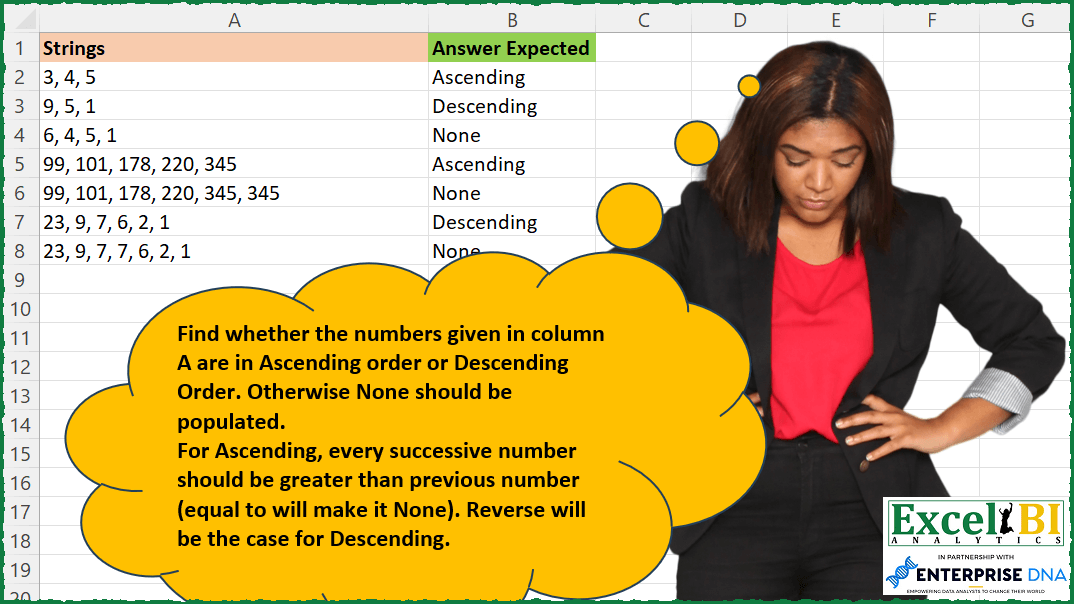
Find whether the numbers given in column A are in Ascending order or Descending Order. Otherwise None should be populated. For Ascending, every successive number should be greater than previous number (equal to will make it None). Reverse will be the case for Descending.
📌 Challenge Details and Links
ExcelBI Excel Challenge Number: 211
Challenge Difficulty: ⭐️⭐️
📥Download Sample File
📥Link to the solutions on LinkedIn
Solving the challenge of Detect Ascending or Descending with Power Query
Power Query solution 1 for Detect Ascending or Descending, proposed by Zoran Milokanović:
let
  Source = Excel.CurrentWorkbook(){[Name = "Input"]}[Content],
  Solution = Table.TransformRows(
    Source,
    each
      let
        n = List.Transform(Text.Split([Strings], ", "), Number.From),
        a = List.Sort(n),
        d = List.Reverse(a),
        u = List.Distinct(n)
      in
        if n = a and n = u then "Ascending" else if n = d and n = u then "Descending" else "None"
  )
in
  Solution
Power Query solution 2 for Detect Ascending or Descending, proposed by Zoran Milokanović:
let
  Source = Excel.CurrentWorkbook(){[Name = "Input"]}[Content],
  Solution = Table.TransformRows(
    Source,
    each
      let
        n = List.Transform(Text.Split([Strings], ", "), Number.From),
        p = List.Skip(List.Positions(n))
      in
        if List.AllTrue(List.Transform(p, each n{_} > n{_ - 1})) then
          "Ascending"
        else if List.AllTrue(List.Transform(p, each n{_} < n{_ - 1})) then
          "Descending"
        else
          "None"
  )
in
  Solution
Power Query solution 3 for Detect Ascending or Descending, proposed by Zoran Milokanović:
let
  Source = Excel.CurrentWorkbook(){[Name = "Input"]}[Content],
  Solution = Table.TransformRows(
    Source,
    each
      let
        n = List.Transform(Text.Split([Strings], ", "), Number.From),
        p = List.Skip(List.Positions(n))
      in
        if List.Accumulate(p, true, (s, c) => s and (n{c} > n{c - 1})) then
          "Ascending"
        else if List.Accumulate(p, true, (s, c) => s and (n{c} < n{c - 1})) then
          "Descending"
        else
          "None"
  )
in
  Solution
Power Query solution 4 for Detect Ascending or Descending, proposed by Alejandro Simón 🇵🇦 🇪🇸:
let
  Source = Excel.CurrentWorkbook(){[Name = "Table1"]}[Content],
  Sol = Table.AddColumn(
    Source,
    "Answer",
    each
      let
        a = Text.Split([Strings], ", "),
        b = List.Transform(a, Number.From),
        c = List.RemoveLastN(List.Transform({0 .. List.Count(b) - 1}, each b{_ + 1} - b{_}), 1),
        d =
          if List.AllTrue(List.Transform({0 .. List.Count(c) - 1}, each c{_} > 0)) then
            "Ascending"
          else if List.AllTrue(List.Transform({0 .. List.Count(c) - 1}, each c{_} < 0)) then
            "Descending"
          else
            "None"
      in
        d
  )
in
  Sol
Solving the challenge of Detect Ascending or Descending with Excel
Excel solution 1 for Detect Ascending or Descending, proposed by Bo Rydobon 🇹🇭:
=MAP(A2:A8,
    LAMBDA(a,
    LET(b,
    --TEXTSPLIT(
        a,
        ,
        ","
    ),
    SWITCH(SUM(
        SIGN(
            DROP(
                b,
                1
            )-DROP(
                b,
                -1
            )
        )
    )/(ROWS(
        b
    )-1),
    1,
    "Ascending",
    -1,
    "Descending",
    "None"))))
Excel solution 2 for Detect Ascending or Descending, proposed by Bo Rydobon 🇹🇭:
=MAP(
    A2:A8,
    LAMBDA(
        a,
        LET(
            b,
            TEXTSPLIT(
                a,
                ,
                ","
            ),
            d,
            DROP(
                b,
                1
            )-DROP(
                b,
                -1
            ),
            IFS(
                AND(
                    d>0
                ),
                "Ascending",
                AND(
                    d<0
                ),
                "Descending",
                1,
                "None"
            )
        )
    )
)
Excel solution 3 for Detect Ascending or Descending, proposed by Rick Rothstein:
=MAP(A2:A8,
    LAMBDA(x,
    LET(t,
    TEXTSPLIT(
        x,
        ", "
    ),
    l,
    0+DROP(
        t,
        ,
        -1
    ),
    r,
    0+DROP(
        t,
        ,
        1
    ),
    IF(PRODUCT(0+(lr)),
    "Descending",
    "None")))))
Excel solution 4 for Detect Ascending or Descending, proposed by John V.:
=MAP(
    A2:A8,
    LAMBDA(
        x,
        LET(
            n,
            TEXTSPLIT(
                x,
                ,
                ","
            ),
            d,
            DROP(
                n,
                1
            )-DROP(
                n,
                -1
            ),
            IFNA(
                IFS(
                    AND(
                        d>0
                    ),
                    "A",
                    AND(
                        d<0
                    ),
                    "De"
                )&"scending",
                "None"
            )
        )
    )
)
Excel solution 5 for Detect Ascending or Descending, proposed by محمد حلمي:
=MAP(A2:A8,
    LAMBDA(a,
    LET(r,
    -TEXTSPLIT(
        a,
        ,
        ","
    ),

i,
    IFNA(
        UNIQUE(
            r
        )=r,

    ),
    IFS(AND((SORT(
            r
        )=r)*i),
    "Descending",

AND((SORT(
    -r
)=-r)*i),
    "Ascending",
    1,
    "None"))))
Excel solution 6 for Detect Ascending or Descending, proposed by محمد حلمي:
=MAP(
    A2:A8,
    LAMBDA(
        a,
        LET(
            b,
            TEXTSPLIT(
                a,
                ,
                ","
            ),
            d,
            DROP(
                b,
                1
            )-DROP(
                b,
                -1
            ),
            IFS(
                AND(
                    d>0
                ),
                "Ascending",
                AND(
                    d<0
                ),

                "Descending",
                1,
                "None"
            )
        )
    )
)
Excel solution 7 for Detect Ascending or Descending, proposed by Kris Jaganah:
=MAP(
    A2:A8,
    LAMBDA(
        x,
        LET(
            a,
            -TEXTSPLIT(
                x,
                ,
                ", "
            ),
            b,
            UNIQUE(
                a
            ),
            c,
            CONCAT(
                -SORT(
                    -b
                )
            ),
             d,
            CONCAT(
                SORT(
                    b
                )
            ),
            e,
            CONCAT(
                a
            ),
            IFS(
                e=c,
                "Ascending",
                e=d,
                "Descending",
                1,
                "None"
            )
        )
    )
)
Excel solution 8 for Detect Ascending or Descending, proposed by Timothée BLIOT:
=MAP(
    A2:A8,
    LAMBDA(
        z,
        LET(
            A,
            TEXTSPLIT(
                z,
                ,
                ","
            )*1,
            B,
            SUM(
                MAP(
                    SEQUENCE(
                        ROWS(
                            A
                        )
                    ),
                    LAMBDA(
                        x,
                        IF(
                            x>1,
                            IF(
                                INDEX(
                                    A,
                                    x
                                )>INDEX(
                                    A,
                                    x-1
                                ),
                                1,
                                IF(
                                    INDEX(
                                    A,
                                    x
                                )
Excel solution 9 for Detect Ascending or Descending, proposed by Hussein SATOUR:
=MAP(
    A2:A8,
     LAMBDA(
         x,
          LET(
              a,
               --TEXTSPLIT(
                   x,
                   ,
                    ", "
               ),
               b,
               ARRAYTOTEXT(
                   SORT(
                       a
                   )
               ),
               c,
               ARRAYTOTEXT(
                   SORT(
                       a,
                       ,
                       -1
                   )
               ),
               IFS(
                   COUNT(
                       a
                   )<>COUNT(
                       UNIQUE(
                       a
                   )
                   ),
                    "None",
                    x=b,
                    "Ascending",
                    x=c,
                    "Descending",
                    1,
                    "None"
               )
          )
     )
)
Excel solution 10 for Detect Ascending or Descending, proposed by Oscar Mendez Roca Farell:
=MAP(
    A2:A8,
     LAMBDA(
         a,
          LET(
              _d,
               TEXTSPLIT(
                   a,
                    ,
                   ", "
               ),
              _p,
               AVERAGE(
                   SIGN(
                       DROP(
                           DROP(
                               _d,
                               1
                           )-_d,
                           -1
                       )
                   )
               ),
               IFERROR(
                   CHOOSE(
                       XMATCH(
                           _p,
                           {-1,
                           1},

                       ),
                        "Des",
                        "As"
                   )&"cending",
                    "None"
               )
          )
     )
)
Excel solution 11 for Detect Ascending or Descending, proposed by Sunny Baggu:
=MAP(

     A2:A8,

     LAMBDA(
         x,

          LET(

               _ts,
               TEXTSPLIT(
                   x,
                    ,
                    ", "
               ) + 0,

               _logic,
               DROP(
                   _ts,
                    1
               ) - DROP(
                   _ts,
                    -1
               ),

               _cri,
               IFS(
                   AND(
                       _logic > 0
                   ),
                    "Ascending",
                    AND(
                        _logic < 0
                    ),
                    "Descending",
                    1,
                    "None"
               ),

               _cri

          )

     )

)
Excel solution 12 for Detect Ascending or Descending, proposed by Md. Zohurul Islam:
=MAP(A2:A8,
    LAMBDA(x,
    LET(
 a,
    TEXTSPLIT(
        x,
        ,
        ", "
    ),

 b,
    DROP(
        a,
        1
    )-DROP(
        a,
        -1
    ),

 c,
    SUM(
        SIGN(
            b
        )
    ),

 d,
    c/(ROWS(
        a
    )-1),

 e,
    IFS(
        d=1,
        "Ascending",
        d=-1,
        "Descending",
        1,
        "None"
    ),

 e)
))
Excel solution 13 for Detect Ascending or Descending, proposed by Nicolas Micot:
=LET(
    nombres;
    FRACTIONNER.TEXTE(
        A2;
        ", "
    );

    ecarts;
    INDEX(
        nombres;
        1;
        SEQUENCE(
            1;
            NBVAL(
                nombres
            )-1;
            2
        )
    )-INDEX(
        nombres;
        1;
        SEQUENCE(
            1;
            NBVAL(
                nombres
            )-1;
            1
        )
    );

    compter;
    SOMME(
        SI(
            ecarts>0;
            1;
            SI(
                ecarts<0;
                -1;
                0
            )
        )
    );

    SI(
        compter=NBVAL(
                nombres
            )-1;
        "Ascending";
        SI(
            -compter=NBVAL(
                nombres
            )-1;
            "Descending";
            "None"
        )
    )
)
Excel solution 14 for Detect Ascending or Descending, proposed by Guillermo Arroyo:
=MAP(
    A2:A8,
    LAMBDA(
        a,
        LET(
            u,
            --TEXTSPLIT(
                a,
                ,
                ", "
            ),
            IF(
                AND(
                    DROP(
                        u,
                        -1
                    )DROP(
                        u,
                        1
                    )
                    ),
                    "Descending",
                    "None"
                )
            )
        )
    )
)
Excel solution 15 for Detect Ascending or Descending, proposed by Daniel Garzia:
=MAP(
    A2:A8,
    LAMBDA(
        x,
        LET(
            s,
            --TEXTSPLIT(
                x,
                ,
                ", "
            ),
            r,
            ROWS(
                s
            )=ROWS(
                UNIQUE(
                s
            )
            ),
            IFS(
                AND(
                    SORT(
                        s,
                        ,
                        -1
                    )=s,
                    r
                ),
                "Descendi&ng",
                AND(
                    SORT(
                s
            )=s,
                    r
                ),
                "Ascending",
                1,
                "None"
            )
        )
    )
)
Excel solution 16 for Detect Ascending or Descending, proposed by Quadri Olayinka Atharu:
=MAP(
    A2:A8,
    LAMBDA(
        x,

        LET(
            _s,
            TOCOL(
                --TEXTSPLIT(
                    x,
                    ", "
                )
            ),

            _asc,
            TEXTJOIN(
                ", ",
                1,
                UNIQUE(
                    SORT(
                        _s
                    )
                )
            ),

            _desc,
            TEXTJOIN(
                ", ",
                1,
                UNIQUE(
                    SORT(
                        _s,
                        ,
                        -1
                    )
                )
            ),

            _r,
            IF(
                x=_asc,
                "Ascending",
                IF(
                    x=_desc,
                    "Descending",
                    "None"
                )
            ),

            _r
        )
    )
)
&&