
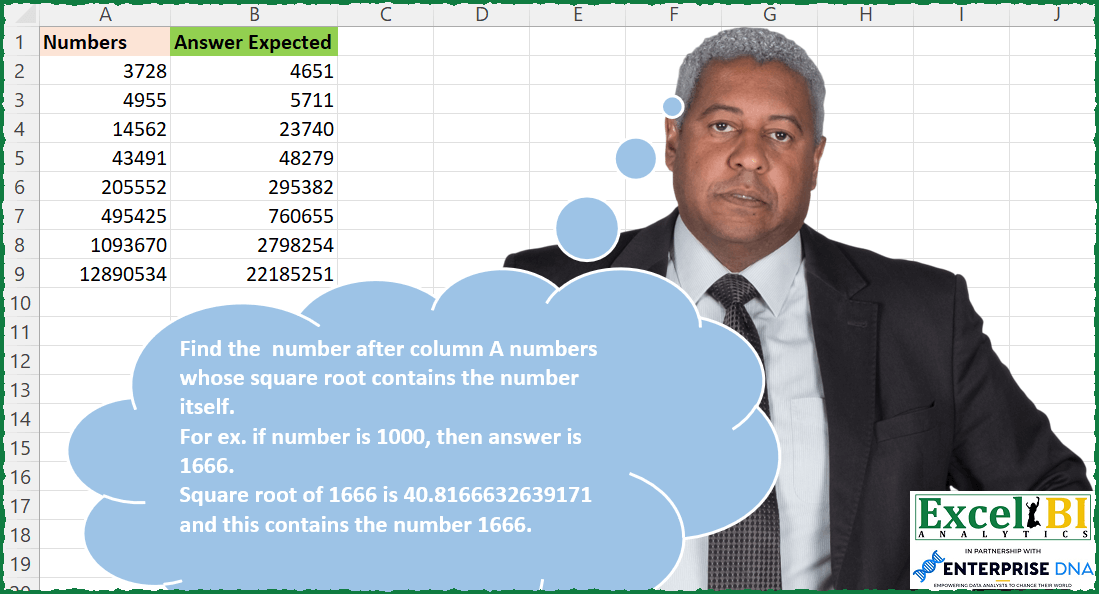
Find the number after column A numbers whose square root contains the number itself. For ex. if number is 1000, then answer is 1666. Square root of 1666 is 40.8166632639171 and this contains the number 1666. Note – Excel permits only 15 significant digits whereas many languages permit a large number of significant digits. Hence, to match the answer, you will need to limit the square root to 15 significant digits only. Also while checking, decimal will need to be removed.
📌 Challenge Details and Links
ExcelBI Excel Challenge Number: 206
Challenge Difficulty: ⭐️⭐️
📥Download Sample File
📥Link to the solutions on LinkedIn
Solving the challenge of Square Root Contains Number with Power Query
Power Query solution 1 for Square Root Contains Number, proposed by Omid Motamedisedeh:
let
  Source = Excel.CurrentWorkbook(){[Name = "Table1"]}[Content],
  Custom1 = Table.AddColumn(
    Source,
    "Answer",
    each List.Last(
      List.Generate(
        () => [x = _[Numbers], y = 1],
        each [y] = 1,
        each [
          x = [x] + 1,
          y = if Text.Contains(Text.From(Number.Sqrt([x])), Text.From([x])) then 0 else 1
        ],
        each [x]
      )
    )
  )
in
  Custom1
Power Query solution 2 for Square Root Contains Number, proposed by Bo Rydobon 🇹🇭:
let
  Source = Excel.CurrentWorkbook(){[Name = "Table1"]}[Content],
  Ans = Table.AddColumn(
    Source,
    "Ans",
    each List.Last(
      List.Generate(
        () => [Numbers] + 1,
        each not Text.Contains(Text.Replace(Text.From(Number.Sqrt(_)), ".", ""), Text.From(_)),
        each _ + 1
      )
    )
      + 1
  )
in
  Ans
Power Query solution 3 for Square Root Contains Number, proposed by Zoran Milokanović:
let
  Source = Excel.CurrentWorkbook(){[Name = "Input"]}[Content],
  Solution = Table.TransformRows(
    Source,
    each List.Max(
      List.Generate(
        () => [Numbers] + 1,
        each not Text.Contains(Text.From(Number.Sqrt(_)), Text.From(_)),
        each _ + 1,
        each _ + 1
      )
    )
  )
in
  Solution
Power Query solution 4 for Square Root Contains Number, proposed by Alejandro Simón 🇵🇦 🇪🇸:
let
 Source = Excel.CurrentWorkbook(){[Name="Table1"]}[Content],
 ListGen = Table.AddColumn(Source, "Answer", each
let
a = List.Generate(
 ()=> [x = [Numbers]+1],
 each not Text.Contains(Text.Remove(Text.From(Number.Sqrt([x])), "."), Text.From([x])),
 each [x = [x]+1],
 each [x]),
b = List.Last(a)
in b+1)
in
 ListGen

Me confundió el comentario de la limitante de 15 dígitos, pero igual funcionó. Traté de agregar Text.Range para cortar el texto en 15 dígitos, sin embargo, me daba error. Si me funcionó con Text.Start(_,15), pero, como no afectaba el resultado,  no lo utilicé.


        Show translation


        Show translation of this comment
Solving the challenge of Square Root Contains Number with Excel
Excel solution 1 for Square Root Contains Number, proposed by Bo Rydobon 🇹🇭:
=LET(s,SEQUENCE(9^6,42),t,TOCOL(IFS(FIND(s,SUBSTITUTE(s^0.5,".",)),s),3),XLOOKUP(A2:A9+1,t,t,,1))Excel solution 2 for Square Root Contains Number, proposed by Bo Rydobon 🇹🇭:
=MAP(A2:A9,LAMBDA(a,LET(s,SEQUENCE(MIN(10^6,a/5),10,a),MIN(TOCOL(IFS(ISNUMBER(FIND(s,SUBSTITUTE(s^0.5,".",))),s),3)))))Excel solution 3 for Square Root Contains Number, proposed by John V.:
=MAP(A2:A9,LAMBDA(x,LET(n,x+SEQUENCE(x/20,40),@TOCOL(n/(FIND(n,SUBSTITUTE(n^0.5,",",))>0),2))))Excel solution 4 for Square Root Contains Number, proposed by محمد حلمي:
=MAP(A2:A9,LAMBDA(a,LET(r,SEQUENCE(100000,20,a+1),MIN(IF(ISNUMBER(FIND(r,SUBSTITUTE( SQRT(r),".",""))),r)))))Excel solution 5 for Square Root Contains Number, proposed by Kris Jaganah:
=MAP(A2:A9,LAMBDA(x,LET(a,SEQUENCE(1000000,20,x+1),MIN(IF(IFERROR(FIND(a,TEXT(a^0.5,"000000.00000000000")),0)>0,a,"")))))Excel solution 6 for Square Root Contains Number, proposed by Timothée BLIOT:
=MAP(A2:A9,LAMBDA(z,LET(a,SEQUENCE(MIN(10^6,z*2),10,z),MIN(IF(ISNUMBER(FIND(a,a^0.5)),a)))))Excel solution 7 for Square Root Contains Number, proposed by Pieter de B.:
=MAP(A2:A9,LAMBDA(a,LET(b,a+SEQUENCE(1000000),TAKE(FILTER(b,ISNUMBER(FIND(b,SQRT(b))),""),1))))Solving the challenge of Square Root Contains Number with Excel VBA
Excel VBA solution 1 for Square Root Contains Number, proposed by Rick Rothstein:
=MAP(A2:A8,A3:A9,LAMBDA(a,b,TAKE(TOCOL(MAP(SEQUENCE(b-a,,a+1),LAMBDA(x,IF(ISNUMBER(FIND(x,SUBSTITUTE(SQRT(x),".",))),x,1/0))),3),1)))
Sub SquareRootContainsNumber()
 Dim N As Long, V As Variant, Arr As Variant
 Arr = Range("A2:A9").Value
 For Each V In Arr
 Do
 V = V + 1
 Loop While InStr(Replace(Sqr(V), ".", ""), V) = 0
 N = N + 1
 Range("C1").Offset(N) = V
 Next
End Sub
Excel VBA solution 2 for Square Root Contains Number, proposed by Nicolas Micot:
VBA solution:
Function getNumber(ByVal number)
Dim arret As Boolean
Dim root
While Not arret
 number = number + 1
 root = Sqr(number)
 texte = Replace(root, ",", "")
 texte = Replace(texte, ".", "")
 texte = Left(texte, 15)
 If InStr(1, texte, number) > 0 Then
 arret = True
 End If
Wend
getNumber = number
End Function
&&&