
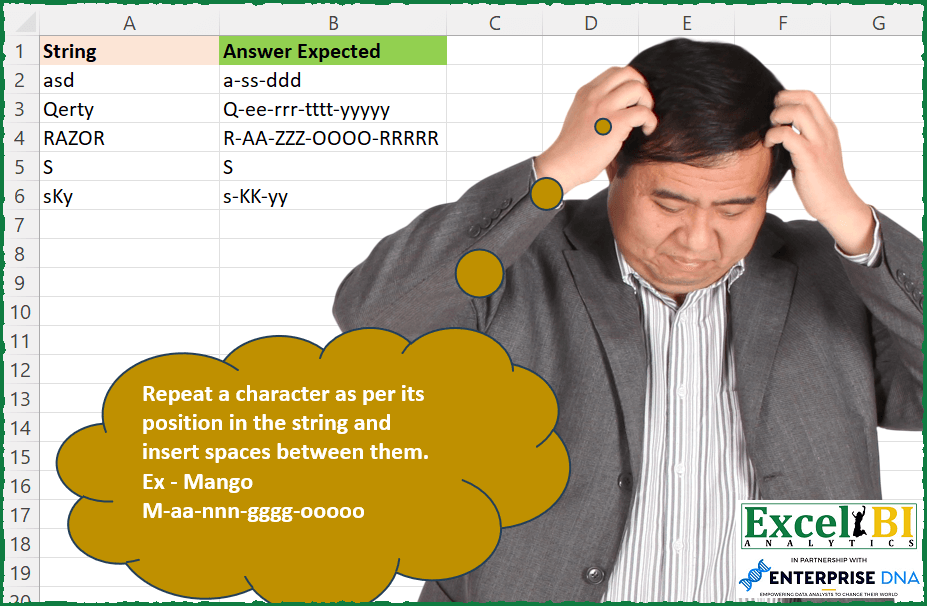
Repeat a character as per its position in the string and insert spaces between them. Ex – Mango M-aa-nnn-gggg-ooooo
📌 Challenge Details and Links
ExcelBI Excel Challenge Number: 196
Challenge Difficulty: ⭐️
📥Download Sample File
📥Link to the solutions on LinkedIn
Solving the challenge of Repeat Characters by Position with Power Query
Power Query solution 1 for Repeat Characters by Position, proposed by Bo Rydobon 🇹🇭:
let
  Source = Excel.CurrentWorkbook(){[Name = "Table1"]}[Content],
  Ans = Table.TransformColumns(
    Source,
    {
      "String",
      each Text.Combine(
        List.Transform({1 .. Text.Length(_)}, (n) => Text.Repeat(Text.Range(_, n - 1, 1), n)),
        "-"
      )
    }
  )
in
  Ans
Power Query solution 2 for Repeat Characters by Position, proposed by Zoran Milokanović:
let
  Source = Excel.CurrentWorkbook(){[Name = "Input"]}[Content],
  Solution = Table.TransformRows(
    Source,
    each [
      l = Text.ToList([String]),
      t = List.Accumulate(
        List.Positions(l),
        "",
        (s, c) => s & (if s = "" then s else "-") & Text.Repeat(l{c}, c + 1)
      )
    ][t]
  )
in
  Solution
Power Query solution 3 for Repeat Characters by Position, proposed by Aditya Kumar Darak 🇮🇳:
let
  Source = Excel.CurrentWorkbook(){[Name = "data"]}[Content],
  Return = Table.AddColumn(
    Source,
    "Answer",
    each Text.Combine(
      List.Transform({1 .. Text.Length([String])}, (f) => Text.Repeat(Text.At([String], f - 1), f)),
      "-"
    )
  )
in
  Return
Power Query solution 4 for Repeat Characters by Position, proposed by Alejandro Simón 🇵🇦 🇪🇸:
let
  Source = Excel.CurrentWorkbook(){[Name = "Table1"]}[Content],
  Sol = Table.AddColumn(
    Source,
    "Answer",
    each
      let
        a = Text.ToList([String]),
        b = List.Transform({0 .. List.Count(a) - 1}, each Text.Repeat(a{_}, _ + 1)),
        c = Text.Combine(b, "-")
      in
        c
  )[[Answer]]
in
  Sol
Power Query solution 5 for Repeat Characters by Position, proposed by Luan Rodrigues:
let
  Fonte = Tabela1,
  add = Table.AddColumn(Fonte, "Personalizar", each Text.ToList([String])),
  exp = Table.ExpandListColumn(add, "Personalizar"),
  res = Table.Group(
    exp,
    {"String"},
    {
      {
        "Contagem",
        each [
          a = Table.AddIndexColumn(_, "Ind", 1, 1),
          b = Text.Combine(
            Table.AddColumn(a, "Txt", each Text.Repeat([Personalizar], [Ind]))[Txt],
            "-"
          )
        ][b]
      }
    }
  )
in
  res
Power Query solution 6 for Repeat Characters by Position, proposed by Brian Julius:
let
  Source = Table.DuplicateColumn(
    Excel.CurrentWorkbook(){[Name = "Table1"]}[Content],
    "String",
    "Letter"
  ),
  SplitToRows = Table.ExpandListColumn(
    Table.TransformColumns(
      Source,
      {
        {
          "Letter",
          Splitter.SplitTextByRepeatedLengths(1),
          let
            itemType = (type nullable text) meta [Serialized.Text = true]
          in
            type {itemType}
        }
      }
    ),
    "Letter"
  ),
  Group = Table.Group(
    SplitToRows,
    {"String"},
    {{"All", each _, type table [String = text, Letter = nullable text]}}
  ),
  AddPositionIndex = Table.RemoveColumns(
    Table.AddColumn(Group, "Position", each Table.AddIndexColumn([All], "Position", 1, 1)),
    "All"
  ),
  AddRepeatText = Table.RemoveColumns(
    Table.AddColumn(
      AddPositionIndex,
      "Repeat",
      each Table.AddColumn([Position], "Repeat", each Text.Repeat([Letter], [Position]))
    ),
    "Position"
  ),
  SelCols = Table.RemoveColumns(
    Table.AddColumn(AddRepeatText, "Repeats", each Table.SelectColumns([Repeat], "Repeat")),
    "Repeat"
  ),
  CombineText = Table.RemoveColumns(
    Table.AddColumn(SelCols, "Answer", each Text.Combine([Repeats][Repeat], "-")),
    "Repeats"
  )
in
  CombineText
Power Query solution 7 for Repeat Characters by Position, proposed by JvdV –:
let
  Source = Excel.CurrentWorkbook(){[Name = "Table1"]}[Content],
  Answer = Table.AddColumn(
    Source,
    "Answer",
    each Text.Range(
      List.Accumulate(
        Text.ToList([String]),
        [s = "", n = 1],
        (x, y) => [s = x[s] & "-" & Text.Repeat(y, x[n]), n = x[n] + 1]
      )[s],
      1
    )
  )
in
  Answer
Power Query solution 8 for Repeat Characters by Position, proposed by Krzysztof Kominiak:
let
  Source = Excel.CurrentWorkbook(){[Name = "Table1"]}[Content],
  AddNestTab = Table.AddColumn(
    Source,
    "NT",
    each Table.AddIndexColumn(Table.FromList(Text.ToList([String])), "Id", 1, 1)
  ),
  ExpandToRows = Table.ExpandTableColumn(AddNestTab, "NT", {"Column1", "Id"}, {"Column1", "Id"}),
  AddNewText = Table.AddColumn(ExpandToRows, "Ntxt", each Text.Repeat([Column1], [Id]))[
    [String],
    [Ntxt]
  ],
  Result = Table.Group(
    AddNewText,
    {"String"},
    {{"Answer", each Text.Combine([Ntxt], "-"), type text}}
  )
in
  Result
Power Query solution 9 for Repeat Characters by Position, proposed by Guillermo Arroyo:
let
  Origen = Excel.CurrentWorkbook(){[Name = "Tabla1"]}[Content],
  a = List.Transform(Origen[String], each Text.ToList(_)),
  b = List.Transform(
    a,
    (x) =>
      Text.Combine(List.Transform({0 .. List.Count(x) - 1}, each Text.Repeat(x{_}, _ + 1)), "-")
  )
in
  b
Power Query solution 10 for Repeat Characters by Position, proposed by Tyler N.:
let
  Src = Excel.CurrentWorkbook(){[Name = "Table1"]}[Content],
  Res = Table.AddColumn(
    Src,
    "R",
    each Text.Combine(
      Table.AddColumn(
        Table.AddIndexColumn(Table.FromList(Text.ToList([String]), null, {"a"}), "b", 1, 1),
        "x",
        each Text.Repeat([a], [b])
      )[x],
      "-"
    )
  )
in
  Res
Solving the challenge of Repeat Characters by Position with Excel
Excel solution 1 for Repeat Characters by Position, proposed by Rick Rothstein:
=MAP(A2:A6,LAMBDA(a,LET(s,SEQUENCE(LEN(a)),TEXTJOIN("-",,REPT(MID(a,s,1),s)))))Excel solution 2 for Repeat Characters by Position, proposed by Rick Rothstein:
=DROP(TEXTSPLIT(ARRAYTOTEXT(REPT(MID(A2:A6,COLUMN(A:Z),1),COLUMN(A:Z)),),,", , ",1),-1)Excel solution 3 for Repeat Characters by Position, proposed by John V.:
=MAP(A2:A6,LAMBDA(x,TEXTJOIN("-",,REPT(MID(x,ROW(1:9),1),ROW(1:9)))))Excel solution 4 for Repeat Characters by Position, proposed by محمد حلمي:
=LET(r,ROW(1:9),
MAP(A2:A6,LAMBDA(a,TEXTJOIN("-",,REPT(MID(a,r,1),r)))))
Excel solution 5 for Repeat Characters by Position, proposed by Julian Poeltl:
=MAP(A2:A6,LAMBDA(A,LET(S,SEQUENCE(LEN(A)),TEXTJOIN("-",,REPT(MID(A,S,1),S)))))Excel solution 6 for Repeat Characters by Position, proposed by Timothée BLIOT:
=MAP(A2:A6,LAMBDA(a,TEXTJOIN("-",,MAP(SEQUENCE(LEN(a)), LAMBDA(x,REPT(MID(a,x,1),x))))))Excel solution 7 for Repeat Characters by Position, proposed by Hussein SATOUR:
=MAP(A2:A6, LAMBDA(x, LET(a, SEQUENCE(LEN(x)), TEXTJOIN("-",, REPT(MID(x,a,1), a)))))Excel solution 8 for Repeat Characters by Position, proposed by Oscar Mendez Roca Farell:
=MAP(A2:A6, LAMBDA(a, LET(_s, SEQUENCE(, 5), TEXTJOIN("-", 1, REPT(MID(a,_s, 1),_s)))))Excel solution 9 for Repeat Characters by Position, proposed by Duy Tùng:
=MAP(A2:A6,LAMBDA(x,TEXTJOIN("-",,REPT(MID(x,SEQUENCE(LEN(x)),1),SEQUENCE(LEN(x))))))Excel solution 10 for Repeat Characters by Position, proposed by Sunny Baggu:
=MAP(
 A2:A6,
 LAMBDA(a,
 LET(
 _m, MID(a, SEQUENCE(LEN(a)), 1),
 _seq, SEQUENCE(ROWS(_m)),
 _rep, REPT(_m, _seq),
 TEXTJOIN("-", , _rep)
 )
 )
)
Excel solution 11 for Repeat Characters by Position, proposed by Md. Zohurul Islam:
=MAP(A2:A6,LAMBDA(x,LET(sq,SEQUENCE(LEN(x)),a,REPT(MID(x,sq,1),sq),TEXTJOIN("-",,a))))Excel solution 12 for Repeat Characters by Position, proposed by Julien Lacaze:
=MAP(A2:A6,LAMBDA(a,TEXTJOIN("-",TRUE,REPT(MID(a,SEQUENCE(LEN(a)),1),FIND(MID(a,SEQUENCE(LEN(a)),1),a)))))
Edit :
Only works for single letter occurence...
This one should give more accurate results :
=MAP(A2:A6,LAMBDA(a,TEXTJOIN("-",TRUE,REPT(MID(a,SEQUENCE(LEN(a)),1),SEQUENCE(LEN(a))))))
Bonus :
Revert From answer to initial String :
=MAP(B2:B6,LAMBDA(a,TEXTJOIN("",TRUE,LEFT(TEXTSPLIT(a,"-")))))
Excel solution 13 for Repeat Characters by Position, proposed by Guillermo Arroyo:
=MAP(A2:A6,LAMBDA(a,TEXTJOIN("-",1,REDUCE("",SEQUENCE(LEN(a)),LAMBDA(i,j,VSTACK(i,REPT(MID(a,j,1),j)))))))Excel solution 14 for Repeat Characters by Position, proposed by Quadri Olayinka Atharu:
=MAP(
    A2:A6,

    LAMBDA(
        _str,

        LET(
            _seq,
            SEQUENCE(
                ,
                LEN(
                    _str
                )
            ),

            _spl,
            MID(
                _str,
                _seq,
                1
            ),

            TEXTJOIN(
                "-",
                1,
                REPT(
                    _spl,
                    _seq
                )
            )
        )
    )
)
Excel solution 15 for Repeat Characters by Position, proposed by Henriette Hamer:
=TEXTJOIN("-";TRUE;REPT(MID(A2;SEQUENCE(1;LEN(A2);1;1);1);SEQUENCE(1;LEN(A2);1;1)))Excel solution 16 for Repeat Characters by Position, proposed by Miguel Angel Franco García:
=UNIRCADENAS("-";VERDADERO;LET(a;EXTRAE(A2;SECUENCIA(LARGO(A2));1);b;FILAS(a);c;SECUENCIA(b);REPETIR(a;c)))Excel solution 17 for Repeat Characters by Position, proposed by Hussain Ali Nasser:
=BYROW(A2:A6,LAMBDA(_range,LET(_split,MID(_range,SEQUENCE(LEN(_range)),1),_seq,SEQUENCE(LEN(_range)),_result,TEXTJOIN("-",,REPT(_split,_seq)),_result)))Excel solution 18 for Repeat Characters by Position, proposed by Morteza Rahmani:
TEXTJOIN("-",,REPT(MID(B3,ROW(INDIRECT("1:" & LEN(B3))),1),ROW(INDIRECT("1:" & LEN(B3)))))Excel solution 19 for Repeat Characters by Position, proposed by Stevenson Yu:
=MAP(A2:A6,LAMBDA(X,LET(A,X,
B, SEQUENCE(LEN(A)),
TEXTJOIN("-",,REPT(MID(A,B,1),B)))))
Excel solution 20 for Repeat Characters by Position, proposed by Paul Reynolds:
=MAP(A2:A6,LAMBDA(c,LET(a,SEQUENCE(LEN(c)),b,REPT(MID(c,a,1),a),TEXTJOIN("-",,b))))Solving the challenge of Repeat Characters by Position with Excel VBA
Excel VBA solution 1 for Repeat Characters by Position, proposed by Challa Sai Kumar Reddy:
Function InsertSpaces(ByVal text As String) As String
 Dim result As String
 Dim i As Integer

 For i = 1 To Len(text)
 If i > 1 Then
 result = result & " "
 End If

 result = result & Mid(text, i, 1) & String(i - 1, "-")
 Next i

 InsertSpaces = result
End Function
' Example usage
Sub TestInsertSpaces()
 Dim character As String
 Dim result As String

 character = "man"
 result = InsertSpaces(character)
 MsgBox result
End Sub
&&&