
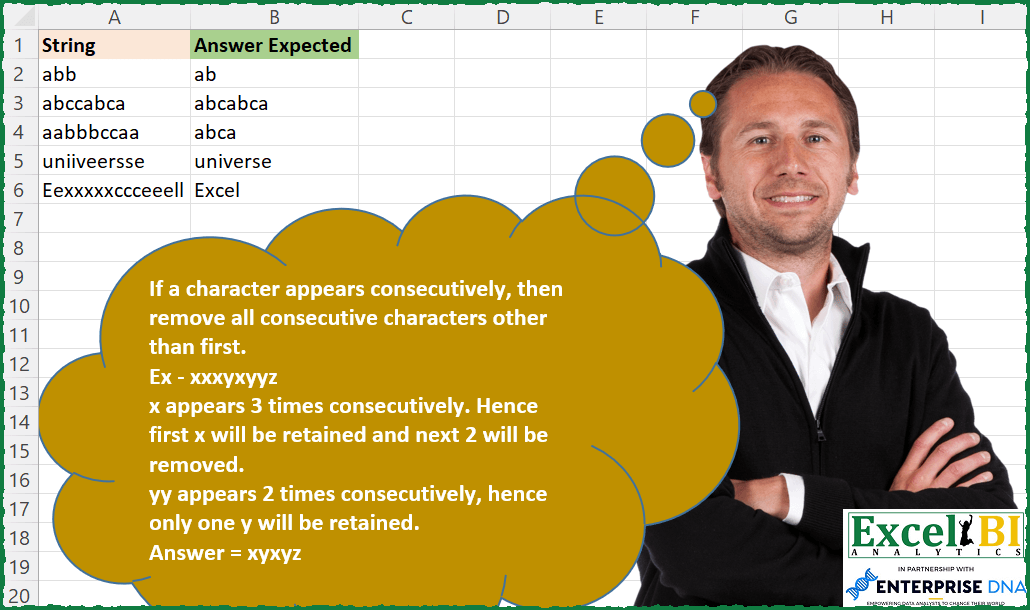
If a character appears consecutively, then remove all consecutive characters other than first. Ex – xxxyxyyz x appears 3 times consecutively. Hence first x will be retained and next 2 will be removed. yy appears 2 times consecutively, hence only one y will be retained. Answer = xyxyz
📌 Challenge Details and Links
ExcelBI Excel Challenge Number: 179
Challenge Difficulty: ⭐️
📥Download Sample File
📥Link to the solutions on LinkedIn
Solving the challenge of Remove Consecutive Duplicates with Power Query
Power Query solution 1 for Remove Consecutive Duplicates, proposed by Bo Rydobon 🇹🇭:
let
  Source = Excel.CurrentWorkbook(){[Name = "Table1"]}[Content],
  Ans = Table.TransformRows(
    Source,
    each Text.Combine(
      List.Combine(
        List.Transform(
          List.Zip({Text.ToList([String]), Text.ToList("0" & [String])}),
          each List.RemoveMatchingItems(_, {_{1}}, Comparer.OrdinalIgnoreCase)
        )
      )
    )
  )
in
  Ans
Power Query solution 2 for Remove Consecutive Duplicates, proposed by Zoran Milokanović:
let
  Source = Excel.CurrentWorkbook(){[Name = "Input"]}[Content],
  Solution = Table.TransformRows(
    Source,
    each Text.Combine(
      List.Accumulate(
        Text.ToList([String]),
        {},
        (s, d) => if Comparer.OrdinalIgnoreCase(List.Last(s) ?? "", d) = 0 then s else s & {d}
      )
    )
  )
in
  Solution
Power Query solution 3 for Remove Consecutive Duplicates, proposed by Aditya Kumar Darak 🇮🇳:
let
  Source = Excel.CurrentWorkbook(){[Name = "data"]}[Content],
  Return = Table.AddColumn(
    Source,
    "Answer",
    each [
      Text = [String],
      Lower = Text.Lower(Text),
      Length = Text.Length(Text) - 1,
      Calc = List.Transform(
        {0 .. Length},
        (f) => if Text.At(Lower, f) = Text.At(" " & Lower, f) then null else Text.At(Text, f)
      ),
      Final = Text.Combine(Calc)
    ][Final]
  )
in
  Return
Power Query solution 4 for Remove Consecutive Duplicates, proposed by Alejandro Simón 🇵🇦 🇪🇸:
let
  Source = Excel.CurrentWorkbook(){[Name = "Table1"]}[Content],
  Sol = Table.AddColumn(
    Source,
    "Answer",
    each
      let
        a = Table.FromColumns({Text.ToList([String])}),
        b = Table.Group(
          a,
          {"Column1"},
          {{"All", each ""}},
          GroupKind.Local,
          Comparer.OrdinalIgnoreCase
        )
      in
        Text.Combine(b[Column1], "")
  )[[Answer]]
in
  Sol
Power Query solution 5 for Remove Consecutive Duplicates, proposed by Luan Rodrigues:
let
  Fonte = Tabela1,
  split = Table.AddColumn(Fonte, "Personalizar", each Text.ToList([String])),
  exp = Table.ExpandListColumn(split, "Personalizar"),
  res = Table.Group(
    exp,
    {"String"},
    {
      {
        "Contagem",
        each Text.Combine(
          Table.Group(
            _,
            {"Personalizar"},
            {{"tab", each List.Distinct(_[Personalizar])}},
            GroupKind.Local,
            Comparer.OrdinalIgnoreCase
          )[Personalizar],
          ""
        )
      }
    }
  )
in
  res
Power Query solution 6 for Remove Consecutive Duplicates, proposed by Venkata Rajesh:
let
  Source = Data,
  Output = Table.AddColumn(
    Source,
    "Expected",
    each [
      list1 = Text.ToList([String]),
      list2 = {null} & List.RemoveLastN(list1, 1),
      list3 = Text.Combine(
        List.RemoveNulls(
          List.Transform(
            List.Positions(list1),
            each if Text.Lower(list1{_}) <> Text.Lower(list2{_}) then list1{_} else null
          )
        )
      )
    ][list3]
  )
in
  Output
Solving the challenge of Remove Consecutive Duplicates with Excel
Excel solution 1 for Remove Consecutive Duplicates, proposed by Bo Rydobon 🇹🇭:
=MAP(A2:A6,LAMBDA(a,LET(s,SEQUENCE(40),b,MID(a,s,1),CONCAT(REPT(b,b<>MID(0&a,s,1))))))Excel solution 2 for Remove Consecutive Duplicates, proposed by Bo Rydobon 🇹🇭:
=REDUCE("",SEQUENCE(40),LAMBDA(a,n,LET(v,MID(A2:A6,n,1),a&REPT(v,v<>RIGHT(a)))))Excel solution 3 for Remove Consecutive Duplicates, proposed by Rick Rothstein:
=MAP("/"&A2:A6,LAMBDA(a,LET(s,SEQUENCE(LEN(a)),m,MID(a,s+1,1),CONCAT(IF(m<>MID(a,s,1),m,"")))))Excel solution 4 for Remove Consecutive Duplicates, proposed by Rick Rothstein:
=MAP(A2:A6,LAMBDA(a,LET(s,SEQUENCE(LEN(a)),y,MID(a&"/",s,1),z,MID(a&"/",s+1,1),CONCAT(MAP(TEXTSPLIT(CONCAT(IF(y=z,y,y&" "))," "),LAMBDA(x,LEFT(x)))))))Excel solution 5 for Remove Consecutive Duplicates, proposed by John V.:
=REDUCE("",ROW(1:20),LAMBDA(i,x,LET(c,MID(A2:A6,x,1),IF(c=RIGHT(i),i,i&c))))Excel solution 6 for Remove Consecutive Duplicates, proposed by محمد حلمي:
=MAP(A2:A6,LAMBDA(a,LET(
c,MID(a,SEQUENCE(LEN(a)),1),
CONCAT(FILTER(c,VSTACK(DROP(c,1),1)<>c)))))
Excel solution 7 for Remove Consecutive Duplicates, proposed by 🇰🇷 Taeyong Shin:
=REGEXREPLACE(A2:A6,"(.)1+","$1")Excel solution 8 for Remove Consecutive Duplicates, proposed by 🇰🇷 Taeyong Shin:
=REDUCE("",SEQUENCE(MAX(LEN(A2:A6))),LAMBDA(a,n,LET(c,MID(A2:A6,n,1),a&REPT(c,RIGHT(a)<>c))))Excel solution 9 for Remove Consecutive Duplicates, proposed by Kris Jaganah:
=MAP(A2:A6,LAMBDA(x,LET(a,MID(x,SEQUENCE(LEN(x)),1),CONCAT(FILTER(a,a<>VSTACK("",DROP(a,-1)))))))Excel solution 10 for Remove Consecutive Duplicates, proposed by Julian Poeltl:
=MAP(A2:A6,LAMBDA(S,LET(SP,MID(S,SEQUENCE(LEN(S)),1),R,DROP(SP<>VSTACK("",SP),-1),CONCAT(FILTER(SP,R)))))Excel solution 11 for Remove Consecutive Duplicates, proposed by Aditya Kumar Darak 🇮🇳:
=MAP(
 A2:A6,
 LAMBDA(a,
 LET(
 sq, SEQUENCE(LEN(a)),
 s, MID(a, sq, 1),
 c, IF(s = MID(" " & a, sq, 1), "", s),
 r, CONCAT(c),
 r
 )
 )
)
Excel solution 12 for Remove Consecutive Duplicates, proposed by Timothée BLIOT:
=MAP(A2:A6,LAMBDA(z,LET(A,MID(z,SEQUENCE(LEN(z)),1),B,MAP(SEQUENCE(ROWS(A)),LAMBDA(x,IF(x>1,--NOT(INDEX(A,x)=INDEX(A,x-1)),1))),CONCAT(FILTER(A,B)))))Excel solution 13 for Remove Consecutive Duplicates, proposed by Hussein SATOUR:
=MAP(A2:A6, LAMBDA(a, REDUCE(,MID(a, SEQUENCE(LEN(a)),1),LAMBDA(x,y, x&IF(RIGHT(y)=RIGHT(x),"",y)))))Excel solution 14 for Remove Consecutive Duplicates, proposed by Oscar Mendez Roca Farell:
=BYROW(A2:A6; LAMBDA(r; LET(_s; SEQUENCE(LEN(r));_m; MID(r;_s;1);_n; MID(LOWER(r);1;_s); CONCAT(FILTER(_m; ISERROR(SEARCH("|| "; SUSBTITUTE(_n;_m;"|")&" ")))))))Excel solution 15 for Remove Consecutive Duplicates, proposed by Sunny Baggu:
=MAP(A2:A6,LAMBDA(a,LET(_m,MID(a,SEQUENCE(LEN(a)),1),_droptop,DROP(_m,1),_dropbott,DROP(_m,-1),_cond,VSTACK(_droptop<>_dropbott,TRUE),CONCAT(TOCOL(IFS(_cond,_m),2)))))Excel solution 16 for Remove Consecutive Duplicates, proposed by Md. Zohurul Islam:
=MAP(A2:A6,LAMBDA(z,LET(
p,MID(z,SEQUENCE(LEN(z)),1),
q,SCAN(1,VSTACK(0,ABS(DROP(p,-1)<>DROP(p,1))),SUM),
s,DROP(REDUCE("",UNIQUE(q),LAMBDA(x,y,LET(a,FILTER(p,q=y),b,DROP(IFNA(HSTACK(a,TAKE(a,1)),""),,1),VSTACK(x,b)))),1),
u,CONCAT(s),
u)))
Excel solution 17 for Remove Consecutive Duplicates, proposed by Charles Roldan:
=MAP(A2:A6,LAMBDA(x,REDUCE(,
MID(x,SEQUENCE(LEN(x)),1),
LAMBDA(a,b,a&REPT(b,NOT(RIGHT(a)=b))))))
Excel solution 18 for Remove Consecutive Duplicates, proposed by Stefan Olsson:
=ArrayFormula(
REDUCE(A2:A6, CHAR(SEQUENCE(26,1,65)),
LAMBDA(string, chr,
REGEXREPLACE(string, "(?i)("&chr&"){2,}", "$1")
)))
Excel solution 19 for Remove Consecutive Duplicates, proposed by Julien Lacaze:
=MAP(A2:A6,LAMBDA(a,CONCAT(IF(MID(a,SEQUENCE(LEN(a)),1)<>MID(a,SEQUENCE(LEN(a))+1,1),MID(a,SEQUENCE(LEN(a)),1),""))))
But for it lowercase the Capital E in Excel
(as it takes that last letter of a repetition)
Excel solution 20 for Remove Consecutive Duplicates, proposed by Guillermo Arroyo:
=MAP(A2:A6;LAMBDA(a;LET(f;LAMBDA(r;p;q;IF(p="";q;r(r;MID(p;2;99);IF(RIGHT(q)=LEFT(p);q;CONCAT(q;LEFT(p))))));f(f;a;""))))
Other method
=MAP(A2:A6;LAMBDA(a;CONCAT(FILTER(MID(a;ROW(1:100);1);VSTACK(1;MID(a;ROW(1:99);1)<>MID(a;ROW(1:99)+1;1))))))
Excel solution 21 for Remove Consecutive Duplicates, proposed by Gabriel Raigosa:
=MAP(A2:A6,LAMBDA(x,LET(st,MID(x,SEQUENCE(99),1),ex,DROP(st,1),CONCAT(LEFT(x),FILTER(ex,DROP(st=ex,-1)=FALSE)))))

▶️ES:
=MAP(A2:A6,LAMBDA(x,LET(st,EXTRAE(x,SECUENCIA(99),1),ex,EXCLUIR(st,1),CONCAT(IZQUIERDA(x),FILTRAR(ex,EXCLUIR(st=ex,-1)=FALSO)))))
Excel solution 22 for Remove Consecutive Duplicates, proposed by Lorenzo Foti:
=LET(s;MID(A2;SEQUENCE(LEN(A2));1);REDUCE("";s;LAMBDA(a;v;IF(RIGHT(a;1)=v;a;a&v))))Excel solution 23 for Remove Consecutive Duplicates, proposed by Ben Gutscher:
=CONCAT(LEFT(A2),LET(pos,SEQUENCE(LEN(A2)-1,,2),letter,MID(A2,pos,1),prevletter,MID(A2,pos-1,1),IF(letter=prevletter,"",letter)))Solving the challenge of Remove Consecutive Duplicates with Excel VBA
Excel VBA solution 1 for Remove Consecutive Duplicates, proposed by Nicolas Micot:
Function f_challenge(texte As String) As String
Dim resultat As String
For i = 1 To Len(texte)
 If Not LCase(Mid(texte, i, 1)) = LCase(Right(resultat, 1)) Then
 resultat = resultat & Mid(texte, i, 1)
 End If
Next i
f_challenge = resultat
End Function
&&&