
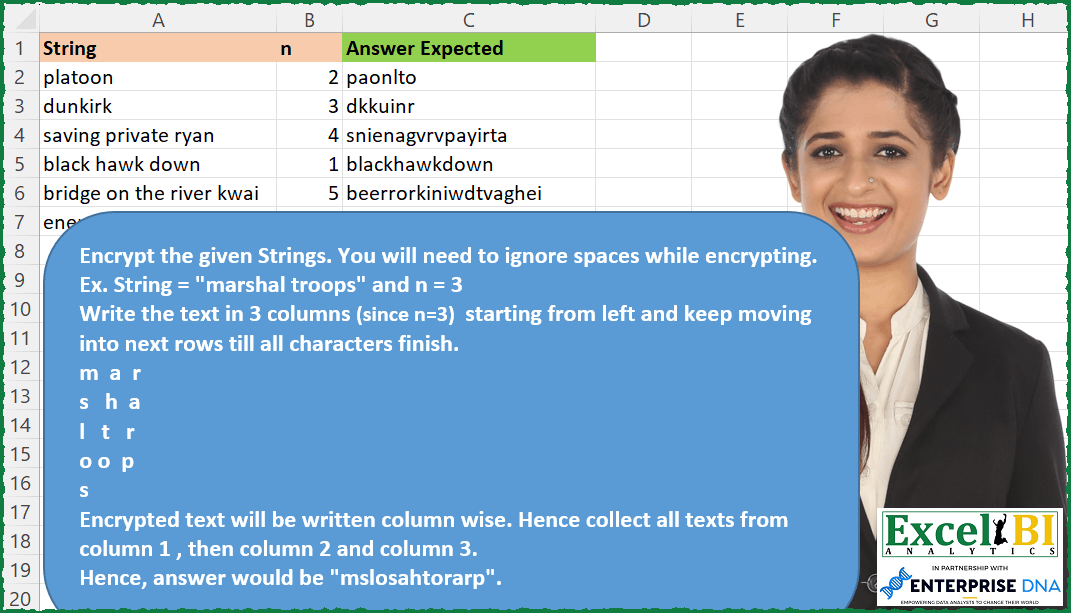
Route Cipher Encrypt the given Strings. You will need to ignore spaces while encrypting. Ex. String = “marshal troops” and n = 3 Write the text in 3 columns (since n=3) starting from left and keep moving into next rows till all characters finish. m a r s h a l t r o o p s Encrypted text will be written column wise. Hence collect all texts from column 1 , then column 2 and column 3. Hence, answer would be “mslosahtorarp”.
📌 Challenge Details and Links
ExcelBI Excel Challenge Number: 178
Challenge Difficulty: ⭐️
📥Download Sample File
📥Link to the solutions on LinkedIn
Solving the challenge of Route Cipher Encrypt with Power Query
Power Query solution 1 for Route Cipher Encrypt, proposed by Bo Rydobon 🇹🇭:
let
  Source = Excel.CurrentWorkbook(){[Name = "Table1"]}[Content],
  Res = Table.TransformRows(
    Source,
    each
      let
        N = List.Transform(Text.Split([Numbers], ", "), Number.From),
        o = List.Select(N, Number.IsOdd),
        e = List.Select(N, Number.IsEven)
      in
        try
          Text.Combine(
            List.Transform(
              if List.Count(o) = List.Count(e) then
                ""
              else if List.Count(o) < List.Count(e) then
                o
              else
                e,
              Text.From
            ),
            ", "
          )
        otherwise
          ""
  )
in
  Res
Power Query solution 2 for Route Cipher Encrypt, proposed by Zoran Milokanović:
let
  Source = Excel.CurrentWorkbook(){[Name = "Input"]}[Content],
  Solution = Table.TransformRows(
    Source,
    each
      let
        i = List.RemoveItems(Text.ToList([String]), {" "}),
        c = List.Count(i),
        a = List.Split(i & List.Repeat({""}, Number.RoundUp(c / [n]) * [n] - c), [n])
      in
        List.Accumulate(
          {1 .. [n]},
          "",
          (s, d) => s & Text.Combine(List.Transform(a, each _{d - 1}))
        )
  )
in
  Solution
Power Query solution 3 for Route Cipher Encrypt, proposed by Aditya Kumar Darak 🇮🇳:
let
  Source = Excel.CurrentWorkbook(){[Name = "data"]}[Content],
  Return = Table.AddColumn(
    Source,
    "Answer",
    each [
      Remove  = Text.Remove([String], " "),
      ToList  = Text.ToList(Remove),
      Split   = List.Split(ToList, [n]),
      Zip     = List.Zip(Split),
      Combine = Text.Combine(List.Combine(Zip))
    ][Combine]
  )
in
  Return
Power Query solution 4 for Route Cipher Encrypt, proposed by Alejandro Simón 🇵🇦 🇪🇸:
let
  Source = Excel.CurrentWorkbook(){[Name = "Table1"]}[Content],
  Sol = Table.AddColumn(
    Source,
    "Answer",
    each
      let
        a = List.RemoveItems(Text.ToList([String]), {" "}),
        b = List.Split(a, [n]),
        c = Table.ToColumns(Table.Transpose(Table.FromColumns(b))),
        d = Text.Combine(List.Combine(List.Transform(c, List.RemoveNulls)))
      in
        d
  )[[Answer]]
in
  Sol
Power Query solution 5 for Route Cipher Encrypt, proposed by Alejandro Simón 🇵🇦 🇪🇸:
let
  Source = Excel.CurrentWorkbook(){[Name = "Table1"]}[Content],
  Sol = Table.AddColumn(
    Source,
    "Answer",
    each
      let
        a = List.Select(Text.ToList([String]), each _ <> " "),
        b = List.Zip(List.Split(a, [n])),
        c = List.Combine(b),
        d = List.Select(c, each _ <> null)
      in
        Text.Combine(d, "")
  )[[Answer]]
in
  Sol
Power Query solution 6 for Route Cipher Encrypt, proposed by Luan Rodrigues:
let
  Fonte = Tabela1,
  res = Table.AddColumn(
    Fonte,
    "Personalizar",
    each [
      a = List.RemoveMatchingItems(Text.ToList([String]), {" "}),
      b = List.Split(a, [n]),
      c = Text.Combine(List.Combine(List.Zip(b)))
    ][c]
  )
in
  res
Power Query solution 7 for Route Cipher Encrypt, proposed by Rafael González B.:
let
 Source =  Excel.CurrentWorkbook(){[Name="Table1"]}[Content],

 ChangeTypes = Table.TransformColumnTypes(Source,{{"String", type text}, {"n", Int64.Type}}),

 Answer = Table.AddColumn(ChangeTypes, "Result", each Text.Combine( List.RemoveItems(
List.Combine(List.Zip(List.Split(
List.RemoveItems( Text.ToList([String]), {" "}), [n]))),{null} ), ""))[[Result]]

in
 Answer

See ya!!

PD: Alejandro Simón your code is more elegant than mine, good for you friend... 👏👏👏😁😁
Power Query solution 8 for Route Cipher Encrypt, proposed by Guillermo Arroyo:
let
  Origen = Excel.CurrentWorkbook(){[Name = "Tabla1"]}[Content],
  a = List.Transform(
    List.Zip({Origen[String], Origen[n]}),
    each List.Zip(List.Split(Text.ToList(Text.Replace(_{0}, " ", "")), _{1}))
  ),
  b = List.Transform(a, each Text.Combine(List.Transform(_, each Text.Combine(_))))
in
  b
Solving the challenge of Route Cipher Encrypt with Excel
Excel solution 1 for Route Cipher Encrypt, proposed by Bo Rydobon 🇹🇭:
=MAP(A2:A7,B2:B7,LAMBDA(a,b,CONCAT(TOCOL(MID(SUBSTITUTE(a," ",),SEQUENCE(50,b),1),,1))))Excel solution 2 for Route Cipher Encrypt, proposed by Rick Rothstein:
=MAP(A2:A7,B2:B7,LAMBDA(r,n,CONCAT(TOCOL(WRAPROWS(MID(SUBSTITUTE(r," ",""),SEQUENCE(LEN(r)),1),n),2,1))))Excel solution 3 for Route Cipher Encrypt, proposed by John V.:
=MAP(A2:A7,B2:B7,LAMBDA(a,b,CONCAT(WRAPCOLS(MID(SUBSTITUTE(a," ",),ROW(1:30),1),b,""))))Excel solution 4 for Route Cipher Encrypt, proposed by محمد حلمي:
=MAP(SUBSTITUTE( A2:A7," ",""),B2:B7,LAMBDA(a,b,
CONCAT(TOCOL(WRAPROWS(MID(a,ROW(1:99),1),b),2,1))))
Excel solution 5 for Route Cipher Encrypt, proposed by Kris Jaganah:
=MAP(A2:A7,B2:B7,LAMBDA(x,y,CONCAT(TOCOL(WRAPROWS(MID(SUBSTITUTE(x," ",""),SEQUENCE(LEN(x)),1),y),3,1))))Excel solution 6 for Route Cipher Encrypt, proposed by Julian Poeltl:
=MAP(A2:A7,B2:B7,LAMBDA(S,N,LET(P,SUBSTITUTE(S," ",""),CONCAT(BYROW(WRAPCOLS(MID(P,SEQUENCE(,LEN(P)),1),N,""),LAMBDA(A,CONCAT(A)))))))Excel solution 7 for Route Cipher Encrypt, proposed by Aditya Kumar Darak 🇮🇳:
=MAP(
 A2:A7,
 B2:B7,
 LAMBDA(a, b,
 LET(
 s, MID(a, SEQUENCE(LEN(a)), 1),
 f, FILTER(s, s <> " "),
 w, WRAPROWS(f, b),
 r, CONCAT(TOCOL(w, 2, 1)),
 r
 )
 )
)
Excel solution 8 for Route Cipher Encrypt, proposed by Timothée BLIOT:
=LET(A,A2:A7,B,B2:B7,MAP(A,B,LAMBDA(a,b,CONCAT(TOCOL(WRAPROWS(LET(W,MID(a,SEQUENCE(LEN(a)),1),FILTER(W,W<>"","")),b),3,1)))))Excel solution 9 for Route Cipher Encrypt, proposed by Hussein SATOUR:
=MAP(A2:A7, B2:B7, LAMBDA(x,y, LET(a, SUBSTITUTE(x, " ",""), CONCAT(TOCOL(WRAPROWS(MID(a, SEQUENCE(LEN(a)), 1), y),2,1)))))Excel solution 10 for Route Cipher Encrypt, proposed by Oscar Mendez Roca Farell:
=MAP(A2:A7, B2:B7, LAMBDA(s, i, LET(_l, SUBSTITUTE(s, " ", ""), _n, SEQUENCE(LEN(_l)), CONCAT(MID(_l, ORDERBY(_n, MOD(_n-1,i)+1), 1)))))Excel solution 11 for Route Cipher Encrypt, proposed by Sunny Baggu:
=MAP(SUBSTITUTE(A2:A7," ",""),B2:B7,LAMBDA(a,b,LET(_m,MID(a,SEQUENCE(LEN(a)),1),_n,b,_route,WRAPROWS(_m,_n),CONCAT(TOCOL(_route,3,-1)))))Excel solution 12 for Route Cipher Encrypt, proposed by Md. Zohurul Islam:
=MAP(A2:A7,B2:B7,LAMBDA(x,y,LET(a,MID(x,SEQUENCE(LEN(x)),1),CONCAT(BYCOL(IFNA(WRAPROWS(FILTER(a,a<>" "),y),""),CONCAT)))))Excel solution 13 for Route Cipher Encrypt, proposed by Charles Roldan:
=MAP(SUBSTITUTE(A2:A7," ",),B2:B7,LAMBDA(x,n,
CONCAT(TOCOL(WRAPCOLS(MID(x,SEQUENCE(LEN(x)),1),n,"")))))
Excel solution 14 for Route Cipher Encrypt, proposed by Julien Lacaze:
=MAP(A2:A7,B2:B7,LAMBDA(a,b,CONCAT(CHOOSEROWS(WRAPCOLS(MID(SUBSTITUTE(a," ",""),SEQUENCE(LEN(SUBSTITUTE(a," ",""))),1),b,""),SEQUENCE(b)))))Excel solution 15 for Route Cipher Encrypt, proposed by Giorgi Goderdzishvili:
=LET(
str,A2,
n_,B2,
ln,LEN(str),
chrs, MID(str,SEQUENCE(,ln),1),
rchrs,FILTER(chrs,chrs<>" "),
wrp,WRAPROWS(rchrs,n_,""),
tc,TOCOL(wrp,3,TRUE),
CONCAT(tc))
Excel solution 16 for Route Cipher Encrypt, proposed by Guillermo Arroyo:
=MAP(A2:A7;B2:B7;LAMBDA(a;b;CONCAT(TOCOL(WRAPROWS(MID(SUBSTITUTE(a;" ";"");SEQUENCE(99);1);b);3;1))))

OR

=MAP(A2:A7;B2:B7;LAMBDA(a;b;CONCAT(SORTBY(MID(SUBSTITUTE(a;" ";"");ROW(1:99);1);MOD(ROW(1:99)-1;b);1))))
Excel solution 17 for Route Cipher Encrypt, proposed by Daniel Garzia:
=MAP(A2:A7,B2:B7,LAMBDA(a,b,LET(_s,SUBSTITUTE(a," ",""),_l,LEN(_s),CONCAT(SORTBY(MID(_s,SEQUENCE(_l),1),MOD(SEQUENCE(_l,,0),b))))))Excel solution 18 for Route Cipher Encrypt, proposed by Anup Kumar:
=MAP(A2:A7,B2:B7,LAMBDA(s,n,LET(
txt, SUBSTITUTE(s," ",""),
txtArr, MID(txt,SEQUENCE(LEN(txt)),1),
wrpArr, WRAPCOLS(txtArr,n),
CONCAT(TOCOL(wrpArr,2))))
)
Excel solution 19 for Route Cipher Encrypt, proposed by Rayan S.:
=MAP(
 A2:A7,
 B2:B7,
 LAMBDA(x, y,
 LET(
 a, MID(x, SEQUENCE(LEN(x)), 1),
 TEXTJOIN("", , WRAPCOLS(FILTER(a, CODE(a) <> 32), y, ""))
 )
 )
)
Excel solution 20 for Route Cipher Encrypt, proposed by Gabriel Raigosa:
=MAP(A2:A7,B2:B7,LAMBDA(s,n,CONCAT(TOCOL(WRAPCOLS(MID(SUBSTITUTE(s," ",""),SEQUENCE(99),1),n),2))))

=MAP(A2:A7,B2:B7,LAMBDA(s,n,CONCAT(IFERROR(WRAPCOLS(MID(SUBSTITUTE(s," ",""),SEQUENCE(99),1),n),""))))

 =MAP(SUBSTITUTE(A2:A7," ",""),B2:B7,LAMBDA(s,n,CONCAT(CHOOSECOLS(SORT(HSTACK(MOD(SEQUENCE(99,,0),n),MID(s,SEQUENCE(99),1))),2))))

 =MAP(SUBSTITUTE(A2:A7," ",""),B2:B7,LAMBDA(s,no,LET(n,MOD(SEQUENCE(99,,0),no),CONCAT(BYROW(UNIQUE(n),LAMBDA(x,CONCAT(FILTER(MID(s,SEQUENCE(99),1),n=x))))))))

▶️ES:  =MAP(A2:A7,B2:B7,LAMBDA(s,n,CONCAT(ENCOL(AJUSTARCOLS(EXTRAE(SUSTITUIR(s," ",""),SECUENCIA(99),1),n),2))))

=MAP(A2:A7,B2:B7,LAMBDA(s,n,CONCAT(SI.ERROR(AJUSTARCOLS(EXTRAE(SUSTITUIR(s," ",""),SECUENCIA(99),1),n),""))))

 =MAP(SUSTITUIR(A2:A7," ",""),B2:B7,LAMBDA(s,n,CONCAT(ELEGIRCOLS(ORDENAR(APILARH(RESIDUO(SECUENCIA(99,,0),n),EXTRAE(s,SECUENCIA(99),1))),2))))

 =MAP(SUSTITUIR(A2:A7," ",""),B2:B7,LAMBDA(s,no,LET(n,RESIDUO(SECUENCIA(99,,0),no),CONCAT(BYROW(UNICOS(n),LAMBDA(x,CONCAT(FILTRAR(EXTRAE(s,SECUENCIA(99),1),n=x))))))))
Excel solution 21 for Route Cipher Encrypt, proposed by Hussain Ali Nasser:
=MAP(A2:A7,B2:B7,LAMBDA(_string,_ncols,LET(_splittext,MID(_string,SEQUENCE(LEN(_string)),1),_splittextwospaces,FILTER(_splittext,_splittext<>" "),CONCAT(TOCOL(WRAPROWS(_splittextwospaces,_ncols),2,TRUE)))))Excel solution 22 for Route Cipher Encrypt, proposed by Stevenson Yu:
=MAP(A2:A7,B2:B7,
LAMBDA(x,y,
LET(a,SUBSTITUTE(x," ",""),
b,MID(a,SEQUENCE(LEN(a),y),1),
c,CONCAT((TRANSPOSE(b))),
c)))
Excel solution 23 for Route Cipher Encrypt, proposed by Lorenzo Foti:
=LET(n;B2;s;SUBSTITUTE(A2;" ";"");CONCAT(TRANSPOSE(MID(TOCOL(MID(s;SEQUENCE(;LEN(s);;n);n));SEQUENCE(;n);1))))&&&