
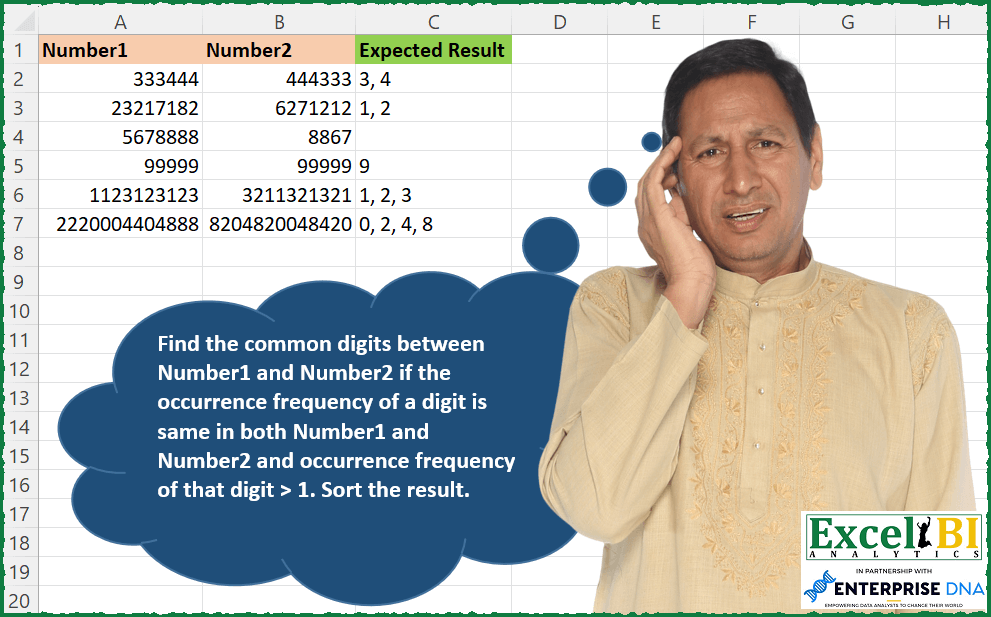
Find the common digits between Number1 and Number2 if the occurrence frequency of a digit is same in both Number1 and Number2 and occurrence frequency of that digit > 1. Sort the result. Example – Number1 = 89898605, Number2=6888998 8 and 9 are common and have frequency > 1. Frequency of 8 is 3 in Number1 and 4 in Number2. Hence, 8 is discarded as frequency is not equal. 9 has the frequency of 2 in both, hence answer would be 2.
📌 Challenge Details and Links
ExcelBI Excel Challenge Number: 177
Challenge Difficulty: ⭐️
📥Download Sample File
📥Link to the solutions on LinkedIn
Solving the challenge of Common Digits with Frequency with Power Query
Power Query solution 1 for Common Digits with Frequency, proposed by Bo Rydobon 🇹🇭:
let
  Source = Excel.CurrentWorkbook(){[Name = "Table1"]}[Content],
  Ans = List.Transform(
    Table.ToRows(Source),
    (r) =>
      Text.Combine(
        List.Select(
          {"0" .. "9"},
          (n) =>
            let
              A = Text.Select(Text.From(r{0}), n)
            in
              A = Text.Select(Text.From(r{1}), n) and Text.Length(A) > 1
        ),
        ", "
      )
  )
in
  Ans
Power Query solution 2 for Common Digits with Frequency, proposed by Bo Rydobon 🇹🇭:
let
  Source = Excel.CurrentWorkbook(){[Name = "Table1"]}[Content],
  Ans = List.Transform(
    Table.ToRows(Source),
    each
      let
        A = List.Transform(_, each Text.ToList(Text.From(_))),
        B = List.RemoveItems(A{0}, List.Difference(A{0}, A{1}))
      in
        Text.Combine(
          List.Select({"0" .. "9"}, (n) => List.Count(List.Select(B, each _ = n)) > 1),
          ", "
        )
  )
in
  Ans
Power Query solution 3 for Common Digits with Frequency, proposed by Zoran Milokanović:
let
  Source = Excel.CurrentWorkbook(){[Name = "Input"]}[Content],
  Solution = Table.TransformRows(
    Source,
    each Text.Combine(
      let
        n1 = Text.ToList(Text.From([Number1])),
        n2 = Text.ToList(Text.From([Number2])),
        i  = List.Sort(List.Distinct(List.Intersect({n1, n2})))
      in
        List.Accumulate(
          List.Positions(i),
          {},
          (s, d) =>
            s
              & (
                let
                  c  = i{d},
                  c1 = List.Count(List.Select(n1, each _ = c)),
                  c2 = List.Count(List.Select(n2, each _ = c))
                in
                  if c1 = c2 and c1 > 1 then {c} else {}
              )
        ),
      ", "
    )
  )
in
  Solution
Power Query solution 4 for Common Digits with Frequency, proposed by Alejandro Simón 🇵🇦 🇪🇸:
let
  Source = Excel.CurrentWorkbook(){[Name = "Table1"]}[Content],
  Sol = Table.AddColumn(
    Source,
    "Answer",
    each
      let
        a = List.Transform(Record.ToList(_), each Text.ToList(Text.From(_))),
        b = List.Select(
          List.Transform({"0" .. "9"}, (x) => List.Select(a{0}, each _ = x)),
          each List.Count(_) > 1
        ),
        c = List.Select(
          List.Transform({"0" .. "9"}, (x) => List.Select(a{1}, each _ = x)),
          each List.Count(_) > 1
        ),
        d = List.Transform(List.Select(b, each List.ContainsAny(b, c)), each List.Distinct(_){0})
      in
        Text.Combine(d, ", ")
  )[[Answer]]
in
  Sol
Power Query solution 5 for Common Digits with Frequency, proposed by Luan Rodrigues:
let
  Fonte = Tabela1,
  tab = Table.AddColumn(
    Fonte,
    "Personalizar",
    each [
      a = Text.ToList(Text.From([Number1])),
      b = Text.ToList(Text.From([Number2])),
      c = List.Distinct(List.Intersect({a, b}))
    ][c]
  ),
  exp = Table.ExpandListColumn(tab, "Personalizar"),
  p1 = Table.AddColumn(
    exp,
    "part1",
    each Text.Length(Text.Select(Text.From([Number1]), {[Personalizar]}))
  ),
  add = Table.AddColumn(
    p1,
    "part2",
    each Text.Length(Text.Select(Text.From([Number2]), {[Personalizar]}))
  ),
  f = Table.SelectRows(add, each ([part1] <> 1)),
  res = Table.Group(
    f,
    {"Number1", "Number2"},
    {
      {
        "Contagem",
        each if [part1] = [part2] then Text.Combine(List.Sort(_[Personalizar]), ", ") else null
      }
    }
  )
in
  res
Power Query solution 6 for Common Digits with Frequency, proposed by Alexis Olson:
let
  Source = Excel.CurrentWorkbook(){[Name = "Table1"]}[Content],
  ToText = Table.TransformColumnTypes(Source, {{"Number1", type text}, {"Number2", type text}}),
  AddColumn = Table.AddColumn(
    ToText,
    "Expected Result",
    each
      let
        digits1 = List.Sort(List.Distinct(Text.ToList([Number1]))),
        digits2 = List.Sort(List.Distinct(Text.ToList([Number2]))),
        distrb1 = List.Transform(digits1, (d) => {d, Text.Length(Text.Select([Number1], d))}),
        distrb2 = List.Transform(digits1, (d) => {d, Text.Length(Text.Select([Number2], d))}),
        intrsct = List.Intersect({distrb1, distrb2}),
        filter1 = List.Select(intrsct, (pair) => pair{1} > 1),
        extract = List.Transform(filter1, (pair) => pair{0}),
        results = Text.Combine(extract, ", ")
      in
        results
  )
in
  AddColumn
Power Query solution 7 for Common Digits with Frequency, proposed by Venkata Rajesh:
let
  Source = Source,
  Output = Table.AddColumn(
    Source,
    "Result",
    each [
      Text1 = Text.From([Number1]),
      Text2 = Text.From([Number2]),
      list1 = Text.ToList(Text1),
      list2 = Text.ToList(Text2),
      list3 = List.Distinct(List.Intersect({list1, list2})),
      list4 = List.Select(
        list3,
        each List.Count(Text.PositionOf(Text1, _, Occurrence.All))
          > 1
            and List.Count(Text.PositionOf(Text1, _, Occurrence.All))
            = List.Count(Text.PositionOf(Text2, _, Occurrence.All))
      ),
      list5 = Text.Combine(List.Sort(list4), ", ")
    ][list5]
  )
in
  Output
Power Query solution 8 for Common Digits with Frequency, proposed by Guillermo Arroyo:
let
  Origen = Excel.CurrentWorkbook(){[Name = "Tabla1"]}[Content],
  a = List.Zip(
    {
      List.Transform(Origen[Number1], each Text.From(_)),
      List.Transform(Origen[Number2], each Text.From(_))
    }
  ),
  b = List.Transform(
    a,
    each
      let
        o = {0 .. 9},
        p = (x) =>
          List.Transform(o, each Text.Length(x) - Text.Length(Text.Replace(x, Text.From(_), ""))),
        q = List.Zip({p(_{0}), p(_{1})}),
        r = List.Transform(q, each (_{0} = _{1}) and (_{0} > 1)),
        s = Text.Combine(List.Transform(List.Select(o, each r{_}), each Text.From(_)), ", ")
      in
        s
  )
in
  b
Solving the challenge of Common Digits with Frequency with Excel
Excel solution 1 for Common Digits with Frequency, proposed by Bo Rydobon 🇹🇭:
=BYROW(A2:B7,LAMBDA(a,LET(s,SEQUENCE(10,,0),b,LEN(a)-LEN(SUBSTITUTE(a,s,)),TEXTJOIN(", ",,REPT(s,MMULT(IF(b>1,b,{1,0}),{1;-1})=0)))))Excel solution 2 for Common Digits with Frequency, proposed by Bo Rydobon 🇹🇭:
=BYROW(A2:B7,LAMBDA(a,LET(s,SEQUENCE(10,,0),b,LEN(a)-LEN(SUBSTITUTE(a,s,)),ARRAYTOTEXT(FILTER(s,(TAKE(b,,1)>1)*(MMULT(b,{1;-1})=0),"")))))Excel solution 3 for Common Digits with Frequency, proposed by Rick Rothstein:
=LET(s,SEQUENCE(10,,0),f,LAMBDA(r,LEN(r)-LEN(SUBSTITUTE(r,s,""))),MAP(A2:A7,B2:B7,LAMBDA(a,b,TEXTJOIN(", ",,FILTER(s,(f(a)=f(b))*(f(a)>1)*(f(b)>1),"")))))Excel solution 4 for Common Digits with Frequency, proposed by John V.:
=MAP(A2:A7,B2:B7,LAMBDA(a,b,LET(s,ROW(1:10)-1,f,LAMBDA(c,LEN(c)-LEN(SUBSTITUTE(c,s,))),TEXTJOIN(", ",,REPT(s,(f(a)>1)*(f(a)=f(b)))))))Excel solution 5 for Common Digits with Frequency, proposed by محمد حلمي:
=MAP(A2:A7,B2:B7,LAMBDA(q,w,LET(
l,ROW(1:10)-1,
r,LAMBDA(x,MAP(l,LAMBDA(a,SUM(--(a=MID(x,SEQUENCE(LEN(x)),1)+0))))),
v,r(q),
ARRAYTOTEXT(FILTER(l,(v>1)*(v=r(w)),"")))))
Excel solution 6 for Common Digits with Frequency, proposed by Kris Jaganah:
=MAP(A2:A7,B2:B7,LAMBDA(x,y,LET(a,LEN(x),b,SORT(--MID(x,SEQUENCE(a),1)),c,SEQUENCE(a)-XMATCH(b,b)+1,d,UNIQUE(b),e,XLOOKUP(d,b,c,,,-1),f,LEN(y),g,SORT(--MID(y,SEQUENCE(f),1)),h,SEQUENCE(f)-XMATCH(g,g)+1,i,UNIQUE(g),j,XLOOKUP(i,g,h,,,-1),k,XLOOKUP(d&e,i&j,i&j,0),ARRAYTOTEXT(LEFT(FILTER(k,--RIGHT(k)>1,""))))))Excel solution 7 for Common Digits with Frequency, proposed by Julian Poeltl:
=MAP(A2:A7,B2:B7,LAMBDA(N,NN,LET(S,SEQUENCE(10,,0),L,LAMBDA(A,LEN(A)-LEN(SUBSTITUTE(A,S,""))),IFERROR(TEXTJOIN(", ",,SORT(FILTER(S,(L(N)=L(NN))*(L(N)>1)))),""))))Excel solution 8 for Common Digits with Frequency, proposed by Julian Poeltl:
=MAP(A2:A7,B2:B7,LAMBDA(N,NN,LET(S,SEQUENCE(10,,0),L,LEN(N)-LEN(SUBSTITUTE(N,S,"")),LL,LEN(NN)-LEN(SUBSTITUTE(NN,S,"")),IFERROR(TEXTJOIN(", ",,SORT(FILTER(S,(L=LL)*(L>1)))),""))))Excel solution 9 for Common Digits with Frequency, proposed by Aditya Kumar Darak 🇮🇳:
=BYROW(
 A2:B7,
 LAMBDA(a,
 LET(
 sq, SEQUENCE(10, , 0),
 c, LEN(a) - LEN(SUBSTITUTE(a, sq, "")),
 f, FILTER(sq, (TAKE(c, , 1) > 1) * (MMULT(c, {1;-1})= 0),""),
 r, ARRAYTOTEXT(f),
 r
 )
 )
)
Excel solution 10 for Common Digits with Frequency, proposed by Timothée BLIOT:
=LET(A,A2:A7, B,B2:B7,
MAP(SEQUENCE(ROWS(A)), LAMBDA(x, ARRAYTOTEXT( LET(W,MAP(SEQUENCE(10,,0), LAMBDA(y,
LET(K, LEN(INDEX(A,x))-SUM(LEN(TEXTSPLIT(INDEX(A,x),y))),
L, LEN(INDEX(B,x))-SUM(LEN(TEXTSPLIT(INDEX(B,x),y))),
IF(OR(K>1,L>1),IF(K=L,1,-1),-1) )
))*SEQUENCE(10)-1, FILTER(W,W>=0,"") ) ) )) )
Excel solution 11 for Common Digits with Frequency, proposed by Hussein SATOUR:
=IFERROR(MAP(A2:A7, B2:B7, LAMBDA(x,y,LET(w, MID(x, SEQUENCE(LEN(x)),1),TEXTJOIN(", ",,SORT(FILTER(UNIQUE(w), MAP(UNIQUE(w), LAMBDA(z, LET(a, LEN(x) - LEN(SUBSTITUTE(x, z, "")), b, LEN(y) - LEN(SUBSTITUTE(y, z, "")), AND(a>1, a=b)))))))))),"")Excel solution 12 for Common Digits with Frequency, proposed by Sunny Baggu:
=MAP(A2:A7,B2:B7,LAMBDA(a,b,
LET(_e1,LAMBDA(x,MID(x,SEQUENCE(LEN(x)),1)),
_m1,_e1(a),_m2,_e1(b),_u,UNIQUE(VSTACK(_m1,_m2)),
_e2,LAMBDA(arr,MAP(_u,LAMBDA(a,SUM(N(arr=a))))),
_cri1,_e2(_m1),_cri2,_e2(_m2),
_cond,(_cri1=_cri2)*(_cri1>1),
ARRAYTOTEXT(SORT(FILTER(_u,_cond,""))))))
Excel solution 13 for Common Digits with Frequency, proposed by Md. Zohurul Islam:
=MAP(A2:A7,B2:B7,LAMBDA(x,y,LET(
a,--MID(x,SEQUENCE(LEN(x)),1),
b,--MID(y,SEQUENCE(LEN(y)),1),
c,UNIQUE(a),
j,DROP(FREQUENCY(a,c),-1),
k,DROP(FREQUENCY(b,c),-1),
cr,(j=k)*(j>1)*(k>1),
d,IFERROR(ARRAYTOTEXT(SORT(FILTER(c,cr))),""),
d)))
Excel solution 14 for Common Digits with Frequency, proposed by Tolga Demirci, PMP, PMI-ACP, MOS-Expert:
=MAP(A2:A7;B2:B7;LAMBDA(t;r;TEXTJOIN(", ";;LET(a;ROW(INDIRECT("A1:"&"A"&COUNTA(q)));b;LET(e;MID(t;SEQUENCE(LEN(t));1);f;MID(r;SEQUENCE(LEN(r));1);IF(MAP(LET(q;SORT(UNIQUE(SORT(e;;1));;1);w;SORT(UNIQUE(f);;1);INDEX(q;LET(p;IFERROR(IF(q=w;ROW(INDIRECT("A1:"&"A"&COUNTA(q)));"");"");FILTER(p;p<>""))));LAMBDA(x;SUM(IF(SORT(e;;1)=x;1;""))))<>1;LET(q;SORT(UNIQUE(SORT(e;;1));;1);w;SORT(UNIQUE(f);;1);INDEX(q;FILTER(IFERROR(IF(q=w;ROW(INDIRECT("A1:"&"A"&COUNTA(q)));"");"");IFERROR(IF(q=w;a;"");"")<>"")));""));FILTER(b;b<>"")))))Excel solution 15 for Common Digits with Frequency, proposed by Stefan Olsson:
=MAP(A2:A7, B2:B7,
LAMBDA(_n1, _n2,
TEXTJOIN(", ", 1,
MAP(SEQUENCE(10,1,0),
LAMBDA(_d,
LET(
_rx, "[^"&_d&"]",
_rx1, REGEXREPLACE(_n1&"", _rx, ""),
IF(AND(LEN(_rx1)>1, _rx1=REGEXREPLACE(_n2&"", _rx, "")), _d,)
))))))
Excel solution 16 for Common Digits with Frequency, proposed by Nicolas Micot:
=LET(_nombres;SEQUENCE(10;1;0;1);_compte;NBCAR(A2:B2)-NBCAR(SUBSTITUE(A2:B2;_nombres;""));_num1;INDEX(_compte;0;1);_num2;INDEX(_compte;0;2);JOINDRE.TEXTE(", ";VRAI;SI((_num1>1)*(_num2>1)*(_num1=_num2);_nombres;"")))Excel solution 17 for Common Digits with Frequency, proposed by Guillermo Arroyo:
=MAP(A2:A7;B2:B7;LAMBDA(a;b;LET(n;SEQUENCE(10;;0);f;LAMBDA(u;LEN(u)-LEN(SUBSTITUTE(u;n;"")));TEXTJOIN(", ";;FILTER(n;(f(a)=f(b))*(f(a)>1);"")))))Excel solution 18 for Common Digits with Frequency, proposed by Daniel Garzia:
=MAP(A2:A7,B2:B7,LAMBDA(_n1,_n2,LET(
_s,SEQUENCE(10,,0),
_f1,FREQUENCY(--MID(_n1,SEQUENCE(LEN(_n1)),1),_s),
_f2,FREQUENCY(--MID(_n2,SEQUENCE(LEN(_n2)),1),_s),
_result,IFERROR(TEXTJOIN(", ",,FILTER(_s,DROP((_f1=_f2)*(_f1>1),-1))),""),
_result)))
Excel solution 19 for Common Digits with Frequency, proposed by Stevenson Yu:
=MAP(A2:A7,B2:B7, LAMBDA(A,B,
LET(C, SEQUENCE(,10,0),
D, LEN(A)-LEN(SUBSTITUTE(A, C, "")),
E, LEN(B)-LEN(SUBSTITUTE(B, C, "")),
F, FILTER(C, (D=E)*(D>1)),
G, IFERROR(TEXTJOIN(", ",1,F),""),
G)))
&&&