
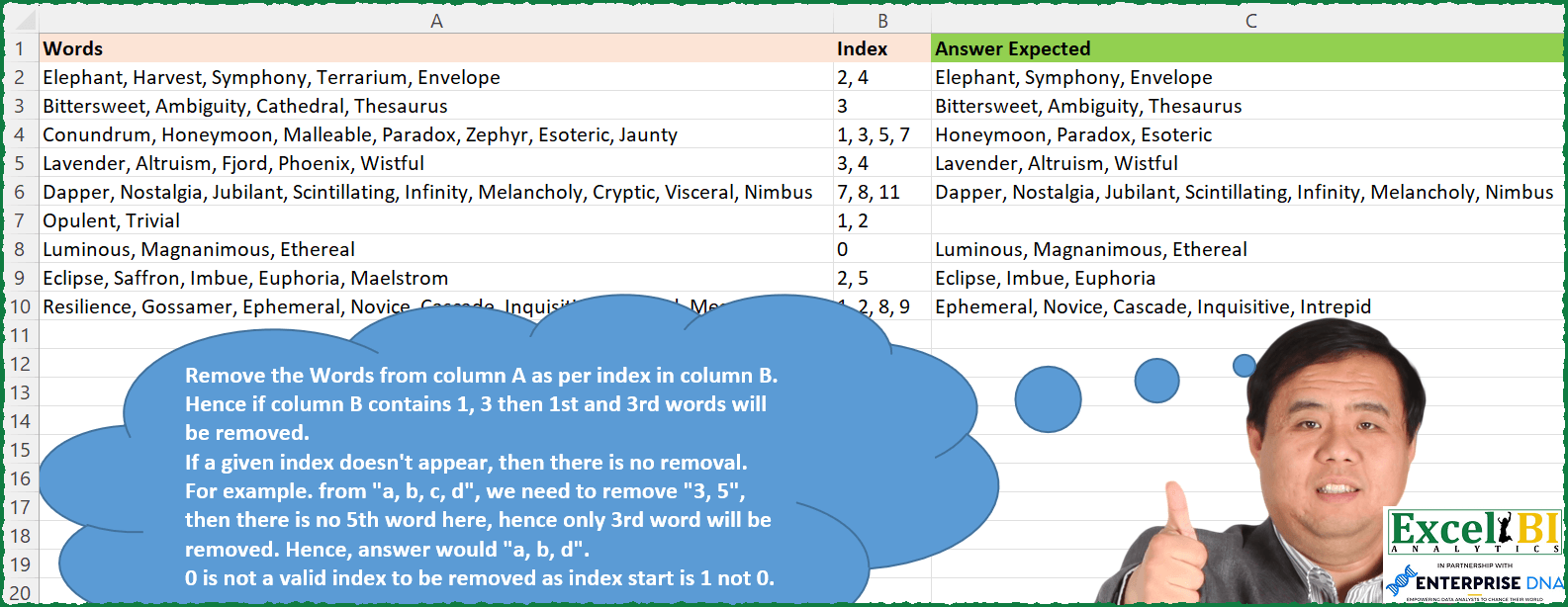
Remove the Words from column A as per index in column B. Hence if column B contains 1, 3 then 1st and 3rd words will be removed. If a given index doesn’t appear, then there is no removal. For example. from “a, b, c, d”, we need to remove “3, 5”, then there is no 5th word here, hence only 3rd word will be removed. Hence, answer would “a, b, d”. 0 is not a valid index to be removed as index start is 1 not 0.
📌 Challenge Details and Links
ExcelBI Excel Challenge Number: 152
Challenge Difficulty: ⭐️
📥Download Sample File
📥Link to the solutions on LinkedIn
Solving the challenge of Remove Words by Index with Power Query
Power Query solution 1 for Remove Words by Index, proposed by Bo Rydobon 🇹🇭:
let
  Source = Excel.CurrentWorkbook(){[Name = "Table1"]}[Content],
  Res = Table.TransformRows(
    Source,
    each
      let
        c = Text.Split([Words], ", ")
      in
        Text.Combine(
          List.RemoveItems(
            c,
            List.Transform(Text.Split([Index], ", "), each ({""} & c){Number.From(_)}?)
          ),
          ", "
        )
  )
in
  Res
Power Query solution 2 for Remove Words by Index, proposed by Zoran Milokanović:
let
  Source = Excel.CurrentWorkbook(){[Name = "Input"]}[Content],
  AddedAnswerExpected = Table.AddColumn(
    Source,
    "Answer Expected",
    each
      let
        _Words = Text.Split([Words], ", "),
        _Positions = List.RemoveItems(
          {0 .. List.Count(_Words) - 1},
          List.Transform(Text.Split([Index], ", "), each Number.FromText(_) - 1)
        )
      in
        Text.Combine(List.Transform(_Positions, each _Words{_}), ", ")
  ),
  Solution = AddedAnswerExpected[[Answer Expected]]
in
  Solution
Power Query solution 3 for Remove Words by Index, proposed by 🇰🇷 Taeyong Shin:
let
 Source = Excel.CurrentWorkbook(){[ Name = "Table1" ]}[Content],
 Result = Table.AddColumn (Source, "Result",
 each
 let
 split = Text.Split ( [Words], ", " ),
 id   = List.Transform ( Text.Split ( [Index], ", " ), Number.From ),
 items = List.RemoveItems ( { 1 .. List.Count ( split ) }, id ),
 filter = List.Transform(items, each split{_-1}),
 str  = Text.Combine ( filter, ", " )
 in
 str
 )
in
 Result

let
 Source = Excel.CurrentWorkbook(){[ Name = "Table1" ]}[Content],
 Result = Table.AddColumn (Source, "Result",
 ( x ) =>
 let
 split = Text.Split ( x[Words], ", " ),
 id = List.Transform ( Text.Split ( x[Index], ", " ), Number.From ),
 num = List.Select (
 { 1 .. List.Count ( split ) },
 each not List.Contains ( id, _ )
 ),
 filter = List.Transform ( num, each split{_ - 1} )
 in
 Text.Combine ( filter, ", " ),
 type text
 )
in
 Result
Power Query solution 4 for Remove Words by Index, proposed by Aditya Kumar Darak 🇮🇳:
let
  Source = Excel.CurrentWorkbook(){[Name = "data"]}[Content],
  Return = Table.AddColumn(
    Source,
    "Output",
    each [
      Split1    = Text.Split([Words], ", "),
      Record    = Record.FromList(Split1, List.Transform({1 .. List.Count(Split1)}, Text.From)),
      Split2    = Text.Split([Index], ", "),
      Remove    = Record.RemoveFields(Record, Split2, MissingField.Ignore),
      Remaining = Record.FieldValues(Remove),
      Final     = Text.Combine(Remaining, ", ")
    ][Final]
  )
in
  Return
Power Query solution 5 for Remove Words by Index, proposed by Alejandro Simón 🇵🇦 🇪🇸:
let
  Source = Excel.CurrentWorkbook(){[Name = "Table1"]}[Content],
  Sol = Table.AddColumn(
    Source,
    "Answer",
    each
      let
        a = Record.ToList(_),
        b = List.Transform(a, each Text.Split(_, ", ")),
        c = List.RemoveMatchingItems(
          b{0},
          List.Transform(b{1}, each try b{0}{Number.From(_) - 1} otherwise "")
        )
      in
        Text.Combine(c, ", ")
  )[[Answer]]
in
  Sol
Power Query solution 6 for Remove Words by Index, proposed by Luan Rodrigues:
let
  Fonte = Tabela1,
  Ind = Table.AddIndexColumn(Fonte, "Índice", 0, 1, Int64.Type),
  Div = Table.ExpandListColumn(
    Table.TransformColumns(
      Ind,
      {
        {
          "Words",
          Splitter.SplitTextByDelimiter(", ", QuoteStyle.Csv),
          let
            itemType = (type nullable text) meta [Serialized.Text = true]
          in
            type {itemType}
        }
      }
    ),
    "Words"
  ),
  Res = Table.Group(
    Div,
    {"Índice"},
    {
      {
        "Contagem",
        each Text.Combine(
          Table.SelectRows(
            Table.AddIndexColumn(_, "Rank", 1, 1),
            each not List.Contains(List.Transform(Text.Split([Index], ", "), Number.From), [Rank])
          )[Words],
          ", "
        )
      }
    }
  )[Contagem]
in
  Res
Power Query solution 7 for Remove Words by Index, proposed by Brian Julius:
let
  Source = Table.DuplicateColumn(
    Excel.CurrentWorkbook(){[Name = "Table1"]}[Content],
    "Words",
    "Word"
  ),
  Spl = Table.ExpandListColumn(
    Table.TransformColumns(
      Source,
      {
        {
          "Word",
          Splitter.SplitTextByDelimiter(",", QuoteStyle.Csv),
          let
            itemType = (type nullable text) meta [Serialized.Text = true]
          in
            type {itemType}
        }
      }
    ),
    "Word"
  ),
  Trim = Table.TransformColumns(Spl, {{"Word", Text.Trim, type text}}),
  Gp = Table.Group(
    Trim,
    {"Words"},
    {{"All", each _, type table [Words = text, Index = text, Word = text]}}
  ),
  Seq = Table.RemoveColumns(
    Table.AddColumn(Gp, "Sequential", each Table.AddIndexColumn([All], "Seq", 1, 1)),
    "All"
  ),
  Exp = Table.ExpandTableColumn(
    Seq,
    "Sequential",
    {"Index", "Word", "Seq"},
    {"Index", "Word", "Seq"}
  ),
  Type = Table.RemoveColumns(
    Table.SelectRows(
      Table.TransformColumnTypes(Exp, {{"Seq", type text}}),
      each not Text.Contains([Index], [Seq])
    ),
    {"Index", "Seq"}
  ),
  Gp2 = Table.Group(Type, {"Words"}, {{"All", each [Word]}}),
  Ext = Table.RenameColumns(
    Table.TransformColumns(
      Gp2,
      {"All", each Text.Combine(List.Transform(_, Text.From), ", "), type text}
    ),
    {{"Words", "Key"}, {"All", "Answers"}}
  ),
  Join = Table.SelectColumns(
    Table.Join(Source, "Words", Ext, "Key", JoinKind.LeftOuter),
    {"Words", "Answers"}
  )
in
  Join
Power Query solution 8 for Remove Words by Index, proposed by Jaroslaw Kujawa:
let
  Source = Excel.CurrentWorkbook(){[Name = "Table22"]}[Content],
  #"Split Column by Delimiter1" = Table.SplitColumn(
    Source,
    "Words",
    Splitter.SplitTextByDelimiter(", ", QuoteStyle.Csv),
    List.Transform({1 .. 100}, each "Words." & Text.From(_))
  ),
  #"Added Custom" = Table.AddColumn(
    #"Split Column by Delimiter1",
    "Custom",
    each try Text.Split([Index], ", ") otherwise {[Index]}
  ),
  #"Added Custom1" = Table.AddColumn(
    #"Added Custom",
    "Custom.1",
    each [
      a = Lines.ToText(
        List.RemoveNulls(
          Record.ToList(
            Record.SelectFields(
              _,
              List.RemoveItems(
                Record.FieldNames(_),
                {"Index", "Custom"}
                  & List.Transform(#"Added Custom"{_}[Custom], each "Words." & Text.From(_))
              )
            )
          )
        ),
        ", "
      ),
      b = Text.Length(a),
      c = if b > 0 then Text.Start(a, b - 2) else null
    ][c]
  )
in
  Table.SelectColumns(#"Added Custom1", {"Custom.1"})
Power Query solution 9 for Remove Words by Index, proposed by Jan Willem Van Holst:
let
  Source = yourData,
  #"Added Custom" = Table.AddColumn(
    Source,
    "Answer",
    each
      let
        listOfIndex       = List.Transform(Text.Split([Index], ", "), each Number.FromText(_) - 1),
        listOfWords       = Text.Split([Words], ", "),
        listOfIndexSelect = List.Select(listOfIndex, each _ >= 0 and _ < List.Count(listOfWords)),
        listToRemove      = List.Transform(listOfIndexSelect, each List.Range(listOfWords, _, 1){0}),
        cleanedList       = List.RemoveMatchingItems(listOfWords, listToRemove),
        result            = Text.Combine(cleanedList, ", ")
      in
        result
  )
in
  #"Added Custom"
Power Query solution 10 for Remove Words by Index, proposed by Udit Chatterjee:
let
  fxGenerateRequiredWords = (words as text, index_pos as text) =>
    let
      wordsList = Text.Split(words, ","),
      wordListLen = List.Count(wordsList),
      validIndexList = List.Select(
        Text.Split(index_pos, ","),
        each Number.FromText(_) > 0 and Number.FromText(_) <= wordListLen
      ),
      zeroBasedIndexList = List.Transform(validIndexList, each Number.FromText(_) - 1),
      wordsAtIndexPos = List.Transform(zeroBasedIndexList, each wordsList{_}),
      reqWordsList = List.Transform(List.Difference(wordsList, wordsAtIndexPos), each Text.Trim(_)),
      reqWordString = Text.Combine(reqWordsList, ", ")
    in
      reqWordString,
  Source = xlProblem151,
  addFunctionCol = Table.AddColumn(
    Source,
    "Required Words",
    each fxGenerateRequiredWords([Words], [Index]),
    type text
  ),
  keepRequiredCol = Table.SelectColumns(addFunctionCol, {"Required Words"})
in
  keepRequiredCol
Solving the challenge of Remove Words by Index with Excel
Excel solution 1 for Remove Words by Index, proposed by Bo Rydobon 🇹🇭:
=MAP(A2:A10,B2:B10,LAMBDA(a,b,LET(c,TEXTSPLIT(a,,", "),d,SEQUENCE(ROWS(c)),ARRAYTOTEXT(FILTER(c,ISNA(XMATCH(d,--TEXTSPLIT(b,","))),"")))))Excel solution 2 for Remove Words by Index, proposed by Rick Rothstein:
=MAP(A2:A10,B2:B10,LAMBDA(a,b,LET(d,", ",t,TEXTSPLIT(a,,d),TEXTJOIN(d,,MAP(SEQUENCE(ROWS(t)),LAMBDA(x,IF(ISERR(FIND(d&x&d,d&b&d)),INDEX(t,x),"")))))))Excel solution 3 for Remove Words by Index, proposed by John V.:
=IFERROR(MAP(A2:A10,B2:B10,LAMBDA(w,i,ARRAYTOTEXT(FILTERXML(""&SUBSTITUTE(w,", ","")&"","//b["&TEXTJOIN(" and ",,"position()!="&TEXTSPLIT(i,", "))&"]")))),"")

✅ With just 365:
=MAP(A2:A10,B2:B10,LAMBDA(a,b,LET(w,TEXTSPLIT(a,,", "),s,SEQUENCE(ROWS(w)),ARRAYTOTEXT(FILTER(w,ISNA(XMATCH(s,--TEXTSPLIT(b,", "))),"")))))
Excel solution 4 for Remove Words by Index, proposed by 🇰🇷 Taeyong Shin:
=MAP(A2:A10, " " & B2:B10 & ",", LAMBDA(w, idx, LET(s, TEXTSPLIT(w, , ", "), TEXTJOIN(", ", , REPT(s, ISERR(FIND(" " & SEQUENCE(ROWS(s)) & ",", idx)))))))Excel solution 5 for Remove Words by Index, proposed by Kris Jaganah:
=MAP(A2:A10,B2:B10,LAMBDA(x,y,LET(a,TEXTSPLIT(x,,", "),b,--TEXTSPLIT(y,,", "),c,XLOOKUP(XMATCH(a,a),b,b,"#"),TEXTJOIN(", ",1,FILTER(a,c="#","")))))Excel solution 6 for Remove Words by Index, proposed by Julian Poeltl:
=MAP(A2:A10,B2:B10,LAMBDA(W,I,LET(SP,TEXTSPLIT(W,", "),N,COLUMNS(SP),S,SEQUENCE(N),IFERROR(TEXTJOIN(", ",,CHOOSECOLS(SP,TOROW(IF(ISNUMBER(SEARCH(", "&S&",",", "&I&",")),NA(),S),3))),""))))Excel solution 7 for Remove Words by Index, proposed by Aditya Kumar Darak 🇮🇳:
=IFERROR(
 MAP(
 A2:A10,
 B2:B10,
 LAMBDA(a, b,
 LET(
 s1, TEXTSPLIT(a, , ", "),
 s2, --TEXTSPLIT(b, , ", "),
 sq, SEQUENCE(ROWS(s1)),
 re, TOCOL(INDEX(s1, UNIQUE(VSTACK(sq, s2), , 1)), 2),
 r, ARRAYTOTEXT(re),
 r
 )
 )
 ),
 ""
)
Excel solution 8 for Remove Words by Index, proposed by Timothée BLIOT:
=LET(A, TEXTSPLIT(TEXTJOIN("/",,A2:A10),", ","/",,,""), I, B2:B10,
B, MAKEARRAY(ROWS(A),COLUMNS(A), LAMBDA(x,y, IF(SUM(--(y=(1*TEXTSPLIT(INDEX(I,x),", ",,,,0)))),"",INDEX(A,x,y)))),
BYROW(B, LAMBDA(x, TEXTJOIN(", ",,x))))
Excel solution 9 for Remove Words by Index, proposed by Hussein SATOUR:
=MAP(A2:A10, B2:B10, LAMBDA(x,y, LET(a, TEXTSPLIT(x, ", "), b, SEQUENCE(COUNTA(a)), ARRAYTOTEXT(CHOOSECOLS(a, FILTER(b, MAP(b, LAMBDA(z, ISNA(XMATCH(z, --TEXTSPLIT(y, ", ")))))))))))Excel solution 10 for Remove Words by Index, proposed by Oscar Mendez Roca Farell:
=MAP(A2:A10; B2:B10; LAMBDA(i; x; LET(_t; TEXTSPLIT(i ; ;", ");
 _n;--TEXTSPLIT(x; ", "); TEXTJOIN(", "; ;
 FILTER(_t; BYROW(--(SEQUENCE(ROWS(_t))<>_n);
 LAMBDA(i; PRODUCT( i)));"")))))
Excel solution 11 for Remove Words by Index, proposed by Sunny Baggu:
=MAP(A2:A10,B2:B10,LAMBDA(a,b,
LET(_sp,TEXTSPLIT(a,,", "),
_num,SEQUENCE(COUNTA(_sp)),
_index,TEXTSPLIT(b,", ")+0,
_cri,_num<>_index,
_cond,BYROW(_cri,LAMBDA(a,AND(a))),
IFERROR(ARRAYTOTEXT(FILTER(_sp,_cond)),""))))
Excel solution 12 for Remove Words by Index, proposed by Md. Zohurul Islam:
=MAP(A2:A10,B2:B10,LAMBDA(x,y,LET(
a,TEXTSPLIT(x,,", "),
sq,SEQUENCE(COUNTA(a)),
b,ABS(TEXTSPLIT(y,,", ")),
c,XMATCH(sq,b),
d,FILTER(sq,ISERROR(c)),
e,IFERROR(ARRAYTOTEXT(XLOOKUP(d,sq,a)),""),
e)
))
Excel solution 13 for Remove Words by Index, proposed by Tolga Demirci, PMP, PMI-ACP, MOS-Expert:
=MAP(A2:A10;B2:B10;LAMBDA(i;j;LET(x;TEXTSPLIT(i;", ");y;IF(ISNUMBER(FIND(IF(TOCOL(x)<>"";ROW(INDIRECT("A1:"&"A"&COUNTA(TOCOL(x))));"");j;1));"";ROW(INDIRECT("A1:"&"A"&COUNTA(TOCOL(x)))));z;IFERROR(INDEX(x;y);"");TEXTJOIN(", ";;FILTER(z;z<>"")))))Excel solution 14 for Remove Words by Index, proposed by Victor Momoh (MVP, MOS, R.Eng):
=MAP(A2:A10,B2:B10,LAMBDA(s,t,
TEXTJOIN(", ",1,LET(a,TEXTSPLIT(s,,", "),
MAP(a,SEQUENCE(COUNTA(a)),LAMBDA(x,y,IF(OR(TEXTSPLIT(t,", ")+0=y),"",x)))))))
Excel solution 15 for Remove Words by Index, proposed by Abhishek Kumar Jain:
=MAP(A2:A10,B2:B10,LAMBDA(x,y,LET(a,TOCOL(TEXTSPLIT(x,", ")),b,--TO&COL(TEXTSPLIT(y,", ")),c,SEQUENCE(COUNTA(a)),IFERROR(TEXTJOIN(", ",0,FILTER(a,IFERROR(XMATCH(c,b),0)=0)),""))))Excel solution 16 for Remove Words by Index, proposed by Guillermo Arroyo:
=MAP(A2:A10,B2:B10,LAMBDA(i,j,LET(w,TEXTSPLIT(i,", "),REDUCE("",SEQUENCE(COLUMNS(w)),LAMBDA(a,b,IF(OR(--TEXTSPLIT(j,", ")=b),a,TEXTJOIN(", ",,a,INDEX(w,1,b))))))))Excel solution 17 for Remove Words by Index, proposed by Mohamed Helmy:
=MAP(A2:A10,B2:B10,LAMBDA(A,B,LET(
e,", ",
V,TEXTSPLIT(A,,e),
ARRAYTOTEXT(FILTER(V,
ISERR(FIND(e&SEQUENCE(ROWS(V))&e,e&B&e)),"")))))
Excel solution 18 for Remove Words by Index, proposed by Mohamed Helmy:
=MAP(A2:A10,B2:B10,LAMBDA(A,B,LET(
V,TEXTSPLIT(A,,", "),ARRAYTOTEXT(FILTER(V,ISERR(
FIND(", "&SEQUENCE(ROWS(V))&",",", "&B&",")),"")))))
Excel solution 19 for Remove Words by Index, proposed by Mohamed Helmy:
=MAP(A2:A10,B2:B10,LAMBDA(A,B,LET(
V,TEXTSPLIT(A,,", "),
TEXTJOIN(", ",,IFERROR(
IF(FIND(", "&SEQUENCE(ROWS(V))&",",", "&B&","),""),V)))))
Excel solution 20 for Remove Words by Index, proposed by Mohamed Helmy:
=MAP(A2:A10,B2:B10,LAMBDA(A,B,LET(
V,TEXTSPLIT(A,,", "),
R,SEQUENCE(ROWS(V)),
TEXTJOIN(", ",,IFERROR(IF(FIND(", "&R&",",", "&B&","),""),V)))))
Excel solution 21 for Remove Words by Index, proposed by Rayan S.:
=MAP(
 A2:A10,
 B2:B10,
 LAMBDA(a, b,
 LET(
 x, TEXTSPLIT(a, , ", "),
 c, COUNTA(x),
 s, SEQUENCE(c, , 1, 1) + 0,
 xx, TEXTSPLIT(b, , ", ") + 0,
 m, IFERROR(XMATCH(s, xx, 0), 0),
 IFERROR( TEXTJOIN(", ", , FILTER(x, m = 0)), "" )
 )
 )
)
Excel solution 22 for Remove Words by Index, proposed by Gabriel Raigosa:
=IFERROR(MAP(A2:A10;B2:B10;LAMBDA(w;i; TEXTJOIN(", ";;LET(wr;TEXTSPLIT(w;", ");FILTER(wr;ISERROR(XMATCH(SEQUENCE(;COUNTA(wr));TEXTSPLIT(i;", ")*1))))) ));"")Excel solution 23 for Remove Words by Index, proposed by Patrick O'Beirne:
=TEXTJOIN(",",TRUE,
LET(list,TEXTSPLIT(A2,","),
excludes,INDEX(list,VALUE(TEXTSPLIT(B2,","))),
FILTER(list,ISNA(MATCH(list,excludes,0)),"")))
Excel solution 24 for Remove Words by Index, proposed by Stéphane T.:
=SIERREUR(MAP(A2:A10;B2:B10;LAMBDA(a;b;JOINDRE.TEXTE(", ";;LET(x; FRACTIONNER.TEXTE(a;;", ");y; CNUM(FRACTIONNER.TEXTE(b;;", ")); FILTRE(x;ESTNA(RECHERCHEV(SEQUENCE(NBVAL(x));y;1;0)))))));"")Solving the challenge of Remove Words by Index with Excel VBA
Excel VBA solution 1 for Remove Words by Index, proposed by Patrick O'Beirne:
Function ExcludeIndexes(List As String, Indexes As String) As String
Dim vList As Variant, vIndexes As Variant, iNdx As Long, Ndx As Long, Excluded As String
vList = Split(List, ",")
vIndexes = Split(Indexes, ",")
Excluded = ""
For iNdx = LBound(vIndexes) To UBound(vIndexes)
 Ndx = vIndexes(iNdx) - 1
 If Ndx >= LBound(vList) And Ndx <= UBound(vList) Then
 vList(Ndx) = ""
 End If
Next iNdx
ExcludeIndexes = ""
For iNdx = LBound(vList) To UBound(vList)
 If Len(vList(iNdx)) > 0 Then
 ExcludeIndexes = ExcludeIndexes & vList(iNdx) & ","
 End If
Next
ExcludeIndexes = Left$(ExcludeIndexes, Len(ExcludeIndexes) - 1)
End Function
&&