
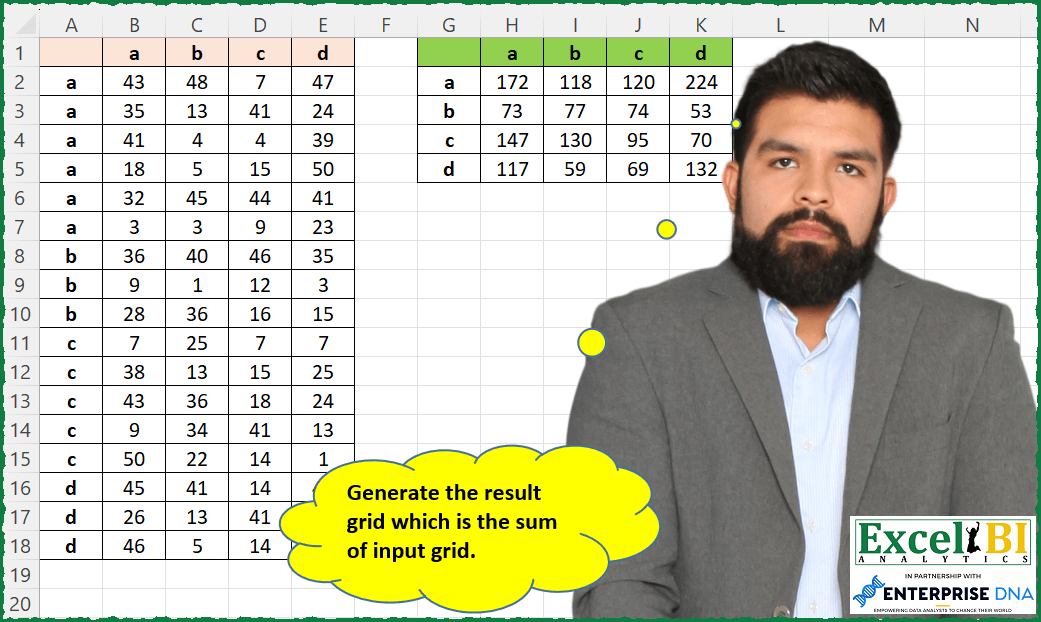
Generate the result grid which is the sum of input grid.
📌 Challenge Details and Links
ExcelBI Excel Challenge Number: 142
Challenge Difficulty: ⭐️
📥Download Sample File
📥Link to the solutions on LinkedIn
Solving the challenge of Grid Sum Generation with Power Query
Power Query solution 1 for Grid Sum Generation, proposed by Bo Rydobon 🇹🇭:
let
  Source = Excel.CurrentWorkbook(){[Name = "Table1"]}[Content],
  Grouped = Table.ExpandRecordColumn(
    Table.Group(
      Source,
      "Column1",
      {
        "Re",
        each
          let
            t = Table.RemoveColumns(_, "Column1")
          in
            Record.FromList(List.Transform(Table.ToColumns(t), List.Sum), Table.ColumnNames(t))
      }
    ),
    "Re",
    List.RemoveFirstN(Table.ColumnNames(Source))
  )
in
  Grouped
Power Query solution 2 for Grid Sum Generation, proposed by Zoran Milokanović:
let
  Source = Excel.CurrentWorkbook(){[Name = "Table1"]}[Content],
  ChangedType = Table.TransformColumnTypes(
    Source,
    {{"a", Int64.Type}, {"b", Int64.Type}, {"c", Int64.Type}, {"d", Int64.Type}, {" ", type text}}
  ),
  GroupedRows = Table.Group(
    ChangedType,
    {" "},
    {
      {"a", each List.Sum([a]), type nullable number},
      {"b", each List.Sum([b]), type nullable number},
      {"c", each List.Sum([c]), type nullable number},
      {"d", each List.Sum([d]), type nullable number}
    }
  )
in
  GroupedRows
Power Query solution 3 for Grid Sum Generation, proposed by Kris Jaganah:
let
  Source = Excel.CurrentWorkbook(){[Name = "Table1"]}[Content],
  #"Changed Type" = Table.TransformColumnTypes(
    Source,
    {
      {"Column1", type text},
      {"a", Int64.Type},
      {"b", Int64.Type},
      {"c", Int64.Type},
      {"d", Int64.Type}
    }
  ),
  #"Unpivoted Other Columns" = Table.UnpivotOtherColumns(
    #"Changed Type",
    {"Column1"},
    "Attribute",
    "Value"
  ),
  #"Merged Columns" = Table.CombineColumns(
    #"Unpivoted Other Columns",
    {"Column1", "Attribute"},
    Combiner.CombineTextByDelimiter("", QuoteStyle.None),
    "Merged"
  ),
  #"Grouped Rows" = Table.Group(
    #"Merged Columns",
    {"Merged"},
    {{"Sum", each List.Sum([Value]), type number}}
  ),
  #"Split Column by Position" = Table.SplitColumn(
    #"Grouped Rows",
    "Merged",
    Splitter.SplitTextByPositions({0, 1}, false),
    {"Merged.1", "Merged.2"}
  ),
  #"Changed Type1" = Table.TransformColumnTypes(
    #"Split Column by Position",
    {{"Merged.1", type text}, {"Merged.2", type text}}
  ),
  #"Pivoted Column" = Table.Pivot(
    #"Changed Type1",
    List.Distinct(#"Changed Type1"[Merged.2]),
    "Merged.2",
    "Sum"
  )
in
  #"Pivoted Column"
Power Query solution 4 for Grid Sum Generation, proposed by Aditya Kumar Darak 🇮🇳:
lete use of Power Query UI here.

let
 Source = Excel.CurrentWorkbook(){[ Name = "data" ]}[Content],
 Unpivot = Table.UnpivotOtherColumns ( Source, { "Column1" }, "Attribute", "Value" ),
 Group  = Table.Group (
 Unpivot,
 { "Column1", "Attribute" },
 { "Total", each List.Sum ( [Value] ) }
 ),
 Return = Table.Pivot ( Group, List.Distinct ( Group[Attribute] ), "Attribute", "Total" )
in
 Return
Power Query solution 5 for Grid Sum Generation, proposed by Aditya Kumar Darak 🇮🇳:
let
  Source = Excel.CurrentWorkbook(){[Name = "data"]}[Content],
  Header = List.Skip(Table.ColumnNames(Source)),
  Group = Table.Group(
    Source,
    {"Column1"},
    {
      "All",
      each [
        List  = List.Skip(Table.ToColumns(_)),
        Total = List.Transform(List, (f) => {List.Sum(f)}),
        Table = Table.FromColumns(Total, Header)
      ][Table]
    }
  ),
  Expand = Table.ExpandTableColumn(Group, "All", Header)
in
  Expand
Power Query solution 6 for Grid Sum Generation, proposed by Alejandro Simón 🇵🇦 🇪🇸:
let
  Source = Excel.CurrentWorkbook(){[Name = "Table1"]}[Content],
  Grouped = Table.Group(
    Source,
    {"Column1"},
    {
      {
        "Count",
        each
          let
            a = _,
            b = List.Transform(List.Skip(Table.ToColumns(a)), each List.Sum(_)),
            c = Table.FromRows({b}, List.Skip(Table.ColumnNames(a)))
          in
            c
      }
    }
  ),
  Sol = Table.ExpandTableColumn(Grouped, "Count", List.Skip(Table.ColumnNames(Source)))
in
  Sol
Power Query solution 7 for Grid Sum Generation, proposed by Luan Rodrigues:
let
  Fonte = Tabela1,
  gp = Table.Group(
    Fonte,
    {"Coluna1"},
    {
      {
        "Contagem",
        each [
          a = _,
          b = Table.Transpose(
            Table.FromList(
              List.Transform(
                List.Transform(
                  Table.ToColumns(a),
                  each try List.Sum(_) otherwise List.Distinct(Table.ToColumns(a){0}){0}
                ),
                Text.From
              )
            ),
            Table.ColumnNames(Fonte)
          )
        ][b]
      }
    }
  ),
  result = Table.ExpandTableColumn(gp, "Contagem", List.RemoveFirstN(Table.ColumnNames(Fonte), 1))
in
  result
Power Query solution 8 for Grid Sum Generation, proposed by Brian Julius:
let
  Source = Excel.CurrentWorkbook(){[Name = "Table1"]}[Content],
  UnpivotOther = Table.UnpivotOtherColumns(Source, {"Column1"}, "Column", "Value"),
  Group = Table.Group(
    UnpivotOther,
    {"Column1", "Column"},
    {{"Total", each List.Sum([Value]), type number}}
  ),
  Pivot = Table.Pivot(Group, List.Distinct(Group[Column]), "Column", "Total")
in
  Pivot
Power Query solution 9 for Grid Sum Generation, proposed by Rafael González B.:
let
  Source = Excel.CurrentWorkbook(){[Name = "Grid"]}[Content],
  ChangeTypes = Table.TransformColumnTypes(
    Source,
    {
      {"Columna1", type text},
      {"a", Int64.Type},
      {"b", Int64.Type},
      {"c", Int64.Type},
      {"d", Int64.Type}
    }
  ),
  Unpivot = Table.UnpivotOtherColumns(ChangeTypes, {"Columna1"}, "Letter2", "Amount"),
  CombineLetters = Table.CombineColumns(
    Unpivot,
    {"Columna1", "Letter2"},
    Combiner.CombineTextByDelimiter("", QuoteStyle.None),
    "Group"
  ),
  GroupBy = Table.Group(CombineLetters, {"Group"}, {{"Sum", each List.Sum([Amount]), type number}}),
  SplitByLetters = Table.SplitColumn(
    GroupBy,
    "Group",
    Splitter.SplitTextByRepeatedLengths(1),
    {"Group.1", "Group.2"}
  ),
  Pivot = Table.Pivot(
    SplitByLetters,
    List.Distinct(SplitByLetters[Group.2]),
    "Group.2",
    "Sum",
    List.Sum
  ),
  FinalResult = Table.RenameColumns(Pivot, {{"Group.1", "Letters"}})
in
  FinalResult
Power Query solution 10 for Grid Sum Generation, proposed by Krzysztof Kominiak:
let
  Source = Excel.CurrentWorkbook(){[Name = "Table1"]}[Content],
  UnpivotOthCols = Table.UnpivotOtherColumns(Source, {"Column1"}, "Attr", "Value"),
  PivotCol = Table.Pivot(
    UnpivotOthCols,
    List.Distinct(UnpivotOthCols[Attr]),
    "Attr",
    "Value",
    List.Sum
  )
in
  PivotCol
Power Query solution 11 for Grid Sum Generation, proposed by Udit Chatterjee:
let
  Source = Excel.CurrentWorkbook(){[Name = "grid_sum_table"]}[Content],
  DatatypeChange = Table.TransformColumnTypes(
    Source,
    {
      {"Column1", type text},
      {"a", Int64.Type},
      {"b", Int64.Type},
      {"c", Int64.Type},
      {"d", Int64.Type}
    }
  ),
  GroupedResult = Table.Group(
    DatatypeChange,
    {"Column1"},
    {
      {"a", each List.Sum([a]), type nullable number},
      {"b", each List.Sum([b]), type nullable number},
      {"c", each List.Sum([c]), type nullable number},
      {"d", each List.Sum([d]), type nullable number}
    }
  )
in
  GroupedResult
Power Query solution 12 for Grid Sum Generation, proposed by Sue Bayes:
let
  Source = Excel.CurrentWorkbook(){[Name = "Table1"]}[Content],
  Unpivot = Table.UnpivotOtherColumns(Source, {"Column1"}, "Attribute", "Value"),
  Grp = Table.Group(
    Unpivot,
    {"Column1", "Attribute"},
    {{"Sum", each List.Sum([Value]), type number}}
  ),
  Pivot = Table.Pivot(Grp, List.Distinct(Grp[Attribute]), "Attribute", "Sum", List.Sum)
in
  Pivot
Solving the challenge of Grid Sum Generation with Excel
Excel solution 1 for Grid Sum Generation, proposed by Bo Rydobon 🇹🇭:
=LET(a,A2:A18,u,UNIQUE(a),VSTACK(A1:E1&"",HSTACK(u,MMULT(N(TOROW(a)=u),B2:E18))))Excel solution 2 for Grid Sum Generation, proposed by Rick Rothstein:
=LET(b,B1:E1,t,TOCOL(b),f,LAMBDA(c,SUMIF(A2:A18,t,c)),VSTACK(HSTACK("",b),HSTACK(t,f(B2:B18),f(C2:C18),f(D2:D18),f(E2:E18))))Excel solution 3 for Grid Sum Generation, proposed by John V.:
=HSTACK(TOCOL(A1:E1&""),VSTACK(B1:E1,MMULT(--TRANSPOSE(A2:A18=B1:E1),B2:E18)))Excel solution 4 for Grid Sum Generation, proposed by محمد حلمي:
=LET(
v,UNIQUE(A2:A18),
HSTACK(VSTACK("",v),VSTACK(TOROW(v),
MAKEARRAY(4,4,LAMBDA(r,c,
INDEX(SUMIF(A2:A18,v,INDEX(B2:E18,,c)),r,))))))
Excel solution 5 for Grid Sum Generation, proposed by محمد حلمي:
=LET(
u,UNIQUE(A2:A18),
VSTACK(HSTACK("",TOROW(u)),
REDUCE(u,SEQUENCE(4),LAMBDA(a,d,
HSTACK(a,SUMIF(A2:A18,u,INDEX(B2:E18,,d)))))))
Excel solution 6 for Grid Sum Generation, proposed by 🇰🇷 Taeyong Shin:
=LET(h,B1:E1,VSTACK(T(+A1:E1),HSTACK(TOCOL(h),MMULT(TRANSPOSE(N(A2:A18=h)),B2:E18))))Excel solution 7 for Grid Sum Generation, proposed by Kris Jaganah:
=HSTACK(VSTACK("",UNIQUE(A2:A18)),VSTACK(B1:E1,TRANSPOSE(--TEXTSPLIT(TEXTJOIN("@",1,BYCOL(B2:E18,LAMBDA(x,TEXTJOIN("#",1,SUMIFS(x,A2:A18,UNIQUE(A2:A18)))))),"#","@"))))Excel solution 8 for Grid Sum Generation, proposed by Julian Poeltl:
=LET(U,UNIQUE(A2:A18),R,TEXTSPLIT(TEXTJOIN("|",,MAP(U,LAMBDA(A,TEXTJOIN(",",,A,BYCOL(FILTER(B2:E18,A2:A18=A),LAMBDA(B,SUM(B))))))),",","|"),VSTACK(HSTACK("",TOROW(U)),IFERROR(R*1,R)))Excel solution 9 for Grid Sum Generation, proposed by Alejandro Campos:
=GROUPBY(A2:A18, B2:E18, SUM, , 0)Excel solution 10 for Grid Sum Generation, proposed by Aditya Kumar Darak 🇮🇳:
=LET(
 _d, A1:E18,
 _ch, TRIM(TAKE(_d, 1)),
 _b, DROP(_d, 1, 1),
 _rh, DROP(TAKE(_d, , 1), 1),
 _urh, UNIQUE(_rh),
 _c, MMULT(--(TOROW(_rh) = _urh), _b),
 _r, VSTACK(_ch, HSTACK(_urh, _c)),
 _r
)
Excel solution 11 for Grid Sum Generation, proposed by Timothée BLIOT:
=LET(a,B2:E18, b,B1:E1, c,A2:A18, MAKEARRAY(COLUMNS(a),COLUMNS(a), LAMBDA(x,y, SUMPRODUCT((INDEX(b,,y)=b)*(INDEX(b,,x)=c)*a))))Excel solution 12 for Grid Sum Generation, proposed by Hussein SATOUR:
=LET(h, A2:A18, v, B1:E1, MAP(UNIQUE(h)&v, LAMBDA(x, SUM(FILTER(TOCOL(B2:E18), TOCOL(h&v) = x)))))Excel solution 13 for Grid Sum Generation, proposed by Sunny Baggu:
=LET(_u,UNIQUE(A2:A18),
VSTACK(HSTACK("",B1:E1),HSTACK(_u,DROP(REDUCE("",_u,LAMBDA(a,v,VSTACK(a,BYCOL((A2:A18=v)*(B2:E18),LAMBDA(c,SUM(c)))))),1))))
Excel solution 14 for Grid Sum Generation, proposed by Sunny Baggu:
=VSTACK(HSTACK("",B1:E1),HSTACK(UNIQUE(A2:A18),
MAKEARRAY(ROWS(UNIQUE(A2:A18)),COLUMNS(B1:E1),
LAMBDA(r,c,SUM(CHOOSECOLS((FILTER(B2:E18,A2:A18=CHOOSEROWS(UNIQUE(A2:A18),r))),c))))))
Excel solution 15 for Grid Sum Generation, proposed by Sunny Baggu:
=LET(_u,UNIQUE(A2:A18),
VSTACK(HSTACK("",B1:E1),HSTACK(_u,DROP(REDUCE("",_u,LAMBDA(a,v,VSTACK(a,BYCOL(FILTER(B2:E18,A2:A18=v),LAMBDA(a,SUM(a)))))),1))))
Excel solution 16 for Grid Sum Generation, proposed by Md. Zohurul Islam:
=LET(a,A2:A18,b,B1:E1,c,B2:E18,
PIVOTBY(TOCOL(IFNA(a,b)),TOCOL(IFNA(b,a)),TOCOL(c),SUM,0,0,,0))
Excel solution 17 for Grid Sum Generation, proposed by Md. Zohurul Islam:
=VSTACK(HSTACK("",B1:E1),GROUPBY(A2:A18,B2:E18,SUM,0,0))Excel solution 18 for Grid Sum Generation, proposed by Md. Zohurul Islam:
=LET(
a,A2:A18,
b,B1:E1,
d,B2:E18,
p,TOCOL(IFNA(a,b)),
q,TOCOL(IFNA(b,a)),
r,p&q,
s,TOCOL(d),
t,UNIQUE(a),
u,MAP(t&b,LAMBDA(x,SUM(FILTER(s,r=x)))),
v,VSTACK(HSTACK("",b),HSTACK(t,u)),
v)
Excel solution 19 for Grid Sum Generation, proposed by Charles Roldan:
=MMULT(TRANSPOSE(--(A2:A18=B1:E1&)),B2:E18)Excel solution 20 for Grid Sum Generation, proposed by Stefan Olsson:
=QUERY({A1:E18}, "select Col1, sum(Col2), sum(Col3), sum(Col4), Sum(Col5) group by Col1",1)Excel solution 21 for Grid Sum Generation, proposed by Gerson Pineda:
=LET(c,B1:E1,HSTACK(""&TOCOL(A1:E1),REDUCE(c,c,LAMBDA(ii,i,VSTACK(ii,MAP(c,LAMBDA(x,SUM(INDEX(FILTER(B2:E18,A2:A18=i),,MATCH(x,c,))))))))))Excel solution 22 for Grid Sum Generation, proposed by Guillermo Arroyo:
=LET(m,A1:E18,r,DROP(CHOOSECOLS(m,1),1),c,DROP(CHOOSEROWS(m,1),,1),d,DROP(m,1,1),ru,UNIQUE(r),VSTACK(HSTACK("",c),HSTACK(ru,MAKEARRAY(ROWS(ru),COLUMNS(c),LAMBDA(i,j,SUM(MMULT(d,--(TRANSPOSE(c)=INDEX(c,1,j)))*(--(r=INDEX(ru,i,1)))))))))Excel solution 23 for Grid Sum Generation, proposed by Anup Kumar:
=B1:E1
In Cell G2 : =TRANSPOSE(B1:E1)

In Cell H2 : =SUMIFS(B$2:B$18,$A$2:$A$18,$G2)
 or
 =SUMPRODUCT(B$2:B$18*($A$2:$A$18=$G2))
Excel solution 24 for Grid Sum Generation, proposed by Rayan S.:
=LET(
 x, A2:A18,
 y, MAP(
 G8#,
 LAMBDA(u, ARRAYTOTEXT(BYCOL(FILTER(B2:E18, x = u), LAMBDA(a, SUM(a) & " "))))
 ),
 VSTACK(
 HSTACK(" ", TOROW(UNIQUE(x))),
 HSTACK(UNIQUE(x), VSTACK(TEXTSPLIT(TEXTJOIN("-", , y), ", ", "-") + 0))
 )
)
Excel solution 25 for Grid Sum Generation, proposed by Amr Tawfik CMA®,FMVA,Lean Coach:
=LET(a,B2:B18,b,C2:C18,c,D2:D18,d,E2:E18,range,A2:A18,input1,
HSTACK(SUMIFS(a,range,G2#),SUMIFS(b,range,G2#),SUMIFS(c,range,G2#),SUMIFS(d,range,G2#))
,input1)
Excel solution 26 for Grid Sum Generation, proposed by Roger Van Decraen:
=SUMPRODUCT(($B$2:$E$18)*($A$2:$A$18=$G3)*($B$1:$E$1=H$2))Solving the challenge of Grid Sum Generation with Python in Excel
Python in Excel solution 1 for Grid Sum Generation, proposed by Alejandro Campos:
df = pd.DataFrame(xl("B1:E18", headers=True).values, index=[l for letra in xl("A1:A18", headers=True)['_'] for l in letra])
df.groupby(df.index).sum().set_axis(['a', 'b', 'c', 'd'], axis=1)
&&