
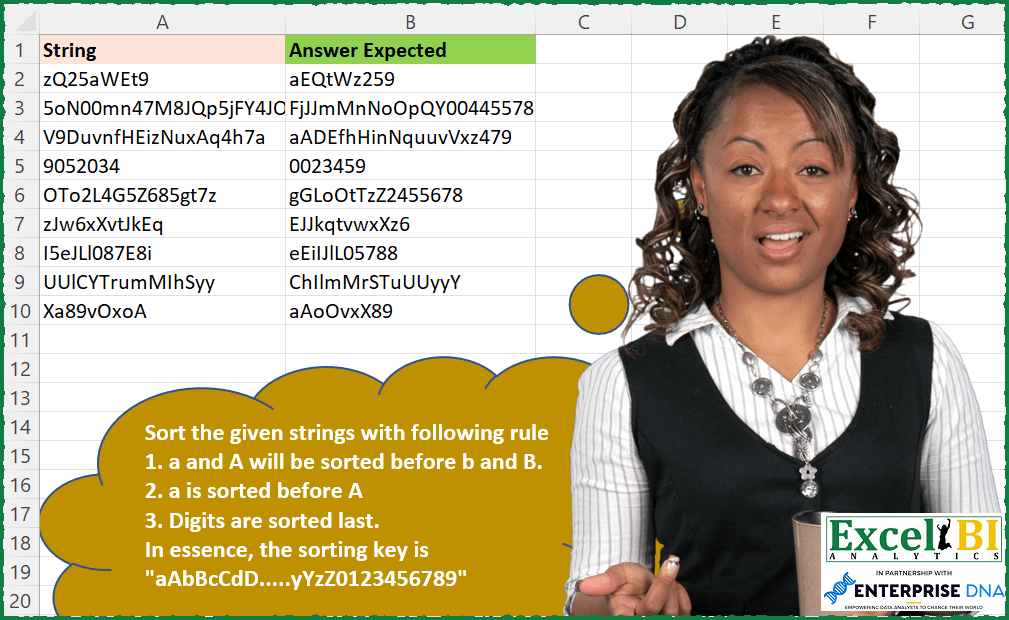
We had a sorting challenge recently. Now this time, sorting rules are different unlike Challenge 116. Sort the given strings with following rule 1. a and A will be sorted before b and B. 2. a is sorted before A 3. Digits are sorted last. In essence, the sorting key is “aAbBcCdD…..yYzZ0123456789”
📌 Challenge Details and Links
ExcelBI Excel Challenge Number: 129
Challenge Difficulty: ⭐️⭐️
📥Download Sample File
📥Link to the solutions on LinkedIn
Solving the challenge of Sort with Custom Rules with Power Query
Power Query solution 1 for Sort with Custom Rules, proposed by Bo Rydobon 🇹🇭:
let
  Source = Excel.CurrentWorkbook(){[Name = "Table1"]}[Content],
  Rs = Table.TransformColumns(
    Source,
    {
      "String",
      each Text.Combine(
        List.Sort(
          Text.ToList(_),
          {{each Character.ToNumber(_) > 64, 1}, {each Text.Lower(_), 0}, {each _ < "a", 0}}
        )
      )
    }
  )
in
  Rs
Power Query solution 2 for Sort with Custom Rules, proposed by Aditya Kumar Darak 🇮🇳:
let
  Source = Excel.CurrentWorkbook(){[Name = "data"]}[Content],
  Order = List.Buffer(List.Combine(List.Zip({{"a" .. "z"}, {"A" .. "Z"}})) & {"0" .. "9"}),
  Custom1 = Table.AddColumn(
    Source,
    "Output",
    each Text.Combine(List.Sort(Text.ToList([String]), (f) => List.PositionOf(Order, f)))
  )
in
  Custom1
Power Query solution 3 for Sort with Custom Rules, proposed by Alejandro Simón 🇵🇦 🇪🇸:
let
  Source = Excel.CurrentWorkbook(){[Name = "Table1"]}[Content],
  Sol = Table.AddColumn(
    Source,
    "Custom",
    each
      let
        a = List.Combine(List.Zip({{"a" .. "z"}, {"A" .. "Z"}})),
        b = Text.ToList([String]),
        c = List.Sort(List.RemoveMatchingItems(b, {"0" .. "9"}), each List.PositionOf(a, _)),
        d = List.Sort(List.RemoveMatchingItems(b, {"A" .. "z"}))
      in
        Text.Combine(c & d, "")
  )
in
  Sol
Power Query solution 4 for Sort with Custom Rules, proposed by Brian Julius:
let
  Source = Excel.CurrentWorkbook(){[Name = "Table1"]}[Content],
  LookupTable = [
    a = List.Union(List.Zip({{"a" .. "z"}, {"A" .. "Z"}})) & {"0" .. "9"},
    b = Table.FromList(a, Splitter.SplitByNothing(), null, null, ExtraValues.Error),
    c = Table.AddIndexColumn(b, "Index", 1, 1)
  ][c],
  ToList = Table.AddColumn(Source, "Char", each Text.ToList([String])),
  Expand = Table.Join(Table.ExpandListColumn(ToList, "Char"), "Char", LookupTable, "Column1"),
  Group = Table.Group(
    Expand,
    {"String"},
    {{"All", each _, type table [String = text, Char = text, Column1 = text, Index = number]}}
  ),
  SortChars = Table.RemoveColumns(
    Table.AddColumn(Group, "TableSort", each Table.Sort([All], {"Index", Order.Ascending})),
    "All"
  ),
  Buffer = Table.Buffer(
    Table.ExpandTableColumn(SortChars, "TableSort", {"Char"}, {"TableSort.Char"})
  ),
  Regroup = Table.Group(
    Buffer,
    {"String"},
    {{"Alll", each _, type table [String = text, TableSort.Char = text]}}
  ),
  Answer = Table.RemoveColumns(
    Table.AddColumn(Regroup, "Answer", each Text.Combine([Alll][TableSort.Char], "")),
    "Alll"
  )
in
  Answer
Power Query solution 5 for Sort with Custom Rules, proposed by Bhavya Gupta:
let
  Source = Excel.CurrentWorkbook(){[Name = "Table1"]}[Content],
  Ref = List.Combine(List.Zip({{"a" .. "z"}, {"A" .. "Z"}})) & {"0" .. "9"},
  Final = Table.AddColumn(
    Source,
    "Result",
    each Text.Combine(
      List.Sort(
        Text.ToList(Text.From([String])),
        (x, y) => Value.Compare(List.PositionOf(Ref, x), List.PositionOf(Ref, y))
      )
    )
  )
in
  Final
Power Query solution 6 for Sort with Custom Rules, proposed by Venkata Rajesh:
let
  Source = Data,
  Output = Table.AddColumn(
    Source,
    "Result",
    each Text.Combine(
      List.Sort(
        Text.ToList([String]),
        each List.PositionOf(List.Combine(List.Zip({{"a" .. "z"}, {"A" .. "Z"}})) & {"0" .. "9"}, _)
      ),
      ""
    )
  )
in
  Output
Solving the challenge of Sort with Custom Rules with Excel
Excel solution 1 for Sort with Custom Rules, proposed by Bo Rydobon 🇹🇭:
=MAP(A2:A10,LAMBDA(a,LET(m,MID(a,SEQUENCE(LEN(a)),1),CONCAT(SORTBY(m,(m<"a")&m,,CODE(m)<96,)))))Excel solution 2 for Sort with Custom Rules, proposed by Rick Rothstein:
=MAP(A2:A10,LAMBDA(a,CONCAT(LET(m,MID(a,SEQUENCE(LEN(a)),1),s,SORTBY(m,MAP(m,LAMBDA(x,IF(CODE(x)>96,UPPER(x),LOWER(x))))),n,COUNT(-s),DROP(DROP(VSTACK(s,s),n),n-COUNTA(s))))))Excel solution 3 for Sort with Custom Rules, proposed by John V.:
=MAP(A2:A10,LAMBDA(x,LET(s,MID(x,ROW(1:30),1),c,CODE(s),CONCAT(SORTBY(s,c-32.5*(c>90)+43*(c<58))))))Excel solution 4 for Sort with Custom Rules, proposed by محمد حلمي:
=BYROW(
MID(A2:A10,SEQUENCE(,99),1),LAMBDA(s,
CONCAT(SORTBY(s,IFNA(
XMATCH(s,CHAR(ROW(65:90))),s&1*99),,CODE(s),-1))))
Excel solution 5 for Sort with Custom Rules, proposed by محمد حلمي:
=MAP(A2:A10,LAMBDA(a,LET(
s,MID(a,ROW(1:99),1),
CONCAT(
SORTBY( s ,
IFNA(XMATCH( s ,
CHAR(ROW(65:99))),(s&1)*99),,CODE(s),-1)))))
Excel solution 6 for Sort with Custom Rules, proposed by 🇰🇷 Taeyong Shin:
=LET(
 mtrx, MID(A2:A10, SEQUENCE(, MAX(LEN(A2:A10))), 1),
 BYROW( mtrx, LAMBDA(br,
 LET(
 c, CODE(br),
 CONCAT(SORTBY(br, c > 57, -1, c - (c > 96) * 33, , br, ))
 )
 ))
)
Excel solution 7 for Sort with Custom Rules, proposed by Kris Jaganah:
=MAP(A2:A10,LAMBDA(a,LET(b,HSTACK(VSTACK(SEQUENCE(26,,1,2),SEQUENCE(26,,2,2),SEQUENCE(10,,53)),CODE(VSTACK(CHAR(SEQUENCE(26,,97)),CHAR(SEQUENCE(26,,65)),CHAR(SEQUENCE(10,,48))))),c,SORT(XLOOKUP(CODE(MID(a,SEQUENCE(LEN(a)),1)),TAKE(b,,-1),TAKE(b,,1))),d,CONCAT(CHAR(XLOOKUP(c,TAKE(b,,1),TAKE(b,,-1)))),d)))Excel solution 8 for Sort with Custom Rules, proposed by Aditya Kumar Darak 🇮🇳:
=LET(
 _d, A2:A10,
 _ch, VSTACK(TOCOL(SEQUENCE(26) + {96, 64}), SEQUENCE(10, , 48)),
 _e, LAMBDA(a,
 LET(
 sp, MID(a, SEQUENCE(LEN(a)), 1),
 so, SORTBY(sp, XMATCH(CODE(sp), _ch)),
 r, CONCAT(so),
 r
 )
 ),
 _r, MAP(_d, _e),
 _r
)
Excel solution 9 for Sort with Custom Rules, proposed by Timothée BLIOT:
=MAP(A2:A10,LAMBDA(z,LET(A,MID(z,SEQUENCE(LEN(z)),1),B,MAP(CODE(A),LAMBDA(x,SWITCH(TRUE,AND(x>47,x<58),x+9,AND(x>64,x<91),((x-64)*2)+1,x>96,(x-96)*2,x+99))), CONCAT(SORTBY(A,B)))))Excel solution 10 for Sort with Custom Rules, proposed by Hussein SATOUR:
=MAP(A2:A10,
 LAMBDA(x,
 LET(
 a, MID(x, SEQUENCE(LEN(x)), 1),
 l, IFERROR(SORT(FILTER(a, EXACT(a, LOWER(a)) * ISERR(--a))), ""),
 n, IFERROR(SORT(FILTER(a, ISNUMBER(--a))), ""),
 u, IFERROR(SORT(FILTER(a, EXACT(a, UPPER(a)) * ISERR(--a))), ""),
 CONCAT(VSTACK(SORT(VSTACK(l, u)), n))
 )))
Excel solution 11 for Sort with Custom Rules, proposed by Sunny Baggu:
=MAP(A2:A10,LAMBDA(a,
LET(_t,"I love Excel BI❤",
_U,CHAR(SEQUENCE(26,,65)),
_L,CHAR(SEQUENCE(26,,97)),
_N,CHAR(SEQUENCE(10,,48)),
_all,VSTACK(_L,_U,_N),
_r,ROWS(_all),
_tbl,HSTACK(_all,SEQUENCE(_r)),
_ts,MID(a,SEQUENCE(LEN(a)),1),
_nx,XMATCH(_ts,CHOOSECOLS(_tbl,1)),
CONCAT(SORTBY(_ts,_nx)))))
Excel solution 12 for Sort with Custom Rules, proposed by Jaroslaw Kujawa:
=LET(strings , A2:A10 ,b , CHAR(SEQUENCE(26;;97)) , c , CONCAT(b & UPPER(b) , CHAR(SEQUENCE(10 , , 48))) ,BYROW(strings , LAMBDA(a , CONCAT(MID(c , SORT(FIND(MID(a , SEQUENCE(LEN(a)) , 1) , c)) , 1)))))
where "b , CHAR(SEQUENCE(26;;97)) , c , CONCAT(b & UPPER(b) , CHAR(SEQUENCE(10 , , 48)))
Excel solution 13 for Sort with Custom Rules, proposed by Abhishek Kumar Jain:
=LET(
a,SEQUENCE(26)+{96,64},
b,SEQUENCE(10,,48),
c,CHAR(VSTACK(TOCOL(a),b)),
MAP(A2:A10,LAMBDA(x,LET(d,MID(x,SEQUENCE(LEN(x)),1),CONCAT(SORTBY(d,XMATCH(d,c)))))))
Excel solution 14 for Sort with Custom Rules, proposed by Guillermo Arroyo:
=MAP(A2:A10,LAMBDA(_a,LET(_m,MID(_a,SEQUENCE(,LEN(_a)),1),_d,CODE(_m),_c,MAP(_m,LAMBDA(_b,TYPE(--_b))),CONCAT(SORTBY(_m,_c,-1,_m,1,_d,-1)))))Excel solution 15 for Sort with Custom Rules, proposed by Anup Kumar:
=BYROW(A2:A10,
LAMBDA(inputStr,
LET(
str,inputStr,
strToArr,MID(str,SEQUENCE(LEN(str),,1,1),1),
NumsArr,CHAR(SEQUENCE(10,,48)),
alphaTbl,HSTACK(CHAR(SEQUENCE(26,,97)),CHAR(SEQUENCE(26,,65))),
alphaOrder,TOCOL(alphaTbl,,0),
sortOrder,CODE(VSTACK(alphaOrder,NumsArr)),
sorted,SORTBY(strToArr,XMATCH(CODE(strToArr),sortOrder)),
TEXTJOIN("",,sorted)
)
)
)
Excel solution 16 for Sort with Custom Rules, proposed by Diego M.:
=MAP(A2:A10,LAMBDA(x,
LET(spell,MID(x,SEQUENCE(LEN(x)),1),
CONCAT(SORTBY(spell,IF(ISNUMBER(--spell),CODE(spell)+100,CODE(UPPER(spell))))))))

BTW, the fact that the MID(string , SEQUENCE(LEN(string)), 1) construct is becoming ubiquitous in users' solutions seems to call for a native SPELL(string)
&&&