
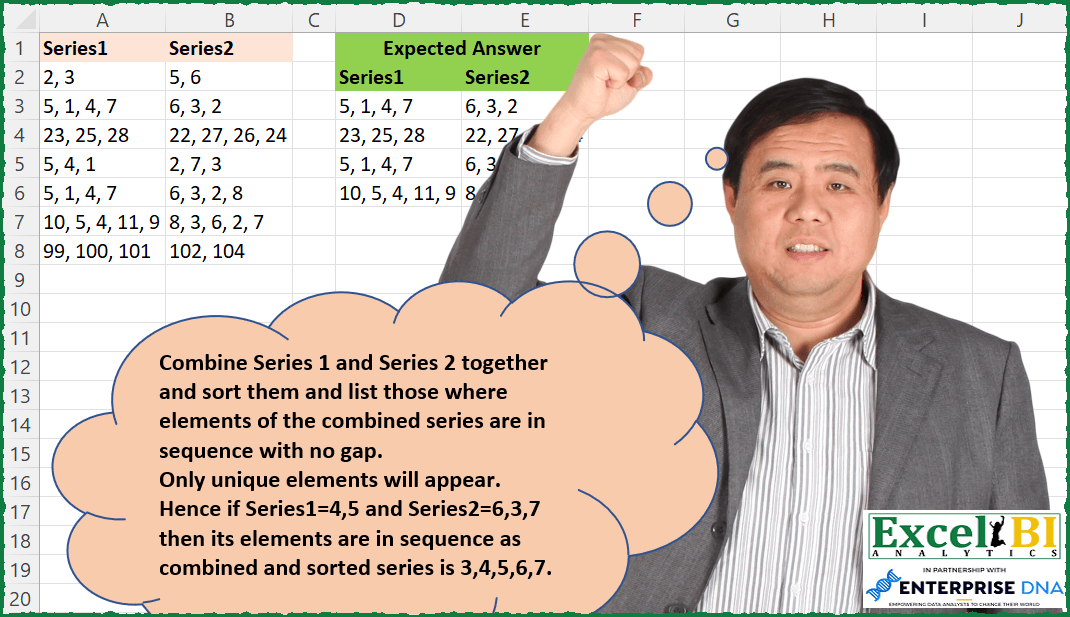
Combine Series 1 and Series 2 together and sort them and list those where elements of the combined series are in sequence with no gap. Only unique elements will appear in both Series 1 and Series 2, also Series 1 and Series 2 combined will have unique elements only, hence you need not ensure uniqueness of numbers. Hence if Series1=4,5 and Series2=6,3,7 then its elements are in sequence as combined and sorted series is 3,4,5,6,7. There is no gap between its elements.
📌 Challenge Details and Links
ExcelBI Excel Challenge Number: 126
Challenge Difficulty: ⭐️⭐️
📥Download Sample File
📥Link to the solutions on LinkedIn
Solving the challenge of Check Sequential Series with Power Query
Power Query solution 1 for Check Sequential Series, proposed by Bo Rydobon 🇹🇭:
let
  Source = Excel.CurrentWorkbook(){[Name = "Table1"]}[Content],
  Sel = Table.SelectRows(
    Source,
    each
      let
        n = List.Transform(Text.Split([Series1] & ", " & [Series2], ", "), Number.From)
      in
        List.Max(n) - List.Min(n) + 1 = List.Count(n)
  )
in
  Sel
Power Query solution 2 for Check Sequential Series, proposed by Alejandro Simón 🇵🇦 🇪🇸:
let
  Source = Excel.CurrentWorkbook(){[Name = "Table1"]}[Content],
  Added = Table.SelectRows(
    Table.AddColumn(
      Source,
      "Custom",
      each
        let
          a = _,
          b = List.Sort(List.Transform(Text.Split([Series1] & ", " & [Series2], ", "), Number.From)),
          c = {b{0} .. List.Max(b)}
        in
          c = b
    ),
    each [Custom] = true
  )[[Series1], [Series2]]
in
  Added
Power Query solution 3 for Check Sequential Series, proposed by Luan Rodrigues:
let
  Fonte = Tabela1,
  tab = Table.AddColumn(
    Fonte,
    "Personalizar",
    each [
      a = Record.FieldValues(_),
      b = Text.Combine(List.Transform(a, Text.From), ","),
      c = List.Sort(List.Transform(Text.Split(b, ","), Number.From)),
      d = {List.Min(c) .. List.Max(c)},
      e = if c = d then true else false
    ][e]
  ),
  res = Table.SelectRows(tab, each ([Personalizar] = true))[[Series1], [Series2]]
in
  res
Power Query solution 4 for Check Sequential Series, proposed by Brian Julius:
let
  Source = Excel.CurrentWorkbook(){[Name = "Table1"]}[Content],
  AddCombined = Table.AddColumn(Source, "Combined", each [Series1] & ", " & [Series2]),
  ComputeKeep = Table.AddColumn(
    AddCombined,
    "Custom",
    each [
      z = Text.Split([Combined], ", "),
      a = List.Transform(z, Number.From),
      b = List.Count(a),
      c = List.Min(a),
      d = List.Max(a),
      e = List.Count(List.Numbers(c, d - c + 1)),
      f = if b = e then "Keep" else null
    ][f]
  ),
  FilterNClean = Table.RemoveColumns(
    Table.SelectRows(ComputeKeep, each ([Custom] = "Keep")),
    {"Combined", "Custom"}
  )
in
  FilterNClean
Power Query solution 5 for Check Sequential Series, proposed by Jan Willem Van Holst:
let
  Source = Table.FromRows(
    Json.Document(
      Binary.Decompress(
        Binary.FromText(
          "dY07DsAgDEOvEmX2kKSUz1kQ979GnagdO4As3rPZWwNyKfSGdD3YGRzSIIOvnRASBSITaUyCYC0GD41oX5EtT8hyrv7NQWYxN8jborMozBJ6OaOctUjN8sppt8jIH88D",
          BinaryEncoding.Base64
        ),
        Compression.Deflate
      )
    ),
    let
      _t = ((type nullable text) meta [Serialized.Text = true])
    in
      type table [Series1 = _t, Series2 = _t]
  ),
  #"Added Custom" = Table.AddColumn(
    Source,
    "Custom",
    each
      let
        _list = List.Transform(Text.Split([Series1], ", "), Number.From)
          & List.Transform(Text.Split([Series2], ", "), Number.From),
        _sortedList = List.Sort(_list),
        _result = _sortedList = {List.Min(_sortedList) .. List.Max(_sortedList)}
      in
        _result
  ),
  #"Filtered Rows" = Table.SelectRows(#"Added Custom", each ([Custom] = true)),
  #"Removed Columns" = Table.RemoveColumns(#"Filtered Rows", {"Custom"})
in
  #"Removed Columns"
Solving the challenge of Check Sequential Series with Excel
Excel solution 1 for Check Sequential Series, proposed by Bo Rydobon 🇹🇭:
=FILTER(
    A2:B8,
    MAP(
        A2:A8&","&B2:B8,
        LAMBDA(
            a,
            LET(
                n,
                -TEXTSPLIT(
                    a,
                    ,
                    ","
                ),
                MAX(
                    n
                )-MIN(
                    n
                )+1=COUNT(
                    UNIQUE(
                    n
                )
                )
            )
        )
    )
)

=FILTER(
    A2:B8,
    MAP(
        A2:A8&","&B2:B8,
        LAMBDA(
            a,
            LET(
                n,
                --TEXTSPLIT(
                    a,
                    ","
                ),
                MAX(
                    n
                )-MIN(
                    n
                )+1=COUNT(
                    n
                )
            )
        )
    )
)
Excel solution 2 for Check Sequential Series, proposed by Rick Rothstein:
=FILTER(
    A2:B8,
    MAP(
        A2:A8,
        B2:B8,
        LAMBDA(
            a,
            b,
            LET(
                t,
                0+TEXTSPLIT(
                    a&", "&b,
                    ", "
                ),
                MAX(
                    t
                )-MIN(
                    t
                )+1=COUNT(
                    t
                )
            )
        )
    )
)
Excel solution 3 for Check Sequential Series, proposed by John V.:
=FILTER(
    A2:B8,
    MAP(
        A2:A8&","&B2:B8,
        LAMBDA(
            x,
            LET(
                s,
                SORT(
                    -TEXTSPLIT(
                        x,
                        ,
                        ","
                    )
                ),
                AND(
                    TOCOL(
                        DROP(
                            s,
                            1
                        )-s,
                        2
                    )=1
                )
            )
        )
    )
)

Another one:
✅=FILTER(
    A2:B8,
    MAP(
        A2:A8&","&B2:B8,
        LAMBDA(
            x,
            LET(
                s,
                -TEXTSPLIT(
                    x,
                    ,
                    ","
                ),
                1+MAX(
                    s
                )-MIN(
                    s
                )=ROWS(
                    s
                )
            )
        )
    )
)
Excel solution 4 for Check Sequential Series, proposed by محمد حلمي:
=FILTER(
    A2:B8,
    BYROW(
        A2:B8,
        LAMBDA(
            b,
            LET(

                a,
                TEXTSPLIT(
                    ARRAYTOTEXT(
                        b
                    ),
                    ", "
                )+0,

                MAX(
                    a
                )-MIN(
                    a
                )+1=COUNT(
                    a
                )
            )
        )
    )
)
Excel solution 5 for Check Sequential Series, proposed by 🇰🇷 Taeyong Shin:
=FILTER(
    A2:B8,

     MAP(
         A2:A8 & ", " & B2:B8,
          LAMBDA(
              m,

               LET(

                    n,
                    SORT(
                        --TEXTSPLIT(
                            m,
                             ,
                             ", "
                        )
                    ),

                    AND(
                        SEQUENCE(
                            ROWS(
                                n
                            ),
                             ,
                             MIN(
                                n
                            )
                        ) = n
                    )

               )

          )
     )

)
Excel solution 6 for Check Sequential Series, proposed by Julian Poeltl:
=LET(
    S,
    A2:B8,
    B,
    BYROW(
        S,
        LAMBDA(
            A,
            TEXTJOIN(
                ",",
                ,
                A
            )
        )
    ),
    A,
    MAP(
        B,
        LAMBDA(
            B,
            LET(
                S,
                SORT(
                    --TEXTSPLIT(
                        B,
                        ","
                    ),
                    ,
                    ,
                    1
                ),
                MAX(
                    DROP(
                        DROP(
                            S,
                            ,
                            1
                        )-S,
                        ,
                        -1
                    )
                )=1
            )
        )
    ),
    FILTER(
        S,
        A
    )
)
Excel solution 7 for Check Sequential Series, proposed by Timothée BLIOT:
=LET(A,A2:B8, B, TRANSPOSE(TEXTSPLIT(TEXTJOIN("/",,BYROW(A, LAMBDA(a, TEXTJOIN(", ",,a)))),", ","/",,,"")),
C, MAKEARRAY(ROWS(B),COLUMNS(B), LAMBDA(x,y, INDEX(SORT(INDEX(B,,y)*1),x) )),
D, BYCOL(C, LAMBDA(y, LET(E, TOCOL(y,3), CONCAT(E)=CONCAT(SEQUENCE(MAX(E)-MIN(E)+1,,MIN(E))) ) )),
FILTER(A,TRANSPOSE(D)))
Excel solution 8 for Check Sequential Series, proposed by Hussein SATOUR:
=TEXTSPLIT(
 TEXTJOIN(";", ,
 MAP(A2:A8, B2:B8,
 LAMBDA(x, y,
 LET(a, --TEXTSPLIT(x & ", " & y, , ", "),
 IF(MAX(a) - MIN(a) + 1 = COUNT(a), x & "/" & y, ""))))), "/",  ";")
Excel solution 9 for Check Sequential Series, proposed by Duy Tùng:
=FILTER(
    A2:B8,
    MAP(
        BYROW(
            A2:B8,
            ARRAYTOTEXT
        ),
        LAMBDA(
            v,
            LET(
                a,
                SORT(
                    --TEXTSPLIT(
                        v,
                        ,
                        ", "
                    )
                ),
                AND(
                    DROP(
                        a,
                        1
                    )-DROP(
                        a,
                        -1
                    )=1
                )
            )
        )
    )
)
Excel solution 10 for Check Sequential Series, proposed by Sunny Baggu:
=VSTACK(HSTACK(
    A1,
    B1
),
    FILTER(A2:B8,
    MAP(A2:A8&", "&B2:B8,
    LAMBDA(a,

LET(_A,
    TEXTSPLIT(
        a,
        ,
        ", "
    ),

_S,
    SORT(
        --_A
    ),

_C,
    COUNT(
        _S
    ),

_Fno,
    TAKE(
        _S,
        1
    ),
    _Lno,
    TAKE(
        _S,
        -1
    ),

_LHS,
    _C/2*(_Fno+_Fno+_C-1),
    _RHS,
    SUM(
        _S
    ),

_cond,
    _LHS=_RHS,
    _cond)))))
Excel solution 11 for Check Sequential Series, proposed by Md. Zohurul Islam:
=LET(

    a,
    A2:B8,

    hdr,
    HSTACK(
        "Series1",
        "Series2"
    ),

    b,
    BYROW(
        a,
        ARRAYTOTEXT
    ),

    d,
    MAP(
        b,
        LAMBDA(
            x,
            LET(
                p,
                SORT(
                    --TEXTSPLIT(
                        x,
                        ,
                        ", "
                    )
                ),
                q,
                COUNT(
                    UNIQUE(
                        DROP(
                            p,
                            1
                        )-DROP(
                            p,
                            -1
                        )
                    )
                ),
                s,
                IF(
                    q=1,
                    1,
                    0
                ),
                s
            )
        )
    ),

    e,
    FILTER(
        a,
        d=1
    ),

    f,
    VSTACK(
        hdr,
        e
    ),

    f
)
Excel solution 12 for Check Sequential Series, proposed by Stefan Olsson:
=QUERY(
BYROW({A2:A8,
     B2:B8},

LAMBDA(br,

LAMBDA(
    a,
     {IF(
         MAX(
             a
         )-MIN(
             a
         )+1=COUNTA(
             a
         ),
         {br},

     )}
)(SPLIT(
    JOIN(
        ",",
         br
    ),
     ",",
     true,
     true
))
)),

"Where Col1<>''",
    0)
Excel solution 13 for Check Sequential Series, proposed by Abhishek Kumar Jain:
=FILTER(
    A2:B8,
    MAP(
        A2:A8,
        B2:B8,
        LAMBDA(
            x,
            y,
            LET(
                a,
                x&", "&y,
                b,
                --TOROW(
                    SORT(
                        TOCOL(
                            TEXTSPLIT(
                                a,
                                ", "
                            )
                        )
                    )
                ),
                c,
                SEQUENCE(
                    ,
                    COUNT(
                        b
                    ),
                    MIN(
                        b
                    )
                ),
                SUM(
                    N(
                        b=c
                    )
                )=COUNT(
                        b
                    )
            )
        )
    )
)

=TEXTSPLIT(
    TEXTJOIN(
        "|",
        TRUE,
        FILTER(
            A2:A8&"-"&B2:B8,
            MAP(
                A2:A8,
                B2:B8,
                LAMBDA(
                    x,
                    y,
                    LET(
                        a,
                        x&", "&y,
                        b,
                        --TOROW(
                            SORT(
                                TOCOL(
                                    TEXTSPLIT(
                                        a,
                                        ", "
                                    )
                                )
                            )
                        ),
                        c,
                        SEQUENCE(
                    ,
                    COUNT(
                        b
                    ),
                    MIN(
                        b
                    )
                ),
                        SUM(
                    N(
                        b=c
                    )
                )=COUNT(
                        b
                    )
                    )
                )
            )
        )
    ),
    "-",
    "|"
)
Excel solution 14 for Check Sequential Series, proposed by Guillermo Arroyo:
=VSTACK(A1:B1,
    FILTER(A2:B8,
    MAP(A2:A8&", "&B2:B8,
    LAMBDA(c,
    LET(p,
    (--TEXTSPLIT(
   &     c,
        ", "
    )),
    l,
    COLUMNS(
        p
    ),
    AND(COLUMNS(
        UNIQUE(
            p,
            1
        )
    )=l,
    (MAX(
        p
    )-MIN(
        p
    )+1)=l))))))
Excel solution 15 for Check Sequential Series, proposed by Diego M.:
=FILTER(A2:B8,
    MAP(A2:A8,
    B2:B8,
    LAMBDA(x,
    y,
     LET(nums,
     SORT(
         UNIQUE(
             --VSTACK(
                 TEXTSPLIT(
                     x,
                     ,
                     ", "
                 ),
                 TEXTSPLIT(
                     y,
                     ,
                     ", "
                 )
             )
         )
     ),

q,
     ROWS(
         nums
     ),

SUM(--(nums= SEQUENCE(
    q,
    ,
    MIN(
         nums
     )
)))=q))))
Solving the challenge of Check Sequential Series with SQL
SQL solution 1 for Check Sequential Series, proposed by Zoran Milokanović:
WITH /* Microsoft SQL Server 2019 */
DATA_PREP
AS
(
 SELECT
 ROW_NUMBER() OVER (ORDER BY (SELECT 1)) AS ORDERING
 ,DP.SERIES1
 ,DP.SERIES2
 ,DP.SERIES1 + ', ' + DP.SERIES2 AS COMBINED_SERIES
 FROM DATA DP
),
CALC
AS
(
 SELECT
 DP.ORDERING
 ,DP.SERIES1
 ,DP.SERIES2
 ,MIN(CAST(TRIM(VALUE) AS DECIMAL)) AS MIN_ELEMENT
 ,MAX(CAST(TRIM(VALUE) AS DECIMAL)) AS MAX_ELEMENT
 ,COUNT(CAST(TRIM(VALUE) AS DECIMAL)) AS TOTAL_ELEMENTS
 FROM DATA_PREP DP
 CROSS APPLY STRING_SPLIT(DP.COMBINED_SERIES, ',')
 GROUP BY
 DP.ORDERING
 ,DP.SERIES1
 ,DP.SERIES2
)
SELECT
 C.SERIES1
,C.SERIES2
FROM CALC C
WHERE
 C.MAX_ELEMENT - C.MIN_ELEMENT + 1 = C.TOTAL_ELEMENTS
ORDER BY
 C.ORDERING
;
&&