
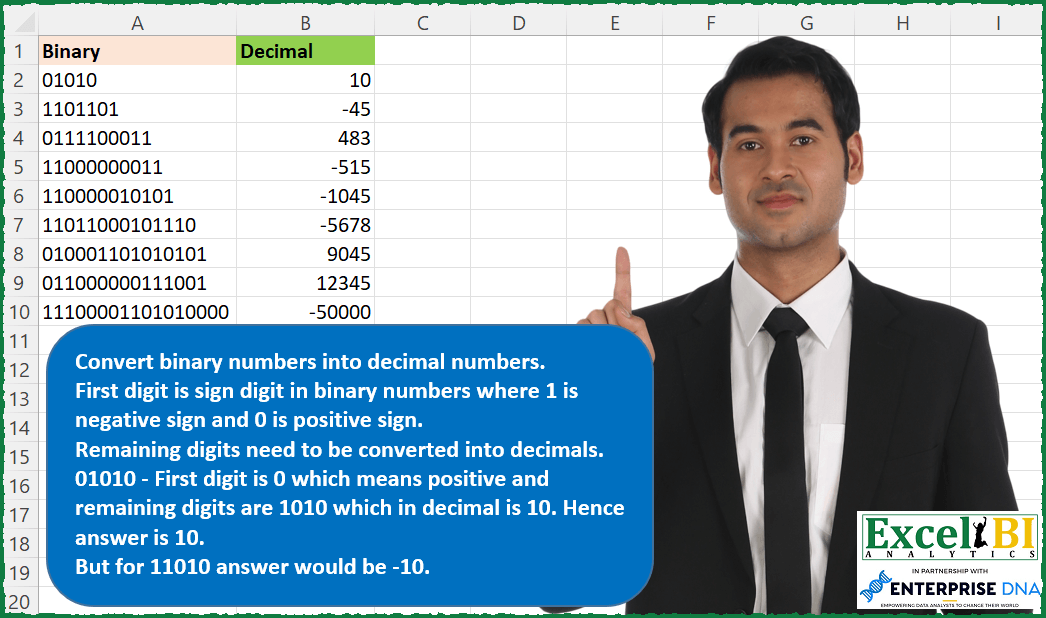
Convert binary numbers into decimal numbers. First digit is sign digit in binary numbers where 1 is negative sign and 0 is positive sign. Remaining digits need to be converted into decimals. 01010 – First digit is 0 which means positive and remaining digits are 1010 which in decimal is 10. Hence answer is 10. But for 11010 answer would be -10.
📌 Challenge Details and Links
ExcelBI Excel Challenge Number: 118
Challenge Difficulty: ⭐️⭐️
📥Download Sample File
📥Link to the solutions on LinkedIn
Solving the challenge of Signed Binary to Decimal with Power Query
Power Query solution 1 for Signed Binary to Decimal, proposed by Bo Rydobon 🇹🇭:
let
  Source = Excel.CurrentWorkbook(){[Name = "Table1"]}[Content],
  RS = List.Transform(
    Table.ToList(Source),
    each
      let
        l = Text.Length(_)
      in
        (1 - 2 * Number.From(Text.Start(_, 1)))
          * List.Sum(
            List.Transform(
              {1 .. l - 1},
              (n) => Number.From(Text.ToList(_){n}) * Number.Power(2, l - 1 - n)
            )
          )
  )
in
  RS
Power Query solution 2 for Signed Binary to Decimal, proposed by Luan Rodrigues:
let
  Fonte = Tabela1,
  Result = Table.AddColumn(
    Fonte,
    "Personalizar",
    each [
      a = Text.ToList([Binary]),
      b = a{0},
      c = List.Transform(List.Reverse(List.RemoveFirstN(a, 1)), Number.From),
      d = {0 .. List.Count(c) - 1},
      e = List.Sum(List.Transform(d, each Number.Power(2, _) * c{_})),
      f = if b = "0" then e else e * - 1
    ][f]
  )
in
  Result
Power Query solution 3 for Signed Binary to Decimal, proposed by Brian Julius:
let
  Source = Table.TransformColumnTypes(
    Table.SplitColumn(
      Raw,
      "Binary",
      Splitter.SplitTextByPositions({0, 1}, false),
      {"Multiplier", "Binary"}
    ),
    {"Multiplier", Number.Type}
  ),
  Multiplier = Table.TransformColumns(
    Source,
    {{"Multiplier", each if _ = 1 then - 1 else 1, type number}}
  ),
  RScript = R.Execute(
    "final <- cbind( dataset, as.data.frame( strtoi(dataset$Binary, base = 2)))",
    [dataset = Multiplier]
  ),
  ExtractDec = Table.TransformColumnTypes(RScript{[Name = "final"]}[Value], {"Binary", Text.Type}),
  Multiply = Table.AddColumn(
    ExtractDec,
    "Decimal",
    each [Multiplier] * [#"strtoi(dataset$Binary, base = 2)"]
  ),
  Clean = Table.RemoveColumns(Multiply, {"Multiplier", "strtoi(dataset$Binary, base = 2)"})
in
  Clean
Power Query solution 4 for Signed Binary to Decimal, proposed by Matthias Friedmann:
let
  Source = Excel.CurrentWorkbook(){[Name = "Binary"]}[Content],
  #"Added Custom" = Table.AddColumn(
    Source,
    "Decimal",
    each [
      a = List.Transform(Text.ToList([Binary]), Number.From),
      b = 1 - 2 * a{0},
      c = List.Reverse(List.Skip(a)),
      d = b * List.Sum(List.Transform({0 .. List.Count(c) - 1}, each Number.Power(2, _) * c{_}))
    ][d]
  )
in
  #"Added Custom"
Solving the challenge of Signed Binary to Decimal with Excel
Excel solution 1 for Signed Binary to Decimal, proposed by Bo Rydobon 🇹🇭:
=(1-LEFT(
    A2:A10
)*2)*DECIMAL(
    MID(
        A2:A10,
        2,
        99
    ),
    2
)
Excel solution 2 for Signed Binary to Decimal, proposed by Rick Rothstein:
=DECIMAL(
    MID(
        A2:A10,
        2,
        99
    ),
    2
)*-1^LEFT(
    A2:A10
)
Excel solution 3 for Signed Binary to Decimal, proposed by 🇰🇷 Taeyong Shin:
=DECIMAL(
    REGEXEXTRACT(
        A2:A10,
        ".(d+)",
        2
    ),
    2
)*-1^LEFT(
    A2:A10
)
Excel solution 4 for Signed Binary to Decimal, proposed by Kris Jaganah:
=IF(
    LEFT(
        A2:A10,
        1
    )/1=0,
    1,
    -1
)*DECIMAL(
    MID(
        A2:A10,
        2,
        LEN(
            A2:A10
        )
    ),
    2
)
Excel solution 5 for Signed Binary to Decimal, proposed by Julian Poeltl:
=LET(
    B,
    A2:A10,
    IF(
        --LEFT(
            B,
            1
        ),
        -1,
        1
    )*DECIMAL(
        RIGHT(
            B,
            LEN(
                B
            )-1
        ),
        2
    )
)
Excel solution 6 for Signed Binary to Decimal, proposed by Aditya Kumar Darak 🇮🇳:
=MAP(
    A2:A10,
     LAMBDA(
         a,
          IF(
              --LEFT(
                  a
              ),
               -1,
               1
          ) * SUM(
              MID(
                  a,
                   SEQUENCE(
                       LEN(
                  a
              ) - 1,
                        ,
                        LEN(
                  a
              ),
                        -1
                   ),
                   1
              ) * 2 ^ SEQUENCE(
                  LEN(
                  a
              ) - 1,
                   ,
                   0
              )
          )
     )
)
Excel solution 7 for Signed Binary to Decimal, proposed by Timothée BLIOT:
=MAP(A2:A10,
    LAMBDA(a,
    IF(
        --LEFT(
            a
        ),
        -1,
        1
    )*SUM(MAP( SEQUENCE(
         LEN(
            a
        )-1,
        ,
        2
    ),
    LAMBDA(x,
    (MID(
        a,
        x,
        1
    ))*(2^(INDEX(
         SEQUENCE(
              LEN(
            a
        ) -1,
             ,
             LEN(
            a
        )-2,
             -1
         ),
        x-1
    ))))))))
Excel solution 8 for Signed Binary to Decimal, proposed by Md. Zohurul Islam:
=LET(

    z,
    A2:A10,

    u,
    ABS(
        LEFT(
            z
        )
    ),

    v,
    RIGHT(
        z,
        LEN(
            z
        )-1
    ),

    w,
    MAP(
        v,
        LAMBDA(
            x,
            LET(
                a,
                LEN(
                    x
                ),
                seq,
                SEQUENCE(
                    a,
                    ,
                    a,
                    -1
                ),
                b,
                MID(
                    x,
                    seq,
                    1
                ),
                d,
                SEQUENCE(
                    a,
                    ,
                    0
                ),
                e,
                2^d,
                f,
                b*e,
                g,
                SUM(
                    f
                ),
                g
            )
        )
    ),

    p,
    IF(
        u=1,
        -1*w,
        w
    ),

    q,
    VSTACK(
        "Decimal",
        p
    ),

    q
)
Excel solution 9 for Signed Binary to Decimal, proposed by Charles Roldan:
=IF(
    --LEFT(
        A2:A10
    ),
     -1,
     1
) * DECIMAL(
    TEXTAFTER(
        A2:A10,
         {"0",
         "1"},

    ),
     2
)
Excel solution 10 for Signed Binary to Decimal, proposed by Tolga Demirci, PMP, PMI-ACP, MOS-Expert:
=0;
    2^(LEN(
        A2
    )-y);
    IF(VALUE(
        LEFT(
            A2;
            1
        )
    )=1;
    -1*2^(LEN(
        A2
    )-n);
    "")))*IF(
        VALUE(
        LEFT(
            A2;
            1
        )
    )=1;
        MID(
            A2;
            n;
            1
        );
        MID(
            A2;
            y;
            1
        )
    )))
Excel solution 11 for Signed Binary to Decimal, proposed by Stefan Olsson:
=MAP(
    A2:A10,

    LAMBDA(
        b,

        IF(
            --LEFT(
                b
            ),
             -1,
             1
        )*DECIMAL(
            REGEXEXTRACT(
                b,
                 ".(.*)"
            ),
            2
        )

    )
)
And the longer original one:
=ArrayFormula(

    MAP(
        A2:A10,

        LAMBDA(
            b,

            IF(
            --LEFT(
                b
            ),
             -1,
             1
        )*MMULT(

                REGEXEXTRACT(
                    b,
                     "."&REPT(
                         "(.)",
                          LEN(
                b
            )-1
                     )
                )+0,

                POWER(
                    2,
                     SEQUENCE(
                         LEN(
                b
            )-1,
                          1,
                          LEN(
                b
            )-2,
                          -1
                     )
                )

            )

        )
    )
)
Excel solution 12 for Signed Binary to Decimal, proposed by Abhishek Kumar Jain:
=MAP(
    A2:A10,
    LAMBDA(
        x,
        LET(
            a,
            BIN2DEC(
                MID(
                    x,
                    2,
                    LEN(
                        x
                    )
                )
            ),
            IF(
                --LEFT(
                        x
                    ),
                -a,
                a
            )
        )
    )
)
Excel solution 13 for Signed Binary to Decimal, proposed by Guillermo Arroyo:
=LET(a,
    A2:A10,
    b,
    IF((--LEFT(
        a,
        1
    )),
    -1,
    1),
    DECIMAL(
        MID(
            a,
            2,
            100
        ),
        2
    )*b)
Excel solution 14 for Signed Binary to Decimal, proposed by Juliano Santos Lima:
=BIN2DEC(
    MID(
        A1:A9,
        2,
        99
    )
)*-1^LEFT(
    A1:A9
)
Excel solution 15 for Signed Binary to Decimal, proposed by Ali ELBaitam:
=MAP(
    BinaryValues,
     λDecimcal
)


/* Takes a binary string,
     returns a signed decimal */
λDecimcal =
LAMBDA(
    binary,

     LET(
         signedbinary,
          λCharacters(
              binary
          ),

          sign,
          IF(
              INT(
                  TAKE(
                      signedbinary,
                       1
                  )
              ) = 0,
               1,
               -1
          ),

          binary,
          DROP(
                      signedbinary,
                       1
                  ),

          size,
          ROWS(
              binary
          ),

          powers,
          SEQUENCE(
              size,
               1,
               size - 1,
               -1
          ),

          sign * SUM(
              binary * MAP(
                  powers,
                   LAMBDA(
                       i,
                        POWER(
                            2,
                             i
                        )
                   )
              )
          )
     )
)

/* converts a cell value to a horizontal array */
λCharacters =
LAMBDA(
    str,
     MID(
         str,
          SEQUENCE(
              LEN(
                  str
              )
          ),
          1
     )
)
Solving the challenge of Signed Binary to Decimal with Python in Excel
Python in Excel solution 1 for Signed Binary to Decimal, proposed by Alejandro Campos:
binary_numbers = xl("A2:A10")[0]
def binary_to_decimal(binary_str):
 sign = -1 if binary_str[0] == '1' else 1
 decimal_value = int(binary_str[1:], 2)
 return sign * decimal_value
decimal_values = [binary_to_decimal(bn) for bn in binary_numbers]
df = pd.DataFrame({
 'Binary': binary_numbers,
 'Decimal': decimal_values
})
df
&&&