
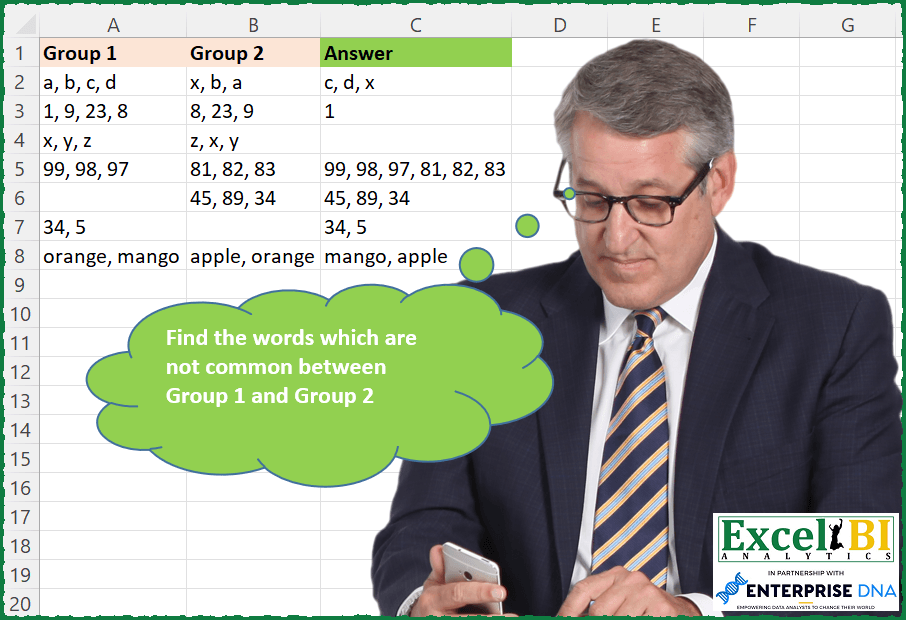
Find the words which are not common between Group 1 and Group 2.
📌 Challenge Details and Links
ExcelBI Excel Challenge Number: 112
Challenge Difficulty: ⭐️⭐️⭐️
📥Download Sample File
📥Link to the solutions on LinkedIn
Solving the challenge of Find Non-Common Words with Power Query
Power Query solution 1 for Find Non-Common Words, proposed by Bo Rydobon 🇹🇭:
let
  Source = Excel.CurrentWorkbook(){[Name = "Table1"]}[Content],
  Rs = List.Transform(
    Table.ToRows(Source),
    each
      let
        a = List.Transform(_, each if _ = null then {} else Text.Split(_, ", "))
      in
        Text.Combine(List.Difference(List.Union(a), List.Intersect(a)), ", ")
  )
in
  Rs
Power Query solution 2 for Find Non-Common Words, proposed by Bo Rydobon 🇹🇭:
let
  Source = Excel.CurrentWorkbook(){[Name = "Table1"]}[Content],
  Rs = List.Transform(
    Table.ToRows(Source),
    each Text.Combine(
      Table.SelectRows(
        Table.Group(
          Table.FromValue(Text.Split(Text.Combine(_, ", "), ", ")),
          "Value",
          {"C", each Table.RowCount(_)}
        ),
        each [C] = 1
      )[Value],
      ", "
    )
  )
in
  Rs
Power Query solution 3 for Find Non-Common Words, proposed by Aditya Kumar Darak 🇮🇳:
let
  Source = Excel.CurrentWorkbook(){[Name = "data"]}[Content],
  Result = Table.AddColumn(
    Source,
    "Result",
    each [
      a = Record.ToList(_),
      b = List.Transform(a, (f) => try Text.Split(f, ", ") otherwise {null}),
      c = List.Combine(b),
      d = List.Intersect(b),
      e = List.RemoveMatchingItems(c, d),
      f = Text.Combine(e, ", ")
    ][f]
  )
in
  Result
Power Query solution 4 for Find Non-Common Words, proposed by Alejandro Simón 🇵🇦 🇪🇸:
let
  Source = Excel.CurrentWorkbook(){[Name = "Table1"]}[Content],
  #"Added Custom" = Table.AddColumn(
    Source,
    "Answer",
    each
      let
        a = try Text.Split([Group 1], ", ") otherwise {},
        b = try Text.Split([Group 2], ", ") otherwise {},
        c = Text.Combine(List.RemoveMatchingItems(a, b) & List.RemoveMatchingItems(b, a), ", ")
      in
        c
  )[[Answer]]
in
  #"Added Custom"
Power Query solution 5 for Find Non-Common Words, proposed by Luan Rodrigues:
let
  Fonte = Tabela1,
  Result = Table.AddColumn(
    Fonte,
    "Personalizar",
    each [
      a = try Text.Split([Group 1], ", ") otherwise null,
      b = try Text.Split([Group 2], ", ") otherwise null,
      Answer = try
        Text.Combine(
          List.Transform(List.RemoveMatchingItems(a, b) & List.RemoveMatchingItems(b, a), Text.From),
          ", "
        )
      otherwise
        Text.Combine(List.Transform(List.RemoveNulls(Record.ToList(_)), Text.From), ", ")
    ][Answer]
  )
in
  Result
Power Query solution 6 for Find Non-Common Words, proposed by Matthias Friedmann:
let
  Source = Excel.CurrentWorkbook(){[Name = "Uncommon"]}[Content],
  #"Added Custom" = Table.AddColumn(
    Source,
    "Custom",
    each List.Difference(
      Splitter.SplitTextByDelimiter(", ")([Group 1]),
      Splitter.SplitTextByDelimiter(", ")([Group 2])
    )
      & List.Difference(
        Splitter.SplitTextByDelimiter(", ")([Group 2]),
        Splitter.SplitTextByDelimiter(", ")([Group 1])
      )
  ),
  #"Extracted Values" = Table.TransformColumns(
    #"Added Custom",
    {"Custom", each Text.Combine(List.Transform(_, Text.From), ", "), type text}
  )
in
  #"Extracted Values"
Power Query solution 7 for Find Non-Common Words, proposed by Victor Wang:
let
  Source = Excel.CurrentWorkbook(){[Name = "Table1"]}[Content],
  Result = Table.TransformRows(
    Source,
    each
      let
        l = Text.Split(Text.Combine(Record.ToList(_), ", "), ", ")
      in
        Text.Combine(List.Select(l, each List.Count(List.PositionOf(l, _, 2)) = 1), ", ")
  )
in
  Result
Power Query solution 8 for Find Non-Common Words, proposed by Krzysztof Kominiak:
let
  Source = Excel.CurrentWorkbook(){[Name = "Table1"]}[Content],
  Result = Table.AddColumn(
    Source,
    "Answer",
    each [
      a = try Text.Split([Group 1], ", ") otherwise {},
      b = try Text.Split([Group 2], ", ") otherwise {},
      c = List.Intersect({a, b}),
      d = List.Difference(a, c),
      e = List.Difference(b, c),
      z = Text.Combine(List.Union({d, e}), ", ")
    ][z]
  )
in
  Result
Power Query solution 9 for Find Non-Common Words, proposed by Ian Segard:
let
  Source = Excel.CurrentWorkbook(){[Name = "CH112In"]}[Content],
  #"Split Column by Delimiter" = Table.TransformColumns(
    Source,
    {
      {
        "Group 1",
        Splitter.SplitTextByDelimiter(", ", QuoteStyle.Csv),
        let
          itemType = (type nullable text) meta [Serialized.Text = true]
        in
          type {itemType}
      }
    }
  ),
  Custom1 = Table.TransformColumns(
    #"Split Column by Delimiter",
    {
      {
        "Group 2",
        Splitter.SplitTextByDelimiter(", ", QuoteStyle.Csv),
        let
          itemType = (type nullable text) meta [Serialized.Text = true]
        in
          type {itemType}
      }
    }
  ),
  #"Added Custom" = Table.AddColumn(Custom1, "Custom", each List.Difference([Group 1], [Group 2])),
  Custom2 = Table.AddColumn(#"Added Custom", "Custom1", each List.Difference([Group 2], [Group 1])),
  #"Added Custom1" = Table.AddColumn(Custom2, "Custom.1", each List.Union({[Custom], [Custom1]})),
  #"Removed Other Columns" = Table.SelectColumns(#"Added Custom1", {"Custom.1"}),
  #"Extracted Values" = Table.TransformColumns(
    #"Removed Other Columns",
    {"Custom.1", each Text.Combine(List.Transform(_, Text.From), ", "), type text}
  ),
  #"Renamed Columns" = Table.RenameColumns(#"Extracted Values", {{"Custom.1", "Out"}})
in
  #"Renamed Columns"
Solving the challenge of Find Non-Common Words with Excel
Excel solution 1 for Find Non-Common Words, proposed by Bo Rydobon 🇹🇭:
=MAP(
    A2:A8&", "&B2:B8,
    LAMBDA(
        a,
        ARRAYTOTEXT(
            IFERROR(
                UNIQUE(
                    TEXTSPLIT(
                        a,
                        ,
                        ", ",
                        1
                    ),
                    ,
                    1
                ),
                ""
            )
        )
    )
)
Excel solution 2 for Find Non-Common Words, proposed by Rick Rothstein:
=MAP(
    A2:A8&", "&B2:B8,
    LAMBDA(
        x,
        TEXTJOIN(
            ", ",
            ,
            IFERROR(
                UNIQUE(
                    TEXTSPLIT(
                        x,
                        ", "
                    ),
                    1,
                    1
                ),
                ""
            )
        )
    )
)
Excel solution 3 for Find Non-Common Words, proposed by محمد حلمي:
=MAP(
    A2:A8,
    B2:B8,
    LAMBDA(
        x,
        y,
        LET(

            v,
            LAMBDA(
                e,
                TEXTSPLIT(
                    e,
                    ", "
                )
            ),

            r,
            LAMBDA(
                a,
                b,
                IFERROR(
                    FILTER(
                        v(
                            a
                        ),
                        ISNA(
                            XMATCH(
                                v(
                            a
                        ),
                                v(
                                    b
                                )
                            )
                        )
                    ),
                    ""
                )
            ),
            IF(
                x="",
                y,
                IF(
                    y="",
                    x,

                    TEXTJOIN(
                        ", ",
                        ,
                        r(
                            x,
                            y
                        ),
                        r(
                            y,
                            x
                        )
                    )
                )
            )
        )
    )
)
Excel solution 4 for Find Non-Common Words, proposed by Julian Poeltl:
=MAP(
    A2:A8,
    B2:B8,
    LAMBDA(
        A,
        B,
        IFERROR(
            TEXTJOIN(
                ", ",
                ,
                UNIQUE(
                    TEXTSPLIT(
                        TEXTJOIN(
                            ", ",
                            ,
                            A,
                            B
                        ),
                        ", "
                    ),
                    1,
                    1
                )
            ),
            ""
        )
    )
)
Excel solution 5 for Find Non-Common Words, proposed by Aditya Kumar Darak 🇮🇳:
=BYROW(
    A2:B8,
     LAMBDA(
         a,
          IFERROR(
              ARRAYTOTEXT(
                  UNIQUE(
                      TEXTSPLIT(
                          ARRAYTOTEXT(
                              a
                          ),
                           ,
                           ", ",
                           1
                      ),
                       ,
                       1
                  )
              ),
               ""
          )
     )
)
Excel solution 6 for Find Non-Common Words, proposed by Timothée BLIOT:
=LET(F,
     LAMBDA(
         a,
          TEXTSPLIT(
              TEXTJOIN(
                  "/",
                  ,
                  SUBSTITUTE(
                      a,
                      ",",
                      ""
                  )
              ),
              " ",
              "/",
              1,
              ,
              ""
          )
     ),
     A,
     F(
         A2:A8
     ),
     B,
     F(
         B2:B8
     ),
     D,
    HSTACK(
        A,
        B
    ),

BYROW(D,
     LAMBDA(r,
     TEXTJOIN(", ",
    ,
    MAP(r,
     LAMBDA(a,
     IF(SUM(SUMPRODUCT(1*(r=a)))=1,
    a,
    "") )) ) )))
Excel solution 7 for Find Non-Common Words, proposed by Jaroslaw Kujawa:
=BYROW(
    groups,
    LAMBDA(
        x,
        IFERROR(
            TEXTJOIN(
                ", ",
                ,
                UNIQUE(
                    TEXTSPLIT(
                        TEXTJOIN(
                            ", ",
                            ,
                            x
                        ),
                        ", "
                    ),
                    TRUE,
                    TRUE
                )
            ),
            ""
        )
    )
)
Excel solution 8 for Find Non-Common Words, proposed by Stefan Olsson:
=MAP(
    A2:A8,
     B2:B8,

    LAMBDA(
        a,
         b,

        TEXTJOIN(
            ", ",
             TRUE,

            UNIQUE(

                SPLIT(
                    a&", "&b,
                     ", ",
                    TRUE,
                    TRUE
                ),

                TRUE,
                TRUE
            )

        )
    )
)
Excel solution 9 for Find Non-Common Words, proposed by Victor Momoh (MVP, MOS, R.Eng):
=IFERROR(
    BYROW(
        A2:B8,
        LAMBDA(
            x,
            ARRAYTOTEXT(
                UNIQUE(
                    TEXTSPLIT(
                        TEXTJOIN(
                            ", ",
                            ,
                            x
                        ),
                        ",
"
                    ),
                    1,
                    1
                )
            )
        )
    ),
    ""
)
Excel solution 10 for Find Non-Common Words, proposed by Abhishek Kumar Jain:
=MAP(
    A2:A8,
    B2:B8,
    LAMBDA(
        x,
        y,
        LET(
            a,
            TRIM(
                TEXTSPLIT(
                    x,
                    ", "
                )
            ),
            b,
            TRIM(
                TEXTSPLIT(
                    y,
                    ", "
                )
            ),
            c,
            XLOOKUP(
                a,
                b,
                b
            ),
            d,
            XLOOKUP(
                b,
                a,
                a
            ),
            e,
            IFERROR(
                FILTER(
                    a,
                    ISNA(
                        c
                    )
                ),
                ""
            ),
            f,
            IFERROR(
                FILTER(
                    b,
                    ISNA(
                        d
                    )
                ),
                ""
            ),
            g,
             TEXTJOIN(
                 ",",
                 FALSE,
                 e,
                 f
             ),
            IFS(
                x="",
                y,
                y="",
                x,
                LEFT(
                    g
                )=",",
                MID(
                    g,
                    2,
                    LEN(
                    g
                )
                ),
                RIGHT(
                    g
                )=",",
                LEFT(
                    g,
                    LEN(
                    g
                )-1
                ),
                TRUE,
                g
            )
        )
    )
)
Excel solution 11 for Find Non-Common Words, proposed by Guillermo Arroyo:
=MAP(
    A2:A8,
    B2:B8,
    LAMBDA(
        a,
        b,
        IFERROR(
            TEXTJOIN(
                ", ",
                1,
                ,
                UNIQUE(
                    TEXTSPLIT(
                        a&", "&b,
                        ", "
                    ),
                    1,
                    1
                )
            ),
            ""
        )
    )
)
Excel solution 12 for Find Non-Common Words, proposed by Fábio Gatti:
=LAMBDA(
    Groups,
    vDelimiter,

     IFERROR(
         BYROW(

              Groups,
             LAMBDA(
               &  Row,

                  LET(

                       vCombine,
                      TEXTJOIN(
                          vDelimiter,
                          1,
                          Row
                      ),

                       vSplit,
                      TEXTSPLIT(
                          vCombine,
                          ,
                          vDelimiter
                      ),

                       vUnique,
                      UNIQUE(
                          vSplit,
                          ,
                          1
                      ),

                       TEXTJOIN(
                           vDelimiter,
                           1,
                           vUnique
                       )

                  )

             )

         ),
         ""
     )

)(A2:B8,
    ", ")
Solving the challenge of Find Non-Common Words with SQL
SQL solution 1 for Find Non-Common Words, proposed by Zoran Milokanović:
1/2
WITH /*Vertica Analytic Database v9.2.0-7*/
DATA_PREP
AS
(
 SELECT
 ROW_NUMBER() OVER () AS ROW_ORDER
 ,LENGTH(TRANSLATE(D.GROUP_1, TRANSLATE(D.GROUP_1, ',', ''), '')) + 1 AS G1_ITEM_COUNT
 ,D.GROUP_1
 ,LENGTH(TRANSLATE(D.GROUP_2, TRANSLATE(D.GROUP_2, ',', ''), '')) + 1 AS G2_ITEM_COUNT
 ,D.GROUP_2
 FROM DATA D
),
GROUP_1
AS
(
 SELECT
 G1.ROW_ORDER
 ,T.ROW_ORDER AS ITEM_ORDER
 ,SPLIT_PART(G1.GROUP_1, ', ', T.ROW_ORDER) AS ITEM
 FROM DATA_PREP G1
 JOIN DATA_PREP T ON T.ROW_ORDER <= G1.G1_ITEM_COUNT
 WHERE
 SPLIT_PART(G1.GROUP_1, ', ', T.ROW_ORDER) <> ''
),
GROUP_2
AS
(
 SELECT
 G2.ROW_ORDER
 ,T.ROW_ORDER AS ITEM_ORDER
 ,SPLIT_PART(G2.GROUP_2, ', ', T.ROW_ORDER) AS ITEM
 FROM DATA_PREP G2
 JOIN DATA_PREP T ON T.ROW_ORDER <= G2.G2_ITEM_COUNT
 WHERE
 SPLIT_PART(G2.GROUP_2, ', ', T.ROW_ORDER) <> ''
),
CALC
AS
(
 SELECT
 NVL(G1.ROW_ORDER, G2.ROW_ORDER) AS ROW_ORDER
 ,NVL(G1.ITEM, G2.ITEM) AS ITEM
 FROM GROUP_1 G1
 FULL JOIN GROUP_2 G2 ON G1.ROW_ORDER = G2.ROW_ORDER
 AND G1.ITEM = G2.ITEM
 WHERE
 G1.ITEM IS NULL
 ORG2.ITEM IS NULL
 ORDER BY
 1, /*GROUP_ORDER*/ NVL(NVL2(G1.ITEM, 'G1', NULL), NVL2(G2.ITEM, 'G2', NULL)), /*ITEM ORDER*/ NVL(G1.ITEM_ORDER, G2.ITEM_ORDER), 2
)
&&