
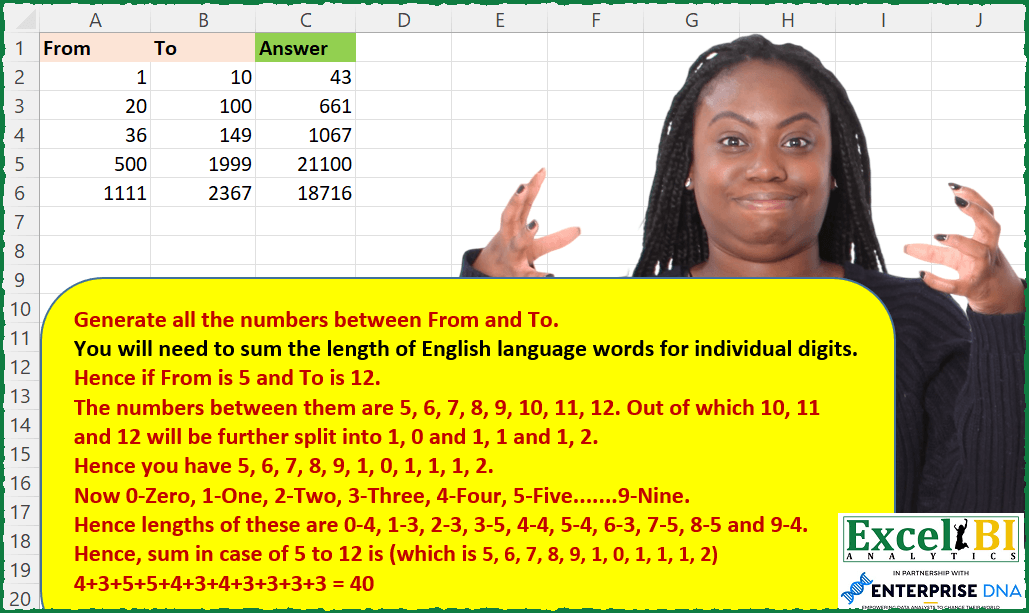
Generate all the numbers between From and To. You will need to sum the length of English language words for individual digits. Hence if From is 5 and To is 12. The numbers between them are 5, 6, 7, 8, 9, 10, 11, 12. Out of which 10, 11 and 12 will be further split into 1, 0 and 1, 1 and 1, 2. Hence you have 5, 6, 7, 8, 9, 1, 0, 1, 1, 1, 2. Now 0-Zero, 1-One, 2-Two, 3-Three, 4-Four, 5-Five…….9-Nine. Hence lengths of these digits are 0-4, 1-3, 2-3, 3-5, 4-4, 5-4, 6-3, 7-5, 8-5 and 9-4. Hence, sum in case of 5 to 12 is 4+3+5+5+4+3+4+3+3+3+3 = 40
📌 Challenge Details and Links
ExcelBI Excel Challenge Number: 111
Challenge Difficulty: ⭐️
📥Download Sample File
📥Link to the solutions on LinkedIn
Solving the challenge of Sum Word Lengths in Range with Power Query
Power Query solution 1 for Sum Word Lengths in Range, proposed by Bo Rydobon 🇹🇭:
let
  Source = Excel.CurrentWorkbook(){[Name = "Table1"]}[Content],
  RS = Table.TransformRows(
    Source,
    each List.Sum(
      List.Transform(
        {[From] .. [To]},
        each List.Sum(
          List.ReplaceMatchingItems(
            Text.ToList(Text.From(_)),
            List.Zip({{"0" .. "9"}, {4, 3, 3, 5, 4, 4, 3, 5, 5, 4}})
          )
        )
      )
    )
  )
in
  RS
Power Query solution 2 for Sum Word Lengths in Range, proposed by Alejandro Simón 🇵🇦 🇪🇸:
let
  Source = Excel.CurrentWorkbook(){[Name = "Table1"]}[Content],
  Lista = Table.AddColumn(
    Source,
    "Custom",
    each List.Combine(
      List.Transform(List.Transform({[From] .. [To]}, each Text.From(_)), each Text.ToList(_))
    )
  ),
  Solucion = Table.AddColumn(
    Lista,
    "Answer",
    each List.Sum(
      List.Transform(
        List.ReplaceMatchingItems(
          List.Transform([Custom], each Number.From(_)),
          List.Zip({{0 .. 9}, {4, 3, 3, 5, 4, 4, 3, 5, 5, 4}})
        ),
        each Number.From(_)
      )
    )
  )[[Answer]]
in
  Solucion
Power Query solution 3 for Sum Word Lengths in Range, proposed by Luan Rodrigues:
let
  Fonte = Tabela1,
  sub = List.Zip({{"0" .. "9"}, {4, 3, 3, 5, 4, 4, 3, 5, 5, 4}}),
  tab = Table.AddColumn(
    Fonte,
    "Personalizar",
    each Text.ToList(Text.Combine(List.Transform({[From] .. [To]}, Text.From)))
  ),
  exp = Table.ExpandListColumn(tab, "Personalizar"),
  lst = Table.TransformColumns(
    exp,
    {
      {
        "Personalizar",
        each Text.Combine(
          List.Transform(List.ReplaceMatchingItems(Text.Split(_, " "), sub), Text.From)
        )
      }
    }
  ),
  Result = Table.Group(
    lst,
    {"From"},
    {{"Contagem", each List.Sum(List.Transform([Personalizar], Number.From))}}
  )[[Contagem]]
in
  Result
Power Query solution 4 for Sum Word Lengths in Range, proposed by Bhavya Gupta:
let
  Source = Excel.CurrentWorkbook(){[Name = "Table1"]}[Content],
  Replacements = List.Zip(
    {{"0" .. "9"}, {"Zero", "One", "Two", "Three", "Four", "Five", "Six", "Seven", "Eight", "Nine"}}
  ),
  Answer = Table.TransformRows(
    Source,
    each List.Sum(
      List.Transform(
        List.ReplaceMatchingItems(
          List.Combine(List.Transform({[From] .. [To]}, each Text.ToList(Text.From(_)))),
          Replacements
        ),
        each Text.Length(_)
      )
    )
  )
in
  Answer
Power Query solution 5 for Sum Word Lengths in Range, proposed by Bhavya Gupta:
let
  Source = Excel.CurrentWorkbook(){[Name = "Table1"]}[Content],
  Replacements = List.Zip({{"0" .. "9"}, {4, 3, 3, 5, 4, 4, 3, 5, 5, 4}}),
  Answer = Table.TransformRows(
    Source,
    each List.Sum(
      List.ReplaceMatchingItems(
        List.Combine(List.Transform({[From] .. [To]}, each Text.ToList(Text.From(_)))),
        Replacements
      )
    )
  )
in
  Answer
Power Query solution 6 for Sum Word Lengths in Range, proposed by Matthias Friedmann:
let
  Source = Excel.CurrentWorkbook(){[Name = "EnglishNumbers"]}[Content],
  Added = Table.AddColumn(
    Source,
    "Answer",
    each List.Sum(
      List.Transform(
        List.Combine(List.Transform({[From] .. [To]}, each (Text.ToList(Text.From(_))))),
        each ({4, 3, 3, 5, 4, 4, 3, 5, 5, 4}){Number.From(_)}
      )
    )
  )
in
  Added
Power Query solution 7 for Sum Word Lengths in Range, proposed by Victor Wang:
let
  Source = Excel.CurrentWorkbook(){[Name = "Table1"]}[Content],
  Lookup = Table.FromColumns({{0 .. 9}, {4, 3, 3, 5, 4, 4, 3, 5, 5, 4}}, {"x", "y"}),
  Result = Table.TransformRows(
    Source,
    each List.Sum(
      List.Transform(
        List.Combine(
          List.Transform(
            {[From] .. [To]},
            each List.Transform(Text.ToList(Text.From(_)), Number.From)
          )
        ),
        each Lookup{[x = _]}[y]
      )
    )
  )
in
  Result
Power Query solution 8 for Sum Word Lengths in Range, proposed by Jan Willem Van Holst:
let
  Source = yourData,
  #"Changed Type" = Table.TransformColumnTypes(Source, {{"From", Int64.Type}, {"To", Int64.Type}}),
  fx = (Digit) =>
    Record.Field([0 = 4, 1 = 3, 2 = 3, 3 = 5, 4 = 4, 5 = 4, 6 = 3, 7 = 5, 8 = 5, 9 = 4], Digit),
  expandFunc_ = (inputList_) => //function from AIB https://community.powerbi.com/t5/Power-Query/Expand-a-list-of-various-types-into-a-new-list/m-p/1093051#M36374
    let
      step0 = List.Combine(
        List.Transform(inputList_, each if Value.Type(_) = type list then _ else {_})
      ),
      step1 = List.Accumulate(
        inputList_,
        true,
        (state, current) => state and Value.Type(current) <> type list
      ),
      output = if step1 = true then step0 else @expandFunc_(step0)
    in
      output,
  #"Added Custom" = Table.AddColumn(
    #"Changed Type",
    "Answer",
    each
      let
        _list           = {[From] .. [To]},
        _listText       = List.Transform(_list, Text.From),
        _listSplit      = List.Transform(_listText, each Splitter.SplitTextByRepeatedLengths(1)(_)),
        _listExpand     = expandFunc_(_listSplit),
        _listconvert    = List.Transform(_listExpand, each fx(_)),
        _listSumConvert = List.Sum(_listconvert)
      in
        _listSumConvert
  )
in
  #"Added Custom"
Power Query solution 9 for Sum Word Lengths in Range, proposed by Jan Willem Van Holst:
let
  Source = yourData,
  fx = (Digit) =>
    Record.Field([0 = 4, 1 = 3, 2 = 3, 3 = 5, 4 = 4, 5 = 4, 6 = 3, 7 = 5, 8 = 5, 9 = 4], Digit),
  #"Changed Type" = Table.TransformColumnTypes(Source, {{"From", Int64.Type}, {"To", Int64.Type}}),
  #"Added Custom" = Table.AddColumn(#"Changed Type", "Custom", each {[From] .. [To]}),
  #"Expanded Custom" = Table.ExpandListColumn(#"Added Custom", "Custom"),
  #"Changed Type1" = Table.TransformColumnTypes(#"Expanded Custom", {{"Custom", type text}}),
  #"Added Custom1" = Table.AddColumn(
    #"Changed Type1",
    "Custom.1",
    each Splitter.SplitTextByRepeatedLengths(1)([Custom])
  ),
  #"Expanded Custom.1" = Table.ExpandListColumn(#"Added Custom1", "Custom.1"),
  #"Changed Type2" = Table.TransformColumnTypes(#"Expanded Custom.1", {{"Custom.1", type text}}),
  #"Added Custom2" = Table.AddColumn(#"Changed Type2", "Custom.2", each fx([Custom.1])),
  #"Merged Columns" = Table.CombineColumns(
    Table.TransformColumnTypes(#"Added Custom2", {{"From", type text}, {"To", type text}}, "en-NL"),
    {"From", "To"},
    Combiner.CombineTextByDelimiter("-", QuoteStyle.None),
    "Merged"
  ),
  #"Grouped Rows" = Table.Group(
    #"Merged Columns",
    {"Merged"},
    {{"Answer", each List.Sum([Custom.2]), type number}}
  )
in
  #"Grouped Rows"
Solving the challenge of Sum Word Lengths in Range with Excel
Excel solution 1 for Sum Word Lengths in Range, proposed by Bo Rydobon 🇹🇭:
=MAP(A2:A6,
    B2:B6,
    LAMBDA(a,
    b,
    LET(c,
    CONCAT(
        SEQUENCE(
            b-a+1,
            ,
            a
        )
    ),
    SUM((LEN(
        c
    )-LEN(
        SUBSTITUTE(
            c,
            SEQUENCE(
                10
            )-1,

        )
    ))*{4;3;3;5;4;4;3;5;5;4}))))
Excel solution 2 for Sum Word Lengths in Range, proposed by Rick Rothstein:
=LET(
    d,
    4335443554,
    MAP(
        A2:A6,
        B2:B6,
        LAMBDA(
            f,
            t,
            LET(
                c,
                CONCAT(
                    SEQUENCE(
                        t-f+1,
                        ,
                        f
                    )
                ),
                SUM(
                    0+MID(
                        d,
                        1+MID(
                            c,
                            SEQUENCE(
                                LEN(
                                    c
                                )
                            ),
                            1
                        ),
                        1
                    )
                )
            )
        )
    )
)
Excel solution 3 for Sum Word Lengths in Range, proposed by Rick Rothstein:
=MAP(
    A2:A6,
    B2:B6,
    LAMBDA(
        f,
        t,
        LET(
            c,
            CONCAT(
                SEQUENCE(
                    t-f+1,
                    ,
                    f
                )
            ),
            SUM(
                0+MID(
                    4335443554,
                    1+MID(
                        c,
                        SEQUENCE(
                            LEN(
                                c
                            )
                        ),
                        1
                    ),
                    1
                )
            )
        )
    )
)
Excel solution 4 for Sum Word Lengths in Range, proposed by John V.:
=MAP(A2:A6,
    B2:B6,
    LAMBDA(f,
    t,
    LET(n,
    CONCAT(
        SEQUENCE(
            1+t-f,
            ,
            f
        )
    ),
    SUM((LEN(
        n
    )-LEN(
        SUBSTITUTE(
            n,
            ROW(
                1:10
            )-1,

        )
    ))*{4;3;3;5;4;4;3;5;5;4}))))
Excel solution 5 for Sum Word Lengths in Range, proposed by محمد حلمي:
=MAP(
    A2:A6,
    B2:B6,
    LAMBDA(
        a,
        b,
        LET(

            v,
            CONCAT(
                SEQUENCE(
                    b-a+1,
                    ,
                    a
                )
            ),

            SUM(

                LOOKUP(

                    MID(
                        v,
                        SEQUENCE(
                            LEN(
                                v
                            )
                        ),
                        1
                    )+0,

                    SEQUENCE(
                        10,
                        ,
                        0
                    ),

                    {4,
                    3,
                    3,
                    5,
                    4,
                    4,
                    3,
                    5,
                    5,
                    4}
                )
            )
        )
    )
)
Excel solution 6 for Sum Word Lengths in Range, proposed by 🇰🇷 Taeyong Shin:
=MAP(
    A2:A6,
     B2:B6,
     LAMBDA(
         a,
         b,

          LET(

               str,
               CONCAT(
                   SEQUENCE(
                       b - a + 1,
                        ,
                        a
                   )
               ),

               SUM(
                    INDEX(
                        {4;3;3;5;4;4;3;5;5;4},
                         MID(
                             str,
                              SEQUENCE(
                                  LEN(
                                      str
                                  )
                              ),
                              1
                         ) + 1
                    )
               )

          )

     )
)
Excel solution 7 for Sum Word Lengths in Range, proposed by Kris Jaganah:
=LET(a,
    A2:A6,
    b,
    B2:B6,
    c,
    SEQUENCE(
        MAX(
            b
        ),
        ,
        MIN(
            a
        )
    ),
    d,
    HSTACK(
        SEQUENCE(
            10,
            ,
            0
        ),
        {4;3;3;5;4;4;3;5;5;4}
    ),
    e,
    MAP(a,
    b,
    LAMBDA(p,
    q,
    SUM(MAP(FILTER(c,
    (c>=p)*(c<=q)),
    LAMBDA(
        x,
        SUM(
            XLOOKUP(
                MID(
                    x,
                    SEQUENCE(
                        ,
                        LEN(
                            x
                        )
                    ),
                    1
                )/1,
                CHOOSECOLS(
                    d,
                    1
                ),
                CHOOSECOLS(
                    d,
                    2
                )
            )
        )
    ))))),
    e)
Excel solution 8 for Sum Word Lengths in Range, proposed by Julian Poeltl:
=MAP(
    A2:A6,
    B2:B6,
    LAMBDA(
        F,
        T,
        LET(
            S,
            CONCAT(
                SEQUENCE(
                    T-F+1,
                    ,
                    F
                )
            ),
            SP,
            --MID(
                S,
                SEQUENCE(
                    LEN(
                        S
                    )
                ),
                1
            ),
            SUM(
                IFERROR(
                    CHOOSE(
                        SP,
                        3,
                        3,
                        5,
                        4,
                        4,
                        3,
                        5,
                        5,
                        4
                    ),
                    4
                )
            )
        )
    )
)
Excel solution 9 for Sum Word Lengths in Range, proposed by Aditya Kumar Darak 🇮🇳:
=MAP(

     A2:A6,

     B2:B6,

     LAMBDA(
         a,
          b,

          LET(

               seq,
               SEQUENCE(
                   b - a + 1,
                    ,
                    a
               ),

               len,
               {4; 3; 3; 5; 4; 4; 3; 5; 5; 4},

               e,
               LAMBDA(
                   x,
                    y,

                    SUM(
                        x,
                         INDEX(
                             len,
                              MID(
                                  y,
                                   SEQUENCE(
                                       LEN(
                                           y
                                       )
                                   ),
                                   1
    &                          ) + 1
                         )
                    )

               ),

               r,
               REDUCE(
                   0,
                    seq,
                    e
               ),

               r

          )

     )

)
Excel solution 10 for Sum Word Lengths in Range, proposed by Timothée BLIOT:
=MAP(
    A2:A6,
    B2:B6,
    LAMBDA(
        v,
        w,
        LET(
            A,
            SEQUENCE(
                w-v+1,
                ,
                v
            ),
            B,
            DROP(
                 REDUCE(
                     "",
                     A,
                     LAMBDA(
                         a,
                         v,
                         TOCOL(
                             VSTACK(
                                 a,
                                 MID(
                                     v,
                                     SEQUENCE(
                                         ,
                                         LEN(
                                             v
                                         )
                                     ),
                                     1
                                 )
                             ),
                             3
                         )
                     )
                 ),
                1
            )*1,
            L,
            {"Zero";"One";"Two";"Three";"Four";"Five";"Six";"Seven";"Eight" ;"Nine"},
            SUM(
                MAP(
                    B,
                    LAMBDA(
                        x,
                        LEN(
                            XLOOKUP(
                                x,
                                SEQUENCE(
                                    10,
                                    ,
                                    0
                                ),
                                L
                            )
                        )
                    )
                )
            )
        )
    )
)
Excel solution 11 for Sum Word Lengths in Range, proposed by Md. Zohurul Islam:
=MAP(
    A2:A6,
    B2:B6,
    LAMBDA(
        u,
        v,

        LET(

            p,
            SEQUENCE(
                10,
                ,
                0
            ),

            q,
            VSTACK(
                "zero",
                "one",
                "two",
                "three",
                "four",
                "five",
                "six",
                "seven",
                "eight",
                "nine"
            ),

            s,
            LEN(
                q
            ),

            sq,
            SEQUENCE(
                v-u+1,
                ,
                u
            ),

            w,
            DROP(
                REDUCE(
                    "",
                    sq,
                    LAMBDA(
                        x,
                        y,
                        LET(
                            a,
                            LEN(
                                y
                            ),
                            b,
                            MID(
                                y,
                                SEQUENCE(
                                    a
                                ),
                                1
                            ),
                            d,
                            VSTACK(
                                x,
                                0+b
                            ),
                            d
                        )
                    )
                ),
                1
            ),

            aa,
            SUM(
                XLOOKUP(
                    w,
                    p,
                    s
                )
            ),
            aa
        )
    )
)
Excel solution 12 for Sum Word Lengths in Range, proposed by Charles Roldan:
=LET(Data,
     A2:B6,
     BigM,
     1+MAX(
         Data
     ),
     Depth,
     1+LOG10(BigM),

List,
     SEQUENCE(
         BigM,
          ,
          0
     ),
     Powers,
     10^SEQUENCE(
         ,
          Depth,
          0
     ),
     MMULT(
         INDEX(
             SCAN(
                 0,
                  BYROW(
                      IF(
                          List
Excel solution 13 for Sum Word Lengths in Range, proposed by Jaroslaw Kujawa:
=LEN(
    CONCAT(
        BYCOL(
            IFERROR(
                INDEX(
                    digs_and_words,
                    XMATCH(
                        1*MID(
                            SEQUENCE(
                                ,
                                To-From+1,
                                From
                            ),
                            SEQUENCE(
                                MAX(
                                    LEN(
                                        SEQUENCE(
                                ,
                                To-From+1,
                                From
                            )
                                    )
                                ),
                                1
                            ),
                            1
                        ),
                        TAKE(
                            digs_and_words,
                            ,
                            1
                        ),
                        0
                    ),
                    2
                ),
                ""
            ),
            LAMBDA(
                a,
                CONCAT(
                    a
                )
            )
        )
    )
)With LET:=LET(
    from,
    1,
    to,
    10,
    digs_and_words,
    2_col_array_wherever_it_is,
    split,
    1*MID(
        SEQUENCE(
            ,
            to-from+1,
            from
        ),
        SEQUENCE(
            MAX(
                LEN(
                    SEQUENCE(
            ,
            to-from+1,
            from
        )
                )
            ),
            1
        ),
        1
    ),
    digs_to_words,
    INDEX(
        digs_and_words,
        XMATCH(
            split,
            TAKE(
                            digs_and_words,
                            ,
                            1
                        )
        ),
        2
    ),
    no_errs,
    IFERROR(
        digs_to_words,
        ""
    ),
    concat_words,
    CONCAT(
        CONCAT(
            no_errs
        )
    ),
    LEN(
        concat_words
    )
)
Excel solution 14 for Sum Word Lengths in Range, proposed by Stefan Olsson:
=MAP(

    MAP(
        A2:A6,
         B2:B6,

        LAMBDA(
            a,
             b,

            REDUCE(
                ,
                 SEQUENCE(
                     b-a+1,
                      1,
                      a,
                      1
                 ),

                LAMBDA(
                    x,
                     s,
                     x&s
                )

            )
        )
    ),

    LAMBDA(
        y,

        LEN(
            REPT(
                y,
                3
            )®EXREPLACE(
                y,
                "[126]",
                ""
            )®EXREPLACE(
                y,
                "[^378]",
                ""
            )
        )

    )
)
Excel solution 15 for Sum Word Lengths in Range, proposed by Victor Momoh (MVP, MOS, R.Eng):
=MAP(
    A2:A6,
    B2:B6,
    LAMBDA(
        p,
        q,
        LET(
            a,
            {4;3;3;5;4;4;3;5;5;4},
            seq,
            CONCAT(
                SEQUENCE(
                    q-p+1,
                    ,
                    p
                )
            ),

            SUM(
                XLOOKUP(
                    0+MID(
                        seq,
                        SEQUENCE(
                            LEN(
                                seq
                            )
                        ),
                        1
                    ),
                    ROW(
                        1:10
                    )-1,
                    a
                )
            )
        )
    )
)
Excel solution 16 for Sum Word Lengths in Range, proposed by Abhishek Kumar Jain:
=MAP(
    A2:A6,
    B2:B6,
    LAMBDA(
        x,
        y,
        LET(
            a,
            CONCAT(
                SEQUENCE(
                    ,
                    y-x+1,
                    x
                )
            ),
            SUM(
                --MID(
                    "43354435543",
                    1+MID(
                        a,
                        SEQUENCE(
                            LEN(
                                a
                            )
                        ),
                        1
                    ),
                    1
                )
            )
        )
    )
)
Excel solution 17 for Sum Word Lengths in Range, proposed by Guillermo Arroyo:
=MAP(
    A2:A6,
    B2:B6,
    LAMBDA(
        f,
        t,
        LET(
            a,
            CONCAT(
                SEQUENCE(
                    ,
                    t-f+1,
                    f,
                    1
                )
            ),
            REDUCE(
                0,
                SEQUENCE(
                    ,
                    LEN(
                        a
                    )
                ),
                LAMBDA(
                    b,
                    c,
                    CHOOSE(
                        --MID(
                            a,
                            c,
                            1
                        )+1,
                        4,
                        3,
                        3,
                        5,
                        4,
                        4,
                        3,
                        5,
                        5,
                        4
                    )+b
                )
            )
        )
    )
)
Excel solution 18 for Sum Word Lengths in Range, proposed by Stevenson Yu:
=LET(
    A,
     CONCAT(
         SEQUENCE(
             B2-A2+1,
             ,
             A2
         )
     ),

    B,
    --MID(
        A,
        SEQUENCE(
            LEN(
                A
            )
        ),
        1
    )+1,

    C,
    CHOOSE(
        B,
        4,
        3,
        3,
        5,
        4,
        4,
        3,
        5,
        5,
        4
    ),
    SUM(
        C
    )
)
Excel solution 19 for Sum Word Lengths in Range, proposed by Tushar Mehta:
=MAP(Table1[From],
    Table1[To],

 LAMBDA(_from,
    _to,
    SUM(LET(seq,
    SEQUENCE(
        _to-_from+1,
        ,
        _from
    ),

 MAP(seq,
    LAMBDA(n,

 LET(_doc,
    "break up a number into its digits - the MOD(...) part - and sum the length of the spelled out digits - the XLOOKUP(...,P3#,R3#) part",

 _len,
    INT(LOG10(n))+1,
    digSeq,
    SEQUENCE(
        _len,
        ,
        0
    ),
    SUM(
        XLOOKUP(
            MOD(
                INT(
                    n/10^digSeq
                ),
                10
            ),
            P3#,
            R3#
        )
    ))))))))
Solving the challenge of Sum Word Lengths in Range with SQL
SQL solution 1 for Sum Word Lengths in Range, proposed by Zoran Milokanović:
WITH /* Microsoft SQL Server 2019 */
NUMBERS
AS
(
 SELECT
 D."FROM", D."TO", D."FROM" AS NUM
 FROM DATA D
 UNION ALL
 SELECT
 C."FROM", C."TO", C.NUM + 1 AS NUM
 FROM NUMBERS C
 WHERE
 C.NUM < C."TO"
),
LETTERS
AS
(
 SELECT
 C."FROM", C."TO", CAST(C.NUM AS VARCHAR) AS LETTERS, 1 AS POSITION, SUBSTRING(CAST(C.NUM AS VARCHAR), 1, 1) AS LETTER
 FROM NUMBERS C
 UNION ALL
 SELECT
 L."FROM", L."TO", L.LETTERS, L.POSITION + 1 AS POSITION, SUBSTRING(L.LETTERS, L.POSITION + 1, 1) AS LETTER
 FROM LETTERS L
 WHERE
 SUBSTRING(L.LETTERS, L.POSITION + 1, 1) <> ''
)
SELECT
 L."FROM"
,L."TO"
,SUM(CASE L.LETTER
 END) AS ANSWER
FROM LETTERS L
GROUP BY
 L."FROM"
,L."TO"
ORDER BY
 1
OPTION (MAXRECURSION 32767)
;
&&