
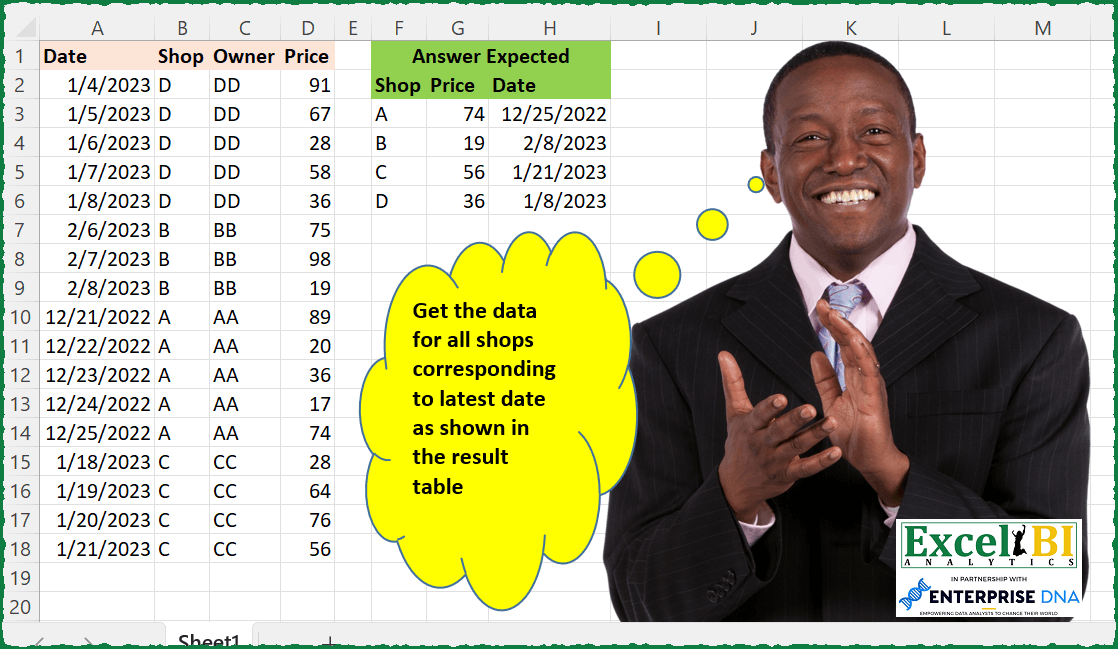
Get the data for all shops corresponding to latest date as shown in the result table. Apply sorting appropriately as shown on shop.
📌 Challenge Details and Links
ExcelBI Excel Challenge Number: 106
Challenge Difficulty: ⭐️
📥Download Sample File
📥Link to the solutions on LinkedIn
Solving the challenge of Latest Date Shop Data with Power Query
Power Query solution 1 for Latest Date Shop Data, proposed by Bo Rydobon 🇹🇭:
let
  Source = Excel.CurrentWorkbook(){[Name = "Table1"]}[Content],
  Combine = Table.Sort(
    Table.Combine(
      Table.Group(
        Source,
        "Shop",
        {"A", each Table.LastN(Table.SelectColumns(_, {"Shop", "Price", "Date"}), 1)}
      )[A]
    ),
    {"Shop"}
  )
in
  Combine
Power Query solution 2 for Latest Date Shop Data, proposed by Aditya Kumar Darak 🇮🇳:
let
  Source  = Excel.CurrentWorkbook(){[Name = "data"]}[Content],
  Grouped = Table.Group(Source, {"Shop"}, {{"Group", each Table.Last(_)}}),
  Sorted  = Table.Sort(Grouped, {{"Shop", Order.Ascending}}),
  Expand  = Table.ExpandRecordColumn(Sorted, "Group", {"Date", "Price"}, {"Date", "Price"})
in
  Expand
Power Query solution 3 for Latest Date Shop Data, proposed by Alejandro Simón 🇵🇦 🇪🇸:
let
  Source = Excel.CurrentWorkbook(){[Name = "Table1"]}[Content],
  Changed = Table.TransformColumnTypes(Source, {{"Date", type date}}),
  Sorted = Table.Sort(Changed, {{"Date", Order.Descending}, {"Shop", Order.Ascending}}),
  Grouped = Table.Group(Sorted, {"Shop"}, {{"Count", each Table.First(_)}})[[Count]],
  Expanded = Table.ExpandRecordColumn(
    Grouped,
    "Count",
    {"Shop", "Price", "Date"},
    {"Shop", "Price", "Date"}
  ),
  Solucion = Table.Sort(Expanded, {{"Shop", Order.Ascending}})
in
  Solucion
Power Query solution 4 for Latest Date Shop Data, proposed by Luan Rodrigues:
let
  Fonte = Tabela1,
  tab = Table.Group(
    Fonte,
    {"Shop"},
    {{"Contagem", each Table.Last(Table.Sort(_, {"Date", Order.Ascending}))}}
  )[[Contagem]],
  t = Table.ExpandRecordColumn(
    tab,
    "Contagem",
    {"Date", "Shop", "Owner", "Price"},
    {"Date", "Shop", "Owner", "Price"}
  )[[Shop], [Price], [Date]],
  Result = Table.Sort(t, {{"Shop", Order.Ascending}})
in
  Result
Power Query solution 5 for Latest Date Shop Data, proposed by Brian Julius:
let
  Source = Table.TransformColumnTypes(
    Excel.CurrentWorkbook(){[Name = "Table1"]}[Content],
    {"Date", Date.Type}
  ),
  Group = Table.ExpandTableColumn(
    Table.Group(
      Source,
      {"Shop"},
      {
        {"All", each _, type table [Date = date, Shop = text, Owner = text, Price = number]},
        {"MaxDate", each List.Max([Date]), type date}
      }
    ),
    "All",
    {"Date", "Price"},
    {"Date", "Price"}
  ),
  Filter = Table.ReorderColumns(
    Table.RemoveColumns(
      Table.Sort(Table.SelectRows(Group, each [Date] = [MaxDate]), {"Shop", Order.Ascending}),
      "MaxDate"
    ),
    {"Shop", "Price", "Date"}
  )
in
  Filter
Power Query solution 6 for Latest Date Shop Data, proposed by Bhavya Gupta:
let
  Source = Excel.CurrentWorkbook(){[Name = "Table1"]}[Content],
  ChangedType = Table.TransformColumnTypes(Source, {{"Date", type date}}),
  GroupedRows = Table.Group(
    ChangedType,
    {"Shop"},
    {{"All", each Table.Sort(_, {{"Date", Order.Descending}}){0}[[Price], [Date]]}}
  ),
  Expanded = Table.ExpandRecordColumn(GroupedRows, "All", {"Price", "Date"}, {"Price", "Date"}),
  ExpectedOutput = Table.Sort(Expanded, {{"Shop", Order.Ascending}})
in
  ExpectedOutput
Power Query solution 7 for Latest Date Shop Data, proposed by Matthias Friedmann:
let
  Source = Excel.CurrentWorkbook(){[Name = "Shops"]}[Content],
  #"Sorted Rows" = Table.Buffer(
    Table.Sort(Source, {{"Shop", Order.Ascending}, {"Date", Order.Descending}})
  ),
  #"Removed Other Columns" = Table.SelectColumns(#"Sorted Rows", {"Shop", "Price", "Date"}),
  #"Removed Duplicates" = Table.Distinct(#"Removed Other Columns", {"Shop"})
in
  #"Removed Duplicates"
Power Query solution 8 for Latest Date Shop Data, proposed by Gerson Pineda:
let
 Source = Table.Sort(Tbl,{{"Date", Order.Descending}}),
 CPF = Table.FirstN(Origen,1)
in
 CPF

let
 Source = Excel.CurrentWorkbook(){[Name="tbl"]}[Content],
 RG = Table.Sort( Table.Group(Source, {"Shop"}, {{"Tbls", each _}}), "Shop" ),
 FA = Table.AddColumn(RG, "P", each FxMax( [Tbls] )),
 TE = Table.SelectColumns( Table.Combine( FA[P] ),{"Shop", "Price", "Date"} ),
 TC = Table.TransformColumnTypes(TE,{{"Shop", type text}, {"Price", Int64.Type}, {"Date", type date}})
in
 TC
Power Query solution 9 for Latest Date Shop Data, proposed by Krzysztof Kominiak:
let
  Source = Excel.CurrentWorkbook(){[Name = "Table1"]}[Content],
  GroupRows = Table.Sort(
    Table.Group(Source, {"Shop"}, {{"NT", each Table.Max(_, "Date"), type record}}),
    {"Shop", Order.Ascending}
  ),
  Expand = Table.SelectColumns(
    Table.ExpandRecordColumn(GroupRows, "NT", {"Date", "Price"}, {"Date", "Price"}),
    {"Shop", "Price", "Date"}
  ),
  Result = Table.TransformColumnTypes(
    Expand,
    {{"Shop", type text}, {"Price", Int64.Type}, {"Date", type date}},
    "en-US"
  )
in
  Result
Power Query solution 10 for Latest Date Shop Data, proposed by Jan Willem Van Holst:
let
  Source = Table.FromRows(
    Json.Document(
      Binary.Decompress(
        Binary.FromText(
          "bdBNDsQgCAXgu7iuiTx/0OVMewvT+1+jBW1nElk8Fn6BCL275MkjILrNHRIpjdy5dZcNKqxUDEJVYoPyoGpQLHMgHvpKpHCeA1dqz8CVqCmBPCnifvtIpNSJsBBhYLRw/hPJQhpXQbaQkyL9bb9L9t/NqBlWRh+CYVzeJRfLt50X",
          BinaryEncoding.Base64
        ),
        Compression.Deflate
      )
    ),
    let
      _t = ((type nullable text) meta [Serialized.Text = true])
    in
      type table [Date = _t, Shop = _t, Owner = _t, Price = _t]
  ),
  #"Changed Type" = Table.TransformColumnTypes(Source, {{"Date", type date}}),
  #"Grouped Rows" = Table.Group(
    #"Changed Type",
    {"Shop"},
    {{"data", (x) => Table.SelectRows(x, each [Date] = List.Max(x[Date]))}}
  ),
  #"Removed Columns" = Table.RemoveColumns(#"Grouped Rows", {"Shop"}),
  #"Expanded data" = Table.ExpandTableColumn(
    #"Removed Columns",
    "data",
    {"Date", "Shop", "Owner", "Price"},
    {"Date", "Shop", "Owner", "Price"}
  ),
  #"Sorted Rows" = Table.Sort(#"Expanded data", {{"Shop", Order.Ascending}}),
  #"Removed Columns1" = Table.RemoveColumns(#"Sorted Rows", {"Owner"})
in
  #"Removed Columns1"
Power Query solution 11 for Latest Date Shop Data, proposed by Alejandra Horvath CPA, CGA:
let
  Source = Excel.CurrentWorkbook(){[Name = "Table1"]}[Content],
  Grouped = Table.Group(
    Source,
    {"Shop"},
    {{"Count", each Table.LastN(Table.Sort(_, {{"Date", Order.Ascending}}), 1)[[Price], [Date]]}}
  ),
  Expanded = Table.ExpandTableColumn(
    Grouped,
    "Count",
    {"Price", "Date"},
    {"Answer Price", "Expected Date"}
  ),
  Sorted = Table.Sort(Expanded, {{"Shop", Order.Ascending}}),
  ChangedType = Table.TransformColumnTypes(
    Sorted,
    {{"Shop", type text}, {"Answer Price", Int64.Type}, {"Expected Date", type date}}
  )
in
  ChangedType
Solving the challenge of Latest Date Shop Data with Excel
Excel solution 1 for Latest Date Shop Data, proposed by Bo Rydobon 🇹🇭:
=INDEX(A2:D18,XMATCH(SORT(UNIQUE(B2:B18)),B2:B18,,-1),{2,4,1})Excel solution 2 for Latest Date Shop Data, proposed by John V.:
=DROP(
    REDUCE(
        0,
        SORT(
            UNIQUE(
                B2:B18
            )
        ),
        LAMBDA(
            i,
            x,
            VSTACK(
                i,
                TAKE(
                    SORT(
                        FILTER(
                            CHOOSECOLS(
                                A2:D18,
                                2,
                                4,
                                1
                            ),
                            B2:B18=x
                        ),
                        3,
                        -1
                    ),
                    1
                )
            )
        )
    ),
    1
)

supposing data is sort ascending by date:
✅=SORT(
    INDEX(
        A2:D18,
        XMATCH(
            UNIQUE(
                B2:B18
            ),
            B2:B18,
            ,
            -1
        ),
        {2,
        4,
        1}
    )
)
Excel solution 3 for Latest Date Shop Data, proposed by محمد حلمي:
=LET(

    b,
    B2:B18,

    u,
    UNIQUE(
        b
    ),

    SORT(
        HSTACK(
            u,

            XLOOKUP(
                u,
                b,
                D2:D18,
                ,
                ,
                -1
            ),

            XLOOKUP(
                u,
                b,
                A2:A18,
                ,
                ,
                -1
            )
        )
    )
)

#2

=LET(

    b,
    B2:B18,

    u,
    UNIQUE(
        b
    ),

    VSTACK(
        HSTACK(
            B1,
            D1,
            A1
        ),

        SORT(
            HSTACK(
                UNIQUE(
        b
    ),

                XLOOKUP(
                u,
                b,
                D2:D18,
                ,
                ,
                -1
            ),

                XLOOKUP(
                u,
                b,
                A2:A18,
                ,
                ,
                -1
            )
            )
        )
    )
)


#3

=LET(

    b,
    B1:B18,

    u,
    UNIQUE(
        b
    ),

    a,
    TEXTSPLIT(
        TEXTJOIN(
            "-",
            ,
            XLOOKUP(
                u,
                b,
                D1:D18&" "&A1:A18,
                ,
                ,
                -1
            )
        ),
        " ",
        "-"
    ),

    v,
    HSTACK(
        u,
         IFERROR(
             a+0,
             a
         )
    ),

    VSTACK(
        TAKE(
            v,
            1
        ),
        SORT(
            DROP(
            v,
            1
        )
        )
    )
)
Excel solution 4 for Latest Date Shop Data, proposed by محمد حلمي:
=DROP(
    SORTBY(

        REDUCE(
            A1:D1,
            SORT(
                UNIQUE(
                    B2:B18
                )
            ),

            LAMBDA(
                a,
                d,
                VSTACK(
                    a,

                    TAKE(
                        FILTER(
                            A2:D18,
                            B2:B18=d
                        ),
                        -1
                    )
                )
            )
        ),
        {3,
        1,
        4,
        2}
    ),
    ,
    -1
)
Excel solution 5 for Latest Date Shop Data, proposed by محمد حلمي:
=DROP(
    SORTBY(

        REDUCE(
            A1:D1,
            SORT(
                UNIQUE(
                    B2:B18
                )
            ),

            LAMBDA(
                a,
                d,
                VSTACK(
                    a,

                    XLOOKUP(
                        d,
                        B2:B18,
                        A2:D18,
                        ,
                        ,
                        -1
                    )
                )
            )
        ),

        {3,
        1,
        4,
        2}
    ),
    ,
    -1
)
Excel solution 6 for Latest Date Shop Data, proposed by 🇰🇷 Taeyong Shin:
=LET(
    d,
    A1:A18,
    s,
    B1:B18,
    GROUPBY(
        HSTACK(
            s,
            D1:D18,
            d
        ),
        ,
        ,
        3,
        0,
        ,
        MAXIFS(
            d,
            s,
            s
        )=d
    )
)
Excel solution 7 for Latest Date Shop Data, proposed by Kris Jaganah:
=LET(a,
    A2:A18,
    b,
    B2:B18,
    c,
    D2:D18,
    d,
    SORT(
        UNIQUE(
            b
        )
    ),
    e,
    MAXIFS(
        a,
        b,
        d
    ),
    f,
    MAP(d,
    e,
    LAMBDA(x,
    y,
    SUM(--(a=y)*--(b=x)*(c)))),
    HSTACK(
        d,
        f,
        e
    ))
Excel solution 8 for Latest Date Shop Data, proposed by Julian Poeltl:
=LET(
    D,
    A2:A18,
    S,
    B2:B18,
    P,
    D2:D18,
    DROP(
        REDUCE(
            "A",
            SORT(
                UNIQUE(
                    S
                )
            ),
            LAMBDA(
                A,
                B,
                VSTACK(
                    A,
                    TAKE(
                        FILTER(
                            HSTACK(
                                S,
                                P,
                                D
                            ),
                            S=B
                        ),
                        -1
                    )
                )
            )
        ),
        1
    )
)
Excel solution 9 for Latest Date Shop Data, proposed by Aditya Kumar Darak 🇮🇳:
=LET(

     _d,
     A2:D18,

     _fd,
     SORT(
         _d,
          {2,
          1}
     ),

     _sh,
     INDEX(
         _fd,
          ,
          2
     ),

     _ush,
     UNIQUE(
         _sh
     ),

     _rw,
     XMATCH(
         _ush,
          _sh,
          ,
          -1
     ),

     _r,
     CHOOSECOLS(
         CHOOSEROWS(
             _fd,
              _rw
         ),
          2,
          4,
          1
     ),

     _r

)
Excel solution 10 for Latest Date Shop Data, proposed by Aditya Kumar Darak 🇮🇳:
=LET(

     _d,
     A2:D18,

     _fd,
     SORT(
         _d,
          {2,
          1}
     ),

     _sh,
     INDEX(
         _fd,
          ,
          2
     ),

     _ush,
     UNIQUE(
         _sh
     ),

     _lp,
     XLOOKUP(
         _ush,
          _sh,
          INDEX(
              _fd,
               ,
               4
          ),
          ,
          ,
          -1
     ),

     _ld,
     XLOOKUP(
         _ush,
          _sh,
          TAKE(
              _fd,
        &       ,
               1
          ),
          ,
          ,
          -1
     ),

     _r,
     HSTACK(
         _ush,
          _lp,
          _ld
     ),

     _r

)
Excel solution 11 for Latest Date Shop Data, proposed by Timothée BLIOT:
=LET(D,
    A2:A18,
     S,
    B2:B18,
     P,
    D2:D18,
     A,
    PIVOTBY(
        S,
        D,
        P,
        SUM
    ),

AP,
     BYROW(
         DROP(
             DROP(
                 A,
                 1,
                 -1
             ),
             -1
         ),
         LAMBDA(
             x,
             LOOKUP(
                 1,
                 1/x,
                 x
             )
         )
     ),

AS,
     INDEX(
         A,
         SEQUENCE(
             ROWS(
                 A
             )-2,
             ,
             2
         ),
         1
     ),

AD,
     BYROW(SEQUENCE(
         ROWS(
             AS
         )
     ),
     LAMBDA(x,
     VALUE(FILTER(D,
     (S=INDEX(
         AS,
         x
     ))*(P=INDEX(
         AP,
         x
     ))) ) )),

HSTACK(
    AS,
    AP,
    AD
))
Excel solution 12 for Latest Date Shop Data, proposed by Duy Tùng:
=GROUPBY(
    B1:B18,
    HSTACK(
        D1:D18,
        A1:A18
    ),
    LAMBDA(
        x,
        @TAKE(
            x,
            -1
        )
    ),
    3,
    0
)
Excel solution 13 for Latest Date Shop Data, proposed by Bhavya Gupta:
=LET(
    data,
    SORT(
        Table1,
        {2,
        1},
        {1,
        -1}
    ),
    c_1,
    CHOOSECOLS(
        data,
        2
    ),
    c_2,
    UNIQUE(
        c_1
    ),
    HSTACK(
        c_2,
        CHOOSECOLS(
            CHOOSEROWS(
                data,
                XMATCH(
                    c_2,
                    c_1
                )
            ),
            4,
            1
        )
    )
)
Excel solution 14 for Latest Date Shop Data, proposed by Md. Zohurul Islam:
=LET(

    dt,
    A2:A18,

    shp,
    B2:B18,

    prc,
    D2:D18,

    rng,
    HSTACK(
        shp,
        prc,
        dt
    ),

    unq,
    SORT(
        UNIQUE(
            shp
        )
    ),

    hdr,
    HSTACK(
        B1,
        D1,
        A1
    ),

    P,
    REDUCE(
        hdr,
        unq,
        LAMBDA(
            x,
            y,
            LET(
                a,
                FILTER(
                    rng,
                    shp=y
                ),
                b,
                TAKE(
                    a,
                    ,
                    -1
                ),
                d,
                FILTER(
                    a,
                    b=MAX(
                        b
                    )
                ),
                e,
                VSTACK(
                    x,
                    d
                ),
                e
            )
        )
    ),

    P
)
Excel solution 15 for Latest Date Shop Data, proposed by Stefan Olsson:
=MAP(
    SORT(
        UNIQUE(
            B2:B18
        )
    ),

    LAMBDA(
        u,

        QUERY(
            {A1:D18},
             "Select Col2, Col4, Col1 Where Col2='"&u&"' Order By Col1 Desc Limit 1",
             0
        )

    )

)
Excel solution 16 for Latest Date Shop Data, proposed by Victor Momoh (MVP, MOS, R.Eng):
=CHOOSEROWS(CHOOSECOLS(A2:D18,{2,4,1}),XMATCH(SORT(UNIQUE(B2:B18)),B2:
B18,,-1))
Excel solution 17 for Latest Date Shop Data, proposed by Abhishek Kumar Jain:
=LET(
    a,
    SORT(
        A2:D18,
        {2,
        1}
    ),
    b,
    INDEX(
        a,
        ,
        2
    ),
    INDEX(
        a,
        XMATCH(
            UNIQUE(
                b
            ),
            b,
            ,
            -1
        ),
        {2,
        4,
        1}
    )
)
Excel solution 18 for Latest Date Shop Data, proposed by Rajesh Sinha:
=SORT(
    UNIQUE(
        B2:B18
    ),
    1,
    1
)
G2: =MAX(
    IF(
        $B$2:$B$18=F2,
        $A$2:$A$18
    )
)
G2: =MAX(
    FILTER(
        A2:A18,
        B2:B18=F2
    )
)
Excel solution 19 for Latest Date Shop Data, proposed by Surendra Reddy:
=SORT(
    UNIQUE(
        Shop
    )
)

Date Column:
=MAX(
    IF(
        Shop=F3,
        Date
    )
)

Price Column:
=MAXIFS(
    Price,
    Date,
    H3,
    Shop,
    F3
)
Excel solution 20 for Latest Date Shop Data, proposed by Herman Lee:
= MAXX(
    FILTER(
        Data,
        Data[Date]=MAX(
            Data[Date]
        )
    ),
     Data[Price]
)
Last Date = LASTDATE(
            Data[Date]
        )
Solving the challenge of Latest Date Shop Data with Python in Excel
Python in Excel solution 1 for Latest Date Shop Data, proposed by Alejandro Campos:
df = xl("A1:D18", headers=True)
df['Date'] = pd.to_datetime(df['Date'], format='%d/%m/%Y')
latest_df = df.sort_values('Date').groupby('Shop').tail(1)
result_df = latest_df[['Shop', 'Price', 'Date']]
result_df = result_df.sort_values('Shop').reset_index(drop=True)
result_df
Solving the challenge of Latest Date Shop Data with DAX
DAX solution 1 for Latest Date Shop Data, proposed by Zoran Milokanović:
EVALUATE
SELECTCOLUMNS(
 INDEX(-1, DISTINCT(ALLSELECTED(Input)), ORDERBY(Input[Date]), PARTITIONBY(Input[Shop])),
 Input[Shop], Input[Price], Input[Date]
)
ORDER BY
 Input[Shop]
Solving the challenge of Latest Date Shop Data with SQL
SQL solution 1 for Latest Date Shop Data, proposed by Zoran Milokanović:
SELECT
 D.SHOP
,D.PRICE
, D.DATE
FROM DATA D
WHERE
 TO_DATE(D.DATE, 'MM/DD/YYYY') IN
(
 SELECT
 MAX(TO_DATE(D2.DATE, 'MM/DD/YYYY'))
 FROM DATA D2
 WHERE
 D.SHOP = D2.SHOP
)
ORDER BY
 1
;
&&