
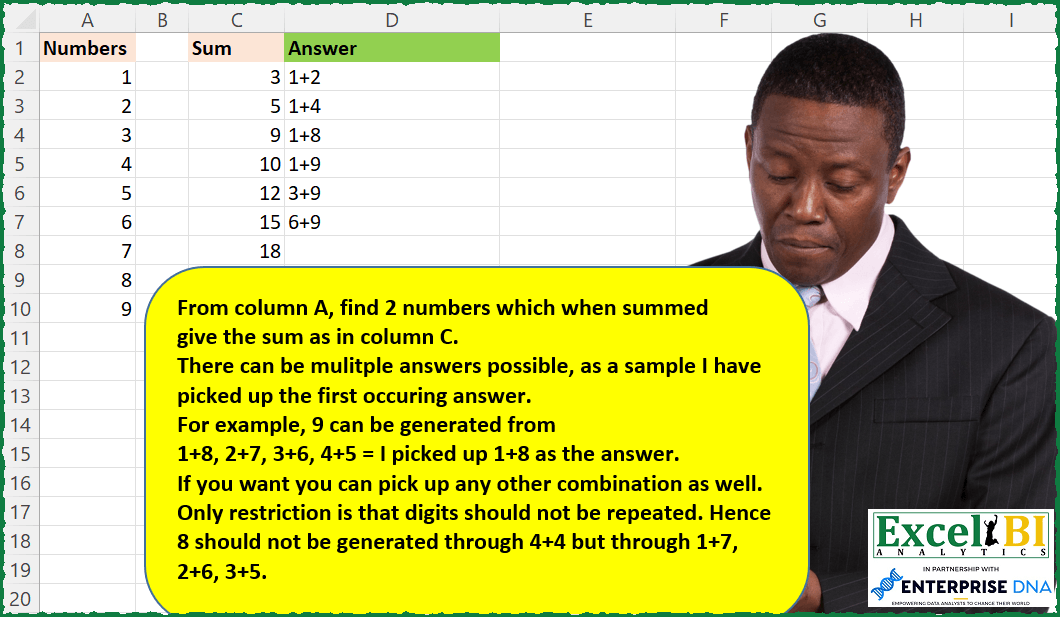
From column A, find 2 numbers which when summed give the sum as in column C. There can be multiple answers possible, as a sample I have picked up the first occurring answer. For example, 9 can be generated from 1+8, 2+7, 3+6, 4+5 = I picked up 1+8 as the answer. If you want you can pick up any other combination as well. Only restriction is that digits should not be repeated. Hence 8 should not be generated through 4+4 but through 1+7, 2+6, 3+5.
📌 Challenge Details and Links
ExcelBI Excel Challenge Number: 98
Challenge Difficulty: ⭐️⭐️
📥Download Sample File
📥Link to the solutions on LinkedIn
Solving the challenge of Find Two Numbers with Sum with Power Query
Power Query solution 1 for Find Two Numbers with Sum, proposed by Bo Rydobon 🇹🇭:
let
  Source = Excel.CurrentWorkbook(){[Name = "Table1"]}[Content],
  Ans = Table.AddColumn(
    Source,
    "Answer",
    (s) =>
      List.Last(
        List.Generate(
          () => [a = 1, b = 2],
          each [a] + [b] <= s[Sum],
          each [
            a = [a] + (if [b] + 1 > 9 then 1 else 0),
            b = if [b] + 1 > 9 then [a] + 1 else [b] + 1
          ],
          each if [a] <> [b] then Text.From([a]) & "+" & Text.From([b]) else null
        )
      )
  )
in
  Ans
Power Query solution 2 for Find Two Numbers with Sum, proposed by Bo Rydobon 🇹🇭:
let
  Source = Excel.CurrentWorkbook(){[Name = "Table1"]}[Content],
  Ans = Table.AddColumn(
    Source,
    "Answer",
    (s) =>
      Text.Combine(
        List.Select(
          List.Transform(
            {1 .. List.Min({s[Sum], 9})},
            each Text.Combine(
              List.Transform(
                List.Select({_ .. 9}, (a) => a > _ and a + _ = s[Sum]),
                (b) => Text.From(_) & "+" & Text.From(b)
              ),
              ", "
            )
          ),
          each _ > ""
        ),
        ", "
      )
  )
in
  Ans
Power Query solution 3 for Find Two Numbers with Sum, proposed by Luan Rodrigues:
let
 Fonte = Tabela1,
 a = Table.AddColumn(Fonte, "Personalizar", each [
a = {"1".."9"},
b = Lines.FromText(Text.From([Numbers])),
c = List.Difference(a,b)
][c]),
 b = Table.ExpandListColumn(a, "Personalizar"),
 c = Table.AddColumn(b, "Personalizar.1", each [
a = List.Sum({[Numbers],Number.From([Personalizar])}),
b = Text.From([Numbers]) & " + " & Text.From([Personalizar])

]),
 d = Table.ExpandRecordColumn(c, "Personalizar.1", {"a", "b"}, {"a", "b"}),
 e = Table.Distinct(d, {"a"}),
 Filter = Table.SelectRows(e, each List.Contains(f[num],[a]) = true),
 f = hashtag#table({"num"},{{3},{5},{9},{10},{12},{15},{18}}),
 g = Table.NestedJoin(f, {"num"}, Filter, {"a"}, "f", JoinKind.LeftOuter),
 Result = Table.ExpandTableColumn(g, "f", {"b"}, {"b"})
in
 Result
Power Query solution 4 for Find Two Numbers with Sum, proposed by Bhavya Gupta:
let
  Source = Excel.CurrentWorkbook(){[Name = "Table1"]}[Content],
  SumToCheck = {3, 5, 9, 10, 12, 15, 18},
  ListOfNumbers = Source[Numbers],
  Transformed = List.Transform(
    List.Combine(
      List.Transform(
        ListOfNumbers,
        (a) =>
          List.Transform(
            List.Select(ListOfNumbers, (b) => b <> a),
            (c) => Text.From(a) & "+" & Text.From(c)
          )
      )
    ),
    each {_} & {Expression.Evaluate(_)}
  ),
  Combinations = List.Transform(
    SumToCheck,
    (s) =>
      Text.Combine(List.Transform(List.Select(Transformed, (d) => d{1} = s), (n) => n{0}), ", ")
  ),
  Final = Table.FromColumns({SumToCheck, Combinations}, {"Sum", "Possible Combinations"})
in
  Final
Power Query solution 5 for Find Two Numbers with Sum, proposed by Matthias Friedmann:
let
 Source = Excel.CurrentWorkbook(){[Name="NumbersForSum"]}[Content],
 Custom = Table.AddColumn(Source, "Custom", each Source[Numbers]),
 Expanded = Table.ExpandListColumn(Custom, "Custom"),
 Addition = Table.AddColumn(Expanded, "Sum", each [Numbers] + [Custom], type number),
 Filtered = Table.SelectRows(Addition, each List.Contains(SumFromNumbers[Sum], [Sum]) and [Numbers]<>[Custom]),
 MergedCol = Table.CombineColumns(Table.TransformColumnTypes(Filtered, {{"Numbers", type text}, {"Custom", type text}}, "de-DE"),{"Numbers", "Custom"},Combiner.CombineTextByDelimiter("+", QuoteStyle.None),"Combinations"),
 MergedQuer = Table.NestedJoin(SumFromNumbers, {"Sum"}, MergedCol, {"Sum"}, "Filtered Rows", JoinKind.LeftOuter),
 Expanded2 = Table.ExpandTableColumn(MergedQuer, "Filtered Rows", {"Combinations"}, {"Combinations"}),
 Distinct = Table.Distinct(Expanded2, {"Sum"})
in
 Distinct


... alternative ALL possible number combinations:
 Grouped = Table.Group(Expanded2, {"Sum"}, {{"Combinations", each Text.Combine([Combinations], ", ")}})
in
 Grouped
Power Query solution 6 for Find Two Numbers with Sum, proposed by Rafael González B.:
let
 Source = Excel.CurrentWorkbook(){[Name="Table2"]}[Content],
 ToNumbers = Table.TransformColumnTypes(Source,{{"Sum", Int64.Type}})
in
 ToNumbers

Now Get Numbers Table (Table1) and Transform it (Next Comments)
Power Query solution 7 for Find Two Numbers with Sum, proposed by Victor Wang:
let
  Nums = Excel.CurrentWorkbook(){[Name = "AllowedNumbers"]}[Content][Numbers],
  Sums = Excel.CurrentWorkbook(){[Name = "Sums"]}[Content],
  Result = Table.AddColumn(
    Sums,
    "Answer",
    each
      let
        l = List.First(
          List.Select(
            List.Transform(
              Nums,
              (a) =>
                [
                  c = List.Select(Nums, (b) => a + b = [Sum]),
                  d = if not List.IsEmpty(c) then {a, c{0}} else null
                ][d]
            ),
            (f) => f <> null and List.IsDistinct(f)
          )
        )
      in
        try (Text.From(l{0}) & " + " & Text.From(l{1})) otherwise null
  )
in
  Result
Power Query solution 8 for Find Two Numbers with Sum, proposed by Jan Willem Van Holst:
let
  Cartesian = () =>
    let
      s1 = List.Generate(
        () => [i = 1, j = 0, myList = {}],
        each [i] <= 9,
        each
          if [j] < 9 then
            [i = [i], j = [j] + 1, myList = {i, j}]
          else
            [i = [i] + 1, j = 1, myList = {i, j}],
        each _[myList]
      ),
      s2 = List.Skip(s1)
    in
      s2,
  Source = Table.FromRows(
    Json.Document(
      Binary.Decompress(
        Binary.FromText("i45WMlaK1YlWMgWTlmDS0ABCGUEoiJShhVJsLAA=", BinaryEncoding.Base64),
        Compression.Deflate
      )
    ),
    let
      _t = ((type nullable text) meta [Serialized.Text = true])
    in
      type table [sum = _t]
  ),
  #"Changed Type" = Table.TransformColumnTypes(Source, {{"sum", Int64.Type}}),
  #"Added Custom" = Table.AddColumn(
    #"Changed Type",
    "Cartesian",
    each
      let
        ListWithCartesianProduct = Cartesian(),
        ListSelected = List.Select(
          ListWithCartesianProduct,
          (l) => (l{0} + l{1} = [sum]) and (l{0} <> l{1})
        ),
        result =
          if List.Count(ListSelected) = 0 then
            ""
          else
            Text.From(ListSelected{0}{0}) & " + " & Text.From(ListSelected{0}{1})
      in
        result
  )
in
  #"Added Custom"
Solving the challenge of Find Two Numbers with Sum with Excel
Excel solution 1 for Find Two Numbers with Sum, proposed by Bo Rydobon 🇹🇭:
=LET(r,A2:A10,c,TOROW(r),XLOOKUP(C2:C8,TOCOL(IF(rExcel solution 2 for Find Two Numbers with Sum, proposed by Bo Rydobon 🇹🇭:
=MAP(C2:C8,LAMBDA(a,LET(b,MIN(a-1,9),IF(b>a-b,a-b&"+"&b,""))))Excel solution 3 for Find Two Numbers with Sum, proposed by Bo Rydobon 🇹🇭:
=LET(r,A2:A10,c,TOROW(r),MAP(C2:C8,LAMBDA(s,IFERROR(ARRAYTOTEXT(TOCOL(IF(IF(rExcel solution 4 for Find Two Numbers with Sum, proposed by Rick Rothstein:
=LET(a,A2:A10,t,TOROW(a),c,aExcel solution 5 for Find Two Numbers with Sum, proposed by John V.:
=MAP(C2:C8,LAMBDA(x,LET(n,A2:A10,t,TOROW(n),IFERROR(TAKE(TOCOL(IF((n+t=x)*(n<>t),n&"+"&t,e),2),1),""))))Excel solution 6 for Find Two Numbers with Sum, proposed by محمد حلمي:
=MAP(C2:C8,LAMBDA(b,
LET(
e,A2:A10,
v,ROWS(e),
r,MID(BASE(SEQUENCE(,2^v,0),2,v),SEQUENCE(v),1),
c,IF(FILTER(--r,
MMULT(TRANSPOSE(e),--r)=b),e,""),TEXTJOIN(", ",,
BYCOL(c,LAMBDA(x,
IF(COUNT(x)>1,TEXTJOIN("+",,x),"")))))))
Excel solution 7 for Find Two Numbers with Sum, proposed by محمد حلمي:
=IFERROR(MAP(C2:C8,LAMBDA(c,LET(a,A2:A10,e,TOROW(a),v,ARRAYTOTEXT( TOCOL(IF(e+a=c,IF(e=a,i,e&"+"&a),i),2,1)),MID(v,1,LEN(v)/2-1)))),"")Excel solution 8 for Find Two Numbers with Sum, proposed by 🇰🇷 Taeyong Shin:
=MAP(C2:C8,LAMBDA(x,LET(n,A2:A10,m,MMULT(--(n+TOROW(n)=x),SIGN(n)),IF(SUM(m)-1,TEXTJOIN("+",,XLOOKUP(1,m,n,,,{1,-1})),""))))Excel solution 9 for Find Two Numbers with Sum, proposed by 🇰🇷 Taeyong Shin:
=MAP(C2:C8,LAMBDA(x,LET(n,A2:A10,r,TOROW(n),TEXTJOIN(",",,REPT(n&"+"&r,(nExcel solution 10 for Find Two Numbers with Sum, proposed by Julian Poeltl:
=LET(N,A2:A10,S,C2:C8,P,TOCOL(IF(N=TRANSPOSE(N),"",N+TRANSPOSE(N))),PP,TOCOL(N&"+"&TRANSPOSE(N)),IFERROR(MAP(S,LAMBDA(A,TAKE(FILTER(PP,P=A),1))),""))Excel solution 11 for Find Two Numbers with Sum, proposed by Aditya Kumar Darak 🇮🇳:
=LET(
 _su, C2:C8,
 _nc, A2:A10,
 _nr, TOROW(_nc),
 _c1, TOCOL(IF(_nc < _nr, _nc + _nr, "")),
 _c2, TOCOL(_nc & "+" & _nr),
 _r, MAP(_su, LAMBDA(a, ARRAYTOTEXT(FILTER(_c2, _c1 = a, "")))),
 _r
)
Excel solution 12 for Find Two Numbers with Sum, proposed by Timothée BLIOT:
=LET(A, A2:A10, B,C2:C8, T, MAKEARRAY(ROWS(A),ROWS(A), LAMBDA(x,y, INDEX(A,x)+INDEX(A,y) )),
S, MAKEARRAY(ROWS(A),ROWS(A), LAMBDA(x,y, x&"+"&y) ), MAP(B, LAMBDA(x, XLOOKUP(x,TOCOL(T),TOCOL(S)) )) )
Excel solution 13 for Find Two Numbers with Sum, proposed by Guillermo Arroyo:
=MAP(C2:C8,LAMBDA(x,LET(a,RANDBETWEEN(1,ROUNDUP(x/2,0)-1),b,x-a,TEXTJOIN("+",,a,b))))Excel solution 14 for Find Two Numbers with Sum, proposed by Mahmoud Bani Asadi:
=LET(
 _su, C2:C8,
 _nc, A2:A10,
 _nr, TOROW(_nc),
 _c1, TOCOL(IF(_nc < _nr, _nc + _nr, "")),
 _c2, TOCOL(_nc & "+" & _nr),
 _r, MAP(_su, LAMBDA(a, ARRAYTOTEXT(FILTER(_c2, _c1 = a, "")))),
Comments,"
Here:
su = Required Sum of Numbers
nc = Numbers in Column
nr = Numbers in Row from Column
c1 = Calculation 1 for getting the totals
c2 = Calculation 2 for getting the expression
r = Return",
_r
)
Excel solution 15 for Find Two Numbers with Sum, proposed by Sergei Baklan:
=LET(
 n, Numbers,
 k, TRANSPOSE(Numbers),
 res, LAMBDA(v,
 LET(
 m, 1 / (n + k = v) / (n <> k),
 IFERROR(
 @TOCOL(m * n & "+" & m * k, 3),
 ""
 )
 )
 ),
 MAP(sum, res)
)
Solving the challenge of Find Two Numbers with Sum with Python
Python solution 1 for Find Two Numbers with Sum, proposed by Igor Perković:
import pandas as pd
# SOURCE
nums = [v[0] for v in pd.read_excel('Combinations for Sum.xlsx', usecols="A").values.tolist()]
sums = [v[0] for v in pd.read_excel('Combinations for Sum.xlsx', usecols="c", nrows=7).values.tolist()]
# Processing
acc={}
for s in sums:
 tmp=[]
 for a in nums:
 for b in nums:
 if (a + b == s) and (a != b):
 res = f'{a}+{b}'
 tmp.append(res)
 acc[s]=','.join(tmp)
# Result
for k,v in acc.items():
 print(f'{k}t{v}')
Solving the challenge of Find Two Numbers with Sum with SQL
SQL solution 1 for Find Two Numbers with Sum, proposed by Zoran Milokanović:
WITH
DATA_PREP_NUMS
AS
(
 SELECT
 ROW_NUMBER() OVER () AS ORDINAL_NUMBER
 ,N.NUMBER
 FROM NUMBERS N
),
DATA_PREP_SUM
AS
(
 SELECT
 ROW_NUMBER() OVER () AS ORDINAL_NUMBER
 ,S.SUM
 FROM SUM S
),
ANSWER
AS
(
 SELECT
 T.SUM
 ,T.ANSWER
 FROM
 (
 SELECT
 R.SUM
 ,TO_CHAR(S1.NUMBER) || '+' || TO_CHAR(S2.NUMBER) AS ANSWER
 ,ROW_NUMBER() OVER (PARTITION BY R.SUM ORDER BY S1.ORDINAL_NUMBER, S2.ORDINAL_NUMBER) AS SEQ
 FROM DATA_PREP_NUMS S1
 CROSS JOIN DATA_PREP_NUMS S2
 CROSS JOIN DATA_PREP_SUM R
 WHERE
 S1.NUMBER <> S2.NUMBER
 AND S1.NUMBER + S2.NUMBER = R.SUM
 ) T
 WHERE
 T.SEQ = 1
)
SELECT
 F.NUMBER
,F.SUM
,A.ANSWER
FROM
(
 SELECT
 NVL(N.ORDINAL_NUMBER, S.ORDINAL_NUMBER) AS ORDINAL_NUMBER
 ,N.NUMBER
 ,S.SUM
 FROM DATA_PREP_NUMS N
 FULL JOIN DATA_PREP_SUM S ON N.ORDINAL_NUMBER = S.ORDINAL_NUMBER
) F
LEFT JOIN ANSWER A ON F.SUM = A.SUM
ORDER BY
 F.ORDINAL_NUMBER
;