
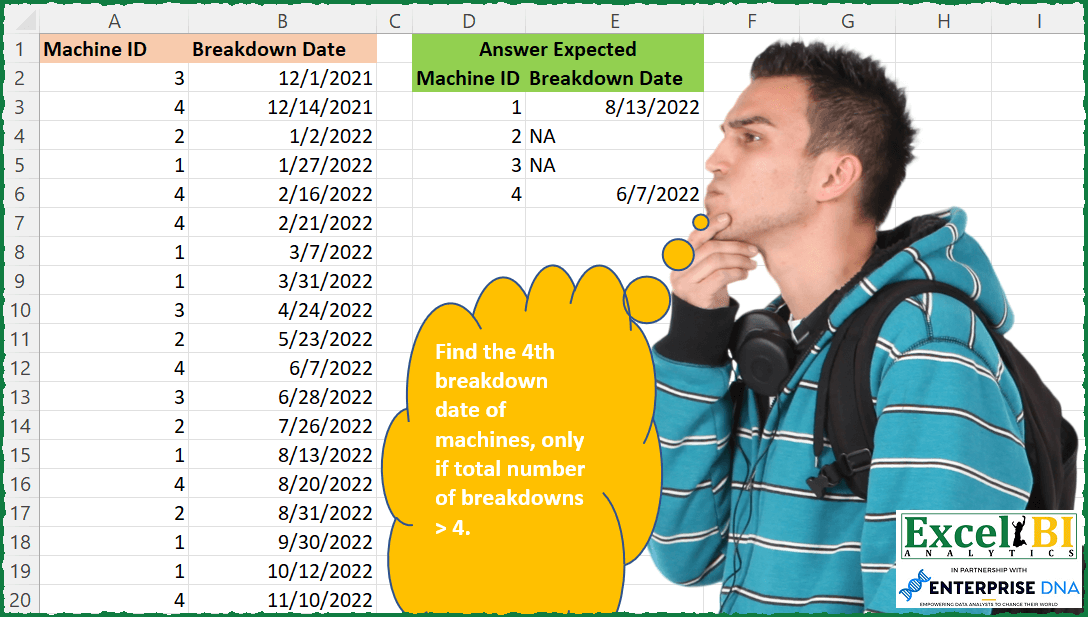
Find the 4th breakdown date of machines, only if total number of breakdowns > 4. Machine ID 2 breaks down 4 times but number of breakdowns is not > 4, hence answer will be NA for machine ID 2. Machine ID 3 breaks down only 3 times, hence answer is NA for Machine ID 3. Machine IDs 1 and 4 break down 6 times each which is > 4, hence they will have respective 4th breakdown date as the answer.
📌 Challenge Details and Links
ExcelBI Excel Challenge Number: 90
Challenge Difficulty: ⭐️⭐️
📥Download Sample File
📥Link to the solutions on LinkedIn
Solving the challenge of Get 4th Breakdown if > with Power Query
Power Query solution 1 for Get 4th Breakdown if >, proposed by Bo Rydobon 🇹🇭:
let
  Source = Excel.CurrentWorkbook(){[Name = "Table1"]}[Content],
  Grouped = Table.Sort(
    Table.Group(
      Source,
      {"Machine ID"},
      {"Count", each if List.Count([Breakdown Date]) > 4 then [Breakdown Date]{3} else "NA"}
    ),
    {"Machine ID", 0}
  )
in
  Grouped
Power Query solution 2 for Get 4th Breakdown if >, proposed by Alejandro Simón 🇵🇦 🇪🇸:
let
  Source = Excel.CurrentWorkbook(){[Name = "Table1"]}[Content],
  ChgType = Table.TransformColumnTypes(
    Table.Sort(Source, {{"Machine ID", Order.Ascending}, {"Breakdown Date", Order.Ascending}}),
    {{"Breakdown Date", type date}}
  ),
  Grouped = Table.Group(
    ChgType,
    {"Machine ID"},
    {{"Count", each Table.RowCount(_), Int64.Type}, {"AllRows", each [Breakdown Date]{3}}}
  ),
  Solution = Table.AddColumn(
    Grouped,
    "Breakdown Date",
    each if [Count] > 4 then [AllRows] else "NA"
  )[[Machine ID], [Breakdown Date]]
in
  Solution
Power Query solution 3 for Get 4th Breakdown if >, proposed by Brian Julius:
let
  Source = Excel.CurrentWorkbook(){[Name = "Table1"]}[Content],
  Type = Table.Sort(
    Table.TransformColumnTypes(Source, {{"Machine ID", Int64.Type}, {"Breakdown Date", type date}}),
    {{"Machine ID", Order.Ascending}, {"Breakdown Date", Order.Ascending}}
  ),
  Group = Table.Group(
    Type,
    {"Machine ID"},
    {
      {"All", each _, type table [Machine ID = nullable number, Breakdown Date = nullable date]},
      {"Count", each Table.RowCount(_), Int64.Type}
    }
  ),
  Filter = Table.RemoveColumns(Table.SelectRows(Group, each [Count] > 4), "Count"),
  Index = Table.RemoveColumns(
    Table.AddColumn(Filter, "Custom", each Table.AddIndexColumn([All], "Index", 1, 1)),
    "All"
  ),
  Expand = Table.ExpandTableColumn(
    Index,
    "Custom",
    {"Breakdown Date", "Index"},
    {"Breakdown Date", "Index"}
  ),
  Filter2 = Table.RenameColumns(
    Table.RemoveColumns(Table.SelectRows(Expand, each ([Index] = 4)), "Index"),
    {"Machine ID", "MachineID"}
  ),
  Join = Table.Sort(
    Table.RemoveColumns(
      Table.Join(
        Table.Distinct(Table.SelectColumns(Source, "Machine ID")),
        "Machine ID",
        Filter2,
        "MachineID",
        JoinKind.LeftOuter
      ),
      "MachineID"
    ),
    {"Machine ID", Order.Ascending}
  )
in
  Join
Power Query solution 4 for Get 4th Breakdown if >, proposed by Bhavya Gupta:
let
  Source = Excel.CurrentWorkbook(){[Name = "Table1"]}[Content],
  #"Changed Type" = Table.TransformColumnTypes(Source, {{"Breakdown Date", type date}}),
  Grouped = Table.Group(
    #"Changed Type",
    {"Machine ID"},
    {
      {"Count", each Table.RowCount(_)},
      {
        "Breakdown Date",
        each if List.Count([Breakdown Date]) > 4 then List.Sort([Breakdown Date]){3} else "NA"
      }
    }
  ),
  ExpectedOutput = Table.Sort(Grouped, {{"Machine ID", Order.Ascending}})[
    [Machine ID],
    [Breakdown Date]
  ]
in
  ExpectedOutput
Power Query solution 6 for Get 4th Breakdown if >, proposed by 🇮🇷 Navid Esmaeilzadeh اسماعیل زاده:
let
 Source = Excel.CurrentWorkbook(){[Name="Table1"]}[Content],
 #"Changed Type" = Table.TransformColumnTypes(Source,{{"Machine ID", Int64.Type}, {"Breakdown Date", type date}}),
 #"Sorted Rows" = Table.Sort(#"Changed Type",{{"Machine ID", Order.Ascending}, {"Breakdown Date", Order.Ascending}}),
 #"Added Index" = Table.AddIndexColumn(#"Sorted Rows", "Index", 1, 1, Int64.Type),
 #"Grouped Rows" = Table.Group(#"Added Index", {"Machine ID"}, {{"Count", each Table.RowCount(_), Int64.Type}, {"All", each _, type table [Machine ID=nullable number, Breakdown Date=nullable date, Index=number]}}),
 #"Added Custom" = Table.AddColumn(#"Grouped Rows", "Custom", each Table.AddIndexColumn([All],"Index.",1,1)),
 #"Removed Other Columns" = Table.SelectColumns(#"Added Custom",{"Machine ID", "Count", "Custom"}),
 #"Expanded Custom" = Table.ExpandTableColumn(#"Removed Other Columns", "Custom", {"Breakdown Date", "Index."}, {"Breakdown Date", "Index."}),
 #"Filtered Rows" = Table.SelectRows(#"Expanded Custom", each [Count] > 4),
 #"Filtered Rows1" = Table.SelectRows(#"Filtered Rows", each [#"Index."] = 4),
 Removed = Table.SelectColumns(#"Filtered Rows1",{"Machine ID", "Breakdown Date"}),
 Back = #"Grouped Rows",

 Custom1 = Table.NestedJoin(Back,{"Machine ID"},Removed,{"Machine ID"},"Back",JoinKind.LeftOuter),
 #"Expanded Back" = Table.ExpandTableColumn(Custom1, "Back", {"Breakdown Date"}, {"Breakdown Date"}),
 #"Removed Other Columns1" = Table.SelectColumns(#"Expanded Back",{"Machine ID", "Breakdown Date"}),
 #"Changed Type1" = Table.TransformColumnTypes(#"Removed Other Columns1",{{"Machine ID", Int64.Type}, {"Breakdown Date", type date}})
in
 #"Changed Type1"
Power Query solution 7 for Get 4th Breakdown if >, proposed by Matthias Friedmann:
let
  Source = Excel.CurrentWorkbook(){[Name = "BreakDowns"]}[Content],
  #"Grouped Rows" = Table.Group(
    Source,
    {"Machine ID"},
    {
      {
        "Breakdown Date",
        each if List.Count([Breakdown Date]) > 4 then [Breakdown Date]{3} else "NA"
      }
    }
  ),
  #"Sorted Rows" = Table.Sort(#"Grouped Rows", {{"Machine ID", Order.Ascending}})
in
  #"Sorted Rows"
Power Query solution 8 for Get 4th Breakdown if >, proposed by Krzysztof Kominiak:
let
  Source = InputData,
  ChanType = Table.TransformColumnTypes(
    Source,
    {{"Breakdown Date", type date}, {"Machine ID", Int64.Type}}
  ),
  GroupRows = Table.Sort(
    Table.Group(ChanType, {"Machine ID"}, {{"Breakdown Date", each _[Breakdown Date]}}),
    {"Machine ID"}
  ),
  Result = Table.TransformColumns(
    GroupRows,
    {"Breakdown Date", each if List.Count(_) > 4 then (_){3} else "NA"}
  )
in
  Result
Power Query solution 9 for Get 4th Breakdown if >, proposed by Thomas DUCROQUETZ:
let
  Source = YourRawData,
  ModifType = Table.TransformColumnTypes(
    Source,
    {{"Machine ID", Int64.Type}, {"Breakdown Date", type date}},
    "en-us"
  ),
  SortMachine = Table.Sort(ModifType, {{"Machine ID", Order.Ascending}}),
  GetFourthTransaction = Table.Group(
    SortMachine,
    {"Machine ID"},
    {
      {
        "Breakdown Date",
        each
          let
            tbl             = _,
            CountBreakdowns = Table.RowCount(tbl)
          in
            if CountBreakdowns > 4 then
              Table.Sort(tbl, {{"Breakdown Date", Order.Ascending}})[Breakdown Date]{3}
            else
              "NA"
      }
    }
  )
in
  GetFourthTransaction
Solving the challenge of Get 4th Breakdown if > with Excel
Excel solution 1 for Get 4th Breakdown if >, proposed by Rick Rothstein:
=LET(a,
    A2:A20,
    b,
    B2:B20,
    u,
    SORT(
        UNIQUE(
            a
        )
    ),
    HSTACK(u,
    MAP(u*(COUNTIF(
        a,
        u
    )>4),
    LAMBDA(
        x,
        IFERROR(
            INDEX(
                FILTER(
                    b,
                    a=x
                ),
                4
            ),
            "NA"
        )
    ))))
Excel solution 2 for Get 4th Breakdown if >, proposed by John V.:
=LET(m,A2:A20,u,SORT(UNIQUE(m)),HSTACK(u,MAP(u,LAMBDA(x,IF(SUM(--(m=x))>4,INDEX(FILTER(B2:B20,m=x),4),"NA")))))

And, another one:
✅=LET(m,A2:A20,u,SORT(UNIQUE(m)),HSTACK(u,MAP(u,LAMBDA(x,IF(SUM(--(m=x))>4,SMALL(IF(m=x,B2:B20),4),"NA")))))
Excel solution 3 for Get 4th Breakdown if >, proposed by محمد حلمي:
=SORT(
    DROP(

        REDUCE(
            "",
            UNIQUE(
                A2:A20
            ),
            LAMBDA(
                a,
                d,
                 LET(

                     i,
                     FILTER(
                         B2:B20,
                         d=A2:A20
                     ),

                     VSTACK(
                         a,
                         HSTACK(
                             d,
                             IFERROR(

                                 IF(
                                     SUM(
                                         INDEX(
                                             i,
                                             {4,
                                             5}
                                         )
                                     ),
                                     INDEX(
                                         i,
                                         4
                                     )
                                 ),
                                 "NA"
                             )
                         )
                     )
                 )
            )
        ),
        1
    )
)
Excel solution 4 for Get 4th Breakdown if >, proposed by 🇰🇷 Taeyong Shin:
=LET(
 Sorted, SORT(A2:B20, {1,2}),
 ID, TAKE(Sorted, , 1),
 Uid, SORT(UNIQUE(ID)),
 DROP(REDUCE("", Uid, LAMBDA(a,b,
 VSTACK(a, LET(arr, FILTER(Sorted, ID = b), IF(ROWS(arr) > 4, CHOOSEROWS(arr, 4), HSTACK(b, "NA"))))
 )), 1)
)
Excel solution 5 for Get 4th Breakdown if >, proposed by 🇰🇷 Taeyong Shin:
=GROUPBY(
    A1:A20,
    B1:B20,
    LAMBDA(
        x,
        IFS(
            ROWS(
                x
            )>4,
            SMALL(
                x,
                4
            )
        )
    ),
    ,
    0
)
Excel solution 6 for Get 4th Breakdown if >, proposed by Kris Jaganah:
=LET(a,A2:A20,b,B2:B20,c,MAP(a,LAMBDA(x,COUNTIF(A2:x,x))),d,BYROW(a,LAMBDA(y,SUM(IF(a=y,1,0)))),e,SORT(UNIQUE(a),1,1),f,BYROW(e,LAMBDA(z,FILTER(b,(a=z)*(c=4)*(d>4)))),g,HSTACK(e,IFERROR(f,"NA")),g)Excel solution 7 for Get 4th Breakdown if >, proposed by Julian Poeltl:
=LET(
    M,
    A2:A20,
    B,
    B2:B20,
    U,
    UNIQUE(
        SORT(
            M
        )
    ),
    HSTACK(
        U,
        MAP(
            U,
            LAMBDA(
                A,
                LET(
                    F,
                    FILTER(
                        B,
                        M=A
                    ),
                    IF(
                        ROWS(
                            F
                        )>4,
                        CHOOSEROWS(
                            F,
                            4
                        ),
                        "NA"
                    )
                )
            )
        )
    )
)
Excel solution 8 for Get 4th Breakdown if >, proposed by Aditya Kumar Darak 🇮🇳:
=LET(
 _n, 4,
 _m, A2:A20,
 _bd, B2:B20,
 _um, SORT(UNIQUE(_m)),
 _e, LAMBDA(a,
 IF(
 SUM(--(_m = a)) > _n,
 INDEX(SORT(FILTER(_bd, _m = a)), _n),
 "NA"
 )
 ),
 _c, MAP(_um, _e),
 _r, HSTACK(_um, _c),
 _r
)

Method 2: Found a way to deal COUNTIFS bug.
=LET(
 _n, 4,
 _m, A2:A20,
 _bd, B2:B20,
 _um, SORT(UNIQUE(_m)),
 _e, LAMBDA(a, b,
 IF(b > _n, INDEX(SORT(FILTER(_bd, _m = a)), _n), "NA")
 ),
 _c, MAP(_um, COUNTIFS(_m, _um), _e),
 _r, HSTACK(_um, _c),
 _r
)
Excel solution 9 for Get 4th Breakdown if >, proposed by Timothée BLIOT:
=LET(ID,
    A2:A20,
    Date,
    B2:B20,
    N,
    SEQUENCE(
        4
    ),
    Times,
    IF(BYROW(ID,
    LAMBDA(a,
    SUMPRODUCT(1*(a=ID))))>4,
    1,
    0),
     HSTACK(
         N,
         IFERROR(
              BYROW(
                  N,
                  LAMBDA(
                      a,
                      INDEX(
                          FILTER(
                              Date,
                              ID*Times=a,
                              ""
                          ),
                          4
                      )
                  )
              ),
             "NA"
         )
     ))
Excel solution 10 for Get 4th Breakdown if >, proposed by Bhavya Gupta:
=LET(MI,
    A2:A20,
    BD,
    B2:B20,
    RC,
    MAP(SEQUENCE(
        ROWS(
            MI
        )
    ),
     LAMBDA(x,
    SUM(0+(TAKE(
        MI,
        x
    )=CHOOSEROWS(
        MI,
        x
    ))))),
    U,
    SORT(
        UNIQUE(
            MI
        )
    ),
    HSTACK(
        U,
        TEXT(
            IF(
                ISNUMBER(
                    XLOOKUP(
                        U&5,
                        MI&RC,
                        BD
                    )
                ),
                XLOOKUP(
                    U&4,
                    MI&RC,
                    BD
                ),
                NA()
            ),
            "dd-mm-yyyy"
        )
    ))
Excel solution 11 for Get 4th Breakdown if >, proposed by Charles Roldan:
=LET(
    Headers,
     A1:B1,
     MachineID,
     A2:A20,
     BreakdownDate,
     B2:B20,
     Machines,
     SORT(
         UNIQUE(
             MachineID
         )
     ),

    VSTACK(
        Headers,
         HSTACK(
             Machines,
              MAP(
                  Machines,
                   LAMBDA(
                       x,
                        IFERROR(
                            TEXT(
                                INDEX(
                                    DROP(
                                        SORT(
                                            FILTER(

                                                BreakdownDate,
                                                 MachineID=x
                                            )
                                        ),
                                         -1
                                    ),
                                     4
                                ),
                                 "m/d/yyyy"
                            ),
                    &         "NA"
                        )
                   )
              )
         )
    )
)
Excel solution 12 for Get 4th Breakdown if >, proposed by Stefan Olsson:
=LAMBDA(
    m,
     BYROW(
         SORT(
             UNIQUE(
                 INDEX(
                     m,
                      ,
                      1
                 )
             )
         ),
          LAMBDA(
              mu,
               {mu,
               IF(
                   COUNTIFS(
                       m,
                        mu
                   )<5,
                    "NA",
                    QUERY(
                        {m},
                        REGEXREPLACE(
                            "select Col2 where Col1=MU limit 1 offset 3",
                             "(MU)",
                             mu&""
                        ),
                         0
                    )
               )}
          )
     )
)(A2:B20)
Excel solution 13 for Get 4th Breakdown if >, proposed by Victor Momoh (MVP, MOS, R.Eng):
=LET(

    a,
    A2:A20,

    b,
    B2:B20,

    c,
    SORT(
        UNIQUE(
            a
        )
    ),

    d,
    COUNTIF(
        a,
        c
    ),

    HSTACK(
        c,

        MAP(
            c,
            d,

            LAMBDA(
                x,
                y,

                IF(
                    y>4,
                    INDEX(
                        FILTER(
                            b,
                            a=x
                        ),
                        4
                    ),
                    "NA"
                )
            )
        )
    )
)
Excel solution 14 for Get 4th Breakdown if >, proposed by Quadri Olayinka Atharu:
=LET(
    id,
    A2:A20,

    bd,
    B2:B20,

    uID,
    SORT(
        UNIQUE(
            id
        )
    ),

    yd,
    BYROW(
        uID,
        LAMBDA(
            x,
            IFERROR(
                INDEX(
                    IF(
                        COUNTA(
                            FILTER(
                                bd,
                                id=x
                            )
                        )>4,
                        FILTER(
                                bd,
                                id=x
                            )
                    ),
                    4
                ),
                "NA"
            )
        )
    ),

    HSTACK(
        uID,
        yd
    )
)
Excel solution 15 for Get 4th Breakdown if >, proposed by RIJESH T.:
=LET(u,SORT(UNIQUE(A2:A20)),HSTACK(u,MAP(u,LAMBDA(a,LET(f,FILTER(B2:B20,A2:A20=a),IF(ROWS(f)>4,CHOOSEROWS(f,4),"NA"))))))Excel solution 16 for Get 4th Breakdown if >, proposed by Rayan S.:
=IFERROR(HSTACK(SORT(UNIQUE(A2:A20)),MAP(SORT(UNIQUE(A2:A20)),LAMBDA(arr,LET(a,$A$2:$A$20,b,$A$2:$B$20,c,COUNTIF(a,arr),INDEX(IF(c>4,FILTER(b,a=arr)),4,2))))),"NA")Excel solution 17 for Get 4th Breakdown if >, proposed by Artur Pilipczuk:
=LET(z_,A2:A20,d_,B2:B20,u_,SORT(UNIQUE(z_)),w_,MAP(u_,
LAMBDA(u,
 LET(l,FILTER(d_,z_=u),IF(ISERROR(INDEX(l,5)),NA(),INDEX(l,4)
))
)
),HSTACK(u_,w_))
Solving the challenge of Get 4th Breakdown if > with Python
Python solution 1 for Get 4th Breakdown if >, proposed by Igor Perković:
import pandas as pd
# Source
df = pd.read_excel('FT.xlsx', sheet_name = 'Data')
# Processing
dfg = df.groupby('Machine ID').count()
df['cc'] = df[df['Machine ID'].isin(dfg[dfg['Breakdown Date']>4].index.tolist())].groupby('Machine ID').cumcount()
res = df[df['cc']==3].sort_values(by=['Machine ID']).loc[:,['Machine ID','Breakdown Date']]
dt = pd.merge(dfg, res, how='left', on=['Machine ID'])
final = dt.loc[:,['Machine ID','Breakdown Date_y']]
final.columns=['Machine ID','Breakdown Date']
# Result
print(final.to_string(index=False))
Python solution 2 for Get 4th Breakdown if >, proposed by Igor Perković:
import polars as pl
# Source
df = pl.read_csv('FT2.csv', parse_dates=True)
# Processing
res = df.groupby("Machine ID").agg( [ pl.count(), pl.col("Breakdown Date").sort(reverse=False).limit(4).last()] ).sort("Machine ID", reverse=False)
f = res.select([ "Machine ID", pl.when(pl.col("count") > 4).then(pl.col("Breakdown Date")).otherwise('NA') ])
# Result
print(f)
Solving the challenge of Get 4th Breakdown if > with DAX
DAX solution 1 for Get 4th Breakdown if >, proposed by Zoran Milokanović:
EVALUATE
GROUPBY(
 ADDCOLUMNS(Input,
 "B",
 VAR C = COUNTROWS(WINDOW(1, ABS, -1, ABS, DISTINCT(ALLSELECTED(Input)), ORDERBY(Input[Breakdown Date]), PARTITIONBY(Input[Machine ID])))
 RETURN
 IF(C > 4, CONVERT(SELECTCOLUMNS(INDEX(4, DISTINCT(ALLSELECTED(Input)), ORDERBY(Input[Breakdown Date]), PARTITIONBY(Input[Machine ID])), Input[Breakdown Date]), STRING), "NA")
 ),
 Input[Machine ID],
 "Breakdown Date", MAXX(CURRENTGROUP(), [B])
)
Solving the challenge of Get 4th Breakdown if > with SQL
SQL solution 1 for Get 4th Breakdown if >, proposed by Zoran Milokanović:
WITH
DATA_PREPARATION
AS
(
 SELECT
 A.MACHINE_ID
 ,A.BREAKDOWN_DATE
 ,COUNT(*) OVER (PARTITION BY A.MACHINE_ID) AS NO_OF_BREAKDOWNS
 ,ROW_NUMBER() OVER (PARTITION BY A.MACHINE_ID ORDER BY TO_DATE(A.BREAKDOWN_DATE, 'MM/DD/YYYY')) AS ORDINAL_NUMBER
 FROM DATA A
)
SELECT
 DP.MACHINE_ID
FROM DATA_PREPARATION DP
GROUP BY
 DP.MACHINE_ID
ORDER BY
 1
;