
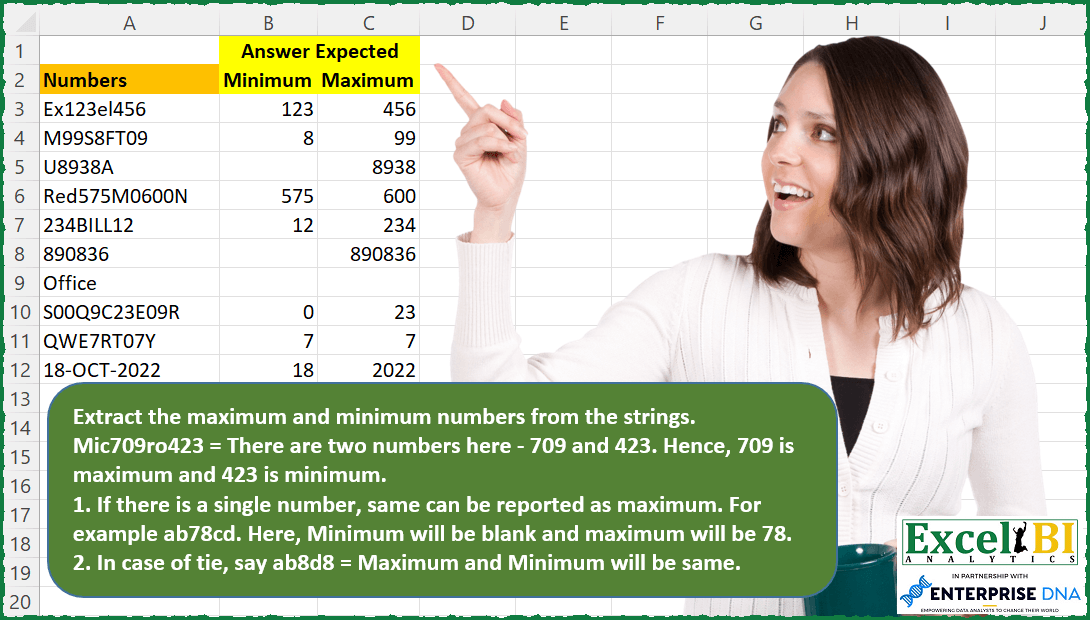
Extract the maximum and minimum numbers from the strings. Mic709ro423 = There are two numbers here – 709 and 423. Hence, 709 is maximum and 423 is minimum. 1. If there is a single number, same can be reported as maximum. For example ab78cd. Here, Minimum will be blank and maximum will be 78. 2. In case of tie, say ab8d8 = Maximum and Minimum will be same.
📌 Challenge Details and Links
ExcelBI Excel Challenge Number: 79
Challenge Difficulty: ⭐️⭐️⭐️⭐️
📥Download Sample File
📥Link to the solutions on LinkedIn
Solving the challenge of Extract Min and Max From with Power Query
Power Query solution 1 for Extract Min and Max From, proposed by Bhavya Gupta:
let
  Source = Excel.CurrentWorkbook(){[Name = "Table1"]}[Content],
  NonNumbers = List.Difference(
    List.Transform({1 .. 255}, each Character.FromNumber(_)),
    {"0" .. "9"}
  ),
  SplitNumbers = Table.AddColumn(
    Source,
    "Custom",
    each Splitter.SplitTextByAnyDelimiter(NonNumbers, QuoteStyle.Csv)(Text.From([Numbers]))
  )[Custom],
  MinMax = Table.FromRows(
    List.Transform(
      List.Transform(
        List.Transform(SplitNumbers, each List.Select(_, each _ <> "")),
        each List.Sort(
          List.Repeat({null}, List.Max({2 - List.Count(_), 0})) & _,
          each Number.From(_)
        )
      ),
      each {List.First(_)} & {List.Last(_)}
    ),
    {"Minimum", "Maximum"}
  ),
  ExpectedOutput = Table.TransformColumnTypes(
    MinMax,
    {{"Minimum", Int64.Type}, {"Maximum", Int64.Type}}
  )
in
  ExpectedOutput
Power Query solution 2 for Extract Min and Max From, proposed by Mahmoud Bani Asadi:
let
  Source = Excel.CurrentWorkbook(){[Name = "Table1"]}[Content],
  AddedCustom = Table.AddColumn(
    Source,
    "Custom",
    each [
      a = Splitter.SplitTextByCharacterTransition(
        {"0" .. "9"},
        (c) => not List.Contains({"0" .. "9"}, c)
      )([Numbers]),
      b = List.Transform(a, each Text.Select(_, {"0" .. "9"})),
      c = List.Transform(b, Number.From),
      d = List.RemoveNulls(c),
      e = List.Sort(d),
      f = List.Last(e),
      g = if List.Count(e) > 1 then e{0} else null,
      h = [Min = g, Max = f]
    ][h]
  ),
  Expanded = Table.ExpandRecordColumn(AddedCustom, "Custom", {"Min", "Max"}, {"Min", "Max"})
in
  Expanded
Solving the challenge of Extract Min and Max From with Excel
Excel solution 1 for Extract Min and Max From, proposed by Rick Rothstein:
=LET(c,MAP(A3:A12,LAMBDA(x,TRIM(CONCAT(IFERROR(0+MID(x,SEQUENCE(99),1)," "))))),mn,MAP(c,LAMBDA(x,IF(ISNUMBER(FIND(" ",x)),IFERROR(MIN(0+TEXTSPLIT(x," ")),""),""))),mx,MAP(c,LAMBDA(x,IFERROR(MAX(0+TEXTSPLIT(x," ")),""))),HSTACK(mn,mx))Excel solution 2 for Extract Min and Max From, proposed by Rick Rothstein:
=LET(
    c,
    TRIM(
        CONCAT(
            IFERROR(
                0+MID(
                    A3,
                    SEQUENCE(
                        99
                    ),
                    1
                ),
                " "
            )
        )
    ),
    t,
    IFERROR(
        0+TEXTSPLIT(
            c,
            " "
        ),
        ""
    ),
    HSTACK(
        IF(
            ISNUMBER(
                FIND(
                    " ",
                    c
                )
            ),
            MIN(
                t
            ),
            ""
        ),
        IFERROR(
            MAX(
                t
            ),
            ""
        )
    )
)
Excel solution 3 for Extract Min and Max From, proposed by محمد حلمي:
=DROP(
    REDUCE(
        1,
        A3:A12,
        LAMBDA(
            b,
            s,
            LET(

                a,
                TEXTSPLIT(
                    s,
                    VSTACK(
                        CHAR(
                            ROW(
                                65:122
                            )
                        ),
                        "-"
                    ),
                    ,
                    1
                )+0,

                IFNA(
                    VSTACK(
                        b,
                        IFERROR(
                            HSTACK(
                                IF(
                                    COUNT(
                                        a
                                    )=1,
                                    "",
                                    MIN(
                                        a
                                    )
                                ),
                                MAX(
                                        a
                                    )
                            ),
                            ""
                        )
                    ),
                    ""
                )
            )
        )
    ),
    1
)
Excel solution 4 for Extract Min and Max From, proposed by محمد حلمي:
=DROP(REDUCE("",A3:A12,LAMBDA(b,s,
LET(
a,TEXTSPLIT(s,
VSTACK(CHAR(ROW(65:122)),{"-"}),,1,,0)+0,
v,MIN(a),
x,MAX(a),
IFNA(VSTACK(b,
IFERROR(HSTACK(IF(COUNT(a)=1,"",v),x),"")),"")))),1)
Excel solution 5 for Extract Min and Max From, proposed by محمد حلمي:
=DROP(
    REDUCE(
        1,
        A3:A12,
        LAMBDA(
            b,
            s,

            LET(

                a,
                TEXTSPLIT(
                    s,
                    VSTACK(
                        CHAR(
                            ROW(
                                65:122
                            )
                        ),
                        "-"
                    ),
                    ,
                    1
                )+0,

                IFNA(
                    VSTACK(
                        b,
                        IFERROR(
                            HSTACK(
                                IF(
                                    COUNT(
                                        a
                                    )=1,
                                    "",
                                    MIN(
                                        a
                                    )
                                ),
                                MAX(
                                        a
                                    )
                            ),
                            ""
                        )
                    ),
                    ""
                )
            )
        )
    ),
    1
)
Excel solution 6 for Extract Min and Max From, proposed by 🇰🇷 Taeyong Shin:
=LET(

     n,
     VALUETOTEXT(
         ROW(
             1:10
         )-1
     ),

     Func,
     LAMBDA(
         str,

          LET(

               Expd,
               MID(
                   str,
                    SEQUENCE(
                        LEN(
                            str
                        )
                    ),
                    1
               ),

               nums,
               CONCAT(
                   XLOOKUP(
                       Expd,
                        n,
                        n,
                        " "
                   )
               ),

               Split,
               --TEXTSPLIT(
                   nums,
                    ,
                    " ",
                    1
               ),

               SWITCH(

                    COUNT(
                        Split
                    ),

                    0,
                    HSTACK(
                        "",
                         ""
                    ),

                    1,
                    HSTACK(
                        "",
                         Split
                    ),

                    HSTACK(
                        MIN(
                        Split
                    ),
                         MAX(
                        Split
                    )
                    )

               )

          )

     ),

     REDUCE(
         Func(
             A3
         ),
          A4:A12,
          LAMBDA(
              a,
              b,
               VSTACK(
                   a,
                    Func(
                        b
                    )
               )
          )
     )

)
Excel solution 7 for Extract Min and Max From, proposed by 🇰🇷 Taeyong Shin:
=MAP(A3:A12&{"",""},IFNA({1,0},A3:A12),LAMBDA(a,b,LET(Th,LAMBDA(LET(n,--REGEXEXTRACT(a,"d+",1),IF((COLUMNS(n)=1)*(b=1),"",IF(b,MIN,MAX)(n)))),IF(REGEXTEST(a,"^[^d]*$"),"",Th()))))Excel solution 8 for Extract Min and Max From, proposed by Timothée BLIOT:
=LET(Numbers,IFERROR(VALUE(TEXTSPLIT(TRIM(TEXTJOIN("/",1,REDUCE(A3:A12,VSTACK(CHAR(SEQUENCE(47,,1)),CHAR(SEQUENCE(256-58,,58))),LAMBDA(a,v,SUBSTITUTE(a,v,"."))))),".","/")),"#"),
IFERROR(HSTACK(BYROW(Numbers, LAMBDA(a,IF(SMALL(a,1)=LARGE(a,1), "",SMALL(a,1)) )), BYROW(Numbers, LAMBDA(a, LARGE(a,1) )) ),"") )
Excel solution 9 for Extract Min and Max From, proposed by Bhavya Gupta:
=LET(data,A3:A12,
c,CHAR(SEQUENCE(255)),
nonnumbers,FILTER(c,ISERROR(c*1)),
MAP(IFNA(EXPAND(data,,2),data),
IFNA(EXPAND({1,-1},ROWS(data)),{1,-1}),
LAMBDA(x,y,LET(a,IFERROR(TEXTSPLIT(UPPER(x),,nonnumbers,1)*1,""),
IF(AND(ROWS(a)=1,y=1),"",TAKE(SORT(a,,y),1))))))
Solving the challenge of Extract Min and Max From with Python in Excel
Python in Excel solution 1 for Extract Min and Max From, proposed by Alejandro Campos:
import re
strings = [
 "Ex123el456",
 "M99S8FT09",
 "U8938A",
 "Red575M0600N",
 "234BILL12",
 "890836",
 "S00Q9C23E09R",
 "QWE7RT07Y",
 "18-OCT-2022"
]
def extract_min_max(s):
 numbers = list(map(int, re.findall(r'd+', s)))
 if numbers:
 maximum = max(numbers)
 minimum = min(numbers) if len(numbers) > 1 else None
 return maximum, minimum
 return None, None
data = []
for s in strings:
 max_num, min_num = extract_min_max(s)
 data.append([min_num, max_num])
df = pd.DataFrame(data, columns=["Minimum", "Maximum"]).fillna('')
df
Solving the challenge of Extract Min and Max From with SQL
SQL solution 1 for Extract Min and Max From, proposed by Zoran Milokanović:
WITH
DATA_PREPARATION
AS
(
 SELECT
 ROW_NUMBER() OVER () AS ORDINAL_NUMBER
 ,D.NUMBERS
 ,TRIM(REGEXP_REPLACE(D.NUMBERS, '[^[:digit:]]+', ' ')) AS NUMBERS_ONLY
 ,LENGTH(REGEXP_REPLACE(TRIM(REGEXP_REPLACE(D.NUMBERS, '[^[:digit:]]+', ' ')), '[[:digit:]]+')) AS NO_OF_DELIMITERS
 FROM DATA D
)
SELECT
 F.NUMBERS
,MAX(F.NUM) AS MAXIMUM
FROM
(
 SELECT
 DP.ORDINAL_NUMBER
 ,DP.NUMBERS
 ,DP.HAS_NUMBERS
 ,DP.NO_OF_DELIMITERS
 ,TO_NUMBER(NVL(SPLIT_PART(DP.NUMBERS_ONLY, ' ', H.ORDINAL_NUMBER), DECODE(DP.HAS_NUMBERS, 'YES', DP.NUMBERS_ONLY))) AS NUM
 FROM DATA_PREPARATION DP
 LEFT JOIN DATA_PREPARATION H ON DP.NO_OF_DELIMITERS <> 0
 AND H.ORDINAL_NUMBER <= DP.NO_OF_DELIMITERS + 1
) F
GROUP BY
 F.ORDINAL_NUMBER
,F.NUMBERS
,F.HAS_NUMBERS
,F.NO_OF_DELIMITERS
ORDER BY
 F.ORDINAL_NUMBER
;