
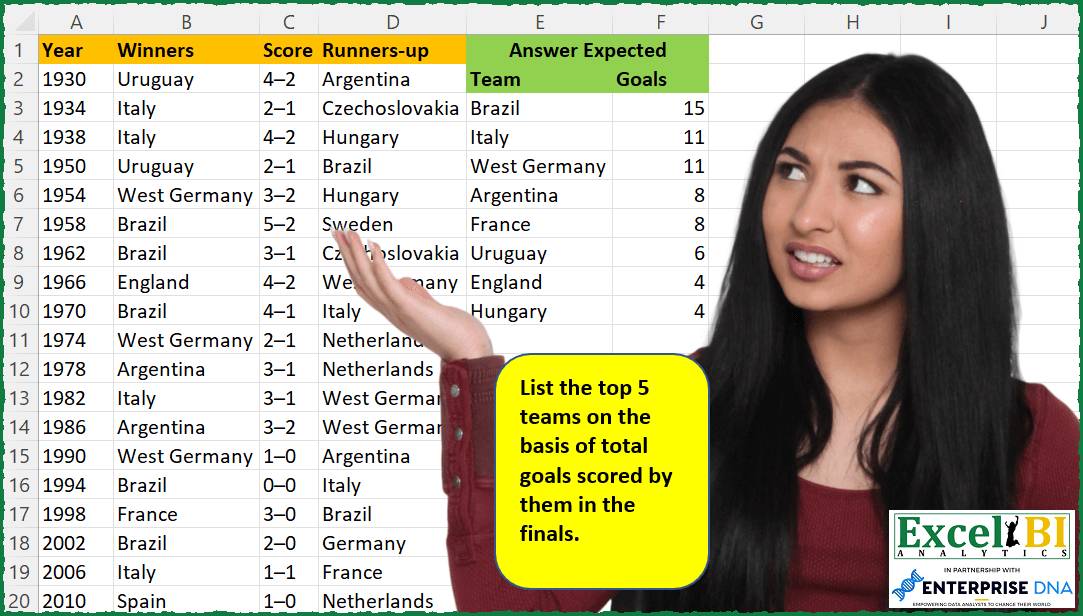
— This week will be FIFA World Cup week. All challenges will be related to FIFA World Cup only for this week. — List the top 5 teams on the basis of total goals scored by them in the finals.
📌 Challenge Details and Links
ExcelBI Excel Challenge Number: 75
Challenge Difficulty: ⭐️⭐️
📥Download Sample File
📥Link to the solutions on LinkedIn
Solving the challenge of Top 5 Goal Scoring Teams with Power Query
Power Query solution 1 for Top 5 Goal Scoring Teams, proposed by Luan Rodrigues:
let
  Fonte = Data,
  w = Table.RenameColumns(
    Table.AddColumn(
      Fonte,
      "Goals",
      each
        let
          a = Text.Split([Score], "–"){0}
        in
          a
    )[[Year], [Winners], [Goals]],
    {{"Winners", "Team"}}
  ),
  r = Table.RenameColumns(
    Table.AddColumn(
      Fonte,
      "Goals",
      each
        let
          a = Text.Split([Score], "–"){1}
        in
          a
    )[[Year], [#"Runners-up"], [Goals]],
    {{"Runners-up", "Team"}}
  ),
  tab = Table.Combine({r, w}),
  t = Table.TransformColumnTypes(tab, {{"Goals", type number}}),
  g1 = Table.Group(t, {"Team"}, {{"Goals", each List.Sum([Goals]), type nullable number}}),
  g2 = Table.Sort(
    Table.Group(
      g1,
      {"Goals"},
      {{"Contagem.1", each _, type table [Team = text, Contagem = nullable number]}}
    ),
    {{"Goals", Order.Descending}}
  ),
  index = Table.SelectRows(Table.AddIndexColumn(g2, "Índice", 1, 1, Int64.Type), each [Índice] < 6)[
    [Contagem.1]
  ],
  Result = Table.ExpandTableColumn(index, "Contagem.1", {"Team", "Goals"}, {"Team", "Goals"})
in
  Result
Power Query solution 2 for Top 5 Goal Scoring Teams, proposed by Brian Julius:
let
  Source = GoalsRaw,
  SplitScores = Table.TransformColumnTypes(
    Table.SplitColumn(
      Source,
      "Score",
      Splitter.SplitTextByDelimiter("–", QuoteStyle.Csv),
      {"Score.1", "Score.2"}
    ),
    {{"Score.1", Int64.Type}, {"Score.2", Int64.Type}}
  ),
  TableA = Table.RenameColumns(
    Table.SelectColumns(SplitScores, {"Winners", "Score.1"}),
    {{"Winners", "Team"}, {"Score.1", "Goals"}}
  ),
  TableB = Table.RenameColumns(
    Table.SelectColumns(SplitScores, {"Runners-up", "Score.2"}),
    {{"Runners-up", "Team"}, {"Score.2", "Goals"}}
  ),
  TableAB = Table.Combine({TableA, TableB}),
  Group = Table.Group(TableAB, {"Team"}, {{"Goals", each List.Sum([Goals]), type nullable number}}),
  RankGoals = Table.AddRankColumn(
    Group,
    "Rank",
    {"Goals", Order.Descending},
    [RankKind = RankKind.Dense]
  ),
  FilterNClean = Table.RemoveColumns(Table.SelectRows(RankGoals, each [Rank] <= 5), "Rank")
in
  FilterNClean
Power Query solution 3 for Top 5 Goal Scoring Teams, proposed by Bhavya Gupta:
let
  Source = Excel.CurrentWorkbook(){[Name = "Table1"]}[Content],
  Unpivoted = Table.UnpivotOtherColumns(Source, {"Year", "Score"}, "Attribute", "Value"),
  Split = Table.SplitColumn(
    Unpivoted,
    "Score",
    Splitter.SplitTextByDelimiter("–", QuoteStyle.Csv),
    {"Score.1", "Score.2"}
  ),
  ConditionalCol = Table.AddColumn(
    Split,
    "Custom",
    each if [Attribute] = "Winners" then [Score.1] else [Score.2]
  ),
  RemovedOtherCols = Table.SelectColumns(ConditionalCol, {"Value", "Custom"}),
  ChangedType = Table.TransformColumnTypes(RemovedOtherCols, {{"Custom", Int64.Type}}),
  Grouped = Table.Group(
    ChangedType,
    {"Value"},
    {{"Goals", each List.Sum([Custom]), type nullable number}}
  ),
  Grouped_2 = Table.Group(Grouped, {"Goals"}, {{"Team", each [Value]}}),
  Sorted = Table.Sort(Grouped_2, {{"Goals", Order.Descending}}),
  FirstN = Table.FirstN(Sorted, 5)[[Team], [Goals]],
  ExpectedOutput = Table.ExpandListColumn(FirstN, "Team")
in
  ExpectedOutput
Power Query solution 4 for Top 5 Goal Scoring Teams, proposed by Matthias Friedmann:
let
  Source = Excel.CurrentWorkbook(){[Name = "TopFive"]}[Content],
  Split = Table.SplitColumn(
    Source,
    "Score",
    Splitter.SplitTextByDelimiter("–", QuoteStyle.Csv),
    {"Score.1", "Score.2"}
  ),
  FromColumns = Table.FromColumns(
    {Split[Winners] & Split[#"Runners-up"]} & {Split[Score.1] & Split[Score.2]},
    {"Team", "Goals"}
  ),
  #"Changed Type" = Table.TransformColumnTypes(FromColumns, {{"Goals", Int64.Type}}),
  #"Grouped Rows" = Table.Group(
    #"Changed Type",
    {"Team"},
    {{"Goals", each List.Sum([Goals]), type nullable number}}
  ),
  #"Grouped Rows1" = Table.Group(#"Grouped Rows", {"Goals"}, {{"All", each _}}),
  #"Sorted Rows" = Table.Sort(#"Grouped Rows1", {{"Goals", Order.Descending}}),
  #"Added Index" = Table.AddIndexColumn(#"Sorted Rows", "Index", 1, 1, Int64.Type),
  #"Filtered Rows" = Table.SelectRows(#"Added Index", each [Index] < 6)[[All]],
  #"Expanded All" = Table.ExpandTableColumn(#"Filtered Rows", "All", {"Team", "Goals"})
in
  #"Expanded All"
Power Query solution 5 for Top 5 Goal Scoring Teams, proposed by Venkata Rajesh:
let
  Source = Data,
  #"Added Custom" = Table.AddColumn(
    Source,
    "Custom",
    each Table.FromColumns(
      {Text.Split([Score], "–"), {[Winners], [#"Runners-up"]}},
      {"Goals", "Team"}
    )
  ),
  #"Removed Other Columns" = Table.SelectColumns(#"Added Custom", {"Custom"}),
  #"Expanded Custom" = Table.ExpandTableColumn(
    #"Removed Other Columns",
    "Custom",
    {"Team", "Goals"},
    {"Team", "Goals"}
  ),
  #"Grouped Rows" = Table.Group(
    #"Expanded Custom",
    {"Team"},
    {{"Goals", each List.Sum(List.Transform([Goals], each Number.From(_))), Int64.Type}}
  ),
  #"Sorted Rows" = Table.Sort(#"Grouped Rows", {{"Goals", Order.Descending}}),
  #"Filtered Rows" = Table.SelectRows(
    #"Sorted Rows",
    each [Goals] >= List.Min(List.FirstN(List.Distinct(#"Sorted Rows"[Goals]), 5))
  )
in
  #"Filtered Rows"
Power Query solution 6 for Top 5 Goal Scoring Teams, proposed by Abhishek Kumar Jain:
let
  Source = Excel.CurrentWorkbook(){[Name = "Table1"]}[Content],
  #"Changed Type" = Table.TransformColumnTypes(
    Source,
    {{"Winners", type text}, {"Score", type text}, {"Runners-up", type text}}
  ),
  #"Split Column by Delimiter" = Table.SplitColumn(
    #"Changed Type",
    "Score",
    Splitter.SplitTextByDelimiter("–", QuoteStyle.Csv),
    {"Score.1", "Score.2"}
  ),
  #"Changed Type1" = Table.TransformColumnTypes(
    #"Split Column by Delimiter",
    {{"Score.1", Int64.Type}, {"Score.2", Int64.Type}}
  ),
  #"Reordered Columns" = Table.ReorderColumns(
    #"Changed Type1",
    {"Winners", "Score.1", "Runners-up", "Score.2"}
  ),
  #"Unpivoted Only Selected Columns" = Table.Unpivot(
    #"Reordered Columns",
    {"Winners", "Runners-up"},
    "Attribute",
    "Value"
  ),
  #"Added Custom" = Table.AddColumn(
    #"Unpivoted Only Selected Columns",
    "Custom",
    each if [Attribute] = "Winners" then [Score.1] else [Score.2]
  ),
  #"Removed Columns" = Table.RemoveColumns(#"Added Custom", {"Score.1", "Score.2", "Attribute"}),
  #"Grouped Rows1" = Table.Group(
    #"Removed Columns",
    {"Value"},
    {{"Goals", each List.Sum([Custom]), type number}}
  ),
  #"Sorted Rows" = Table.Sort(#"Grouped Rows1", {{"Goals", Order.Descending}})
in
  #"Sorted Rows"
Power Query solution 7 for Top 5 Goal Scoring Teams, proposed by Mahmoud Bani Asadi:
let
 Source = Excel.CurrentWorkbook(){[Name="Table1"]}[Content],
 tbl = Table.Combine(
 Table.AddColumn(Source,
 "Custom", each
 hashtag#table(
 {"Team","Goal"},
 {
 {[Winners],Text.Split([Score],"–"){0}},
 {[#"Runners-up"],Text.Split([Score],"–"){1}}
 }))[Custom]),
 ChangedType = Table.TransformColumnTypes(tbl,{{"Goal", Int64.Type}}),
 Grp1 = Table.Group(ChangedType, {"Team"}, {{"Goal", each List.Sum([Goal]), type number}}),
 Grp2 = Table.Group(Grp1, {"Goal"}, {{"Count", each [Team]}}),
 Sort = Table.Sort(Grp2,{{"Goal", Order.Descending}}),
 First5 = Table.FirstN(Sort,5),
 Expand = Table.ExpandListColumn(First5, "Count")
in
 Expand
Power Query solution 8 for Top 5 Goal Scoring Teams, proposed by Dominic Walsh:
let
  Source = Excel.CurrentWorkbook(){[Name = "Table1"]}[Content],
  Unpivot = Table.UnpivotOtherColumns(Source, {"Score", "Year"}, "Attribute", "Value"),
  Split = Table.SplitColumn(
    Unpivot,
    "Score",
    Splitter.SplitTextByDelimiter("–", QuoteStyle.Csv),
    {"Score.1", "Score.2"}
  ),
  Goals = Table.AddColumn(
    Split,
    "Goals",
    each if [Attribute] = "Winners" then Number.From([Score.1]) else Number.From([Score.2])
  ),
  Group = Table.Group(Goals, {"Value"}, {{"Scored", each List.Sum([Goals]), type number}}),
  Sort = Table.Sort(Group, {{"Scored", Order.Descending}}),
  Fifth = Table.Distinct(Sort, {"Scored"})[Scored]{4},
  Result = Table.SelectRows(Sort, each [Scored] >= Fifth)
in
  Result
Power Query solution 10 for Top 5 Goal Scoring Teams, proposed by Deron Huke
Power Query solution 11 for Top 5 Goal Scoring Teams, proposed by Deron Huskey:
let
 Source = Excel.CurrentWorkbook(){[Name="GoalsInFinals"]}[Content],
 DefaultChangeType = Table.TransformColumnTypes(Source,{{"Year", Int64.Type}, {"Winners", type text}, {"Score", type text}, {"Runners-up", type text}}),
 SplitScoreOnHyphen = Table.SplitColumn(DefaultChangeType, "Score", Splitter.SplitTextByDelimiter("–", QuoteStyle.Csv), {"Score.1", "Score.2"}),
 UnpivotTheScores = Table.UnpivotOtherColumns(SplitScoreOnHyphen, {"Year", "Winners", "Runners-up"}, "Attribute", "Value"),
 UnpivotTheTeams = Table.UnpivotOtherColumns(UnpivotTheScores, {"Year", "Attribute", "Value"}, "Attribute.1", "Value.1"),

 AddTheGoalsColumn = Table.AddColumn(UnpivotTheTeams, "Goals", each if [Attribute] = "Score.1" and [Attribute.1] = "Winners" then [Value] else if [Attribute] = "Score.2" and [Attribute.1] = "Runners-up" then [Value] else 0),
 RenameValue1ToTeam = Table.RenameColumns(AddTheGoalsColumn,{{"Value.1", "Team"}}),
 RemoveUnnecessaryColumns = Table.RemoveColumns(RenameValue1ToTeam,{"Year","Attribute", "Value", "Attribute.1"}),
 ChangeGoalsToWholeNumber = Table.TransformColumnTypes(RemoveUnnecessaryColumns,{{"Goals", Int64.Type}}),
 SummarizeGoalsByTeam = Table.Group(ChangeGoalsToWholeNumber, {"Team"}, {{"Goals", each List.Sum([Goals]), type nullable number}}),

DenseRankTheGoals = Table.AddRankColumn(SummarizeGoalsByTeam,"Goals Rank",{"Goals",Order.Descending},[RankKind = RankKind.Dense]),
 SortByGoalsThenTeam = Table.Sort(DenseRankTheGoals,{{"Goals Rank", Order.Ascending}, {"Team", Order.Ascending}}),
 IncludeRanks_LE_5 = Table.SelectRows(SortByGoalsThenTeam, each [Goals Rank] <= 5),
 RemoveTheRank = Table.RemoveColumns(IncludeRanks_LE_5,{"Goals Rank"})
in
 RemoveTheRank
Solving the challenge of Top 5 Goal Scoring Teams with Excel
Excel solution 1 for Top 5 Goal Scoring Teams, proposed by John V.:
=LET(t,
    VSTACK(
        B2:B22,
        D2:D22
    ),
    s,
    TOCOL(
        MID(
            C2:C22,
            {1,
            3},
            1
        ),
        ,
        1
    ),
    g,
    MAP(t,
    LAMBDA(x,
    SUM(s*(t=x)))),
    SORT(
        UNIQUE(
            FILTER(
                HSTACK(
                    t,
                    g
                ),
                g>=LARGE(
                    UNIQUE(
                        g
                    ),
                    5
                )
            )
        ),
        2,
        -1
    ))
Excel solution 2 for Top 5 Goal Scoring Teams, proposed by محمد حلمي:
=LET(
x,
    C2:C22,

a,
    UNIQUE(
        TOCOL(
            B2:D22
        )
    ),

v,
    MAP(a,
    LAMBDA(a,
    SUM((B2:B22=a)*
TEXTBEFORE(
    x,
    "–"
),
    (a=D2:D22)*TEXTAFTER(
        x,
        "–"
    )))),

SORT(
    FILTER(
        HSTACK(
            a,
            v
        ),
        v>=LARGE(
            UNIQUE(
                v
            ),
            5
        )
    ),
    {2,
    1},
    {-1,
    1}
))
Excel solution 3 for Top 5 Goal Scoring Teams, proposed by 🇰🇷 Taeyong Shin:
=LET(c,TOCOL(REGEXEXTRACT(B2:D22,"[pL ]+"),2,1),n,TOCOL(--REGEXREPLACE(C2:C22,"^(d+)|(d+)$|.","$"&{1,2}),,1),m,MMULT(N(c=TOROW(c)),n),GROUPBY(c,n,SUM,,0,-2,LARGE(UNIQUE(m),5)<=m))Excel solution 4 for Top 5 Goal Scoring Teams, proposed by Kris Jaganah:
=LET(
    a,
    B2:B22,
    b,
    D2:D22,
    c,
    C2:C22,
    d,
    LEFT(
        c,
        FIND(
            "–",
            c,
            1
        )-1
    )/1,
    e,
    RIGHT(
        c,
        LEN(
            c
        )-FIND(
            "–",
            c,
            1
        )
    )/1,
    f,
    VSTACK(
        HSTACK(
            a,
            d
        ),
        HSTACK(
            b,
            e
        )
    ),
    g,
    HSTACK(
        UNIQUE(
            CHOOSECOLS(
                f,
                1
            )
        ),
        BYROW(
            UNIQUE(
            CHOOSECOLS(
                f,
                1
            )
        ),
            LAMBDA(
                x,
                SUM(
                    IF(
                        CHOOSECOLS(
                f,
                1
            )=x,
                        CHOOSECOLS(
                            f,
                            2
                        ),
                        0
                    )
                )
            )
        )
    ),
    SORT(
        FILTER(
            g,
            CHOOSECOLS(
                g,
                2
            )>=LARGE(
                UNIQUE(
                    CHOOSECOLS(
                g,
                2
            )
                ),
                5
            )
        ),
        2,
        -1
    )
)
Excel solution 5 for Top 5 Goal Scoring Teams, proposed by Julian Poeltl:
=LET(W,B2:B22,R,D2:D22,S,C2:C22,T,VSTACK(W,R),G,--VSTACK(TEXTBEFORE(S,"–"),TEXTAFTER(S,"–")),U,UNIQUE(T),H,HSTACK(U,MAP(U,LAMBDA(A,SUM(FILTER(G,T=A))))),SORT(FILTER(H,TAKE(H,,-1)>=LARGE(UNIQUE(TAKE(H,,-1)),5)),2,-1))Excel solution 6 for Top 5 Goal Scoring Teams, proposed by Aditya Kumar Darak 🇮🇳:
=LET(

     _n,
     5,

     _d,
     A2:D22,

     _t,
     TOCOL(
         CHOOSECOLS(
             _d,
              2,
              4
         ),
          ,
          1
     ),

     _s,
     INDEX(
         _d,
          ,
          3
     ),

     _is,
     VSTACK(
         TEXTBEFORE(
             _s,
              "–"
         ),
          TEXTAFTER(
              _s,
               "–"
          )
     ),

     _ut,
     UNIQUE(
         _t
     ),

     _ts,
     MAP(
         _ut,
          LAMBDA(
              a,
               SUM(
                   --FILTER(
                       _is,
                        _t = a
                   )
               )
          )
     ),

     _uts,
     UNIQUE(
         _ts
     ),

     _l,
     LARGE(
         _uts,
          MIN(
              _n,
               COUNT(
                   _uts
               )
          )
     ),

     _r&,
     SORT(
         FILTER(
             HSTACK(
                 _ut,
                  _ts
             ),
              _ts >= _l
         ),
          {2,
          1},
          {-1,
          1}
     ),

     _r

)
Excel solution 7 for Top 5 Goal Scoring Teams, proposed by Timothée BLIOT:
=LET(Winners,
    B2:B22,
     RunnersUp,
     D2:D22,
     Score,
     TEXTSPLIT(
         TEXTJOIN(
             "/",
             1,
             C2:C22
         ),
         "–",
         "/"
     ),

Stacked,
    HSTACK(
        VSTACK(
            Winners,
            RunnersUp
        ),
        VSTACK(
            INDEX(
                Score,
                ,
                1
            ),
            INDEX(
                Score,
                ,
                2
            )
        )
    ),

Goals,
     BYROW(INDEX(
         Stacked,
         ,
         1
     ),
     LAMBDA(a,
     SUMPRODUCT((INDEX(
         Stacked,
         ,
         1
     )=a)*INDEX(
         Stacked,
         ,
         2
     )) )),

Ordered,
     UNIQUE(
         SORT(
             HSTACK(
                 INDEX(
         Stacked,
         ,
         1
     ),
                 Goals
             ),
             2,
             -1
         )
     ),

FILTER(
    Ordered,
    LARGE(
        UNIQUE(
            INDEX(
                Ordered,
                ,
                2
            )
        ),
        5
    )<=INDEX(
                Ordered,
                ,
                2
            )
))
Excel solution 8 for Top 5 Goal Scoring Teams, proposed by Charles Roldan:
=LAMBDA(Data,n, LET(
GameTeams, TOCOL(CHOOSECOLS(Data, {2, 4}), ,1),
GameGoals, --TOCOL(MID(CHOOSECOLS(Data, 3), {1,3}, 1), , 1),
Teams, UNIQUE(GameTeams),
Goals, MMULT(--EXACT(Teams, TOROW(GameTeams)), GameGoals),
SORT(FILTER(HSTACK(Teams, Goals), Goals>=LARGE(UNIQUE(Goals), n)), 2, -1)))(A2:D22, 5)
Excel solution 9 for Top 5 Goal Scoring Teams, proposed by Owen Price:
=LET(t,VSTACK(B2:B22,D2:D22),
s,VSTACK(--LEFT(C2:C22,1),--RIGHT(C2:C22,1)),
d,HSTACK(t,s),
u,UNIQUE(t),
m,MAP(u,LAMBDA(x,SUM(FILTER(s,t=x)))),
a,MIN(TAKE(SORT(UNIQUE(m),,-1),5)),
f,FILTER(HSTACK(u,m),m>=a),
SORTBY(f,TAKE(f,,-1),-1))
Excel solution 10 for Top 5 Goal Scoring Teams, proposed by Stefan Olsson:
=LET(

     _w,
    B2:B22,

     _l,
    D2:D22,

     _wscores,
     ArrayFormula(
         REGEXEXTRACT(
             C2:C22,
              "^(d+)"
         )+0
     ),

     _lscores,
     ArrayFormula(
         REGEXEXTRACT(
             C2:C22,
              "(d+)$"
         )+0
     ),

     _q,
    QUERY(
        {_w,
        _wscores;_l,
        _lscores},
        "Select Col1, Sum(Col2) Group by Col1 Label Sum(Col2) ''",
        0
    ),

     SORTN(
         _q,
         7,
         true,
         2,
         false
     )

)
Excel solution 11 for Top 5 Goal Scoring Teams, proposed by Gerson Pineda:
=LET(
_s,
    VSTACK(
        B2:B22,
        D2:D22
    ),

_g,
    VSTACK(
        TEXTBEFORE(
            C2:C22,
            "–"
        ),
        TEXTAFTER(
            C2:C22,
            "–"
        )
    ),

_u,
    MAP(UNIQUE(
        _s
    ),
    LAMBDA(i,
    SUM((_s=i)*_g))),

TAKE(
    SORT(
        HSTACK(
            UNIQUE(
        _s
    ),
            _u
        ),
        2,
        -1
    ),
    5
))
Excel solution 12 for Top 5 Goal Scoring Teams, proposed by Victor Momoh (MVP, MOS, R.Eng):
=LET(a,B2:B22,
b,D2:D22,
c,UNIQUE(VSTACK(a,b)),
d,C2:C22,
e,SORT(HSTACK(c,MAP(c,LAMBDA(x,SUM(((a=x)*(0+TEXTBEFORE(d,"–"))+((b=x)*(0+TEXTAFTER(d,"–")))))))),2,-1),
f,TAKE(e,,-1),
FILTER(e,f>=LARGE(f,5)))

But using LEFT and RIGHT in place of TEXT BEFORE and TEXT AFTER, assuming scores can not be in 2 digits, you have

=LET(a,B2:B22,
b,D2:D22,
c,UNIQUE(VSTACK(a,b)),
d,C2:C22,
e,SORT(HSTACK(c,MAP(c,LAMBDA(x,SUM(((a=x)*(0+LEFT(d)))+((b=x)*(0+RIGHT(d))))))),2,-1
),
f,TAKE(e,,-1),
FILTER(e,f>=LARGE(f,5)))
Excel solution 13 for Top 5 Goal Scoring Teams, proposed by El Badlis Mohd Marzudin:
=LET(
_team,
    VSTACK(
        B2:B22,
        D2:D22
    ),

_score,
    C2:C22,

_adjTbl,
    HSTACK(
        _team,
        VSTACK(
            LEFT(
                _score
            ),
            RIGHT(
                _score
            )
        )+0
    ),

_ut,
    UNIQUE(
        CHOOSECOLS(
            _adjTbl,
            1
        )
    ),

_final,
    HSTACK(
        _ut,
        BYROW(
            _ut,
            LAMBDA(
                a,
                SUM(
                    FILTER(
                        CHOOSECOLS(
                            _adjTbl,
                            2
                        ),
                        CHOOSECOLS(
            _adjTbl,
            1
        )=a
                    )
                )
            )
        )
    ),


SORT(FILTER(_final,
    (CHOOSECOLS(
        _final,
        2
    )>=LARGE(
        UNIQUE(
            CHOOSECOLS(
        _final,
        2
    )
        ),
        5
    ))),
    {2,
    1},
    {-1,
    1}))
Excel solution 14 for Top 5 Goal Scoring Teams, proposed by RIJESH T.:
=LET(s,C2:C22,v,VSTACK(HSTACK(B2:B22,--LEFT(s)),HSTACK(D2:D22,--RIGHT(s))),t,TAKE(v,,1),d,DROP(v,,1),u,UNIQUE(t),m,MAP(u,LAMBDA(a,SUM(FILTER(d,t=a)))),SORT(FILTER(HSTACK(u,m),m>=LARGE(UNIQUE(m),5)),2,-1))Excel solution 15 for Top 5 Goal Scoring Teams, proposed by Agah Dikici:
=LET(
    a,
    VSTACK(
        B2:B22,
        D2:D22
    ),
    b,
    --VSTACK(
        LEFT(
            C2:C22
        ),
        RIGHT(
            C2:C22
        )
    ),
    c,
    UNIQUE(
        a
    ),
    d,
    MAP(
        c,
        LAMBDA(
            x,
            SUM(
                FILTER(
                    b,
                    a=x
                )
            )
        )
    ),
    SORT(
        FILTER(
            HSTACK(
                c,
                d
            ),
            d>=LARGE(
                UNIQUE(
                    d
                ),
                5
            )
        ),
        2,
        -1
    )
)
Solving the challenge of Top 5 Goal Scoring Teams with SQL
SQL solution 1 for Top 5 Goal Scoring Teams, proposed by Zoran Milokanović:
SELECT
 F.TEAM
,F.GOALS
FROM
(
 SELECT
 T.TEAM
 ,T.GOALS
 ,DENSE_RANK() OVER (ORDER BY T.GOALS DESC) AS TOP_N
 FROM
 (
 SELECT
 F.TEAM
 ,SUM(F.GOAL) AS GOALS
 FROM
 (
 SELECT
 DW.WINNERS AS TEAM
 ,SUBSTR(DW.SCORE, 1, /*BEFORE DASH*/ INSTR(DW.SCORE, '-') - 1) AS GOAL
 FROM DATA DW
 UNION ALL
 SELECT
 DR.RUNNERS_UP AS TEAM
 ,SUBSTR(DR.SCORE, /*AFTER DASH*/ INSTR(DR.SCORE, '-') + 1) AS GOAL
 FROM DATA DR
 ) F
 GROUP BY
 F.TEAM
 ) T
) F
WHERE
 F.TOP_N <= 5
ORDER BY
 2 DESC, 1
;