
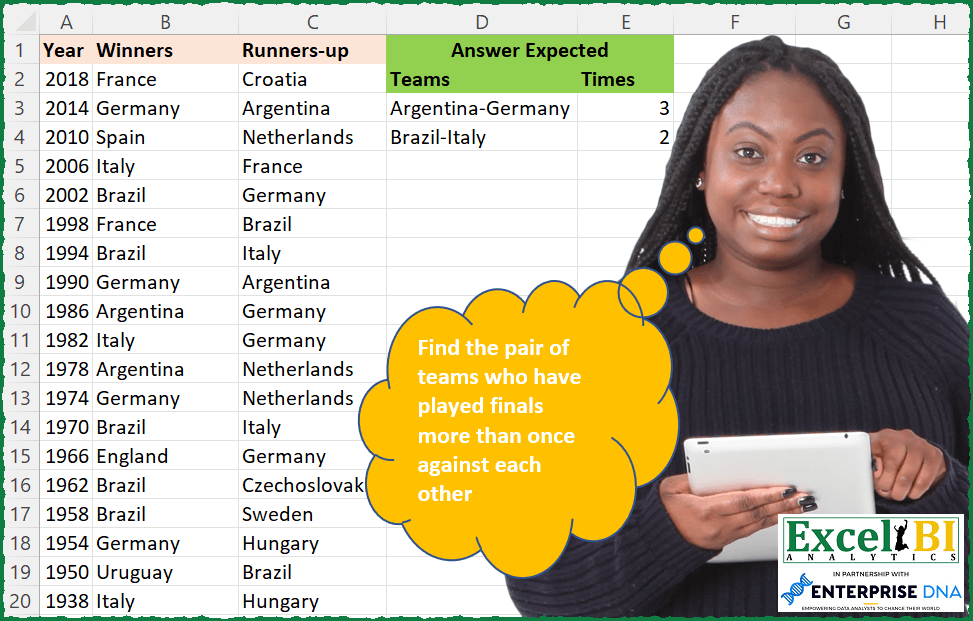
— This week will be FIFA World Cup week. All challenges will be related to FIFA World Cup only for this week. — Find the pair of teams who have played finals more than once against each other
📌 Challenge Details and Links
ExcelBI Excel Challenge Number: 73
Challenge Difficulty: ⭐️⭐️⭐️
📥Download Sample File
📥Link to the solutions on LinkedIn
Solving the challenge of Teams Repeated in Finals with Power Query
Power Query solution 1 for Teams Repeated in Finals, proposed by Aditya Kumar Darak 🇮🇳:
let
  Source = Excel.CurrentWorkbook(){[Name = "data"]}[Content],
  Teams = Table.AddColumn(
    Source,
    "Teams",
    each [
      FieldValues = Record.FieldValues(_),
      Skip        = List.Skip(FieldValues),
      Sort        = List.Sort(Skip),
      Combine     = Text.Combine(Sort, "-")
    ][Combine]
  ),
  Count = Table.Group(Teams, "Teams", {"Times", Table.RowCount}),
  Filter = Table.SelectRows(Count, each [Times] > 1),
  Return = Table.Sort(Filter, {"Times", 1})
in
  Return
Power Query solution 2 for Teams Repeated in Finals, proposed by Luan Rodrigues:
let
  Fonte = Data,
  t = Table.AddColumn(
    Fonte,
    "Teams",
    each [
      a     = List.Sort({[Winners], [#"Runners-up"]}),
      Teams = Text.Combine(List.Transform(a, Text.From), "-")
    ][Teams]
  ),
  Result = Table.SelectRows(
    Table.Group(t, {"Teams"}, {{"Times", each Table.RowCount(_)}}),
    each [Times] > 1
  )
in
  Result
Power Query solution 3 for Teams Repeated in Finals, proposed by Bhavya Gupta:
let
  Source = Table.FromList(
    List.Transform(
      List.Zip(
        List.RemoveFirstN(Table.ToColumns(Excel.CurrentWorkbook(){[Name = "Table1"]}[Content]), 1)
      ),
      each Text.Combine(List.Sort(_), "-")
    ),
    null,
    type table [Teams]
  ),
  Grouped = Table.Group(Source, {"Teams"}, {{"Times", each Table.RowCount(_), Int64.Type}}),
  Filtered = Table.Sort(Table.SelectRows(Grouped, each [Times] > 1), {{"Times", Order.Descending}})
in
  Filtered
Power Query solution 4 for Teams Repeated in Finals, proposed by Victor Momoh (MVP, MOS, R.Eng):
leteness, a PQ solution
let
 Source = Excel.CurrentWorkbook(){[Name="FinalCount"]}[Content],
 AddSortedList = Table.AddColumn(Source, "SortedList", each Text.Combine(List.Sort({[Winners],[#"Runners-up"]}),"-")),
 GroupBy = Table.Group(AddSortedList, {"SortedList"}, {{"Times", each Table.RowCount(_), Int64.Type}}),
 SortDesc = Table.Sort(GroupBy,{{"Times", Order.Descending}}),
 Result = Table.SelectRows(SortDesc, each [Times] > 1)
in
 Result
Power Query solution 5 for Teams Repeated in Finals, proposed by Mahmoud Bani Asadi:
let
  Source = Excel.CurrentWorkbook(){[Name = "Table1"]}[Content],
  UnpivotedColumns = Table.UnpivotOtherColumns(Source, {"Year"}, "Attribute", "Value"),
  Group1 = Table.Group(
    UnpivotedColumns,
    {"Year"},
    {{"Teams", each Text.Combine(List.Sort(_[Value]), "-")}}
  ),
  Group2 = Table.Group(Group1, {"Teams"}, {{"Times", each Table.RowCount(_), Int64.Type}}),
  Filtered = Table.SelectRows(Group2, each [Times] >= 2)
in
  Filtered
Power Query solution 6 for Teams Repeated in Finals, proposed by Dominic Walsh:
let
  Source = Excel.CurrentWorkbook(){[Name = "Table1"]}[Content],
  Unpivot = Table.UnpivotOtherColumns(Source, {"Year"}, "Attribute", "Value"),
  Sort = Table.Buffer(Table.Sort(Unpivot, {{"Year", Order.Descending}, {"Value", Order.Ascending}})),
  Combine = Table.Group(Sort, {"Year"}, {{"Count", each Text.Combine(_[Value], "-")}}),
  Group = Table.Group(Combine, {"Count"}, {{"Finals", each Table.RowCount(_), Int64.Type}}),
  Filter = Table.SelectRows(Group, each [Finals] > 1)
in
  Filter
Power Query solution 7 for Teams Repeated in Finals, proposed by Gabriel Gordon:
let
  Source = Excel.CurrentWorkbook(){[Name = "tblMatch"]}[Content],
  RemoveYears = Table.RemoveColumns(Source, {"Year"}),
  AlfaOrderedList = Table.AddColumn(
    RemoveYears,
    "alfa",
    each
      if [Winners] < [#"Runners-up"] then
        {[Winners], [#"Runners-up"]}
      else
        {[#"Runners-up"], [Winners]}
  ),
  RemoveOrigTeams = Table.RemoveColumns(AlfaOrderedList, {"Winners", "Runners-up"}),
  ExpandList = Table.TransformColumns(
    RemoveOrigTeams,
    {"alfa", each Text.Combine(List.Transform(_, Text.From), "-"), type text}
  ),
  GroupCount = Table.Group(ExpandList, {"alfa"}, {{"Count", each Table.RowCount(_), Int64.Type}}),
  FilterGT1 = Table.SelectRows(GroupCount, each [Count] > 1)
in
  FilterGT1
Power Query solution 8 for Teams Repeated in Finals, proposed by Kolyu Minevski:
let
  Source = Excel.CurrentWorkbook(){[Name = "Table1"]}[Content],
  Finals = Table.AddColumn(
    Source,
    "Finalists",
    each Text.Combine({[Winners], [#"Runners-up"]}, "-"),
    type text
  ),
  Split = Table.ExpandListColumn(
    Table.TransformColumns(
      Finals,
      {
        {
          "Finalists",
          Splitter.SplitTextByDelimiter("-", QuoteStyle.Csv),
          let
            itemType = (type nullable text) meta [Serialized.Text = true]
          in
            type {itemType}
        }
      }
    ),
    "Finalists"
  ),
  ChngType = Table.TransformColumnTypes(Split, {{"Finalists", type text}, {"Year", type text}}),
  Sort = Table.Sort(ChngType, {{"Finalists", Order.Ascending}, {"Year", Order.Ascending}}),
  Group = Table.Group(
    Sort,
    {"Year"},
    {{"Count", each _, type table [Year = number, Finals = nullable text]}}
  ),
  AddCustom = Table.AddColumn(Group, "Custom", each Table.Column([Count], "Finalists")),
  AddCustom1 = Table.AddColumn(AddCustom, "Countries", each Text.Combine([Custom], "-")),
  Group1 = Table.Group(
    AddCustom1,
    {"Countries"},
    {
      {"Count", each Table.RowCount(_), Int64.Type},
      {"Years", each Text.Combine([Year], "; "), type nullable text}
    }
  ),
  Final = Table.SelectRows(Group1, each ([Count] > 1))
in
  Final
Solving the challenge of Teams Repeated in Finals with Excel
Excel solution 1 for Teams Repeated in Finals, proposed by John V.:
=LET(t,
    BYROW(
        B2:C22,
        LAMBDA(
            r,
            TEXTJOIN(
                "-",
                ,
                SORT(
                    r,
                    ,
                    ,
                    1
                )
            )
        )
    ),
    f,
    MAP(t,
    LAMBDA(x,
    SUM(--(t=x)))),
    SORT(
        UNIQUE(
            FILTER(
                HSTACK(
                    t,
                    f
                ),
                f>1
            )
        ),
        2,
        -1
    ))
Excel solution 2 for Teams Repeated in Finals, proposed by محمد حلمي:
=LET(
E,A2:A22,
A,SORT(MAP(E,LAMBDA(A,TEXTJOIN("-",,
SORT(FILTER(B2:C22,E=A),,,1))))),
C,UNIQUE(A),
Z,MAP(C,LAMBDA(X,SUM(--(X=A)))),
FILTER(HSTACK(C,Z),Z>1))
Excel solution 3 for Teams Repeated in Finals, proposed by 🇰🇷 Taeyong Shin:
=LET(

     Join,
     BYROW(
         VSTACK(
             B2:C22,
              CHOOSECOLS(
                  B2:C22,
                   2,
                   1
              )
         ),
          LAMBDA(
              br,
               TEXTJOIN(
                   "-",
                    ,
                    br
               )
          )
     ),

     Teams,
     SORT(
         UNIQUE(
             VSTACK(
                 UNIQUE(
                     Join
                 ),
                  UNIQUE(
                      Join,
                       ,
                       1
                  )
             ),
              ,
              1
         )
     ),

     nums,
     MAP(
         Teams,
          LAMBDA(
              m,
               COUNT(
                   XMATCH(
                       Join,
                        m
                   )
               )
          )
     ),

     DROP(
         HSTACK(
             Teams,
              nums
         ),
          -ROWS(
              Teams
          )/2
     )

)

(2)
=LET(

     arr,
     BYROW(
         B2:C22,
          LAMBDA(
              br,
               TEXTJOIN(
                   "-",
                    ,
                    SORT(
                        br,
                         ,
                         ,
                         1
                    )
               )
          )
     ),

     Teams,
     UNIQUE(
         VSTACK(
             UNIQUE(
                 arr
             ),
              UNIQUE(
                  arr,
                   ,
                   1
              )
         ),
          ,
          1
     ),

     nums,
     MAP(
         Teams,
          LAMBDA(
              m,
               COUNT(
                   XMATCH(
                       arr,
                        m
                   )
               )
          )
     ),

     SORT(
         HSTACK(
             Teams,
              nums
         ),
          2,
          -1
     )

)
Excel solution 4 for Teams Repeated in Finals, proposed by 🇰🇷 Taeyong Shin:
=LET(
    w,
    B2:B22,
    r,
    C2:C22,
    n,
    COUNTIFS(
        w,
        w,
        r,
        r
    )+COUNTIFS(
        r,
        w,
        w,
        r
    ),
    GROUPBY(
        BYROW(
            B2:C22,
            LAMBDA(
                x,
                TEXTJOIN(
                    "-",
                    ,
                    SORT(
                        x,
                        ,
                        ,
                        1
                    )
                )
            )
        ),
        n,
        SINGLE,
        ,
        0,
        -2,
        n>1
    )
)
Excel solution 5 for Teams Repeated in Finals, proposed by Aditya Kumar Darak 🇮🇳:
=LET(

     _d,
     B2:C22,

     _t,
     BYROW(
         _d,
          LAMBDA(
              a,
               TEXTJOIN(
                   "-",
                    TRUE,
                    SORT(
                        a,
                         ,
                         ,
                         TRUE
                    )
               )
          )
     ),

     _ut,
     UNIQUE(
         _t
     ),

     _tm,
     MAP(
         _ut,
          LAMBDA(
              a,
               COUNT(
                   XMATCH(
                       _t,
                        a
                   )
               )
          )
     ),

     _r,
     SORT(
         FILTER(
             HSTACK(
                 _ut,
                  _tm
             ),
              _tm > 1
         ),
          2,
          -1
     ),

     _r

)
Excel solution 6 for Teams Repeated in Finals, proposed by Timothée BLIOT:
=LET(Teams,
    SORT(
        B2:C22,

    ),

Texts,
    BYROW(SEQUENCE(
        ROWS(
            Teams
        )
    ),
    LAMBDA(a,
    TEXTJOIN("-",
    1,
    (SORT(
        INDEX(
            Teams,
            a,
            SEQUENCE(
                2
            )
        )
    ))))),

Games,
    BYROW(Texts,
    LAMBDA(a,
    SUMPRODUCT(1*(a=Texts)))),

UNIQUE(
    FILTER(
        HSTACK(
            Texts,
            Games
        ),
        Games>=2
    )
))
Excel solution 7 for Teams Repeated in Finals, proposed by Bhavya Gupta:
=LET(W,
    B2:B22,
    R,
    C2:C22,
    a,
    W&"-"&R,
    b,
    MAP(
        a,
        LAMBDA(
            x,
            TEXTJOIN(
                "-",
                ,
                SORT(
                    TEXTSPLIT(
                        x,
                        ,
                        "-"
                    )
                )
            )
        )
    ),
    c,
    UNIQUE(
        b
    ),
    d,
    MAP(c,
    LAMBDA(y,
    SUM(--(b=y)))),
    SORT(
        FILTER(
            HSTACK(
                c,
                d
            ),
            d>1
        ),
        2,
        -1
    ))
Excel solution 8 for Teams Repeated in Finals, proposed by Victor Momoh (MVP, MOS, R.Eng):
=LET(a,BYROW(B2:C22,LAMBDA(x,TEXTJOIN("-",1,SORT(x,,,1)))),
b,HSTACK(UNIQUE(a),MAP(UNIQUE(a),LAMBDA(x,COUNTA(FILTER(a,a=x))))),
FILTER(b,TAKE(b,,-1)>1))
Excel solution 9 for Teams Repeated in Finals, proposed by Rajesh Sinha:
=X2&Y2
AB2: =UNIQUE(X2:X22)
AC1: =TRANSPOSE(UNIQUE(Y2:Y22))
AC2: =IF($AB2=AC$1," - ",COUNTIFS($Z$2:$Z$22,"*"&$AB2&"*",$Z$2:$Z$22,"*"&AC$1&"*"))
AC12: =LARGE(AC2:AL9,1)
AC13: =LARGE($AC$2:$AL$9,3)

AE12: =INDEX(AB$2#,SUMPRODUCT(MAX(($AC$2:$AL$9=AC12)*(ROW($AB$2:$AB$9))))-ROW(AB$2)+1)&"-"&INDEX(AC$1#,SUMPRODUCT(MAX(($AC$2:$AL$9=AC12)*(COLUMN($AC$2:$AL$9))))-COLUMN(AC$1)+1)
Excel solution 10 for Teams Repeated in Finals, proposed by Agah Dikici:
=LET(
    w,
    B2:B22,
    r,
    C2:C22,
    a,
    SORT(
        IF(
            w>r,
            w&"-"&r,
            r&"-"&w
        )
    ),
    c,
    -XMATCH(
        a,
        a
    )+XMATCH(
        a,
        a,
        ,
        -1
    ),
    d,
    UNIQUE(
        FILTER(
            a,
            c
        )
    ),
    HSTACK(
        d,
        XLOOKUP(
            d,
            a,
            c
        )+1
    )
)
Solving the challenge of Teams Repeated in Finals with DAX
DAX solution 1 for Teams Repeated in Finals, proposed by Zoran Milokanović:
EVALUATE
FILTER(
 GROUPBY(
 ADDCOLUMNS(Input, "Teams", VAR T = UNION({Input[Winners]}, {Input[Runners-up]}) RETURN MINX(T, [Value]) & "-" & MAXX(T, [Value])),
 [Teams],
 "Times", SUMX(CURRENTGROUP(), 1)
 ),
 [Times] > 1
)
Solving the challenge of Teams Repeated in Finals with SQL
SQL solution 1 for Teams Repeated in Finals, proposed by Zoran Milokanović:
SELECT
 LEAST(D.WINNERS, D.RUNNERS_UP) || '-' || GREATEST(D.WINNERS, D.RUNNERS_UP) AS TEAMS
,COUNT(*) AS TIMES
FROM DATA D
GROUP BY
 LEAST(D.WINNERS, D.RUNNERS_UP) || '-' || GREATEST(D.WINNERS, D.RUNNERS_UP)
HAVING
 COUNT(*) > 1
ORDER BY
 2 DESC, 1
;