
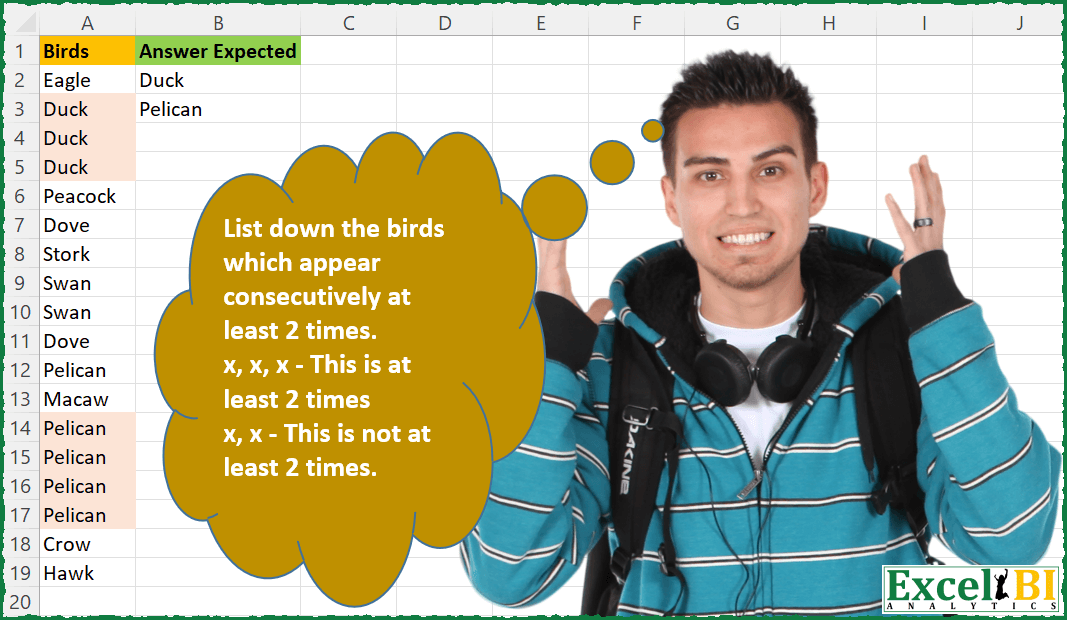
List down the birds which appear consecutively at least 2 times. x, x, x – This is at least 2 times x, x – This is not at least 2 times. Your formula need not be different from others as long as you have worked out your formula independently)
📌 Challenge Details and Links
ExcelBI Excel Challenge Number: 66
Challenge Difficulty: ⭐️
📥Download Sample File
📥Link to the solutions on LinkedIn
Solving the challenge of Find Consecutive Birds with Power Query
Power Query solution 1 for Find Consecutive Birds, proposed by Aditya Kumar Darak 🇮🇳:
let
  Source = Excel.CurrentWorkbook(){[Name = "data"]}[Content],
  Group  = Table.Group(Source, "Birds", {"Count", Table.RowCount}, GroupKind.Local),
  Return = Table.SelectRows(Group, each [Count] > 2)[[Birds]]
in
  Return
Power Query solution 2 for Find Consecutive Birds, proposed by Luan Rodrigues:
let
  Fonte = Data,
  Result = Table.SelectRows(
    Table.Group(
      Fonte,
      {"Birds"},
      {{"Contagem", each Table.RowCount(_), Int64.Type}},
      GroupKind.Local
    ),
    each [Contagem] > 2
  )[[Birds]]
in
  Result
Power Query solution 3 for Find Consecutive Birds, proposed by Matthias Friedmann:
let
 Source = Excel.CurrentWorkbook(){[Name="ConsecBirds"]}[Content],
 #"Grouped Rows" = Table.Group(Source, {"Birds"}, {{"Count", each Table.RowCount(_), Int64.Type}}, GroupKind.Local),
 #"Filtered Rows" = Table.SelectRows(#"Grouped Rows", each [Count] > 2)[[Birds]]
in
 #"Filtered Rows"


With Keep Duplicates you also need to put manually removeCount as the result after the inner in, so the advantage of getting a ready made formula is diminished:
let
 Source = Excel.CurrentWorkbook(){[Name="ConsecBirds"]}[Content],
 #"Kept Duplicates" =
 let
 columnNames = {"Birds"},
 addCount = Table.Group(Source, columnNames, {{"Count", Table.RowCount, type number}}, GroupKind.Local),
 selectDuplicates = Table.SelectRows(addCount, each [Count] > 2),
 removeCount = Table.RemoveColumns(selectDuplicates, "Count")
 in
 removeCount
in
 #"Kept Duplicates"

Explanations and links regarding GroupKind.Local:
https://www.linkedin.com/posts/matthiasfriedmann_excel-excelchallenge-powerquerychallenge-activity-6998615127243554816-Vi1j
Power Query solution 4 for Find Consecutive Birds, proposed by Mahmoud Bani Asadi:
let
  Source = Excel.CurrentWorkbook(){[Name = "Table1"]}[Content],
  #"Kept Duplicates" =
    let
      columnNames      = {"Birds"},
      addCount         = Table.Group(Source, columnNames, {{"Count", Table.RowCount, type number}}),
      selectDuplicates = Table.SelectRows(addCount, each [Count] > 2),
      removeCount      = Table.RemoveColumns(selectDuplicates, "Count")
    in
      Table.Join(Source, columnNames, removeCount, columnNames, JoinKind.Inner),
  #"Removed Duplicates" = Table.Distinct(#"Kept Duplicates")
in
  #"Removed Duplicates"
Power Query solution 5 for Find Consecutive Birds, proposed by Mahmoud Bani Asadi:
let
  Source = Table.FromRows(
    Json.Document(
      Binary.Decompress(
        Binary.FromText(
          "i45Wck1Mz0lVitWJVnIpTc7GwQhITUzOhwnml0HUB5fkF0GEgssT81AZcJ1wEd/E5MRyMMstMSc5Pw9qbk5mciLxbI/EcqCxsQA=",
          BinaryEncoding.Base64
        ),
        Compression.Deflate
      )
    ),
    let
      _t = ((type nullable text) meta [Serialized.Text = true])
    in
      type table [Birds = _t]
  ),
  #"Kept Duplicates" =
    let
      columnNames = {"Birds"},
      addCount = Table.Group(
        Source,
        columnNames,
        {{"Count", Table.RowCount, type number}},
        GroupKind.Local
      ),
      selectDuplicates = Table.SelectRows(addCount, each [Count] > 2),
      removeCount = Table.RemoveColumns(selectDuplicates, "Count")
    in
      Table.Join(Source, columnNames, removeCount, columnNames, JoinKind.Inner),
  #"Removed Duplicates" = Table.Distinct(#"Kept Duplicates")
in
  #"Removed Duplicates"
Power Query solution 6 for Find Consecutive Birds, proposed by Jan Willem Van Holst:
let
 Source = <insert you="" table="" here="">,
 TotalString = Text.Combine(Source[Birds]),
 ListOfBirds = List.Generate(
 ()=> [Bird="Dummy", Count=0],
 each [Count] <= List.Count(Source[Birds]),
 each [
 Count = [Count] + 1,
 Bird = Source[Birds]{[Count]}
 ],
 each if Text.Contains(TotalString,Text.Repeat([Bird],3)) then [Bird] else null
),
Result = List.RemoveItems(List.Distinct(ListOfBirds), {null})
in
 Result


          </insert>
Power Query solution 7 for Find Consecutive Birds, proposed by Abdoul Karim N.:
let
  Source = Excel.CurrentWorkbook(){[Name = "Birds"]}[Content],
  Group = Table.Group(
    Source,
    {"Birds"},
    {{"Count", each Table.RowCount(_), Int64.Type}},
    GroupKind.Local
  ),
  Filter = Table.SelectRows(Group, each ([Count] > 2))[Birds]
in
  Filter
Power Query solution 8 for Find Consecutive Birds, proposed by Gabriel Gordon:
let
  Source = Excel.CurrentWorkbook(){[Name = "tbl"]}[Content],
  GroupBirds = Table.Group(
    Source,
    {"Birds"},
    {{"Count", each _, type table [Birds = nullable text]}}
  ),
  CheckRowsGT2 = Table.AddColumn(
    GroupBirds,
    "Cantidad",
    each if Table.RowCount([Count]) > 2 then 1 else null
  ),
  KeepOnlyGT2 = Table.SelectRows(CheckRowsGT2, each ([Cantidad] = 1)),
  Result = Table.RemoveColumns(KeepOnlyGT2, {"Count", "Cantidad"})
in
  Result
Solving the challenge of Find Consecutive Birds with Excel
Excel solution 1 for Find Consecutive Birds, proposed by Rick Rothstein:
=LET(
    a,
    A2:A23,
    c,
    CONCAT(
        a
    ),
    u,
    UNIQUE(
        a
    ),
    FILTER(
        u,
        MAP(
            u,
            LAMBDA(
                x,
                LEN(
                    c
                )-LEN(
                    SUBSTITUTE(
                        c,
                        REPT(
                            x,
                            3
                        ),
                        ""
                    )
                )
            )
        )
    )
)
Excel solution 2 for Find Consecutive Birds, proposed by Rick Rothstein:
=LET(a,A2:A23,c,CONCAT(a&" "),u,UNIQUE(a),FILTER(u,MAP(u,LAMBDA(x,LEN(c)-LEN(SUBSTITUTE(c,REPT(x&" ",3),""))))))Excel solution 3 for Find Consecutive Birds, proposed by John V.:
=UNIQUE(FILTER(A2:A17,
    (A2:A17=A3:A18)*(A3:A18=A4:A19)))
Excel solution 4 for Find Consecutive Birds, proposed by محمد حلمي:
=FILTER(A2:A19,
IFNA(LET(a,
MAP(A2:A19,
LAMBDA(a,COUNTIF(A2:a,a))),a=2*(DROP(a,1)=3)),))
Excel solution 5 for Find Consecutive Birds, proposed by محمد حلمي:
=UNIQUE(FILTER(A3:A20,MAP(A3:A20,LAMBDA(a,AND(a=T(OFFSET(a,{0;1;2},)))))))Excel solution 6 for Find Consecutive Birds, proposed by محمد حلمي:
=UNIQUE(
FILTER(A3:A20,
MAP(A3:A20,
LAMBDA(a,AND(a=T(OFFSET(a,{0;1;2},)))))))
Excel solution 7 for Find Consecutive Birds, proposed by محمد حلمي:
=FILTER(A2:A19,
IFNA(LET(a,
MAP(A2:A19,
LAMBDA(a,COUNTIF(A2:a,a))),a+DROP(a,1)=5),))
Excel solution 8 for Find Consecutive Birds, proposed by محمد حلمي:
=UNIQUE(
    FILTER(
        A3:A20,
        MAP(
            A3:A20,

            LAMBDA(
                a,

                AND(
                    a=OFFSET(
                        a,
                        ,
                        ,
                        3
                    )
                )
            )
        )
    )
)
Excel solution 9 for Find Consecutive Birds, proposed by محمد حلمي:
=LET(c,A1:A20,
UNIQUE(FILTER(c,
MAP(c,ROW(c),
LAMBDA(b,a,IFERROR(AND(INDEX(c,a+{1,2})=b),))))))
Excel solution 10 for Find Consecutive Birds, proposed by 🇰🇷 Taeyong Shin:
=LET(Data, A2:A19,
Bool, SCAN(0, SEQUENCE(ROWS(Data)), LAMBDA(a,b, (a+1)*(INDEX(A2:A20, b)=INDEX(A2:A20, b+1)) ))>1,
UNIQUE(FILTER(Data, Bool))
)
Excel solution 11 for Find Consecutive Birds, proposed by 🇰🇷 Taeyong Shin:
=TOCOL(
    REGEXEXTRACT(
        CONCAT(
            A2:A19
        ),
        "(w+)1+K1",
        1
    )
)
Excel solution 12 for Find Consecutive Birds, proposed by 🇰🇷 Taeyong Shin:
=LET(
    b,
     A2:A19,
     ub,
     UNIQUE(
         b
     ),
     TOCOL(
         IF(
             FIND(
                 REPT(
                     ub,
                      3
                 ),
                  CONCAT(
         b
     )
             ),
              ub
         ),
          2
     )
)
Excel solution 13 for Find Consecutive Birds, proposed by 🇰🇷 Taeyong Shin:
=LET(Data, A2:A19,
UNIQUE(FILTER(Data, ISNUMBER(FIND(BYROW(IF(SEQUENCE(, 3), Data), LAMBDA(r, CONCAT(r) )), CONCAT(Data))) ))
)
Excel solution 14 for Find Consecutive Birds, proposed by Kris Jaganah:
=LET(
    a,
    A1:A18,
    b,
    A2:A19,
    c,
    A3:A19,
    d,
    IFERROR(
        MAP(
            a,
            b,
            c,
            LAMBDA(
                x,
                y,
                z,
                IF(
                    AND(
                        x=z,
                        x=y
                    ),
                    1,
                    0
                )
            )
        ),
        0
    ),
    e,
    UNIQUE(
        FILTER(
            b,
            d=1
        )
    ),
    e
)
Excel solution 15 for Find Consecutive Birds, proposed by Julian Poeltl:
=LET(B,A2:A19,UNIQUE(FILTER(B,IFERROR((B=DROP(B,1))*(B=DROP(B,2)),0))))Excel solution 16 for Find Consecutive Birds, proposed by Aditya Kumar Darak 🇮🇳:
= UNIQUE(FILTER(
 A2:A19,

 (A2:A19 = VSTACK(
     DROP(
         A2:A19,
          1
     ),
      ""
 ))
 * (A2:A19 = VSTACK(
     "",
      DROP(
          A2:A19,
           -1
      )
 ))))
Excel solution 17 for Find Consecutive Birds, proposed by Timothée BLIOT:
=LET(
Birds, A2:A19,

PreviousSame, BYROW(SEQUENCE(ROWS(Birds)), LAMBDA(a, IF(a>1, IF( INDEX(Birds,a-1) = INDEX(Birds,a), 1, 0),0) )),
PreviousTwo, IF(BYROW(SEQUENCE(ROWS(Birds)), LAMBDA(a, INDEX(PreviousSame,a-1) + INDEX(PreviousSame,a) ))=2,1,0),
UNIQUE(FILTER(Birds, PreviousTwo,"")))
Excel solution 18 for Find Consecutive Birds, proposed by Charles Roldan:
=LAMBDA(
    Birds,
    n,

    UNIQUE(
        FILTER(
            DROP(
                Birds,
                 -n
            ),
             VSTACK(
                 BYROW(
                     INDEX(
                         Birds,

                         MAKEARRAY(
                             ROWS(
                                 Birds
                             ) - n,
                              n + 1,
                              LAMBDA(
                                  a,
                                  b,
                                   a + b - 1
                              )
                         )
                     ),

                     LAMBDA(
                         x,
                          1 = COUNTA(
                              UNIQUE(
                                  x,
                                   TRUE
                              )
                          )
                     )
                 )
             )
        )
    )
)(A2:A19,
     2)
Excel solution 19 for Find Consecutive Birds, proposed by 🇮🇷 Navid Esmaeilzadeh اسماعیل زاده:
=UNIQUE(IFERROR(INDEX(A2:A19,SMALL(IF(($A$2:$A$19=$A$3:$A$20)*($A$2:$A$19=$A$4:$A$21),ROW($A$2:$A$19),""),ROW(A1:A18))),""))Excel solution 20 for Find Consecutive Birds, proposed by Victor Momoh (MVP, MOS, R.Eng):
=UNIQUE(
    FILTER(
        A2:A19,
        MAP(
            A2:A19,
            LAMBDA(
                x,
                COUNTIF(
                    OFFSET(
                        x,
                        ,
                        ,
                        3
                    ),
                    x
                )
            )
        )>2
    )
)
Excel solution 21 for Find Consecutive Birds, proposed by El Badlis Mohd Marzudin:
=UNIQUE(

    FILTER(
        A2:A19,

        BYROW(
            A2:A19,

            LAMBDA(
                a,

                COUNTA(
                    UNIQUE(
                        OFFSET(
                            A1,
                            ROW(
                                a
                            )-1,
                            ,
                            3
                        )&
                    )
                )=1
            )
        )
    )
)
Excel solution 22 for Find Consecutive Birds, proposed by Viswanathan M B:
=LET(
    Rng,
     A2:A19,

     n,
    3,

     Rtn,
     REDUCE(
         "",
          SEQUENCE(
              ROWS(
                  Rng
              )
          ),

          LAMBDA(
              a,
              b,
               IF(
                   ROWS(
                       UNIQUE(
                           INDEX(
                               Rng,
                                SEQUENCE(
                                    n,
                                    1,
                                    b
                                )
                           )
                       )
                   )=1,
                    VSTACK(
                        a,
                        INDEX(
                            Rng,
                             b
                        )
                    ),
                   a
               )
          )
     ),

     DROP(
         UNIQUE(
             Rtn
         ),
         1
     )
)
Excel solution 23 for Find Consecutive Birds, proposed by Viswanathan M B:
=Unique(Filter(Drop(A2:A19,1), Drop(A2:A19,-1)=Drop(A2:A19,1)))Excel solution 24 for Find Consecutive Birds, proposed by Rajesh Sinha:
=UNIQUE(FILTER($A$2:$A$19,COUNTIF($A$2:$A$19,$A$2:$A$19)>2,""))Excel solution 25 for Find Consecutive Birds, proposed by Stevenson Yu:
=LET(
    A,
    A2:A19,

    B,
    CONCAT(
        A
    ),

    C,
    UNIQUE(
        A
    ),

    FILTER(
        C,
        IFERROR(
            FIND(
                C&C&C,
                B
            ),
            0
        )>0
    )
)

Adding a little bit of extra code (83 characters minimum) allows the number of consecutive repetitions to be defined (as R):

=LET(

    A,
    A2:A19,

    R,
    3,

    B,
    CONCAT(
        A
    ),

    C,
    UNIQUE(
        A
    ),

    FILTER(
        C,
        IFERROR(
            FIND(
                REPT(
                    C,
                    R
                ),
                B
            ),
            0
        )>0
    )
)

I feel that all of these LAMBDA solutions are unnecessary if only Microsoft would allow the Conditional IF functions (COUNT/SUM/AVERAGE)
Excel solution 26 for Find Consecutive Birds, proposed by Riley Johnson:
=LET(

     birds,
     $A$2:$A$19,

     uBirds,
     UNIQUE(
         birds
     ),

     bool,
     LAMBDA(
         bird,

          3 <= MAX(
               SCAN(
                   0,
                    birds,

                    LAMBDA(
                        acc,
                        b,

                         IF(
                             b = bird,
                              acc + 1,
                              0
                         )

                    )

               )

          )

     ),

     FILTER(
         uBirds,
          MAP(
              uBirds,
               bool
          ),
          "No Match"
     )

)
Solving the challenge of Find Consecutive Birds with Python in Excel
Python in Excel solution 1 for Find Consecutive Birds, proposed by Alejandro Campos:
from collections import Counter
birds = xl("A2:A19")[0]
[b for b, c in Counter(b for b, n in zip(birds, birds[1:]) if b == n).items() if c >= 2]