
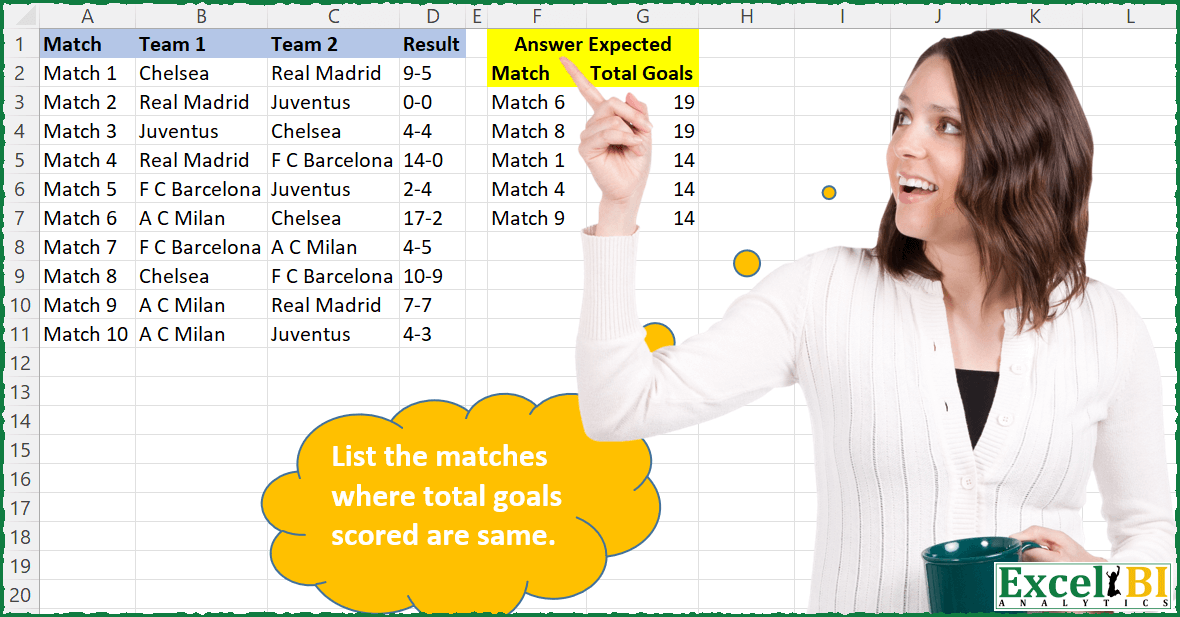
List the matches where total goals scored are same.
📌 Challenge Details and Links
ExcelBI Excel Challenge Number: 61
Challenge Difficulty: ⭐️⭐️⭐️
📥Download Sample File
📥Link to the solutions on LinkedIn
Solving the challenge of Find Matches with Same Goals with Power Query
Power Query solution 1 for Find Matches with Same Goals, proposed by Aditya Kumar Darak 🇮🇳:
let
  Source = Excel.CurrentWorkbook(){[Name = "data"]}[Content],
  Result = Table.TransformColumns(
    Source,
    {"Result", each Expression.Evaluate(Text.Replace(_, "-", "+"))}
  ),
  Group = Table.Group(Result, "Result", {"Match", each [Match]}),
  Filter = Table.SelectRows(Group, each List.Count([Match]) > 1),
  Sort = Table.Sort(Filter, {"Result", 1}),
  Return = Table.ExpandListColumn(Sort, "Match")
in
  Return
Power Query solution 2 for Find Matches with Same Goals, proposed by Luan Rodrigues:
let
  Fonte = Data,
  Group = Table.Group(
    Fonte,
    {"Match"},
    {
      {
        "Contagem",
        each Table.AddColumn(
          _,
          "Soma",
          each List.Sum(List.Transform(Text.Split([Result], "-"), each Number.From(_)))
        ),
        type table [Soma = text]
      }
    }
  ),
  Exp = Table.ExpandTableColumn(Group, "Contagem", {"Soma"}, {"Soma"}),
  Group2 = Table.SelectRows(
    Table.Group(Exp, {"Soma"}, {{"Contagem", each Table.RowCount(_), Int64.Type}}),
    each ([Contagem] > 1)
  ),
  Mesc = Table.NestedJoin(Exp, {"Soma"}, Group2, {"Soma"}, "Linhas Filtradas", JoinKind.LeftOuter),
  Result = Table.Sort(
    Table.SelectRows(
      Table.ExpandTableColumn(Mesc, "Linhas Filtradas", {"Soma"}, {"Total Goals"}),
      each [Total Goals] <> null
    ),
    {"Total Goals", Order.Descending}
  )[[Match], [Total Goals]]
in
  Result
Power Query solution 3 for Find Matches with Same Goals, proposed by Brian Julius:
let
  Source = Table.TransformColumnTypes(
    Table.SplitColumn(
      TotalGoalsRaw,
      "Result",
      Splitter.SplitTextByDelimiter("-", QuoteStyle.Csv),
      {"Goals1", "Goals2"}
    ),
    {{"Goals1", Int64.Type}, {"Goals2", Int64.Type}}
  ),
  TotalGoals = Table.AddColumn(Source, "Total Goals", each [Goals1] + [Goals2], Int64.Type),
  Group = Table.Group(
    TotalGoals,
    {"Total Goals"},
    {
      {
        "AllData",
        each _,
        type table [
          Match = nullable text,
          Team 1 = nullable text,
          Team 2 = nullable text,
          Goals1 = nullable number,
          Goals2 = nullable number,
          Total Goals = number
        ]
      },
      {"Count", each Table.RowCount(_), Int64.Type}
    }
  ),
  Filter = Table.RemoveColumns(
    Table.SelectRows(Group, each ([Count] <> 1)),
    {"Total Goals", "Count"}
  ),
  ExpandSort = Table.Sort(
    Table.ExpandTableColumn(Filter, "AllData", {"Match", "Total Goals"}, {"Match", "Total Goals"}),
    {{"Total Goals", Order.Descending}, {"Match", Order.Ascending}}
  )
in
  ExpandSort
Power Query solution 4 for Find Matches with Same Goals, proposed by Matthias Friedmann:
let
 Source = Excel.CurrentWorkbook(){[Name = "TotalGoals"]}[Content],
 #"Added Custom" = Table.AddColumn(
 Source,
 "Goals",
 each Expression.Evaluate(Text.Replace([Result], "-", "+"))
 )[[Match], [Goals]],
 #"Kept Duplicates" =
 let
 columnNames = {"Goals"},
 addCount = Table.Group(#"Added Custom", columnNames, {{"Count", Table.RowCount, type number}}),
 selectDuplicates = Table.SelectRows(addCount, each [Count] > 1),
 removeCount = Table.RemoveColumns(selectDuplicates, "Count")
 in
 Table.Join(#"Added Custom", columnNames, removeCount, columnNames, JoinKind.Inner),
 #"Sorted Rows" = Table.Sort(
 #"Kept Duplicates",
 {{"Goals", Order.Descending}, {"Match", Order.Ascending}}
 )
in
 #"Sorted Rows"
Power Query solution 5 for Find Matches with Same Goals, proposed by Venkata Rajesh:
Step1: Create a custom column
 List.Sum(List.Transform(Text.Split([Result],"-"),each Number.From(_)))
Power Query solution 6 for Find Matches with Same Goals, proposed by Mahmoud Bani Asadi:
let
  Source = Excel.CurrentWorkbook(){[Name = "Table1"]}[Content],
  #"Split Column by Delimiter" = Table.SplitColumn(
    Source,
    "Result",
    Splitter.SplitTextByDelimiter("-", QuoteStyle.Csv),
    {"Result.1", "Result.2"}
  ),
  #"Changed Type" = Table.TransformColumnTypes(
    #"Split Column by Delimiter",
    {{"Result.1", Int64.Type}, {"Result.2", Int64.Type}}
  ),
  #"Inserted Addition" = Table.AddColumn(
    #"Changed Type",
    "Addition",
    each [Result.1] + [Result.2],
    Int64.Type
  ),
  #"Kept Duplicates" =
    let
      columnNames = {"Addition"},
      addCount = Table.Group(
        #"Inserted Addition",
        columnNames,
        {{"Count", Table.RowCount, type number}}
      ),
      selectDuplicates = Table.SelectRows(addCount, each [Count] > 1),
      removeCount = Table.RemoveColumns(selectDuplicates, "Count")
    in
      Table.Join(#"Inserted Addition", columnNames, removeCount, columnNames, JoinKind.Inner),
  #"Removed Other Columns" = Table.SelectColumns(#"Kept Duplicates", {"Match", "Addition"}),
  #"Sorted Rows" = Table.Sort(
    #"Removed Other Columns",
    {{"Addition", Order.Descending}, {"Match", Order.Ascending}}
  )
in
  #"Sorted Rows"
Power Query solution 7 for Find Matches with Same Goals, proposed by Mahmoud Bani Asadi:
let
  Source = Excel.CurrentWorkbook(){[Name = "Table1"]}[Content],
  #"Split Column by Delimiter" = Table.ExpandListColumn(
    Table.TransformColumns(
      Source,
      {
        {
          "Result",
          Splitter.SplitTextByDelimiter("-", QuoteStyle.Csv),
          let
            itemType = (type nullable text) meta [Serialized.Text = true]
          in
            type {itemType}
        }
      }
    ),
    "Result"
  ),
  #"Changed Type" = Table.TransformColumnTypes(
    #"Split Column by Delimiter",
    {{"Result", Int64.Type}}
  ),
  #"Grouped Rows" = Table.Group(
    #"Changed Type",
    {"Match"},
    {{"Total Goals", each List.Sum([Result]), type nullable number}}
  ),
  #"Kept Duplicates" =
    let
      columnNames = {"Total Goals"},
      addCount = Table.Group(#"Grouped Rows", columnNames, {{"Count", Table.RowCount, type number}}),
      selectDuplicates = Table.SelectRows(addCount, each [Count] > 1),
      removeCount = Table.RemoveColumns(selectDuplicates, "Count")
    in
      Table.Join(#"Grouped Rows", columnNames, removeCount, columnNames, JoinKind.Inner),
  #"Sorted Rows" = Table.Sort(
    #"Kept Duplicates",
    {{"Total Goals", Order.Descending}, {"Match", Order.Ascending}}
  )
in
  #"Sorted Rows"
Power Query solution 8 for Find Matches with Same Goals, proposed by Mahmoud Bani Asadi:
let
  Source = Excel.CurrentWorkbook(){[Name = "Table1"]}[Content],
  Custom1 = Table.TransformColumns(
    Source,
    {{"Result", each List.Sum(List.Transform(Text.Split(_, "-"), Number.From))}}
  ),
  #"Kept Duplicates" =
    let
      columnNames = Table.ColumnNames(Custom1),
      addCount = Table.Group(Custom1, {"Result"}, {{"Count", each Table.RowCount(_), Int64.Type}}),
      selectDuplicates = Table.SelectRows(addCount, each [Count] > 1),
      removeCount = Table.RemoveColumns(selectDuplicates, "Count")
    in
      Table.Join(Custom1, {"Result"}, removeCount, {"Result"}, JoinKind.Inner)[[Match], [Result]],
  #"Sorted Rows" = Table.Sort(
    #"Kept Duplicates",
    {{"Result", Order.Descending}, {"Match", Order.Ascending}}
  )
in
  #"Sorted Rows"
Power Query solution 9 for Find Matches with Same Goals, proposed by Abdoul Karim N.:
let
  Source = Excel.CurrentWorkbook(){[Name = "Matches"]}[Content],
  ChangedType = Table.TransformColumnTypes(
    Source,
    {{"Match", type text}, {"Team 1", type text}, {"Team 2", type text}, {"Result", type text}}
  ),
  GetTotalGoals = Table.AddColumn(
    ChangedType,
    "Total Goals",
    each List.Sum(List.Transform(Text.Split([Result], "-"), Number.From))
  )[[Match], [Total Goals]],
  GroupForDuplicates = Table.Group(
    GetTotalGoals,
    {"Total Goals"},
    {
      {"Count", each Table.RowCount(_), Int64.Type},
      {"Table", each _, type table [Match = nullable text, Total Goals = number]}
    }
  ),
  GetDuplicates = Table.SelectRows(GroupForDuplicates, each [Count] > 1),
  RemovedColumns = Table.RemoveColumns(GetDuplicates, {"Total Goals", "Count"}),
  ExpandedTable = Table.ExpandTableColumn(
    RemovedColumns,
    "Table",
    {"Match", "Total Goals"},
    {"Match", "Total Goals"}
  )
in
  ExpandedTable
Power Query solution 10 for Find Matches with Same Goals, proposed by Gabriel Gordon:
let
  Source = Excel.CurrentWorkbook(){[Name = "Table1"]}[Content],
  RemCols = Table.RemoveColumns(Source, {"Team 1", "Team 2"}),
  SplitScore = Table.SplitColumn(
    RemCols,
    "Result",
    Splitter.SplitTextByDelimiter("-", QuoteStyle.Csv),
    {"Result.1", "Result.2"}
  ),
  ResultAsNr = Table.TransformColumnTypes(
    SplitScore,
    {{"Result.1", Int64.Type}, {"Result.2", Int64.Type}}
  ),
  AdditionCol = Table.AddColumn(ResultAsNr, "Addition", each [Result.1] + [Result.2], Int64.Type),
  RemCols2 = Table.RemoveColumns(AdditionCol, {"Result.1", "Result.2"}),
  GroupbyScores = Table.Group(
    RemCols2,
    {"Addition"},
    {{"data", each _, type table [Match = nullable text, Addition = number]}}
  ),
  CriteriaCol = Table.AddColumn(
    GroupbyScores,
    "indice",
    each if Table.RowCount([data]) > 1 then 1 else null
  ),
  FilterRows = Table.SelectRows(CriteriaCol, each ([indice] = 1)),
  RemCols3 = Table.RemoveColumns(FilterRows, {"indice"}),
  ExpandTable = Table.ExpandTableColumn(RemCols3, "data", {"Match"}, {"Match"}),
  #"Reordered Columns" = Table.ReorderColumns(ExpandTable, {"Match", "Addition"}),
  #"Sorted Rows" = Table.Sort(#"Reordered Columns", {{"Addition", Order.Descending}})
in
  #"Sorted Rows"
Solving the challenge of Find Matches with Same Goals with Excel
Excel solution 1 for Find Matches with Same Goals, proposed by Rick Rothstein:
=LET(r,D2:D11,t,TEXTBEFORE(r,"-")+TEXTAFTER(r,"-"),SORT(FILTER(HSTACK(A2:A11,t),ISNA(MATCH(t,UNIQUE(t,,1),0))),2,-1))Excel solution 2 for Find Matches with Same Goals, proposed by John V.:
=LET(r,D2:D11,g,TEXTBEFORE(r,"-")+TEXTAFTER(r,"-"),SORT(FILTER(HSTACK(A2:A11,g),MAP(g,LAMBDA(x,SUM(N(g=x))))>1),2,-1))Excel solution 3 for Find Matches with Same Goals, proposed by محمد حلمي:
=LET(
d,D2:D11,
a,MAP(d,LAMBDA(a,
 TEXTBEFORE(a,"-")+TEXTAFTER(a,"-"))),
b,--(a=TOROW(a)),
c,MMULT(b,ROW(d)^0)>1,
v,FILTER(HSTACK(A2:A11,a),c),
 SORT(v,2,-1))
Excel solution 4 for Find Matches with Same Goals, proposed by 🇰🇷 Taeyong Shin:
=LET(Goal, BYROW(--TEXTSPLIT(ARRAYTOTEXT(D2:D11), "-", ", "), LAMBDA(bc, SUM(bc) )),
nums, UNIQUE(VSTACK(UNIQUE(Goal), UNIQUE(Goal, , 1)), , 1),
Bool, MMULT(N(Goal=TRANSPOSE(nums)), SEQUENCE(ROWS(nums), , , 0)),
SORT(FILTER(HSTACK(A2:A11, Goal), Bool), 2, -1)
)

=LET(Goal, ABS(EVAL("-" & D2:D11)),
nums, UNIQUE(VSTACK(UNIQUE(Goal, , 1), UNIQUE(Goal)), , 1),
SORT(FILTER(HSTACK(A2:A11, Goal), ISNUMBER(FIND(" " & Goal, " " & TEXTJOIN(" ", , nums)))), 2, -1)
)

EVAL=LAMBDA(values, EVALUATE(values))
Excel solution 5 for Find Matches with Same Goals, proposed by Julian Poeltl:
=LET(
    G,
    MAP(
        D2:D11,
        LAMBDA(
            A,
            SUM(
                --TEXTSPLIT(
                    A,
                    "-"
                )
            )
        )
    ),
    U,
    UNIQUE(
        G
    ),
    M,
    FILTER(
        U,
        1
Excel solution 6 for Find Matches with Same Goals, proposed by Aditya Kumar Darak 🇮🇳:
= LET(
 _m,
 A2:A11,
 _g,
 D2:D11,
 _tg,
 MAP(_g, LAMBDA(a, SUM(--TEXTSPLIT(a, "-")))),
 _utg,
 UNIQUE(_tg, , TRUE),
 SORT(FILTER(HSTACK(_m, _tg), ISNA(XMATCH(_tg, _utg))), 2, -1))
Excel solution 7 for Find Matches with Same Goals, proposed by Timothée BLIOT:
=LET(Match,
     A2:A11,

Result,
     BYROW(
         D2:D11,
          LAMBDA(
              a,
               SUM(
                   VALUE(
                       TEXTSPLIT(
                           a,
                           "-"
                       )
                   )
               )
          )
     ),

Test,
     BYROW(Result,
     LAMBDA(a,
     IF(SUMPRODUCT(1*(Result=a))>1,
    1,
    0) )),

SORT(
    UNIQUE(
        FILTER(
            HSTACK(
                Match,
                Result
            ),
             Test,
            ""
        )
    ),
    2,
    -1
))
Excel solution 8 for Find Matches with Same Goals, proposed by Victor Momoh (MVP, MOS, R.Eng):
=LET(a,MAP(D2:D11,LAMBDA(x,SUM(--TEXTSPLIT(x,"-")))),
SORT(FILTER(HSTACK(A2:A11,a),MAP(a,LAMBDA(p,SUM(--(a=p))>1))),2,-1))
Excel solution 9 for Find Matches with Same Goals, proposed by Ibrahim Sadiq:
=LET(a,
    D2:D11,
    b,
    MAP(a,
    LAMBDA(a,
    SUM(--(TEXTSPLIT(
        a,
        "-"
    ))))),
    c,
    IF(MMULT(--(b=TRANSPOSE(
        b
    )),
    SEQUENCE(
        ROWS(
            a
        ),
        ,
        1,
        0
    ))<>1,
    1,
    0),
    SORT(
        FILTER(
            HSTACK(
                A2:A11,
                b
            ),
            c
        ),
        2,
        -1
    ))
Excel solution 10 for Find Matches with Same Goals, proposed by Stevenson Yu:
=LET(B,D2:D11,
C,TEXTBEFORE(B,"-")+TEXTAFTER(B,"-"),
D,BYROW(N(C=TOROW(C)),LAMBDA(Q,SUM(Q))),
SORT(FILTER(HSTACK(A2:A11,C),D>1),2,-1))
Solving the challenge of Find Matches with Same Goals with Excel VBA
Excel VBA solution 1 for Find Matches with Same Goals, proposed by محمد حلمي:
An idea of assembling numbers from Tae yong S. ,
It can be dispensed Lambda
=LET(
d,D2:D11,
r,--TEXTSPLIT(ARRAYTOTEXT(d), "-", ", "),
x,IMSUB(INDEX(r,,1),-INDEX(r,,2))+0,
b,--(x=TOROW(x)),
c,MMULT(b,ROW(d)^0)>1,
v,FILTER(HSTACK(A2:A11,x),c),
SORT(v,2,-1))
Excel VBA solution 2 for Find Matches with Same Goals, proposed by 🇰🇷 Taeyong Shin:
محمد حلمي