
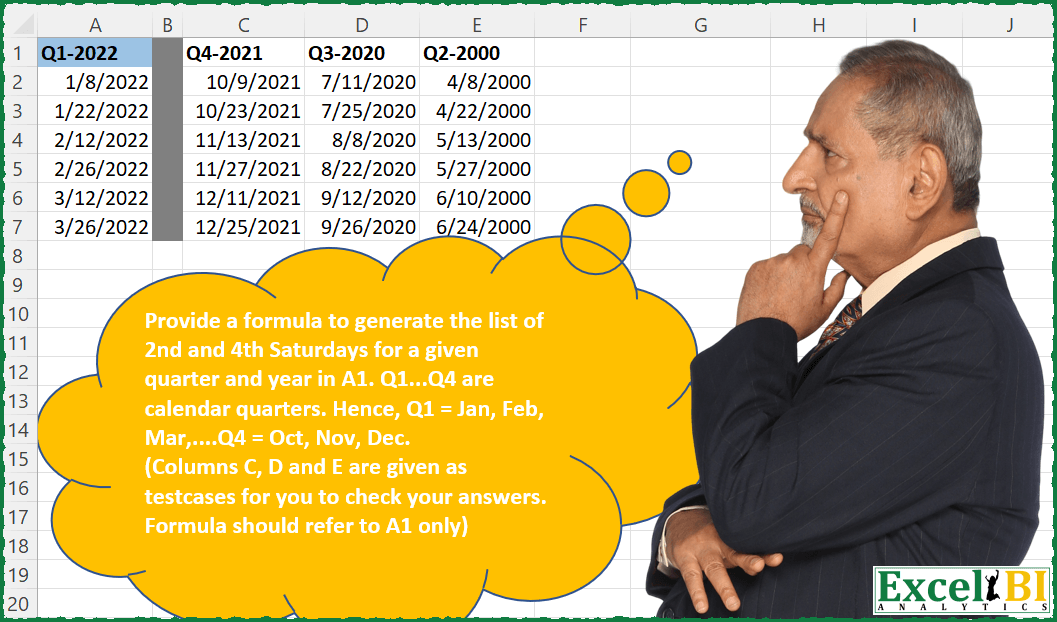
Provide a formula to generate the list of 2nd and 4th Saturdays for a given quarter and year in A1. Q1…Q4 are calendar quarters. Hence, Q1 = Jan, Feb, Mar,….Q4 = Oct, Nov, Dec. (Columns C, D and E are given as testcases for you to check your answers. Formula should refer to A1 only)
📌 Challenge Details and Links
ExcelBI Excel Challenge Number: 56
Challenge Difficulty: ⭐️⭐️⭐️
📥Download Sample File
📥Link to the solutions on LinkedIn
Solving the challenge of List 2nd and 4th Saturdays with Power Query
Power Query solution 1 for List 2nd and 4th Saturdays, proposed by Luan Rodrigues:
let
  Source = Data,
  tab = Table.AddColumn(
    Source,
    "Personalizar",
    each [
      a = Date.From(Text.Select([Column1], {"0" .. "9", "-"})),
      b = Date.EndOfQuarter(a),
      c = {Number.From(a) .. Number.From(b)}
    ][c]
  )[Personalizar],
  tab1 = tab{0},
  Conv = Table.FromList(tab1, Splitter.SplitByNothing(), null, null),
  Sab = Table.SelectRows(
    Table.AddColumn(Conv, "Personalizar", each Date.DayOfWeek(Date.From([Column1]))),
    each [Personalizar] = 6
  ),
  Qt = Table.AddColumn(Sab, "Personalizar.1", each Date.Month(Date.From([Column1]))),
  Group = Table.Group(
    Qt,
    {"Personalizar.1"},
    {
      {
        "Contagem",
        each Table.SelectRows(
          Table.AddIndexColumn(Table.Sort(_, {{"Column1", Order.Ascending}}), "Rank", 1, 1),
          each [Rank] = 2 or [Rank] = 4
        ),
        type table [Column1 = nullable date]
      }
    }
  )[[Contagem]],
  Exp = Table.ExpandTableColumn(Group, "Contagem", {"Column1"}, {"Column1"}),
  Result = Table.TransformColumnTypes(Exp, {{"Column1", type date}}, "en-US")
in
  Result
Power Query solution 2 for List 2nd and 4th Saturdays, proposed by Matthias Friedmann:
let
  Source = Excel.CurrentWorkbook(){[Name = "QYYYY"]}[Content],
  #"Start of Quarter" = Table.TransformColumns(
    Source,
    {
      "Column1",
      each Text.From((Number.From(Text.Middle(_, 1, 1)) * 3 - 2)) & "." & Text.End(_, 4),
      type date
    }
  ),
  #"Changed Type" = Table.TransformColumnTypes(#"Start of Quarter", {{"Column1", type date}}),
  #"Days of Quarter" = Table.AddColumn(
    #"Changed Type",
    "Days",
    each {Int64.From([Column1]) .. Int64.From(Date.EndOfQuarter([Column1]))}
  )[[Days]],
  #"Expanded Days" = Table.ExpandListColumn(#"Days of Quarter", "Days"),
  #"Changed Type1" = Table.TransformColumnTypes(#"Expanded Days", {{"Days", type date}}),
  #"Filtered Rows" = Table.SelectRows(
    #"Changed Type1",
    each (Date.DayOfWeekName([Days]) = "Saturday" and Number.IsEven(Date.WeekOfMonth([Days])))
  )
in
  #"Filtered Rows"
Solving the challenge of List 2nd and 4th Saturdays with Excel
Excel solution 1 for List 2nd and 4th Saturdays, proposed by Rick Rothstein:
=LET(
    y,
    RIGHT(
        A1,
        4
    ),
    q,
    MID(
        A1,
        2,
        1
    ),
    m,
    ROW(
        1:12
    ),
    d,
    DATE(
        y,
        m,
        8-7
    ),
    f,
    LAMBDA(
        x,
        d+7*x-WEEKDAY(
            d
        )
    ),
    INDEX(
        SORT(
            VSTACK(
                f(
                    2
                ),
                f(
                    4
                )
            )
        ),
        SEQUENCE(
            6,
            ,
            6*q-5
        )
    )
)

Because the day of the week is Saturday,
     we can make this formula 6 characters shorter (this will ONLY work Saturday as the day of the week)

=LET(
    y,
    RIGHT(
        A1,
        4
    ),
    q,
    MID(
        A1,
        2,
        1
    ),
    m,
    ROW(
        1:12
    ),
    d,
    DATE(
        y,
        m,
        1
    ),
    f,
    LAMBDA(
        x,
        d+7*x-WEEKDAY(
            d
        )
    ),
    INDEX(
        SORT(
            VSTACK(
                f(
                    2
                ),
                f(
                    4
                )
            )
        ),
        SEQUENCE(
            6,
            ,
            6*q-5
        )
    )
)
Excel solution 2 for List 2nd and 4th Saturdays, proposed by John V.:
=LET(d,
    DATE(RIGHT(
        A1,
        4
    ),
    3*(MID(
        A1,
        2,
        1
    )-1)+{1;2;3},
    1),
    TOCOL(
        d-WEEKDAY(
            d
        )+{14,
        28}
    ))
Excel solution 3 for List 2nd and 4th Saturdays, proposed by محمد حلمي:
=LET(a,
    DATE(RIGHT(
        C1,
        4
    )+0,

SEQUENCE(3,
    ,
    (MID(
        C1,
        2,
        1
    )-1)*3+1),
    1),

TOCOL(
    7-WEEKDAY(
        a
    )+{7,
    21}+a
))
Excel solution 4 for List 2nd and 4th Saturdays, proposed by محمد حلمي:
=
LET(a,DATE(RIGHT(D1,4)+0,SEQUENCE(3,,
SWITCH(MID(D1,2,1)+0,1,1,2,4,3,7,4,10)),1),
TOCOL(7-WEEKDAY(a)+{7,21}+a))
Excel solution 5 for List 2nd and 4th Saturdays, proposed by 🇰🇷 Taeyong Shin:
=WORKDAY.INTL(EDATE(RIGHT(G1:J1,4)&"-"&(MID(G1:J1,2,1)-1)*3+1,TOCOL(SEQUENCE(3,,0)+{0,0}))-1,TOCOL({2,4}+{0;0;0}),"1111101")Excel solution 6 for List 2nd and 4th Saturdays, proposed by 🇰🇷 Taeyong Shin:
=LET(
    Range,
     A1:D1,

     MAKEARRAY(
         3*2,
          COLUMNS(
              Range
          ),
          LAMBDA(
              r,
              c,

               LET(
                   val,
                    INDEX(
                        Range,
                         c
                    ),
                    year,
                    RIGHT(
                        val,
                         4
                    ),
                    qtr,
                    MID(
                        val,
                         2,
                         1
                    ),

                    Dt,
                    CHOOSECOLS(
                        WRAPCOLS(
                            DATE(
                                year,
                                 SEQUENCE(
                                     12
                                 ),
                                 1
                            ),
                             3
                        ),
                         qtr
                    ),

                    INDEX(
                        TOCOL(
                            WORKDAY.INTL(
                                Dt-1,
                                 {2,
                                4},
                                 "1111101"
                            )
                        ),
                         r
                    )

               )

          )
     )

)
Excel solution 7 for List 2nd and 4th Saturdays, proposed by 🇰🇷 Taeyong Shin:
=LET(Range, A1:D1,
Expr, LAMBDA(a,b,
 LET(val, INDEX(Range, b), year, RIGHT(val, 4), Qtr, MID(val, 2, 1),
 Dt, CHOOSECOLS(WRAPCOLS(DATE(year, SEQUENCE(12), 1), 3), Qtr),
 HSTACK(a, TOCOL(WORKDAY.INTL(Dt-1, {2,4}, "1111101")) )
 )),
DROP(REDUCE("", SEQUENCE(COUNTA(Range)), Expr ), , 1)
)
Excel solution 8 for List 2nd and 4th Saturdays, proposed by Julian Poeltl:
=LET(D,A1,SP,TEXTSPLIT(D,"-"),Y,--INDEX(SP,,2),Q,CHOOSE(--RIGHT(INDEX(SP,,1),1),0,3,6,9),S,DATE(Y,SEQUENCE(3)+Q,1),W,7-WEEKDAY(S),SORT(VSTACK(S+W+7,S+W+21)))Excel solution 9 for List 2nd and 4th Saturdays, proposed by Aditya Kumar Darak 🇮🇳:
= LET(
 _i, A1,
 _y, RIGHT(_i, 4),
 _q, MID(_i, 2, 1),
 _d, DATE(_y, (_q - 1) * 3 + {1;2;3}, 1),
 TOCOL(_d + 7 * {2,4} - WEEKDAY(_d - 7)))
Excel solution 10 for List 2nd and 4th Saturdays, proposed by Timothée BLIOT:
=LET(
Input, A1,
Quarter, VALUE(MID(Input,2,1)),
Year, VALUE(RIGHT(Input,4)),
Dates, DATE(Year,SEQUENCE(3)+(3*(Quarter-1)),1),

TOCOL((Dates-WEEKDAY(Dates,1))+(7*{2,4})))
Excel solution 11 for List 2nd and 4th Saturdays, proposed by Oscar Javier Rosero Jiménez:
=LET(
_c,A1,
_f,SEQUENCE(90,,DATE(RIGHT(_c,4),CHOOSE(MID(_c,2,1),1,4,7,10),1)),
_fd,FILTER(_f,WEEKDAY(_f)=7),
_f24,ROUNDUP(DAY(_fd)/7,0),
FILTER(_fd,(_f24=2)+(_f24=4)))
Excel solution 12 for List 2nd and 4th Saturdays, proposed by CA Vikal Jain:
=SORT(TOCOL(DATE(RIGHT(L4,4),((MID(L4,2,1))*3)-{0,1,2},1)-WEEKDAY(DATE(RIGHT(L4,4),((MID(L4,2,1))*3)-{0,1,2},1),1)+SEQUENCE(2,,14,14)),1)&&&