
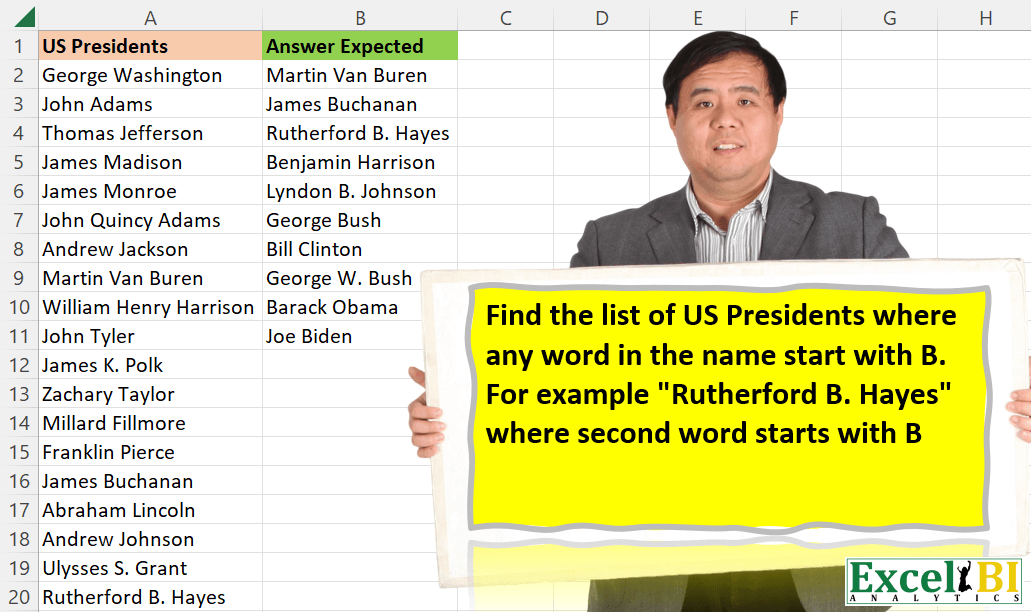
Find the list of US Presidents where any word in the name start with B. For example “Rutherford B. Hayes” where second word starts with B. “Bill Clinton” where Bill starts with B.
📌 Challenge Details and Links
ExcelBI Excel Challenge Number: 54
Challenge Difficulty: ⭐️
📥Download Sample File
📥Link to the solutions on LinkedIn
Solving the challenge of Presidents With B Word with Power Query
Power Query solution 1 for Presidents With B Word, proposed by Aditya Kumar Darak 🇮🇳:
let
  Source = Excel.CurrentWorkbook(){[Name = "data"]}[Content],
  Return = Table.SelectRows(Source, each Text.Contains([US Presidents], "B"))
in
  Return
Power Query solution 2 for Presidents With B Word, proposed by Luan Rodrigues:
let
  Fonte = Data,
  Result = Table.SelectRows(
    Table.AddColumn(
      Fonte,
      "President",
      each [
        a         = Text.ToList(Text.Select(Text.Proper([US Presidents]), {"A" .. "Z", " "})),
        President = List.Contains(a, "B")
      ][President]
    ),
    each [President] = true
  )[[US Presidents]]
in
  Result
Power Query solution 3 for Presidents With B Word, proposed by Pavel A.:
let
  Source = Excel.CurrentWorkbook(){[Name = "Table1"]}[Content],
  DataTypeDefinition = Table.TransformColumnTypes(Source, {{"US Presidents", type text}}),
  FilterTable = Table.SelectRows(
    DataTypeDefinition,
    each List.Contains(List.Transform(Text.Split([US Presidents], " "), each Text.Start(_, 1)), "B")
  )
in
  FilterTable
Power Query solution 4 for Presidents With B Word, proposed by Brian Julius:
let
  Source = #"Presidents Raw",
  #"Duplicated Column" = Table.DuplicateColumn(Source, "US Presidents", "US Presidents - Copy"),
  #"Split Column by Delimiter" = Table.ExpandListColumn(
    Table.TransformColumns(
      #"Duplicated Column",
      {
        {
          "US Presidents - Copy",
          Splitter.SplitTextByDelimiter(" ", QuoteStyle.Csv),
          let
            itemType = (type nullable text) meta [Serialized.Text = true]
          in
            type {itemType}
        }
      }
    ),
    "US Presidents - Copy"
  ),
  #"Split Column by Position" = Table.SplitColumn(
    #"Split Column by Delimiter",
    "US Presidents - Copy",
    Splitter.SplitTextByPositions({0, 1}, false),
    {"US Presidents - Copy.1", "US Presidents - Copy.2"}
  ),
  #"Filtered Rows" = Table.SelectRows(
    #"Split Column by Position",
    each ([#"US Presidents - Copy.1"] = "B")
  ),
  #"Removed Columns" = Table.RemoveColumns(
    #"Filtered Rows",
    {"US Presidents - Copy.1", "US Presidents - Copy.2"}
  )
in
  #"Removed Columns"
Power Query solution 5 for Presidents With B Word, proposed by Jaroslaw Kujawa:
let
Source=Excel.CurrentWorkbook(){[Name="US_presidents"]}[Content]
inTable.SelectRows(Source, each Text.PositionOf([US_Presidents],"B")>=0)
Power Query solution 6 for Presidents With B Word, proposed by Matthias Friedmann:
let
 Source = Excel.CurrentWorkbook(){[Name = "AllPres"]}[Content],
 #"Filtered Rows" = Table.SelectRows(Source, each Text.Contains([US Presidents], "B"))
in
 #"Filtered Rows"

That is simple and completly UI driven.
But what if you have to cater for list with names like O’Brian or other names where the B is not at the beginning?
You can apply Jardiel Euflázio's Excel idea to pq and adapt:
Text.Contains(" " & [US Presidents], " B"))
Power Query solution 7 for Presidents With B Word, proposed by Antriksh Sharma:
let
  Source = DataSource,
  Transformation = Table.FromColumns(
    {
      List.RemoveNulls(
        List.Transform(
          Source[US Presidents],
          (Name) =>
            if List.AnyTrue(
              List.Transform(Text.Split(Name, " "), each Text.Lower(Text.Start(_, 1)) = "b")
            )
            then
              Name
            else
              null
        )
      )
    },
    type table [President = text]
  )
in
  Transformation
Power Query solution 9 for Presidents With B Word, proposed by Mahmoud Bani Asadi:
let
  Source = Excel.CurrentWorkbook(){[Name = "Table1"]}[Content],
  Filter = Table.SelectRows(
    Source,
    each Text.Contains(Text.Select([US Presidents], {"A" .. "Z"}), "B")
  )
in
  Filter
Power Query solution 10 for Presidents With B Word, proposed by Mahmoud Bani Asadi:
let
  Source = Excel.CurrentWorkbook(){[Name = "Table1"]}[Content],
  #"Duplicated Column" = Table.DuplicateColumn(Source, "US Presidents", "US Presidents - Copy"),
  #"Split Column by Delimiter" = Table.ExpandListColumn(
    Table.TransformColumns(
      #"Duplicated Column",
      {
        {
          "US Presidents - Copy",
          Splitter.SplitTextByDelimiter(" ", QuoteStyle.Csv),
          let
            itemType = (type nullable text) meta [Serialized.Text = true]
          in
            type {itemType}
        }
      }
    ),
    "US Presidents - Copy"
  ),
  #"Extracted First Characters" = Table.TransformColumns(
    #"Split Column by Delimiter",
    {{"US Presidents - Copy", each Text.Start(_, 1), type text}}
  ),
  #"Filtered Rows" = Table.SelectRows(
    #"Extracted First Characters",
    each ([#"US Presidents - Copy"] = "B")
  ),
  #"Removed Columns" = Table.RemoveColumns(#"Filtered Rows", {"US Presidents - Copy"})
in
  #"Removed Columns"
Power Query solution 11 for Presidents With B Word, proposed by Mahmoud Bani Asadi:
let
  Source = Excel.CurrentWorkbook(){[Name = "Table1"]}[Content],
  Result = Table.SelectRows(
    Source,
    each List.Contains(List.Transform(Text.Split([US Presidents], " "), each Text.Start(_, 1)), "B")
  )
in
  Result
Power Query solution 12 for Presidents With B Word, proposed by Abdoul Karim N.:
let
  Source = Excel.CurrentWorkbook(){[Name = "USPresidents"]}[Content],
  SplitbySpace = Table.SplitColumn(
    Source,
    "US Presidents",
    Splitter.SplitTextByDelimiter(" ", QuoteStyle.Csv),
    {"US Presidents.1", "US Presidents.2", "US Presidents.3"}
  ),
  ChangedType = Table.TransformColumnTypes(
    SplitbySpace,
    {{"US Presidents.1", type text}, {"US Presidents.2", type text}, {"US Presidents.3", type text}}
  ),
  CombineFirstLetters = Table.AddColumn(
    ChangedType,
    "StartWithB",
    each Text.Combine(
      {
        Text.Start([US Presidents.1], 1),
        Text.Start([US Presidents.2], 1),
        Text.Start([US Presidents.3], 1)
      }
    )
  ),
  ContainsB = Table.SelectRows(CombineFirstLetters, each Text.Contains([StartWithB], "B")),
  GetNameBack = Table.CombineColumns(
    ContainsB,
    {"US Presidents.1", "US Presidents.2", "US Presidents.3"},
    Combiner.CombineTextByDelimiter(" ", QuoteStyle.None),
    "US Presidents"
  ),
  RemoveColumn = Table.RemoveColumns(GetNameBack, {"StartWithB"})
in
  RemoveColumn
Solving the challenge of Presidents With B Word with Excel
Excel solution 1 for Presidents With B Word, proposed by Rick Rothstein:
=LET(a,A2:A47,FILTER(a,FIND("B",a&"B")Excel solution 2 for Presidents With B Word, proposed by Rick Rothstein:
=FILTER(A2:A47,IFERROR(FIND("B",A2:A47),))Excel solution 3 for Presidents With B Word, proposed by John V.:
=FILTER(
    A2:A47,
    IFERROR(
        FIND(
            " B",
            " "&A2:A47
        ),

    )
)

for the challenge,
     work like this:
=FILTER(
    A2:A47,
    IFERROR(
        FIND(
            "B",
            A2:A47
        ),

    )
)
Excel solution 4 for Presidents With B Word, proposed by محمد حلمي:
=
FILTER(
    A2:A47,

    MAP(
        A2:A47,

        LAMBDA(
            a,
            COUNTA(
                TEXTSPLIT(
                    a,
                    "B"
                )
            )>1
        )
    )
)
Excel solution 5 for Presidents With B Word, proposed by محمد حلمي:
=
FILTER(
    A2:A47,
    ISTEXT(
        ASC(
            FIND(
                "B",
                A2:A47
            )
        )
    )
)
Excel solution 6 for Presidents With B Word, proposed by محمد حلمي:
=FILTER(A2:A47,ISTEXT(FIND("B",A2:A47)&""))Excel solution 7 for Presidents With B Word, proposed by محمد حلمي:
=FILTER(
    A2:A47,

    MAP(
        A2:A47,

        LAMBDA(
            a,
            OR(
                LEFT(
                    TEXTSPLIT(
                        a,
                        " "
                    )
                )="B"
            )
        )
    )
)
Excel solution 8 for Presidents With B Word, proposed by محمد حلمي:
=
FILTER(
    A2:A47,
    ISTEXT(
        IFNA(
            TEXTAFTER(
                A2:A47,
                "B"
            ),

        )
    )
)
Excel solution 9 for Presidents With B Word, proposed by محمد حلمي:
=FILTER(A2:A47,LEN(TEXTAFTER(A2:A47,"B",,,,0))>1)Excel solution 10 for Presidents With B Word, proposed by محمد حلمي:
=
FILTER(
    A2:A47,
    CODE(
        TEXTAFTER(
            A2:A47,
            "B",
            ,
            ,
            ,
            0
        )
    )<>48
)
Excel solution 11 for Presidents With B Word, proposed by 🇰🇷 Taeyong Shin:
=TOCOL(
    REGEXEXTRACT(
        A2:A47,
        ".*?bB.*"
    ),
    2
)

=FILTER(
    A2:A47,
    MAP(
        A2:A47,
        LAMBDA(
            x,
            OR(
                COUNTIF(
                    x,
                    {"* B*",
                    "B*"}
                )
            )
        )
    )
)
Excel solution 12 for Presidents With B Word, proposed by Kris Jaganah:
=LET(
    a,
    A2:A47,
    b,
    MAP(
        a,
        LAMBDA(
            x,
            SUM(
                IFERROR(
                    FIND(
                        "B",
                        MID(
                            x,
                            SEQUENCE(
                                ,
                                LEN(
                                    x
                                ),
                                1,
                                1
                            ),
                            1
                        ),
                        1
                    ),
                    0
                )
            )
        )
    ),
    FILTER(
        a,
        b>0
    )
)
Excel solution 13 for Presidents With B Word, proposed by Julian Poeltl:
=FILTER(A2:A47,
    MAP(A2:A47,
    LAMBDA(A,
    SUM(--(LEFT(
        TEXTSPLIT(
            A,
            " "
        ),
        1
    )="b")))))
Excel solution 14 for Presidents With B Word, proposed by Aditya Kumar Darak 🇮🇳:
= FILTER(A2:A47, ISNUMBER(FIND("B", A2:A47)))Excel solution 15 for Presidents With B Word, proposed by Timothée BLIOT:
=FILTER(
    A2:A47,
    BYROW(
        IFERROR(
            LEFT(
                TEXTSPLIT(
                    TEXTJOIN(
                        "/",
                        1,
                        A2:A47
                    ),
                    " ",
                    "/"
                ),
                1
            ),
            ""
        ),
        LAMBDA(
            a,
            --ISNUMBER(
                SEARCH(
                    "B",
                    TEXTJOIN(
                        ,
                        1,
                        a
                    )
                )
            )
        )
    ),
    ""
)
Excel solution 16 for Presidents With B Word, proposed by Bhavya Gupta:
= FILTER(
    A2:A47,
    ISNUMBER(
        FIND(
            "B",
            PROPER(
                A2:A47
            )
        )
    )
)
Excel solution 17 for Presidents With B Word, proposed by Jaroslaw Kujawa:
=FILTER(
    presidents,
    ISNUMBER(
        IFERROR(
            FIND(
                "B",
                presidents
            ),
            FIND(
                " B",
                presidents
            )
        )
    )
)
Excel solution 18 for Presidents With B Word, proposed by 🇮🇷 Navid Esmaeilzadeh اسماعیل زاده:
={IFERROR(INDIRECT("A"&SMALL(IF((LEFT(
    LEFT(
        $A$2:$A$47,
        FIND(
            " ",
            $A$2:$A$47
        )-1
    ),
    1
)="B")+(IF(
    FIND(
        " ",
        $A$2:$A$47
    )=IFERROR(
        FIND(
            " ",
            $A$2:$A$47,
            FIND(
                " ",
                $A$2:$A$47
            )+1
        ),
        FIND(
            " ",
            $A$2:$A$47
        )
    ),
    " "&,
    MID(
        $A$2:$A$47,
        FIND(
            " ",
            $A$2:$A$47
        )+1,
        1
    )
)="B")+(IF(
    FIND(
        " ",
        $A$2:$A$47
    )
Excel solution 19 for Presidents With B Word, proposed by Stefan Olsson:
=filter(A2:A,ArrayFormula(REGEXMATCH(A2:A,"B")))Excel solution 20 for Presidents With B Word, proposed by Jardiel Euflázio:
=FILTER(
    A2:A47,
    ISNUMBER(
        SEARCH(
            " B",
            " "&A2:A47
        )
    )
)
Excel solution 21 for Presidents With B Word, proposed by Victor Momoh (MVP, MOS, R.Eng):
=FILTER(A2:A47,MAP(A2:A47,LAMBDA(x,SUM(--(LEFT(TEXTSPLIT(x,{" ",". "}))="B"))>0)))Excel solution 22 for Presidents With B Word, proposed by Mahmoud Bani Asadi:
=FILTER(Table1[US Presidents],
 BYROW(Table1[US Presidents],
 LAMBDA(x,
 ISNUMBER(
 MATCH("B",
 LEFT(TEXTSPLIT(x,," ")),
 0)
 )
 )
 )
 )
Excel solution 23 for Presidents With B Word, proposed by Paolo Pozzoli:
=LET(

    names;
    A2:A47;

    posB;
    MAP(
        A2:A47;
        LAMBDA(
            x;
            SE.ERRORE(
                TROVA(
                    "B";
                    x
                );

            )
        )
    );

    out;
    FILTRO(
        names;
        posB
    );

    out
)

--- IN ONE STEP ---
=LET(

    names;
    A2:A47;

    out;
    FILTRO(
        names;
        SE.ERRORE(
            MAP(
                A2:A47;
                LAMBDA(
                    x;
                    SE.ERRORE(
                        TROVA(
                            "B";
                            x
                        );

                    )
                )
            );

        );

    );

    out
)
Excel solution 24 for Presidents With B Word, proposed by RIJESH T.:
=FILTER(
    A1:A47,
    ISNUMBER(
        SEARCH(
            "B",
            REDUCE(
                "",
                A2:A47,
                LAMBDA(
                    A,
                    B,
                    VSTACK(
                        A,
                        CONCAT(
                            LEFT(
                                TEXTSPLIT(
                                    B,
                                    " "
                                )
                            )
                        )
                    )
                )
            )
        )
    )
)
Excel solution 25 for Presidents With B Word, proposed by Meni Porat:
=TOCOL(IF(NOT(ISNA(--TEXTAFTER(A2:A47,"B"))),A2:A47,NA),2)Excel solution 26 for Presidents With B Word, proposed by Pawan Keswani:
=IF(LEFT(A2,1)="B",A2,IF(ISERR(SEARCH(" b",A2))," ",A2))
This will give either Space (if condition not matched)
Excel solution 27 for Presidents With B Word, proposed by Guido Hendrickx:
=FILTER(A1:A47;ISNUMBER(ROW(A1:A47)/(FIND("B";A1:A47)>0)))
legacy option=IFERROR(INDEX(A1:A47;AGGREGATE(15;6;ROW(A1:A47)/(FIND("B";A1:A47)>0);ROW(OFFSET(A1;;;COUNTA(A:A)))));"")
Excel solution 28 for Presidents With B Word, proposed by Chahine Atallah:
=1,
    A2,
    IF(
        MID(
            A2,
            SEARCH(
                "B",
                A2
            )-1,
            1
        )=" ",
        A2,
        ""
    ))
Excel solution 29 for Presidents With B Word, proposed by Kiran Kumar:
= FILTER(
    A2:A47,
    ISNUMBER(
        FIND(
            "B",
            PROPER(
                A2:A47
            )
        )
    )
)
Solving the challenge of Presidents With B Word with DAX
DAX solution 1 for Presidents With B Word, proposed by Zoran Milokanović:
EVALUATE
FILTER(Input, FIND(" B", " " & Input[US Presidents], 1, 0) > 0)
&&