
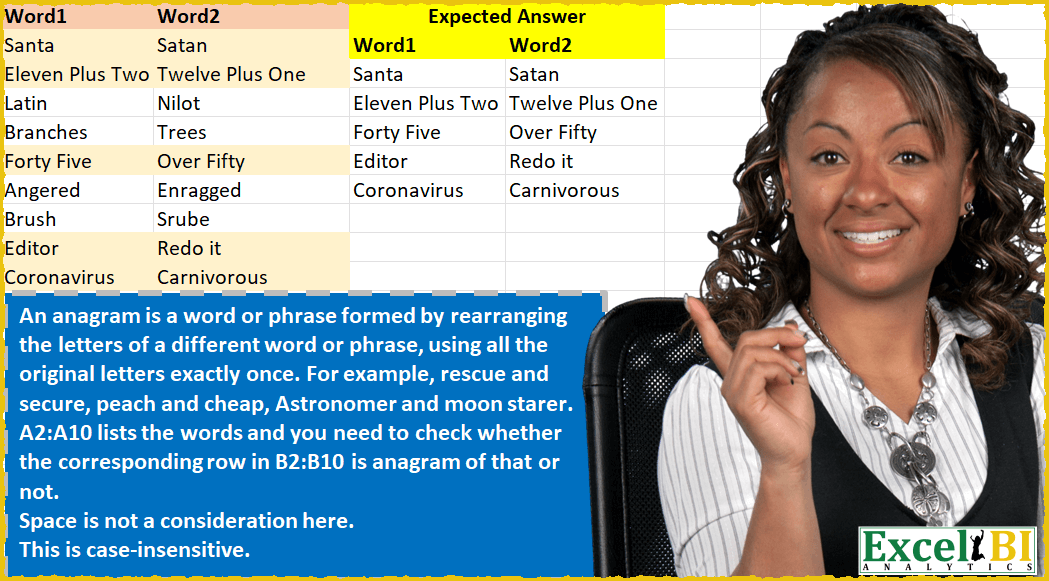
An anagram is a word or phrase formed by rearranging the letters of a different word or phrase, using all the original letters exactly once. For example – “rescue” and “secure”, “peach” and “cheap”, “Astronomer” and “moon starer”. A2:A10 lists the words and you need to check whether the corresponding cell in B2:B10 is anagram of that or not. Space character is not a consideration here as in example of Astronomer and moon starer. Hence, when you are checking, disregard space. This is case-insensitive.
📌 Challenge Details and Links
ExcelBI Excel Challenge Number: 50
Challenge Difficulty: ⭐️⭐️
📥Download Sample File
📥Link to the solutions on LinkedIn
Solving the challenge of Check Word Anagram Pair with Power Query
Power Query solution 1 for Check Word Anagram Pair, proposed by Aditya Kumar Darak 🇮🇳:
let
  MyFunction = (text) => List.Sort(Text.ToList(Text.Lower(Text.Remove(text, " ")))),
  Source     = Excel.CurrentWorkbook(){[Name = "data"]}[Content],
  Result     = Table.SelectRows(Source, each MyFunction([Word1]) = MyFunction([Word2]))
in
  Result
Power Query solution 2 for Check Word Anagram Pair, proposed by Alejandro Simón 🇵🇦 🇪🇸:
let
  Source = Excel.CurrentWorkbook(){[Name = "Table1"]}[Content],
  Lowercased = Table.TransformColumns(
    Source,
    {{"Word1", Text.Lower, type text}, {"Word2", Text.Lower, type text}}
  ),
  Tabla = Table.FromColumns(
    {
      Source[Word1],
      Source[Word2],
      Table.AddColumn(
        Lowercased[[Word1]],
        "W1",
        each Text.Combine(
          List.Sort(
            List.Select(Splitter.SplitTextByRepeatedLengths(1)([Word1]), each _ <> " "),
            Order.Ascending
          ),
          ""
        )
      )[W1],
      Table.AddColumn(
        Lowercased[[Word2]],
        "W2",
        each Text.Combine(
          List.Sort(
            List.Select(Splitter.SplitTextByRepeatedLengths(1)([Word2]), each _ <> " "),
            Order.Ascending
          ),
          ""
        )
      )[W2]
    },
    {"Word1", "Word2", "W1", "W2"}
  ),
  Comparar = Table.AddColumn(Tabla, "Custom", each if [W1] = [W2] then "Y" else null),
  Solucion = Table.SelectRows(Comparar, each ([Custom] = "Y"))[[Word1], [Word2]]
in
  Solucion
Power Query solution 3 for Check Word Anagram Pair, proposed by Brian Julius:
letter count )=0 as the primary filter condition.

let
 Source = Table.FromRows(Json.Document(Binary.Decompress(Binary.FromText("JY5LDoNACECvMpl1L9EaXTW1ad0ZF7RSJZlAgjjG2xedFfAev76Pb2CDePFowHG49LFOmJHDM61L6DZx122YMhbSMp5ddzBidw9KYie5KfB3xuUYUPR4wEbU9tBQRsdtRvX8Z/vprjyh4uiiZoVp8rTsWZf5+EjXT7lVj2Sijl44SqByrhIVhkze7aYCZcqOvBqGPw==", BinaryEncoding.Base64), Compression.Deflate)), let _t = ((type nullable text) meta [Serialized.Text = true]) in type table [Word1 = _t, Word2 = _t]),
 #"Concat&Index" = Table.AddIndexColumn( Table.AddColumn(Source, "Concat", each Text.ToList( Text.Lower( Text.Remove( [Word1] & [Word2], " ")))), "Index", 1, 1),
 Expand = Table.ExpandListColumn(#"Concat&Index", "Concat"),
 Group = Table.Group(Expand, {"Index", "Word1", "Word2", "Concat"}, {{"Count", each Table.RowCount(_), Int64.Type}}),
 Modulo = Table.AddColumn(Group, "Modulo", each Number.Mod([Count], 2), type number),
 SumMod = Table.SelectRows( Table.Group(Modulo, {"Word1", "Word2"}, {{"SumMod", each List.Sum([Modulo]), type number}}), each [SumMod] = 0),
 RemoveCol = Table.RemoveColumns(SumMod,{"SumMod"})
in
 RemoveCol
Power Query solution 4 for Check Word Anagram Pair, proposed by Matthias Friedmann:
let
 Source = Excel.CurrentWorkbook(){[Name="Anagram"]}[Content],
 #"Filtered Rows" = Table.SelectRows(Source, each
 List.Sort(
 Text.ToList(
 Text.Remove(
 Text.Lower([Word1]),
 " ")
 )
 ) =
 List.Sort(
 Text.ToList(
 Text.Remove(
 Text.Lower([Word2]),
 " ")
 )
 )
 )
in
 #"Filtered Rows"


Doesn't look great in the comment. Easier to read here:
let
 Source = Excel.CurrentWorkbook(){[Name = "Anagram"]}[Content],
 #"Filtered Rows" = Table.SelectRows(
 Source,
 each List.Sort(Text.ToList(Text.Remove(Text.Lower([Word1]), " ")))
 = List.Sort(Text.ToList(Text.Remove(Text.Lower([Word2]), " ")))
 )
in
 #"Filtered Rows"
Power Query solution 5 for Check Word Anagram Pair, proposed by Abdoul Karim N.:
let
  Source = Excel.CurrentWorkbook(){[Name = "Words"]}[Content],
  ChangedType = Table.TransformColumnTypes(Source, {{"Word1", type text}, {"Word2", type text}}),
  Word1Tranformed = Table.AddColumn(
    Source,
    "New Word1",
    each List.Sort(Text.ToList(Text.Lower(Text.Remove([Word1], " "))), Order.Ascending)
  ),
  Word2Tranformed = Table.AddColumn(
    Word1Tranformed,
    "New Word2",
    each List.Sort(Text.ToList(Text.Lower(Text.Remove([Word2], " "))), Order.Ascending)
  ),
  Same = Table.AddColumn(Word2Tranformed, "Verifing", each [New Word1] = [New Word2]),
  FilteredRows = Table.SelectRows(Same, each ([Verifing] = true)),
  SelectColumns = Table.SelectColumns(FilteredRows, {"Word1", "Word2"})
in
  SelectColumns
Solving the challenge of Check Word Anagram Pair with Excel
Excel solution 1 for Check Word Anagram Pair, proposed by Rick Rothstein:
=FILTER(
    A2:B10,
    MAP(
        A2:A10,
        B2:B10,
        LAMBDA(
            x,
            y,
            TRIM(
                CONCAT(
                    SORT(
                        MID(
                            x,
                            ROW(
                                1:99
                            ),
                            1
                        )
                    )
                )
            )=TRIM(
                CONCAT(
                    SORT(
                        MID(
                            y,
                            ROW(
                                1:99
                            ),
                            1
                        )
                    )
                )
            )
        )
    )
)
Excel solution 2 for Check Word Anagram Pair, proposed by Rick Rothstein:
=LET(f,LAMBDA(w,CONCAT(TRIM(SORT(MID(w,SEQUENCE(LEN(w)),1))))),f(A2)=f(B2))Excel solution 3 for Check Word Anagram Pair, proposed by John V.:
=FILTER(
    A2:B10,
    BYROW(
        A2:B10,
        LAMBDA(
            x,
            LET(
                w,
                BYCOL(
                    MID(
                        x,
                        ROW(
                            1:99
                        ),
                        1
                    ),
                    LAMBDA(
                        y,
                        TRIM(
                            CONCAT(
                                SORT(
                                    y
                                )
                            )
                        )
                    )
                ),
                TAKE(
                    w,
                    ,
                    1
                )=DROP(
                    w,
                    ,
                    1
                )
            )
        )
    )
)

=LET(
    f,
    LAMBDA(
        c,
        TRIM(
            CONCAT(
                SORT(
                    MID(
                        c,
                        ROW(
                            1:99
                        ),
                        1
                    )
                )
            )
        )
    ),
    FILTER(
        A2:B10,
        MAP(
            A2:A10,
            B2:B10,
            LAMBDA(
                a,
                b,
                f(
                    a
                )=f(
                    b
                )
            )
        )
    )
)
Excel solution 4 for Check Word Anagram Pair, proposed by John V.:
=LET(
    f,
    LAMBDA(
        c,
        TRIM(
            CONCAT(
                SORT(
                    MID(
                        c,
                        ROW(
                            1:99
                        ),
                        1
                    )
                )
            )
        )
    ),
    FILTER(
        A2:B10,
        MAP(
            A2:A10,
            B2:B10,
            LAMBDA(
                a,
                b,
                f(
                    a
                )=f(
                    b
                )
            )
        )
    )
)
Excel solution 5 for Check Word Anagram Pair, proposed by محمد حلمي:
=FILTER(A2:B10,MAP(A2:A10,B2:B10,LAMBDA(a,b,LET(s,LAMBDA(i,SUM(IFERROR(CODE(LOWER(MID(SUBSTITUTE(i," ",),ROW(1:20),1))),))),MAP(a,s)=MAP(b,s)))))Excel solution 6 for Check Word Anagram Pair, proposed by محمد حلمي:
=FILTER(A2:B10,MAP(A2:A10,B2:B10,LAMBDA(a,b,AND(CONCAT(TRIM(SORT(MID(a,SEQUENCE(LEN(a)),1))))=CONCAT(TRIM(SORT(MID(b,SEQUENCE(LEN(b)),1))))))))Excel solution 7 for Check Word Anagram Pair, proposed by 🇰🇷 Taeyong Shin:
=LET(
    txt,
     MAP(
         SUBSTITUTE(
             A2:B10,
              " ",

         ),
          LAMBDA(
              m,
               CONCAT(
                   SORT(
                       MID(
                           m,
                            SEQUENCE(
                                LEN(
                                    m
                                )
                            ),
                            1
                       )
                   )
               )
          )
     ),

     FILTER(
         A2:B10,
          CHOOSECOLS(
              txt,
               1
          )=CHOOSECOLS(
              txt,
               2
          )
     )

)
Excel solution 8 for Check Word Anagram Pair, proposed by Julian Poeltl:
=LET(T,A2:B10,FILTER(T,BYROW(T,LAMBDA(A,LET(O,SUBSTITUTE(INDEX(A,,1)," ",""),T,SUBSTITUTE(INDEX(A,,2)," ",""),SUM(--ISNUMBER(XMATCH(MID(O,SEQUENCE(LEN(O)),1),MID(T,SEQUENCE(LEN(T)),1))))=LEN(T))))))Excel solution 9 for Check Word Anagram Pair, proposed by Aditya Kumar Darak 🇮🇳:
= LET(

     _fun,

     LAMBDA(

          txt,

          TRIM(
              CONCAT(
                  SORT(
                      MID(
                          txt,
                           SEQUENCE(
                               LEN(
                                   txt
                               )
                           ),
                           1
                      )
                  )
              )
          )
     ),

     FILTER(
         A2:B10,
          MAP(
              A2:A10,
               _fun
          ) = MAP(
              B2:B10,
               _fun
          )
     )
)
Excel solution 10 for Check Word Anagram Pair, proposed by Aditya Kumar Darak 🇮🇳:
= FILTER(
 A2:B10,
 MAP(
 SUBSTITUTE(A2:A10, " ", ""),
 SUBSTITUTE(B2:B10, " ", ""),
 LAMBDA(
 a,
 b,
 IFNA(
 AND(  SORT(MID(a, SEQUENCE(LEN(a)), 1))
 = SORT(MID(b, SEQUENCE(LEN(b)), 1))),
 FALSE))))
Excel solution 11 for Check Word Anagram Pair, proposed by Timothée BLIOT:
=LET(

Words,A2:B10,
Word1,INDEX(Words,,1),
Word2,INDEX(Words,,2),

NoSpace, VSTACK(TAKE(SUBSTITUTE(Word1," ",""),,1),TAKE(SUBSTITUTE(Word2," ",""),,2)),

Letters, MAKEARRAY(ROWS(Words)*2, MAX(LEN(NoSpace)), LAMBDA(a,b,
UPPER(MID(INDEX(NoSpace,a),b,1)))),

Codes, VALUE(IFERROR((CODE(Letters)),0)),

Sort, TEXTSPLIT(TEXTJOIN("/",1,BYROW(Codes,LAMBDA(a,TEXTJOIN(",",1,SORT(a,,-1,1))))),",","/")+0,

Compare, --(TAKE(Sort,ROWS(Word1))=DROP(Sort,ROWS(Word2))),

Answer, BYROW(Compare, LAMBDA(a, --((COLUMNS(a)-SUM(a))=0))),

FILTER(Words,Answer,""))
Excel solution 12 for Check Word Anagram Pair, proposed by Hussein SATOUR:
=FILTER(A2:B10, BYROW(A2:B10, LAMBDA(x,
IFERROR(PRODUCT(LET(a, SUBSTITUTE(INDEX(x,,1), " ",""), b, SUBSTITUTE(INDEX(x,,2), " ",""),
SORT(MID(a, SEQUENCE(LEN(a)), 1)) = SORT(MID(b, SEQUENCE(LEN(b)), 1))) * 1), 0))) = 1)
Excel solution 13 for Check Word Anagram Pair, proposed by Bhavya Gupta:
=FILTER(
    A2:B10,
    MAP(
        A2:A10,
        B2:B10,
        LAMBDA(
            w_1,
            w_2,
            LET(
                a,
                CHAR(
                    SEQUENCE(
                        27,
                        ,
                        97
                    )
                ),
                b,
                LAMBDA(
                    x,
                    y,
                    IF(
                        CODE(
                            y
                        )=123,
                        CONCAT(
                            SORT(
                                TRIM(
                                    TEXTSPLIT(
                                        x,
                                        ,
                                        ",",
                                        TRUE
                                    )
                                )
                            )
                        ),
                        SUBSTITUTE(
                            x,
                            y,
                            ","&y
                        )
                    )
                ),
                REDUCE(
                    LOWER(
                        w_1
                    ),
                    a,
                    b
                )=REDUCE(
                    LOWER(
                        w_2
                    ),
                    a,
                    b
                )
            )
        )
    )
)
Excel solution 14 for Check Word Anagram Pair, proposed by Victor Momoh (MVP, MOS, R.Eng):
=FILTER(A2:B10,MAP(A2:A10,B2:B10,LAMBDA(a,b,TRIM(CONCAT(SORT(MID(a,SEQUENCE
(LEN(a)),1))))=TRIM(CONCAT(SORT(MID(b,SEQUENCE(LEN(b)),1)))))))
Excel solution 15 for Check Word Anagram Pair, proposed by RIJESH T.:
=LET(
    w,
    A2:B10,
    a,
    MAP(
        w,
        LAMBDA(
            a,
            TRIM(
                CONCAT(
                    SORT(
                        MID(
                            a,
                            ROW(
                                1:20
                            ),
                            1
                        )
                    )
                )
            )
        )
    ),
    FILTER(
        w,
        TAKE(
            a,
            ,
            1
        )=DROP(
            a,
            ,
            1
        )
    )
)
Excel solution 16 for <&strong>Check Word Anagram Pair, proposed by Sarun Chimamphant:
=LET(f,LAMBDA(x,TRIM(CONCAT(SORT(MID(x,SEQUENCE(LEN(x)),1))))),FILTER(A2:B10,MAP(A2:A10,B2:B10,LAMBDA(c,d,f(c)=f(d)))))&&