
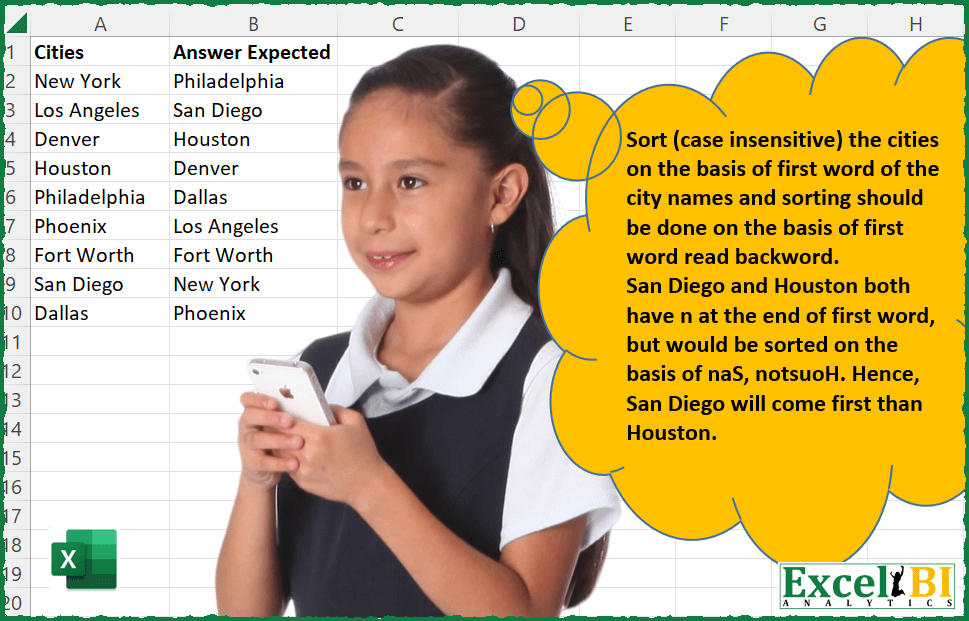
Sort (case insensitive) the cities on the basis of first word of the city names and sorting should be done on the basis of first word read backward i.e. reversed. San Diego and Houston both have n at the end of first word, but would be sorted on the basis of naS, notsuoH. Hence, San Diego will come prior to Houston.
📌 Challenge Details and Links
ExcelBI Excel Challenge Number: 48
Challenge Difficulty: ⭐️
📥Download Sample File
📥Link to the solutions on LinkedIn
Solving the challenge of Sort Cities on Reversed Prefix with Power Query
Power Query solution 1 for Sort Cities on Reversed Prefix, proposed by Aditya Kumar Darak 🇮🇳:
let
  Source = Excel.CurrentWorkbook(){[Name = "data"]}[Content],
  Result = Table.Sort(Source, each Text.Lower(Text.Reverse(Text.BeforeDelimiter([Cities], " "))))
in
  Result
Power Query solution 2 for Sort Cities on Reversed Prefix, proposed by Luan Rodrigues:
let
  Fonte = Excel.CurrentWorkbook(){[Name = "Tabela1"]}[Content],
  Result = Table.Sort(
    Table.AddColumn(
      Fonte,
      "Personalizar",
      each [a = Text.Split([Cities], " "){0}, b = Text.Reverse(a)][b]
    ),
    {{"Personalizar", Order.Ascending}}
  )[[Cities]]
in
  Result
Power Query solution 3 for Sort Cities on Reversed Prefix, proposed by Bhavya Gupta:
let
  Source = Excel.CurrentWorkbook(){[Name = "Table2"]}[Content],
  Custom = Table.AddColumn(
    Source,
    "SortByArray",
    each Text.Lower(Text.Reverse(Text.BeforeDelimiter([Cities] & " ", " ")))
  ),
  Sorted = Table.Sort(Custom, {{"SortByArray", Order.Ascending}}),
  AnswerExpected = Table.SelectColumns(Sorted, {"Cities"})
in
  AnswerExpected
Power Query solution 4 for Sort Cities on Reversed Prefix, proposed by Jaroslaw Kujawa:
let
Source = Excel.CurrentWorkbook(){[Name=Table]}[Content], hashtag#Added Custom = Table.AddColumn(Source, Custom, each if [Cities]Text.Remove([Cities], ) then Text.Reverse( Text.Lower( Text.Start([Cities], Text.PositionOf([Cities], )))) else Text.Reverse(Text.Lower([Cities]))), hashtag#Sorted Rows = Table.Sort(hashtag#Added Custom,{{Custom, Order.Ascending}}), hashtag#Removed Columns1 = Table.RemoveColumns(hashtag#Sorted Rows,{Custom})

in hashtag#Removed Columns1
Power Query solution 5 for Sort Cities on Reversed Prefix, proposed by Matthias Friedmann:
let
  Source = Excel.CurrentWorkbook(){[Name = "CityName"]}[Content],
  #"Added Custom" = Table.AddColumn(
    Source,
    "Custom",
    each Text.Lower(Text.Reverse(Text.BeforeDelimiter([Cities], " "))),
    type text
  ),
  #"Sorted Rows" = Table.Sort(#"Added Custom", {"Custom"})[[Cities]]
in
  #"Sorted Rows"
Power Query solution 6 for Sort Cities on Reversed Prefix, proposed by Antriksh Sharma:
let
  Source = DataSource,
  FirstWordReversed = Table.AddColumn(
    Source,
    "FirstWord",
    each [Split = Text.Split([Cities], " "), FlipFirstWord = Text.Lower(Text.Reverse(Split{0}))][
      FlipFirstWord
    ],
    type text
  ),
  Result = Table.Sort(FirstWordReversed, {"FirstWord", Order.Ascending})[[Cities]]
in
  Result
Power Query solution 7 for Sort Cities on Reversed Prefix, proposed by Victor Wang:
let
  Source = Excel.CurrentWorkbook(){[Name = "Table1"]}[Content][Cities],
  Sort   = List.Sort(Source, each Text.Reverse(Text.Split(_, " "){0}))
in
  Sort
Power Query solution 8 for Sort Cities on Reversed Prefix, proposed by Victor Wang:
let
  Source = Excel.CurrentWorkbook(){[Name = "Table1"]}[Content][Cities],
  Sort = List.Sort(
    Source,
    (x, y) =>
      Value.Compare(Text.Reverse(Text.Split(x, " "){0}), Text.Reverse(Text.Split(y, " "){0}))
  )
in
  Sort
Power Query solution 10 for Sort Cities on Reversed Prefix, proposed by Venkata Rajesh:
let
  Source = Data,
  FirstWordRev = Table.AddColumn(
    Source,
    "FirstWordRev",
    each Text.Reverse(List.First(Text.Split([Cities], " ")))
  ),
  Result = Table.Sort(FirstWordRev, {{"FirstWordRev", Order.Ascending}})[Cities]
in
  Result
Power Query solution 11 for Sort Cities on Reversed Prefix, proposed by Mahmoud Bani Asadi:
let
  Source = Excel.CurrentWorkbook(){[Name = "Table1"]}[Content],
  InsertedTextBeforeDelimiter = Table.AddColumn(
    Source,
    "Text Before Delimiter",
    each Text.Reverse(Text.BeforeDelimiter([Cities], " ")),
    type text
  ),
  SortedRows = Table.Sort(InsertedTextBeforeDelimiter, {{"Text Before Delimiter", Order.Ascending}})[
    [Cities]
  ]
in
  SortedRows
Power Query solution 12 for Sort Cities on Reversed Prefix, proposed by Abdoul Karim N.:
let
  Source = Excel.CurrentWorkbook(){[Name = "Cities"]}[Content],
  ChangedType = Table.TransformColumnTypes(Source, {{"Cities", type text}}),
  Reversing = Table.AddColumn(
    ChangedType,
    "FirsLetterBack",
    each try
      Text.Lower(Text.Reverse(Text.Start([Cities], Text.PositionOf([Cities], " "))))
    otherwise
      Text.Lower(Text.Reverse([Cities]))
  ),
  SortedRows = Table.SelectColumns(
    Table.Sort(Reversing, {{"FirsLetterBack", Order.Ascending}}),
    "Cities"
  )
in
  SortedRows
Power Query solution 13 for Sort Cities on Reversed Prefix, proposed by Shubham Vashisht:
let
  Source = Data,
  // Split the text as list
  Splitaslist = Table.AddColumn(
    Source,
    "Custom",
    each Splitter.SplitTextByDelimiter(" ", QuoteStyle.Csv)([Cities])
  ),
  // Extract field from list followed by reversing and sorting the field value
  Getlistvalue = Table.Sort(
    Table.AddColumn(Splitaslist, "L1", each Text.Reverse([Custom]{0})),
    {{"L1", Order.Ascending}}
  ),
  // Removing other col and renaming the col
  Final = Table.RenameColumns(
    Table.SelectColumns(Getlistvalue, {"Cities"}),
    {"Cities", "Answer Expected"}
  )
in
  Final
Power Query solution 14 for Sort Cities on Reversed Prefix, proposed by Shubham Vashisht:
let
  Source = Data,
  Result = Table.RenameColumns(
    Table.RemoveColumns(
      Table.Sort(
        Table.AddColumn(Source, "L1", each Text.Reverse(Text.BeforeDelimiter([Cities], " "))),
        {{"L1", Order.Ascending}}
      ),
      {"L1"}
    ),
    {{"Cities", "Answer Expected"}}
  )
in
  Result
Solving the challenge of Sort Cities on Reversed Prefix with Excel
Excel solution 1 for Sort Cities on Reversed Prefix, proposed by Rick Rothstein:
=LET(
    a,
    A2:A10,
    DROP(
        SORT(
            HSTACK(
                MAP(
                    LEFT(
                        a,
                        FIND(
                            " ",
                            a&" "
                        )-1
                    ),
                    LAMBDA(
                        x,
                        CONCAT(
                            MID(
                                x,
                                SEQUENCE(
                                    LEN(
                                        x
                                    ),
                                    ,
                                    LEN(
                                        x
                                    ),
                                    -1
                                ),
                                1
                            )
                        )
                    )
                ),
                a
            ),
            1
        ),
        ,
        1
    )
)

EDIT NOTE: Using the excellent suggestions by Bhavya Gupta,
     the above formula can be shortened to this...

=LET(
    a,
    A2:A10,
    SORTBY(
        a,
        MAP(
            TEXTBEFORE(
                a&" ",
                " "
            ),
            LAMBDA(
                        x,
                        CONCAT(
                            MID(
                                x,
                                SEQUENCE(
                                    LEN(
                                        x
                                    ),
                                    ,
                                    LEN(
                                        x
                                    ),
                                    -1
                                ),
                                1
                            )
                        )
                    )
        ),

    )
)
Excel solution 2 for Sort Cities on Reversed Prefix, proposed by John V.:
=LET(
    c,
    A2:A10,
    SORTBY(
        c,
        MAP(
            c,
            LAMBDA(
                x,
                LET(
                    b,
                    TEXTBEFORE(
                        x&" ",
                        " "
                    ),
                    n,
                    LEN(
                        x
                    ),
                    CONCAT(
                        MID(
                            b,
                            1+n-SEQUENCE(
                                n
                            ),
                            1
                        )
                    )
                )
            )
        )
    )
)
But,
     reading the Rick Rothstein post,
     I get this one:
=LET(
    c,
    A2:A10,
    SORTBY(
        c,
        MAP(
            TEXTBEFORE(
                c&" ",
                " "
            ),
            LAMBDA(
                x,
                CONCAT(
                    MID(
                        x,
                        1+LEN(
                        x
                    )-SEQUENCE(
                            LEN(
                        x
                    )
                        ),
                        1
                    )
                )
            )
        )
    )
)
Is very similar,
     but 2 characters less (Sequence part)
Excel solution 3 for Sort Cities on Reversed Prefix, proposed by محمد حلمي:
=SORTBY(
    A2:A10,

    MAP(
        A2:A10,

        LAMBDA(
            a,

            LET(
                c,
                TEXTBEFORE(
                    a,
                    " ",
                    ,
                    ,
                    1
                ),
                SORT(
                    CONCAT(

                        MID(
                            c,
                            SEQUENCE(
                                LEN(
                                    c
                                ),
                                ,
                                LEN(
                                    c
                                ),
                                -1
                            ),
                            1
                        )
                    )
                )
            )
        )
    )
)
Excel solution 4 for Sort Cities on Reversed Prefix, proposed by 🇰🇷 Taeyong Shin:
=LET(
    c,
    A2:A10,
    SORTBY(
        c,
        REDUCE(
            "",
            SEQUENCE(
                20
            ),
            LAMBDA(
                a,
                i,
                MID(
                    TEXTBEFORE(
                        c,
                        " ",
                        ,
                        ,
                        1
                    ),
                    i,
                    1
                )&a
            )
        )
    )
)
Excel solution 5 for Sort Cities on Reversed Prefix, proposed by Kris Jaganah:
=LET(
    a,
    A2:A10,
    SORTBY(
        a,
        MAP(
            a,
            LAMBDA(
                b,
                IFERROR(
                    TEXTJOIN(
                        ,
                        TRUE,
                        MID(
                            b,
                            SEQUENCE(
                                ,
                                FIND(
                                    " ",
                                    b,
                                    1
                                )-1,
                                FIND(
                                    " ",
                                    b,
                                    1
                                )-1,
                                -1
                            ),
                            1
                        )
                    ),
                    TEXTJOIN(
                        "",
                        TRUE,
                        MID(
                            b,
                            SEQUENCE(
                                ,
                                LEN(
                                    b
                                ),
                                LEN(
                                    b
                                ),
                                -1
                            ),
                            1
                        )
                    )
                )
            )
        )
    )
)
Excel solution 6 for Sort Cities on Reversed Prefix, proposed by Julian Poeltl:
=LET(
    W,
    A2:A10,
    F,
    TEXTSPLIT(
        W,
        " "
    ),
    SORTBY(
        W,
        MAP(
            F,
            LAMBDA(
                A,
                CONCAT(
                    MID(
                        A,
                        SEQUENCE(
                            LEN(
                                A
                            ),
                            ,
                            LEN(
                                A
                            ),
                            -1
                        ),
                        1
                    )
                )
            )
        )
    )
)
Excel solution 7 for Sort Cities on Reversed Prefix, proposed by Aditya Kumar Darak 🇮🇳:
= LET(

     _b,

     TEXTBEFORE(
         A2:A10,
          " ",
          ,
          ,
          1
     ),

     _r,

     MAP(

          _b,

          LEN(
              _b
          ),

          LAMBDA(
              a,
               b,
               CONCAT(
                   MID(
                       a,
                        SEQUENCE(
                            b,
                             ,
                             b,
                             -1
                        ),
                        1
                   )
               )
          )
     ),

     SORTBY(
         A2:A10,
          _r
     )
)Excel solution 8 for Sort Cities on Reversed Prefix, proposed by Timothée BLIOT:
=LET(

    Cities,
    A2:A10,


    Words,

    MAKEARRAY(
        ROWS(
            Cities
        ),
        MAX(
            BYROW(
                Cities,
                 LAMBDA(
                     a,
                      SUM(
                          1+--ISNUMBER(
                              SEARCH(
                                  " ",
                                  TRIM(
                                      a
                                  )
                              )
                          )
                      )
                 )
            )
        ),
         LAMBDA(
             a,
             b,

             IFERROR(
                 INDEX(
                     TEXTSPLIT(
                         INDEX(
                             Cities,
                             a
                         ),
                         " "
                     ),
                     b
                 ),
                 "#"
             )
         )
    ),


    FirstWord,
    INDEX(
        Words,
        ,
        1
    ),

    Characters,
    BYROW(
        FirstWord,
         LAMBDA(
             x,
              LEN(
                  x
              )
         )
    ),


    Letters,

    MAKEARRAY(
        ROWS(
            FirstWord
        ),
        MAX(
            BYROW(
                FirstWord,
                LAMBDA(
                    a,
                    LEN(
                                      a
                                  )
                )
            )
        ),
         LAMBDA(
             a,
             b,

             MID(
                 INDEX(
                     FirstWord,
                     a
                 ),
                 b,
                 1
             )
         )
    ),


    Reversed,

    MAKEARRAY(
         ROWS(
             Letters
         ),
         COLUMNS(
             Letters
         ),
         LAMBDA(
             a,
             b,

             IF(
                 b <= INDEX(
                     Characters,
                      a
                 ),
                  INDEX(
                      Letters,
                       a,
                       INDEX(
                     Characters,
                      a
                 ) - b + 1
                  ),
                 ""
             )
         )
    ),


    Codes,

    IFERROR(
        CODE(
            UPPER(
                Reversed
            )
        ),
        ""
    ),


    SortingKeyCodes,

    HSTACK(
        BYROW(
            Codes,
             LAMBDA(
                 a,
                  TEXTJOIN(
                      "",
                       TRUE,
                       TEXT(
                           a,
                            "000"
                       )
                  )
             )
        ),
        SEQUENCE(
            ROWS(
                Codes
            )
        )
    ),


    Sorted,
    SORTBY(
        SortingKeyCodes,
        INDEX(
            SortingKeyCodes,
            ,
            1
        )
    ),


    Answer,
    INDEX(
        Words,
        INDEX(
            Sorted,
            ,
            2
        )
    ),

    Answer
)Excel solution 9 for Sort Cities on Reversed Prefix, proposed by Duy Tùng:
=SORTBY(
    A2:A10,
    BYROW(
        MID(
            TEXTSPLIT(
                A2:A10,
                " "
            ),
            20-SEQUENCE(
                ,
                19
            ),
            1
        ),
        CONCAT
    )
)Excel solution 10 for Sort Cities on Reversed Prefix, proposed by Bhavya Gupta:
=SORTBY(
    A2:A10,
    MAP(
        TEXTBEFORE(
            A2:A10,
            " ",
            ,
            ,
            1
        ),
        LAMBDA(
            x,
            CONCAT(
                MID(
                    x,
                    SEQUENCE(
                        LEN(
                            x
                        ),
                        ,
                        LEN(
                            x
                        ),
                        -1
                    ),
                    1
                )
            )
        )
    )
)
=SORTBY(
    A2:A10,
    MAP(
        TEXTBEFORE(
            A2:A10,
            " ",
            ,
            ,
            1
        ),
        LAMBDA(
            x,
            CONCAT(
                MID(
                    x,
                    SORT(
                        SEQUENCE(
                            LEN(
                            x
                        )
                        ),
                        ,
                        -1
                    ),
                    1
                )
            )
        )
    )
)Excel solution 11 for Sort Cities on Reversed Prefix, proposed by Charles Roldan:
=LET(Cities,
     A2:A10,
     Reverse,
     LAMBDA(
         g,
          g(
              g
          )
     )(LAMBDA(g,
     LAMBDA(x,
     IF(LEN(
         x
     ),
     g(
              g
          )(REPLACE(
              x,
               1,
               1,

          )) & LEFT(
         x
     ),
     "")))),
     SORTBY(
         Cities,
          MAP(
              TEXTBEFORE(
                  Cities & " ",
                   " "
              ),
               Reverse
          )
))Excel solution 12 for Sort Cities on Reversed Prefix, proposed by Stefan Olsson:
=QUERY(
    {A2:A10,
     BYROW(
         A2:A10,
          LAMBDA(
              city,
               REDUCE(
                   "",
                    SPLIT(
                        REGEXREPLACE(
                            REGEXEXTRACT(
                                city,
                                 "[[:alpha:]]*"
                            ),
                             "",
                            "✂️"
                        ),
                        "✂️"
                    ),
                    LAMBDA(
                        a,
                        v,
                        v&a
                    )
               )
          )
     )},
     "Select Col1 order by Col2",
    0
)Excel solution 13 for Sort Cities on Reversed Prefix, proposed by Oscar Javier Rosero Jiménez:
=LAMBDA(
    text,
     SORTBY(
         text,
         DROP(
             REDUCE(
                 "",
                 TEXTSPLIT(
                     text,
                     " "
                 ),
                 LAMBDA(
                     b,
                     a,
                     VSTACK(
                         b,
                         CONCAT(
                             MID(
                                 a,
                                  SEQUENCE(
                                      LEN(
                                          a
                                      ),
                                       ,
                                       LEN(
                                          a
                                      ),
                                       -1
                                  ),
                                  1
                             )
                         )
                     )
                 )
             ),
             1
         )
     )
)(A2:A10)Excel solution 14 for Sort Cities on Reversed Prefix, proposed by Peter Bartholomew:
= LAMBDA(word,
 LET(
 n, LEN(word),
 k, SEQUENCE(n, 1, n, -1),
 CONCAT(MID(word, k, 1))
 )
 ) ;
will reverse the order of letters in a single string.  The next Lambda function
Reverse1stWordλ
= LAMBDA(words,
 MAP(TEXTBEFORE(words," ",1,1,1), ReverseStringλ)
 );
picks out the first word from each city and reverses its order.  Then it only remains to perform the sort
= SORTBY(Cities, Reverse1stWordλ(Cities))Excel solution 15 for Sort Cities on Reversed Prefix, proposed by Jardiel Euflázio:
=LET(
    a,
    A2:A10,
    CHOOSECOLS(
        SORT(
            HSTACK(
                a,
                MAP(
                    a,
                    LAMBDA(
                        a,
                        LET(
                            b,
                            TEXTBEFORE(
                                a,
                                " ",
                                ,
                                ,
                                ,
                                a
                            ),
                            c,
                            LEN(
                                b
                            ),
                            CONCAT(
                                MID(
                                    b,
                                    SEQUENCE(
                                        c,
                                        ,
                                        c,
                                        -1
                                    ),
                                    1
                                )
                            )
                        )
                    )
                )
            ),
            2,
            1
        ),
        1
    )
)Excel solution 16 for Sort Cities on Reversed Prefix, proposed by Jardiel Euflázio:
=SORTBY(
    A2:A10,
    MAP(
        A2:A10,
        LAMBDA(
            a,
            LET(
                b,
                TEXTBEFORE(
                    a,
                    " ",
                    ,
                    ,
                    ,
                    a
                ),
                c,
                LEN(
                    b
                ),
                CONCAT(
                    MID(
                        b,
                        SEQUENCE(
                            c,
                            ,
                            c,
                            -1
                        ),
                        1
                    )
                )
            )
        )
    ),
    1
)Excel solution 17 for Sort Cities on Reversed Prefix, proposed by Victor Momoh (MVP, MOS, R.Eng):
=SORTBY(
    A2:A10,
    MAP(
        $A$2:$A$10,
        LAMBDA(
            x,
            LET(
                a,
                LOWER(
                    TEXTBEFORE(
                        x&" ",
                        " "
                    )
                ),
                CONCAT(
                    MID(
                        a,
                        LEN(
                            x
                        )-SEQUENCE(
                            LEN(
                            x
                        )
                        )+1,
                        1
                    )
                )
            )
        )
    )
)Excel solution 18 for Sort Cities on Reversed Prefix, proposed by Paolo Pozzoli:
=LET(
    cities;
    A2:A10;

    revWrds1st;
    ReverseNameArr(
        cities;
        VERO;
        1
    );

    sortedWrds1st;
    DATI.ORDINA(
        revWrds1st
    );

    idx;
    CONFRONTA(
        revWrds1st;
        sortedWrds1st;
        0
    );

    orderedCities;
    DATI.ORDINA.PER(
        cities;
        idx;
        1
    );

    orderedCities
)
Italian formulas dictionary ( DATI.ORDINA = SORT, CONFRONTA = MATCH, DATI.ORDINA.PER = SORTBY )Excel solution 19 for Sort Cities on Reversed Prefix, proposed by Sarun Chimamphant:
=LET(
    a,
    A2:A10,
    b,
    IFERROR(
        TEXTBEFORE(
            a,
            " "
        ),
        a
    ),
    c,
    MAP(
        b,
        LAMBDA(
            d,
            CONCAT(
                MID(
                    d,
                    SEQUENCE(
                        LEN(
                            d
                        ),
                        ,
                        LEN(
                            d
                        ),
                        -1
                    ),
                    1
                )
            )
        )
    ),
    SORTBY(
        a,
        c
    )
)Excel solution 20 for Sort Cities on Reversed Prefix, proposed by Fábio Gatti:
=LAMBDA(
    Range,

     LET(

          fxReverse,
         LAMBDA(
             Text,
             LET(
                 vLen,
                 LEN(
                     Text
                 ),
                 vSeq,
                 SEQUENCE(
                     vLen,
                     ,
                     vLen,
                     -1
                 ),
                 CONCAT(
                     MID(
                         Text,
                         vSeq,
                         1
                     )
                 )
             )
         ),

          vReverse,
         MAP(
             TEXTBEFORE(
                 Range,
                 " ",
                 ,
                 ,
                 ,
                 Range
             ),
             fxReverse
         ),

          Sort,
         SORTBY(
             Range,
             vReverse
         ),


          Sort

     )

)(A2:A10)Excel solution 21 for Sort Cities on Reversed Prefix, proposed by Ibrahim Sadiq:
=SORTBY(
    A2:A10,
    MAP(
        A2:A10,
        LAMBDA(
            x,
            LET(
                a,
                TEXTBEFORE(
                    x&" ",
                    " "
                ),
                LEFT(
                    CONCAT(
                        MID(
                            a,
                            SEQUENCE(
                                ,
                                LEN(
                                    a
                                ),
                                LEN(
                                    a
                                ),
                                -1
                            ),
                            2
                        )
                    ),
                    2
                )
            )
        )
    ),
    1
)Excel solution 22 for Sort Cities on Reversed Prefix, proposed by Stevenson Yu:
=LET(
    Z,
    A2:A10,

    SORTBY(
        Z,

        BYROW(
            Z,

            LAMBDA(
                X,

                LET(
                    A,
                    X,

                    B,
                    TEXTBEFORE(
                        A,
                        " ",
                        ,
                        ,
                        1
                    ),

                    C,
                    LEN(
                        B
                    ),

                    CONCAT(
                        MID(
                            B,
                            SEQUENCE(
                                C,
                                ,
                                C,
                                -1
                            ),
                            1
                        )
                    )
                )
            )
        )
    )
)Excel solution 23 for Sort Cities on Reversed Prefix, proposed by Zbigniew Szyszkowski:
=SORTBY(
    A2:A10,
     MAP(
         TEXTBEFORE(
             UPPER(
                 A2:A10
             ),
             " ",
             ,
             1,
             1
         ),
         LAMBDA(
             i,
             CONCAT(
                 MID(
                     i,
                     SEQUENCE(
                         LEN(
                             i
                         ),
                         ,
                         LEN(
                             i
                         ),
                         -1
                     ),
                     1
                 )
             )
         )
     )
)