
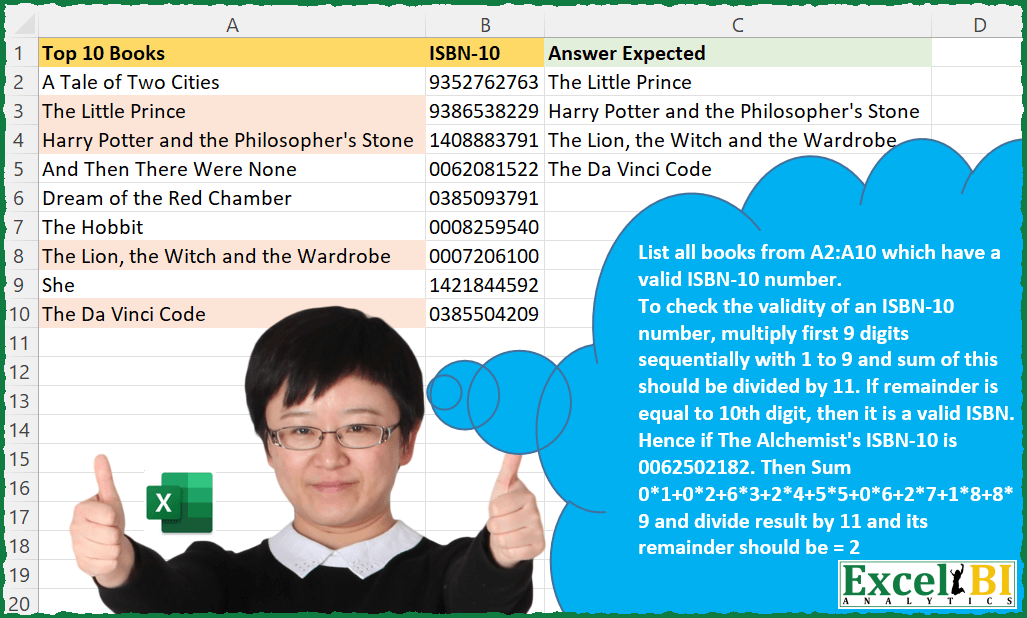
List all books from A2:A10 which have a valid ISBN-10 number. To check the validity of an ISBN-10 number, multiply first 9 digits sequentially with 1 to 9 and sum of this should be divided by 11. If remainder is equal to 10th digit, then it is a valid ISBN. Hence if The Alchemist’s ISBN-10 is 0062502182. Then Sum 0*1+0*2+6*3+2*4+5*5+0*6+2*7+1*8+8*9 and divide result by 11 and its remainder should be = 2 which is the 10th digit. Hence, this is a valid ISBN-10 number.
📌 Challenge Details and Links
ExcelBI Excel Challenge Number: 29
Challenge Difficulty: ⭐️
📥Download Sample File
📥Link to the solutions on LinkedIn
Solving the challenge of Validate ISBN-10 Numbers with Power Query
Power Query solution 1 for Validate ISBN-10 Numbers, proposed by Aditya Kumar Darak 🇮🇳:
let
  Source = Excel.CurrentWorkbook(){[Name = "data"]}[Content],
  Return = Table.SelectRows(
    Source,
    each [
      Total = List.Accumulate(
        {1 .. 9},
        0,
        (s, c) => s + c * Number.From(Text.At([#"ISBN-10"], c - 1))
      ),
      Check = Number.Mod(Total, 11) = Number.From(Text.End([#"ISBN-10"], 1))
    ][Check]
  )[Top 10 Books]
in
  Return
Power Query solution 2 for Validate ISBN-10 Numbers, proposed by Brian Julius:
let
  Source = ISBNRaw,
  TextList = Table.AddColumn(Source, "Custom", each Text.ToList([#"ISBN-10"])),
  Expanded = Table.TransformColumnTypes(
    Table.ExpandListColumn(TextList, "Custom"),
    {"Custom", Int64.Type}
  ),
  Group = Table.Group(
    Expanded,
    {"Top 10 Books"},
    {
      {
        "All",
        each _,
        type table [
          Top 10 Books = nullable text,
          #"ISBN-10" = nullable text,
          Custom = nullable number
        ]
      }
    }
  ),
  Index = Table.AddColumn(Group, "Indexed", each Table.AddIndexColumn([All], "Index", 1, 1)),
  Expand = Table.ExpandTableColumn(Index, "Indexed", {"Custom", "Index"}, {"Custom", "Index"}),
  Multiply = Table.AddColumn(Expand, "Multiplication", each [Custom] * [Index], type number),
  SumProd = Table.Group(
    Multiply,
    {"Top 10 Books"},
    {"SumProd", each Number.Mod(List.Sum([Multiplication]), 11)}
  ),
  #"Filtered Rows" = Table.RenameColumns(
    Table.RemoveColumns(Table.SelectRows(SumProd, each ([SumProd] = 0)), "SumProd"),
    {"Top 10 Books", "Expected Answer"}
  )
in
  #"Filtered Rows"
Power Query solution 3 for Validate ISBN-10 Numbers, proposed by Matthias Friedmann:
let
  Source = Excel.CurrentWorkbook(){[Name = "ISBN"]}[Content],
  #"Filtered Rows" = Table.SelectRows(
    Source,
    each Number.Mod(
      List.Sum(
        List.Accumulate(
          {1 .. 9},
          Text.ToList(Text.Start([#"ISBN-10"], 9)),
          (a, b) => List.ReplaceRange(a, b - 1, 1, {(Number.From(a{b - 1}) * b)})
        )
      ),
      11
    )
      = Number.From(Text.End([#"ISBN-10"], 1))
  )
in
  #"Filtered Rows"
Power Query solution 4 for Validate ISBN-10 Numbers, proposed by Venkata Rajesh:
let
  Source = Data,
  Result = Table.SelectColumns(
    Table.SelectRows(
      Table.AddColumn(
        Source,
        "Check",
        each
          let
            _Num = [#"ISBN-10"]
          in
            Number.From(Text.End([#"ISBN-10"], 1))
              = Number.Mod(
                List.Sum(
                  List.Transform({1 .. 9}, each _ * Number.From(Text.Middle(_Num, _ - 1, 1)))
                ),
                11
              )
      ),
      each ([Check] = true)
    ),
    {"Top 10 Books", "ISBN-10"}
  )
in
  Result
Power Query solution 5 for Validate ISBN-10 Numbers, proposed by Hristo Tsenov:
let

 Source = Excel.CurrentWorkbook(){[Name="Table1"]}[Content],
 Valid = Table.SelectRows(Table.AddColumn(Source, "Valid", each try Value.Is(Number.From([#"ISBN-10"]),type number) and Text.Length(Text.From([#"ISBN-10"]))=10 and (not Text.Contains(Text.From([#"ISBN-10"]),",") and not Text.Contains(Text.From([#"ISBN-10"]),".")) otherwise false), each ([Valid] = true)),
 Index = Table.AddIndexColumn(Table.ExpandListColumn(Table.AddColumn(Valid, "Numbers", each Text.ToList(Text.From([#"ISBN-10"]))), "Numbers"), "Index", 1, 1, Int64.Type),
 Group = Table.Group(Table.AddColumn(Index, "Result", each if [Index]>9 then Number.Mod([Index],10)*Value.FromText([Numbers]) else [Index]*Value.FromText([Numbers])), {"Top 10 Books", "ISBN-10"}, {{"divisible", each List.Sum([Result]), type number}}),
 Select = Table.SelectColumns(Table.SelectRows(Table.AddColumn(Group, "Valid", each if Number.Mod([divisible],11)=Value.FromText(Text.End(Text.From([#"ISBN-10"]),1)) then true else false), each ([Valid] = true)),{"Top 10 Books"})
in
 Select

Small addition from me.  The code check also if the input is valid (means that anything different from ten digits in the input column will be ignored).
Solving the challenge of Validate ISBN-10 Numbers with Excel
Excel solution 1 for Validate ISBN-10 Numbers, proposed by Rick Rothstein:
=FILTER(A2:A10,MAP(B2:B10,LAMBDA(x,LET(S,ROW(1:9),MOD(SUM(S*MID(x,S,1)),11)=0+RIGHT(x)))))Excel solution 2 for Validate ISBN-10 Numbers, proposed by John V.:
=FILTER(A2:A10,MAP(B2:B10,LAMBDA(x,LET(s,ROW(1:9),-MOD(SUM(MID(x,s,1)*s),11)=-RIGHT(x)))))Excel solution 3 for Validate ISBN-10 Numbers, proposed by محمد حلمي:
=FILTER(
    A2:A10,
    MAP(
        B2:B10,
        LAMBDA(
            b,
            MOD(
                SUM(
                    MID(
                        b,
                        ROW(
                            1:9
                        ),
                        1
                    )*ROW(
                            1:9
                        )
                ),
                11
            )=RIGHT(
                b
            )+0
        )
    )
)
Excel solution 4 for Validate ISBN-10 Numbers, proposed by Julian Poeltl:
=FILTER(
    A2:A10,
    MAP(
        B2:B10,
        LAMBDA(
            I,
            LET(
                S,
                SEQUENCE(
                    10
                ),
                SP,
                MID(
                    I,
                    S,
                    1
                ),
                MOD(
                    SUM(
                        DROP(
                            SP*S,
                            -1
                        )
                    ),
                    11
                )=--TAKE(
                    SP,
                    -1
                )
            )
        )
    )
)
Excel solution 5 for Validate ISBN-10 Numbers, proposed by Alejandro Campos:
=FILTER(
 A2:B10,
 MAP(
 B2:B10,
 LAMBDA(isbn,
 LET(
 isbn_digits, MID(isbn, SEQUENCE(9, 1, 1, 1), 1),
 total, SUM(SEQUENCE(9) * isbn_digits),
 check_digit, MOD(total, 11),
 AND(LEN(isbn) = 10, ISNUMBER(--isbn_digits), --MID(isbn, 10, 1) = check_digit)))))
Excel solution 6 for Validate ISBN-10 Numbers, proposed by Timothée BLIOT:
=LET(
array,
    BYROW(A2:A10,
    LAMBDA(r,

LET(
Digits,
    MID(
        OFFSET(
            r,
            0,
            1
        ),
        SEQUENCE(
            10
        ),
        1
    ),

MultipliedDigits,
    INDEX(
        Digits,
        SEQUENCE(
            9
        )
    )*SEQUENCE(
            9
        ),

Test,
    --(MOD(
        SUM(
            MultipliedDigits
        ),
        11
    )=VALUE(
        INDEX(
            Digits,
            10
        )
    )),

IF(
    Test=1,
    r,
    ""
))
)),

FILTER(
    array,
    array<>""
))
Excel solution 7 for Validate ISBN-10 Numbers, proposed by Oscar Mendez Roca Farell:
=IFERROR(INDEX(A$1:A$10;
    AGGREGATE(15;
    6;
    ROW(
        A$2:A$10
    )/(MOD(
        MMULT(
            --RIGHT(
                INT(
                    B$2:B$10/10^{987654321}
                )
            )*{123456789};
            {1;
            2;
            3;
            4;
            5;
            6;
            7;
            8;
            9}^0
        );
        11
    )=--RIGHT(
        B$2:B$10
    ));
    ROW(
        A1
    )));
    "")
Excel solution 8 for Validate ISBN-10 Numbers, proposed by Bhavya Gupta:
=FILTER(A2:A10,MAP(B2:B10,LAMBDA(ISBN,MOD(REDUCE(0,SEQUENCE(9),LAMBDA(a,b,a+b*MID(ISBN,b,1))),11)=MID(ISBN,10,1)*1)))

=FILTER(A2:A10,MAP(B2:B10,LAMBDA(ISBN,REDUCE(0,SEQUENCE(10),LAMBDA(a,b,IF(b=10,MOD(a,11),a+b*MID(ISBN,b,1))))=MID(ISBN,10,1)*1)))

=LET(a,SEQUENCE(9),FILTER(A2:A10,MAP(B2:B10,LAMBDA(ISBN,MOD(SUM(MID(ISBN,a,1)*a),11)=MID(ISBN,10,1)*1))))

=FILTER(A2:A10,BYROW(MAKEARRAY(9,9,LAMBDA(r,c,MID(INDEX(B2:B10,r),c,1)*c)),LAMBDA(s,MOD(SUM(s),11)))=MID(B2:B10,10,1)*1)
Excel solution 9 for Validate ISBN-10 Numbers, proposed by Owen Price:
=LET(
    rng,
    A2:B10,

    fn,
    LAMBDA(

        t,
        LET(
            s,
            SEQUENCE(
                9
            ),

            m,
            MID(
                t,
                s,
                1
            ),

            MOD(
                SUM(
                    m*s
                ),
                11
            )=--RIGHT(
                t,
                1
            )
        )
    ),

    FILTER(
        INDEX(
            rng,
            ,
            1
        ),
        MAP(
            INDEX(
                rng,
                ,
                2
            ),
            fn
        )
    )
)
Excel solution 10 for Validate ISBN-10 Numbers, proposed by Tolga Demirci, PMP, PMI-ACP, MOS-Expert:
=IF(
    MOD(
        SUM(
            IFERROR(
                MID(
                    B2;
                    ROW(
                        $A$1:$A$100
                    );
                    1
                )*{1;
                2;
                3;
                4;
                5;
                6;
                7;
                8;
                9};
                ""
            )
        );
        11
    )=VALUE(
        RIGHT(
            B2;
            1
        )
    );
    A2;
    ""
)
Excel solution 11 for Validate ISBN-10 Numbers, proposed by Stefan Olsson:
=TRANSPOSE(
    TEXTSPLIT(
        TEXTJOIN(
            "|";
            TRUE;
            MAP(
                A2:A10;
                B2:B10;
                LAMBDA(
                    _title;
                    _isbn;
                    IF(
                        VALUE(
                            RIGHT(
                                _isbn;
                                1
                            )
                        )=MOD(
                            SUM(
                                {1;
                                2;
                                3;
                                4;
                                5;
                                6;
                                7;
                                8;
                                9}*VALUE(
                                    MID(
                                        _isbn;
                                        {1;
                                        2;
                                        3;
                                        4;
                                        5;
                                        6;
                                        7;
                                        8;
                                        9};
                                        1
                                    )
                                )
                            );
                            11
                        );
                        _title;

                    )
                )
            )
        );
        "|";

    )
)
Excel solution 12 for Validate ISBN-10 Numbers, proposed by Jardiel Euflázio:
=FILTER(
A2:A10,

MAP(
B2:B10,

LAMBDA(a,
MOD(SUM(MID(a,SEQUENCE(9),1)*SEQUENCE(9)),11)&""=RIGHT(a)
)

)

)
Excel solution 13 for Validate ISBN-10 Numbers, proposed by Jardiel Euflázio:
=FILTER(
A2:A10,


BYROW(
B2:B10,


LAMBDA(a,

MOD(
    SUM(
        MID(
            a,
            SEQUENCE(
                9
            ),
            1
        )*SEQUENCE(
                9
            )
    ),
    11
)=(0+RIGHT(
    a
))
)

)

)
Excel solution 14 for Validate ISBN-10 Numbers, proposed by Victor Momoh (MVP, MOS, R.Eng):
=LET(
    a,
    SEQUENCE(
        ,
        9
    ),
    FILTER(
        A2:A10,
        MAP(
            B2:B10,
            LAMBDA(
                x,
                MOD(
                    SUM(
                        a*MID(
                            x,
                            a,
                            1
                        )
                    ),
                    11
                )=--RIGHT(
                    x
                )
            )
        )
    )
)

Second one using MMULT
=FILTER(
    A2:A10,
    MOD(
        MMULT(
            1*MID(
                $B$2:$B$10,
                SEQUENCE(
        ,
        9
    ),
                1
            ),
            SEQUENCE(
                9
            )
        ),
        11
    )=--RIGHT(
        B2:B10
    )
)
Excel solution 15 for Validate ISBN-10 Numbers, proposed by Cary Ballard, DML:
=FILTER(

     A2:A10,

     MAP(
         B2:B10,
          LAMBDA(
              m,
               MOD(
                   SUM(
                       MID(
                           m,
                            SEQUENCE(
                                LEN(
                                    m
                                ) - 1
                            ),
                            1
                       ) * SEQUENCE(
                           9
                       )
                   ),
                    11
               )
          )
     ) = --RIGHT(
         B2:B10
     )

)
Excel solution 16 for Validate ISBN-10 Numbers, proposed by Nazmul Islam Jobair:
=LET(

     _books,
     A2:A10,

     _isbns,
     B2:B10,

     _sum,
     BYROW(

          _isbns,

          LAMBDA(
              r,
               SUM(
                   SEQUENCE(
                       9
                   ) * MID(
                       LEFT(
             &              r,
                            9
                       ),
                        SEQUENCE(
                       9
                   ),
                        1
                   )
               )
          )

     ),

     _valid?,
     MOD(
         _sum,
          11
     ) = --RIGHT(
         _isbns,
          1
     ),

     FILTER(
         _books,
          _valid?
     )

)
Excel solution 17 for Validate ISBN-10 Numbers, proposed by Charalampos Dimitrakopoulos:
=FILTER(
    A2:A10,
    BYROW(
        B2:B10,
        LAMBDA(
            r,
            IFERROR(
                MOD(
                    SUMPRODUCT(
                        SEQUENCE(
                            9
                        ),
                        --MID(
                            r,
                            SEQUENCE(
                            9
                        ),
                            1
                        )
                    ),
                    11
                )=--RIGHT(
                    r,
                    1
                ),
                FALSE
            )
        )
    )
)
Excel solution 18 for Validate ISBN-10 Numbers, proposed by Riley Johnson:
= LET(

     _books,
     tbl[Top 10 Books],

     _isbns,
     tbl[ISBN-10],


     _valid_isbn,
     MAP(
          _isbns,

          LAMBDA(
              _isbn,

               LET(

                    _nums,
                    --MID(
                         _isbn,
                         SEQUENCE(
                              LEN(
                                   _isbn
                              )
                         ),
                         1
                    ),

                    _seq,
                    SEQUENCE(
                        ,
                        9
                    ),

                    MOD(
                         SUMPRODUCT(
                              INDEX(
                                  _nums,
                                   _seq
                              ),
                              _seq
                         ),
                         11
                    ) = INDEX(
                        _nums,
                         10
                    )

               )

          )

     ),


     FILTER(
         _books,
          _valid_isbn,
          "No Valid ISBN-10 Numbers"
     )

)
Excel solution 19 for Validate ISBN-10 Numbers, proposed by Agah Dikici:
=FILTER(
    A2:A10,
    BYROW(
        B2:B10,
        LAMBDA(
            x,
            AND(
                LEN(
                    x
                )=10,
                --RIGHT(
                    x
                )=MOD(
                    SUMPRODUCT(
                        --MID(
                            x,
                            SEQUENCE(
                                9
                            ),
                            1
                        ),
                        SEQUENCE(
                                9
                            )
                    ),
                    11
                )
            )
        )
    )
)
Solving the challenge of Validate ISBN-10 Numbers with Python in Excel
Python in Excel solution 1 for Validate ISBN-10 Numbers, proposed by Alejandro Campos:
df = xl("A1:B10", headers=True)
def is_valid_isbn10(isbn):
 if len(isbn) != 10 or not isbn.isdigit():
 return False
 total = sum(int(isbn[i]) * (i + 1) for i in range(9))
 check_digit = total % 11
 return check_digit == int(isbn[-1])
df_valid = df[df['ISBN-10'].apply(is_valid_isbn10)].reset_index(drop=True)
df_valid