
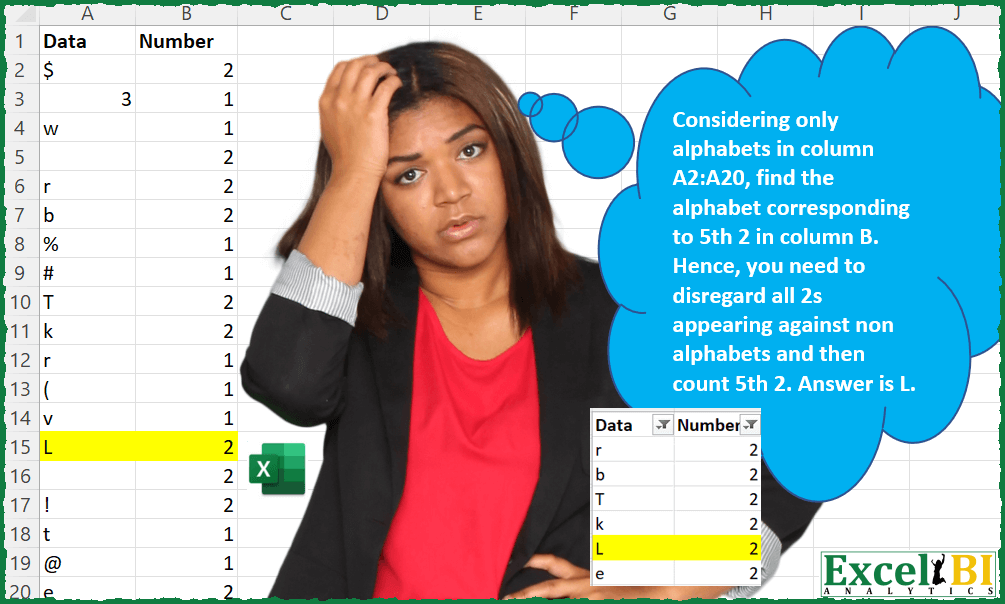
Considering only alphabets in column A2:A20, find the alphabet corresponding to 5th 2 in column B. Hence, you need to disregard all 2s appearing against non alphabets and then count 5th 2. Answer is L as shown below
📌 Challenge Details and Links
ExcelBI Excel Challenge Number: 28
Challenge Difficulty: ⭐️
📥Download Sample File
📥Link to the solutions on LinkedIn
Solving the challenge of Find Nth Two Against Letters with Power Query
Power Query solution 1 for Find Nth Two Against Letters, proposed by Aditya Kumar Darak 🇮🇳:
let
  Source = Excel.CurrentWorkbook(){[Name = "data"]}[Content],
  N      = 5,
  Char   = {"A" .. "Z", "a" .. "z"},
  Filter = Table.SelectRows(Source, each List.Contains(Char, [Data]) and [Number] = 2),
  Return = Filter{N - 1}[Data]
in
  Return
Power Query solution 2 for Find Nth Two Against Letters, proposed by Luan Rodrigues:
let
  Fonte = Excel.CurrentWorkbook(){[Name = "Tabela26"]}[Content],
  Type = Table.SelectRows(
    Table.TransformColumnTypes(Fonte, {{"Data", type text}}),
    each [Data] <> null and [Number] = 2
  ),
  Result = Table.SelectRows(
    Table.AddColumn(Type, "Personalizar", each Text.Select([Data], {"a" .. "z", "A" .. "Z"})),
    each [Personalizar] <> ""
  )[Data]{4}
in
  Result
Power Query solution 3 for Find Nth Two Against Letters, proposed by Brian Julius:
let
  Source = Table.TransformColumnTypes(#"Fifth2 Raw", {"Number", Int64.Type}),
  Screen = Table.SelectColumns(
    Table.SelectRows(
      Table.AddColumn(
        Source,
        "Custom",
        each if List.Contains({"A" .. "Z", "a" .. "z"}, [Data]) then 1 else 0
      ),
      each List.AllTrue({[Custom] = 1, [Number] = 2})
    ),
    "Data"
  ){4}
in
  Screen
Power Query solution 4 for Find Nth Two Against Letters, proposed by Matthias Friedmann:
let
 Source = Excel.CurrentWorkbook(){[Name="FifthAlphabet"]}[Content],
 #"5thAlphabetwith2" = Table.SelectRows(Source, each List.Contains({"a".."z","A".."Z"},[Data]) and [Number] = 2)[Data]{4}
in
 #"5thAlphabetwith2"

--
Direct comparison with the code formatted with https://www.powerqueryformatter.com/formatter
let
 Source = Excel.CurrentWorkbook(){[Name = "FifthAlphabet"]}[Content],
 #"5thAlphabetwith2" = Table.SelectRows(
 Source,
 each List.Contains({"a".."z", "A".."Z"}, [Data]) and [Number] = 2
 )[Data]{4}
in
 #"5thAlphabetwith2"
Power Query solution 5 for Find Nth Two Against Letters, proposed by Venkata Rajesh:
let
  Source = Data,
  Output = Table.SelectRows(
    Table.AddColumn(
      Source,
      "Custom",
      each List.Contains({"A" .. "Z", "a" .. "z"}, [Data]) and [Number] = 2
    ),
    each ([Custom] = true)
  ){4}[Data]
in
  Output
Power Query solution 6 for Find Nth Two Against Letters, proposed by Hristo Tsenov:
let
  Source = Excel.CurrentWorkbook(){[Name = "Table1"]}[Content],
  Custom = Table.SelectRows(
    Table.AddColumn(Source, "Custom", each [Number] = 2 and List.Contains({"A" .. "z"}, [Data])),
    each ([Custom] = true)
  ),
  Result = Table.SelectColumns(
    Table.SelectRows(Table.AddIndexColumn(Custom, "Index", 1, 1, Int64.Type), each ([Index] = 5)),
    {"Data"}
  )
in
  Result
Power Query solution 7 for Find Nth Two Against Letters, proposed by Alexandru Badiu:
let
  Source = Datasource,
  #"Added Custom" = Table.SelectRows(
    Table.AddColumn(Source, "Custom", each List.Contains({"A" .. "Z", "a" .. "z"}, [Data])),
    each ([Custom] = true) and ([Number] = 2)
  ),
  #"Grouped Rows" = Table.ExpandTableColumn(
    Table.Group(
      #"Added Custom",
      {"Number"},
      {
        {
          "Count",
          each _,
          type table [Data = nullable text, Number = nullable number, Custom = logical]
        }
      }
    ),
    "Count",
    {"Data", "Number", "Custom"},
    {"Data", "Number.1", "Custom"}
  )[Data]{4}
in
  #"Grouped Rows"
Power Query solution 8 for Find Nth Two Against Letters, proposed by Jesper Qvist:
let
 Kilde = Excel.CurrentWorkbook(){[Name="Tabel1"]}[Content],
 #"Ændret type" = Table.TransformColumnTypes(Kilde,{{"Data", type any}, {"Number", Int64.Type}}),
 #"Tilføjet brugerdefineret1" = Table.AddColumn(#"Ændret type", "Brugerdefineret.1", each List.Contains({"a".."z","A".."Z"}, [Data])),
 #"Filtrerede rækker" = Table.SelectRows(#"Tilføjet brugerdefineret1", each ([Brugerdefineret.1] = true)),
 #"Filtrerede rækker1" = Table.SelectRows(#"Filtrerede rækker", each [Number] = 2),
 #"Tilføjet indeks" = Table.AddIndexColumn(#"Filtrerede rækker1", "Indeks", 1, 1, Int64.Type),
 #"Filtrerede rækker2" = Table.SelectRows(#"Tilføjet indeks", each [Indeks] = 5),
 Data = #"Filtrerede rækker2"{0}[Data]
in
 Data


        Show translation


        Show translation of this comment
Power Query solution 9 for Find Nth Two Against Letters, proposed by Solar Zhu:
let
  Source = Table.SelectRows(Excel.CurrentWorkbook(){[Name = "Data"]}[Content], each [Number] = 2),
  #"Added Custom" = Table.RemoveFirstN(
    Table.SelectRows(
      Table.AddColumn(
        Source,
        "Custom",
        each List.Contains({"a" .. "z"} & {"A" .. "Z"}, [Data]) and [Number] = 2
      ),
      each [Custom] = true
    ),
    4
  ){0}[Data]
in
  #"Added Custom"
Solving the challenge of Find Nth Two Against Letters with Excel
Excel solution 1 for Find Nth Two Against Letters, proposed by Rick Rothstein:
=LET(A,
    A2:A20,
    C,
    CODE(
        UPPER(
            A
        )
    ),
    INDEX(FILTER(A,
    IFERROR(((C>64)*(C<91))*(OFFSET(
        A,
        ,
        1
    )=2)=1,
    )),
    5))
Excel solution 2 for Find Nth Two Against Letters, proposed by Rick Rothstein:
=let(a,a2:a20,index(filter(a,(b2:b20=2)*(a>="a")*(a<="z")),5))Excel solution 3 for Find Nth Two Against Letters, proposed by John V.:
=LET(d,
    A2:A20,
    c,
    CODE(
        UPPER(
            d&" "
        )
    ),
    INDEX(FILTER(d,
    (c>64)*(c<91)*(B2:B20=2)),
    5))
Excel solution 4 for Find Nth Two Against Letters, proposed by محمد حلمي:
=INDEX(FILTER(A2:A20,
    (CODE(
        A2:A20&CHAR(
            1
        )
    )+50>114)*(B2:B20=2)),
    5)
Excel solution 5 for Find Nth Two Against Letters, proposed by 🇰🇷 Taeyong Shin:
=MID(TEXTJOIN("",
     ,
     IF((A2:A20>="A")*(B2:B20=2),
     T(
         +A2:A20
     ),
     "")),
     5,
     1)
Excel solution 6 for Find Nth Two Against Letters, proposed by 🇰🇷 Taeyong Shin:
=REGEXEXTRACT(
    CONCAT(
        A2:B20
    ),
     "(?:.*?[a-z]2){4}.*?(?=[a-z]2)K.",
     ,
     1
)
=MID(
    REGEXREPLACE(
        CONCAT(
        A2:B20
    ),
         "([a-z])2|.",
         "$1",
         ,
         1
    ),
     5,
     1
)
=LEFT(
    INDEX(
        REGEXEXTRACT(
            CONCAT(
        A2:B20
    ),
             "[a-z]2",
             1,
             1
        ),
         5
    )
)

=INDEX(FILTER(A2:A20,
     (A2:A20 > "9") * (B2:B20 = 2)),
     5)
Excel solution 7 for Find Nth Two Against Letters, proposed by Kris Jaganah:
=FILTER(IFERROR(IF((CODE(A2:A20)>65)*(A2:A20<>"")*(B2:B20=2)=1,A2:A20,""),""),IFERROR(IF((CODE(A2:A20)>65)*(A2:A20<>"")*(B2:B20=2)=1,A2:A20,""),"")<>"",)Excel solution 8 for Find Nth Two Against Letters, proposed by Julian Poeltl:
=CHOOSEROWS(LET(D,
    A2:A20,
    C,
    IFERROR(
        CODE(
            D
        ),
        0
    ),
    FILTER(D,
    ((C>64)*(C<91)+(C>96)*(C<123))*(B2:B20=2))),
    5)
Excel solution 9 for Find Nth Two Against Letters, proposed by Aditya Kumar Darak 🇮🇳:
= LET(
 _calc,

 FILTER(
 A2:A20,

 (B2:B20 = criteria) * (A2:A20 >= "a") * (A2:A20 <= "z")),

 INDEX(
     _calc,
      MIN(
          5,
           ROWS(
               _calc
           )
      )
 ))
Excel solution 10 for Find Nth Two Against Letters, proposed by Aditya Kumar Darak 🇮🇳:
= LET(
 _code,

 CODE(
     UPPER(
         A2:A20
     )
 ),

 _calc,

 FILTER(
 A2:A20,

 (B2:B20 = criteria) * IFERROR((_code > 64) * (_code < 91),
     0)),

 INDEX(
     _calc,
      MIN(
          5,
           ROWS(
               _calc
           )
      )
 ))
Excel solution 11 for Find Nth Two Against Letters, proposed by Timothée BLIOT:
=LET(

    letters,
    CHAR(
        SEQUENCE(
            26,
            ,
            65,
            1
        )
    ),

    selection,
    FILTER(
        A2:B20,
        ISNUMBER(
            XMATCH(
                A2:A20,
                 letters,
                 0
            )
        )*ISNUMBER(
            XMATCH(
                B2:B20,
                 2,
                 0
            )
        ),
        "no value"
    ),

    INDEX(
        selection,
        5,
        1
    )
)
Excel solution 12 for Find Nth Two Against Letters, proposed by Bhavya Gupta:
=LET(a,
     SEQUENCE(
         26
     ),

 INDEX(FILTER(A2:A20,
    MAP(A2:A20,
    B2:B20,

 LAMBDA(x,
     y,
    (y=2)*SUM(
        N(
            EXACT(
                x,

                 VSTACK(
                     CHAR(
                         a+64
                     ),
                     CHAR(
                         a+96
                     )
                 )
            )
        )
    )))),
    5))
Excel solution 13 for Find Nth Two Against Letters, proposed by Charles Roldan:
=INDEX(FILTER(A2:A20,
IFERROR(--ISEVEN(MATCH(CODE(A2:A20),{1;65;91;97;123})),0)*(B2:B20=2)),5)
Excel solution 14 for Find Nth Two Against Letters, proposed by Stefan Olsson:
=query(
    {A2:B20},
    "select Col1 where Col2=2 and Col1 matches '[a-z,A-Z]' limit 1 offset 4",
    0
)

together with index
=index(
    query(
        {A2:B20},
        "select Col1 where Col2=2 and Col1 matches '[a-z,A-Z]'",
        0
    ),
    5
)
Excel solution 15 for Find Nth Two Against Letters, proposed by Victor Momoh (MVP, MOS, R.Eng):
=LET(a,
    FILTER(
        A2:A20,
        B2:B20=2
    ),
    b,
    CODE(
        UPPER(
            a
        )
    ),
    INDEX(FILTER(a,
    IFERROR((b>64)*(b<91),
    0)),
    5))
Excel solution 16 for Find Nth Two Against Letters, proposed by Cary Ballard, DML:
=LET(
 a, FILTER(A2:B20, (A2:A20 >= "A") * (A2:A20 <= "z")),
 INDEX(FILTER(TAKE(a, , 1), DROP(a, , 1) = 2), 5)
)
Excel solution 17 for Find Nth Two Against Letters, proposed by Viswanathan M B:
=Let(cd, code(A2:A24),
 FRng, Filter(A2:A24, ((cd>64)*(cd<92))+((cd>96)*(cd<123))*(B2:B24=2)),
 If(rows(FRng)<5,”NA”, index(FRng,5,2)))
Excel solution 18 for Find Nth Two Against Letters, proposed by Juliano Santos Lima:
=INDEX(FILTER(A2:B20,
    1=(B2:B20=2)*ISNUMBER(
        MATCH(
            LOWER(
                A2:A20
            ),
            CHAR(
                SEQUENCE(
                    26,
                    ,
                    CODE(
                        "a"
                    ),
                    1
                )
            ),
            0
        )
    )),
    5,
    )
Excel solution 19 for Find Nth Two Against Letters, proposed by Riley Johnson:
=LET(
 _target_num,
     2,

 _target_instance,
     5,


 _LETTERS,
     CHAR(
          SEQUENCE(
              26,
               ,
              CODE(
                  "A"
              )
          )
     ),


 _filtered_data,
     FILTER( tbl[Data],

 ISNUMBER(
      XMATCH(
           UPPER(
                tbl[Data]
           ),
           _LETTERS
      )
 )
 * ( tbl[Number] = _target_num )
 ),


 INDEX(
      _filtered_data,
      _target_instance
 )

)
Excel solution 20 for Find Nth Two Against Letters, proposed by Agah Dikici:
=LET(r,
    A2:A20,
    n,
    B2:B20,
    c,
    CODE(
        UPPER(
            r
        )
    ),
    INDEX(r,
    MATCH(5,
    SCAN(0,
    --(IFERROR((c>=64)*(c<=91),
    0)*2=n),
    LAMBDA(
        a,
        b,
        a+b
    )),
    0)))