
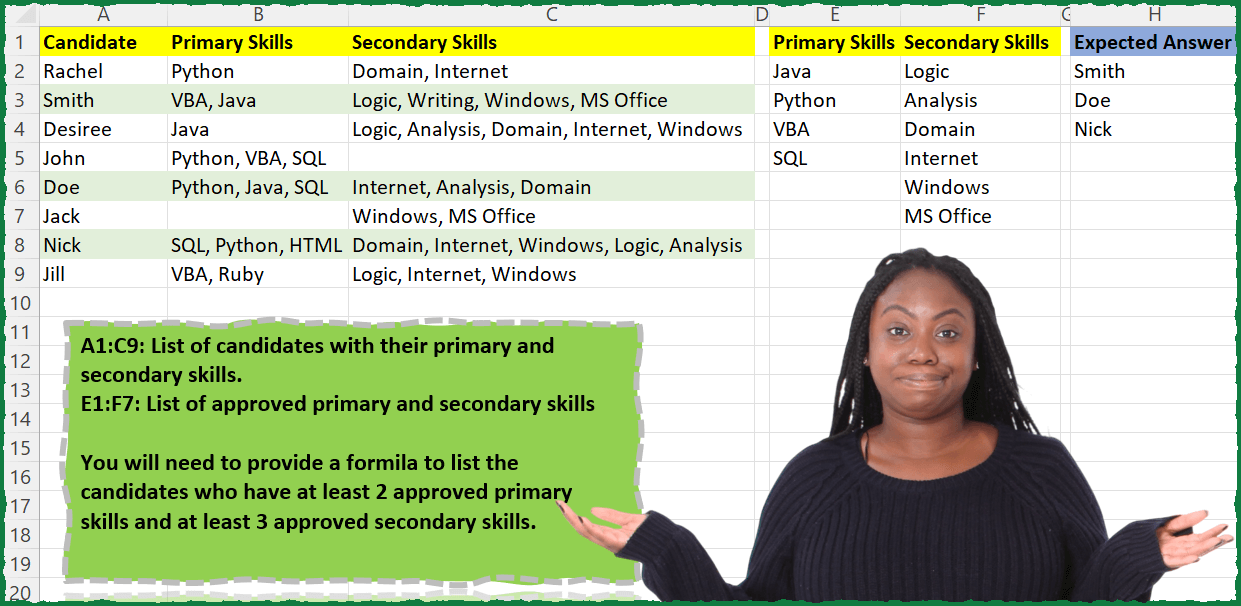
A1:C9: List of candidates with their primary and secondary skills. E1:F7: List of approved primary and secondary skills You will need to provide a formula to list the candidates who have at least 2 approved primary skills and at least 3 approved secondary skills.
📌 Challenge Details and Links
ExcelBI Excel Challenge Number: 27
Challenge Difficulty: ⭐️⭐️
📥Download Sample File
📥Link to the solutions on LinkedIn
Solving the challenge of Filter Candidates by Skill Match with Power Query
Power Query solution 1 for Filter Candidates by Skill Match, proposed by Aditya Kumar Darak 🇮🇳:
let
  Source = Excel.CurrentWorkbook(),
  Data = Source{[Name = "data"]}[Content],
  Primary = Table.ToList(Source{[Name = "Primary"]}[Content]),
  Secondary = Table.ToList(Source{[Name = "Secondary"]}[Content]),
  Return = Table.SelectRows(
    Data,
    each [
      PS  = Text.Split(Text.Trim([Primary Skills]), ", "),
      SS  = Text.Split(Text.Trim([Secondary Skills]), ", "),
      IPS = List.Intersect({PS, Primary}),
      ISS = List.Intersect({SS, Secondary}),
      C   = try List.Count(IPS) >= 2 and List.Count(ISS) >= 3 otherwise false
    ][C]
  )[Candidate]
in
  Return
Power Query solution 2 for Filter Candidates by Skill Match, proposed by Matthias Friedmann:
let
  Source = Excel.CurrentWorkbook(){[Name = "Candidates"]}[Content],
  #"Filtered Rows" = Table.SelectRows(
    Source,
    each try
      List.Count(List.Intersect({PrimarySkills, Text.Split([Primary Skills], ", ")}))
        > 1 and List.Count(List.Intersect({SecondarySkills, Text.Split([Secondary Skills], ", ")}))
        > 2
    otherwise
      false
  )[[Candidate]]
in
  #"Filtered Rows"
Power Query solution 4 for Filter Candidates by Skill Match, proposed by Venkata Rajesh:
let
  Source = Candidates,
  Output = Table.SelectRows(
    Table.AddColumn(
      Source,
      "Custom",
      each
        if List.Count(
          List.Intersect(
            {try Text.Split([Primary Skills], ", ") otherwise {""}, Skills[Primary Skills]}
          )
        )
          > 1
            and List.Count(
              List.Intersect(
                {try Text.Split([Secondary Skills], ", ") otherwise {""}, Skills[Secondary Skills]}
              )
            )
          > 2
        then
          true
        else
          false
    ),
    each ([Custom] = true)
  )[Candidate]
in
  Output
Power Query solution 5 for Filter Candidates by Skill Match, proposed by Hristo Tsenov:
let
  Source = Excel.CurrentWorkbook(){[Name = "Table1"]}[Content],
  #"Custom" = Table.AddColumn(
    Source,
    "Custom",
    each Text.Split(Text.Combine({[Primary Skills], [Secondary Skills]}, ", "), ", ")
  ),
  #"Expand" = Table.ExpandListColumn(#"Custom", "Custom"),
  #"Custom1" = Table.AddColumn(
    #"Expand",
    "Custom.1",
    each if List.Contains(Table2[Primary Skills], [Custom]) = true then 1 else 0
  ),
  Custom2 = Table.AddColumn(
    #"Custom1",
    "Custom.2",
    each if List.Contains(Table2[Secondary Skills], [Custom]) = true then 1 else 0
  ),
  #"Group" = Table.Group(
    Custom2,
    {"Candidate"},
    {
      {"Primary", each List.Sum([Custom.1]), type number},
      {"Secondary", each List.Sum([Custom.2]), type number}
    }
  ),
  #"Select" = Table.SelectColumns(
    Table.SelectRows(Group, each [Primary] > 1 and [Secondary] > 2),
    {"Candidate"}
  )
in
  #"Select"
Power Query solution 6 for Filter Candidates by Skill Match, proposed by Alexandru Badiu:
let
  Source = Datasource,
  SkillsTarget = Table.AddColumn(
    Source,
    "Target Primary",
    each //at least 2 approved Primary Skills
    List.Count(
      List.Intersect(
        {Text.Split([Primary Skills], ", "), List.RemoveMatchingItems(Skills[Primary Skills], {""})}
      )
    )
      > 1
        and //at least 3 approved Secondary Skills
        List.Count(
          List.Intersect(
            {
              Text.Split([Secondary Skills], ", "),
              List.RemoveMatchingItems(Skills[Secondary Skills], {""})
            }
          )
        )
      > 2
  ),
  Result = Table.SelectRows(SkillsTarget, each ([Target Primary] = true))[Candidate]
in
  Result
Power Query solution 7 for Filter Candidates by Skill Match, proposed by Solar Zhu:
let
  Source = Excel.CurrentWorkbook(){[Name = "Table1"]}[Content],
  #"Added Custom" = Table.AddColumn(
    Source,
    "Custom",
    each
      if [Primary Skills] = null then
        null
      else if [Secondary Skills] = null then
        null
      else if List.Count(
        List.Intersect({Text.Split([Primary Skills], ", "), Table2[Primary Skills]})
      )
        > 1
          and List.Count(
            List.Intersect({Text.Split([Secondary Skills], ", "), Table2[Secondary Skills]})
          )
        > 2
      then
        true
      else
        false
  )
in
  #"Added Custom"
Solving the challenge of Filter Candidates by Skill Match with Excel
Excel solution 1 for Filter Candidates by Skill Match, proposed by John V.:
=FILTER(A2:A9,
    MAP(B2:B9,
    C2:C9,
    LAMBDA(b,
    c,
    (COUNT(
        FIND(
            E2:E5,
            b
        )
    )>1)*(COUNT(
        FIND(
            F2:F7,
            c
        )
    )>2))))

2. ► One range: =FILTER(A2:A9,
    BYROW(B2:C9,
    LAMBDA(x,
    AND(BYCOL(FIND(
        E2:F7,
        x
    )/(E2:F7>""),
    LAMBDA(
        y,
        COUNT(
            y
        )
    ))>{1,
    2}))))
Excel solution 2 for Filter Candidates by Skill Match, proposed by محمد حلمي:
=FILTER(A2:A9,
    MAP(B2:B9,
    C2:C9,

LAMBDA(b,
    c,
    (
COUNT(
    FIND(
        E2:E5,
        b
    )
)>1)*COUNT(
    FIND(
        F2:F7,
        c
    )
)>2))))
Excel solution 3 for Filter Candidates by Skill Match, proposed by 🇰🇷 Taeyong Shin:
=LET(bool, BYROW(B2:C9, LAMBDA(br,
 LET(join, ARRAYTOTEXT(br),
 COUNT(1/(MMULT(SEQUENCE(, 6, , 0), N(ISNUMBER(SEARCH(TEXT(E2:F7, "@"), join))) )>={2,3}) )=2
 )
 )),
 FILTER(A2:A9, bool)
)
Excel solution 4 for Filter Candidates by Skill Match, proposed by 🇰🇷 Taeyong Shin:
=FILTER(A2:A9,BYROW(LEN(REGEXREPLACE(B2:C9,"("&TEXTJOIN("|",,E2:F7)&")|.","${1:+1:}"))>1,AND))Excel solution 5 for Filter Candidates by Skill Match, proposed by Julian Poeltl:
=LET(T,
    A2:C9,
    TT,
    E2:F7,
    P,
    MAP(
        CHOOSECOLS(
            T,
            2
        ),
        LAMBDA(
            A,
            SUM(
                --ISNUMBER(
                    XMATCH(
                        TEXTSPLIT(
                            A,
                            ", "
                        ),
                        TAKE(
                            TT,
                            ,
                            1
                        )
                    )
                )
            )
        )
    ),
    S,
    MAP(
        TAKE(
            T,
            ,
            -1
        ),
        LAMBDA(
            A,
            SUM(
                --ISNUMBER(
                    XMATCH(
                        TEXTSPLIT(
                            A,
                            ", "
                        ),
                        TAKE(
                            TT,
                            ,
                            -1
                        )
                    )
                )
            )
        )
    ),
    FILTER(TAKE(
        T,
        ,
        1
    ),
    (P>1)*(S>2)))
Excel solution 6 for Filter Candidates by Skill Match, proposed by Aditya Kumar Darak 🇮🇳:
= FILTER(
 A2:A9,
 MAP(
 B2:B9,
 C2:C9,
 LAMBDA(
 a,
 b,
 LET(
 _c1,
 SUM(COUNTIFS(a, "*" & E2:E5 & "*")) >= 2,
 _c2,
 SUM(COUNTIFS(b, "*" & F2:F7 & "*")) >= 3,
 AND(_c1, _c2)))))
Excel solution 7 for Filter Candidates by Skill Match, proposed by Oscar Mendez Roca Farell:
={IFERROR(INDEX(A$1:A$9;AGGREGATE(15;6;ROW(A$2:A$9)/((MMULT(--(IFERROR(SEARCH(TRANSPOSE(E$2:E$5);B$2:B$9);0)>0);ROW(E$2:E$5)^0)>1)*(MMULT(--(IFERROR(SEARCH(TRANSPOSE(F$2:F$7);C$2:C$9);0)>0);ROW(F$2:F$7)^0)>2));ROW($Z1)));"")Excel solution 8 for Filter Candidates by Skill Match, proposed by Duy Tùng:
=LET(f,LAMBDA(a,c,BYROW(FIND(TOROW(a),c),COUNT)),FILTER(A2:A9,(f(E2:E5,B2:B9)>1)+(f(F2:F7,C2:C9)>2)=2))Excel solution 9 for Filter Candidates by Skill Match, proposed by Bhavya Gupta:
=FILTER(A2:A9,MAP(B2:B9,C2:C9,
 LAMBDA(p,s,LET(a,TEXTSPLIT(p,", "),b,TEXTSPLIT(s,", "),
 (SUM(--NOT(ISERROR(XLOOKUP(E2:E5,a,a))))>1)*
 (SUM(--NOT(ISERROR(XLOOKUP(F2:F7,b,b))))>2))
)))
Excel solution 10 for Filter Candidates by Skill Match, proposed by Bhavya Gupta:
=FILTER(A2:A9,MAP(B2:B9,C2:C9,
 LAMBDA(p,s,
 (SUM(--ISNUMBER(XMATCH(E2:E5,TEXTSPLIT(p,", "))))>1)*
 (SUM(--ISNUMBER(XMATCH(F2:F7,TEXTSPLIT(s,", "))))>2))))
Excel solution 11 for Filter Candidates by Skill Match, proposed by Charles Roldan:
=LET(
    EnoughSkills,
    LAMBDA(
        SkillSet,
        Desired,
        Min,
        BYROW(

            ISNUMBER(
                FIND(
                    TRANSPOSE(
                        Desired
                    ),
                    SkillSet
                )
            ),

            LAMBDA(
                x,
                SUM(
                    --x
                )>=Min
            )
        )
    ),

    FILTER(
        A2:A9,
        EnoughSkills(
            B2:B9,
            E2:E5,
            2
        )*EnoughSkills(
            C2:C9,
            F2:F7,
            3
        )
    )
)
Excel solution 12 for Filter Candidates by Skill Match, proposed by Jardiel Euflázio:
=FILTER(

A2:A9,


MAP(
B2:B9,

C2:C9,


LAMBDA(
a,

b,


(SUM(0+(ISNUMBER(
    MATCH(
        TEXTSPLIT(
            a,
            ", "
        ),
        E2:E5,
        0
    )
)))>=2)*
(SUM(0+(ISNUMBER(
    MATCH(
        TEXTSPLIT(
            b,
            ", "
        ),
        F2:F7,
        0
    )
)))>=3)

)

)

)
Excel solution 13 for Filter Candidates by Skill Match, proposed by Daniel Garzia:
=FILTER(A2:A9;
    MAP(B2:B9;
    C2:C9;
    LAMBDA(a;
    b;
    (COUNT(
        XMATCH(
            TEXTSPLIT(
                a;
                ;
                ", "
            );
            E2:E5
        )
    )>=2)*(COUNT(
        XMATCH(
            TEXTSPLIT(
                b;
                ;
                ", "
            );
            F2:F7
        )
    )>=3))))
Excel solution 14 for Filter Candidates by Skill Match, proposed by Cary Ballard, DML:
=LET(
 a, A2:A9,
 b, B2:B9,
 c, C2:C9,
 p, E2:E5,
 s, F2:F7,
 fx, LAMBDA(x,y, BYROW(SEARCH(TOROW(x), y), LAMBDA(r, COUNT(r)))),
 d, HSTACK(a, fx(p, b), fx(s, c)),
 FILTER(TAKE(d,,1), (CHOOSECOLS(d,2)>1)*(CHOOSECOLS(d,3)>2))
)
Excel solution 15 for Filter Candidates by Skill Match, proposed by Viswanathan M B:
=LET(PS,
     E2:E5,

 SS,
     F2:F7,

 Fn,
     LAMBDA(
         a,
          SUM(
              a
          )
     ),

 NPS,
     BYROW(
         --NOT(
             ISERR(
                 SEARCH(
                     TRANSPOSE(
                         PS
                     ),
                      B2:B9
                 )
             )
         ),
          Fn
     ),

 NSS,
     BYROW(
         --NOT(
             ISERR(
                 SEARCH(
                     TRANSPOSE(
                         SS
                     ),
                      C2:C9
                 )
             )
         ),
          Fn
     ),

 FILTER(A2:A9,
     (NPS>=2)*(NSS>=3)))
Excel solution 16 for Filter Candidates by Skill Match, proposed by Nazmul Islam Jobair:
=LET(
 _cand,
     A2:A9,

 _skills,
     B2:C9,

 _prSkills,
     E2:E5,

 _scSkills,
     F2:F7,

 _hasSkill?,
     BYROW(
 _skills,

 LAMBDA(r,

 LET(
 _pr,
     INDEX(
         r,
          ,
          1
     ),

 _sc,
     INDEX(
         r,
          ,
          2
     ),

 _prCount,
     SUM(
 --(IFERROR(
     TEXTSPLIT(
         _pr,
          ", "
     ),

 ) = _prSkills)
 ),

 _scCount,
     SUM(
 --(IFERROR(
     TEXTSPLIT(
         _sc,
          ", "
     ),

 ) = _scSkills)
 ),

 AND(
     _prCount >= 2,
      _scCount >= 3
 )
 )
 )
 ),

 FILTER(
     _cand,
      _hasSkill?
 )
)
Excel solution 17 for Filter Candidates by Skill Match, proposed by Riley Johnson:
=LET(
 _canidates,              Table1[Candidate],
 _primary_skills,         Table1[Primary Skills],
 _secondary_skills,       Table1[Secondary Skills],
 _trgt_prim_skills,       Table2[Primary Skills],
 _trgt_secondary_skills,  Table3[Secondary Skills],

 _skill_search, LAMBDA(_candidates_skills,_target_skills,number_skills,
 MAP(
 _candidates_skills,
 LAMBDA(_canidate_skills,
 SUM(
 --ISNUMBER( SEARCH( _target_skills & ",", _canidate_skills & "," ) )
 ) >= number_skills
 )
 )
 ),

 FILTER( _canidates,
 _skill_search(_primary_skills, _trgt_prim_skills, 2)
 * _skill_search(_secondary_skills, _trgt_secondary_skills, 3),
 "No Candidates Match Target Skills"
 )
)