
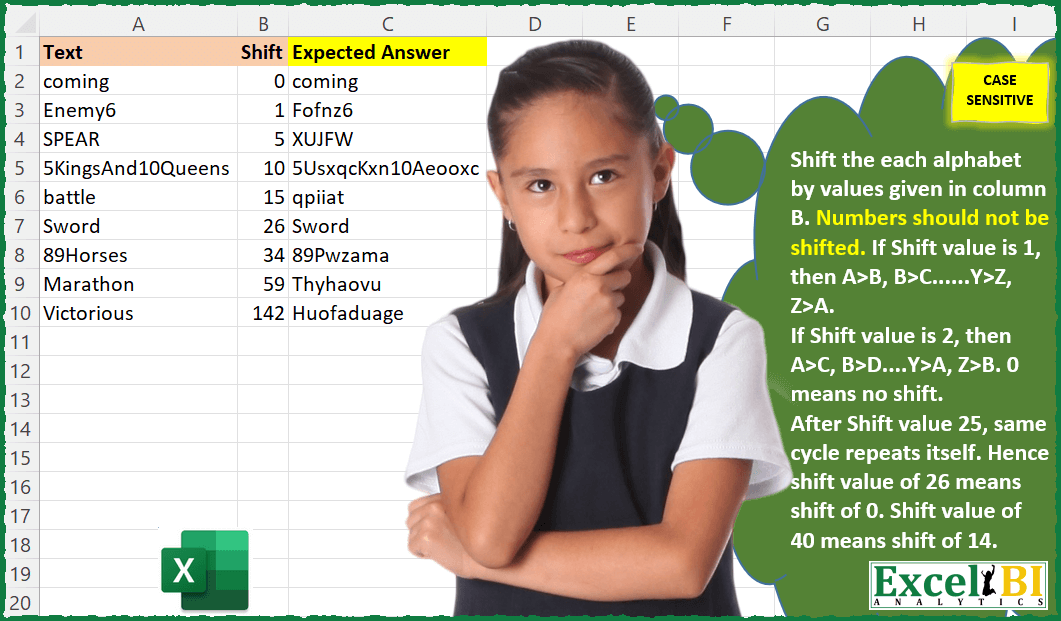
Caesar’s Cipher – This is second challenge on Caesar’s cipher. Shift the each alphabet by values given in column B. If Shift value is 1, then A>B, B>C……Y>Z, Z>A. If Shift value is 2, then A>C, B>D….Y>A, Z>B. 0 means no shift. After Shift value of 25, same cycle repeats itself. Hence shift value of 26 means shift of 0. Shift value of 40 means shift of 14. Numbers should not be shifted. This is case sensitive, hence a shift of 2 will change A to C not to c.
📌 Challenge Details and Links
ExcelBI Excel Challenge Number: 26
Challenge Difficulty: ⭐️⭐️⭐️
📥Download Sample File
📥Link to the solutions on LinkedIn
Solving the challenge of Apply Caesar Cipher with Shift with Power Query
Power Query solution 1 for Apply Caesar Cipher with Shift, proposed by Aditya Kumar Darak 🇮🇳:
let
  Source = Excel.CurrentWorkbook(){[Name = "data"]}[Content],
  List = {"A" .. "Z", "A" .. "Z", "a" .. "z", "a" .. "z"},
  Return = Table.AddColumn(
    Source,
    "Answer",
    each [
      Split   = Text.ToList([Text]),
      Shift   = Number.Mod([Shift] - 1, 26) + 1,
      Char    = List.Range(List, Shift, 26) & List.Range(List, Shift + 52, 26),
      Zip     = List.Zip({List.Distinct(List), Char}),
      Replace = List.ReplaceMatchingItems(Split, Zip),
      Combine = Text.Combine(Replace)
    ][Combine]
  )
in
  Return
Power Query solution 2 for Apply Caesar Cipher with Shift, proposed by Alejandro Simón 🇵🇦 🇪🇸:
let
  Source = Excel.CurrentWorkbook(){[Name = "Table1"]}[Content],
  Solucion = Table.AddColumn(
    Source,
    "Expected Answer",
    each
      let
        a = _,
        b = Number.Mod(a[Shift], 26),
        c = {"A" .. "Z"},
        d = {"a" .. "z"},
        e = Text.ToList(a[Text]),
        f = Text.Combine(
          List.Transform(
            e,
            each
              if List.Contains(c, _) then
                c{Number.Mod(List.PositionOf(c, _) + b, 26)}
              else if not List.Contains(d, _) then
                _
              else
                d{Number.Mod(List.PositionOf(d, _) + b, 26)}
          ),
          ""
        )
      in
        f
  )
in
  Solucion
Power Query solution 3 for Apply Caesar Cipher with Shift, proposed by Melissa de Korte:
let
  UPPER = List.Buffer(List.Repeat({"A" .. "Z"}, 2)),
  lower = List.Buffer(List.Repeat({"a" .. "z"}, 2)),
  Source = Excel.CurrentWorkbook(){[Name = "Table1"]}[Content],
  Result = Table.AddColumn(
    Source,
    "Result",
    each [
      t = Text.ToList([Text]),
      s = Number.Mod([Shift], 26),
      r = Text.Combine(
        List.Transform(
          t,
          each
            if List.Contains(UPPER, _) then
              List.Skip(UPPER, List.PositionOf(UPPER, _) + s){0}
            else if List.Contains(lower, _) then
              List.Skip(lower, List.PositionOf(lower, _) + s){0}
            else
              _
        )
      )
    ][r]
  )
in
  Result
Power Query solution 4 for Apply Caesar Cipher with Shift, proposed by Hristo Tsenov:
let
  Source = Excel.CurrentWorkbook(){[Name = "Table1"]}[Content],
  Upper = {"a" .. "z"},
  #"Expand" = Table.ExpandListColumn(
    Table.AddColumn(Source, "Char", each Text.ToList([Text])),
    "Char"
  ),
  Columns = Table.AddColumn(
    Table.AddColumn(
      Table.AddColumn(
        Table.TransformColumns(
          Table.AddColumn(#"Expand", "Check", each Text.PositionOfAny([Char], {"A" .. "Z"}) = - 1),
          {{"Char", Text.Lower, type text}}
        ),
        "Pos",
        each List.PositionOf(Upper, [Char]) + 1
      ),
      "Real",
      each if [Shift] > 25 then [Shift] - 26 else [Shift]
    ),
    "Change",
    each
      if [Pos] = 0 then
        0
      else if [Pos] + [Real] < 27 then
        [Pos] + [Real]
      else
        Number.Mod([Pos] + [Real], 26)
  ),
  #"Convert" = Table.FromList(#"Upper", Splitter.SplitByNothing(), null, null, ExtraValues.Error),
  #"Expand2" = Table.ExpandTableColumn(
    Table.NestedJoin(
      Table.AddIndexColumn(Columns, "Index", 1, 1, Int64.Type),
      {"Change"},
      Table.AddIndexColumn(#"Convert", "Index", 1, 1, Int64.Type),
      {"Index"},
      "Added Index1",
      JoinKind.LeftOuter
    ),
    "Added Index1",
    {"Column1"},
    {"Col"}
  ),
  #"Group" = Table.Group(
    Table.Sort(
      Table.AddColumn(
        #"Expand2",
        "Cus",
        each if [Change] = 0 then [Char] else if [Check] = true then [Col] else Text.Upper([Col])
      ),
      {{"Index", Order.Ascending}}
    ),
    {"Text"},
    {{"Result", each Text.Combine([Cus], ""), type text}}
  )
in
  #"Group"
Solving the challenge of Apply Caesar Cipher with Shift with Excel
Excel solution 1 for Apply Caesar Cipher with Shift, proposed by Rick Rothstein:
=BYROW(
    A2:A10,
    LAMBDA(
        x,
        LET(
            L,
            MID(
                x,
                SEQUENCE(
                    LEN(
                        x
                    )
                ),
                1
            ),
            C,
            CODE(
                L
            )+MOD(
                OFFSET(
                    x,
                    ,
                    1
                ),
                26
            ),
            CONCAT(
                IFERROR(
                    0+L,
                    CHAR(
                        C-IF(
                            C>122-IF(
                                EXACT(
                                    L,
                                    UPPER(
                L
            )
                                ),
                                32
                            ),
                            26
                        )
                    )
                )
            )
        )
    )
)
Excel solution 2 for Apply Caesar Cipher with Shift, proposed by John V.:
=MAP(A2:A10,
    B2:B10,
    LAMBDA(a,
    b,
    LET(c,
    CODE(
        MID(
            a,
            SEQUENCE(
                LEN(
                    a
                )
            ),
            1
        )
    ),
    n,
    97-32*(c<91),
    CONCAT(
        CHAR(
            IF(
                c<58,
                c,
                n+MOD(
                    c+b-n,
                    26
                )
            )
        )
    ))))
Excel solution 3 for Apply Caesar Cipher with Shift, proposed by محمد حلمي:
=MAP(A2:A10,B2:B10,LAMBDA(a,b,
LET(
m,MID(a,SEQUENCE(LEN(a)),1),
a,CODE(LOWER(m)),
v,CHAR(IF((a>96)*(a<123),MOD(a+b-97,26)+97,a)),
CONCAT(IF(CODE(v)-CODE(m)>15,UPPER(v),v)))))
Excel solution 4 for Apply Caesar Cipher with Shift, proposed by Julian Poeltl:
=MAP(A2:A10,B2:B10,LAMBDA(T,S,LET(SP,CODE(MID(T,SEQUENCE(LEN(T)),1)),CONCAT(CHAR(IFS((SP>96)*(SP<123),MOD(SP-97+S,26)+97,(SP>64)*(SP<91),MOD(SP-65+S,26)+65,1,SP))))))Excel solution 5 for Apply Caesar Cipher with Shift, proposed by Aditya Kumar Darak 🇮🇳:
= MAP(
 A2:A10,
 B2:B10,
 LAMBDA(
 text,
 shift,
 LET(
 _splt,
 MID(text, SEQUENCE(LEN(text)), 1),
 _code,
 CODE(_splt),
 _low,
 MAP(_code, LAMBDA(a, MAX(FLOOR.MATH(a, {64,96})))),
 _shift,
 IF((_code > 64) * (_code < 91) + (_code > 96) * (_code < 123),
 _low + MOD(shift + _code - _low - 1, 26) + 1,
 _code),
 CONCAT(CHAR(_shift)))))
Excel solution 6 for Apply Caesar Cipher with Shift, proposed by Timothée BLIOT:
=CONCAT(
LET(
Word,
    A2,

Shift,
    B2,


Letters,
    CHAR(
        SEQUENCE(
            ,
            26,
            65,
            1
        )
    ),

Shifting,
    B2-((ROUNDDOWN(
        Shift/26,
        0
    ))*26),


Characters,
    TRANSPOSE(
        MID(
            Word,
            SEQUENCE(
                LEN(
                    Word
                )
            ),
            1
        )
    ),

UpperLower,
    IF(
        EXACT(
            UPPER(
                Characters
            ),
            Characters
        ),
        1,
        0
    ),

AlphabetPositions,
     IFERROR(
         MATCH(
             Characters,
             Letters,
             0
         ),
         "NA"
     ),


ShiftedPositions,
    IFERROR(
        IF(
            AlphabetPositions+Shifting>26,
            AlphabetPositions+Shifting-26,
            AlphabetPositions+Shifting
        ),
        "NA"
    ),


ShiftedCharacters,
    IFERROR(
        INDEX(
            Letters,
            1,
            ShiftedPositions
        ),
        MID(
            Word,
            SEQUENCE(
                ,
                COLUMNS(
                    ShiftedPositions
                )
            ),
            1
        )
    ),


ShiftedCharactersUpperLowered,
    IF(
        UpperLower=1,
        UPPER(
            ShiftedCharacters
        ),
        LOWER(
            ShiftedCharacters
        )
    ),


ShiftedCharactersUpperLowered))
Excel solution 7 for Apply Caesar Cipher with Shift, proposed by Bhavya Gupta:
=MAP(A2:A10,B2:B10,LAMBDA(Text,Shift,LET(a,CODE(MID(Text,SEQUENCE(LEN(Text)),1)),CONCAT(CHAR(IFS((a>97)*(a<122),MOD(MOD(a,97)+MOD(Shift,26),26)+97,(a>64)*(a<91),MOD(MOD(a,65)+MOD(Shift,26),26)+65,TRUE,a))))))Excel solution 8 for Apply Caesar Cipher with Shift, proposed by Charles Roldan:
=MAP(A2:A10,B2:B10,LAMBDA(Text,Shift,LET(
Table,{1;65;91;97;123},
Code,CODE(MID(Text,SEQUENCE(LEN(Text)),1)),
TableMatch,MATCH(Code,Table),
Letter,Code-INDEX(Table,TableMatch),
CodeShift,(MOD(Letter+Shift,26)-Letter)*ISEVEN(TableMatch),
CONCAT(CHAR(Code+CodeShift)))))
Excel solution 9 for Apply Caesar Cipher with Shift, proposed by Cary Ballard, DML:
=MAP(A2:A10,
     B2:B10,

 LAMBDA(t,
    s,

 LET(
 a,
     MID(
         t,
          SEQUENCE(
              LEN(
                  t
              )
          ),
          1
     ),

 b,
     CODE(
         a
     ),

 f,
     LAMBDA(
         x,
          MOD(
              b + s - x,
               26
          ) + x
     ),

 c,
     IFS(ISNUMBER(
         --a
     ),
     b,
     (b > 65) * (b < 90),
     f(
         65
     ),
     1,
     f(
         97
     )),

 CONCAT(
     CHAR(
         c
     )
 )
 )
 )
)
Excel solution 10 for Apply Caesar Cipher with Shift, proposed by Riley Johnson:
=LET(
 texts, Table1[Text],
 shifts, Table1[Shift],

 _ALPHA_COUNT, 26,
 _NUMERICS_COUNT, 10,
 _LOWERS,    SEQUENCE( _ALPHA_COUNT,     , CODE("a") ),
 _UPPERS,    SEQUENCE( _ALPHA_COUNT,     , CODE("A") ),
 _NUMERICS,  SEQUENCE( _NUMERICS_COUNT,  , CODE("0") ),

 _shifter, LAMBDA(_pos,_shift,
 IF( MOD( _pos + _shift, _ALPHA_COUNT ) = 0,
 _ALPHA_COUNT,
 MOD( _pos + _shift, _ALPHA_COUNT )
 )
 ),

 _cipher, LAMBDA(_text,_shift,
 LET(
 _codes, CODE( MID( _text, SEQUENCE( LEN( _text ) ), 1 ) ),

 _lo_char_pos, XMATCH( _codes, _LOWERS, 0),
 _up_char_pos, XMATCH( _codes, _UPPERS, 0),

 _new_lo_pos, _shifter( _lo_char_pos, _shift ),
 _new_up_pos, _shifter( _up_char_pos, _shift ),

 _shifted_codes, IFS(
 ISNUMBER( _lo_char_pos ), INDEX( _LOWERS, _new_lo_pos ),
 ISNUMBER( _up_char_pos ), INDEX( _UPPERS, _new_up_pos ),
 TRUE, _codes
 ),

 _result, CONCAT( CHAR( _shifted_codes ) ),
 _result
 )
 ),

 MAP( texts, shifts, _cipher )
)
Excel solution 11 for Apply Caesar Cipher with Shift, proposed by Gonnie Levy - Tuurenhout:
=IF(
    AND(
        SUM(
            B2:D2
        )=15;
        SUM(
            B3:D3
        )=15;
        SUM(
            B4:D4
        )=15;
        SUM(
            B2:B4
        )=15;
        SUM(
            C2:C4
        )=15;
        SUM(
            D2:D4
        )=15;
        SUM(
            B2;
            C3;
            D4
        )=15;
        SUM(
            D2;
            C3;
            B4
        )=15
    );
    "Yes";
    "No"
) there is a shorter solution;


=IF(
    SUMPRODUCT(
        B2:B4;
        C2:C4;
        D2:D4
    )+SUM(
            B2;
            C3;
            D4
        )=240;
    "Yes";
    "No"
)