
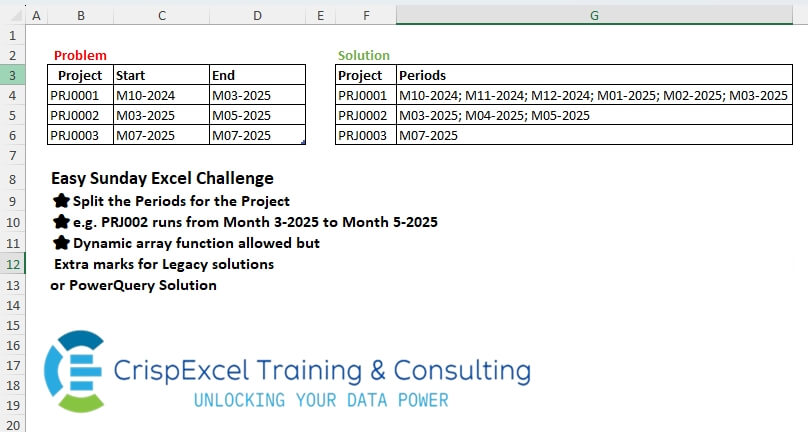
Create Weekly Date Groups and Sum A Week runs from Monday to Sunday Dynamic array function allowed, but Extra marks for Legacy solutions or PowerQuery Solution
📌 Challenge Details and Links
Challenge Number: 74
Challenge Difficulty: ⭐⭐
📥Download Sample File
📥Link to the solutions on LinkedIn
Solving the challenge of Split Periods For The Project with Power Query
Power Query solution 1 for Split Periods For The Project, proposed by Kris Jaganah:
let
  A = Excel.CurrentWorkbook(){[Name = "Swipes"]}[Content],
  B = Table.AddColumn(
    A,
    "Week Dates",
    each [
      a = Date.From([Date]),
      b = (x, y) => Date.ToText(Date.AddDays(Date.From(x), y), [Format = "dd-MM-yyyy"]),
      c = b(a, - Date.DayOfWeek(a)),
      d = c & " - " & b(c, 6)
    ][d]
  ),
  C = Table.Group(B, {"Staff No.", "Week Dates"}, {"Total Hours", each List.Sum([Worked Hours])})
in
  C
Power Query solution 2 for Split Periods For The Project, proposed by Alejandro Simón 🇵🇦 🇪🇸:
let
Source = Excel.CurrentWorkbook(){[Name="Swipes"]}[Content],
Week = Table.AddColumn(Source, "Week", each
 let
 a = List.Transform(Text.Split([Date], "-"), Number.From),
 b = Date.WeekOfYear(
hashtag
#date(a{2},a{1},a{0}),1)
 in b),
Sol = Table.Combine(Table.Group(Week, {"Week"}, {{"A", each
 let
 a = [#"Staff No."]{0},
 b = [Date]{0}&" - "&List.Last([Date]),
 c = List.Sum([Worked Hours]),
 d = Table.FromColumns({{a},{b},{c}}, {"Staff No.", "Dates", "Total Hours"})
 in d}})[A])
in
Sol
Power Query solution 3 for Split Periods For The Project, proposed by Meganathan Elumalai:
let
  Source = Excel.CurrentWorkbook(){[Name = "Swipes"]}[Content],
  Tbl = Table.AddColumn(Source, "WeekNum", (f) => Date.WeekOfYear(Date.From(f[Date]), 1)),
  Result = Table.RemoveColumns(
    Table.Group(
      Tbl,
      {"Staff No.", "WeekNum"},
      {
        {
          "Week Dates",
          each [
            dtt = Date.ToText,
            df  = Duration.From,
            dt  = Date.From(List.Min([Date])),
            sd  = dt - df(Date.DayOfWeek(dt, 1)),
            fin = dtt(sd) & " - " & dtt(sd + df(6))
          ][fin]
        },
        {"Total Hrs", each List.Sum([Worked Hours])}
      }
    ),
    {"WeekNum"}
  )
in
  Result
Power Query solution 4 for Split Periods For The Project, proposed by Peter Krkos:
let first = Date.StartOfWeek(_{0}[Date], Day.Monday), b = Text.Combine({f(first), f(Date.AddDays(first, 6)) }, " - ") in {_{0}[#"Staff No."], b, List.Sum([Worked Hours])}
 ][a], type table}}, 0,
 (x,y)=> Value.Compare(Date.WeekOfYear(y), Date.WeekOfYear(x)))[L], type table[#"Staff No."=text, Week Dates=text, Total Hours=Int64.Type])
Power Query solution 5 for Split Periods For The Project, proposed by Alexandre Garcia:
let
  A = Excel.CurrentWorkbook(){[Name = "Swipes"]}[Content],
  B = [Format = "dd-MM-yyyy"],
  C = (x, y) => Date.ToText(x(y, 1), B),
  D = Table.ToList(
    A,
    each {
      _{0},
      ((x) => C(Date.StartOfWeek, x) & " - " & C(Date.EndOfWeek, x))(Date.FromText(_{1}, B)),
      _{2}
    }
  ),
  E = Table.FromList(
    List.Distinct(List.Transform(D, each _{1})),
    (x) => {D{0}{0}, x, List.Sum(List.Zip(List.Select(D, each _{1} = x)){2})},
    {"Staff No.", "Week Dates", "Total Hours"}
  )
in
  E
Power Query solution 6 for Split Periods For The Project, proposed by Maciej Kopczyński:
let
  source = Excel.CurrentWorkbook(){[Name = "tblStart"]}[Content],
  changeDataTypes = Table.TransformColumnTypes(source, {{"Date", type date}}),
  weekDates = Table.AddColumn(
    changeDataTypes,
    "Week Dates",
    each Date.ToText(Date.StartOfWeek([Date]), "dd-MM-yyy")
      & " - "
      & Date.ToText(Date.AddDays(Date.StartOfWeek([Date]), 6), "dd-MM-yyyy"),
    type text
  ),
  grouping = Table.Group(
    weekDates,
    {"Staff No.", "Week Dates"},
    {{"Total Hours", each List.Sum([Worked Hours]), type number}}
  )
in
  grouping
Power Query solution 7 for Split Periods For The Project, proposed by Aleksandar Kovacevic:
leted 29-02-2025.
let
 Source = Excel.CurrentWorkbook(){[Name="Swipes"]}[Content],
 Corr =
 Table.TransformColumns(
 Table.SelectRows(
 Source, each ([Date] <> "29-02-2025")
 ),
 { "Date", each
hashtag
#date( Number.From( Text.End( _, 4 ) ), Number.From( Text.Middle( _, 4, 1 ) ), Number.From( Text.Start( _, 2 ) ) ) }
 ),
 Grp =
 Table.Group(
 Corr,
 "Date",
 {
 { "Staff No.", each _[#"Staff No."]{0} },
 { "Week Dates", each Text.Combine( { Text.From( Date.StartOfWeek( _[Date]{0} ) ), Text.From( Date.EndOfWeek( _[Date]{0} ) ) }, " - " ) },
 { "Tottal Hours", each List.Sum( _[Worked Hours] ) }
 },
 0,
 ( x, y ) => Value.Compare( Date.StartOfWeek( x ) , Date.StartOfWeek( y ) )
 ),
 Res = Table.RemoveColumns( Grp, "Date" )
in
 Res
Solving the challenge of Split Periods For The Project with Excel
Excel solution 1 for Split Periods For The Project, proposed by Kris Jaganah:
=LET(
   a,
   SCAN(
       ,
       --Swipes[Date],
       LAMBDA(
           x,
           y,
           IF(
               y>=x+7,
               x+7,
               x))),
   b,
   "dd-mm-yyyy",
   c,
   TEXT(
       a,
       b)&" - "&TEXT(
       a+6,
       b),
   VSTACK(
       {"Staff No.",
       "Week Dates",
       "Total Hours"},
       DROP(
           GROUPBY(
               HSTACK(
                   a,
                   Swipes[Staff No.],
                   c),
               Swipes[Worked Hours],
               SUM,
               ,
               0),
           ,
           1)))
Excel solution 2 for Split Periods For The Project, proposed by Hussein SATOUR:
=LET(
   d,
   C4:C23,
   f,
   LAMBDA(
       x,
       TEXT(
           d-WEEKDAY(
               d,
               2)+x,
           "dd-mm-e")),
   DROP(
       GROUPBY(
           HSTACK(
               WEEKNUM(
                   +d,
                   2),
               B4:B23,
               f(
                   1)&" - "&f(
                   7)),
           D4:D23,
           SUM),
       -1,
       1))
Excel solution 3 for Split Periods For The Project, proposed by Oscar Mendez Roca Farell:
=LET(
   w,
   C4+7*MOD(
       ISOWEEKNUM(
           +C4:C23),
       8),
   t,
   "dd-mm-e",
    DROP(
        GROUPBY(
            HSTACK(
                w,
                B4:B23,
                TEXT(
                    w,
                    t)&" - "&TEXT(
                    w+6,
                    t)),
             D4:D23,
            SUM,
            ,
            0),
        ,
        1))
Excel solution 4 for Split Periods For The Project, proposed by Sunny Baggu:
=LET(

    _d,
    DATE(

         RIGHT(
             Swipes[Date],
              4),

         MID(
             Swipes[Date],
              4,
              2),

         LEFT(
             Swipes[Date],
              2)
         ),

    _a,
    INDEX(
        _d,
         1,
         1),

    _b,
    INDEX(
        _d,
         ROWS(
             _d),
         1),

    _s,
    SEQUENCE(
        _b - _a + 1,
         ,
         _a),

    _c,
    WRAPCOLS(
        _s,
         7),

    _wd,
    TOCOL(

         BYCOL(

              _c,

              LAMBDA(
                  a,

                   TEXT(
                       TAKE(
                           a,
                            1),
                        "dd-mm-yyyy") & " - " &
                   TEXT(
                       TAKE(
                           a,
                            -1),
                        "dd-mm-yyyy")
                   )
              )
         ),

    _h,
    TOCOL(

         BYCOL(

              XLOOKUP(
                  _c,
                   _d,
                   Swipes[Worked Hours],
                   0),

              LAMBDA(
                  a,
                   SUM(
                       a))
              )
         ),

    HSTACK(
        IF(
            _h,
             B4),
         _wd,
         _h)
   )
Excel solution 5 for Split Periods For The Project, proposed by Pieter de B.:
=LET(
   a,
   BYROW(
       MID(
           C4:C23,
           {4,
           1,
           9},
           2),
       LAMBDA(
           b,
           TEXTJOIN(
               "/",
               ,
               b))),
   x,
   a-MOD(
       a-2,
       7),
   DROP(
       GROUPBY(
           HSTACK(
               WEEKNUM(
                   x),
               B4:B23,
               MAP(
                   x,
                   LAMBDA(
                       b,
                       TEXTJOIN(
                           " - ",
                           ,
                           TEXT(
                               b+{0,
                               6},
                               "dd-mm-e"))))),
           D4:D23,
           SUM),
       -1,
       1))
Excel solution 6 for Split Periods For The Project, proposed by Hamidi Hamid:
=LET(
   z,
   IFERROR(
       --C4:C23,
       C5:C24-1)-1,
   ns,
   WEEKNUM(
       z*1,
       11),
   x,
   DROP(
       GROUPBY(
           HSTACK(
               B4:B23,
               ns),
           z,
           MIN,
           ,
           0),
       1),
   y,
   IFERROR(
       --C4:C23,
       --C5:C24-1)+2,
   w,
   DROP(
       GROUPBY(
           HSTACK(
               B4:B23,
               WEEKNUM(
                   y*1,
                   11)),
           y,
           MAX,
           ,
           0),
       -1),
   q,
   SUBSTITUTE(
       BYROW(
           TEXT(
               HSTACK(
                   TAKE(
                       x,
                       ,
                       -1),
                   TAKE(
                       w,
                       ,
                       -1)),
               "dd-mm-yyyy"),
           ARRAYTOTEXT),
       ", ",
       " - "),
   e,
   HSTACK(
       CHOOSECOLS(
           w,
           1),
       q,
       TAKE(
           GROUPBY(
               WEEKNUM(
                   z+1,
                   11),
               D4:D23,
               SUM,
               ,
               0),
           ,
           -1)),
   e)
Excel solution 7 for Split Periods For The Project, proposed by Asheesh Pahwa:
=LET(
   d,
   MID(
       C4:C23,
       {1,
       4,
       7},
       {2,
       2,
       4}),

   dt,
   DATE(
       TAKE(
           d,
           ,
           -1),
       INDEX(
           d,
           ,
           2),
       TAKE(
           d,
           ,
           1)),
   s,
   SEQUENCE(
       MAX(
           dt)-MIN(
           dt)+1,
       ,
       MIN(
           dt)),
   I,
   IF(
       WEEKDAY(
           s,
           2)=7,
       1,
       0),
   v,
   VSTACK(
       1,
       DROP(
           SCAN(
               1,
               I,
               LAMBDA(
                   x,
                   y,
                   x+y)),
           -1)),
   w,
   XLOOKUP(
       s,
       dt,
       D4:D23,
       ""),
   REDUCE(
       F3:H3,
       UNIQUE(
           v),
       LAMBDA(
           x,
           y,
           VSTACK(
               x,
               LET(
                   f,
                   FILTER(
                       HSTACK(
                           s,
                           w),
                       v=y),
                   t,
                   TAKE(
                       f,
                       ,
                       1),
                   HSTACK(
                       B4,
                       TAKE(
                           t,
                           1)&"-"&TAKE(
                           t,
                           -1),
                       SUM(
                           TAKE(
                               f,
                               ,
                               -1))))))))
Excel solution 8 for Split Periods For The Project, proposed by Meganathan Elumalai:
=DROP(
   GROUPBY(
       HSTACK(
           WEEKNUM(
               +C4:C23,
               2),
           B4:B23),
       C4:D23,
       HSTACK(
           LAMBDA(
               n,
               LET(
                   b,
                   @n-WEEKDAY(
                       @n,
                       2)+1,
                   fm,
                   "dd-mm-e",
                   TEXT(
                       b,
                       fm)&"-"&TEXT(
                       b+6,
                       fm))),
           SUM),
       0,
       0),
   1,
   1)
Excel solution 9 for Split Periods For The Project, proposed by Ernesto Vega Castillo:
=LET(
   a,
   B4:B23,
   b,
   C4:C23,
   c,
   D4:D23,
   d,
   BYROW(
       b,
       LAMBDA(
           x,
           x-WEEKDAY(
               x,
               2)+1)),
   e,
   TEXT(
       d,
       "dd-mm-e")&" - "&TEXT(
       b-WEEKDAY(
           b,
           2)+7,
       "dd-mm-e"),
   CHOOSECOLS(
       GROUPBY(
           HSTACK(
               a,
               d,
               e),
           c,
           SUM,
           0,
           0),
       1,
       3,
       4))
Solving the challenge of Split Periods For The Project with Python
Python solution 1 for Split Periods For The Project, proposed by Konrad Gryczan, PhD:
import pandas as pd
import numpy as np
path = "files/Challenge1425.xlsx"
input = pd.read_excel(path, usecols="B:D", skiprows=2, nrows=21)
test = pd.read_excel(path, usecols="F:H", skiprows=2, nrows=4)
input['Date'] = input['Date'].str.replace("29-02", "27-02", regex=False)
input['Date'] = pd.to_datetime(input['Date'], format='%d-%m-%Y')
date_range = pd.date_range(start=input['Date'].min(), end=input['Date'].max(), freq='D')
seq = pd.DataFrame({'Date': date_range})
seq = seq.merge(input, on='Date', how='left')
seq['Staff No.'] = seq['Staff No.'].ffill()
seq['week'] = seq['Date'].dt.isocalendar().week
summary = (
 seq.groupby(['Staff No.', 'week'])
 .agg(
 **{
 'Total Hours': ('Worked Hours', lambda x: x.sum(skipna=True)),
 'Week Dates': ('Date', lambda x: f"{x.min().strftime('%Y-%m-%d')} - {x.max().strftime('%Y-%m-%d')}")
 }
 )
 .reset_index()
)
summary = summary[['Staff No.', 'Week Dates', 'Total Hours']]
Solving the challenge of Split Periods For The Project with Python in Excel
Python in Excel solution 1 for Split Periods For The Project, proposed by Alejandro Campos:
#PY
df = xl("Swipes[
#Todo]", headers=True)
df['Date'] = pd.to_datetime(df['Date'], format='%d-%m-%Y', dayfirst=True, errors='coerce')
weekly_hours = df.groupby(pd.Grouper(key='Date', freq='W')).sum()
formatted_result = pd.DataFrame({
 "Staff No.": ['CAS0002'] * len(weekly_hours),
 "Week Dates": [f"{(week_end - pd.Timedelta(days=6)).strftime('%d-%m-%Y')} - {week_end.strftime('%d-%m-%Y')}" for week_end in weekly_hours.index],
 "Total Hours": weekly_hours['Worked Hours'].apply(lambda x: f'{x:.2f}'.replace('.', ','))})
formatted_result.reset_index(drop=True, inplace=True)
formatted_result
Python in Excel solution 2 for Split Periods For The Project, proposed by Aditya Kumar Darak 🇮🇳:
#PythonInExcel
Note: I have changed 29-02-2025 to 28-02-2025.
df = xl("Swipes[
#All]", headers=True)
df["Date"] = pd.to_datetime(df["Date"], format="%d-%m-%Y")
df["Week"] = df["Date"].dt.to_period("W-SUN")
grouped = df.groupby(["Staff No.", "Week"])["Worked Hours"].sum().reset_index()
grouped["Week Dates"] = grouped["Week"].apply(
 lambda p: f"{p.start_time.strftime('%d-%m-%Y')} - {p.end_time.strftime('%d-%m-%Y')}"
)
result = grouped[["Staff No.", "Week Dates", "Worked Hours"]]
result.rename(columns={"Worked Hours": "Total Hours"}, inplace=True)
result
Python in Excel solution 3 for Split Periods For The Project, proposed by Mey Tithveasna:
PY()
df = xl("B3:D23", headers=True)
df['Date'] = pd.to_datetime(df['Date'], format='%d-%m-%Y')
df['Week Start'] = df['Date'] - pd.to_timedelta(df['Date'].dt.weekday, unit='D')
weekly_sum = df.groupby('Week Start').agg({'Worked Hours': 'sum'}).reset_index()
weekly_sum['Week Range'] = weekly_sum['Week Start'].dt.strftime('%d-%m-%Y') + ' - ' + (weekly_sum['Week Start'] + pd.Timedelta(days=6)).dt.strftime('%d-%m-%Y')
print(weekly_sum[['Week Range', 'Worked Hours']])
Python in Excel solution 4 for Split Periods For The Project, proposed by Mey Tithveasna:
Abdallah Ally
# df = xl("B3:D23", headers=True)
# Convert 'Date' to datetime format
df['Date'] = pd.to_datetime(df['Date'], format='%d-%m-%Y')
df['Week Start'] = df['Date'] - pd.to_timedelta(df['Date'].dt.weekday, unit='D')
weekly_sum = df.groupby('Week Start').agg({'Worked Hours': 'sum'}).reset_index()
weekly_sum['Week Range'] = weekly_sum['Week Start'].dt.strftime('%d-%m-%Y') + ' - ' + (weekly_sum['Week Start'] + pd.Timedelta(days=6)).dt.strftime('%d-%m-%Y')
print(weekly_sum[['Week Range', 'Worked Hours']])
Solving the challenge of Split Periods For The Project with R
R solution 1 for Split Periods For The Project, proposed by Konrad Gryczan, PhD:
library(tidyverse)
library(readxl)
path = "files/Challenge1425.xlsx"
input = read_excel(path, range = "B3:D23")
test = read_excel(path, range = "F3:H7")
input = input %>%
 mutate(Date = str_replace(Date, "29-02", "27-02") %>% dmy())
seq = seq.Date(min(input$Date), max(input$Date), by = "1 day") %>%
 data.frame(Date = .) %>%
 left_join(input, by = "Date") %>%
 fill(`Staff No.`, .direction = "down") %>%
 mutate(week = isoweek(Date)) %>%
 summarise(`Total Hours` = sum(`Worked Hours`, na.rm = TRUE),
 `Week Dates` = paste(min(Date), max(Date), sep = " - "),
 .by = c("Staff No.", "week")) %>%
 select(1,4,3)
R solution 2 for Split Periods For The Project, proposed by ferhat CK:
=LET(a,HSTACK(BYROW(Swipes[Date],LAMBDA(x,WEEKNUM(x,11))),Swipes[Staff No.]),b,DROP(GROUPBY(a,--C4:C23,HSTACK(MIN,MAX),0,0,,,),1,2),n,WEEKDAY(b,2)*{-1,-1},c,b+IF(n<-3,7+n,1+n),HSTACK(TAKE(a,4,-1),TEXT(TAKE(c,,1),"dd-mm-yyyy")&" - "&TEXT(TAKE(c,,-1),"dd-mm-yyyy"),DROP(GROUPBY(a,Swipes[Worked Hours],SUM),-1,2)))