
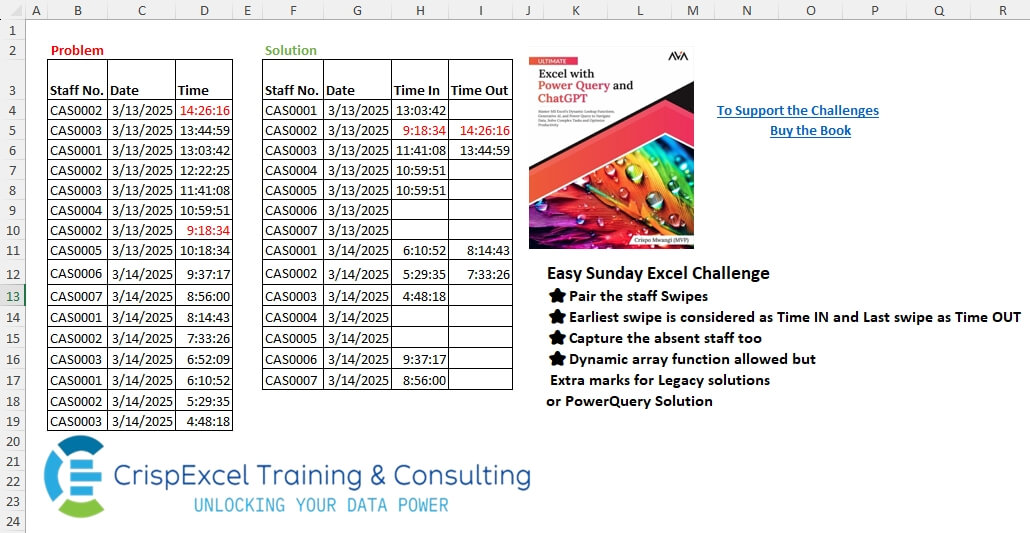
Pair the staff Swipes. The earliest swipe is considered as Time IN and the Last swipe as Time OUT Capture the absent staff, too. Dynamic array function allowed, but Extra marks for Legacy solutions or PowerQuery Solutions.
📌 Challenge Details and Links
Challenge Number: 73
Challenge Difficulty: ⭐⭐
📥Download Sample File
📥Link to the solutions on LinkedIn
Solving the challenge of Pair Swipes with Power Query
Power Query solution 1 for Pair Swipes, proposed by Zoran Milokanović:
let
  Source = Excel.CurrentWorkbook(){[Name = "Input"]}[Content],
  P = List.Transform(Table.ToColumns(Source), List.Distinct),
  _ = Table.Sort(
    Table.Group(
      Source
        & Table.FromRows(
          List.TransformMany(P{1}, each P{0}, (i, _) => {_, i, null}),
          Value.Type(Source)
        ),
      {"Staff No.", "Date"},
      {
        {"Time In", each List.Min([Time])},
        {"Time Out", each {null, List.Max([Time])}{Byte.From(List.NonNullCount([Time]) > 1)}}
      }
    ),
    {"Date", "Staff No."}
  )
in
  _
Power Query solution 2 for Pair Swipes, proposed by Zoran Milokanović:
let
  Source = Table.Group(
    Excel.CurrentWorkbook(){[Name = "Input"]}[Content],
    {"Staff No.", "Date"},
    {{"Time In", each List.Min([Time])}, {"Time Out", each List.Max([Time])}}
  ),
  R = Table.ToRows(Source),
  N = {null, null},
  D = each List.Sort(List.Distinct(List.Zip(R){_})),
  _ = Table.FromRows(
    List.TransformMany(
      D(1),
      each D(0),
      (i, _) => {_, i}
        & List.FirstN(
          List.Distinct(List.LastN(List.Select(R, (r) => r{0} = _ and r{1} = i){0}? ?? N, 2)) & N,
          2
        )
    ),
    Value.Type(Source)
  )
in
  _
Power Query solution 3 for Pair Swipes, proposed by Kris Jaganah:
let
  A = Excel.CurrentWorkbook(){[Name = "Table1"]}[Content],
  B = List.Distinct(A[#"Staff No."]),
  C = List.Distinct(A[Date]),
  D = Table.FromRows(List.TransformMany(B, each C, (x, y) => {x, y}), {"Staff No", "Date"}),
  E = Table.AddColumn(
    D,
    "Ans",
    each [
      a = Table.SelectRows(A, (v) => v[#"Staff No."] = [Staff No] and v[Date] = [Date])[Time],
      b = Time.From(List.Min(a)),
      c = Time.From(List.Max(a)),
      d = if b = c then null else c
    ]
  ),
  F = Table.ExpandRecordColumn(E, "Ans", {"b", "d"}, {"Time In", "Time Out"}),
  G = Table.Sort(F, {{"Date", 0}, {"Staff No", 0}})
in
  G
Power Query solution 4 for Pair Swipes, proposed by Brian Julius:
let
  Source = Excel.CurrentWorkbook(){[Name = "Table1"]}[Content],
  ReType = Table.TransformColumnTypes(
    Source,
    {{"Staff No.", type text}, {"Date", type date}, {"Time", type time}}
  ),
  Group = Table.Group(
    ReType,
    {"Staff No.", "Date"},
    {{"Time In", each List.Min([Time])}, {"TimeOut", each List.Max([Time])}}
  ),
  CrossJ = Table.PrefixColumns(
    Table.AddColumn(
      Table.Distinct(Table.SelectColumns(Group, {"Date"})),
      "Staff No.",
      each Table.Distinct(Table.SelectColumns(Group, {"Staff No."}))
    ),
    "x"
  ),
  Expand = Table.ExpandTableColumn(CrossJ, "x.Staff No.", {"Staff No."}, {"x.Staff No."}),
  Join = Table.Join(
    Expand,
    {"x.Staff No.", "x.Date"},
    Group,
    {"Staff No.", "Date"},
    JoinKind.LeftOuter
  ),
  Rem = Table.RemoveColumns(Join, {"Staff No.", "Date"}),
  Reord = Table.ReorderColumns(Rem, {"x.Staff No.", "x.Date", "Time In", "TimeOut"}),
  Ren = Table.RenameColumns(Reord, {{"x.Staff No.", "Staff No."}, {"x.Date", "Date"}}),
  AddTOut = Table.AddColumn(Ren, "Time Out", each if [Time In] = [TimeOut] then null else [TimeOut]),
  Rem2 = Table.RemoveColumns(AddTOut, {"TimeOut"}),
  Sort = Table.Sort(Rem2, {{"Date", Order.Ascending}, {"Staff No.", Order.Ascending}})
in
  Sort
Power Query solution 5 for Pair Swipes, proposed by Abdallah Ally:
let
  Source = Excel.CurrentWorkbook(){[Name = "Table1"]}[Content],
  Transform = List.TransformMany(
    List.Distinct(List.Sort(Source[Date])),
    each List.Distinct(List.Sort(Source[#"Staff No."])),
    (x, y) => {y, x}
  ),
  FromRows = Table.FromRows(Transform, {"Staff No.", "Date"}),
  AddCol = Table.AddColumn(
    FromRows,
    "Data",
    each [
      a = Table.SelectRows(Source, (x) => x[Date] = [Date] and x[#"Staff No."] = [#"Staff No."]),
      b = {List.Min(a[Time], null), List.Max(a[Time], null)},
      c = [#"Time In" = b{0}, #"Time Out" = if b{0} = b{1} then null else b{1}]
    ][c]
  ),
  Expand = Table.ExpandRecordColumn(AddCol, "Data", {"Time In", "Time Out"}),
  Result = Table.TransformColumnTypes(
    Expand,
    {{"Date", type date}, {"Time In", type time}, {"Time Out", type time}}
  )
in
  Result
Power Query solution 6 for Pair Swipes, proposed by Meganathan Elumalai:
let
  Source = Excel.CurrentWorkbook(){[Name = "Table1"]}[Content],
  Lst = List.TransformMany(
    List.Sort(List.Distinct(Source[#"Staff No."])),
    (x) => List.Distinct(Source[Date]),
    (x, y) => {x, y}
  ),
  Tbl = Table.FromRows(
    List.Sort(
      List.Transform(
        Lst,
        (f) =>
          [
            L = Table.SelectRows(Source, (x) => x[#"Staff No."] = f{0} and x[Date] = f{1})[Time],
            fin = f
              & {
                Time.From(List.Min(L)),
                if List.Max(L) = List.Min(L) then null else Time.From(List.Max(L))
              }
          ][fin]
      ),
      {each _{1}, each _{0}}
    ),
    {"Staff No", "Date", "Time In", "Time Out"}
  ),
  Result = Table.TransformColumnTypes(
    Tbl,
    {{"Date", type date}, {"Time In", type time}, {"Time Out", type time}}
  )
in
  Result
Power Query solution 7 for Pair Swipes, proposed by Peter Krkos:
let
  GroupedRows = Table.Group(
    Source,
    {"Staff No.", "Date"},
    {{"Time In", each List.Min([Time]), type time}, {"Time Out", each List.Max([Time]), type time}}
  ),
  Dates = List.Distinct(GroupedRows[Date]),
  GroupedRows2 = Table.Group(
    GroupedRows,
    {"Staff No."},
    {{"Date", each List.RemoveMatchingItems(Dates, [Date]){0}?, type date}}
  ),
  FilteredRows = Table.SelectRows(GroupedRows2, each ([Date] <> null)),
  Combined = Table.Combine({GroupedRows, FilteredRows}),
  SortedRows = Table.Sort(Combined, {{"Date", Order.Ascending}, {"Staff No.", Order.Ascending}})
in
  SortedRows
Power Query solution 8 for Pair Swipes, proposed by Krzysztof Kominiak:
let
  Source = Excel.CurrentWorkbook(){[Name = "Table1"]}[Content],
  A = Table.TransformColumnTypes(
    Source,
    {{"Staff No.", type text}, {"Date", type date}, {"Time", type time}}
  ),
  B = Table.Group(
    A,
    {"Staff No.", "Date"},
    {
      {
        "NT",
        each [
          #"Time in"  = List.Min([Time]),
          #"Time out" = if List.Count([Time]) = 1 then null else List.Max([Time])
        ]
      }
    }
  ),
  C = Table.Sort(
    Table.ExpandListColumn(
      Table.AddColumn(
        Table.Sort(Table.Distinct(A[[#"Staff No."]]), "Staff No."),
        "Date",
        each List.Sort(List.Distinct(A[Date]))
      ),
      "Date"
    ),
    {{"Date", Order.Ascending}, {"Staff No.", Order.Ascending}}
  ),
  D = Table.NestedJoin(
    C,
    {"Staff No.", "Date"},
    B,
    {"Staff No.", "Date"},
    "Tab",
    JoinKind.LeftOuter
  ),
  E = Table.ExpandTableColumn(D, "Tab", {"NT"}),
  Result = Table.ExpandRecordColumn(E, "NT", {"Time in", "Time out"}, {"Time in", "Time out"})
in
  Result
Power Query solution 9 for Pair Swipes, proposed by Aleksandar Kovacevic:
let
 Source = Excel.CurrentWorkbook(){[Name="Table1"]}[Content],
 Grp =
 Table.ExpandListColumn(
 Table.Group(
 Source,
 {"Staff No."},
 {
 {"All", each _ },
 { "Date", each List.Distinct( Source[Date] ) }
 }
 ),
 "Date"
 ),
 Trs =
 Table.ExpandRecordColumn(
 Table.AddColumn(
 Grp,
 "R",
 each
 [
 L = Table.SelectRows( [All], (x) => _[Date] = x[Date] )[Time],
 Time In = List.Min( L ),
 Time Out = if List.Count( L ) > 1 then List.Max( L ) else null
 ]
 ),
 "R", { "Time In", "Time Out" }
 ),
 Res =
 Table.TransformColumnTypes(
 Table.Sort( Table.RemoveColumns( Trs, { "All" } ), { "Date", "Staff No." } ),
 {{"Staff No.", type text}, {"Date", type date}, {"Time In", type time}, {"Time Out", type time}}
 )
in
Power Query solution 10 for Pair Swipes, proposed by Nelson Mwangi:
let
  Source = Excel.CurrentWorkbook(){[Name = "Table2"]}[Content],
  UniqueStaffNo = Table.Distinct(Table.SelectColumns(Source, {"Staff No."})),
  AddDateList = Table.AddColumn(UniqueStaffNo, "Date", each List.Distinct(Source[Date])),
  ExpandDates = Table.ExpandListColumn(AddDateList, "Date"),
  Group = Table.Group(
    Source,
    {"Staff No.", "Date"},
    {
      {"TimeIn", each List.Min([Time]), type number},
      {"Time_Out", each List.Max([Time]), type number}
    }
  ),
  TimeOut = Table.AddColumn(
    Group,
    "TimeOut",
    each if [TimeIn] = [Time_Out] then null else [Time_Out]
  ),
  LeftJoin = Table.NestedJoin(
    ExpandDates,
    {"Staff No.", "Date"},
    TimeOut,
    {"Staff No.", "Date"},
    "Merge"
  ),
  Expand = Table.ExpandTableColumn(LeftJoin, "Merge", {"TimeIn", "TimeOut"}),
  DataType = Table.TransformColumnTypes(Expand, {{"Date", type date}, {"Staff No.", type text}}),
  Sort = Table.Sort(DataType, {{"Date", Order.Ascending}, {"Staff No.", Order.Ascending}})
in
  Sort
Solving the challenge of Pair Swipes with Excel
Excel solution 1 for Pair Swipes, proposed by Kris Jaganah:
=LET(
   a,
   B4:B19,
   b,
   C4:C19,
   c,
   SORT(
       TOCOL(
           UNIQUE(
               a)&" "&TOROW(
               UNIQUE(
                   b)))),
   d,
   TEXTSPLIT(
       c,
       ,
       " "),
   e,
   --TEXTAFTER(
       c,
       " "),
   f,
   SORT(
       B4:D19,
       3),
   g,
   LAMBDA(
       x,
       XLOOKUP(
           d&e,
           BYROW(
               DROP(
                   f,
                   ,
                   -1),
               CONCAT),
           TAKE(
                   f,
                   ,
                   -1),
           "",
           ,
           x)),
   h,
   g(
       1),
   i,
   g(
       -1),
   VSTACK(
       {"Staff No.",
       "Date",
       "Time In",
       "Time Out"},
       SORT(
           HSTACK(
               d,
               e,
               h,
               IF(
                   h=i,
                   "",
                   i)),
           {2,
           1})))
Excel solution 2 for Pair Swipes, proposed by Hussein SATOUR:
=LET(
   H,
   HSTACK,
   s,
   B4:B19,
   d,
   C4:C19,
   a,
   TEXTSPLIT(
       CONCAT(
           UNIQUE(
               s)&"/"&TOROW(
               UNIQUE(
                   d))&";,"),
       {";",
       "/"},
       ","),
   b,
   DROP(
       IFERROR(
           --a,
           a),
       -1),
   f,
   LAMBDA(
       x,
       y,
       VSTACK(
           x,
           INDEX(
               b,
               ,
               y))),
   DROP(
       GROUPBY(
           H(
               f(
                   d,
                   2),
               f(
                   s,
                   1),
               f(
                   d,
                   2)),
           f(
               D4:D19,
               3),
           H(
               LAMBDA(
                   w,
                   IF(
                       MIN(
                           w)=0,
                       "",
                       MIN(
                           w))),
               LAMBDA(
                   z,
                   IF(
                       MAX(
                           z)=MIN(
                           z),
                       "",
                       MAX(
                           z)))),
           ,
           0),
       ,
       1))
Excel solution 3 for Pair Swipes, proposed by Oscar Mendez Roca Farell:
=LET(
   b,
   B4:B19,
   c,
   C4:C19,
   s,
   SORT(
       UNIQUE(
           b)),
   d,
   TOROW(
       UNIQUE(
           c)),
    F,
   LAMBDA(
       F,
       TOCOL(
           F(
               D4:D19,
               b,
               s,
               c,
               d),
           ,
           1)),
   i,
   F(
       MINIFS),
   a,
   F(
       MAXIFS),
    t,
    TOCOL(
        s&-d,
        ,
        1),
   HSTACK(
       MID(
           t,
           1,
           7),
       --MID(
           t,
           9,
           5),
       IF(
           i,
           i,
           ""),
       IF(
           a-i,
           a,
           "")))
Excel solution 4 for Pair Swipes, proposed by Duy Tùng:
=LET(
   b,
   B4:B19,
   c,
   C4:C19,
   a,
   DROP(
       REDUCE(
           0,
           UNIQUE(
               c),
           LAMBDA(
               x,
               y,
               VSTACK(
                   x,
                   IF(
                       {1,
                       0},
                       SORT(
                           UNIQUE(
                               b)),
                       y)))),
       1),
   f,
   LAMBDA(
       h,
       IFERROR(
           MAP(
               BYROW(
                   a,
                   CONCAT),
               LAMBDA(
                   x,
                   h(
                       FILTER(
                           D4:D19,
                           x=b&c)))),
           "")),
   HSTACK(
       a,
       f(
           MIN),
       IF(
           f(
               MAX)=f(
           MIN),
           "",
           f(
               MAX))))
Excel solution 5 for Pair Swipes, proposed by Pieter de B.:
=LET(
   b,
   B4:B19,
   c,
   C4:C19,
   u,
   UNIQUE,
   x,
   TOCOL(
       u(
           b)&-TOROW(
           u(
               C4:C19))),
   L,
   LAMBDA(
       y,
       XLOOKUP(
           x,
           b&-c,
           D4:D19,
           "",
           ,
           y)),
   s,
   TEXTSPLIT(
       TEXTAFTER(
           "-"&x,
           "-",
           {1,
           2}),
       "-"),
   a,
   L(
       -1),
   z,
   L(
       1),
   SORT(
       GROUPBY(
           IFERROR(
               --s,
               s),
           HSTACK(
               a,
               IFERROR(
                   IF(
                       z-a,
                       z,
                       ""),
                   "")),
           SINGLE,
           ,
           0),
       2))
Excel solution 6 for Pair Swipes, proposed by Hamidi Hamid:
=LET(
   p,
   LAMBDA(
       z,
       m,
       TAKE(
           z,
           ,
           m)),
   x,
   SORT(
       UNIQUE(
           B4:B19)),
   y,
   TOROW(
       UNIQUE(
           C4:C19)),
   f,
   LAMBDA(
       s,
       q,
       TOCOL(
           IFNA(
               s,
               q),
           ,
           1)),
   au,
   HSTACK(
       f(
           x,
           y),
       f(
           y,
           x)),
   tu,
   XLOOKUP(
       p(
           au,
           1)&p(
           au,
           -1),
       B4:B19&C4:C19,
       D4:D19,
       "",
       ,
       {-1,
       1}),
   td,
   IFERROR(
       IF(
           p(
               tu,
               -1)*1=p(
               tu,
               1)*1,
           "",
           p(
               tu,
               -1)),
       ""),
   HSTACK(
       au,
       p(
               tu,
               1),
       td))
Excel solution 7 for Pair Swipes, proposed by Asheesh Pahwa:
=LET(
   a,
   ARRAYTOTEXT(
       MAP(
           UNIQUE(
               C4:C19),
           LAMBDA(
               x,
               ARRAYTOTEXT(
                   SORT(
                       UNIQUE(
                           F4:F17))&"-"&x)))),
   t,
   TEXTSPLIT(
       a,
       "-",
       ", "),
   p,
   B4:B19&C4:C19,
   _t,
   TAKE(
       t,
       ,
       1)&TAKE(
       t,
       ,
       -1),
   u,
   _t,
   HSTACK(
       t,
       IFNA(
           DROP(
               REDUCE(
                   "",
                   _t,
                   LAMBDA(
                       x,
                       y,
                       VSTACK(
                           x,
                           LET(
                               f,
                               FILTER(
                                   D4:D19,
                                   p=y,
                                   ""),
                               s,
                               SORT(
                                   f),
                               IF(
                                   COUNT(
                                       s)>1,
                                   TAKE(
                                       s,
                                       {1,
                                       -1}),
                                   s))))),
               1),
           "")))
Excel solution 8 for Pair Swipes, proposed by Meganathan Elumalai:
=LET(x,
   DROP(
       REDUCE(
           "",
           UNIQUE(
               C4:C19),
           LAMBDA(
               a,
               v,
               VSTACK(
                   a,
                   IF(
                       {1,
                       0},
                       SORT(
                           UNIQUE(
                               B4:B19)),
                       v)))),
       1),
   l,
   LAMBDA(fx,
   MAP(TAKE(
       x,
       ,
       1),
   DROP(
       x,
       ,
       1),
   LAMBDA(p,
   q,
   fx(FILTER(D4:D19,
   (B4:B19=p)*(C4:C19=q),
   0))))),
   HSTACK(
       x,
       l(
           MIN),
       IF(
           l(
               MAX)=l(
           MIN),
           "",
           l(
               MAX))))
Solving the challenge of Pair Swipes with Python
Python solution 1 for Pair Swipes, proposed by Konrad Gryczan, PhD:
import pandas as pd
from itertools import product
from datetime import time
path = "files/Challenge1325.xlsx"
input = pd.read_excel(path, sheet_name=0, usecols="B:D", skiprows=2, nrows=17)
test = pd.read_excel(path, sheet_name=0, usecols="F:I", skiprows=2, nrows=14).rename(columns=lambda x: x.replace('.1', ''))
df = pd.DataFrame(product(input['Staff No.'].unique(), input['Date'].unique()), columns=['Staff No.', 'Date'])
df = df.merge(input, on=['Staff No.', 'Date'], how='left')
df = df.sort_values(by=['Staff No.', 'Date', "Time"]).reset_index(drop=True)
df = df.groupby(['Staff No.', 'Date']).apply(lambda group: group.iloc[[0, -1]]).reset_index(drop=True)
df = df.drop_duplicates().reset_index(drop=True)
df['Count'] = df.groupby(['Staff No.', 'Date']).cumcount() + 1
df_pivot = df.pivot(index=['Staff No.', 'Date'], columns='Count', values='Time').reset_index()
df_pivot = df_pivot.sort_values(by=['Date', 'Staff No.']).reset_index(drop=True)
df_pivot.columns = ['Staff No.', 'Date', 'Time In', 'Time Out']
print(df_pivot)
Solving the challenge of Pair Swipes with Python in Excel
Python in Excel solution 1 for Pair Swipes, proposed by Alejandro Campos:
#PY
df = xl("B3:D19", True)
df["DateTime"] = pd.to_datetime(df["Date"].astype(str) + " " + df["Time"].astype(str))
grouped = df.groupby(["Staff No.", "Date"])["DateTime"].agg(["min", "max"]).reset_index()
grouped.columns = ["Staff No.", "Date", "Time_IN", "Time_OUT"]
grouped[["Time_IN", "Time_OUT"]] = grouped[["Time_IN", "Time_OUT"]].apply(lambda x: x.dt.strftime('%H:%M:%S'))
grouped.loc[grouped["Time_IN"] == grouped["Time_OUT"], "Time_OUT"] = ""
final_df = pd.merge(pd.MultiIndex.from_product([df["Staff No."].unique(), df["Date"].unique()],
 names=["Staff No.", "Date"]).to_frame(index=False), grouped, on=["Staff No.", "Date"], how="left").fillna("")
final_df.sort_values(["Date", "Staff No."]).reset_index(drop=True)
Solving the challenge of Pair Swipes with R
R solution 1 for Pair Swipes, proposed by Konrad Gryczan, PhD:
library(tidyverse)
library(readxl)
path = "files/Challenge1325.xlsx"
input = read_excel(path, range = "B3:D19")
test  = read_excel(path, range = "F3:I17") %>%
 mutate(across(starts_with("Time"), ~hms::as_hms(.)))
expanded = expand.grid(unique(input$`Staff No.`), unique(input$Date)) %>%
 left_join(input, by = c("Var1" = "Staff No.", "Var2" = "Date")) %>%
 mutate(Time = hms::as_hms(Time)) %>%
 arrange(Var1, Var2, Time) %>%
 mutate(n = n(),
 rn = row_number(),
 .by = c("Var1", "Var2")) %>%
 filter(rn == 1|rn == n) %>%
 mutate(rn = row_number(), .by = c(Var1, Var2)) %>%
 select(-n) %>%
 pivot_wider(names_from = rn, values_from = Time) %>%
 arrange(Var2, Var1)
colnames(expanded) = colnames(test)
print(expanded)