
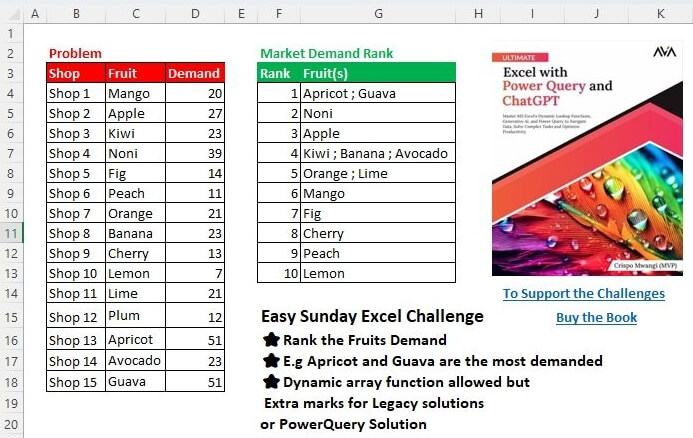
Rank the Fruits Based on Demand e.g. Apricot and Guava are the most demanded Dynamic array function allowed, but Extra marks for Legacy solutions or PowerQuery Solution
📌 Challenge Details and Links
Challenge Number: 64
Challenge Difficulty: ⭐
📥Download Sample File
📥Link to the solutions on LinkedIn
Solving the challenge of Rank by Demand with Power Query
Power Query solution 1 for Rank by Demand, proposed by Kris Jaganah:
let
  A = Excel.CurrentWorkbook(){[Name = "Table1"]}[Content],
  B = Table.Group(A, "Demand", {"Fruit(s)", each Text.Combine([Fruit], " ; ")}),
  C = Table.Sort(B, {"Demand", 1}),
  D = Table.AddIndexColumn(C, "Rank", 1)[[Rank], [#"Fruit(s)"]]
in
  D
Power Query solution 2 for Rank by Demand, proposed by Kris Jaganah:
let
  A = Excel.CurrentWorkbook(){[Name = "Table1"]}[Content],
  B = Table.AddRankColumn(A, "Rank", {"Demand", 1}, [RankKind = 1]),
  C = Table.Group(B, "Rank", {"Fruit(s)", each Text.Combine([Fruit], " ; ")})
in
  C
Power Query solution 3 for Rank by Demand, proposed by Alejandro Simón 🇵🇦 🇪🇸:
let
  Source = Excel.CurrentWorkbook(){[Name = "Table1"]}[Content],
  Grp    = Table.Group(Source, {"Demand"}, {{"A", each Text.Combine([Fruit], "; ")}}),
  Sort   = Table.Sort(Grp, {{"Demand", 1}}),
  Sol    = Table.FromColumns({{1 .. List.Count(Sort[A]) - 1}, Sort[A]}, {"Rank", "Fruit(s)"})
in
  Sol
Power Query solution 4 for Rank by Demand, proposed by Brian Julius:
let
  Source = Excel.CurrentWorkbook(){[Name = "Table1"]}[Content],
  AddRank = Table.AddRankColumn(
    Source,
    "Rank",
    {"Demand", Order.Descending},
    [RankKind = RankKind.Dense]
  ),
  Group = Table.Group(AddRank, {"Rank"}, {{"Fruit(s)", each [Fruit]}}),
  Extract = Table.TransformColumns(
    Group,
    {"Fruit(s)", each Text.Combine(List.Transform(_, Text.From), "; "), type text}
  )
in
  Extract
Power Query solution 5 for Rank by Demand, proposed by Abdallah Ally:
let
  Source = Excel.CurrentWorkbook(){[Name = "Table1"]}[Content],
  AddCol = Table.AddRankColumn(Source, "Rank", {"Demand", 1}, [RankKind = RankKind.Dense]),
  Result = Table.Group(AddCol, "Rank", {"Fruit(s)", each Text.Combine([Fruit], " ; ")})
in
  Result
Power Query solution 6 for Rank by Demand, proposed by Meganathan Elumalai:
let
  Source = Excel.CurrentWorkbook(){[Name = "Table1"]}[Content],
  Result = Table.AddIndexColumn(
    Table.Sort(
      Table.Group(Source, "Demand", {{"Fruits", each Text.Combine([Fruit], "; ")}}),
      {"Demand", 1}
    ),
    "Rank",
    1
  )[[Rank], [Fruits]]
in
  Result
Power Query solution 7 for Rank by Demand, proposed by Meganathan Elumalai:
let
  Source = Excel.CurrentWorkbook(){[Name = "Table1"]}[Content],
  Result = Table.RenameColumns(
    Table.Sort(
      Table.Group(
        Table.ReplaceValue(
          Source,
          each [Shop],
          each [Demand],
          (x, y, z) => List.PositionOf(List.Sort(List.Distinct(Source[Demand]), 1), z) + 1,
          {"Shop"}
        ),
        "Shop",
        {{"Fruits", each Text.Combine([Fruit], "; ")}}
      ),
      {"Shop"}
    ),
    {"Shop", "Rank"}
  )
in
  Result
Power Query solution 8 for Rank by Demand, proposed by CA Raghunath Gundi:
let
  Source = Excel.CurrentWorkbook(){[Name = "Ques"]}[Content],
  Sum    = Table.Group(Source, {"Fruit"}, {{"Sum", each List.Sum([Demand]), type number}}),
  Rank   = Table.AddRankColumn(Sum, "Rank", {"Sum", Order.Descending}, [RankKind = RankKind.Dense]),
  Group  = Table.Group(Rank, {"Rank"}, {{"Fruit(s)", each Text.Combine(_[Fruit], ", ")}})
in
  Group
Power Query solution 9 for Rank by Demand, proposed by Gerson Pineda:
let
  Source = Excel.CurrentWorkbook(){[Name = "Table1"]}[Content],
  a      = Table.Group(Source, {"Demand"}, {{"Fruit", each Text.Combine(_[Fruit], ", ")}}),
  b      = Table.Sort(a, {{"Demand", 1}}),
  c      = Table.FromColumns({{1 .. Table.RowCount(b)}, b[Fruit]}, {"Rank", "Fruit(s)"})
in
  c
Power Query solution 10 for Rank by Demand, proposed by Yaroslav Drohomyretskyi:
let
  Source = Excel.CurrentWorkbook(){[Name = "Table1"]}[Content],
  Rank = Table.AddRankColumn(
    Source,
    "Rank",
    {"Demand", Order.Descending},
    [RankKind = RankKind.Dense]
  ),
  Group = Table.Group(Rank, {"Rank"}, {{"Fruit(s)", each Text.Combine(_[Fruit], " ; ")}})
in
  Group
Power Query solution 11 for Rank by Demand, proposed by Ezel K.:
let
  Kaynak = Excel.CurrentWorkbook(){[Name = "Tablo1"]}[Content],
  KS = Table.RemoveColumns(Kaynak, {"Shop"}),
  SS = Table.Sort(KS, {{"Demand", Order.Descending}}),
  YSS = Table.ReorderColumns(SS, {"Demand", "Fruit"}),
  GS = Table.Group(YSS, {"Demand"}, {{"Sayı", each Text.Combine([Fruit], " - "), type text}}),
  SS1 = Table.Sort(GS, {{"Demand", Order.Descending}}),
  KS1 = Table.RemoveColumns(SS1, {"Demand"}),
  son = Table.AddIndexColumn(KS1, "Dizin", 1, 1, Int64.Type),
  #"Reordered Columns" = Table.ReorderColumns(son, {"Dizin", "Sayı"}),
  #"Renamed Columns" = Table.RenameColumns(
    #"Reordered Columns",
    {{"Dizin", "Rank"}, {"Sayı", "Fruits"}}
  )
in
  #"Renamed Columns"
Power Query solution 12 for Rank by Demand, proposed by Enrico Mendiola:
let
  Source = Excel.CurrentWorkbook(){[Name = "Table1"]}[Content],
  #"Changed Type" = Table.TransformColumnTypes(
    Source,
    {{"Shop", type text}, {"Fruit", type text}, {"Demand", Int64.Type}}
  ),
  #"Added Rank" = Table.AddColumn(
    #"Changed Type",
    "Rank",
    each List.PositionOf(
      List.Sort(List.Distinct(#"Changed Type"[Demand]), Order.Descending),
      [Demand]
    )
      + 1
  ),
  #"Grouped Rows" = Table.Group(
    #"Added Rank",
    {"Rank"},
    {{"Count", each Text.Combine(_[Fruit], ", ")}}
  ),
  #"Sorted Rows" = Table.Sort(#"Grouped Rows", {{"Rank", Order.Ascending}})
in
  #"Sorted Rows"
Solving the challenge of Rank by Demand with Excel
Excel solution 1 for Rank by Demand, proposed by Rick Rothstein:
=LET(
   s,
   MAP(
       SORT(
           UNIQUE(
               D4:D18),
           ,
           -1),
       LAMBDA(
           x,
           TEXTJOIN(
               ", ",
               ,
               FILTER(
                   C4:C18,
                   D4:D18=x)))),
   HSTACK(
       SEQUENCE(
           ROWS(
               s)),
       s))
Excel solution 2 for Rank by Demand, proposed by Kris Jaganah:
=LET(a,
   SORT(
       B4:D18,
       3,
       -1),
   b,
   TAKE(
       a,
       ,
       -1),
   c,
   SCAN(0,
   N((VSTACK(
       0,
       DROP(
           b,
           -1))-b)<>0),
   SUM),
   GROUPBY(
       c,
       INDEX(
           a,
           ,
           2),
       LAMBDA(
           x,
           TEXTJOIN(
               " ; ",
               ,
               x)),
       ,
       0))
Excel solution 3 for Rank by Demand, proposed by Hussein SATOUR:
=LET(
   a,
   GROUPBY(
       RANK(
           D4:D18,
           D4:D18),
       C4:C18,
       LAMBDA(
           x,
           TEXTJOIN(
               " ; ",
               ,
               x)),
       ,
       0),
   HSTACK(
       SEQUENCE(
           ROWS(
               a)),
       TAKE(
           a,
           ,
           -1)))
Excel solution 4 for Rank by Demand, proposed by Oscar Mendez Roca Farell:
=LET(
   g,
   SORT(
       C4:D18,
       2,
       -1),
   d,
   DROP(
       g,
       ,
       1),
   GROUPBY(
       XMATCH(
           d,
           UNIQUE(
               d)),
       TAKE(
       g,
       ,
       1),
       ARRAYTOTEXT,
       ,
       0))
Excel solution 5 for Rank by Demand, proposed by Duy Tùng:
=LET(
   a,
   DROP(
       GROUPBY(
           D4:D18,
           C4:C18,
           LAMBDA(
               x,
               TEXTJOIN(
                   "; ",
                   ,
                   x)),
           ,
           0,
           -1),
       ,
       1),
   VSTACK(
       {"Rank",
       "Fruit(s)"},
       HSTACK(
           SEQUENCE(
               ROWS(
                   a)),
           a)))
Excel solution 6 for Rank by Demand, proposed by Sunny Baggu:
=LET(

    _a,
    SORT(
        UNIQUE(
            D4:D18),
         ,
         -1),

    HSTACK(

         SEQUENCE(
             ROWS(
                 _a)),

         MAP(

              _a,

              LAMBDA(
                  a,

                   TEXTJOIN(
                       " ; ",
                        ,
                        FILTER(
                            C4:C18,
                             D4:D18 = a))
                   )
              )
         )
   )
Excel solution 7 for Rank by Demand, proposed by Pieter de B.:
=GROUPBY(
   MATCH(
       -D4:D18,
       SORT(
           -UNIQUE(
               D4:D18))),
   C4:C18,
   ARRAYTOTEXT,
   ,
   0)
Excel solution 8 for Rank by Demand, proposed by Hamidi Hamid:
=LET(
   x,
   SORT(
       C4:D18,
       2,
       -1),
   xu,
   UNIQUE(
       TAKE(
           x,
           ,
           -1)),
   HSTACK(
       SEQUENCE(
           COUNTA(
               xu)),
       MAP(
           xu,
           LAMBDA(
               a,
               ARRAYTOTEXT(
                   FILTER(
                       TAKE(
                           x,
                           ,
                           1),
                       TAKE(
           x,
           ,
           -1)=a))))))
Excel solution 9 for Rank by Demand, proposed by Asheesh Pahwa:
=LET(
   d,
   D4:D18,
   u,
   UNIQUE(
       SORT(
           d,
           ,
           -1)),
   HSTACK(
       SEQUENCE(
           ROWS(
               u)),
       MAP(
           u,
           LAMBDA(
               x,
               TEXTJOIN(
                   "; ",
                   ,
                   FILTER(
                       C4:C18,
                       d=x))))))
Excel solution 10 for Rank by Demand, proposed by ferhat CK:
=LET(
   a,
   RANK.EQ(
       D4:D18,
       D4:D18),
   DROP(
       REDUCE(
           0,
           SORT(
               UNIQUE(
                   a)),
           LAMBDA(
               x,
               y,
               VSTACK(
                   x,
                   HSTACK(
                       ROWS(
                           x),
                       ARRAYTOTEXT(
                           FILTER(
                               C4:C18,
                               a=y)))))),
       1))
Excel solution 11 for Rank by Demand, proposed by Meganathan Elumalai:
=GROUPBY(
   XMATCH(
       D4:D18,
       SORT(
           UNIQUE(
               D4:D18),
           ,
           -1)),
   C4:C18,
   LAMBDA(
       n,
       TEXTJOIN(
           "; ",
           ,
           n)),
   ,
   0)
Excel solution 12 for Rank by Demand, proposed by Imam Hambali:
=LET(
   a,
    SUBSTITUTE(
        GROUPBY(
            D4:D18,
            C4:C18,
            ARRAYTOTEXT,
            0,
            0,
            -1),
        ",",
        " ;"),
    VSTACK(
        {"Rank",
        "Fruit(s)"},
         HSTACK(
             SEQUENCE(
                 ROWS(
                     a)),
              CHOOSECOLS(
                  a,
                  2))) )
Excel solution 13 for Rank by Demand, proposed by CA Raghunath Gundi:
=LET(
   a,
   SORT(
       GROUPBY(
           C4:C18,
           D4:D18,
           SUM,
           0,
           0),
       2,
       -1),

   b,
   GROUPBY(
       TAKE(
           a,
           ,
           -1),
       TAKE(
           a,
           ,
           1),
       ARRAYTOTEXT,
       0,
       0,
       -1),

   c,
   HSTACK(
       SEQUENCE(
           ROWS(
               b)),
       TAKE(
           b,
           ,
           -1)),

   VSTACK(
       {"Rank",
       "Fruit(s)"},
       c))
Excel solution 14 for Rank by Demand, proposed by Eddy Wijaya:
=LET(
   d,
   D4:D18,

   r,
   UNIQUE(
       SORT(
           d,
           ,
           -1)),

   ra,
   DROP(
       REDUCE(
           0,
           r,
           LAMBDA(
               a,
               v,
               VSTACK(
                   a,
                   TEXTJOIN(
                       " ; ",
                       ,
                       FILTER(
                           C4:C18,
                           d=v))))),
       1),

   HSTACK(
       SEQUENCE(
           COUNTA(
               ra)),
       ra))
Excel solution 15 for Rank by Demand, proposed by Gerson Pineda:
=LET(
   m,
   GROUPBY(
       D4:D18,
       C4:D18,
       ARRAYTOTEXT,
       ,
       0,
       -1),
   HSTACK(
       SEQUENCE(
           ROWS(
               m)),
       INDEX(
           m,
           ,
           2)))
Excel solution 16 for Rank by Demand, proposed by Peter Bartholomew:
= LET(

    sorted,
    GROUPBY(
        Fruit,
         Demand,
        SUM,
        ,
        0),

    item,
    TAKE(
        sorted,
        ,
        1),

    quantity,
    TAKE(
        sorted,
        ,
        -1),

    ranked,
    GROUPBY(
        quantity,
         item,
         ARRAYTOTEXT,
        ,
        0,
        -1),

    HSTACK(
        SEQUENCE(
            ROWS(
                ranked)),
         TAKE(
             ranked,
             ,
             -1))
    )
Excel solution 17 for Rank by Demand, proposed by Yaroslav Drohomyretskyi:
=LET(

   rank,
   SUBSTITUTE(
       GROUPBY(
           Table1[Demand],
           Table1[Fruit],
           ARRAYTOTEXT,
           ,
           0,
           -1),
       ",",
       " ;"),

   VSTACK(
       {"Rank",
       "Fruit(s)"},
       HSTACK(
           SEQUENCE(
               ROWS(
                   rank)),
           TAKE(
               rank,
               ,
               -1))))
Excel solution 18 for Rank by Demand, proposed by El Badlis Mohd Marzudin:
=LET(
   a,
   DROP(
       GROUPBY(
           D4:D18,
           C4:C18,
           LAMBDA(
               x,
               TEXTJOIN(
                   " ; ",
                   ,
                   x)),
           ,
           0,
           -1),
       ,
       1),
   HSTACK(
       SEQUENCE(
           ROWS(
               a)),
       a))
Excel solution 19 for Rank by Demand, proposed by Ernesto Vega Castillo:
=VSTACK(
   {"Rank",
   "Fruit(s)"},
   LET(
       a,
       GROUPBY(
           D4:D18,
           C4:C18,
           ARRAYTOTEXT,
           0,
           0,
           -1),
       HSTACK(
           SEQUENCE(
               ROWS(
                   a)),
           TAKE(
               a,
               ,
               -1))))
Excel solution 20 for Rank by Demand, proposed by Tomasz Jakóbczyk:
=LET(
   f,
   C4:C18,
   d,
   D4:D18,
   HSTACK(
       SEQUENCE(
           COUNTA(
               UNIQUE(
                   d))),
       MAP(
           SORT(
               UNIQUE(
                   d),
               ,
               -1),
           LAMBDA(
               x,
               TEXTJOIN(
                   " , ",
                   TRUE,
                   FILTER(
                       f,
                       d=x))))))
Excel solution 21 for Rank by Demand, proposed by Ezel K.:
one alternative.. LET(
   gb;
   DROP(
       SORT(
           GROUPBY(
               $D$4:$D$18;
               $C$4:$C$18;
               ARRAYTOTEXT;
               ;
               0);
           1;
           -1);
       ;
       1);
   HSTACK(
       SEQUENCE(
           ROWS(
               gb));
       gb))
Excel solution 22 for Rank by Demand, proposed by Trung Quan:
=LET(
   a,
   HSTACK(
       XMATCH(
           D4:D18,
           SORT(
               UNIQUE(
                   D4:D18),
               ,
               -1)),
       C4:C18),
   GROUPBY(
       TAKE(
           a,
           ,
           1),
       TAKE(
           a,
           ,
           -1),
       LAMBDA(
           x,
           TEXTJOIN(
               " ; ",
               ,
               x)),
       ,
       0))
Excel solution 23 for Rank by Demand, proposed by Konstantinos Theodosiou:
=VSTACK(
   TRANSPOSE(
       {"Rank";
       "Fruit(s)"});
   LET(
       ar;
       BYROW(
           SORT(
               UNIQUE(
                   D4:D18);
               ;
               -1);
            LAMBDA(
                x;
                 TEXTJOIN(
                     " ; ";
                      TRUE;
                      FILTER(
                          C4:C18;
                           D4:D18 = x))));
       HSTACK(
           SEQUENCE(
               COUNTA(
                   ar));
           ar)))
Excel solution 24 for Rank by Demand, proposed by abdelaziz allam:
=HSTACK(
   SEQUENCE(
       11),
   MAP(
       SORT(
           UNIQUE(
               D4:D18),
           ,
           -1),
       LAMBDA(
           a,
           TEXTJOIN(
               ";",
               TRUE,
               FILTER(
                   C4:C18,
                   D4:D18=a)))))
Excel solution 25 for Rank by Demand, proposed by CA Rashique KP:
=LET(

   Fruits,

   CHOOSECOLS(
       GROUPBY(
           D4:D18,
           C4:C18,
           ARRAYTOTEXT,
           0,
           0,
           -1),
       2),

   Rank,

   SEQUENCE(
       COUNTA(
           Fruits)),

   HSTACK(
       Rank,
       Fruits))
Solving the challenge of Rank by Demand with Python
Python solution 1 for Rank by Demand, proposed by Konrad Gryczan, PhD:
import pandas as pd
path = "files/Ex-Challenge 04 2025.xlsx"
input = pd.read_excel(path, usecols="B:D", skiprows=2, nrows=15)
test = pd.read_excel(path, usecols="F:G", skiprows=2, nrows=10)
result = input.assign(Rank=input['Demand'].rank(method='dense', ascending=False).astype(int))
 .groupby('Rank')['Fruit'].agg(' ; '.join)
 .reset_index()
 .sort_values(by='Rank')
Python solution 2 for Rank by Demand, proposed by Abdallah Ally:
import pandas as pd
file_path = 'Ex-Challenge 04 2025.xlsx'
df = pd.read_excel(io=file_path, usecols='B:D', skiprows=2, nrows=15)
# Perform data manipulation
df = (
 df
 .assign(Rank = df['Demand'].rank(ascending=False, method='dense').map(int))
 .groupby('Rank')['Fruit'].agg(' ; '.join)
 .rename('Fruit(s)')
 .reset_index()
)
df
Solving the challenge of Rank by Demand with R
R solution 1 for Rank by Demand, proposed by Konrad Gryczan, PhD:
library(tidyverse)
library(readxl)
path = "files/Ex-Challenge 04 2025.xlsx"
input = read_excel(path, range = "B3:D18")
test = read_excel(path, range = "F3:G13")
result = input %>%
 mutate(Rank = dense_rank(desc(Demand))) %>%
 summarise(`Fruit(s)` = paste0(Fruit, collapse = " ; "), .by = Rank) %>%
 arrange(Rank)