
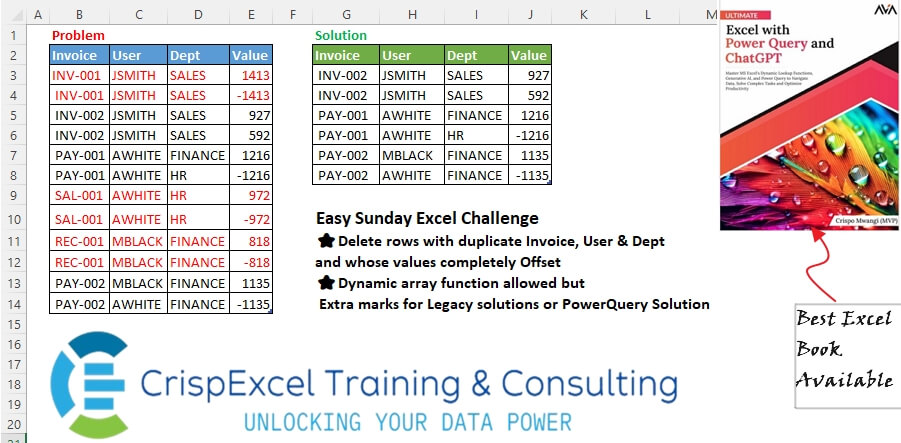
Delete rows with duplicate Invoice, User & Dept, whose values can be completely Offset. Dynamic array function allowed, but Extra marks for Legacy solutions or PowerQuery Solution
📌 Challenge Details and Links
Challenge Number: 58
Challenge Difficulty: ⭐
📥Download Sample File
📥Link to the solutions on LinkedIn
Solving the challenge of Delete Duplicate Rows with Power Query
Power Query solution 1 for Delete Duplicate Rows, proposed by Zoran Milokanović:
leting Duplicate Invoices w/
hashtag
#powerquery.
hashtag
#bitanbit
hashtag
#powerbi

let
 Source = Excel.CurrentWorkbook(){[Name = "Table1"]}[Content],
 R = Table.ToRows(Table.TransformColumns(Source, {"Invoice", Text.Trim})),
 _ = Table.FromRows(List.TransformMany(R, each {{_}}{List.PositionOf(R, List.FirstN(_, 3) & {- _{3}}) + 1}? ?? {}, (i, _) => _), Table.ColumnNames(Source))
in
 _
Power Query solution 2 for Delete Duplicate Rows, proposed by Aditya Kumar Darak 🇮🇳:
let
  Source = Excel.CurrentWorkbook(){[Name = "Table1"]}[Content],
  Cols   = List.RemoveLastN(Table.ColumnNames(Source), 1),
  Trim   = Table.TransformColumns(Source, List.Transform(Cols, each {_, Text.Trim})),
  Abs    = Table.TransformColumns(Trim, {"Value", each - _}),
  Diff   = List.Intersect({Table.ToRecords(Trim), Table.ToRecords(Abs)}),
  Return = Table.RemoveMatchingRows(Trim, Diff)
in
  Return
Power Query solution 3 for Delete Duplicate Rows, proposed by Alejandro Simón 🇵🇦 🇪🇸:
let
  Source = Excel.CurrentWorkbook(){[Name = "Table1"]}[Content],
  Trim = Table.TransformColumns(Source, {{"Invoice", Text.Trim, type text}}),
  Grp = Table.Group(
    Trim,
    Table.ColumnNames(Trim),
    {{"A", each _}, {"B", each List.Sum([Value])}},
    0,
    (x, y) =>
      Number.From(
        Record.RemoveFields(Trim{x}, "Value")
          <> Record.RemoveFields(Trim{y}, "Value") and x[Value]
          <> y[Value]
      )
  ),
  Sol = Table.Combine(Table.SelectRows(Grp, each [B] <> 0)[A])
in
  Sol
Power Query solution 4 for Delete Duplicate Rows, proposed by Abdallah Ally:
let
  Source = Excel.CurrentWorkbook(){[Name = "Table1"]}[Content],
  Trim = Table.TransformColumns(
    Source,
    {{"Invoice", Text.Trim}, {"Posted", Text.Trim}, {"Dept", Text.Trim}}
  ),
  Transform = List.Transform(Table.ToRows(Trim), each List.FirstN(_, 3) & {Number.Abs(_{3})}),
  Result = Table.SelectRows(
    Trim,
    each List.Count(
      List.Select(
        Transform,
        (x) => x = [a = Record.ToList(_), b = List.FirstN(a, 3) & {Number.Abs(a{3})}][b]
      )
    )
      = 1
  )
in
  Result
Power Query solution 5 for Delete Duplicate Rows, proposed by 🇮🇷 Navid Esmaeilzadeh اسماعیل زاده:
let
  Source = Excel.CurrentWorkbook(){[Name = "Table1"]}[Content],
  A = Table.AddColumn(
    Source,
    "R",
    each Text.Trim(
      Text.Combine(List.FirstN(Record.ToList(_), 3) & {Text.From(Number.Abs([Value]))}, "-")
    )
  ),
  B = Table.Group(
    A,
    {"R"},
    {
      {"Count", each Table.RowCount(_), Int64.Type},
      {"T", each Table.SelectColumns(_, {"Invoice", "Posted", "Dept", "Value"})}
    }
  ),
  C = Table.SelectRows(B, each [Count] = 1),
  D = Table.Combine(C[T])
in
  D
Power Query solution 6 for Delete Duplicate Rows, proposed by Yaroslav Drohomyretskyi:
let
  Source = Excel.CurrentWorkbook(){[Name = "Table1"]}[Content],
  Trim = Table.TransformColumns(Source, {{"Invoice", Text.Trim, type text}}),
  Group = Table.Group(
    Trim,
    {"Invoice", "Posted", "Dept"},
    {{"Value", each List.Sum([Value]), type number}}
  ),
  Exclude = Table.SelectRows(Group, each ([Value] = 0))[Invoice],
  Result = Table.SelectRows(Trim, each not List.Contains(Exclude, [Invoice]))
in
  Result
Power Query solution 7 for Delete Duplicate Rows, proposed by Ahmed Ariem:
let
  f = (x) =>
    [
      a = Table.RowCount(x) > 1,
      b = List.Count(List.Distinct(List.Transform(x[Value], Number.Abs))) = 1,
      c = if a and b then null else x
    ][c],
  Source = Excel.CurrentWorkbook(){[Name = "Table1"]}[Content],
  Trim = Table.TransformColumns(Source, {{"Invoice", Text.Trim, type text}}),
  Gr = Table.Group(Trim, {"Invoice", "Posted", "Dept"}, {"tmp", f}),
  Expand = Table.ExpandTableColumn(Gr, "tmp", {"Value"}, {"Value"}),
  Select = Table.SelectRows(Expand, each ([Value] <> null))
in
  Select
Solving the challenge of Delete Duplicate Rows with Excel
Excel solution 1 for Delete Duplicate Rows, proposed by Kris Jaganah:
=VSTACK(
   Table1[
   hashtag
   #Headers],
   FILTER(
       Table1,
       -ISNA(
           XMATCH(
               TRIM(
                   Table1[Invoice]),
               LEFT(
                   UNIQUE(
                       BYROW(
                           TRIM(
                               Table1[[Invoice]:[Dept]]),
                           CONCAT)&ABS(
                           Table1[Value]),
                       ,
                       1),
                   7)))=0))
Excel solution 2 for Delete Duplicate Rows, proposed by Julian Poeltl:
=VSTACK(
   B2:E2,
   LET(
       TR,
       TRIM(
           B3:D14),
       V,
       E3:E14,
       T,
       UNIQUE(
           HSTACK(
               TR,
               ABS(
                   V)),
           ,
           1),
       TT,
       TAKE(
           T,
           ,
           3),
       HSTACK(
           TT,
           DROP(
               REDUCE(
                   0,
                   UNIQUE(
                       BYROW(
                           TT,
                           LAMBDA(
                               A,
                               CONCAT(
                                   A)))),
                   LAMBDA(
                       A,
                       B,
                       VSTACK(
                           A,
                           FILTER(
                               V,
                               BYROW(
                                   TR,
                                   LAMBDA(
                               A,
                               CONCAT(
                                   A)))=B)))),
               1))))
Excel solution 3 for Delete Duplicate Rows, proposed by Hussein SATOUR:
=LET(
   a,
   TRIM(
       B3:B14&C3:C14&D3:D14&ABS(
           E3:E14)),
   CHOOSEROWS(
       B3:E14,
       XMATCH(
           UNIQUE(
               a,
               ,
               1),
           a)))
Excel solution 4 for Delete Duplicate Rows, proposed by Oscar Mendez Roca Farell:
=LET(
   b,
   TRIM(
       B3:B14)&C3:C14&D3:D14&ABS(
       E3:E14),
   FILTER(
       B3:E14,
       BYROW(
           N(
               b=TOROW(
                   b)),
           SUM)=1))
Excel solution 5 for Delete Duplicate Rows, proposed by Duy Tùng:
=LET(
   a,
   B2:E14,
   b,
   BYROW(
       IFERROR(
           ABS(
               a),
           a),
       CONCAT),
   FILTER(
       a,
       ISNUMBER(
           XMATCH(
               b,
               UNIQUE(
                   b,
                   ,
                   1)))))
Excel solution 6 for Delete Duplicate Rows, proposed by Sunny Baggu:
=LET(

    _a,
    TRIM(

         Table1[Invoice] & Table1[Posted] & Table1[Dept] &
         ABS(
             Table1[Value])
         ),

    _s,
    SEQUENCE(
        ROWS(
            _a)),

    _u,
    UNIQUE(
        _a,
         ,
         1),

    CHOOSEROWS(
        Table1,
         XLOOKUP(
             _u,
              _a,
              _s))
   )
Excel solution 7 for Delete Duplicate Rows, proposed by Abdallah Ally:
=LET(
   a,
   B3:E14,
   b,
   BYROW(
       TRIM(
           a),
       LAMBDA(
           x,
           CONCAT(
               IFERROR(
                   ABS(
                       x),
                   x )))),
   VSTACK(
       B2:E2,
       FILTER(
           a,
           MAP(
               b,
               LAMBDA(
                   x,
                   COUNTA(
                       FILTER(
                           b,
                           b=x))=1)))))
Excel solution 8 for Delete Duplicate Rows, proposed by Pieter de B.:
=FILTER(
   B3:E14,
   SUMIFS(
       E3:E14,
       B3:B14,
       B3:B14,
       C3:C14,
       C3:C14,
       D3:D14,
       D3:D14))
Excel solution 9 for Delete Duplicate Rows, proposed by Asheesh Pahwa:
=LET(
   I,
   TRIM(
       B3:B14&C3:C14&D3:D14&ABS(
           E3:E14)),
   u,
   UNIQUE(
       I,
       ,
       1),
   x,
   XMATCH(
       u,
       I),
   CHOOSEROWS(
       B3:E14,
       x))
Excel solution 10 for Delete Duplicate Rows, proposed by ferhat CK:
=LET(
   a,
   TRIM(
       Table1[Invoice])&Table1[Posted]&Table1[Dept]&ABS(
       Table1[Value]),
   b,
   DROP(
       REDUCE(
           0,
           UNIQUE(
               a),
           LAMBDA(
               x,
               y,
               VSTACK(
                   x,
                   IF(
                       SUM(
                           FILTER(
                               Table1[Value],
                               a=y))=0,
                       TOCOL(
                           {0,
                           0}),
                       1)))),
       1),
   FILTER(
       Table1,
       b=1))
Excel solution 11 for Delete Duplicate Rows, proposed by Ankur Sharma:
=LET(
   d,
    BYROW(
        Table1[[Invoice]:[Dept]],
         ARRAYTOTEXT),

   c,
    MAP(
        d,
         LAMBDA(
             z,
              SUM(
                  FILTER(
                      Table1[Value],
                       d = z)))),

   FILTER(
       Table1,
        c <> 0))
Excel solution 12 for Delete Duplicate Rows, proposed by JvdV –:
=LET(
   a,
   B2:E14,
   b,
   TEXT(
       a,
       "[<0]0"),
   FILTER(
       a,
       BYROW(
           b,
           LAMBDA(
               x,
               SUM(
                   N(
                       BYROW(
                           b=x,
                           AND)))))=1))
Excel solution 13 for Delete Duplicate Rows, proposed by CA Raghunath Gundi:
=FILTER(
   B3:E14,
   LET(
       a,
       BYROW(
           HSTACK(
               TRIM(
                   B3:D14),
               ABS(
                   E3:E14)),
           ARRAYTOTEXT),

       b,
        UNIQUE(
            a,
            ,
            TRUE),

       ISNUMBER(
           MATCH(
               a,
               b,
               0))))
Excel solution 14 for Delete Duplicate Rows, proposed by Gerson Pineda:
=FILTER(
   B3:E14,
   LET(
       m,
       TRIM(
           B3:B14)&C3:C14&D3:D14&ABS(
           E3:E14),
       MAP(
           m,
           LAMBDA(
               x,
               SUM(
                   N(
                       x=m))))=1))
Excel solution 15 for Delete Duplicate Rows, proposed by Victor Momoh (MVP, MOS, R.Eng):
=LET(
   p,
   BYROW(
       Table1,
       LAMBDA(
           x,
           CONCAT(
               TRIM(
                   IFERROR(
                       ABS(
                           x),
                       x))))),
   FILTER(
       Table1,
       1=MAP(
           p,
           LAMBDA(
               y,
               SUM(
                   N(
                       p=y))))))

and other variants(
   keeping the first half of the formula same) could be
=LET(
   p,
   BYROW(
       Table1,
       LAMBDA(
           x,
           CONCAT(
               TRIM(
                   IFERROR(
                       ABS(
                           x),
                       x))))),
   b,
   UNIQUE(
       p,
       ,
       1),
   FILTER(
       Table1,
       IFNA(
           XMATCH(
               p,
               b),
           0)))

=LET(
   p,
   BYROW(
       Table1,
       LAMBDA(
           x,
           CONCAT(
               TRIM(
                   IFERROR(
                       ABS(
                           x),
                       x))))),
   b,
   UNIQUE(
       p,
       ,
       1),
   FILTER(
       Table1,
       BYROW(
           N(
               p=TOROW(
                   b)),
           SUM)))
Excel solution 16 for Delete Duplicate Rows, proposed by Md. Shah Alam, Microsoft Certified Trainer:
=VSTACK(Table257[
hashtag
#Headers],
   LET(x,
   BYROW(
       TRIM(
           IFERROR(
               ABS(
                   Table14),
               Table14)),
       LAMBDA(
           a,
           CONCAT(
               a))),
   FILTER(Table14,
   MAP(x,
   LAMBDA(y,
   SUM(0+(x=y))))=1)))
Excel solution 17 for Delete Duplicate Rows, proposed by Philip Kinuthia:
=VSTACK(
   Table1[
   hashtag
   #Headers],
   FILTER(
       Table1,
       SUMIFS(
           Table1[Value],
           Table1[Invoice],
           Table1[Invoice],
           Table1[Posted],
           Table1[Posted],
           Table1[Dept],
           Table1[Dept])<>0))
Solving the challenge of Delete Duplicate Rows with Python
Python solution 1 for Delete Duplicate Rows, proposed by Konrad Gryczan, PhD:
import pandas as pd
path = "files/Ex-Challenge 01 2025.xlsx"
input = pd.read_excel(path, usecols="B:E", skiprows=1, nrows=12)
test = pd.read_excel(path, usecols="G:J", skiprows=1, nrows=6)
 .rename(columns=lambda x: x.replace('.1', ''))
 .apply(lambda x: x.str.strip() if x.name == 'Invoice' else x)
input['name'] = input[['Invoice', 'Posted', 'Dept']]
 .apply(lambda x: x.str.strip()).astype(str)
 .agg('_'.join, axis=1)
grouped = input.groupby('name')
 .filter(lambda x: len(x) == 1 or (len(x) == 2 and x['Value'].sum() != 0))
result = grouped.copy().assign(**grouped['name'].str.split('_', expand=True).rename(columns={0: 'Invoice', 1: 'Posted', 2: 'Dept'}))
 .drop(columns=['name']).reset_index(drop=True)
print(result.equals(test)) # True
Solving the challenge of Delete Duplicate Rows with Python in Excel
Python in Excel solution 1 for Delete Duplicate Rows, proposed by Alejandro Campos:
My
#PythonExcel solution
df = xl("B2:E14", headers=True)
df_filtered = df.groupby(['Invoice', 'Posted', 'Dept']).filter(
 lambda x: x['Value'].sum() != 0).reset_index(drop=True)
Python in Excel solution 2 for Delete Duplicate Rows, proposed by Aditya Kumar Darak 🇮🇳:
#PythonInExcel
data = xl("Table1[
#All]", True)
textCols = data.select_dtypes("object")
data[textCols.columns] = textCols.applymap(str.strip)
data["Abs"] = data["Value"].abs()
dups = data.duplicated(list(textCols.columns) + ["Abs"], False)
result = data[~dups].drop(columns="Abs").reset_index(drop=True)
result
Solving the challenge of Delete Duplicate Rows with R
R solution 1 for Delete Duplicate Rows, proposed by Konrad Gryczan, PhD:
library(tidyverse)
library(readxl)
path = "files/Ex-Challenge 01 2025.xlsx"
input = read_excel(path, range = "B2:E14")
test = read_excel(path, range = "G2:J8")
result = input %>%
 mutate(across(c(Invoice, Posted, Dept), ~trimws(.))) %>%
 unite("name", c("Invoice", "Posted", "Dept"), sep = "_") %>%
 group_by(name) %>%
 filter(n() == 1 | (n() == 2 & sum(Value) != 0)) %>%
 separate("name", c("Invoice", "Posted", "Dept"), sep = "_")
all.equal(result, test)
#> [1] TRUE