
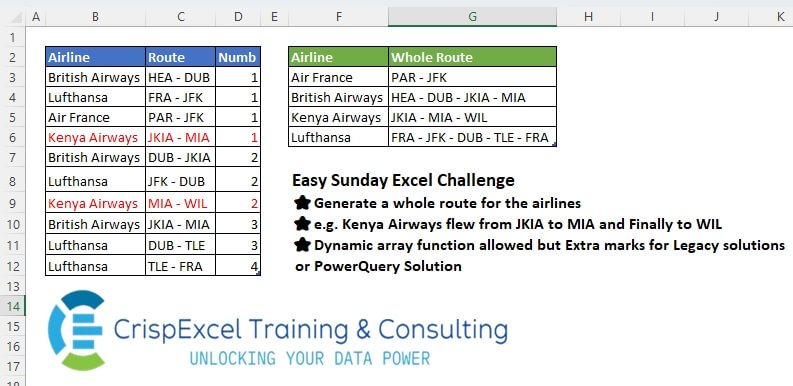
Generate a whole route for the airlines e.g. Kenya Airways flew from JKIA to MIA and Finally to WIL Dynamic array function allowed, but Extra marks for Legacy solutions or PowerQuery Solution
📌 Challenge Details and Links
Challenge Number: 53
Challenge Difficulty: ⭐
📥Download Sample File
📥Link to the solutions on LinkedIn
Solving the challenge of Extracting Whole Route with Power Query
Power Query solution 1 for Extracting Whole Route, proposed by Zoran Milokanović:
let
  Source = Excel.CurrentWorkbook(){[Name = "Table4"]}[Content],
  S = Table.Sort(
    Table.Group(
      Source,
      "Airline",
      {
        "Whole Route",
        each Text.Combine(
          List.Transform(
            [Numb],
            (n) =>
              let
                r = [Route]{n - 1}
              in
                {Text.AfterDelimiter(r, " "), r}{Byte.From(n = 1)}
          ),
          " "
        )
      }
    ),
    "Airline"
  )
in
  S
Power Query solution 2 for Extracting Whole Route, proposed by Kris Jaganah:
let
  A = Excel.CurrentWorkbook(){[Name = "Table4"]}[Content],
  B = Table.Group(
    A,
    {"Airline"},
    {
      "Whole Route",
      each
        let
          a = List.TransformMany([Route], (z) => Text.Split(z, " - "), (x, y) => y),
          b = List.Distinct(a),
          c = List.Last(a)
        in
          Text.Combine(if List.Last(b) = c then b else b & {c}, " - ")
    }
  ),
  C = Table.Sort(B, "Airline")
in
  C
Power Query solution 3 for Extracting Whole Route, proposed by Alejandro Simón 🇵🇦 🇪🇸:
let
  Source = Excel.CurrentWorkbook(){[Name = "Table4"]}[Content],
  Group = Table.Group(
    Source,
    {"Airline"},
    {
      {
        "Whole Route",
        each
          let
            a = [Route],
            b = List.Combine(List.Transform(a, each Text.Split(_, " - "))),
            c = List.Transform(
              {1 .. List.Count(b) - 1},
              each if b{_} = b{_ - 1} then null else b{_}
            ),
            d = Text.Combine({b{0}} & List.RemoveNulls(c), " - ")
          in
            d
      }
    }
  ),
  Sol = Table.Sort(Group, {{"Airline", 0}})
in
  Sol
Power Query solution 4 for Extracting Whole Route, proposed by Brian Julius:
let
  Source = Excel.CurrentWorkbook(){[Name = "Table4"]}[Content],
  Split = Table.ExpandListColumn(
    Table.TransformColumns(
      Source,
      {
        {
          "Route",
          Splitter.SplitTextByDelimiter(" - ", QuoteStyle.Csv),
          let
            itemType = (type nullable text) meta [Serialized.Text = true]
          in
            type {itemType}
        }
      }
    ),
    "Route"
  ),
  Rem = Table.RemoveColumns(Split, {"Numb"}),
  Group = Table.Group(Rem, {"Airline"}, {{"All", each [Route]}}),
  WRoute = Table.RemoveColumns(
    Table.AddColumn(
      Group,
      "WholeRoute",
      each [
        a  = [All],
        LD = List.Distinct(a),
        b  = if List.First(a) <> List.Last(a) then LD else LD & {List.First(a)}
      ][b]
    ),
    "All"
  ),
  Ext = Table.Sort(
    Table.TransformColumns(
      WRoute,
      {"WholeRoute", each Text.Combine(List.Transform(_, Text.From), " - ")}
    ),
    {"Airline"}
  )
in
  Ext
Power Query solution 5 for Extracting Whole Route, proposed by 🇮🇷 Navid Esmaeilzadeh اسماعیل زاده:
let
  Source = Excel.CurrentWorkbook(){[Name = "Table4"]}[Content],
  A = Table.AddColumn(Source, "R", each Text.Split([Route], " - ")),
  B = Table.ExpandListColumn(A, "R"),
  C = Table.Group(B, {"Airline"}, {{"T", each _}}),
  F = (x) =>
    let
      a = Table.AddIndexColumn(x, "Index", 0, 1),
      b = Table.AddColumn(
        a,
        "R2",
        each try if a[R]{[Index] + 1} = [R] then null else [R] otherwise [R]
      ),
      c = Text.Combine(List.RemoveNulls(b[R2]), " - ")
    in
      c,
  D = Table.AddColumn(C, "Whole Route", each F([T])),
  E = Table.SelectColumns(D, {"Airline", "Whole Route"}),
  G = Table.Sort(E, {{"Airline", Order.Ascending}})
in
  G
Power Query solution 6 for Extracting Whole Route, proposed by CA Raghunath Gundi:
let
  Source = Excel.CurrentWorkbook(){[Name = "Table4"]}[Content],
  Group = Table.Group(
    Source,
    {"Airline"},
    {{"Grp", each _, type table [Airline = text, Route = text, Numb = number]}}
  ),
  Result = Table.Sort(
    Table.TransformColumns(
      Group,
      {
        "Grp",
        each Text.Combine(
          Table.AddColumn(
            _,
            "Whole Route",
            each if [Numb] = 1 then [Route] else Text.AfterDelimiter([Route], "- ")
          )[Whole Route],
          " - "
        )
      }
    ),
    {"Airline", Order.Ascending}
  )
in
  Result
Power Query solution 7 for Extracting Whole Route, proposed by Yaroslav Drohomyretskyi:
let
  Source = Excel.CurrentWorkbook(){[Name = "Table4"]}[Content],
  Group = Table.Group(
    Source,
    {"Airline"},
    {
      {
        "Whole Route",
        each Text.BeforeDelimiter(_[Route]{0}, "-")
          & Text.Combine(List.Transform([Route], each Text.AfterDelimiter(_, " ")), " "),
        type text
      }
    }
  ),
  Sort = Table.Sort(Group, {{"Airline", Order.Ascending}})
in
  Sort
Power Query solution 8 for Extracting Whole Route, proposed by Krzysztof Kominiak:
let
  Source = Excel.CurrentWorkbook(){[Name = "Table4"]}[Content],
  GetLs = Table.TransformColumns(Source, {"Route", each Text.Split(Text.Remove(_, " "), "-")}),
  GroupRows = Table.Group(
    GetLs,
    {"Airline"},
    {
      {
        "NT",
        each [
          s1 = List.Combine([Route]),
          s2 = List.Accumulate(
            s1,
            {},
            (s, c) => if List.Contains(s, c) and c <> List.Last(s1) then s else s & {c}
          ),
          s3 = Text.Combine(s2, " - ")
        ][s3]
      }
    }
  ),
  Result = Table.Sort(GroupRows, {{"Airline", Order.Ascending}})
in
  Result
Solving the challenge of Extracting Whole Route with Excel
Excel solution 1 for Extracting Whole Route, proposed by Rick Rothstein:
=LET(
   r,
   B3:B12,
   j,
   TEXTJOIN,
   u,
   UNIQUE,
   p,
   SORT(
       u(
           r)),
   REDUCE(
       {"Airline",
       "Whole Route"},
       p,
       LAMBDA(
           a,
           x,
           VSTACK(
               a,
               HSTACK(
                   x,
                   j(
                       " - ",
                       ,
                       u(
                           TEXTSPLIT(
                               j(
                                   " - ",
                                   ,
                                   FILTER(
                                       OFFSET(
                                           r,
                                           ,
                                           1),
                                       r=x)),
                               "-"),
                           1)))))))
Excel solution 2 for Extracting Whole Route, proposed by Kris Jaganah:
=GROUPBY(
   B2:B12,
   C2:C12,
   LAMBDA(
       x,
       LET(
           a,
           TEXTSPLIT(
               CONCAT(
                   x&" - "),
                ,
               " - ",
               1),
           b,
           UNIQUE(
               a),
           c,
           TAKE(
               a,
               -1),
           TEXTJOIN(
               " - ",
               ,
               TOCOL(
                   IF(
                       c=TAKE(
                           b,
                           -1),
                       b,
                       VSTACK(
                           b,
                           c)),
                   3)))),
   3,
   0)
Excel solution 3 for Extracting Whole Route, proposed by Kris Jaganah:
=LET(
   a,
   B3:B12,
   b,
   SORT(
       UNIQUE(
           a)),
   HSTACK(
       b,
       MAP(
           b,
           LAMBDA(
               x,
               LET(
                   a,
                   TRIM(
                       TEXTSPLIT(
                           CONCAT(
                               FILTER(
                                   C3:C12,
                                   a=x)&"-"),
                           ,
                           "-",
                           1)),
                   TEXTJOIN(
                       "-",
                       ,
                       FILTER(
                           a,
                           VSTACK(
                               0,
                               DROP(
                                   a,
                                   -1))<>a)))))))
Excel solution 4 for Extracting Whole Route, proposed by Julian Poeltl:
=LET(
   A,
   Table4[Airline],
   R,
   Table4[Route],
   U,
   UNIQUE(
       SORT(
           A)),
   VSTACK(
       HSTACK(
           "Airline",
           "Whole Route"),
       HSTACK(
           U,
           MAP(
               U,
               LAMBDA(
                   B,
                   LET(
                       F,
                       FILTER(
                           R,
                           A=B),
                       IFERROR(
                           TEXTJOIN(
                               " - ",
                               ,
                               TEXTBEFORE(
                                   DROP(
                                       F,
                                       -1),
                                   " -",
                                   ,
                                   ,
                                   ,
                                   ),
                               TAKE(
                                       F,
                                       -1)),
                           F)))))))
Excel solution 5 for Extracting Whole Route, proposed by Aditya Kumar Darak 🇮🇳:
=GROUPBY(

    Table4[Airline],

    Table4[Route],

    LAMBDA(
        a,

         LET(

              d,
              IFERROR(
                  TEXTBEFORE(
                      DROP(
                          a,
                           -1),
                       " - "),
                   ""),

              c,
              TAKE(
                          a,
                           -1),

              r,
              TEXTJOIN(
                  " - ",
                   1,
                   d,
                   c),

              r
              )
         ),

    0,

    0
   )
Excel solution 6 for Extracting Whole Route, proposed by Hussein SATOUR:
=MAP(
   F3:F6,
   LAMBDA(
       x,
       LET(
           f,
           FILTER(
               C3:C12,
               B3:B12=x),
           IFERROR(
               CONCAT(
                   @f,
                   " "&TEXTAFTER(
                       DROP(
                           f,
                           1),
                       " ")),
               @f))))
Excel solution 7 for Extracting Whole Route, proposed by Oscar Mendez Roca Farell:
=GROUPBY(
   B2:B12,
   C2:C12,
   LAMBDA(
       t,
       @t&IF(
           ROWS(
               t)>1,
           CONCAT(
               " "&TEXTAFTER(
                   DROP(
                       t,
                       1),
                   " ")),
           "")),
   3,
   0)
Excel solution 8 for Extracting Whole Route, proposed by Hamidi Hamid:
=LET(
   v,
   SORT(
       UNIQUE(
           B3:B12)),
   x,
   MAP(
       v,
       LAMBDA(
           a,
           ARRAYTOTEXT(
               FILTER(
                   C3:C12,
                   B3:B12=a)))),
   w,
   IFERROR(
       DROP(
           REDUCE(
               0,
               x,
               LAMBDA(
                   a,
                   b,
                   TRIM(
                       VSTACK(
                           a,
                           TEXTSPLIT(
                               b,
                               {"-",
                               ","},
                               ))))),
           1),
       ""),
   wd,
   DROP(
       HSTACK(
           "",
           w),
       ,
       -1),
   q,
   TRANSPOSE(
       IFERROR(
           IF(
               wd=w,
               "",
               w),
           w)),
   qq,
   BYROW(
       q,
       CONCAT),
   HSTACK(
       v,
       BYROW(
           TRANSPOSE(
               FILTER(
                   q,
                   qq<>"")),
           LAMBDA(
               a,
               TEXTJOIN(
                   " - ",
                   ,
                   a)))))
Excel solution 9 for Extracting Whole Route, proposed by Asheesh Pahwa:
=MAP(
   SORT(
       UNIQUE(
           B3:B12)),
   LAMBDA(
       x,
       LET(
           f,
           FILTER(
               C3:C12,
               B3:B12=x),
           d,
           DROP(
               f,
               1),
           r,
           DROP(
               REDUCE(
                   "",
                   d,
                   LAMBDA(
                       a,
                       v,
                       VSTACK(
                           a,
                           TEXTSPLIT(
                               v,
                               ,
                               " - ")))),
               1),
           t,
           TEXTJOIN(
               "-",
               1,
               TAKE(
               f,
               1),
               UNIQUE(
                   DROP(
                       r,
                       1))),
           IF(
               COUNTA(
                   f)>1,
               t,
               f))))
Excel solution 10 for Extracting Whole Route, proposed by ferhat CK:
=REDUCE(
   {"Airline",
   "Whole Route"},
   SORT(
       UNIQUE(
           Table4[Airline])),
   LAMBDA(
       x,
       y,
       VSTACK(
           x,
           HSTACK(
               y,
               TEXTJOIN(
                   " - ",
                   TRUE,
                   SCAN(
                       ,
                       TEXTSPLIT(
                           TEXTJOIN(
                               " - ",
                               ,
                               FILTER(
                                   Table4[Route],
                                   Table4[Airline]=y)),
                           ,
                           " - "),
                       LAMBDA(
                           a,
                           v,
                           IF(
                               a=v,
                               "",
                               v))))))))
Excel solution 11 for Extracting Whole Route, proposed by Imam Hambali:
=LET(

   cc,
    CHOOSECOLS,

   rs,
    GROUPBY(
        Table4[Airline],
        C3:C12,
        ARRAYTOTEXT,
        0,
        0),

   VSTACK(
       {"Airline",
       "Whole Route"},
        HSTACK(
            cc(
                rs,
                1),
             REGEXREPLACE(
                 cc(
                     rs,
                     2),
                 ",(.*?)-",
                 " - ")))
   )
Excel solution 12 for Extracting Whole Route, proposed by Mey Tithveasna:
=LET(
   ua,
   UNIQUE(
       Table4[Airline]),
   m,
   MAP(
       ua,
       LAMBDA(
           x,
           TEXTJOIN(
               "-",
               ,
               UNIQUE(
                   TRIM(
                       TEXTSPLIT(
                           TEXTJOIN(
                               "-",
                               ,
                               FILTER(
                                   Table4[Route],
                                   Table4[Airline]=x)),
                           "-")))))),
   HSTACK(
       ua,
       m))
Excel solution 13 for Extracting Whole Route, proposed by Milan Shrimali:
=LET(A,
   B3:D12,
   BYROW(SORT(
       UNIQUE(
           CHOOSECOLS(
               A,
               1)),
       1,
       -1),
   LAMBDA(X,
   HSTACK(X,
   LET(SPLT,
   HSTACK(
       CHOOSECOLS(
               A,
               1),
       ARRAYFORMULA(
           SPLIT(
               CHOOSECOLS(
                   A,
                   2),
               "-"))),
   JOIN("-",
   TOCOL(FILTER(CHOOSECOLS(
       SPLT,
       2,
       3),
   (CHOOSECOLS(
       SPLT,
       1)=X)))))))))
Excel solution 14 for Extracting Whole Route, proposed by Peter Bartholomew:
= LET(

    flight,
    SORT(
        UNIQUE(
            Table4[Airline])),

    HSTACK(
        flight,
         MAP(
             flight,
              ROUTEλ))
    )
where

ROUTEλ
= LAMBDA(
   _flight,

    LET(

         leg,
         FILTER(
             Table4[Route],
             Table4[Airline]=_flight),

         split,
         VSTACK(
             @TEXTBEFORE(
                 leg,
                  "-"),
              TEXTAFTER(
                  leg,
                  "-")),

         route,
         TRIM(
             TOCOL(
                 split)),

         TEXTJOIN(
             " - ",
              ,
              route)
         )
   )
Excel solution 15 for Extracting Whole Route, proposed by Sergei Baklan:
= IF(
    Table4[Numb] = 1,

    Table4[Route],

    RIGHT(
         Table4[Route],

         LEN(
              Table4[Route]) - FIND(
              "- ",
              Table4[Route]) -1 )
    )

- add measure
Whole Route:=CONCATENATEX(
    Table4,
    Table4[Part],
    " - " )
Excel solution 16 for Extracting Whole Route, proposed by Amr Tawfik CMA®,FMVA,Lean Coach:
=HSTACK(
   UNIQUE(
       Table4[Airline]),
   MAP(
       L2#,
       LAMBDA(
           X,
           TEXTJOIN(
               "-",
               TRUE,
               UNIQUE(
                   TEXTSPLIT(
                       TEXTJOIN(
                           " ",
                           TRUE,
                           FILTER(
                               Table4[Route],
                               Table4[Airline]=X)),
                       {" ",
                       "-"}),
                   TRUE)))))
Excel solution 17 for Extracting Whole Route, proposed by Ezel K.:
=x,
   Table4[Route],
   "")),
   "-"),
   TRUE))))))
Excel solution 18 for Extracting Whole Route, proposed by abdelaziz allam:
=HSTACK(

    UNIQUE(
        Table4[Airline]),

    MAP(

         UNIQUE(
        Table4[Airline]),

         LAMBDA(
             a,

              TEXTJOIN(

                   "-",

                   TRUE,

                   UNIQUE(

                        TRIM(

                             TEXTSPLIT(

                                  TEXTJOIN(

                                       "-",

                                       ,

                                       FILTER(

                                            Table4[Route],

                                            Table4[Airline] = a
                                            )
                                       ),

                                  ,

                                  "-"
                                  )
                             )
                        )
                   )
              )
         )
   )
Solving the challenge of Extracting Whole Route with Python
Python solution 1 for Extracting Whole Route, proposed by Konrad Gryczan, PhD:
import pandas as pd
path = "files/Excel Challenge Dec 8th.xlsx"
input = pd.read_excel(path, usecols="B:D", skiprows=1, nrows=10)
test = pd.read_excel(path, usecols="F:G", skiprows=1, nrows=4)
pivot_wider = input.pivot(index='Airline', columns='Numb', values='Route')
pivot_longer = pd.melt(pivot_wider.reset_index(), id_vars=['Airline'], value_vars=pivot_wider.columns, var_name='Numb', value_name='Route')
pivot_longer = pivot_longer.sort_values(['Airline', 'Numb'])
pivot_longer = pivot_longer.dropna()
pivot_longer['Route'] = pivot_longer.apply(lambda row: row['Route'] if row['Numb'] == 1 else (row['Route'].split('-')[1] if len(row['Route'].split('-')) > 1 else row['Route']), axis=1)
result = pivot_longer.groupby('Airline')['Route'].apply(lambda x: ' -'.join(x)).reset_index()
print(result.equals(test)) # True
Solving the challenge of Extracting Whole Route with Python in Excel
Python in Excel solution 1 for Extracting Whole Route, proposed by Aditya Kumar Darak 🇮🇳:
#PythonInExcel
data = xl("Table4[
#All]", headers=True)
result = (
 data.groupby("Airline")
 .apply(
 lambda x: " - ".join(
 [i.split(" - ")[0] for i in x["Route"][:-1]] + [data["Route"].iloc[-1]]
 )
 )
)
result
Python in Excel solution 2 for Extracting Whole Route, proposed by Ümit Barış Köse, MSc:
df = xl("Table424[
#All]", headers=True)
result = (df.pivot(index='Airline', columns='Numb', values='Route')
 .reset_index()
 .melt(id_vars=['Airline'], var_name='Numb', value_name='Route')
 .sort_values(['Airline', 'Numb'])
 .dropna()
 .assign(Route=lambda df: df['Route'].where(df['Numb'] == 1, df['Route'].str.split('-').str[1].fillna(df['Route'])))
 .groupby('Airline')['Route']
 .agg(' -'.join)
Solving the challenge of Extracting Whole Route with R
R solution 1 for Extracting Whole Route, proposed by Konrad Gryczan, PhD:
library(tidyverse)
library(readxl)
path = "files/Excel Challenge Dec 8th.xlsx"
input = read_excel(path, range = "B2:D12")
test = read_excel(path, range = "F2:G6")
result = input %>%
 pivot_wider(names_from = "Numb", values_from = "Route") %>%                                                                                                                                                         pivot_wider(names_from = "Numb", values_from = "Route") %>%
 pivot_longer(cols = c(2:5), names_to = "Numb", values_to = "Route") %>%
 filter(!is.na(Route)) %>%
 mutate(Route = ifelse(Numb == 1, Route, str_extract(Route, "\- [A-Z]+"))) %>%
 arrange(Airline)
all.equal(result, test)
#> [1] TRUE