
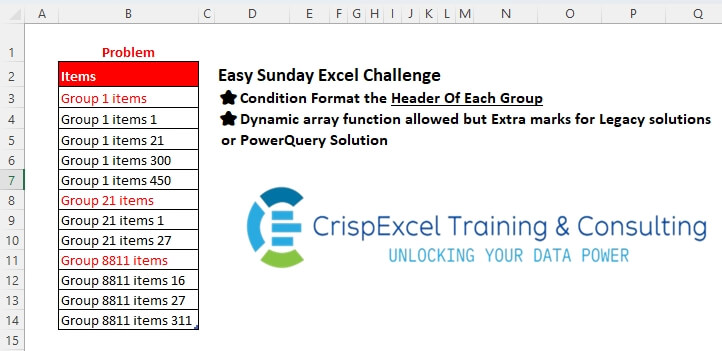
Condition Format the Header Of Each Group Dynamic array function allowed, but Extra marks for Legacy solutions or PowerQuery Solution
📌 Challenge Details and Links
Challenge Number: 52
Challenge Difficulty: ⭐
📥Download Sample File
📥Link to the solutions on LinkedIn
Solving the challenge of Condition Formatting Headers with Power Query
Power Query solution 1 for Condition Formatting Headers, proposed by Kris Jaganah:
let
  A = Excel.CurrentWorkbook(){[Name = "tblUnits"]}[Content],
  B = Table.Group(
    A,
    {"Items"},
    {"All", each _},
    0,
    (x, y) => Number.From(Text.AfterDelimiter(y[Items], " ", 2) = "")
  )
in
  B
Power Query solution 2 for Condition Formatting Headers, proposed by Alejandro Simón 🇵🇦 🇪🇸:
let
  Source = Excel.CurrentWorkbook(){[Name = "tblUnits"]}[Content],
  Sol = Table.Combine(
    Table.Group(
      Source,
      "Items",
      {
        {
          "A",
          each
            let
              a = _,
              b = Table.ToColumns(a){0},
              c = {Text.Upper(b{0})} & List.Skip(b),
              d = Table.FromColumns({c}, Table.ColumnNames(a))
            in
              d
        }
      },
      0,
      (a, b) => Number.From(List.Last(Text.Split(b, " ")) = "items")
    )[A]
  )
in
  Sol
Power Query solution 3 for Condition Formatting Headers, proposed by Alejandro Simón 🇵🇦 🇪🇸:
let
  Source = Excel.CurrentWorkbook(){[Name = "tblUnits"]}[Content],
  Sol = Table.TransformColumns(
    Source,
    {{"Items", each if Text.EndsWith(_, "items") then Text.Upper(_) else _}}
  )
in
  Sol
Power Query solution 4 for Condition Formatting Headers, proposed by Brian Julius:
let
  Source = Table.PromoteHeaders(
    Table.FromRows(
      Json.Document(
        Binary.Decompress(
          Binary.FromText(
            "i45W8ixJzS1W0lFSitWJVnIvyi8tUDBUyMQpqGCIXdgIh7ixgQF2CRNTNAkjrNYa4bAXLm5kjiphYWGI1SCEuIKhGU4p3KYpGBtCnBALAA==",
            BinaryEncoding.Base64
          ),
          Compression.Deflate
        )
      )
    )
  ),
  AddGrp = Table.AddColumn(
    Source,
    "Grp",
    each Number.From(Text.BetweenDelimiters([Items], "Group ", " items"))
  ),
  AddLen = Table.AddColumn(AddGrp, "Len", each Text.Length([Items])),
  Group = Table.Group(AddLen, {"Grp"}, {{"MinLen", each List.Min([Len])}, {"All", each _}}),
  Expand = Table.ExpandTableColumn(Group, "All", {"Items", "Len"}, {"Items", "Len"}),
  Answer = Table.SelectColumns(
    Table.AddColumn(
      Expand,
      "Items ",
      each if [MinLen] = [Len] then Text.Upper([Items]) else [Items]
    ),
    "Items "
  )
in
  Answer
Solving the challenge of Condition Formatting Headers with Excel
Excel solution 1 for Condition Formatting Headers, proposed by Rick Rothstein:
=--TEXT(
   RIGHT(
       B3),
   ";;;1")
Excel solution 2 for Condition Formatting Headers, proposed by Rick Rothstein:
=ISERR(
   -RIGHT(
       B3))
Excel solution 3 for Condition Formatting Headers, proposed by Julian Poeltl:
=ISERR(
   --RIGHT(
       B3))
Excel solution 4 for Condition Formatting Headers, proposed by Oscar Mendez Roca Farell:
=1-COUNTIF(
   B3,
   "* * * *")
Excel solution 5 for Condition Formatting Headers, proposed by Pieter de B.:
=RIGHT(
   B3)
Excel solution 6 for Condition Formatting Headers, proposed by Hamidi Hamid:
=COUNTIF(
   $B$3:B3,
   "*"&TEXTBEFORE(
       B3:B14,
       "items")&"*")
Excel solution 7 for Condition Formatting Headers, proposed by Mey Tithveasna:
=ISERR(
   --RIGHT(
       B3))
Excel solution 8 for Condition Formatting Headers, proposed by Milan Shrimali:
=BYROW(
   B3:B14,
   lambda(
       x,
       istext(
           choosecols(
               split(
                   X,
                   " "),
               -1))))
Excel solution 9 for Condition Formatting Headers, proposed by Ahmed Ariem:
=COUNTIF(
   $S$1:$S$12;
   S1&"*")
Excel solution 10 for Condition Formatting Headers, proposed by Ahmed Ariem:
=NOT(
   ISNA(
       LOOKUP(
           B3&"*",
           B4:B14)))
Excel solution 11 for Condition Formatting Headers, proposed by Tomasz Jakóbczyk:
=RIGHT(
   CLEAN(
       TRIM(
           B3));
   5)
Excel solution 12 for Condition Formatting Headers, proposed by Songglod Petchamras:
=ISERR(
   --MID(
       B3,
       LEN(
           B3),
       1))
Solving the challenge of Condition Formatting Headers with Python in Excel
Python in Excel solution 1 for Condition Formatting Headers, proposed by Alejandro Campos:
In
#PythonExcel with upper case
df = pd.DataFrame([item.upper() if "items" in item and item.endswith('s') else item
 for item in xl("tblUnits[[
#Todo];[Items]]", headers=True)["Items"]],
 columns=["Items"])
df
Solving the challenge of Condition Formatting Headers with R
R solution 1 for Condition Formatting Headers, proposed by Konrad Gryczan, PhD:
library(tidyverse)
library(readxl)
path = "files/Excel Challenge Nov 24th.xlsx"
input = read_excel(path, range = "B2:B14")
result = input %>%
 mutate(cond_form = ifelse(str_detect(Items, "\D+ \d+ \D+ \d+", negate = T), "Yes", ""))