
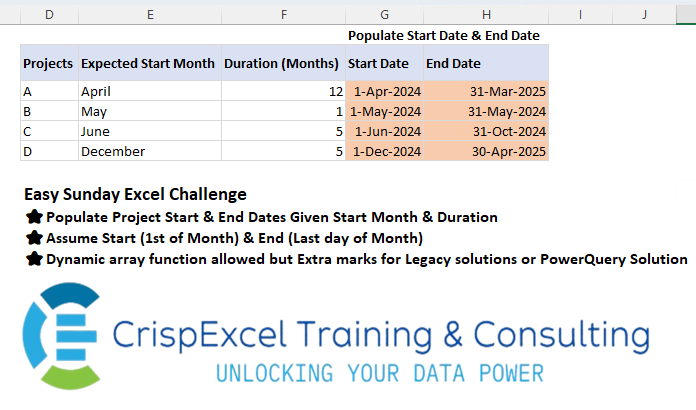
Populate Project Start & End Dates Given Start Month & Duration Assume Start (1st of Month) & End (Last day of Month) Dynamic array function allowed but Extra marks for Legacy solutions or PowerQuery Solution
📌 Challenge Details and Links
Challenge Number: 35
Challenge Difficulty: ⭐
📥Link to the solutions on LinkedIn
Solving the challenge of Populate Start & End Date from a month name with Power Query
Power Query solution 1 for Populate Start & End Date from a month name, proposed by Aditya Kumar Darak 🇮🇳:
let
 Source = Excel.CurrentWorkbook(){[ Name = "data" ]}[Content],
 Records = Table.AddColumn (
 Source,
 "Record",
 each [
 Start Date = Date.From ( "1-" & [Expected Start Month] & "2024" ),
 End Date  = Date.AddMonths ( #"Start Date", [#"Duration (Months)"] )
 -
hashtag
#duration ( 0, 0, 0, 1 )
 ]
 ),
 Return = Table.ExpandRecordColumn ( Records, "Record", { "Start Date", "End Date" } )
in
 Return
Power Query solution 2 for Populate Start & End Date from a month name, proposed by Alejandro Simón 🇵🇦 🇪🇸:
let
  Source = Excel.CurrentWorkbook(){[Name = "Table1"]}[Content],
  StartDate = Table.AddColumn(
    Source,
    "Star Date",
    each Date.FromText("01-" & [Expected Start Month] & "-2024")
  ),
  EndDate = Table.AddColumn(
    StartDate,
    "End Date",
    each Date.EndOfMonth(Date.AddMonths([Star Date], [#"Duration (Months)"] - 1))
  )
in
  EndDate
Power Query solution 3 for Populate Start & End Date from a month name, proposed by Brian Julius:
let
  Source = Excel.CurrentWorkbook(){[Name = "Table1"]}[Content],
  AddStart = Table.AddColumn(
    Source,
    "StartDate",
    each "1-" & Text.Start([Expected Start Month], 3) & "-2024"
  ),
  AddEnd = Table.AddColumn(
    AddStart,
    "EndDate",
    each [
      a = Date.FromText([StartDate]),
      b = [#"Duration (Months)"] - 1,
      c = Date.AddMonths(Date.FromText([StartDate]), b),
      d = Date.EndOfMonth(c),
      e = Date.ToText(d, "d-MMM-yyyy")
    ][e]
  )
in
  AddEnd
Power Query solution 4 for Populate Start & End Date from a month name, proposed by 🇮🇷 Navid Esmaeilzadeh اسماعیل زاده:
let
  Source = Excel.CurrentWorkbook(){[Name = "Table1"]}[Content],
  #"Changed Type" = Table.TransformColumnTypes(
    Source,
    {
      {"Projects", type text},
      {"Expected Start Month", type text},
      {"Duration (Months)", Int64.Type}
    }
  ),
  #"Added Custom" = Table.AddColumn(
    #"Changed Type",
    "Start Date",
    each Date.ToText(
      Date.FromText("1" & [Expected Start Month] & "2024", "en-EN"),
      "d-MMM-yyyy",
      "en-EN"
    )
  ),
  #"Added Custom1" = Table.AddColumn(
    #"Added Custom",
    "End Date",
    each Date.ToText(
      Date.EndOfMonth(
        Date.AddMonths(
          Date.FromText("1" & [Expected Start Month] & "2024", "en-EN"),
          [#"Duration (Months)"] - 1
        )
      ),
      "d-MMM-yyyy",
      "en-EN"
    )
  )
in
  #"Added Custom1"
Power Query solution 5 for Populate Start & End Date from a month name, proposed by Ankur Sharma:
let
Source = Excel.CurrentWorkbook(){[Name="Table1"]}[Content],
GetStartDate = Table.AddColumn(Source, "Start Date", each Date.From([Expected Start Month] &
 Text.From(Date.Year(DateTime.LocalNow())))),
GetEndDate = Table.AddColumn(GetStartDate, "End Date", each Date.EndOfMonth(Date.AddMonths([Start Date],
 [#"Duration (Months)"] - 1))),
#"Removed Columns" = Table.RemoveColumns(GetEndDate,{"Projects", "Expected Start Month", "Duration (Months)"}),
#"Changed Type" = Table.TransformColumnTypes(#"Removed Columns",{{"Start Date", type date}, {"End Date", type date}})
in
#"Changed Type"

Best Wishes!
Power Query solution 6 for Populate Start & End Date from a month name, proposed by Yaroslav Drohomyretskyi:
let
  Source = Excel.CurrentWorkbook(){[Name = "Table1"]}[Content],
  Start = Table.AddColumn(
    Source,
    "Start Date",
    each Date.ToText(Date.FromText([Expected Start Month] & " 01, 2024"), "d-MMM-yyyy")
  ),
  End = Table.AddColumn(
    Start,
    "End Date",
    each Date.ToText(
      Date.EndOfMonth(
        Date.AddMonths(
          Date.FromText([Expected Start Month] & " 01, 2024"),
          [#"Duration (Months)"] - 1
        )
      ),
      "d-MMM-yyyy"
    )
  )
in
  End
Power Query solution 7 for Populate Start & End Date from a month name, proposed by Marc Wring:
let
 Source = Excel.CurrentWorkbook(){[Name="tbl_data"]}[Content],
 #"Start Date" = Table.AddColumn(Source, "Start Date", each
hashtag
#date(2024, Date.Month(Date.FromText([Expected Start Month] & " 1")), 1)),
 #"End Date" = Table.AddColumn(#"Start Date", "End Date", each Date.EndOfMonth(Date.AddMonths([Start Date], [#"Duration (Months)"]-1)))
in
 #"End Date"
Power Query solution 8 for Populate Start & End Date from a month name, proposed by Sukanya Mukherjee:
let
 Source = Excel.CurrentWorkbook(){[Name="Table1"]}[Content],
 #"Changed Type" = Table.TransformColumnTypes(Source,{{"Expected Start Month", type text}, {"Duration (Months)", Int64.Type}}),
 #"Changed Type3" = Table.TransformColumnTypes(#"Changed Type",{{"Duration (Months)", Int64.Type}}),
 #"Added Custom" = Table.AddColumn(#"Changed Type3", "StartDate", each Date.FromText([Expected Start Month]&"01,2024"
)),
 #"Changed Type1" = Table.TransformColumnTypes(#"Added Custom",{{"StartDate", type date}}),
 #"Added Custom1" = Table.AddColumn(#"Changed Type1", "EndDate", each Date.EndOfMonth(Date.AddMonths([StartDate],[#"Duration (Months)"]-1))),
 #"Changed Type2" = Table.TransformColumnTypes(#"Added Custom1",{{"EndDate", type date}})
in
 #"Changed Type2"

Thank you
Solving the challenge of Populate Start & End Date from a month name with Excel
Excel solution 1 for Populate Start & End Date from a month name, proposed by Rick Rothstein:
=0+(E3&1)
Put this formula in cell H4 and copy down...
=EOMONTH(
   G3,
   F3-1)

Dynamic Array Solution
----------------------------------
=HSTACK(0+(E3:E6&1),
   EOMONTH(
       E3:E6&1,
       F3:F6-1))

NOTE: If E3&1 does not work correctly for you,
    try using E3&2024 instead (carry this through all the formulas)
Excel solution 2 for Populate Start & End Date from a month name, proposed by محمد حلمي:
=LET(d,
   --(1&E3:E6),
   HSTACK(
       d,
       EOMONTH(
           +d,
           F3:F6-1)))
Excel solution 3 for Populate Start & End Date from a month name, proposed by 🇰🇷 Taeyong Shin:
=EDATE(
   E3:E6&-1,
   IF(
       {1,
       0},
       0,
       F3:F6))
Excel solution 4 for Populate Start & End Date from a month name, proposed by Julian Poeltl:
=LET(
   S,
   DATEVALUE(
       1&E3:E6),
   HSTACK(
       S,
       EOMONTH(
           S,
           F3:F6-1)))
Excel solution 5 for Populate Start & End Date from a month name, proposed by Aditya Kumar Darak 🇮🇳:
=EOMONTH(
   --1 & E3:E6 & 2024,
    HSTACK(
        SEQUENCE(
            ROWS(
                E3:E6),
             ,
             -1,
             0),
         F3:F6 - 1))
Excel solution 6 for Populate Start & End Date from a month name, proposed by Oscar Mendez Roca Farell:
=EOMONTH(--(E3:E6&-1),
    IF(
        {1,
         0},
         -1,
         F3:F6-1))+{1,
    0}

And legacy solution to copy and drag from G3:

=EOMONTH(--($E3&-24),
    N(
        E3)-1)+MOD(
        COLUMNS(
            $G3:G3),
         2)
Excel solution 7 for Populate Start & End Date from a month name, proposed by Sunny Baggu:
=LET(

    a,
    DATE(

         2024,

         XMATCH(

              TRIM(
                  E3:E6),

              TEXT(
                  EDATE(
                      1 / 1 / 2024,
                       SEQUENCE(
                           12)),
                   "mmmm"),


              ),

         1
         ),

    b,
    EOMONTH(
        --a,
         F3:F6 - 1),

    HSTACK(
        a,
         b)
   )
Excel solution 8 for Populate Start & End Date from a month name, proposed by Sunny Baggu:
=HSTACK(
--(E3:E6 & 1),

EOMONTH(--(E3:E6 & 1),
    F3:F6 - 1))
Excel solution 9 for Populate Start & End Date from a month name, proposed by Pieter de B.:
=EDATE(--(1&D3:D6),
   IFNA(
       HSTACK(
           0,
           E3:E6+1),
       0))
Excel solution 10 for Populate Start & End Date from a month name, proposed by Hamidi Hamid:
=LET(x;
   ("01/"&MATCH(
       J3:J6;
       TEXT(
           SEQUENCE(
               12)*28;
           "mmmm");
       )&"/2024")*1;
   y;
   MAP(
       x;
       F3:F6;
       LAMBDA(
           a;
           b;
           EDATE(
               a;
               b)-1));
   HSTACK(
       x;
       y))
Excel solution 11 for Populate Start & End Date from a month name, proposed by Ankur Sharma:
=LET(a,
    --(1 & "-" & LEFT(
        E3:E6,
         3) & "-" & 2024),
    HSTACK(
        a,
         MAP(
             a,
              F3:F6,
              LAMBDA(
                  y,
                   z,
                   EOMONTH(
                       y,
                        z - 1)))))
Excel solution 12 for Populate Start & End Date from a month name, proposed by Eddy Wijaya:
=LET(

   d,
   E3:E6,

   dur,
   F3:F6,

   start,
   DATE(
       2024,
       MONTH(
           1&d),
       1),

   end,
   EOMONTH(
       start,
       dur-1),

   HSTACK(
       start,
       end))
Excel solution 13 for Populate Start & End Date from a month name, proposed by Mey Tithveasna:
=LET(e,
   --(E3:E6&2024),
   f,
   F3:F6,
   HSTACK(
       e,
       EOMONTH(
           e,
           f-1)))
Excel solution 14 for Populate Start & End Date from a month name, proposed by Milan Shrimali:
=MAP(
   MAP(
       B3:B6,
       LAMBDA(
           X,
           DATEVALUE(
               X&2024))),
   C3:C6,
   LAMBDA(
       X,
       Y,
       HSTACK(
           X,
           EDATE(
               X,
               Y)-1)))
Excel solution 15 for Populate Start & End Date from a month name, proposed by Ibrahim Sadiq:
=LET(a,
   --(1&"-"&LEFT(
       E3:E6,
       3)&"-"&2024),
   b,
   EOMONTH(
       a,
       +F3:F6-1),
   HSTACK(
       a,
       b))
Excel solution 16 for Populate Start & End Date from a month name, proposed by Sukanya Mukherjee:
=HSTACK(
   DATE(
       2024,
       MONTH(
           E3:E6&1),
       1))

End Date
=EOMONTH(EDATE(DATE(
       2024,
       MONTH(
           E3:E6&1),
       1),
   (F3:F6)-1),
   0)
Solving the challenge of Populate Start & End Date from a month name with Python
Python solution 1 for Populate Start & End Date from a month name, proposed by Konrad Gryczan, PhD:
#Python
import pandas as pd
import datetime
import calendar
path = "files/Excel Challange 21st July.xlsx"
input_data = pd.read_excel(path, usecols="D:F", skiprows=1, nrows=4)
test = pd.read_excel(path, usecols="G:H", skiprows=1, nrows=4)
month_dict = {month: index for index, month in enumerate(calendar.month_name) if month}
result = input_data.copy()
result['month'] = result['Expected Start Month'].apply(lambda x: month_dict[x])
result['Start Date'] = result.apply(lambda row: datetime.datetime(datetime.datetime.now().year, row['month'], 1), axis=1)
result['End Date'] = result.apply(lambda row: row['Start Date'] + pd.DateOffset(months=row['Duration (Months)']) - pd.DateOffset(days=1), axis=1)
result = result[['Start Date', 'End Date']].apply(pd.to_datetime)
print(result.equals(test))  # True
Solving the challenge of Populate Start & End Date from a month name with R
R solution 1 for Populate Start & End Date from a month name, proposed by Konrad Gryczan, PhD:
#RStats
library(tidyverse)
library(readxl)
path = "files/Excel Challange 21st July.xlsx"
input = read_excel(path, range = "D2:F6")
test = read_excel(path, range = "G2:H6")
result = input %>%
 mutate(month = match(`Expected Start Month`, month.name),
 `Start Date` = make_date(year(now()), month, 1)) %>%
 mutate(`End Date` = `Start Date` + months(`Duration (Months)`)- days(1)) %>%
 select(`Start Date`, `End Date`) %>%
 mutate(across(everything(), as.POSIXct))
identical(result, test)
# [1] TRUE