
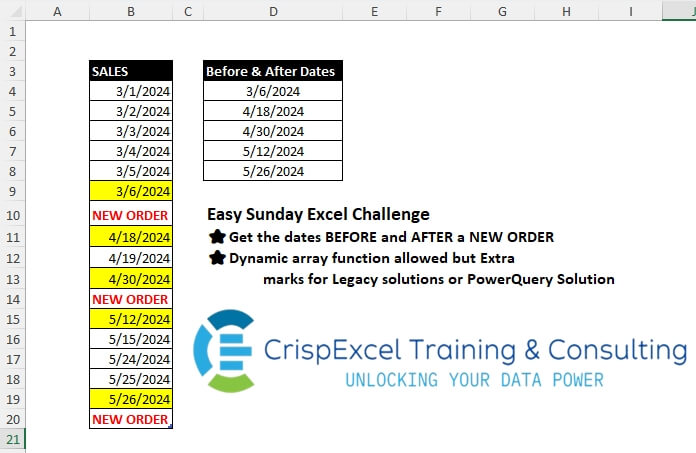
Get the dates BEFORE and AFTER a NEW ORDER Dynamic array function allowed but Extra marks for Legacy solutions or PowerQuery Solution
📌 Challenge Details and Links
Challenge Number: 33
Challenge Difficulty: ⭐
📥Link to the solutions on LinkedIn
Solving the challenge of Get Dates Before and After a New Order with Power Query
Power Query solution 1 for Get Dates Before and After a New Order, proposed by Zoran Milokanović:
let
  Source = {""} & Excel.CurrentWorkbook(){[Name = "Table1"]}[Content][SALES] & {""},
  N = "NEW ORDER",
  S = List.Select(
    Source,
    each
      let
        p = List.PositionOf(Source, _)
      in
        _ is datetime and (Source{p - 1} = N or Source{p + 1} = N)
  )
in
  S
Power Query solution 2 for Get Dates Before and After a New Order, proposed by Kris Jaganah:
let
  Source = Excel.CurrentWorkbook(){[Name = "Table1"]}[Content],
  Idx = Table.AddIndexColumn(Source, "Index", 1, 1),
  Select = Table.AddColumn(
    Idx,
    "Custom",
    each Table.SelectRows(Idx, (x) => x[Index] = [Index] - 1 or x[Index] = [Index] + 1)
  ),
  Xpand = Table.ExpandTableColumn(Select, "Custom", {"SALES"}, {"Before & After Dates"}),
  Filter = Table.SelectRows(Xpand, each ([SALES] = "NEW ORDER")),
  Type = Table.TransformColumnTypes(Filter, {"Before & After Dates", type date}, "en-AU"),
  Keep = Table.SelectColumns(Type, {"Before & After Dates"})
in
  Keep
Power Query solution 3 for Get Dates Before and After a New Order, proposed by Aditya Kumar Darak 🇮🇳:
let
  Source = Excel.CurrentWorkbook(){[Name = "Table1"]}[Content],
  Count = Table.RowCount(Source) - 1,
  Generate = List.TransformMany(
    {1 .. Count},
    (x) => {x - 1, x + 1},
    (x, y) => if (Source[SALES]{y}? ?? null) = "NEW ORDER" then Source[SALES]{x} else null
  ),
  Return = List.RemoveNulls(Generate)
in
  Return
Power Query solution 4 for Get Dates Before and After a New Order, proposed by Alejandro Simón 🇵🇦 🇪🇸:
let
  Source = Excel.CurrentWorkbook(){[Name = "Table1"]}[Content],
  Pos = List.PositionOf(Source[SALES], "NEW ORDER", 2),
  Sol = List.Distinct(
    List.Combine(
      List.Transform(
        Pos,
        each
          if _ = 0 then
            {Source[SALES]{_ + 1}}
          else if _ = Table.RowCount(Source) - 1 then
            {Source[SALES]{_ - 1}}
          else
            {Source[SALES]{_ - 1}, Source[SALES]{_ + 1}}
      )
    )
  )
in
  Sol
Power Query solution 5 for Get Dates Before and After a New Order, proposed by Luan Rodrigues:
let
  Fonte = Table1,
  pos = List.PositionOfAny(Fonte[SALES], {"NEW ORDER"}, 2),
  list = List.TransformMany(pos, each {_ - 1} & {_} & {_ + 1}, (a, b) => b),
  res = Table.SelectRows(
    Table.AddIndexColumn(Fonte, "ind", 0, 1),
    each List.ContainsAll(list, {[ind]}) and [SALES] is datetime
  )[SALES]
in
  res
Power Query solution 6 for Get Dates Before and After a New Order, proposed by Brian Julius:
let
  Source = Excel.CurrentWorkbook(){[Name = "Table1"]}[Content],
  AddAns = Table.AddColumn(
    Source,
    "BeforeAfterDates",
    each [
      b = Source[SALES],
      c = List.PositionOf(b, "NEW ORDER", Occurrence.All),
      d = List.Transform(c, each try b{_ - 1} otherwise null),
      e = List.Transform(c, each try b{_ + 1} otherwise null),
      f = List.Sort(List.RemoveNulls(List.Combine({d, e})))
    ][f]
  ),
  Clean = Table.TransformColumnTypes(
    Table.ExpandListColumn(
      Table.FirstN(Table.RemoveColumns(AddAns, {"SALES"}), 1),
      "BeforeAfterDates"
    ),
    {"BeforeAfterDates", Date.Type}
  )
in
  Clean
Power Query solution 7 for Get Dates Before and After a New Order, proposed by 🇮🇷 Navid Esmaeilzadeh اسماعیل زاده:
let
  Source = Excel.CurrentWorkbook(){[Name = "Table1"]}[Content],
  #"Added Index" = Table.AddIndexColumn(Source, "Index", 0, 1, Int64.Type),
  #"Added Custom" = Table.AddColumn(
    #"Added Index",
    "I",
    each if [SALES] = "NEW ORDER" then {[Index] + 1, [Index] - 1} else null
  ),
  #"Expanded Date" = Table.ExpandListColumn(#"Added Custom", "I"),
  #"Filtered Rows" = Table.SelectRows(#"Expanded Date", each ([I] <> null)),
  #"Removed Other Columns" = Table.SelectColumns(#"Filtered Rows", {"I"}),
  #"Sorted Rows" = Table.Sort(#"Removed Other Columns", {{"I", Order.Ascending}}),
  #"Added Custom1" = Table.AddColumn(#"Sorted Rows", "Date", each Source[SALES]{[I]}),
  #"Removed Errors" = Table.RemoveRowsWithErrors(#"Added Custom1", {"Date"}),
  #"Removed Other Columns1" = Table.SelectColumns(#"Removed Errors", {"Date"}),
  #"Changed Type" = Table.TransformColumnTypes(#"Removed Other Columns1", {{"Date", type date}})
in
  #"Changed Type"
Power Query solution 8 for Get Dates Before and After a New Order, proposed by Yaroslav Drohomyretskyi:
let
  Source = Excel.CurrentWorkbook(){[Name = "Table1"]}[Content],
  Index = Table.AddIndexColumn(Source, "Index", 0, 1, Int64.Type),
  Dates = Table.AddColumn(
    Index,
    "Before & After Dates",
    each
      if [SALES] = "NEW ORDER" then
        {Index{[Index] - 1}[SALES], Index{[Index] + 1}[SALES]}
      else
        null
  ),
  Remove = Table.SelectColumns(Dates, {"Before & After Dates"}),
  Expand = Table.ExpandListColumn(Remove, "Before & After Dates"),
  Errors = Table.RemoveRowsWithErrors(Expand, {"Before & After Dates"}),
  NoNull = Table.SelectRows(
    Errors,
    each [#"Before & After Dates"] <> null and [#"Before & After Dates"] <> ""
  ),
  Type = Table.TransformColumnTypes(NoNull, {{"Before & After Dates", type date}})
in
  Type
Power Query solution 9 for Get Dates Before and After a New Order, proposed by Ahmed Ariem:
let
  Source = Excel.CurrentWorkbook(){[Name = "Table1"]}[Content],
  types = Table.TransformColumnTypes(Source, {{"SALES", type any}}),
  SelectRows = Table.SelectRows(
    types,
    (x) =>
      List.ContainsAny(
        {x[SALES]},
        [
          lists = List.Buffer(types[SALES]),
          a     = List.PositionOf(lists, "NEW ORDER", Occurrence.All),
          b     = List.Transform(a, (x) => lists{x - 1}),
          c     = List.Transform(a, (x) => lists{x + 1}? ?? null),
          d     = List.Sort(List.Union({b, c}))
        ][d]
      )
  )
in
  SelectRows
Power Query solution 10 for Get Dates Before and After a New Order, proposed by Victor Wang:
let
  Source = Excel.CurrentWorkbook(){[Name = "Table1"]}[Content],
  AddIndex = Table.AddIndexColumn(Source, "Index", 1, 1, Int64.Type),
  FilterNewOrders = Table.SelectRows(AddIndex, each ([SALES] = "NEW ORDER")),
  TransformIndex = Table.TransformColumns(
    FilterNewOrders,
    {{"Index", each {_ + 1, _ - 1}, type list}}
  ),
  ExpandIndex = Table.ExpandListColumn(TransformIndex, "Index")[[Index]],
  InnerJoin = Table.Join(AddIndex, {"Index"}, ExpandIndex, {"Index"})[[SALES]]
in
  InnerJoin
Power Query solution 11 for Get Dates Before and After a New Order, proposed by Arnaud Duvernois:
let
  Source = Excel.CurrentWorkbook(){[Name = "Tableau1"]}[Content],
  Select = List.Select(
    Source[SALES],
    each try
      Source[SALES]{List.PositionOf(Source[SALES], _) + 1}
        = "NEW ORDER" or Source[SALES]{List.PositionOf(Source[SALES], _) - 1}
        = "NEW ORDER"
    otherwise
      null
  ),
  ToCol = Table.FromColumns({Select}, {"Before and afterdates"})
in
  ToCol
Power Query solution 12 for Get Dates Before and After a New Order, proposed by Nelson Mwangi:
let
  Source = Excel.CurrentWorkbook(){[Name = "Table1"]}[Content],
  Ind1 = Table.AddIndexColumn(Source, "Ind1", 0, 1, Int64.Type),
  Ind2 = Table.AddColumn(Ind1, "Ind2", each [Ind1] + 1, type number),
  Merge1 = Table.NestedJoin(Ind2, {"Ind2"}, Ind2, {"Ind1"}, "Index2Col"),
  Xpand = Table.ExpandTableColumn(Merge1, "Index2Col", {"SALES"}, {"Before"}),
  Merge2 = Table.NestedJoin(Xpand, {"Ind1"}, Xpand, {"Ind2"}, "After"),
  Expand = Table.ExpandTableColumn(Merge2, "After", {"SALES"}, {"After"}),
  Dates = Table.AddColumn(
    Expand,
    "Before & After Dates",
    each if [Before] = "NEW ORDER" then [SALES] else if [After] = "NEW ORDER" then [SALES] else null
  )[[#"Before & After Dates"]],
  Filternull = Table.SelectRows(Dates, each ([#"Before & After Dates"] <> null))
in
  Filternull
Solving the challenge of Get Dates Before and After a New Order with Excel
Excel solution 1 for Get Dates Before and After a New Order, proposed by Rick Rothstein:
=DROP(
   TOCOL(
       FILTER(
           HSTACK(
               B3:B19,
               B5:B21),
           ISTEXT(
               B4:B20))),
   -1)

If it would be possible for two adjacent cells to both contain "New Order",
    then this version of the above formula would be necessary...

=LET(
   d,
   DROP(
   TOCOL(
       FILTER(
           HSTACK(
               B3:B19,
               B5:B21),
           ISTEXT(
               B4:B20))),
   -1),
   FILTER(
       d,
       ISNUMBER(
           d)))

And,
    for the purist out there who do not like my idea of the split ranges,
    here are the above two formulas using only the single data range itself...

=LET(
   b,
   B4:B20,
   DROP(
       TOCOL(
           FILTER(
               HSTACK(
                   OFFSET(
                       b,
                       -1,
                       ),
                   OFFSET(
                       b,
                       1,
                       )),
               ISTEXT(
                   b))),
       -1))

=LET(
   b,
   B4:B20,
   d,
   DROP(
       TOCOL(
           FILTER(
               HSTACK(
                   OFFSET(
                       b,
                       -1,
                       ),
                   OFFSET(
                       b,
                       1,
                       )),
               ISTEXT(
                   b))),
       -1),
   FILTER(
       d,
       ISNUMBER(
           d)))
Excel solution 2 for Get Dates Before and After a New Order, proposed by محمد حلمي:
=TOCOL(HSTACK(
   B3:B20,
   B5:B20)/(B4:B20>"9"),
   2)
Excel solution 3 for Get Dates Before and After a New Order, proposed by 🇰🇷 Taeyong Shin:
=LET(d,
   B4:B20,
   TOCOL(1/(1/IFS(
       d>"",
       HSTACK(
           VSTACK(
               0,
               d),
           DROP(
               d,
               1)))),
   2))

Legacy
=IFERROR(INDEX($B$1:$B$20,
   AGGREGATE(15,
   6,
   ROW(
       $B$4:$B$20)+{-1,
   1}/($B$4:$B$20>""),
   ROW(
       A1))),
   "")
Excel solution 4 for Get Dates Before and After a New Order, proposed by Kris Jaganah:
=LET(
   a,
   Table13[SALES],
   b,
   SEQUENCE(
       ROWS(
           a)),
   TOCOL(
       IFS(
           a="NEW ORDER",
           XLOOKUP(
               b-{1,
               -1},
               b,
               a)),
       3))
Excel solution 5 for Get Dates Before and After a New Order, proposed by Julian Poeltl:
=LET(S,
   B4:B20,
   SS,
   SEQUENCE(
       ROWS(
           S))*(S="NEW ORDER"),
   F,
   FILTER(
       SS,
       SS<>0),
   TEXTSPLIT(
       TEXTJOIN(
           ",",
           ,
           MAP(
               F,
               LAMBDA(
                   A,
                   TEXTJOIN(
                       ",",
                       ,
                       IFERROR(
                           INDEX(
                               S,
                               A-1),
                           ""),
                       IFERROR(
                           INDEX(
                               S,
                               A+1),
                           ""))))),
       ,
       ",")*1)
Excel solution 6 for Get Dates Before and After a New Order, proposed by Aditya Kumar Darak 🇮🇳:
=TOCOL(
   INDEX(
       Table1[SALES],
        FILTER(
            SEQUENCE(
                ROWS(
                    Table1[SALES])),
             Table1[SALES] = "New Order") + {-1,
        1}),
    2)
Excel solution 7 for Get Dates Before and After a New Order, proposed by Oscar Mendez Roca Farell:
=TOCOL(
   --REPT(
       HSTACK(
           B3:B19,
            B5:B21),
        N(
            +B4:B20)=0),
    2)

And my legacy solution:

=IFERROR(AGGREGATE(15,
    6,
    1/(N(
        +B$4:B$19)*(B$5:B$20>"")+N(
        +B$5:B$21)*(B$4:B$19>""))^-1,
    ROW(
        A1)),
    "")
Excel solution 8 for Get Dates Before and After a New Order, proposed by Sunny Baggu:
=LET(

    s,
    Table1[SALES],

    _a,
    s = "NEW ORDER",

    TOCOL(

         INDEX(
             s,
              TOCOL(
                  SEQUENCE(
                      ROWS(
                          s)) + IF(
                      _a,
                       {-1,
                       1},
                       "x"),
                   3)),

         3
         )
   )
Excel solution 9 for Get Dates Before and After a New Order, proposed by Sunny Baggu:
=LET(

    s,
    Table1[SALES],

    c,
    DROP(
        s,
         1) + DROP(
        VSTACK(
            TAKE(
        s,
         1),
             s),
         -1),

    FILTER(
        s,
         ISERR(
             c))
   )
Excel solution 10 for Get Dates Before and After a New Order, proposed by Abdallah Ally:
=FILTER(B4:B20,
   MAP(B4:B20,
   LAMBDA(x,
   (OFFSET(
       x,
       1,
       )="NEW ORDER")+(OFFSET(
       x,
       -1,
       )="NEW ORDER"))))
Excel solution 11 for Get Dates Before and After a New Order, proposed by Hamidi Hamid:
=LET(
   x,
   HSTACK(
       Table1[SALES],
       C3:C19)*1,
   DROP(
       TOCOL(
           FILTER(
               x,
               ISERROR(
                   TAKE(
                       x,
                       ,
                       1))+ISERROR(
                   TAKE(
                       x,
                       ,
                       -1)),
               ""),
           3),
       1))
Excel solution 12 for Get Dates Before and After a New Order, proposed by Asheesh Pahwa:
=LET(
   s,
   B4:B20,
   e,
   s="NEW ORDER",
   sq,
   SEQUENCE(
       ROWS(
           e)),

   f,
   FILTER(
       sq,
       e),
   DROP(
       INDEX(
           s,
           DROP(
               REDUCE(
                   "",
                   f,
                   LAMBDA(
                       x,
                       y,
                       VSTACK(
                           x,
                           y+{-1;1}))),
               1),
           ),
       -1))
Excel solution 13 for Get Dates Before and After a New Order, proposed by Thang Van:
=LET(
   res,
   MAP(
       SEQUENCE(
           ROWS(
               Table1[SALES])),
       LAMBDA(
           a,
           IF(
               INDEX(
                   Table1[SALES],
                   a)="NEW ORDER",
               TEXTJOIN(
                   ",",
                   TRUE,
                   IFERROR(
                       INDEX(
                           Table1[SALES],
                           a-1),
                       ""),
                   IFERROR(
                       INDEX(
                           Table1[SALES],
                           a+1),
                       ""))))),

   TEXTSPLIT(
       TEXTJOIN(
           ",",
           ,
           FILTER(
               res,
               res<>FALSE)),
       ,
       ","))
Excel solution 14 for Get Dates Before and After a New Order, proposed by Ankur Sharma:
=LET(
   a,
    MAP(
        Table1[SALES],
         LAMBDA(
             z,
              IF(
                  OFFSET(
                      z,
                       -1,
                       0) = "New Order",
                   z,
                   IF(
                       OFFSET(
                           z,
                            1,
                            0) = "New Order",
                        z,
                        "")))),
    FILTER(
        a,
         a <> ""))
Excel solution 15 for Get Dates Before and After a New Order, proposed by Meganathan Elumalai:
=IFERROR(INDEX($B$4:$B$20,
   SMALL(MODE.MULT(IFERROR((ROW(
       $B$4:$B$20)-ROW(
       $B$4)+1)/MATCH(
       $B$4:$B$20,
       {"New Order"},
       {0,
       0}),
   ""))+{-1,
   1},
   ROW(
       INDIRECT(
           "1:"&COUNTIF(
               $B$4:$B$20,
               "New Order")*2)))),
   "")
Excel solution 16 for Get Dates Before and After a New Order, proposed by Mey Tithveasna:
=LET(
   b,
   B4:B20,
   TOCOL(
       INDEX(
           b,
            FILTER(
                SEQUENCE(
                    COUNTA(
                        b)),
                 b="NEW ORDER")+{-1,
           1}),
       3))
Excel solution 17 for Get Dates Before and After a New Order, proposed by Milan Shrimali:
=UNIQUE(
   TOCOL(
       MAP(
           B3:B19,
           LAMBDA(
               X,
               if(
                   X="NEW ORDER",
                   HSTACK(
                       OFFSET(
                           X,
                           -1,
                           0),
                       OFFSET(
                           X,
                           1,
                           0)),
                   "")))),
   0,
   1)
Excel solution 18 for Get Dates Before and After a New Order, proposed by El Badlis Mohd Marzudin:
=LET(
   d,
   Table1[SALES],
   s,
   SEQUENCE(
       ROWS(
           d)),
   DROP(
       XLOOKUP(
           TOCOL(
               FILTER(
                   s,
                   NOT(
                       ISNUMBER(
           d)))+{-1,
               1},
               3),
           s,
           d,
           ""),
       -1))
Excel solution 19 for Get Dates Before and After a New Order, proposed by Miguel Angel Franco García:
=LET(
   a;
   ENCOL(
       SI(
           B4:B20=B10;
           SECUENCIA(
               FILAS(
                   B4:B20));
           NOD());
       3);
   EXCLUIR(
       INDICE(
           B4:B20;
           ENCOL(
               APILARH(
                   a-1;
                   a+1)));
       -1))
Excel solution 20 for Get Dates Before and After a New Order, proposed by Tomasz Jakóbczyk:
=IFNA(
   IFS(
       B5="NEW ORDER",
       ROW()-3,
       B3="NEW ORDER",
       ROW()-3),
   "")
In D4:
=INDEX(Table1[SALES],
   FILTER((H4:H20),
   (H4:H20)<>""),
   1)
Solving the challenge of Get Dates Before and After a New Order with Python
Python solution 1 for Get Dates Before and After a New Order, proposed by Konrad Gryczan, PhD:
import pandas as pd
import numpy as np
path = "files/Excel Challenge  7th July.xlsx"
input = pd.read_excel(path, usecols="B", skiprows = 2, nrows = 17)
test  = pd.read_excel(path, usecols="D", skiprows = 2, nrows = 5)
result = np.where((input["SALES"].shift() == "NEW ORDER") | (input["SALES"].shift(-1) == "NEW ORDER"), 1, 0)
result = input[result == 1].reset_index(drop=True)
result["SALES"] = result["SALES"].astype("datetime64[ns]")
print(result["SALES"].equals(test["Before & After Dates"])) # True
Solving the challenge of Get Dates Before and After a New Order with Python in Excel
Python in Excel solution 1 for Get Dates Before and After a New Order, proposed by Abdallah Ally:
df = xl("B3:B20", headers=True)
# Perform data wrangling
cond = ((df['SALES'].shift(1) == 'NEW ORDER')
 + (df['SALES'].shift(-1) == 'NEW ORDER'))
df = df[['SALES']][cond].reset_index(drop=True)
df = df.rename(columns={'SALES': 'Before & After Dates'})
df
Solving the challenge of Get Dates Before and After a New Order with R
R solution 1 for Get Dates Before and After a New Order, proposed by Konrad Gryczan, PhD:
Suprisingly short :D
library(tidyverse)
library(readxl)
path = "files/Excel Challenge 7th July.xlsx"
input = read_xlsx(path, range = "B3:B20", col_types = "date")
test = read_xlsx(path, range = "D3:D8")
result = input %>%
 filter((is.na(lag(SALES)) | is.na(lead(SALES))) & (!row_number() %in% c(1, n())))
identical(result$SALES, test$`Before & After Dates`)
#> [1] TRUE