
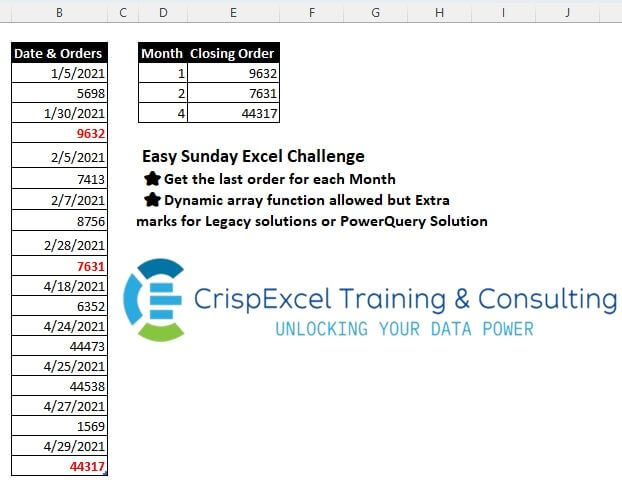
Get the last order for each Month Dynamic array function allowed, but Extra marks for Legacy solutions or PowerQuery Solution
📌 Challenge Details and Links
Challenge Number: 31
Challenge Difficulty: ⭐
📥Link to the solutions on LinkedIn
Solving the challenge of Get Last Order with Power Query
_x000D_Power Query solution 1 for Get Last Order, proposed by Omid Motamedisedeh:
let
  Source = Excel.CurrentWorkbook(){[Name = "Table1"]}[Content],
  Ta = Table.FromList(
    List.Reverse(
      List.Distinct(List.Reverse(List.Split(Source[#"Date & Orders"], 2)), each Date.Month(_{0}))
    ),
    each {Date.Month(_{0}), _{1}},
    {"Month", "Closing Order"}
  )
in
TaPower Query solution 2 for Get Last Order, proposed by Aditya Kumar Darak 🇮🇳:
let
  Source = Excel.CurrentWorkbook(){[Name = "Table1"]}[Content],
  Group = Table.Group(
    Source,
    "Date & Orders",
    {
      {"Month", each Date.Month(Table.FirstValue(_))},
      {"Last Order", each List.Last([#"Date & Orders"])}
    },
    GroupKind.Local,
    (x, y) => try Value.Compare(Date.Month(x), Date.Month(y)) otherwise 0
  ),
  Return = Group[[Month], [Last Order]]
in
ReturnPower Query solution 3 for Get Last Order, proposed by Alejandro Simón 🇵🇦 🇪🇸:
let
  Source = Excel.CurrentWorkbook(){[Name = "Table1"]}[Content],
  Month = Table.AddColumn(
    Source,
    "Month",
    each if [#"Date & Orders"] is datetime then Date.Month([#"Date & Orders"]) else null
  ),
  FD = Table.FillDown(Month, {"Month"}),
  Sol = Table.Group(FD, {"Month"}, {{"Closing Order", each List.Last([#"Date & Orders"])}})
in
SolPower Query solution 4 for Get Last Order, proposed by 🇮🇷 Navid Esmaeilzadeh اسماعیل زاده:
let
  Source = Excel.CurrentWorkbook(){[Name = "Table1"]}[Content],
  #"Date & Orders" = Table.FromColumns(
    {
      List.Alternate(Source[#"Date & Orders"], 1, 1, 1),
      List.Alternate(Source[#"Date & Orders"], 1, 1)
    },
    {"Date", "Orders"}
  ),
  #"Changed Type" = Table.TransformColumnTypes(
    #"Date & Orders",
    {{"Date", type date}, {"Orders", Int64.Type}}
  ),
  #"Sorted Rows" = Table.Sort(#"Changed Type", {{"Date", Order.Ascending}}),
  #"Inserted Month" = Table.AddColumn(#"Sorted Rows", "Month", each Date.Month([Date]), Int64.Type),
  #"Grouped Rows" = Table.Group(
    #"Inserted Month",
    {"Month"},
    {{"T", each _, type table [Date = nullable date, Orders = nullable number, Month = number]}}
  ),
  #"Added Custom" = Table.AddColumn(#"Grouped Rows", "Closing Order", each List.Last([T][Orders])),
  #"Removed Other Columns" = Table.SelectColumns(#"Added Custom", {"Month", "Closing Order"})
in
#"Removed Other Columns"Power Query solution 5 for Get Last Order, proposed by CA Raghunath Gundi:
let
  Source = Excel.CurrentWorkbook(){[Name = "Table1"]}[Content],
  Text = Table.TransformColumnTypes(Source, {{"Date & Orders", type text}}),
  Index = Table.AddIndexColumn(Text, "Index", 1, 1, Int64.Type),
  Custom = Table.AddColumn(Index, "Custom", each if Number.IsOdd([Index]) then [Index] else null),
  FillDowm = Table.FillDown(Custom, {"Custom"}),
  Grp1 = Table.Group(
    FillDowm,
    {"Custom"},
    {{"Count", each Table.ToList(Table.SelectColumns(_, "Date & Orders"))}}
  ),
  Custom1 = Table.Combine(List.Transform(Grp1[Count], each Table.FromRows({_}, {"Date", "Orders"}))),
  Date = Table.TransformColumns(
    Custom1,
    {{"Date", each Date.From(DateTimeZone.From(_)), type date}}
  ),
  Number = Table.TransformColumnTypes(Date, {{"Orders", Int64.Type}}),
  Sort = Table.Sort(Number, {{"Date", Order.Ascending}}),
  Month = Table.AddColumn(Sort, "Month", each Date.Month([Date]), Int64.Type),
  Grp2 = Table.Group(Month, {"Month"}, {{"Closing Order", each List.Last(_[Orders])}})
in
Grp2Power Query solution 6 for Get Last Order, proposed by Yaroslav Drohomyretskyi:
let
  Source = Excel.CurrentWorkbook(){[Name = "Table1"]}[Content],
  Clean = Table.AlternateRows(
    Table.FillUp(
      Table.AddColumn(
        Table.AddIndexColumn(Source, "Index", 0, 1, Int64.Type),
        "Order",
        each if Number.IsOdd([Index]) then [#"Date & Orders"] else null
      ),
      {"Order"}
    ),
    1,
    1,
    1
  ),
  Month = Table.AddColumn(Clean, "Month", each Date.Month([#"Date & Orders"])),
  Result = Table.Group(
    Month,
    {"Month"},
    {{"Closing Order", each Table.Sort(_, {"Date & Orders", Order.Descending}){0}[Order]}}
  )
in
ResultSolving the challenge of Get Last Order with Excel
_x000D_Excel solution 1 for Get Last Order, proposed by Rick Rothstein:
=LET(
   w,
   WRAPROWS(
       B3:B22,
       2),
   m,
   MONTH(
       TAKE(
           w,
           ,
           1)),
   d,
   UNIQUE(
       m),
   HSTACK(
       d,
       XLOOKUP(
           d,
           m,
           TAKE(
               w,
               ,
               -1),
           ,
           ,
-1)))Excel solution 2 for Get Last Order, proposed by محمد حلمي:
=LET(

   i,
   WRAPROWS(
       B3:B22,
       2),

   v,
   UNIQUE(
       EOMONTH(
           TAKE(
               i,
               ,
               1),
           0)),

   HSTACK(
       MONTH(
           v),
       VLOOKUP(
           v,
           i,
2)))Excel solution 3 for Get Last Order, proposed by 🇰🇷 Taeyong Shin:
=LOOKUP(
   D3,
   MONTH(
       $B$3:$B$21/ISODD(
           ROW(
               $B$3:$B$21)))-ROW(
               $B$3:$B$21)%,
   $B$4:$B$22/ISEVEN(
       ROW(
           $B$4:$B$22)))

365
=LOOKUP(--(YEAR(
   B3)&-(D3:D5+1)),
   WRAPROWS(
       B3:B22,
2))Excel solution 4 for Get Last Order, proposed by Kris Jaganah:
=LET(
   a,
   WRAPROWS(
       Table1[Date & Orders],
       2),
   b,
   MONTH(
       TAKE(
           a,
           ,
           1)),
   c,
   UNIQUE(
       b),
   VSTACK(
       {"Month",
       "Closing Order"},
       HSTACK(
           c,
           XLOOKUP(
               c,
               b,
               TAKE(
                   a,
                   ,
                   -1),
               ,
               ,
-1))))Excel solution 5 for Get Last Order, proposed by Julian Poeltl:
=LET(
   D,
   B3:B22,
   C,
   COUNT(
       D)/2,
   M,
   MONTH(
       CHOOSEROWS(
           D,
           SEQUENCE(
               C,
               ,
               ,
               2))),
   O,
   CHOOSEROWS(
       D,
       SEQUENCE(
           C,
           ,
           2,
           2)),
   UM,
   UNIQUE(
       M),
   VSTACK(
       HSTACK(
           "Month",
           "Closing Order"),
       HSTACK(
           UM,
           INDEX(
               O,
               XMATCH(
                   UM,
                   M,
                   ,
-1)))))Excel solution 6 for Get Last Order, proposed by Oscar Mendez Roca Farell:
=LET(
   d,
    B3:B22,
    m,
    UNIQUE(
        FILTER(
            MONTH(
                d),
             MOD(
                 ROW(
                d),
                  2))),
    HSTACK(
        m,
         XLOOKUP(
             m,
              MONTH(
                  DROP(
                      d,
                      -1)),
              DROP(
                  d,
                   1),
              ,
              ,
-1)))Excel solution 7 for Get Last Order, proposed by Abdallah Ally:
=LET(
   a,
   SORT(
       WRAPROWS(
           B3:B22,
           2)),
   b,
   TAKE(
       a,
       ,
       1),
   VSTACK(
       {"Month" ,
       "Closing Order"},
       FILTER(
           HSTACK(
               MONTH(
                   b),
               TAKE(
                   a,
                   ,
                   -1)),
            MAP(
                b,
                LAMBDA(
                    x,
                    x=MAX(
                        FILTER(
                            b,
                            MONTH(
                   b)=MONTH(
x))))))))Excel solution 8 for Get Last Order, proposed by 🇵🇪 Ned Navarrete C.:
=LET(
   f,
   WRAPROWS(
       B3:B22,
       2),
   m,
   TAKE(
       f,
       ,
       1),
   GROUPBY(
       MONTH(
           m),
       m,
       LAMBDA(
           x,
           XLOOKUP(
               MAX(
                   x),
               m,
               TAKE(
                   f,
                   ,
                   -1))),
       ,
       0))

=LET(
   f,
   WRAPROWS(
       B3:B22,
       2),
   m,
   MONTH(
       TAKE(
       f,
       ,
       1)),
   HSTACK(
       UNIQUE(
           m),
       MAP(
           UNIQUE(
           m),
           LAMBDA(
               r,
               TAKE(
                   FILTER(
                       f,
                       m=r),
                   -1,
-1)))))Excel solution 9 for Get Last Order, proposed by Hamidi Hamid:
=LET(
   x,
   MONTH(
       SORT(
           FILTER(
               Table1[Date & Orders],
               MOD(
                   ROW(
                       Table1[Date & Orders]),
                   2)=1,
               ""),
           ,
           1)),
   HSTACK(
       UNIQUE(
           x),
       XLOOKUP(
           UNIQUE(
           x),
           x,
           XLOOKUP(
               SORT(
                   FILTER(
                       Table1[Date & Orders],
                       MOD(
                   ROW(
                       Table1[Date & Orders]),
                   2)=1,
                       ""),
                   ,
                   1),
               Table1[Date & Orders],
               B4:B23,
               "",
               0,
               1),
           "",
           0,
-1)))Excel solution 10 for Get Last Order, proposed by Asheesh Pahwa:
=LET(
   do,
   B3:B22,
   w,
   WRAPROWS(
       do,
       2),

   e,
   EOMONTH(
       --TAKE(
           w,
           ,
           1),
       0),

   u,
   UNIQUE(
       e),
   HSTACK(
       u,
       VLOOKUP(
           u,
           w,
           2,
1)))Excel solution 11 for Get Last Order, proposed by Ankur Sharma:
=LET(a,
    WRAPROWS(
        Table1[Date & Orders],
         2),
    b,
    TAKE(
        a,
         ,
         1),
    c,
    DROP(
        a,
         ,
         1),
    d,
    MONTH(--(b)),
    e,
    UNIQUE(
        d),
    HSTACK(
        e,
         MAP(
             e,
              LAMBDA(
                  z,
                   XLOOKUP(
                       z,
                        d,
                        c,
                        ,
                        ,
-1)))))Excel solution 12 for Get Last Order, proposed by Meganathan Elumalai:
=LET(seq,
   ROW(
       INDIRECT(
           "1:"&ROWS(
               $B$3:$B$22)/2)),
   INDEX(MONTH(INDEX($B$3:$B$22,
   1+(seq-1)*2)),
   MODE.MULT(IFERROR(MATCH(seq,
   MONTH(INDEX($B$3:$B$22,
   1+(seq-1)*2)),
   {0,
   0}),
   ""))))
For Closing Orders,

=LET(seq,
   ROW(
       INDIRECT(
           "1:"&ROWS(
               $B$3:$B$22)/2)),
   VLOOKUP(INDEX(EOMONTH(INDEX($B$3:$B$22,
   1+(seq-1)*2),
   0),
   MODE.MULT(IFERROR(MATCH(seq,
   MONTH(INDEX($B$3:$B$22,
   1+(seq-1)*2)),
   {0,
   0}),
   ""))),
   CHOOSE({1,
   2},
   INDEX($B$3:$B$22,
   1+(seq-1)*2),
   INDEX($B$3:$B$22,
   (seq)*2)),
2))Excel solution 13 for Get Last Order, proposed by JvdV –:
=LET(
   x,
   SORT(
       WRAPROWS(
           B3:B22,
           2),
       ,
       -1),
   GROUPBY(
       MONTH(
           TAKE(
               x,
               ,
               1)),
       DROP(
               x,
               ,
               1),
       LAMBDA(
           x,
           @x),
       ,
       0))

Or:

=LET(
   x,
   WRAPROWS(
           B3:B22,
           2),
   GROUPBY(
       MONTH(
           TAKE(
               x,
               ,
               1)),
       DROP(
               x,
               ,
               1),
       LAMBDA(
           y,
           @TAKE(
               y,
               -1)),
       ,
0))Excel solution 14 for Get Last Order, proposed by Milan Shrimali:
=LET(
   a,
   wraprows(
       A2:A21,
       2),

   b,
   hstack(
       arrayformula(
           month(
               choosecols(
                   a,
                   1))),
       a),

   unq,
   unique(
       choosecols(
           b,
           1)),

   map(
       unq,
       lambda(
           x,

           hstack(
               x,
               choosecols(
                   chooserows(
                       sort(
                           filter(
                               choosecols(
                                   b,
                                   2,
                                   3),
                               choosecols(
           b,
           1)=x),
                           1,
                           1),
                       -1),
2)))))Excel solution 15 for Get Last Order, proposed by El Badlis Mohd Marzudin:
=LET(

   a,
    TEXT(
        WRAPROWS(
            Table1[Date & Orders],
            2),
        {"m",
        0}),

   b,
    TAKE(
        a,
        ,
        1),

   c,
    NOT(
        IFNA(
            b=DROP(
                b,
                1),
            FALSE)),

   --FILTER(
       a,
c))Excel solution 16 for Get Last Order, proposed by red craven:
=SMALL(IF(MATCH(MONTH(INDEX(B$3:B$22,
   ((ROW(
       $1:$10)-1)*2)+1)),
   MONTH(INDEX(B$3:B$22,
   ((ROW(
       $1:$10)-1)*2)+1)),
   0)=ROW(
       $1:$10),
   MONTH(INDEX(B$3:B$22,
   ((ROW(
       $1:$10)-1)*2)+1))),
   ROW(
       A1))
For Closing Order
=IF(N4=0,
   "",
   INDEX(B$3:B$22,
   MAX((MONTH(
       B$3:B$22)=N4)*ROW(
       $1:$20))+1))

Dynamic:
=LET(
   a,
   WRAPROWS(
       B3:B22,
       2),
   GROUPBY(
       MONTH(
           TAKE(
               a,
               ,
               1)),
       TAKE(
           a,
           ,
           -1),
       LAMBDA(
           x,
           @TAKE(
               x,
               -1)),
       ,
0))Excel solution 17 for Get Last Order, proposed by abdelaziz allam:
=LET(

    arr,
    WRAPROWS(
        Table1[Date & Orders],
         2),

    arrd,
    CHOOSECOLS(
        arr,
         1),

    arrc,
    CHOOSECOLS(
        arr,
         2),

    VSTACK(

         {"Month",
         "Closing Order"},

         HSTACK(

              UNIQUE(
                  MONTH(
                      arrd)),

              XLOOKUP(
                  UNIQUE(
                  MONTH(
                      arrd)),
                   MONTH(
                      arrd),
                   arrc,
                   ,
                   0,
                   -1)
              )
         )
)Solving the challenge of Get Last Order with Python
_x000D_Python solution 1 for Get Last Order, proposed by Konrad Gryczan, PhD:
import pandas as pd
import numpy as np
path = "files/Excel Challenge 16th June.xlsx"
input = pd.read_excel(path, skiprows=1, usecols="B")
test = pd.read_excel(path, skiprows=1, usecols="D:E", nrows = 3)
result = pd.DataFrame(input.values.reshape(-1, 2), columns=['A', 'B'])
result['month'] = result['A'].dt.month
result = result.groupby('month').tail(1)
result = result[['month', 'B']].reset_index(drop=True)
result = result.astype('int64')
result.columns = test.columns
print(result.equals(test)) # TrueSolving the challenge of Get Last Order with R
_x000D_R solution 1 for Get Last Order, proposed by Konrad Gryczan, PhD:
library(tidyverse)
library(readxl)
path = "files/Excel Challenge 16th June.xlsx"
input = read_excel(path, range = "B2:B22")
test = read_excel(path, range = "D2:E5")
result = input %>%
 as.list() %>%
 unlist() %>%
 matrix(ncol = 2, byrow = TRUE) %>%
 as_tibble() %>%
 setNames(c("Date", "Value")) %>%
 mutate(Date = as.Date(Date, origin = "1899-12-30"),
 Month = month(Date)) %>%
 summarise(`Closing Order` = last(Value), .by = Month)
identical(result, test)
# [1] TRUE