
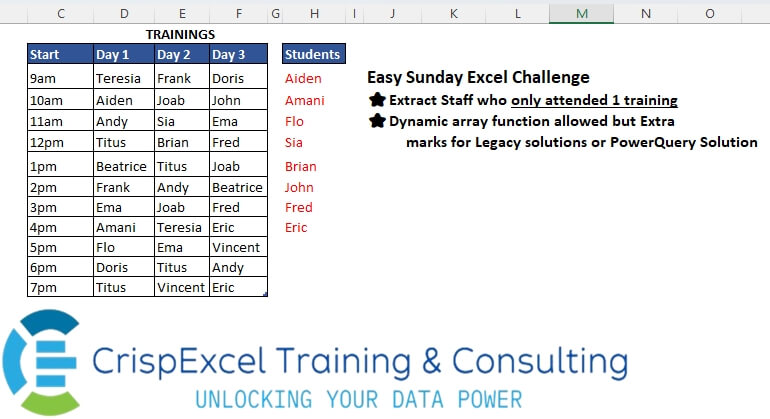
Extract Staff who only attended 1 training Dynamic array function allowed, but Extra marks for Legacy solutions or PowerQuery Solution
📌 Challenge Details and Links
Challenge Number: 29
Challenge Difficulty: ⭐
📥Link to the solutions on LinkedIn
Solving the challenge of Lookup Uncommon Names in the set with Power Query
Power Query solution 1 for Lookup Uncommon Names in the set, proposed by Omid Motamedisedeh:
let
  Source = Excel.CurrentWorkbook(){[Name = "Table13"]}[Content],
  UP = Table.UnpivotOtherColumns(Source, {"Start"}, "Attribute", "Value"),
  Custom1 = List.Distinct(
    Table.SelectRows(
      UP,
      each List.Count(List.Distinct(Table.SelectRows(UP, (X) => X[Value] = _[Value])[Attribute]))
        = 1
    )[Value]
  )
in
  Custom1
Power Query solution 2 for Lookup Uncommon Names in the set, proposed by Omid Motamedisedeh:
let
  Source = Excel.CurrentWorkbook(){[Name = "Table13"]}[Content],
  Li     = List.Combine(List.Transform(List.Skip(Table.ToColumns(Source)), List.Distinct)),
  Result = List.Select(Li, each List.Count(List.Select(Li, (x) => x = _)) = 1)
in
  Result
Power Query solution 3 for Lookup Uncommon Names in the set, proposed by Omid Motamedisedeh:
let
  Source = Excel.CurrentWorkbook(){[Name = "Table13"]}[Content],
  Li = List.Skip(Table.ToColumns(Source)),
  Result = List.Distinct(
    List.Accumulate(
      {0, 1, 2},
      {},
      (a, b) => a & List.Difference(Li{b}, List.Combine(List.RemoveRange(Li, b)))
    )
  )
in
  Result
Power Query solution 4 for Lookup Uncommon Names in the set, proposed by Aditya Kumar Darak 🇮🇳:
let
  Source = Excel.CurrentWorkbook(){[Name = "Table13"]}[Content],
  ToCol = List.Skip(Table.ToColumns(Source)),
  Students = List.Distinct(List.Combine(ToCol)),
  Return = List.Select(
    Students,
    each List.Count(List.Select(ToCol, (f) => List.Contains(f, _))) = 1
  )
in
  Return
Power Query solution 5 for Lookup Uncommon Names in the set, proposed by Alejandro Simón 🇵🇦 🇪🇸:
let
  Source = Excel.CurrentWorkbook(){[Name = "Table1"]}[Content],
  Lista  = List.Combine(List.Skip(List.Transform(Table.ToColumns(Source), List.Distinct))),
  Sol    = List.Select(List.Distinct(Lista), each List.Count(List.Select(Lista, (x) => x = _)) = 1)
in
  Sol
Power Query solution 6 for Lookup Uncommon Names in the set, proposed by Brian Julius:
let
  Source = Excel.CurrentWorkbook(){[Name = "Table13"]}[Content],
  UnpivOther = Table.UnpivotOtherColumns(Source, {"Start"}, "Attribute", "Students"),
  RemCol0 = Table.RemoveColumns(UnpivOther, {"Start"}),
  Group = Table.Group(
    RemCol0,
    {"Students"},
    {{"Count", each Table.RowCount(Table.Distinct(_)), Int64.Type}}
  ),
  Filter = Table.SelectRows(Group, each ([Count] = 1)),
  Sort = Table.Sort(Filter, {{"Students", Order.Ascending}}),
  RemCol = Table.RemoveColumns(Sort, {"Count"})
in
  RemCol
Power Query solution 7 for Lookup Uncommon Names in the set, proposed by Abdallah Ally:
let
  Source = Excel.CurrentWorkbook(){[Name = "Table13"]}[Content],
  Columns = List.Skip(Table.ColumnNames(Source), 1),
  Duplicates = List.Accumulate(Columns, {}, (x, y) => x & List.Distinct(Table.Column(Source, y))),
  Students = List.Select(
    List.Distinct(Duplicates),
    each List.Count(List.Select(Duplicates, (x) => x = _)) = 1
  )
in
  Students
Power Query solution 8 for Lookup Uncommon Names in the set, proposed by Ramiro Ayala Chávez:
let
  S   = Excel.CurrentWorkbook(){[Name = "Table1"]}[Content],
  a   = List.Combine(List.Transform(List.Skip(Table.ToColumns(S)), each List.Distinct(_))),
  b   = Table.Group(Table.FromColumns({a}, {"Students"}), {"Students"}, {"G", each List.Count(_)}),
  Sol = Table.SelectRows(b, each [G] = 1)[[Students]]
in
  Sol
Power Query solution 9 for Lookup Uncommon Names in the set, proposed by 🇮🇷 Navid Esmaeilzadeh اسماعیل زاده:
let
  Source = Excel.CurrentWorkbook(){[Name = "Table13"]}[Content],
  #"Unpivoted Other Columns" = Table.UnpivotOtherColumns(Source, {"Start"}, "Attribute", "Value"),
  #"Grouped Rows" = Table.Group(
    #"Unpivoted Other Columns",
    {"Value"},
    {{"Count", each List.Count(List.Distinct([Attribute])), type text}}
  ),
  #"Changed Type" = Table.TransformColumnTypes(#"Grouped Rows", {{"Count", Int64.Type}}),
  #"Filtered Rows" = Table.SelectRows(#"Changed Type", each [Count] = 1),
  #"Removed Columns" = Table.RemoveColumns(#"Filtered Rows", {"Count"})
in
  #"Removed Columns"
Power Query solution 10 for Lookup Uncommon Names in the set, proposed by Daniel Madhadha:
let
  Source = Excel.CurrentWorkbook(){[Name = "Table13"]}[Content],
  #"Unpivoted Other Columns" = Table.UnpivotOtherColumns(Source, {"Start"}, "Attribute", "Value"),
  #"Removed Duplicates" = Table.Distinct(#"Unpivoted Other Columns", {"Attribute", "Value"}),
  #"Kept Duplicates" =
    let
      columnNames = {"Value"},
      addCount = Table.Group(
        #"Removed Duplicates",
        columnNames,
        {{"Count", Table.RowCount, type number}}
      ),
      selectDuplicates = Table.SelectRows(addCount, each [Count] = 1),
      removeCount = Table.RemoveColumns(selectDuplicates, "Count")
    in
      Table.Join(#"Removed Duplicates", columnNames, removeCount, columnNames, JoinKind.Inner),
  #"Removed Columns" = Table.RemoveColumns(#"Kept Duplicates", {"Start", "Attribute"})
in
  #"Removed Columns"
Power Query solution 11 for Lookup Uncommon Names in the set, proposed by Daniel Madhadha:
let
  Source = Excel.CurrentWorkbook(){[Name = "Table13"]}[Content],
  UnpivotedColumns = Table.UnpivotOtherColumns(Source, {"Start"}, "Day", "Student"),
  GroupedRows = Table.Group(
    UnpivotedColumns,
    {"Student"},
    {{"Count", each Table.RowCount(_), Int64.Type}}
  ),
  FilteredRows = Table.SelectRows(GroupedRows, each [Count] = 1),
  Result = Table.SelectColumns(FilteredRows, {"Student"})
in
  Result
Power Query solution 12 for Lookup Uncommon Names in the set, proposed by Nelson Mwangi:
let
  Source = Excel.CurrentWorkbook(){[Name = "Table13"]}[Content],
  Unpivot = Table.UnpivotOtherColumns(Source, {"Start"}, "Day", "Students"),
  RemoveDups = Table.Distinct(Unpivot, {"Day", "Students"}),
  Group = Table.Group(
    RemoveDups,
    {"Students"},
    {{"Count", each Table.RowCount(Table.Distinct(_)), Int64.Type}}
  ),
  Filter = Table.SelectRows(Group, each ([Count] = 1))[[Students]]
in
  Filter
Solving the challenge of Lookup Uncommon Names in the set with Excel
Excel solution 1 for Lookup Uncommon Names in the set, proposed by محمد حلمي:
=UNIQUE(
   TOCOL(
       DROP(
           REDUCE(
               0,
               SEQUENCE(
                   3),
               LAMBDA(
                   a,
                   v,

                   HSTACK(
                       a,
                       UNIQUE(
                           CHOOSECOLS(
                               D3:F13,
                               v))))),
           ,
           1),
       2,
       1),
   ,
   1)
Excel solution 2 for Lookup Uncommon Names in the set, proposed by محمد حلمي:
=UNIQUE(
   MID(
       UNIQUE(
            TOCOL(
                {1,
                2,
                3}&D3:F13,
                ,
                1)),
       2,
       9),
   ,
   1)
Excel solution 3 for Lookup Uncommon Names in the set, proposed by Julian Poeltl:
=LET(
   T,
   D3:F13,
   U,
   UNIQUE(
       TOCOL(
           T)),
   C,
   ","&BYCOL(
       T,
       LAMBDA(
           A,
           TEXTJOIN(
               ",",
               ,
               UNIQUE(
                   A))))&",",
   FILTER(
       U,
       MAP(
           U,
           LAMBDA(
               A,
               SUM(
                   --ISNUMBER(
                       SEARCH(
                           ","&A&",",
                           C)))))=1))
Excel solution 4 for Lookup Uncommon Names in the set, proposed by Hussein SATOUR:
=UNIQUE(
   TEXTSPLIT(
       CONCAT(
           BYCOL(
               D3:F13,
               LAMBDA(
                   x,
                   CONCAT(
                       UNIQUE(
                           x)&"/")))),
       ,
       "/",
       1),
   ,
   1)
Excel solution 5 for Lookup Uncommon Names in the set, proposed by Oscar Mendez Roca Farell:
=UNIQUE(
   TEXTBEFORE(
       UNIQUE(
           TOCOL(
               K4:M14&K3:M3)),
        "D"),
    ,
    1)
Excel solution 6 for Lookup Uncommon Names in the set, proposed by Abdallah Ally:
=UNIQUE(
   REDUCE(
       "Students",
       SEQUENCE(
           3,
           ,
           2),
       LAMBDA(
           x,
           y,
            VSTACK(
                x,
                UNIQUE(
                    CHOOSECOLS(
                        Table13,
                        y))))),
   ,
   1)
Excel solution 7 for Lookup Uncommon Names in the set, proposed by 🇵🇪 Ned Navarrete C.:
=LET(
   e,
   LAMBDA(
       r,
       UNIQUE(
           r)),
   UNIQUE(
       VSTACK(
           e(
               D3:D13),
           e(
               E3:E13),
           e(
               F3:F13)),
       ,
       1))

=LET(
   U,
   UNIQUE,
   U(
       VSTACK(
           U(
               D3:D13),
           U(
               E3:E13),
           U(
               F3:F13)),
       ,
       1))
Excel solution 8 for Lookup Uncommon Names in the set, proposed by Pieter de B.:
=UNIQUE(
   TEXTSPLIT(
       UNIQUE(
           TOCOL(
               Table13[[Day 1]:[Day 3]]&Table13[[
               hashtag
               #Headers],
               [Day 1]:[Day 3]])),
       "Day "),
   ,
   1)

Or using the ranges:
=UNIQUE(
   TEXTSPLIT(
       UNIQUE(
           TOCOL(
               D3:F13&D2:F2)),
       "Day "),
   ,
   1)
Excel solution 9 for Lookup Uncommon Names in the set, proposed by Hamidi Hamid:
=UNIQUE(
   MID(
       UNIQUE(
           TOCOL(
               MAP(
                   Table13[[Day 1]:[Day 3]],
                   LAMBDA(
                       a,
                       COLUMN(
                           a)&a)))),
       2,
       100),
   ,
   1)
Excel solution 10 for Lookup Uncommon Names in the set, proposed by Asheesh Pahwa:
=LET(
   d,
   D3:F13,

   u,
   UNIQUE(
       TOCOL(
           d)),

   m,
   MAP(
       u,
       LAMBDA(
           x,

           SUM(
               N(
                   BYCOL(
                       N(
                           d=x),
                       LAMBDA(
                           x,
                           SUM(
                               x)))>=1)))),

   FILTER(
       u,
       m=1))
Excel solution 11 for Lookup Uncommon Names in the set, proposed by Ankur Sharma:
=UNIQUE(
   TEXTSPLIT(
       TEXTJOIN(
           ", ",
            ,
            BYCOL(
                Table13[[Day 1]:[Day 3]],
                 LAMBDA(
                     z,
                      TEXTJOIN(
                          ", ",
                           ,
                           UNIQUE(
                               z))))),
        ,
        ", "),
    ,
    TRUE)
Excel solution 12 for Lookup Uncommon Names in the set, proposed by Mey Tithveasna:
=UNIQUE(
   TEXTSPLIT(
       TEXTJOIN(
           ",",
           ,
           BYCOL(
               D2:F12,
               LAMBDA(
                   a,
                   TEXTJOIN(
                       ",",
                       ,
                       UNIQUE(
                           a)))),
           ","),
       ,
       ","),
   ,
   TRUE)
Excel solution 13 for Lookup Uncommon Names in the set, proposed by Milan Shrimali:
=let(
   a,
   byrow(
       arrayformula(
           LET(
               day_1,
               D3:D11,
               day_2,
               E3:E11,
               day_3,
               F3:F11,
               unq,
               UNIQUE(
                   tocol(
                       D3:F11)),
               HSTACK(
                   unq,
                   COUNTIF(
                       day_1,
                       unq),
                   COUNTIF(
                       day_2,
                       unq),
                   COUNTIF(
                       day_3,
                       unq)))),
       lambda(
           x,
           hstack(
               choosecols(
                   x,
                   1),
               countif(
                   x,
                   0)))),
   choosecols(
       filter(
           a,
           choosecols(
               a,
               2)=2),
       1))
Excel solution 14 for Lookup Uncommon Names in the set, proposed by Mahmoud Bani Asadi:
=LET(

   a,
   D3:F13&"-"&D2:F2,

   b,
   TEXTSPLIT(
       UNIQUE(
           TOCOL(
               a)),
       "-"),

   INDEX(
       b,
       UNIQUE(
           XMATCH(
               b,
               b),
           ,
           1)))
Excel solution 15 for Lookup Uncommon Names in the set, proposed by Mahmoud Bani Asadi:
=UNIQUE(
   TEXTSPLIT(
       UNIQUE(
           TOCOL(
               D3:F13&"-"&D2:F2)),
       "-"),
   ,
   1)
Solving the challenge of Lookup Uncommon Names in the set with Python
Python solution 1 for Lookup Uncommon Names in the set, proposed by Konrad Gryczan, PhD:
import pandas as pd
input = pd.read_excel("files/Excel Challenge 9th June .xlsx", usecols="C:F", skiprows=1)
test = pd.read_excel("files/Excel Challenge 9th June .xlsx",  usecols="H:H", skiprows=1, nrows = 8)
 .sort_values(by="Students").reset_index(drop=True)
result = input.melt(id_vars=["Start"], var_name="Subject", value_name="Students")
result = result.groupby("Students").count().reset_index()
result = result[result["Start"] == 1]["Students"].reset_index(drop=True)
print(result)
# Eric and Fred has 2 trainings
Solving the challenge of Lookup Uncommon Names in the set with Python in Excel
Python in Excel solution 1 for Lookup Uncommon Names in the set, proposed by Abdallah Ally:
import pandas as pd
file_path = 'Easy Excel Challenge 9th June .xlsx'
df = pd.read_excel(file_path, usecols='C:F', skiprows=1)
# Perform data wrangling
values = []
for col in df.columns[1:]:
 values += list(df[col].unique())
df = pd.DataFrame([x for x in values if values.count(x) == 1], columns=['Students'])
df
Solving the challenge of Lookup Uncommon Names in the set with R
R solution 1 for Lookup Uncommon Names in the set, proposed by Konrad Gryczan, PhD:
library(tidyverse)
library(readxl)
input = read_excel("files/Excel Challenge 9th June .xlsx", range = "C2:F13")
test = read_excel("files/Excel Challenge 9th June .xlsx", range = "H2:H10") %>%
 arrange(Students)
result = input %>%
 pivot_longer(cols = -c(1)) %>%
 count(value) %>%
 filter(n == 1) %>%
 select(Students = value) %>%
 arrange(Students)
result
# Eric and Fred attended 2 trainings