
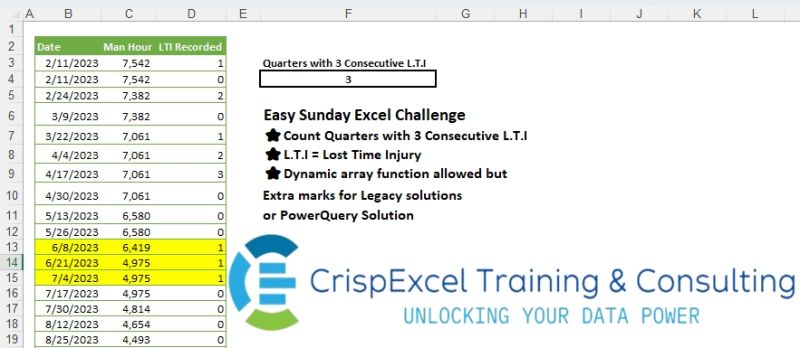
Count Quarters with 3 Consecutive L.T.I L.T.I = Lost Time Injury Dynamic array function allowed but Extra marks for Legacy solutions or PowerQuery Solution
📌 Challenge Details and Links
Challenge Number: 23
Challenge Difficulty: ⭐⭐
📥Link to the solutions on LinkedIn
Solving the challenge of Count Consecutive Items with Power Query
Power Query solution 1 for Count Consecutive Items, proposed by Omid Motamedisedeh:
let
  Source = Excel.CurrentWorkbook(){[Name = "tblLTI"]}[Content],
  T = Table.TransformColumns(Source, {"Date", Date.QuarterOfYear}),
  X = List.Accumulate(
    {0 .. Table.RowCount(T) - 3},
    0,
    (x, y) =>
      if List.Count(List.Distinct(List.Range(T[Date], y, 3)))
        > 1 or List.Contains(List.Range(T[LTI Recorded], y, 3), 0)
      then
        x
      else
        x + 1
  )
in
  X
Power Query solution 2 for Count Consecutive Items, proposed by Aditya Kumar Darak 🇮🇳:
let
  Source = Excel.CurrentWorkbook(){[Name = "tblLTI"]}[Content],
  Group = Table.Group(
    Source,
    {"Date", "LTI Recorded"},
    {"C", Table.RowCount},
    0,
    (x, y) => Number.From(Number.Mod(Date.Month(y[Date]), 3) = 1 or y[LTI Recorded] = 0)
  ),
  Return = List.Count(List.Select(Group[C], each _ > 3))
in
  Return
Power Query solution 3 for Count Consecutive Items, proposed by Alejandro Simón 🇵🇦 🇪🇸:
let
  Source = Excel.CurrentWorkbook(){[Name = "tblLTI"]}[Content],
  Group = Table.Group(
    Source,
    {"Date"},
    {
      {
        "A",
        each
          let
            a = [LTI Recorded],
            b = List.Accumulate(
              a,
              {0},
              (s, c) => if c > 0 then s & {List.Sum({List.Last(s)} & {1})} else s & {0}
            )
          in
            List.Max(b)
      }
    },
    0,
    (x, y) =>
      Number.From(
        {Date.QuarterOfYear(x[Date]), Date.Year(x[Date])}
          <> {Date.QuarterOfYear(y[Date]), Date.Year(y[Date])}
      )
  )[A],
  Sol = List.Count(List.Select(Group, each _ > 2))
in
  Sol
Power Query solution 4 for Count Consecutive Items, proposed by Brian Julius:
let
 Source = Excel.CurrentWorkbook(){[Name="tblLTI"]}[Content],
 #"Added Index" = Table.AddIndexColumn(Source, "Index", 1, 1, Int64.Type),
 AddYrQ = Table.AddColumn(#"Added Index", "YearQ", each [
 a = [Date],
 b = Date.Year(a) * 10,
 c = b + Date.QuarterOfYear(a)
 ][c]),
 AddIncident = Table.Buffer( Table.Sort( Table.AddColumn(AddYrQ, "Incident", each if [LTI Recorded] > 0 then 1 else 0), {"Index", Order.Ascending})),
 Group = Table.Group(AddIncident, {"YearQ"}, {"All", each _}),
 FiltInner = Table.SelectRows( Table.AddColumn(Group, "Consec3", each [
 a = [All],
 b = Table.SelectRows( Table.Group(a, {"Incident"}, {{"All", each _}, {"Count", each Table.RowCount(_)}}, GroupKind.Local), each [Incident] = 1),
 c = Table.SelectRows(b, each [Count] >= 3),
 d = Table.RowCount(c)
 ][d]), each [Consec3] >= 1),
 Final = Table.RenameColumns(
hashtag
#table(1, {{ List.Sum(FiltInner[Consec3]) }}), {"Column1", "Qs with 3 Consec LTIs"})
in
 Final
Solving the challenge of Count Consecutive Items with Excel
Excel solution 1 for Count Consecutive Items, proposed by Bo Rydobon 🇹🇭:
=SUM(
   --DROP(
       GROUPBY(
           MONTH(
               MONTH(
                   B3:B41)*10)+YEAR(
                   B3:B41)*4,
           D3:D41,
           LAMBDA(
               x,
               MAX(
                   SCAN(
                       0,
                       x>0,
                       LAMBDA(
                           a,
                           v,
                           a*v+v)))>2),
           ,
           0),
       ,
       1))
Excel solution 2 for Count Consecutive Items, proposed by Rick Rothstein:
=LET(b,
   B3:B41,
   d,
   D3:D41,
   z,
   (d>0)*(MONTH(
       10*MONTH(
           b))&YEAR(
           b)),
   REDUCE(0,
   SEQUENCE(
       COUNT(
           d)-2),
   LAMBDA(a,
   x,

LET(i,
   INDEX(
       z,
       x),
   a+(i>0)*((i=INDEX(
       z,
       x+1))+(i=INDEX(
       z,
       x+2))=2)))))
Excel solution 3 for Count Consecutive Items, proposed by محمد حلمي:
=LET(e,
   B3:B41,
   SUM(MAP(ROW(
       e)-2,
   LAMBDA(b,

LET(i,
   INDEX((INT((MONTH(
       e)-1)/3)+1)*(D3:D41>0),

b+{0,
   1,
   2}),
   --IFERROR(
       AND(
           @+i=i,
           i),
       ))))))
Excel solution 4 for Count Consecutive Items, proposed by 🇰🇷 Taeyong Shin:
=LET(

    q,
    YEAR(
        B3:B41) & MATCH(
        MONTH(
        B3:B41),
         {0,
        4,
        7,
        10}),

    SUM(
        N(
            SCAN(
                0,
                 DROP(
                     q = VSTACK(
                         @q,
                          q),
                      -1) * D3:D41,
                 LAMBDA(
                     a,
                     v,
                      IF(
                          v,
                           a + 1,
                           0) )) = 3))
   )
Excel solution 5 for Count Consecutive Items, proposed by 🇰🇷 Taeyong Shin:
=LET(
   d,
   B3:B41,
   q,
   YEAR(
       d)&MONTH(
       MONTH(
       d)*10),
   COUNT(
       FIND(
           111,
           GROUPBY(
               q,
               SIGN(
                   D3:D41),
               CONCAT,
               ,
               0))))
Excel solution 6 for Count Consecutive Items, proposed by Julian Poeltl:
=LET(T,
   tblLTI,
   D,
   TAKE(
       T,
       ,
       1),
   L,
   TAKE(
       T,
       ,
       -1),
   M,
   MONTH(
       D),
   DC,
   IFS(
       M<4,
       1,
       M<7,
       2,
       M<10,
       3,
       1,
       4)&YEAR(
       D),
   U,
   UNIQUE(
       DC),
   SUM(MAP(U,
   LAMBDA(U,
   LET(F,
   FILTER(
       L,
       DC=U),
   A,
   DROP(
       F,
       -2),
   B,
   DROP(
       DROP(
           F,
           1),
       -1),
   C,
   DROP(
       F,
       2),
   SUM((A>=B)*(B>=C)*(A>0)*(B>0)*(C>0)))))))
Excel solution 7 for Count Consecutive Items, proposed by Oscar Mendez Roca Farell:
=LET(m,
    MONTH(
        10*MONTH(
            B3:B41)),
    SUM(BYCOL(N((D3:D41>0)*(m=TOROW(
        UNIQUE(
            m)))),
    LAMBDA(
        c,
         SUM(
             N(
                 SCAN(
                     0,
                      c,
                      LAMBDA(
                          i,
                           x,
                           i*x+x))=3))))))
Solving the challenge of Count Consecutive Items with Python
Python solution 1 for Count Consecutive Items, proposed by Konrad Gryczan, PhD:
import pandas as pd
from pandas.tseries.offsets import MonthEnd
input = pd.read_excel("files/Excel Challenge 5th May.xlsx", sheet_name="Sheet1", header=1, usecols="B:D")
input['Month'] = pd.to_datetime(input['Date']).dt.to_period('M').dt.to_timestamp()
input['quarter'] = input['Month'].dt.quarter
input['year'] = input['Date'].dt.year
result = input.groupby(['year', 'Month', 'quarter']).agg({'Man Hour': 'sum', 'LTI Recorded': 'sum'}).reset_index()
result['valid'] = result['LTI Recorded'].gt(0).astype(int)
result['valid'] = result.groupby(['year', 'quarter'])['valid'].transform('all').astype(int)
result = result[["year", "quarter", "valid"]].drop_duplicates()
result = result.agg({'valid': 'sum'}).reset_index()
print(result) # 3
Solving the challenge of Count Consecutive Items with Python in Excel
Python in Excel solution 1 for Count Consecutive Items, proposed by Abdallah Ally:
import pandas as pd
file_path = 'Easy Sunday Excel Challenge 5th May.xlsx'
df = pd.read_excel(file_path, usecols='B:D', skiprows=1)
# Perform data transformation and cleansing
df['Quarter'] = df.Date.dt.quarter
values = 0
progress = 0
for i in df.index:
 if i == 0 and df.iat[i, 2] > 0:
 progress = 1
 elif i > 0 and df.iat[i, 2] > 0 and df.iat[i, 3] != df.iat[i - 1, 3]:
 progress = 1
 elif i > 0 and df.iat[i, 2] > 0 and df.iat[i, 3] == df.iat[i - 1, 3]:
 progress += 1
 else:
 progress = 0
 if progress == 3:
 values += 1
 progress = 0
print(values)
Solving the challenge of Count Consecutive Items with R
R solution 1 for Count Consecutive Items, proposed by Konrad Gryczan, PhD:
library(tidyverse)
library(readxl)
input = read_excel("files/Excel Challenge 5th May.xlsx", range = "B2:D41")
result = input %>%
 mutate(Month = floor_date(Date, "month"),
 quarter = quarter(Month),
 year = year(Date)) %>%
 summarise(`Man Hour` = sum(`Man Hour`),
 `LTI Recorded` = sum(`LTI Recorded`),
 .by = c(year, Month, quarter)) %>%
 mutate(valid = ifelse(all(`LTI Recorded` > 0), 1, 0), .by = c(year, quarter)) %>%
 summarise(n = n_distinct(paste(year, quarter, sep = "-")), .by = valid) %>%
 filter(valid == 1) %>%
 pull(n)
print(result)
# [1] 3L