
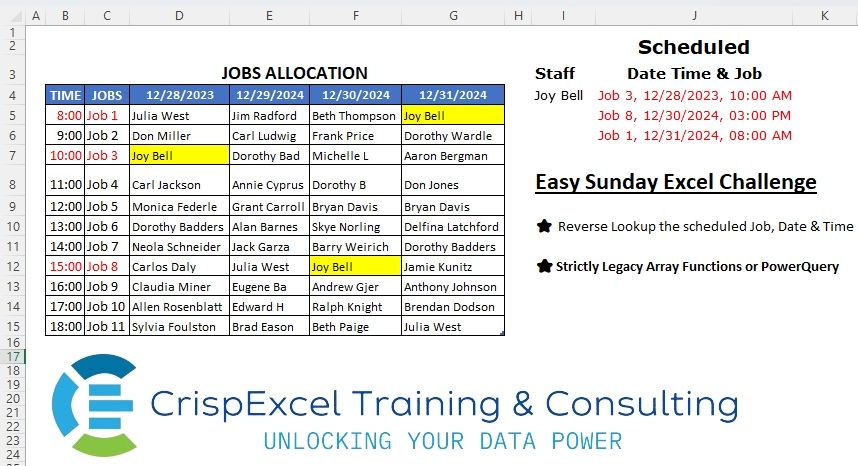
Reverse Lookup of all the scheduled jobs, Dates and Time Strictly Legacy Array Functions or PowerQuery
📌 Challenge Details and Links
Challenge Number: 9
Challenge Difficulty: ⭐⭐⭐⭐
📥Download Sample File
📥Link to the solutions on LinkedIn
Solving the challenge of Reverse Lookup with Power Query
Power Query solution 1 for Reverse Lookup, proposed by Kris Jaganah:
let
  Source = Excel.CurrentWorkbook(){[Name = "tblJobs"]}[Content],
  #"Changed Type" = Table.TransformColumnTypes(Source, {{"TIME", type time}}),
  Unpivot = Table.UnpivotOtherColumns(#"Changed Type", {"TIME", "JOBS"}, "Attribute", "Staff"),
  Combine = Table.AddColumn(
    Unpivot,
    "Custom",
    each Text.Combine({[JOBS], Text.From([Attribute]), Text.From([TIME])}, ", ")
  ),
  Group = Table.Group(
    Combine,
    {"Staff"},
    {"Date Time & Job", each Text.Combine([Custom], Character.FromNumber(10))}
  )
in
  Group
Power Query solution 2 for Reverse Lookup, proposed by Alejandro Simón 🇵🇦 🇪🇸:
let
  Source = Excel.CurrentWorkbook(){[Name = "tblJobs"]}[Content],
  Time = Table.TransformColumnTypes(Source, {{"TIME", type time}}),
  Unpivot = Table.UnpivotOtherColumns(Time, {"TIME", "JOBS"}, "Date", "Staff"),
  Sort = Table.Sort(Unpivot, {{"Staff", Order.Ascending}, {"Date", Order.Ascending}}),
  Sol = Table.Group(
    Sort,
    {"Staff"},
    {
      {
        "Date Time & Job",
        each
          let
            a = List.Sort(Table.ToRows(_), each _{2}),
            b = List.Transform(a, each _{1} & "," & Text.From(_{2}) & ", " & Text.From(_{0})),
            c = Text.Combine(b, "#(lf)")
          in
            c
      }
    }
  )
in
  Sol
Power Query solution 3 for Reverse Lookup, proposed by Brian Julius:
let
  Source = Excel.CurrentWorkbook(){[Name = "tblJobs"]}[Content],
  UnpivotOther = Table.TransformColumnTypes(
    Table.UnpivotOtherColumns(Source, {"TIME", "JOBS"}, "DATE", "Staff"),
    {{"TIME", Time.Type}, {"DATE", Date.Type}}
  ),
  Sort = Table.Sort(
    UnpivotOther,
    {{"Staff", Order.Ascending}, {"DATE", Order.Ascending}, {"TIME", Order.Ascending}}
  ),
  AddConcat = Table.Buffer(
    Table.AddColumn(
      Sort,
      "Date, Time & Job",
      each ([JOBS] & ", " & Text.From([DATE]) & ", " & Text.From([TIME])),
      Text.Type
    )
  )
in
  AddConcat
Power Query solution 4 for Reverse Lookup, proposed by Nelson Mwangi:
let
  Source = Excel.CurrentWorkbook(){[Name = "tblJobs"]}[Content],
  Unpivot = Table.UnpivotOtherColumns(Source, {"TIME", "JOBS"}, "Date", "Staff"),
  DataType = Table.TransformColumnTypes(Unpivot, {{"TIME", type time}, {"Date", type date}}),
  Sort = Table.Sort(DataType, {{"Staff", Order.Ascending}, {"Date", Order.Ascending}}),
  Merge = Table.CombineColumns(
    Table.TransformColumnTypes(Sort, {{"Date", type text}, {"TIME", type text}}, "en-US"),
    {"JOBS", "Date", "TIME"},
    Combiner.CombineTextByDelimiter(", ", QuoteStyle.None),
    "Date Time & Job"
  ),
  Reorder = Table.ReorderColumns(Merge, {"Staff", "Date Time & Job"}),
  FilterJoy = Table.SelectRows(Reorder, each ([Staff] = "Joy Bell"))
in
  FilterJoy
Solving the challenge of Reverse Lookup with Excel
Excel solution 1 for Reverse Lookup, proposed by محمد حلمي:
=IFERROR(

   INDEX(
       $C$5:$C$13,
       MOD(
           v,
           1)*10)&", "&
   TEXT(
       INDEX(
           $D$4:$G$4,
           INT(
               v))+INDEX(
           $B$5:$B$13,

           MOD(
           v,
           1)*10),
       "mm/dd/e, hh:mm am/pm"),
   "")


V
Refer to by Name Manger
=SMALL( IF(Sheet1!$D$5:$G$13=Sheet1!$I$4,
   (COLUMN(
       Sheet1!$D$5:$G$13)-3)+(ROW(
       Sheet1!$D$5:$G$13)-4)/10),
   ROW(
       Sheet1!A1))
Excel solution 2 for Reverse Lookup, proposed by محمد حلمي:
=IFERROR(
INDEX(C$5:C$13,
   MOD(SMALL(IF(D$5:G$13=I$4,

COLUMN(
   D$5:G$13)-3+(ROW(
   D$5:G$13)-4)/10),
   ROW(
       A1)),
   1)*10)&", "&
TEXT(
   SMALL(
       IF(
           D$5:G$13=I$4,
           D$4:G$4+B$5:B$13),

       ROW(
       A1)),
   "MM/dd/e, hh:mm am/pm"),
   "")
Excel solution 3 for Reverse Lookup, proposed by JvdV –:
=FILTERXML(
   "<t><s>"&TEXTJOIN(
       "</s><s>",
       ,
       TRANSPOSE(
           REPT(
               C$5:C$13,
               D$5:G$13=I$4)&TEXT(
               IF(
                   D$5:G$13=I$4,
                   B$5:B$13+D$4:G$4,
                   ""),
               ", mm/dd/yyyy, hh:mm AM/PM")))&"</s></t>",
   "//s["&ROW(
       A1)&"]")

CSE-formula to be dragged down (considering only legacy functions).

Not a fan of TEXTJOIN()
Solving the challenge of Reverse Lookup with Python
Python solution 1 for Reverse Lookup, proposed by Owen Price:
Here's a PQ solution.
https://gist.github.com/ncalm/846af38b5073badc025b3dded2228ca0